Migrating Backups to other Recovery Appliances
This chapter explains the migration of backups between Recovery Appliances for maintenance purposes, such as upgrading to newer Recovery Appliances from older Recovery Appliances.
The migration assistant in RACLI is designed to seemlessly transition backups from older Recovery Appliances (source) to newer Recovery Appliances (destination). It clones the users and protection policies from the source and ensures that they are added to the destination Recovery Appliance. The migration assistant establishes on the destination Recovery Appliance the same configuration that exists on the source. This includes the replication server (if it was on the source), protection policies, VPC users, OKV endpoints configuration on the Recovery Appliance for copy-to-cloud, and Oracle Secure Backup (OSB) for copy-to-tape. Finally, all of the protected databases from the source Recovery Appliance are copied onto the destination Recovery Appliance.
Note: Oracle Secure Backup (OSB) 19.1 desupport was announced on May 1, 2026 with premier support end date on September 30, 2027. See My Oracle Support note PNEWS3035 for more information. Please refer to Lifetime Support Policy: Oracle Technology Products for updated support timeframes.
Oracle recommends that database backups to cloud take advantage of Oracle Database Zero Data Loss Cloud Protect, which uses Oracle Zero Data Loss Autonomous Recovery Service in OCI. Cloud Protect offers an efficient incremental forever backup strategy, real-time transaction protection, logically air-gapped immutable backups, and fast, point-in-time recovery.
For customers who require database backups to Amazon S3, Oracle Database Cloud Backup for Amazon S3 may be used. This offering is similar to Oracle Secure Backup Cloud Module in that it is fully integrated with Recovery Manager (RMAN) and enables you to back up your Oracle database to Amazon S3. You can exchange your Oracle Secure Backup license for an Oracle Database Cloud Backup for Amazon S3 license on a 1:1 basis. See Oracle Database Cloud Backup for Amazon S3 for more information.
As with Oracle Secure Backup Cloud Module, Oracle Database Cloud Backup for Amazon S3 can be used free of charge on Oracle Zero Data Loss Recovery Appliance (ZDLRA) for the sole purpose of backing up data to and restoring data from S3-compatible storage devices that are in the same campus as ZDLRA.
The migration assistant performs several pre-check operations.
-
Verifies the RACLI versions match between source and destination.
-
Verifies the TLS settings match between source and destination.
-
Verifies the storage location size of the destination matches or is greater than the source’s storage size.
-
Verifies the new OKV jar file is downloaded and staged on the destination Recovery Appliance. It verifies both Recovery Appliances share the same wallet. This means client-to-client symmetric encryption using a single, shared key matches between souce and destination Recovery Appliances. During migration, it performs OKV endpoint enrollment on the destination Recovery Appliance, which allows copy-to-cloud operations that were performed on the source to work in the same way on the destination.
-
Verifies the status of the source Recovery Appliance copy-to-tape operations are disabled or paused.
-
Verifies no conflicts in database names from the source Recovery Appliance to databases that already exist on the destination. If the target Recovery Appliance already has users or policies named the same as on the source, they are skipped during migration. Copy-to-tape library names are not part of the migration process.
After the pre-checks, the migration assistant collects meta data from the source Recovery Appliance, builds a migration bundle, and creates a migration server. On the destination Recovery Appliance, the migration assistant clones metadata of the users, protection policies, and protected databases. If the source Recovery Appliance had a replication server, this replication server is created on the destination Recovery Appliance. It adds a policy to the migration server, where a COPYALL_BACKUPS is initiated. The COPYALL_BACKUPS replicates all of the existing backups for the database to the destination Recovery Appliance, including backups that might be expired but not yet purged from the source Recovery Appliance. The source replicates the backups in controlled and orderly fashion, while the destination, being COPYALL_BACKUPS aware, ingests and maintains the backups in the correct order.
Note: The migration process from a source to a destination Recovery Appliance can take an extended time period to complete due to the volume of backup data that needs to be copied through available network bandwidth.
The migration assistant checks and confirms the COPYALL_BACKUPS status. Upon completion, it removes and deletes the migration server from the source Recovery Appliance.
Configuring Migration between Recovery Appliance s Using RACLI
Partnership Overview
The migration partnership links two different Recovery Appliances (RAs) and allows for remote management with a non-root user. The partnership:
-
Establishs a one-to-one relationship between two Recovery Appliances and is removed after migration completes.
-
Creates an internal “partner” OS user on the source Recovery Appliance that has SSH access to the destination in order to perform specific RACLI commands.
-
Establishes two-way communication, therefore the command only needs to be run on one Recovery Appliance.
The migration operations should be performed using the RACLI commands.
Table 1 Principal RACLI Commands for Migration
| Program Unit | Description |
|---|---|
racli add ra_partner--target_host=FQDN [--partner_user=NAME] [--partner_uid=UID] [--admin_user=VALUE] [--admin_key=VALUE] |
Establishes a two-way connection between a source and destination Recovery Appliance. It creates a non-root ‘partner_user’ with limited privileges, and sets up SSH key-based 2-way authentication. |
racli list ra_partner |
Shows all of the information on the partner Recovery Appliance including its host name. |
racli alter ra_partner {--target_host=FQDN } [--partner_user=VALUE] [--partner_dir=VALUE] [--admin_user=VALUE] [--admin_key=VALUE] |
Updates the partner’s SSH key and other details on source Recovery Appliance to share with destination. |
racli remove ra_partner --target_host=FQDN [--partner_user=VALUE] [--partner_dir=VALUE] [--admin_user=VALUE] [--admin_key=VALUE] |
Run on source Recovery Appliance to remove objects and configuration created to support the partner relationship between source and destination Recovery Appliance used during migration. |
racli begin migration |
Begins migration from source Recovery Appliance to destination Recovery Appliance. |
racli status migration |
Returns status of migration server and COPYALL_BACKUPS backup state. |
racli end migration |
Cleans up migration server between source and the destination Recovery Appliances. |
Migration Notes
-
Extra Caution with Database Operations: Be extra cautious when adding, deleting or renaming databases while the database migration is still in progress. Ensure that the operations are carried out on both partner Recovery Appliances.
-
Storage Space: If the source Recovery Appliance (RA1) is migrating to a single destination Recovery Appliance (RA2), the RA2 must have a larger storage location size than the source RA1 to pass the precheck. This ensures there is enough space to copy all the data from the source RA1.
-
Replication Server on Source: Only one replication server is allowed to be associated with the source Recovery Appliance (RA1) before migration. If the source RA1 had originally more than one replication servers, the additional replication servers need to be removed; migration to RA2 will only set up one replication server.
-
Single migrations without cloning replication: If the source Recovery Appliance had a replication server configured, the migration process establishes this on the destination Recovery Appliance.
-
Copy-to-Cloud: If the source Recovery Appliance (RA1) for a migration has a copy-to-cloud setup including master keys (checked via
racli list okv_util), then this OKV must be registered on the destination Recovery Appliance (RA2) through RA2’s web console prior to migration.
[Refer to Installing the OKV Client Software.]The master key must be downloaded to each node of the destination host. If this is not done, the precheck may fail indicating that the master key is found on the local Recovery Appliance but not on the destination Recovery Appliance.
-
Migration of Protection Policies: The migration procedure is intended to migrate all protection policies and their associated databases to the destination Recovery Appliance in order to be able to decommission the source Recovery Appliance. You can also migrate “by protection policy”, meaning that only the databases associated with the named protection policy are migrated. This is specified using “
racli begin migration” with the argument--protection_policy_name=<POLICY_NAME>. -
Missing Partnerships: This causes failures during the precheck. For instance, if the source Recovery Appliance (RA1) was replicating with Recovery Appliance RA3 and the source RA1 is now migratiing to Recovery Appliance RA2, a partnership between RA2 and RA3 is necessary.
racli add ra_partner --target_host=RA3_full_name --partner_user=RA2_RA3
If the source Recovery Appliance (RA1) had existing replication server to a Recovery Appliance (RA3), the migration assistant creates the replication server and adds protection policies for replication between the destination Recovery Appliance (RA2) and replication Recovery Appliance (RA3).
Use Case 1: Migrating from RA1 and RA2
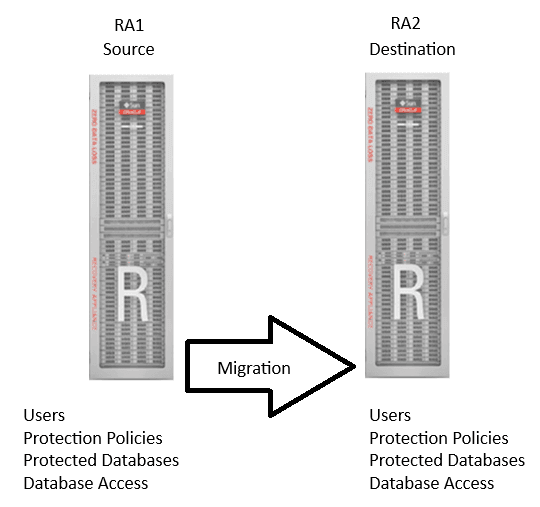
When migrating backups from a single Recovery Appliance to another, follow these steps.
Figure 1: Migration between two Recovery Appliances
-
On RA1 (source), establish a partnership to RA2 (destination / target).
racli add ra_partner --target_host=<RA2> -
On RA1, start the migration process.
racli begin migration --target_host=<RA2>Note: The migration process creates, adds, and uses the migration server. Upon successful completion, it deletes and removes the migration server and cleans up any migration-related processes.
-
Review and fix any pre-check errors. Then rerun
racli begin migration. -
Database administrator can change the client (database) backup to point to RA2.
-
On RA1, check on the status of the migration process.
racli status migration -
When the status shows a
COMPLETEstate, end migration and cleanup migration server.racli end migration --target_host=<RA2>
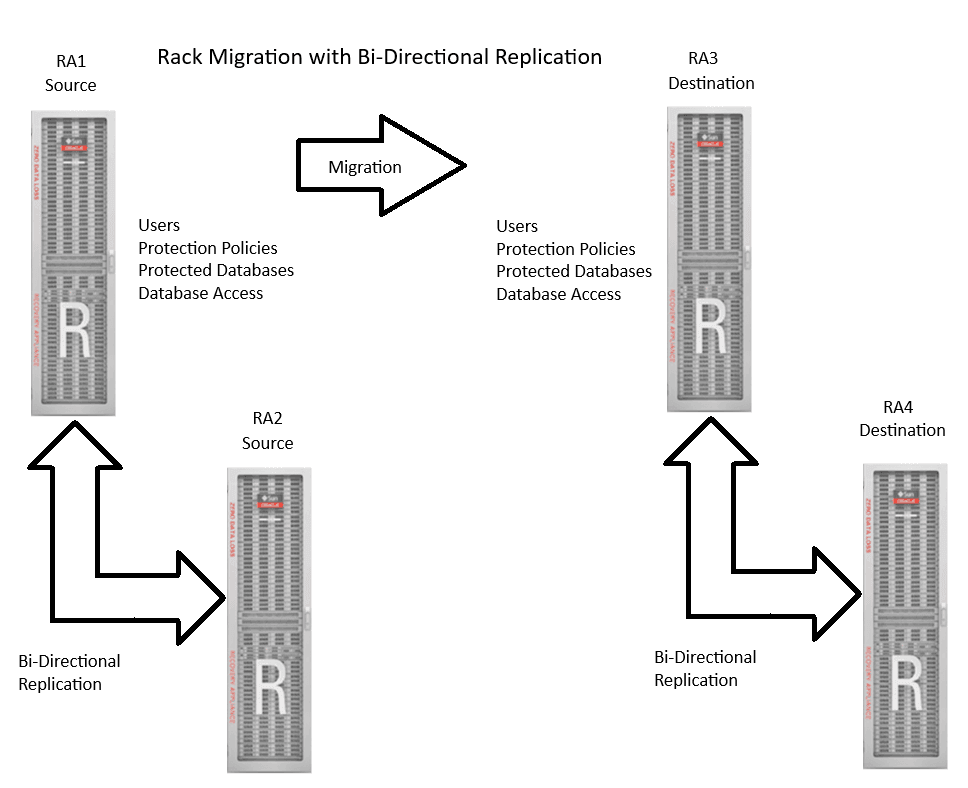
Use Case 2: Migrating from a bidirectional replication pair RA1 & RA2 to another replication pair RA3 and RA4
Figure 2: Rack Migration with Bi-Directional Replication
Procedures:
-
On RA1 (source), setup RA partnerships.
Setup RA partnership between RA1 and RA3.
racli add ra_partner --target_host=RA3_full_nameOn RA1 (source), setup RA partnership between RA1 and RA4. This allows RA1 to partner with RA3 and RA4 and serve as the control center for the overall migration process.
racli add ra_partner --target_host=RA4_full_nameOn RA2 (source, because this is the original replication), setup RA partnership between RA2 and RA4.
racli add ra_partner --target_host=RA4_full_name -
Start the migration process.
racli begin migration --target_host=<RA2>Note: The migration process creates, adds, and uses the migration server. Upon successful completion, it deletes and removes the migration server and cleans up any migration-related processes.
-
Database administrator can change the client (database) backup to now point to RA3 and RA4 (assuming bi-directional replication).
-
On RA1 (source), regularly check on the status of the migration process.
racli status migration -
When the status shows
COMPLETE, you can end migration, which cleans up all migration process components, including the migration server.racli end migration --target_host=<RA2>
Use Case 3: Migrating by protection policy from RA1 and RA2
This use case is similar to Use Case 1, except that a protection policy is provided when starting the migration. As a result, only the databases associated with the named protection policy are migrated from the source RA1 to the target RA2 Recovery Appliance.
-
On RA1 (source), establish a partnership to RA2 (destination / target).
racli add ra_partner --target_host=<RA2> -
On RA1, specify the protection policy when you start the migration process.
racli begin migration --target_host=<RA2> --protection_policy_name=<POLICY_NAME>All databases associated with the named protection policy are migrated.
Note: The migration process creates, adds, and uses the migration server. Upon successful completion, it deletes and removes the migration server and cleans up any migration-related processes.
-
Review and fix any pre-check errors. Then rerun
racli begin migration. -
On RA1, check on the status of the migration process.
racli status migration -
When the status shows a
COMPLETEstate, you end the migration and cleanup migration server.racli end migration --target_host=<RA2>