1 Microsoft SCOM REST Event Connector Overview
The SCOM REST Event Connector sends newly created events from Oracle Enterprise Manager to a Microsoft SCOM Management Server and annotates event updates.
The connector supports the following features:
- Sharing of event information from Oracle Enterprise Manager to the Microsoft SCOM Management Server
- Customization of event to alert mappings between Oracle Enterprise Manager and the Microsoft SCOM Management Server
- Sending of event updates via annotations
The connector does not communicate directly with the Microsoft SCOM Management Server. Instead, it relies on two web services that reside between the OMS and the Microsoft SCOM Management Server. When an event is created or updated in Oracle Enterprise Manager, the connector sends the event’s details to the Event Connector Web Service via a REST call. The Event Connector Web Service then converts this data into task parameters and sends them via a POST call to the /OperationsManager/data/submitTask endpoint of the Microsoft SCOM Web Service. Once the task parameters are received by the Microsoft SCOM Management Server, a local task is executed to create a Windows Application Event Log entry. Finally, a management pack rule creates an alert view in the Microsoft SCOM Operations console based on the log entry. The following diagram visualizes this communication. Note that this diagram illustrates the flow of communication between services and is not intended to imply any specific network topology requirements. Any or all of these services can run on the same server, depending on your specific topology requirements.
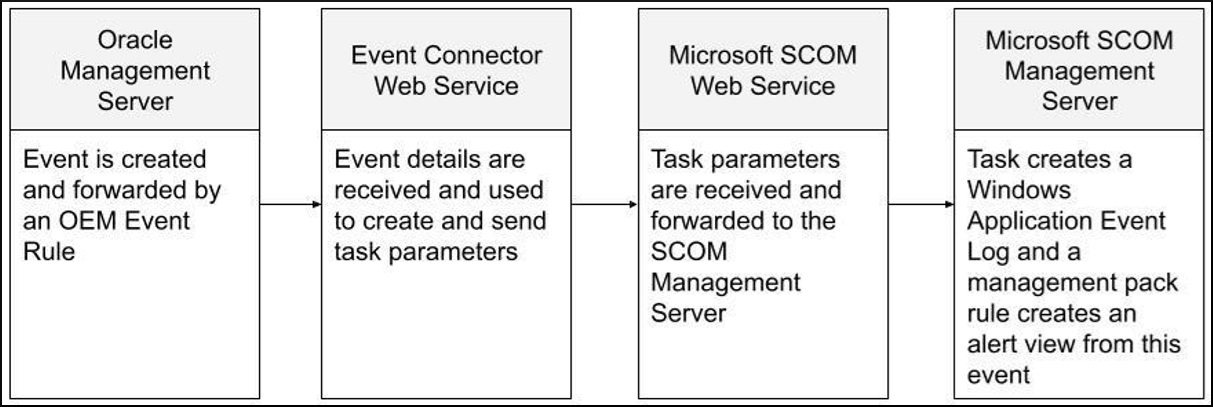
Both sides of communication on the Event Connector Web Service use the following:
- REST-based requests
- Basic authentication
- Optional secure communication via SSL/TLS
The following details are sent from Oracle Enterprise Manager:
- Resolution State
- Event ID
- Target Host
- Target Type
- Target Name
- Event URL
- Severity
- Priority
- Description of the event
- Creation/update timestamp
Terminology
ECWS_HOME: The root installation directory, where theWebService.jarfile is placed.Note:
ECWS_HOMEdoes not refer to an assumed environment variable and is only used for convenience within the context of this document.JAVA_HOME: The home directory that points to Java 17 or later.Note:
JAVA_HOMEdoes not refer to an assumed environment variable and is only used for convenience within the context of this document.- Event Connector Web Service: The web service that belongs to the Oracle Enterprise Manager Event Connector. This resides between the OMS and the Microsoft SCOM Web Service. It provides the endpoint that is defined within Oracle Enterprise Manager from the connector configuration page.
- Microsoft SCOM Web Service: An optional installation feature when installing the Microsoft SCOM Management Server. This Internet Information Services (IIS) site provides the management API endpoint,
/OperationsManager/data/submitTask, which is required by the Event Connector Web Service.
Supported Environments and Versions
- 64-bit Windows or 64-bit Linux (where Event Connector Web Service is running)
- Minimum Requirements: 4 CPU Cores, 2.5 GHz
- Available Disk Space: 130 MB (to account for log growth)
- Oracle Enterprise Manager 13.5 and 24.1 and later
- Microsoft System Center Operations Manager 2019 or later (on a local or remote host to the Event Connector Web Service)
Prerequisite Installations and Configurations
- Microsoft SCOM Operations console
- Microsoft SCOM Web Service, configured and running. For information, see Install the Operations Manager web console in Microsoft documentation.
- Java 17 or later on the host running the Event Connector Web Service
- Access to Oracle Enterprise Manager and the software library