1 About LDAP Manager
Learn how to integrate Oracle Communications Billing and Revenue Management (BRM) LDAP Manager with your LDAP directory server.
Topics in this document:
How LDAP Manager Works
Use LDAP Manager to integrate your LDAP directory server with BRM. LDAP Manager replicates account and service data in the BRM database to the LDAP database. Changes made to the LDAP database are not replicated in the BRM database.
To send data to the LDAP directory server, LDAP Manager uses the following components:
-
Replication Opcode: This opcode determines which BRM data is sent to the LDAP directory and how that data is structured. For more information, see "Understanding the Replication Module".
-
Channel Framework: The channel framework sends data to the LDAP directory server either serially or in parallel, depending on your configuration. It also helps manage directory server downtime and fulfill auditing requirements. For more information, see "Understanding the Channel Framework".
-
LDAP Data Manager: The LDAP DM translates the data into the LDAP database format and establishes a connection between BRM and the LDAP database. For more information, see "About the LDAP Data Manager".
-
pin_channel_export: This export application transfers changes from BRM to the directory server, ensuring that the data in the BRM channel stays in sync with the external directory server. It also includes reporting and error management utilities: pin_channel_report and pin_channel_clear_errors. For more information, see "Configuring the pin_channel_export Utility".
Figure 1-1 shows how changes to data in the BRM database are sent to the LDAP directory server.
Figure 1-1 BRM Database Updates to LDAP Directory Server
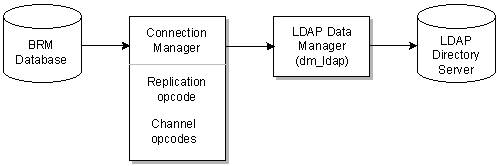
Description of "Figure 1-1 BRM Database Updates to LDAP Directory Server"
About Setting Up Your LDAP Integration
To set up an LDAP integration, you perform these tasks:
-
Install and configure BRM, along with your LDAP directory server.
-
Install and configure LDAP Manager. For example, you need to configure the connections between the CM and the LDAP Data Manager. See "Installing LDAP Manager".
-
Define the mapping between BRM data and LDAP data. For example, you need to specify how an account object in BRM is stored in the LDAP database. See "Mapping Data Between LDAP Data Manager and Your Directory Server".
-
Set up your directory server. To set up your directory server with attributes that BRM can understand, such as Portal Object ID (POID), names, addresses, currency, login, and service information, you must create a BRM object-type definition called the replicate user or r_user object class in your directory server. See "Managing the Directory Server Organization".