12 Understanding Linear and Non-Linear Rating in ECE
Learn about linear and non-linear rating in Oracle Communications Elastic Charging Engine (ECE).
Topics in this document:
How ECE Applies Linear Rating
Linear rating, a concept widely used in the telecom industry, assumes that resource consumption occurs at a constant rate throughout the usage period. For example, linear rating can apply a rate of 1 MB per minute for data usage or 1 included minute per minute for voice usage. If a customer consumes 100 MB in 10 minutes, linear rating assumes a usage rate of 10 MB per minute.
However, linear rating can produce inaccurate results when a boundary condition occurs and consumption is not evenly distributed over time. For this reason, linear rating is best suited for voice and event usage with constant consumption rates.
Figure 12-1 shows a linear rating example. ECE grants usage at 23:55:00 with CCRU-1. At 00:05:00, the network reports 10 MB of usage in CCRU-2.
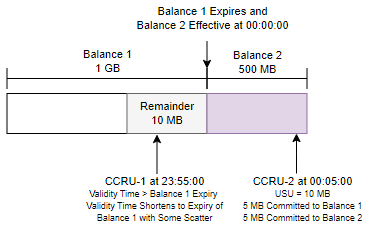
In this example, the total usage is 10 MB in 10 minutes, so linear rating calculates a consumption rate of 1 MB per minute. Because Balance 1 expires at 00:00:00, linear rating distributes the usage as follows:
-
5 MB is consumed between 23:55:00 and 23:59:59 and charged to Balance 1.
-
5 MB is consumed between 00:00:00 and 00:05:00 and charged to Balance 2.
Linear rating reduces Balance 1 from 10 MB to 5 MB and Balance 2 from 500 MB to 495 MB.
How Non-Linear Rating Manages Tariff Boundaries
Non-linear rating does not assume a constant resource consumption rate. For example, it can track a customer who consumes 10 MB in the first five minutes and another 20 MB in the next five minutes. Non-linear rating calculates resource consumption based on the granted usage amount and uses Tariff Time Change (TTC) to manage tariff-boundary conditions. This method provides precise usage reporting before and after tariff-boundary changes.
Figure 12-2 shows a non-linear rating example in which ECE grants 10 MB in CCRU-1 from 23:55:00 until 23:59:59 because a TTC occurs at midnight. ECE grants a separate usage amount in CCRU-2 from 00:00:00 until the next TTC or credit-limit boundary.
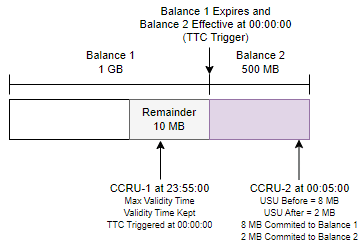
In this example, CCRU-2 reports that the customer consumed 8 MB before the TTC and 2 MB after the TTC. Non-linear rating distributes the usage as follows:
-
8 MB is consumed between 23:55:00 and 23:59:59 and charged to Balance 1
-
2 MB is consumed between 00:00:00 and 00:05:00 and charged to Balance 2
Balance 1 reduces from 10 MB to 2 MB, and Balance 2 reduces from 500 MB to 498 MB.
How ECE Reserves Resources for Non-Linear Rating
ECE applies non-linear rating to all usage by default. Non-linear rating enables ECE to rate long network sessions incrementally based on the exact data consumed between tariff changes. It also lets operators show subscribers a running balance after each tariff change based on actual data consumption.
When using non-linear rating, ECE determines whether a tariff change occurs during the authorization and reservation process for a session request from the network. ECE creates a reservation for resources before and after the TTC and sends a Tariff-Time-Change AVP in the response so the network can report the exact data consumed before and after the tariff change.
Additionally, ECE conducts reverse rating to calculate the amount of usage the subscriber can afford and reserves the balance for the RSUs based on the worst-case charging condition (the maximum charge that can be applied for the RSUs). This process ensures that the overall usage does not exceed the customer's credit limit and that there is no revenue leakage, regardless of whether the balance is consumed before or after the tariff change.
How ECE Creates Separate Rated Events with Nonlinear Rating and TTC
When non-linear rating and TTC are enabled, ECE may create separate rated events for the same network session. This can occur even when midsession CDR generation is disabled, because the rated-event split is based on rating and tariff boundary processing, not only on the midsession CDR generation setting.
Using RAR for In-Session Quota and Policy Updates
RAR is recommended when the charging system must actively update a subscriber's quota or charging rules while the subscriber is consuming a service, such as after an in-session purchase, adjustment, or balance change. If RAR is not enabled in the network, verify how the deployment handles in-session quota and policy updates.
How ECE Applies Non-Linear Rating at Time-Model Boundaries
When a usage request spans a time-model boundary where one timeModel rate plan applies before the boundary and another rate plan applies after the boundary, ECE evaluates the request across the changeover and returns a TTC time point at the boundary. The TTC reason is VALIDITY_BASED.
Configuring Linear or Non-Linear Rating
You can configure ECE to use linear or non-linear rating for all usage events, for specific products, or for specific product and event combinations. By default, ECE uses non-linear rating for all usage events.
-
To configure ECE to use linear rating for all usage events, see "Configuring ECE to Use Linear Rating for All Usage Events".
-
To override the default rating type for individual products, see "Configuring Linear or Non-Linear Rating for Specific Products".
-
To override the default rating type for specific event-and-product combinations, see "Configuring Linear or Non-Linear Rating for Product and Event Combinations".
Note:
For data sessions, enable non-linear rating and TTC for all usage events. Also, enable non-linear rating for the applicable data product or data event-and-product combination. This configuration is required when an in-session purchase or balance adjustment affects data usage balances.
Configuring ECE to Use Linear Rating for All Usage Events
By default, ECE uses non-linear rating for all usage events. Non-linear rating enables ECE to rate long-running sessions incrementally based on the exact usage consumed between tariff changes.
You can configure ECE to use linear rating for all usage events instead. When you use linear rating, ECE evenly distributes resource consumption across the usage period and does not split rating based on Tariff-Time-Change processing.
To configure ECE to use linear rating for all usage events:
-
Access the ECE configuration MBeans in a JMX editor, such as JConsole. See "Accessing ECE Configuration MBeans".
-
Expand the ECE Configuration node.
-
Expand charging.server.
-
Expand attributes.
-
Select the nonLinearRatingEnabled attribute and set its value to false.
The default is true.
-
Select the tariffTimeChangeSupported attribute and set its value to false.
The default is true.
Alternatively, in the ECE_home/config/management/charging-settings.xml file, set the nonLinearRatingEnabled and tariffTimeChangeSupported entries to false. Restart ECE for the changes to take effect.
Configuring Linear or Non-Linear Rating for Specific Products
You can override the default rating type for specific products. By default, ECE applies the rating type specified by nonLinearRatingEnabled to all usage events. For example, you might configure ECE to apply non-linear rating to usage events by default and apply linear rating to voice usage.
To override the default rating type for a specific product:
-
Access the ECE configuration MBeans in a JMX editor, such as JConsole. See "Accessing ECE Configuration MBeans".
-
Expand the ECE Configuration node.
-
Expand charging.reservationConfig.
-
Expand Operations.
-
For each product that requires an override, select enabledOrDisableNonLinear and then set these attributes:
-
productType: Specify the product name defined in the ECE request specification data, such as TelcoVoice.
-
enableOrDisable: Set this attribute as follows:
-
false: Use linear rating.
-
true: Use non-linear rating.
-
-
Configuring Linear or Non-Linear Rating for Product and Event Combinations
You can override the default rating type for specific event-and-product combinations. By default, ECE applies the rating type specified by nonLinearRatingEnabled to all usage events.
Note:
The initial product-and-event configuration is applied when ECE is deployed. Subsequent changes to this configuration are not applied dynamically through JConsole. To change the linear or non-linear rating setting for a product-and-event combination, update the charging-settings.xml file and redeploy ECE.
To override the default rating type for a specific product and event combination:
-
Open the ECE_home/config/management/charging-settings.xml file.
-
In the reservationConfig section, locate the productConfigurationGroup element.
-
Add a separate productConfiguration element for each product and event combination that requires an override.
Note:
Use separate productConfiguration elements when events for the same product type require different linear or non-linear rating behavior.
-
Set the following attributes for each productConfiguration element:
-
type: Specify the product type defined in the ECE request specification data.
-
eventType: Specify the event type to which the configuration applies.
-
nonLinearEnabled: Set this attribute as follows:
-
false: Use linear rating for this product and event combination.
-
true: Use non-linear rating for this product and event combination.
-
-
-
Deploy or redeploy the ECE Helm chart.
For example, the following configuration uses linear rating for SMS events and non-linear rating for voice and data events for the Telco1G product type:
<productConfigurationGroup config-class="java.util.ArrayList">
   <productConfiguration
      config-class="oracle.communication.brm.charging.appconfiguration.beans.reservation.ProductConfiguration"
      connectionTimeEnabled="true"
      eventType="EventDelayedSessionTelco1GSms"
      nonLinearEnabled="false"
      type="Telco1G">
      <rumConfigurationGroup config-class="java.util.ArrayList">
         <!-- SMS RUM configuration -->
      </rumConfigurationGroup>
   </productConfiguration>

   <productConfiguration
      config-class="oracle.communication.brm.charging.appconfiguration.beans.reservation.ProductConfiguration"
      connectionTimeEnabled="true"
      eventType="EventDelayedSessionTelco1GVoice"
      nonLinearEnabled="true"
      type="Telco1G">
      <rumConfigurationGroup config-class="java.util.ArrayList">
         <!-- Voice RUM configuration -->
      </rumConfigurationGroup>
   </productConfiguration>

   <productConfiguration
      config-class="oracle.communication.brm.charging.appconfiguration.beans.reservation.ProductConfiguration"
      connectionTimeEnabled="true"
      eventType="EventDelayedSessionTelco1GData"
      nonLinearEnabled="true"
      type="Telco1G">
      <rumConfigurationGroup config-class="java.util.ArrayList">
         <!-- Data RUM configuration -->
      </rumConfigurationGroup>
   </productConfiguration>
</productConfigurationGroup>