4 CNC Console Troubleshooting in Non OCI Deployment
This section provides information to troubleshoot the common errors which can be encountered during the installation and upgrade of CNC Console.
4.1 Unable to display the release version of the NF at CNC Console banner
Unable to display the release version of the NF at CNC Console banner
Problem: CNC Console banner displays the release version of CNC Console, but not displaying the release version of the NF.
Solution:
- The “About” section and Application name displayed next to Oracle logo use the envSystemName and envNFVersion helm fields.
- The value set of envSystemName and envNFVersion combines to display the Application name (Application name = envSystemName + envNFVersion).
- CNC Console Core Custom values have envSystemName and envNFVersion mentioned in it, but these values can be overridden.
4.2 Unable to reach CNC Console Core IP or port directly
Unable to reach CNC Console Core IP or port directly
Problem: Unable to reach CNC Console Core IP or port directly. redirect_uri is inserted instead of directly accessing the CNC Console Core.
Solution: As per the design, CNC Console redirects requests to CNC Console IAM for authentication. On successful authentication, CNC Console IAM redirects the user back to CNC Console GUI.
4.3 Admin user created under CNC Console realm is unable to access CNC Console IAM
Admin user created under CNC Console realm is unable to access CNC Console IAM
Problem: The user with ‘Admin’ privileges is unable to access CNC Console IAM. Solution: Users created under the Cncc realm have access only to CNC Console Core and not to CNC Console IAM. To access CNC Console IAM, create the admin user under the Master realm.4.4 CNC Console returns 403 error during NF Configuration
CNC Console returns 403 error during NF Configuration
Problem: CNCConsole returns a 403 Error Code and error "Forbidden. Data could not be saved".Error Code/Error Message:403/Forbidden
Solution: Log into CNC Console IAM to check the roles of the user. The user must have <NF>_READ and <NF>_WRITE roles assigned to perform the write operation on any NF through the CNC Console.4.5 CNC Console returns 500 - Internal Server Error
CNC Console returns 500 - Internal Server Error
Problem: CNC Console returns a 500 Error Code while accessing NF Resource. Error Code/Error Message:500/Internal Server Error
Solution: The internal server error occurs when the NF routes are not configured correctly. To resolve this error, ensure that correct routes for each NF are configured during deployment. You can provide routes in either of the IP/FQDN in the Instances section:
id: <Instance ID>
type: <NF type>
owner: <ID of cluster owning the Instance>
ip: <IP of NF deployment>
port: <Port of NF deployment
4.6 CNC Console IAM is accessible, but CNC Console Core is not accessible
CNC Console IAM is accessible, but CNC Console Core is not accessible
Problem: CNC Console IAM is accessible, but CNC Console Core is not accessible. Error Message:The ID Token contains invalid claims, which is a JWT validation error, indicating that the system clock on your server is off.
Observation: This issue occurs when Ingress Gateway is behind in time and when CNC Console IAM is ahead of time. For example, If IAM (node1) is ahead of time and Ingress Gateway (node2) is 5 minutes behind, the Ingress Gateway invalidates the received token and throws "The ID Token contains invalid claims: {iat=2020-05-26T08:32:12Z}" error.
Solution: To resolve the error, you must ensure that the same time is maintained in CNC Console IAM and Ingress Gateway when they run in the same instance or different NTP server instances.4.7 CNC Console IAM admin password configured through Kubectl secret is not reflected
CNC Console IAM admin password configured through Kubectl secret is not reflected
Problem:CNC Console IAM admin password change through cncc-iam-secret is not working (Example: if configured cncc-iam-secret).
Solution: During the first installation, CNC Console IAM reads the password from the cncc-iam-secret and stores it in the database. So any further changes to the admin password must be done through the CNC Console IAM GUI.4.8 Access Error in CNC Console Core GUI
Access Error in CNC Console Core GUI
Problem:
Unable to access CNC Console Core GUI and an “Invalid redirect URI” error occurs.
Observation:
This error occurs when there is a mismatch between the Root URL provided in CNC Console IAM Admin Console and the URI through which you access the CNC Console Core GUI.
For example, In CNC Console IAM, the Root URL is mentioned as http://cncc-core-ingress-gateway.cncc.svc.cluster.local:30075/ and if you are accessing the CNC Console Core GUI with IP and NodePort, that is, http://10.75.xx.xx:30075/* or vice-versa, you get “invalid redirect_uri” error on CNC Console Core GUI.
Solution: To resolve this error, ensure that the Root URL provided in CNC Console IAM and the URI through which you access the CNC Console Core GUI are the same.
4.9 Changing the CNC Console IAM admin password
Changing the CNC Console IAM admin password
Problem:How to change the CNC Console IAM admin password using the REST API call.
Solution: Refer the following sections in CNC Console User Guide:- Accessing NF Resources through Curl or Postman
- CNC Console IAM REST APIs
4.10 Unable to access Kibana
Unable to access Kibana
Problem:Kibana Common Service is not accessible
Solution: To resolve this issue, ensure that you are accessing Kibana through the correct path. The default access path to Kibana is through "/kibana". You can also access Kibana through the URL <node-ip>:<node-port>/mycne-cluster/kibana.4.11 CNC Console installation failure while installing using cnDBTier
CNC Console installation failure while installing using cnDBTier
Problem:While installing CNC Console using cnDBTier, the cncc-iam-kc pod does not come up and goes into a crash state.
Solution: cnDBTier needs additional grants such as "REFERENCES, INDEX" due to the addition of db hook job.4.12 CNC Console IAM kc pod fails while ASM is enabled
CNC Console IAM kc pod fails while ASM is enabled
Problem:While ASM is enabled, CNC Console IAM kc pod fails due to Readiness probe failure.
Solution: Check whether annotation "sidecar.istio.io/rewriteAppHTTPProbers" is enabled and set to true under 'nonlbStatefulSets' in custom_cncc-iam_values.yaml during CNC Console IAM deployment.4.13 Unable to Access CNC Console GUI when ASM is Enabled
Unable to Access CNC Console GUI when ASM is Enabled
Problem:Unable to access CNC Console GUI after installation as cncc-iam-ingress-gateway is listening on port 8080 instead of port 8081(ASM enabled).
Solution: After installing CNC Console, the cncc-iam-ingress-gateway is listening on port 8080 instead of port 8081 when ASM is enabled. To resolve this issue, configure the parameters in the custom_cncc-iam_values.yaml file as follows:- Annotation: sidecar.istio.io/rewriteAppHTTPProbers: "\"true\""
- serviceMeshCheck: true
- Annotation: sidecar.istio.io/inject: "true"
4.14 CNC Console Core GUI does not get loaded after logging in
CNC Console Core GUI does not get loaded after logging in
ProblemCNC Console Core microservices are up and running but CNC Console Core GUI does not get loaded after logging in.
SolutionCNC Console supports only single pod deployment, check the following configurations (must be set to 1).
ingress-gateway:
  # Number of Pods must always be available, even during a disruption.
  minAvailable: 1
  # Min replicas to scale to maintain an average CPU utilization
  minReplicas: 1
  # Max replicas to scale to maintain an average CPU utilization
  maxReplicas: 1
Note:
These are preset to 1 and these parameters are not exposed in custom values.4.15 CNC Console is not supporting ASM with mTLS disabled configuration
CNC Console is not supporting ASM with mTLS disabled configuration
ProblemWhen service mesh is enabled and mTLS is set either to disabled or to permissive with insecure HTTP connections, CNC Console Core microservice doesn't come up or CNC Console Core GUI takes time to load because some internal CSS ir JS calls are still triggered with HTTPs.
Solution- Update serviceMeshHttpsEnabled to false in
custom-cncc-core_values.yaml file to allow insecure HTTP
connections.
#Mandatory: This parameter must be set to "true" when CNC Console is deployed with the Service Mesh serviceMeshCheck: true # If Service Mesh is deployed with TLS/MTLS disabled then set this flag to false serviceMeshHttpsEnabled: false - Add a PeerAuthentication rule stating mTLS is disabled for CNC
Console namespace. For example,
kubectl apply -n <namespace> -f - <<EOF
apiVersion: security.istio.io/v1beta1
kind: PeerAuthentication
metadata:
  name: cnccpeer
spec:
  mtls:
    mode: DISABLE
EOF

##################################
# Example with cncc as namespace #
##################################
kubectl apply -n cncc -f - <<EOF
apiVersion: security.istio.io/v1beta1
kind: PeerAuthentication
metadata:
  name: cnccpeer
spec:
  mtls:
    mode: DISABLE
EOF
4.16 Pods not coming up in an ASM enabled CNC Console deployment in istio injected namespace
Pods not coming up in an ASM enabled CNC Console deployment in istio injected namespace
Problem
job/cncc-iam-pre-install          Error creating: pods "cncc-iam-pre-install-" is forbidden: PodSecurityPolicy: unable to admit pod:
 [spec.initContainers[0].securityContext.runAsNonRoot: Invalid value: false: must be true spec.initContainers[0].securityContext: Invalid value: []int64{0}: group 0 must be in the ranges: [{1 65535}] spec.initContainers[0].securityContext.capabilities.add: Invalid value: "NET_ADMIN": capability may not be added spec.initContainers[0].securityContext.capabilities.add: Invalid value: "NET_RAW": capability may not be added spec.initContainers[0].securityContext.runAsNonRoot: Invalid value: false: must be true]
Solution
kubectl apply -f - <<EOF
apiVersion: rbac.authorization.k8s.io/v1
kind: RoleBinding
metadata:
  name: "psp:<namespace>:cs-restricted"
  namespace: "<namespace>"
roleRef:
  kind: ClusterRole
  apiGroup: rbac.authorization.k8s.io
  name: "psp:privileged"
subjects:
- kind: Group
  apiGroup: rbac.authorization.k8s.io
  name: "system:serviceaccounts"
EOF
4.17 Failed to allocate IP for CNC Console IAM Ingress Gateway
Failed to allocate IP for CNC Console IAM Ingress Gateway
ProblemInstallation of CNC Console IAM is successful but while checking CNC Console IAM service status, unable to assign the external IP for svc cncc-iam-ingress-gateway and received the following error: Warning Allocation Failed 61s (x3 over 8m48s) metallb-controller Failed to allocate IP for "cncc/cncc-iam-ingress-gateway": no available IPs.
SolutionCheck if the annotations are missing from the cncc-iam-ingress-gateway service. Add the missing annotations, due to which the dynamic metalLbIpAllocation will work properly.
4.18 Unable to Create required tables in CNC Console IAM DB
Unable to Create required tables in CNC Console IAM DB
ProblemDeployment needs two instances of CNC Console where only the first instance is deployed correctly. After installing the second instance of CNC Console in a different namespace, the pod "cncc-voice-iam-kc-0" repeatedly crashes
Observation
After analyzing the logs, it was found that during the preinstall checks, the hook pods did not create all the required tables in the DB. For example, in the first instance DB, all tables created, while in the second instance DB, there are only 43 tables created. The cbDBTier has a maximum table limit of 512. So, during the deployment of the second instance of CNC Console, the maximum table limit threshold has exceeded, and hence 43 tables were created.
Deployment needs two instances of CNC Console, first instance is deployed correctly.
After the installation of the second cncc-iam in a different namespace, the pod cncc-voice-iam-kc-0 is crashed repeatedly. By analyzing the logs it seems that not all the tables has been created by the hook pods during the pre-install checks. In the first instance db we can see that there are all tables created while in the second instance we can see only 43 tables.
SolutionTo resolve this issue, you must either increase the maximum table limit or clean up unwanted databases to bring table count within the threshold limits. For more information about configuring the table limits, see Oracle Communications Cloud Native Core DBTier Installation and Upgrade Guide.
Default limits in ndb:
MaxNoOfOrderedIndexes: 512
MaxNoOfTables: 512
NoOfFragmentLogFiles: 256
4.19 Resolve CNC Console Validation hook error
Resolve CNC Console Validation hook error
Problem
Validation hook error occurs during CNC Console Core Deployment.
Solution
To resolve this issue, enable Helm Configuration Validation for CNC Console Deployment, applicable for M-CNCC Core and A-CNCC deployment.
Check the cncc-acore-validation-hook or cncc-mcore-validation-hook pod logs for the error codes. Make the required corrections in the custom-cncc-core_values.yaml file and reinstall M-CNCC Core or A-CNCC. For more information about validation hook and error details, see "CNC Console Multi Cluster Deployment Helm Configuration Validation" section in Oracle Communications Cloud Native Configuration Console Installation, Upgrade, and Fault Recovery Guide.
Table 4-1 Validation Hook Error Codes
| Error Code | Error Message Format | Error Scenarios | Sample Error Messages |
|---|---|---|---|
| 1001 | Invalid value. Resource: <Configuration Name>, ID: <ID>, Attribute: <Attribute>. <More Info> |
|
Invalid value. Resource: mCnccIam, ID: Cluster1, Attribute: Port. It should be numeric value. Invalid value. Resource: instance, ID: Cluster3Cluster3-instance1, Attribute: Scheme. Allowed values are: [http, https]. Invalid value. Resource: instance, ID: Cluster1-grafana##$$%, Attribute: id. Ids should be alphanumeric with hyphen allowed as special character. The count of mCnccIam exceeded max limit. Allowed Value:x. Actual Value: y Max limit exceeded. Allowed Value:x. Actual Value: y Invalid value. Resource: aCncc, ID: Cluster3, Attribute: N/A. Both ip and fqdn cannot be provided. Invalid value. Resource: isMultiClusterEnabled, ID:,Attribute: False. isMultiClusterEnabled is set as false, only single cluster configuration is allowed. Invalid value. Resource: isMultiClusterEnabled, ID:,Attribute: True. isMultiClusterEnabled is set as true, only multi cluster configuration is allowed. |
| 1002 | Duplicate value. Resource: <Configuration Name>, ID: <ID>, Attribute: <Attribute>. <More Info> |
|
Duplicate value(s). Resource: aCncc, ID: [Cluster3], Attribute: id. |
| 1003 | Invalid Reference. Resource: <Configuration Name>, ID: <ID>, Attribute: <Attribute>. <More Info> |
|
Invalid Reference. Resource: instance, ID: Cluster5, Attribute: Owner. Not present in mCncc ids or aCncc ids. Invalid Reference. Resource: instance, ID: N/A, Attribute: N/A. M-Cncc Iam ids and M-Cncc Core ids do not match. |
| 1004 | Missing value. Resource: <Configuration Name>, ID: <ID>, Attribute: <Attribute>. <More Info> |
|
Missing value. Resource: instance, ID: Cluster4-grafana, Attribute: apiPrefix. Missing value. Resource: instance, ID: Cluster3-PolicyInstance, Attribute: N/A. Either ip or fqdn is required. |
4.20 Does CNC Console support Command Line Interface (CLI)
Does CNC Console support Command Line Interface (CLI)
Problem: Can NF APIs integrated with CNC Console be accessed through curl or postman.
Solution The NF configuration APIs can be accessed through CNC Console GUI or directly using postman or curl. CNC Console providess authentication and authorization in both ways. For more information, see "Generating Access Tokens and Accessing NF Resources" section in Oracle Communications Cloud Native Configuration Console User Guide.
4.21 Upgrade or Rollback Failure
Upgrade or Rollback Failure
Problem: Upgrade or Rollback Failure
Solution
When CNC Console upgrade or rollback fails, perform the following procedure:
- Check the pre or post upgrade or rollback hook logs as applicable.
- If the failure occurs, then check the cause of the failure from the
logs by running the following
command:
kubectl logs <pod name> -n <namespace> - After detecting the cause of failure, do the following:
- For upgrade failure:
- If the cause of upgrade failure is database or network connectivity issue, then resolve the issue and rerun the upgrade command.
- If the upgrade failure occurs during the postupgrade phase, for example, post upgrade hook failure due to target release pod not moving to ready state, then perform a rollback.
- For upgrade failure:
- For rollback failure: If the cause of rollback failure is database or network connectivity issue, then resolve the issue and rerun the rollback command.
4. If the issue persists, contact My Oracle Support.
4.22 CNC Console Upgrade Results IP in Pending state
CNC Console Upgrade Results IP in Pending state
Problem: CNC Console deployment using static IP is not allocated to the new mcore service during upgrade.
Solution
CNC Console supports the single helm chart deployment for deploying all three components M-CNCC IAM, M-CNCC Core and A-CNCC Core.
Earlier CNC Console IAM and CNC Console Core were deployed independently, now with single helm chart all 3 components can be deployed using single helm install command.
Upgrade from two helm deployments to one helm deployment is supported but one of the helm deployment must be manually deleted.
CNC Console IAM deployment can be upgraded which upgrades M-CNCC IAM and freshly install M-CNCC Core and A-CNCC Core services. User can manuallydelete CNC Console Core deployment. For more information, see Upgrade and Rollback sections of Oracle Communications Cloud Native Configuration Console Installation, Upgrade, and Fault Recovery Guide.
In case, if static LoadBalancer IP is used in existing deployment, after the upgrade, new mcore service IP will be shown as pending. IP will be allocated once the existing M-CNCC Core service is uninstalled.
4.23 CNC Console Upgrade Displays Port Already in Use Error
CNC Console Upgrade Displays Port Already in Use Error
Problem: CNC Console deployment using static node port throws Port already in use error during upgrade.
Solution
If static port is used in existing deployment, before upgrade, in custom values file port needs to be updated to use another port to avoid port conflict error.
4.24 CNC Console Helm Test Fails
CNC Console Helm Test Fails
Problem: CNC Console helm test fails when there are stale jobs or pods.
Solution
In some cases, Helm RC builds have intermittent issues which blocks auto deletion of jobs.
Ensure stable helm version is installed in your environment.
4.25 CNC Console Helm Test Fails with Service Account Error
CNC Console Helm Test Fails with Service Account Error
Problem: CNC Console helm test fails when there are stale jobs or pods.
CNCC helm test fails with error message "Unauthorized! Configured service account doesn't have access. Service account may have been revoked.".Solution
The time sync between worker nodes is must for helm test to work. Ensure CNE worker nodes time is in sync.
4.26 Unable to integrate LDAP with Console deployed on ASM setup
Problem: While integrating LDAP/LDAPs with CNC console, Test Connection is successful but Test Authentication fails. Generic error is displayed on screen "Error when trying to connect to LDAP. See server.log for details. LDAP test error "
Solution:
kubectl apply -n cncc -f - <<EOF
apiVersion: v1
kind: Endpoints
metadata:
  name: <Unique ServiceEntry Name for Service>
  namespace: <CNCC-NAMESPACE>
subsets:
- addresses:
  - ip: <Service-public-IP>
  ports:
  - port: <Service-public-PORT>
    protocol: <Service-PROTOCOL>
---
apiVersion: v1
kind: Service
metadata:
  name: <Unique Endpoint Name for Service>-headless
  namespace: <CNCC-NAMESPACE>
spec:
  clusterIP: None
  ports:
  - port: <Service-public-PORT>
    protocol: <Service-PROTOCOL>
    targetPort: <Service-public-PORT>
  sessionAffinity: None
  type: ClusterIP
---
apiVersion: v1
kind: Service
metadata:
  name: <Unique ServiceEntry Name for Service>
  namespace: <CNCC-NAMESPACE>
spec:
  externalName: <Unique ServiceEntry Name for Service>-headless.<CNCC-NAMESPACE>.svc.cluster.local
  sessionAffinity: None
  type: ExternalName
---
apiVersion: networking.istio.io/v1alpha3
kind: ServiceEntry
metadata:
  name: <Unique ServiceEntry Name for Service>
  namespace: <CNCC-NAMESPACE>
spec:
  hosts:
  - <Service-public-FQDN>
  ports:
  - number: <Service-public-PORT>
    name: <Service-PORTNAME>
  location: MESH_EXTERNAL
---
apiVersion: networking.istio.io/v1alpha3
kind: DestinationRule
metadata:
  name: <Unique DestinationRule Name for Service>
  namespace: cncc
spec:
  host: <Service-public-FQDN>
  trafficPolicy:
    tls:
      mode: DISABLE
---
EOFkubectl apply -n cncc -f - <<EOF
apiVersion: v1
kind: Endpoints
metadata:
name: ldap-connectivity-service-headless
namespace: cncc
subsets:
- addresses:
- ip: 10.75.212.154
ports:
- port: 30763
protocol: TCP
---
apiVersion: v1
kind: Service
metadata:
name: ldap-connectivity-service-headless
namespace: cncc
spec:
clusterIP: None
ports:
- port: 30763
protocol: TCP
targetPort: 30763
sessionAffinity: None
type: ClusterIP
---
apiVersion: v1
kind: Service
metadata:
name: ldap-connectivity-service
namespace: cncc
spec:
externalName: ldap-connectivity-service-headless.cncc.svc.cluster.local
sessionAffinity: None
type: ExternalName
---
apiVersion: networking.istio.io/v1alpha3
kind: ServiceEntry
metadata:
name: ldap-external-se
namespace: cncc
spec:
hosts:
- ldap-connectivity-service-headless.cncc.svc.cluster.local
ports:
- number: 30763
name: ldap
location: MESH_EXTERNAL
---
apiVersion: networking.istio.io/v1alpha3
kind: DestinationRule
metadata:
name: ldap-external-dr
namespace: cncc
spec:
host: ldap-connectivity-service-headless.cncc.svc.cluster.local
trafficPolicy:
tls:
mode: DISABLE
---
EOFOnce the yaml file is applied, LDAP Server can be integrated.
While setting up User Federation with CNCC IAM, when providing your company LDAP server details, connection URL needs to be configured using ldap-connectivity-service.
Example: ldap://ldap-connectivity-service:30362
4.27 CNC Console IAM GUI gives an error while accessing some resources under master realm
CNC Console IAM GUI gives an error while accessing some resources under master realm.
Problem:
CNC Console IAM GUI throws the following error when some resources are accessed under the master realm:
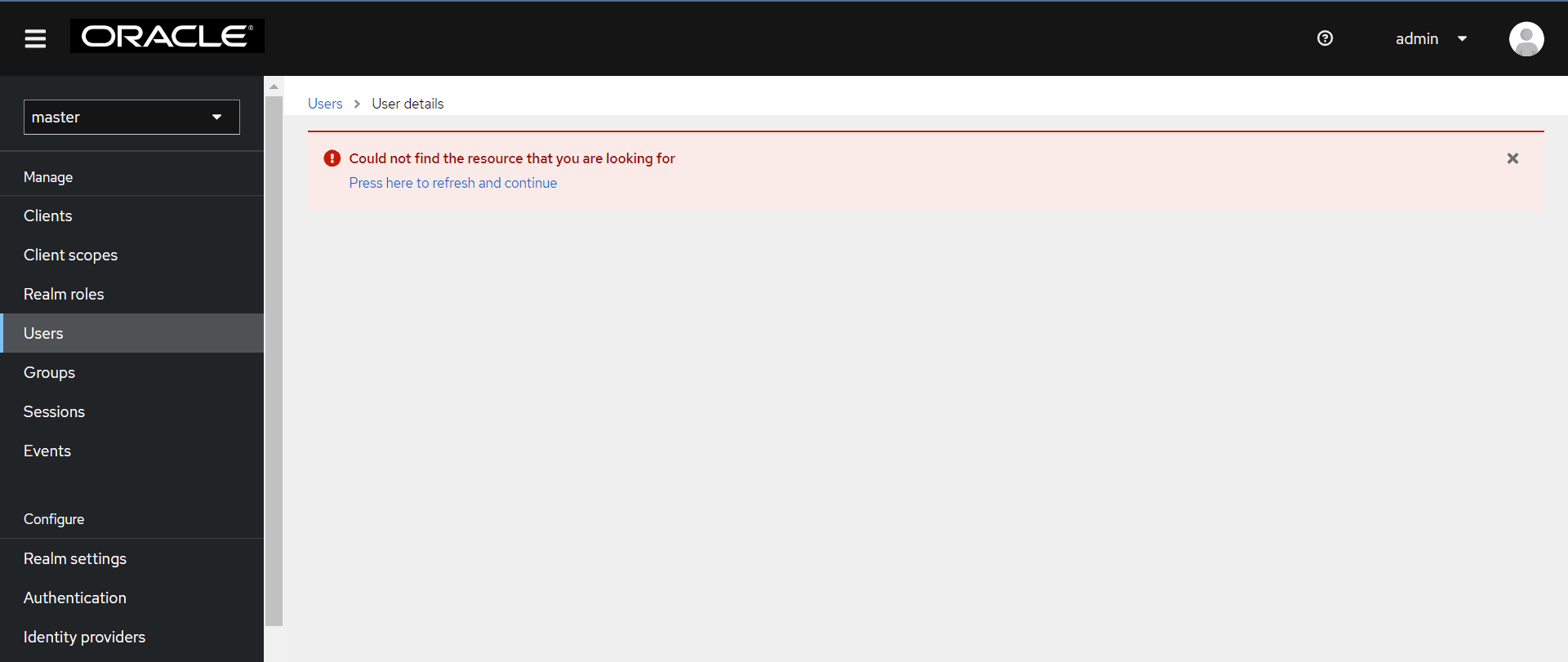
"Error: Could not find the resource that you are looking for. Press here to refresh and continue."
Solution:
Some resources (APIs) are blocked under the "master realm" or "cncc realm" because of security reasons. This restricts the user from making any configuration changes. These resources are not applicable for Console. So, whenever the user tries to access blocked resources(APIs), the admin user always gets the error message asking the user to refresh and continue. It is expected behavior. Also note that CNC Console IAM is enabled with a single admin user. All admin operations must be carried out by the same admin user.
Figure 4-1 Unable to Find Resource Error
4.28 Unable to login to CNC Console Core when TLS version is v1.2 and Ciphers Other Than That of TLSv1.2 are Provided
Problem: CNC Console user is unable to log into CNC Console GUI.
After the user enters the username and password, the 503-service unavailable error is displayed on GUI. In Pod logs “The specified CipherSuites array contains invalid null or empty string elements” exception is seen.
- IAM service is HTTPS.
- M-CNCC Core or A-CNCC service has the TLS version set to TLSv1.2.
- M-CNCC Core or A-CNCC service has ciphers other than that of TLSv1.2.
Solution: The user should specify the cipher suites applicable to the corresponding TLS version. Cipher Suites can be specified in custom values using mcncc-core.ingress-gateway.cipherSuites or acncc-core.ingress-gateway.cipherSuites.
For more information, see Oracle communications, Cloud Native Configuration Console Installation, Upgrade, and Fault Recovery Guide.
4.29 Database Connectivity Failure When Instance Level Access Control is Enabled
Problem: The operator faces database connectivity failure with the CNC Console IAM hook when the instance level access control feature is enabled.
Solution: When the connectivity is established again, operator must delete the INSTANCE_ALL role manually from the UI and run the installation for the CNC Console IAM hooks again to assign the INSTANCE_ALL role to the existing users.
4.30 403 Forbidden Error when Accessing NF or CS Resources With Instance Level Access Control Enabled
Problem: A user with some required permissions encounters the 403 forbidden error when they try to acess any NF or CS resources.
Solution: Check the acore-ingress-gateway pod logs to identify the missing permissions for the user.
4.31 Recovery of Admin Account in CNCC IAM
Problem: In CNCC IAM, if only one admin user is created and it gets locked out, and there is no alternative account available to regain access or manage the system.
Solution: There are two ways to unlock the current admin user.
Solution 1: Create a new admin user
- In the
occncc_custom_values_<version>.yamlfile used for the current deployment, update theglobal.iamUserNamefieldparameter to create a new admin user. For example, change it from&iamUserNameadmin&iamUserNameadmin2If password policies are enabled in CNCC IAM, ensure that new password adheres to the guidelines configured in CNCC IAM. For more details about the password policies, refer 'Password Policies for CNC Console Users' section in Oracle Communications Cloud Native Configuration Console User Guide.
- Run the following command to delete the existing
cncc-iam-secret:$ kubectl delete secret cncc-iam-secret -n <namespace> - Run the following command to recreate the secret with a password that
complies with the
guidelines:
Example:$ kubectl create secret generic <secret-name> --from-literal=iamAdminPasswordKey='<password>' --namespace <namespace>$ kubectl create secret generic cncc-iam-secret --from-literal=iamAdminPasswordKey='xxxxxxxxx' --namespace cncc
- Run the following command to delete the existing
- Run the following Helm upgrade command to upgrade the deployment by using the
updated yaml
files:
For more details about the Helm upgrade, refer 'Upgrading CNC Console' section in the Oracle ® Communications Cloud Native Configuration Console Installation, Upgrade, and Fault Recovery Guide.helm upgrade <cncc_iam_release_name> <helm_chart> -f <occncc_custom_values_<version>.yaml> -n <namespace> - After completing the upgrade, log in to CNCC IAM using the updated admin credentials. Once logged in, navigate to the Users section under the default realm to update the password for the old admin account if necessary. For more details about update the admin user password, refer 'Creating or Updating Admin Password in CNC Console IAM' section in the Oracle ® Communications Cloud Native Configuration Console User Guide.The above steps ensure you regain access to CNCC IAM by creating a new user and then resetting an existing admin user.
Solution 2: Reset the Password of the Existing Admin User
To reset the password of the existing user, do the following:
- Run the following command to get into the mysql
pod:
kubectl exec -it <mysql pod name> -n <namespace> bash - Run the following command to login into the mysql
pod:
mysql -h 127.0.0.1 -u <username> -p<password> - Run the following command to use the database which you used to deploy cncc
application:
use <database name>; - Run the following command to find the admin user id from the USER_ENTITY
table:
select * from USER_ENTITY; - Run the following command to delete the entry from CREDENTIAL
TABLE:
delete from CREDENTIAL where user_id = '<user-id>' - Run the following command to delete the row from USER_ROLE_MAPPING
table with user id as admin user
id:
delete from USER_ROLE_MAPPING where user_id = '<user-id>'; - Run the following command to delete the row from USER_ENTITY table with user id
as admin user
id:
delete from USER_ENTITY where ID = '<user-id>'; - If password policies are enabled in CNCC IAM, ensure that new
password adheres to the guidelines configured in CNCC IAM. For more details
about the password policies, refer 'Password Policies for CNCC Users' section in
the Oracle Communications Cloud Native Configuration Console
User Guide.
- Run the following command to delete the existing
cncc-iam-secret.$ kubectl delete secret cncc-iam-secret -n <namespace> - Run the following command to recreate it with a password
that complies with the
guidelines:
Example:$ kubectl create secret generic <secret-name> --from-literal=iamAdminPasswordKey='<password>' --namespace <namespace>$ kubectl create secret generic cncc-iam-secret --from-literal=iamAdminPasswordKey='xxxxxxxxx' --namespace cncc - Run the following command to restart the CNCC-IAM-KC-0 pod
and login to iam using the password given in cncc-iam
secret:
Kubectl delete po <IAM-KC Pod> -n <namespace>
- Run the following command to delete the existing
Note:
If the password is not compliant with configured password policies, user will get an error while login to CNCC IAM.4.32 Pods Enter the CreateContainerConfigError State
CreateContainerConfigError
state.
Solution: Do the following to debug the issue. Check the secrets (cncc-iam-secret and cncc-db-secret), and recreate them if required:
- The pods may go into
CreateContainerConfigErrorstate if the secrets are not configured correctly or if they are not present. The following error will be displayed:cncc-iam-kc-0 1/2 CreateContainerConfigError - Run the following command to check the pod
description:
kubectl describe po <pod-name> -n <namespace>Sample Error Output:
Warning Failed 3s (x10 over 96s) kubelet Error: secret "cncc-iam-secret" not found - Create the secret if its missing or recreate the secret if its not configured correctly, based on the displayed error.
- Install the CNC Console again, the pods must be up and running now.
4.33 Login Error When Accessing CNC Console IAM or CNC Console Core
Figure 4-2 Login Error

Solution: Close the current browser window and open a new browser window to access CNC Console IAM or CNC Console Core GUI.
4.34 Unable to Access CNC Console Through FQDN
Problem: When setting up CNC Console with FQDN, we usually map load balancer IPs to FQDN. However, sometimes the deployment is accessible through IP but not with FQDN.
Solution:The issue may be related to how the FQDN is being resolved in the user's environment. It could eitherbe because of DNS or Network settings, or how the browser handles the URL.
- Update the
/etc/hostsfile by adding an entry mapping the hostname K8s_SVC_NAME to the appropriate IP address instead of using the full FQDN. - Modify the CNC Console
custom values.yamlfile by updating the hostname reference from full FQDN to K8s_SVC_NAME. - Redeploy or upgrade the CNC Console deployment.
4.35 Ingress Gateway Pods go Into CrashLoopBackOff
Problem: During the CNC Console upgrade process, the upgrade completes without errors, but the pods encounter an issue and enter a CrashLoopBackOff state, preventing them from functioning properly.
Solution: Check if you are using an older Kubernetes/Go version. When deploying
the CNC Console on an older Kubernetes/Go version, such as v1.23.10/go1.17.13, you must
modify the CNC Console custom values file by removing ec_point_formats
from both clientDisabledExtensions and
serverDisabledExtensions to prevent deployment failures related to
version compatibility.
4.36 IAM Hook Pod Logs Reports the "Table Count Mismatch for dbName='${dbName}'" Error
[VERIFY-TABLE-COUNT] Database '${dbName}' contains '${ActualTableCount}' tables (required='${RequiredTableCount}').
[VERIFY-TABLE-COUNT] Table count mismatch for dbName='${dbName}': present='${ActualTableCount}', required='${RequiredTableCount}'${dbName}is the name of your CNC Console Database${version}is the CNC Console version${ActualTableCount}is the number of tables currently in the database${RequiredTableCount}is the expected number of tables that should be present in the database
[VERIFY-TABLE-COUNT] Database 'cnccdb' contains 88 tables (required=87).
[VERIFY-TABLE-COUNT] Table count mismatch for dbName='cnccdb': present=88, required=87- SQL script failures like driver errors, syntax errors, or timeouts.
- Insufficient user privileges to create schemas or tables.
- Interrupted installation or upgrade preventing the full schema from being applied.
- Outdated cnDBTier settings that do not match the current CNC Console MaxLimits recommendations described in the "cnDBTier Profiles" section in Oracle Communications Cloud Native Configuration Console Installation, Upgrade, and Fault Recovery Guide.
To resolve this,
- If this error is caused by outdated cnDBTier max limits, perform an in-solution upgrade of cnDBTier using the updated values.
- If this is caused by any other reason, do not restart the installation
or upgrade process, or perform a rollback. Contact My Oracle Support for further analysis. When reaching out, be sure to collect and submit:
- Complete hook job logs
- The CNC Console Custom Values file
4.37 IAM Hook Pod Logs Report "Unexpected error during SQL script execution: Communications link failure." Error
Problem
[CREATE-SCHEMAS] Schema creation failed for dbName:version ='${dbName}:${version}'.
Reason: [RUN-SQL-SCRIPT] Unexpected error during SQL script execution: Communications link failure.
The driver has not received any packets from the server.${dbName}is the name of your CNC Console database.${version}is the CNC Console version.
[PRE-UPGRADE] Error during pre-upgarde process: [CREATE-SCHEMAS] Schema creation failed for dbName:version ='cnccdb_tmp:25.1.200'. Reason: [RUN-SQL-SCRIPT] Unexpected error during SQL script execution: Communications link failure\n\nThe last packet sent successfully to the server was 0 milliseconds ago. The driver has not received any packets from the server..Solution
You may have encoutered this issue because
- the connection to the MySQL database is not working. This may be due to the hostname being wrong, the port being closed, the host being unreachable, firewall settings, or problems with the DNS lookup.
- there may have been a network interruption during the schema creation.
Perform the following procedure to resolve this issue:
- Check that you can connect to the database from where you are running the CNC Console process.
- Make sure the MySQL server hostname and port are correct and the server is accessible.
- Restart the CNC Console installation or upgrade process.
If the problem continues, contact My Oracle Support for help. When you contact them, collect and share:
- The full hook job logs
- The CNC Console Custom Values file
4.38 IAM Hook Pod Logs Report "SQLException for query='${SQL_QUERY}'. Error Message: ${SQL_ERROR}. " Error
When you run the CNC Console installation or upgrade, you see an error in the pod logs. The logs show a message similar to:
[PRE-UPGRADE] Error during pre-upgrade process: [CREATE-SCHEMAS] Schema creation failed for
        dbName:version ='${dbName}:${version}'. Reason: [RUN-SQL-SCRIPT] SQLException for
query='${SQL_QUERY}'. Error Message: ${SQL_ERROR}.${dbName}is the name of your CNC Console database.${version}is the CNC Console version.
For example:
[PRE-UPGRADE] Error during pre-upgarde process: [CREATE-SCHEMAS] Schema creation failed for
        dbName:version ='cnccdb_tmp'. Reason: [RUN-SQL-SCRIPT] SQLException for
        query='CREATE TABLE IF NOT - EXISTS KEYCLOAK_DML_TABLE (\n ID varchar(36) NOT NULL,\n NAME
        varchar(36) NOT NULL,\n PRIMARY KEY ID)\n) ENGINE=ndbcluster DEFAULT CHARSET=latin1'. Error
        Message: You have an error in your SQL syntax
Solution
You may encouter this error if
- The SQL script could not run because of driver errors, issues with the SQL syntax, or timeouts.
- The user running the script may not have enough privileges to create schemas or tables.
- The upgrade or installation may have been interrupted, which could leave the schema only partly applied.
To resolve this issue,
- Do not restart the installation, upgrade process, or perform a rollback.
- Contact My Oracle Support for help.
When you contact My Oracle Support, be sure to collect and provide the following:
- The complete hook job logs.
- The CNC Console Custom Values file used.