Install the RTP Proxies
Installing the RTP Proxy requires a well-provisioned KVM server with SR-IOV, IOMMU, NUMA nodes, RSS, and DPDK kernel-bypass networking.
About the RTP Proxy
The RTP Proxy receives and forwards RTP packets according to policy-driven rules. In an Intelligent Media Connector deployment, the RTP Proxy sits between the Session Border Controller (SBC) and the Media Flow Engine (MFE). It listens on virtual IP addresses (VIPs) for RTP traffic, classifies each packet against a dynamically maintained rule table, and forwards matching traffic to the appropriate MFE endpoint.
The RTP Proxy also protects SBC traffic during MFE failover. When an MFE fails, the RTP Proxy avoids renegotiation with the SBC for existing calls, reducing burst traffic toward the SBC and limiting CPU impact on the SBC. The RTP Proxy itself runs in a high availability model, with an active node and a standby node, managed by Converged Application Server.
Terms
| ARP | Address Resolution Protocol |
| BDF | Bus Device Function |
| DMA | Direct Memory Access |
| DPDK | Data Plane Development Kit |
| GARP | Gratuitous Address Resolution Protocol |
| HA | High Availability |
| IMC | Intelligent Media Connector |
| IOMMU | Input-Output Memory Management Unit |
| KVM | Kernel-based Virtual Machine |
| L2 | Layer 2 |
| MFE | Media Flow Engine |
| NUMA | Non-Uniform Memory Access |
| PCI | Peripheral Component Interconnect |
| PF | Physical Function |
| PMD | Poll Mode Driver |
| SBC | Session Border Controller |
| SR-IOV | Single Root Input/Output Virtualization |
| VF | Virtual Function |
| VFIO | Virtual Function I/O |
| VIP | Virtual IP address |
| vIOMMU | Virtual Input-Output Memory Management Unit |
Network Requirements for High Availability
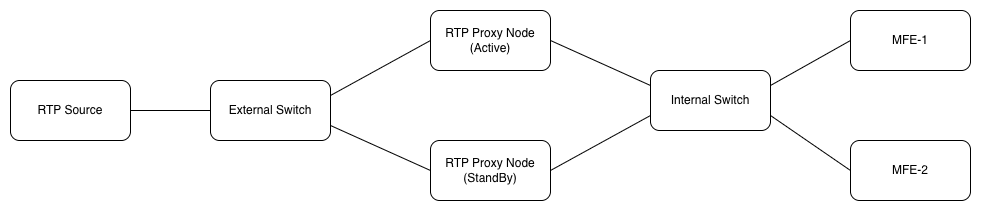
The RTP Proxy operates in a high availability mode. Currently, only one active/standby RTP Proxy pair is supported. One pair can connect to up to 20 MFEs, assuming each MFE is running at maximum capacity.
RTP Proxy HA requires Layer 2 adjacency. The external SBC-facing interfaces of the active and standby RTP Proxy nodes must be connected to the same external VLAN or broadcast domain. The internal MFE-facing interfaces of both nodes must be connected to the same internal VLAN or broadcast domain. No Layer 3 gateway, routed hop, or network segmentation device can exist between the active and standby RTP Proxy nodes on either the external or internal networks.
- The standby node takes over the VIP and sends GARP announcements.
- GARP messages propagate in order to update MAC address tables and neighbor ARP caches.
- The VIP moves seamlessly between the active and standby nodes.
- RTP streams continue to flow without interruption.
Figure 8-1 RTP Network
System Requirements
Your KVM server must meet the following requirements:
Table 8-3 Host System Requirements
| Requirement | Description |
|---|---|
| Hypervisor | KVM/QEMU managed by libvirt (minimum version 10.10.0) |
| Host OS | Oracle Linux 9 and UEK8 kernel. |
| Host NICs | At least one 10Gbps NIC with SR-IOV support.
Refer to the Table 8-6 table for the supported NICs and their corresponding drivers. |
| SR-IOV capability of the NIC (Number of PFs with SR-IOV) | Minimum 2 |
| NUMA topology of the system | At least one NUMA |
| Access | Administrative privileges on hosts/VMs, ability to reboot/modify BIOS and kernel. |
| Time Synchronization | NTP or chrony enabled on host and VMs. |
| Hyperthreading | Hyperthreading must be enabled. |
Table 8-4 Guest System Requirements
| Requirement | Description |
|---|---|
| OS | Oracle Linux 9 and UEK8 kernel. |
| CPU | 12 vCPUs (16 recommended) |
| Memory | 16GB (32 recommended) |
| Storage | 40+ GB |
| Network |
|
| Chipset | Q35 |
| DPDK | version 24.11.3
This is included in the rtp-proxy-8.3.0.0.0.tar.gz which is downloaded later; it is not a part of the KVM installation. |
Installation Steps Overview
Installing the RTP Proxy requires that you complete each of the following steps.
- Prepare the KVM Host.
This includes selecting the right BIOS settings, configuring kernel parameters, confirming SR-IOV and IOMMU support, creating VFs, setting up NUMA nodes, and enabling RSS.
- Prepare the KVM Guest.
This includes creating a VM with the Q35 machine type, configuring PCI host devices, aligning virtual resources with NUMA nodes, and installing and configuring the guest operating system.
- Install RTP Proxy.
This includes downloading the correct patch, setting the correct values in the config.json file, configuring Coherence, binding the NICs to DPDK, starting the RTP Proxy services, and configuring the standby node.