10 Dial-up Control Plan Management in ACS
Overview
Introduction
This chapter explains the procedures you need to carry out when configuring control plans in ACS.
What is a Control Plan?
A control plan is similar to a flow chart. Control plans essentially define the decisions and actions that are made when a call is routed from source to destination. A control plan may consist of multiple unique decision points or actions called feature nodes. Control plans are constructed in ACS using the ACS Control Plan Editor (CPE).
Note:
This chapter provides a general overview of control plans and their implementation in the CPE. You can view CPE Help for more specific CPE information.
Using Self Management Control Plans
Introduction
ACS provides an ACS management control plan. This plan enables telcos to provide a dial-up control plan which enables the telco's customers to make changes to their control plans using prompts and actions from their phone.
The control plan uses standard feature nodes and makes specific use of the NTS nodes.
The ACS Management Control Plan
To use the dial-up feature of the ACS management control plan, the telco can connect the ACS management control plan to a service number (SN) and allocate it to a customer. This feature is managed using the Service Numbers tab.
The customer can then dial this SN and change a number of control plan settings using a touch-tone phone. The following control plan settings can be managed by ACS customers using a valid SN. See:
- Activating a control plan for a service number
- Activating a control plan for a CLI
- Changing the switch node exit in an existing control plan
- Setting the follow me number
Control plans that can be edited by the customer must be assigned an MF Identifier when saved. The MF Identifier is a unique code that allows the application to determine which control plan is to be changed when the ACS management control plan is dialed. The MF Identifier may be set by the user when the control plan is saved.
Note:
In order to use the ACS management control plan through a dial-up phone, the customer must have a PIN and a management ID. These requirements are configured using the Customer tab.
Process
This table describes the process of using the ACS management control plan to make ACS customer control plan updates is.
-
The user dials the SN the ACS management control plan is scheduled against.
-
The control plan starts. The first interaction (before any settings can be altered), requires the user to provide a correct account number and PIN. If unsuccessful, the call is disconnected.
-
The caller is prompted to select the setting that is to be changed.
-
The user is then guided by a series of instructions that allow them to change their control plan settings.
Note:
This feature is unavailable when run on MVAM 2.2.0c0.
Using the ACS Dial-up Manager
Introduction
The dial-up feature of the ACS management control plan is used by dialing a specified number and following the options presented.
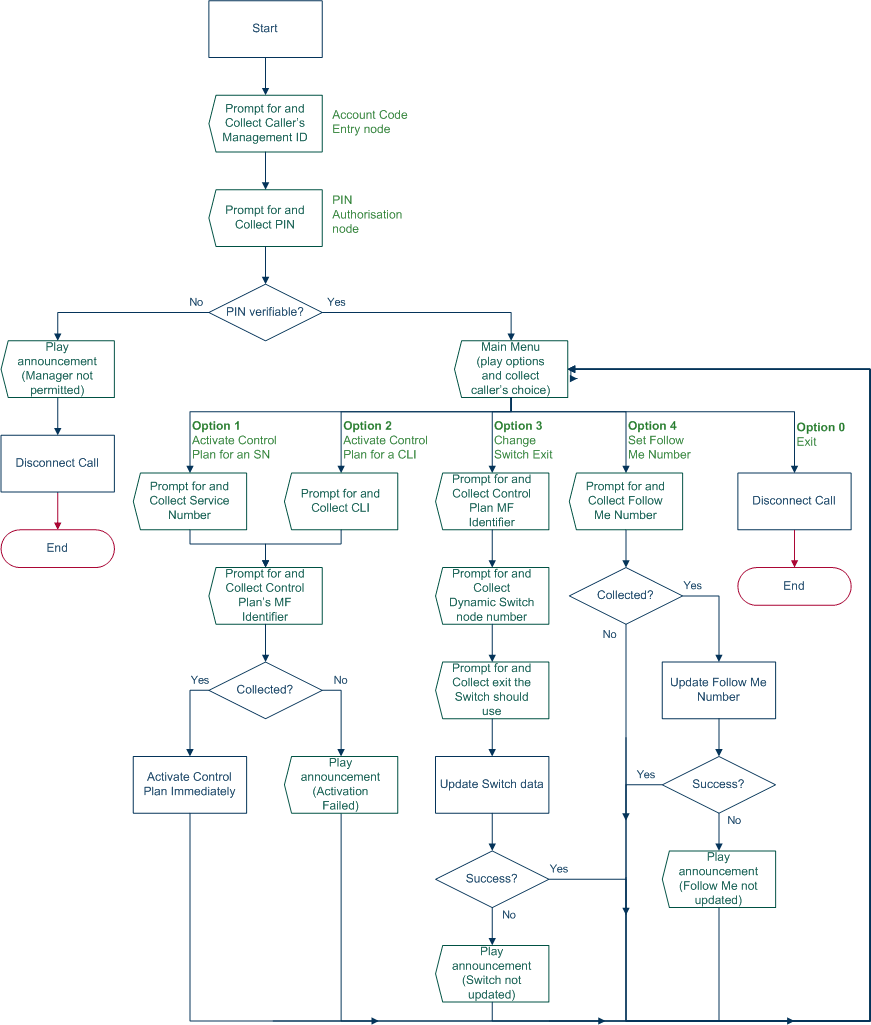
Dial-up Logic Flow Diagram
This diagram illustrates the flow of the dial-up feature of the ACS management control plan.
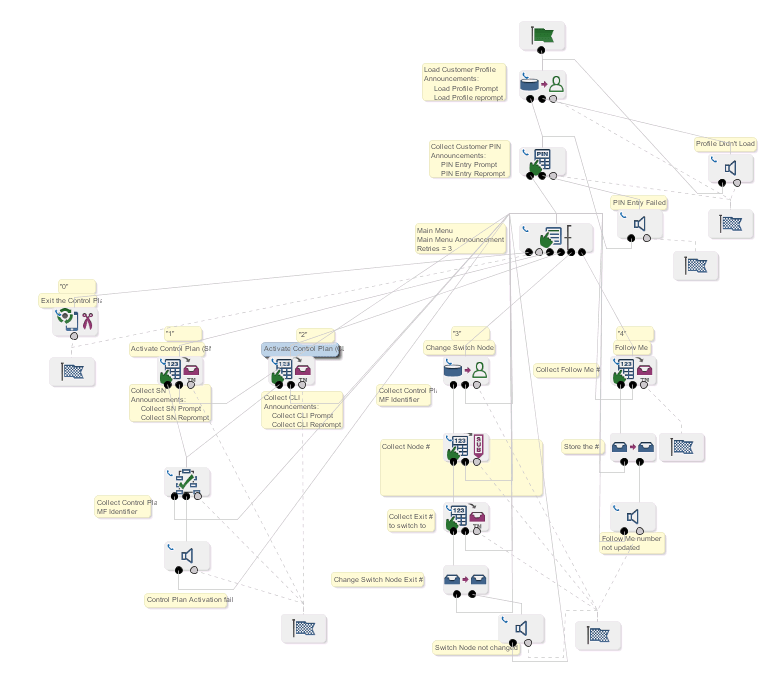
ACS Management Control Plan Example
The following figure shows the ACS management control plan, and the feature nodes used in the control plan for dial-up management.
Using Dial-up Self-management
Follow these steps to use the dial-up management feature.
-
Dial the service number which is connected to the ACS management control plan. This is the number the telco has scheduled the ACS management control plan against.
-
Enter your management ID (to identify yourself).
-
Enter your customer PIN.
Note:
No more than 32 digits can be entered at any one time.
Result: The system checks the PIN is correct. If it is not correct within the allowed number of retries, the call is disconnected.
-
Listen to the announcement which lists the options which you can change.
The options are:
- Activate a control plan attached to a service number (SN)
- Activate a control plan attached to a caller line identifier (CLI)
- Change the exit that is used in a switch node
- Set the follow me number
- End the call
-
Press the digit which corresponds to the required option.
Tip:
A selection may be made at any time; it is not necessary to wait until the message is finished. Once a selection is made, the call will proceed to the menu for the option you selected.
The detailed interaction for each option is listed below.
Activating a Control Plan for a Service Number
Follow these steps to activate a control plan for a service number.
Note:
To access this functionality you must have entered 1 at the main menu.
-
At the prompt, enter the service number for the active control plan you want to change.
-
At the prompt, enter the MF Identifier that is to be made active for the supplied service number.
Results:
- If everything is correct, the system will update the service number and attach the specified control plan to it with an effective date and time of now (the time and date at which the call to the ACS Dial-up Manager is made).
- If for any reason, the service number is not changed, you return to the main menu to try again.
Activating a Control Plan for a CLI
Follow these steps to activate a control plan for a CLI.
Note:
To initiate this functionality you must have entered 2 at the main menu.
-
At the prompt, enter the CLI for the active control plan you want to change.
-
At the prompt, enter the MF identifier that is to be made active for the supplied CLI.
Results:
- If everything is correct, the system will update the CLI and attach the specified control plan to it with an effective date and time of now (the time and date at which the call to the ACS Dial-up Manager is made).
- If for any reason, the CLI is not changed, you return to the main menu to try again.
Changing the Switch Node Exit
Follow these steps to update the exit a Dynamic Switch feature node will route to.
Note:
To initiate this functionality you must have entered 3 at the main menu.
-
At the prompt, enter the MF Identifier for the control plan that the switch node is in.
-
At the prompt, enter the node number for the Dynamic Switch node you want to change.
-
At the prompt, enter the exit number the Dynamic Switch node should now exit to.
Results:
- If everything is correct, the system will update the control plan.
- If for any reason, the switch node exit is not changed (that is, you entered the incorrect node number and the number entered was not for a switch node, or the exit specified does not exist), you return to the main menu to try again.
Setting the Follow Me Number
Follow this procedure to set your follow me number.
Note:
To initiate this functionality you must have entered 4 at the main menu.
-
At the prompt, enter the new follow me number.
Results:
- If everything is correct, the system will update the follow me number and return to the main menu.
- If for any reason, the follow me number is not updated successfully, you will be informed and returned to the main menu to try again.