3 Initial Configuration
Setting Up CCS for the First Time
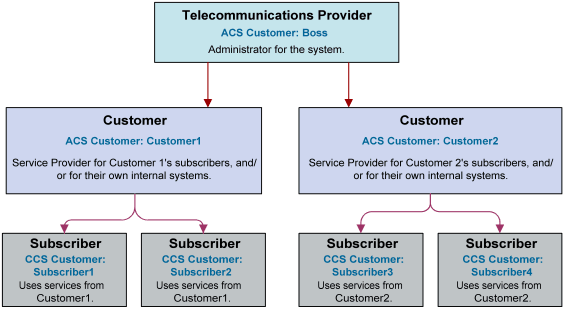
Default Customer - BOSS
The system is shipped with a default system customer, “BOSS”.
You must use this service provider when setting up CCS.
topic title
| Syntax: | paraMeter = value
|
| Description: | The number of seconds ............... |
| Type: | Integer, Decimal, Array, Parameter list, String, Boolean |
| Optionality: | Optional (default used if not set) |
| Allowed: | |
| Default: | |
| Notes: | |
| Example: | paraMeter =
|
Creating a global Control Plan
Only the system administrator is able to create a global Control Plan using the Control Plan Editor.
The global Control Plan contains all the features of ordinary Control Plans, following the guidelines in CCS User's Guide. However, the global Control Plan takes precedence over any Control Plan associated with it.
Any nodes in the global Control Plan that require telephony action (unconditional terminate, disconnect, terminate unchanged) result in the main Control Plan being abandoned.
Example: If the Global Screening CCS Control Plan included a disconnect node, the caller would hear the announcement advertising Customer Garden Center and then the call would be disconnected. The Control Plan created by Customer Pizza is never enacted.
Implementing a New Service
Introduction
This quick start procedure to implementing a new service assumes that a CCS service provider has been created. The attributes of a CCS service provider are its default language and contact details.
Procedure
Follow these steps to implement a new service.
| Step | Action | For details, see... |
|---|---|---|
| 1 |
On the Resource Limits tab, set the following:
|
Resource Limits |
| 2 | On the Currency tab, configure the currency. | Currency |
| 3 |
On the ACS Configuration screen, set the following:
|
See ACS User's Guide. |
| 4 | Create domains | Domain |