1 System Overview
What is CCS and VWS?
Overview
Charging Control Services (CCS) and Voucher and Wallet Server (VWS) are prepaid and post-paid services. They offer flexibility and control over billing methods and telephony services in general.
They operate at the service application level of the network.
Features
Features of CCS and the VWS include:
- Customization of call / session management and routing according to factors such as:
- Geography
- Demographics
- Availability of resources
- User preference
- Call screening
- Validation of subscriber credit prior to routing of calls
- Free call options (for example, to customer service)
- Variable levels of credit and selection for different services for complex promotion logic
- Forced disconnection on credit exhaustion
- Fraud control (detection of unauthorized simultaneous subscriber ID entry, credit card use, or bad PIN)
- Links to VWS to provide wallet and balance management, including:
- Individual or group subscriber accounts
- Monetary and time-based wallet balances
- User interaction:
- On-line credit recharge and balance query through a www CGI interface
- Home and roaming network support through CAMEL 2 / 3
- Support for GSM, 2G, 2.5G and 3G circuit-switched and packet networks
ACS functionality
CCS works in conjunction with the Advanced Control Services product for added processing capability. Many of the features of CCS are accessed through ACS, for example:
- Customer-managed control plans
- Graduated levels of security
- Management of all outgoing and incoming calls
- Statistics generation
- Announcements.
See ACS User's Guide for the full functionality provided with CCS.
CCS Macro Nodes
The feature nodes that are available to CCS within the Control Plan Editor are listed in the Feature Nodes Reference Guide.
For information on using the CPE see CPE User's Guide.
Service providers
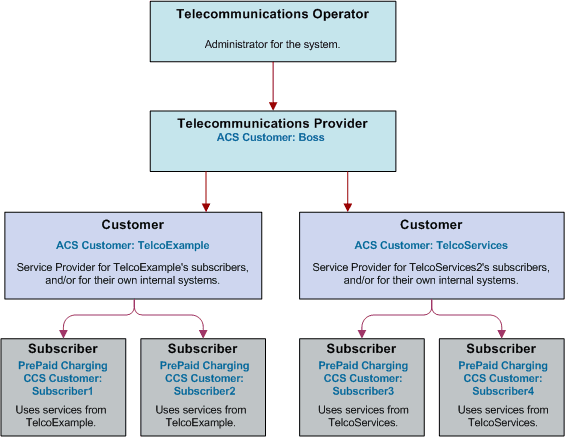
The Voucher and Wallet Server is installed and run as a network service by a Telecommunications Operator (telco). It enables the Telco to create service providers and to create customers and subscribers for those service providers. Although the customer is able to monitor subscriber details and recharge wallet balances through the web interface, the telco retains full control over all aspects of the wallet.
Domains
Domains
CCS uses domains to control which service is provided by a specific network element.
A domain defines the functionality CCS uses a set of one or more domain nodes for. Domain nodes are network elements that provide one or more of the following functions:
- Billing
- Wallet management
- Voucher management
An example of a domain would be a pair of Oracle Voucher and Wallet Servers.
Domains enable CCS to separate traffic for a dedicated service such as voucher redemption.
BCD Domain
The BCD domain is used for subscriber accounts stored on the Billing and Revenue Management (BRM) system. For these accounts, the following Convergent Charging Controller charging features will have no effect if used:
- Periodic Service/Charge logic (for example, the ability to perform logic based on periodic charge subscriptions in BRM)
- Balance cascade overrides
- Service logic derived discounts
- Text notification of mid-call tariff change (for example, text notification of mid-call tariff change will not be available).
Note:
Convergent Charging Controller does not require a subscriber to have a subscriber record stored locally on Convergent Charging Controller. If subscriber information is not present on Convergent Charging Controller,Convergent Charging Controller uses the subscriber's logical calling number as the subscriber reference.Domain Types
Domain types enable CCS to handle groups of domain nodes that share a common technology. This can reflect the communication protocol, and/or make and model of the node.
Examples: The following are domain types:
- VWS
- DIAMETER
- Intec
For more information about configuring these domain types, see Domain .
Changing Domains During Call Processing
The Set Active Domain feature node enables the domain type to be changed at any point within a control plan. For example, if TUS is installed with a default Voucher Domain type of '2', the domain type can be changed mid-call to VWS.
For more information about the Set Active Domain feature node, see Feature Nodes Reference Guide.
What Services Does CCS Provide?
Introduction
As a prepaid and post-paid service, CCS offers profitable alternate billing options to a telecommunications provider.
- Single Use Debit (Prepaid) phone-cards generate a profit for the telco, due to breakage (the remaining, unusable balance on a phone card at expiry).
- Expiry of balance and voucher expiry have an effect similar to breakage, making fixed line or mobile phones equally profitable for the telco.
Wallet flexibility
Combinations of prepaid and post-paid facilities can be tailor-made to suit individual service providers and to meet the business needs of the telco.
The rich system of prepaid services enables services to be offered to everyone wherever they are. CCS enables the telco to offer these customers the flexibility and convenience of multiple services on a single wallet, in a manageable and user-controlled form.
Wallet configuration options
Some examples of wallet flexibility are illustrated below:
- A single wallet can provide two services:
- PIN access from any phone
- Access from a registered telephone line number (CLI) used for any telephony service (phone, internet).
- Wallets can be recharged through the web interface, using a voucher or a credit card.
- A single subscriber can have a single wallet with up to two services.
- A single subscriber can have multiple access devices, all drawing on the same wallet balance.
- A group of subscribers can have access to a single wallet, in the name of one customer. Each subscriber in the group would access the wallet using the same physical phone line, or using the same PIN.
- A group of subscribers can have multiple devices drawing on the same wallet balance. Each subscriber in the group would have his or her own named wallet. She or he would access the wallet using a different physical phone line or using a unique PIN.
- Wallets can be set up anonymously, where a subscriber is not named as in the case of phonecards purchased for resale, or of single-use debit wallets.
Example 1 - single wallet
In this example, a subscriber has a single wallet.
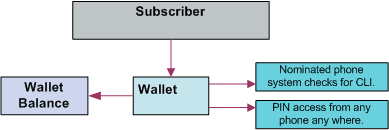
A wallet can be accessible by a CLI (the number of a physical phone line used to access the wallet. This can be a mobile or fixed phone.) or by using a PIN. It is only required to select one method of access (PIN or CLI), but it is possible to have both. In this example, the subscriber has both a CLI and a PIN.
This enables the subscriber to use the wallet from any phone, using the PIN, or from a specific phone, where the CLI has been associated with the wallet.
Diagram - single wallet
Here is an example of a single user with single wallet balance, a single wallet and two access mechanisms.
Example 2 - multiple devices
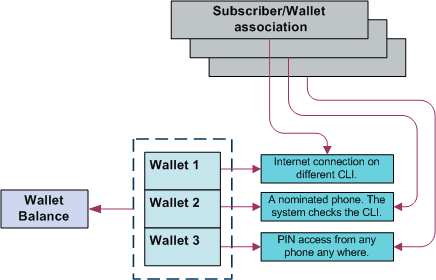
A single subscriber can have an internet connection, a mobile phone and a prepaid card, all drawing on the same wallet and rechargeable through the web interface.
| Scenario | Description |
| 1 | The internet connection requires a phone connection, which has a CLI. This CLI is registered to a subscriber. Since a subscriber can only have one CLI, no other phone line can be used to access this subscriber/wallet association without a PIN. |
| 2 | The subscriber wishes to use a mobile phone without a PIN. The internet connection has been registered as the CLI, so a second subscriber must be created. The new subscriber draws on the same wallet balance as the first subscriber, but is based on the CLI of the mobile phone. |
| 3 | The subscriber wishes to have a PIN, in order to access the wallet from any fixed or mobile phone. It is possible to add a PIN to either of the two wallets created above, which would allow this feature to be used independently. However, the subscriber in this example has elected to create a completely new subscriber/wallet association. It draws on the same balance as the first two, but has a PIN and no CLI. |
Diagram
Here is an example of a single user with single wallet balance, and three subscriber/wallet associations, one for each of three services.
Example 3 - client group
Alternatively, several individual subscribers can have associations with a single wallet. The service provider can monitor each subscriber/wallet association without the inconvenience of maintaining a separate wallet for each subscriber. In a business setting, this has positive implications.
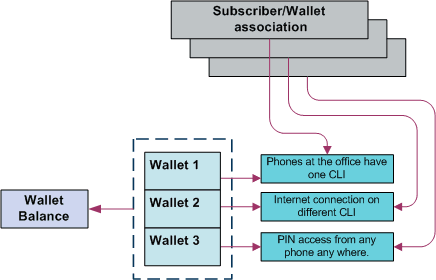
Within an organization, all employees can be issued with a calling card, giving them access to a common wallet. This would allow employees to work off-site, while retaining full access to their usual telephony services. The organization can also run an internet connection through this same wallet, as well as any specific fixed or mobile phones that are registered on the CCS system. This could be achieved through three subscriber/wallet associations, drawing on one wallet.
| Scenario | Description |
| 1 | The telephone system at the office runs on a single telephone line. A subscriber/wallet association is set up, based on the CLI of that phone line. Any call made from the office will draw on the same wallet. If an organization had more than one phone line, or more than one office, each of these phone lines could have an individual subscriber/wallet association drawing on the same wallet. |
| 2 | The office internet connection requires a telephone connection, which has a CLI. The CLI is registered to a new subscriber using the same wallet as before. Since a subscriber can only have one CLI, no other phone line can be used to access this subscriber record without a PIN. It is possible for a subscriber to have both a CLI and a PIN, so the internet connection CLI could be on the same subscriber record as the PIN described above. In this example, the customer wishes to keep these subscriber records separate. |
| 3 | The customer wishes to issue calling cards to all employees. A subscriber/wallet association is set up with a PIN, but with no CLI. All employees are given cards with the subscriber ID printed on them. They are given the PIN to access the wallet. All employees can then access the wallet from any fixed or mobile phone, using the PIN. If it is preferred that each employee has an independent PIN, then each employee must have a separate subscriber record. A subscriber record can only have one PIN. |
Diagram
Here is an example of multiple users with a common wallet balance, three subscriber/wallet associations for each of three services.
Example 4 - shared single account
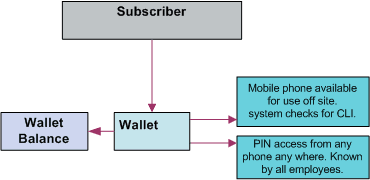
Customers may prefer to manage their services on a single wallet. The flexibility of CCS makes this a viable option. Even with a single wallet, it is still possible to manage an internet connection through the CLI, as well as PIN access from any phone. This means that the CLI registered on the subscriber record is that of the internet connection, while the registered PIN enables access to the wallet from any phone.
Alternatively, the registered CLI could refer to the office phone line or to a specific mobile phone. As long as the subscriber/wallet association is registered with only one CLI and one PIN, the service provider can use the wallet according to its requirements.
Diagram
Here is an example of multiple users with one wallet balance, one wallet and two services.
Example 5 - branded prepaid cards
A further opportunity enabled by CCS is branded prepaid. Branded prepaid allows service providers to market customized prepaid cards (either single-use debit wallets of a set value or rechargeable debit cards) with their own company logo. This can be a novel means of advertising for the service provider, particularly if the prepaid cards include special rates and discounts not available elsewhere. This is easily configurable in CCS.
The convenience and economy of the card is in itself a selling point, but the service provider also benefits from the longevity of the advertisement – especially in the case of rechargeable cards. A subscriber is far less likely to discard an advertisement printed on a phonecard.
In this example, the card is a $5 single-use debit wallet, which means that each card printed has a subscriber record and wallet of its own.
Making a Call in CCS
Introduction
After a subscriber has been assigned a subscriber ID and PIN or a CLI, it is possible for them to make a call against a CCS subscriber/wallet association.
Calling from a registered phone
Here is the process followed when a subscriber makes a call from a registered fixed or mobile phone (CLI).
| Stage | Action |
|---|---|
| 1 |
The subscriber dials the toll-free number corresponding to the country in which they are located. Note: The telco supplies this number to the service provider. |
| 2 |
CCS checks the CLI against the subscriber information. As the phone is registered, a dial tone will indicate that the CLI has been accepted. Note: If the information is invalid, then the call will not be connected. |
| 3 |
The subscriber enters the required phone number, followed by #. Result: The call will be connected and charged to the subscriber’s wallet, using the appropriate tariffs for that specific date and time of day. |
Calling from any phone
Here is the process followed when a subscriber makes a call from a fixed or mobile phone that is not registered, using CCS.
| Stage | Description |
|---|---|
| 1 |
The subscriber dials the toll-free number corresponding to the country in which they are located. Note: The telco supplies this number to the service provider. |
| 2 |
CCS checks the CLI against the subscriber information. As the phone is not registered, a ‘beep’ will indicate that the system requires entry of phone subscriber identification details. |
| 3 |
The subscriber enters the subscriber ID and PIN as a single number, followed by #. The subscriber ID consists of 6 digits, including a 2-digit prefix specific to the service provider. The PIN can have up to 20 digits. Example: The subscriber with a subscriber ID of 445678 and a PIN of 9900 would enter the number 4456789900#. |
| 4 |
A dial tone will indicate that the subscriber ID and PIN have been accepted. Note: The Product Capability control plan collects the PIN information and the next service handover validates the PIN. If the PIN is validated, the call gets connected. When the PIN validation fails and if the CCS_PIN_AUTH_FAILURE is configured, the last used PIN number in the service handover is used to authenticate. |
| 5 |
The subscriber enters the required phone number, followed by #. Result: The call will be connected and charged to the subscriber’s wallet using the appropriate tariffs for that specific date and time of day. |
The Product Capability control plan collects the PIN information and the next service handover validates the PIN. If the PIN is validated, the call gets connected. When the PIN validation fails and if the CCS_PIN_AUTH_FAILURE is configured, the last used PIN number in the service handover is used to authenticate.
Subscriber Accounts and Wallets
Subscriber accounts
A subscriber account is the unique record in CCS which records the details of a person (subscriber) who is purchasing services from the telecommunications provider.
A subscriber account is identified by a unique E.164 number. This is referred to as the MSISDN of the subscriber.
Wallets
Each subscriber account has one associated primary wallet. The subscriber can also have a secondary wallet. Wallets can be shared between subscriber accounts. A wallet is a group of balances owned by the subscriber and available to pay for prepaid services offered by the platform.
Example: A subscriber could have a “General Cash” balance and a “Free SMS” balance in their wallet. Each balance has its own expiry date, which means that any value left in the balance after this date is removed.
Wallets are associated with a specific VWS Voucher and Wallet Server pair. For more information about this relationship, see Voucher and Wallet Server Technical Guide.
Balance units
Balance units define how a wallet treats a type of currency (for example, treating SMSs differently from cash). All balance types have a balance unit.
Balance types
Balances of different sorts of value are distinguished by balance type. Balance types enable Service Providers to separate a subscriber's cash/units into logically separate areas such as:
- Promotional (have 1 day to use 20 SMSs)
- Normal (recharges done by a subscriber)
When a new balance type is created, you must list the services it can be used for.
Balance Types can be dedicated to particular services. A Promotional Cash Balance might only be for services which are high value for the subscriber, but can be delivered at minimal cost to the operator.
Example: National voice calls to other of the operator’s subscribers.
Product Types
Product types
A product type defines the:
- Services that are available to a subscriber
- Control plans that are run when a service is used
Product types are assigned to a subscriber and wallet combination. This enables the subscriber to have two different product types, if they have two wallets. If a wallet is shared between subscribers, each subscriber can have a different product type for that wallet.
Activation credits/promotions
You can associate product types with wallet activation promotions, with configurable:
- Balances (one of the predefined balance types, or one of the operator‑defined balance types)
- Values
- Validity periods
Example: A wallet activation promotion that adds 10 EUR to the Promotional Cash balance with a validity period of 2 months can be associated with the Bronze product type. This results in each Bronze subscriber receiving 10 EUR on their Promotional Cash balance when they use a service for the first time. The expiry date of the balance is set to 2 months after the activation date.
Recharges
Introduction
Subscribers can recharge their balances through a range of recharge mechanisms, including:
- Voucher recharge through IVR
- Voucher recharge through direct dial
- External recharge through provisioning interface (for example: ATM, credit card, web interface)
In addition to the nominal value of the recharge, a bonus can be given when a recharge is made.
After the recharge, a notification SMS is sent to the subscriber.
Recharge promotions
You can reward a subscriber with a promotion bonus when a custom recharge is performed. The promotion bonus is given when two conditions are met:
- The CCS PI
EXTRA_EDRparameter must be set to:EXTRA_EDR = "CHANNEL=CHANNEL_NAME"
- The recharge value passed in the PI command exceeds the balance value condition associated with the applicable promotion.
Example: If a promotion is defined with channel “ATM” and balance value event condition 10 EUR, a PI recharge with reference ATM20080110123000 and value 20 EUR will trigger the promotion to be awarded.
Promotions can be configured with various parameters.
Balance expiry
Recharges extend the expiry periods of the balances and/or the wallet being recharged.
When a balance is recharged, its expiry date is set to the current date plus the balance expiry period specified in the recharge's voucher type. If the current expiry date of the balance is already greater than this date, the current date is kept.
Wallet expiry
Recharges extend the expiry periods of the wallet being recharged.
When a wallet is recharged, its expiry date is set to the current date plus the wallet expiry period specified in the recharge's voucher type. If the current expiry date of the wallet is already greater than this date, the current date is kept.
Failed recharges
You can set the maximum number of failed recharge attempts that are allowed within a 24 hour period (allowed values 2-99). If the maximum number of failed recharge attempts is exceeded, the account of the recharging subscriber is moved into the frozen state.
Voucher batches
You can use the CCS Voucher Management screens to create vouchers in batches of up to 999999999 vouchers.
Each voucher batch is encrypted during the batch creation process using a PGP public/private key pair. You can upload voucher reseller's PGP public keys to encrypt a batch so that it can only be decoded by the retailer.
For security reasons, after the creation of a voucher batch, the batch remains in “Created” state until it is moved into the “Active” state manually by an operator.
Voucher recharge methods
This table describes the methods subscribers can use to recharge their account with a voucher.
| Method | Description |
|---|---|
| Self-care |
Subscribers use IVR to interact with the self-care function. For more information about self-care, see Subscriber Self-care . |
| Web | Subscribers use a web interface to enter the voucher details. The website is developed by the operator and uses PI commands to integrate with the CCS PS. |
| SMS Direct Access |
Subscribers send an SMS to a dedicated short code on the CCS PS with the voucher number inside the SMS. Example: A subscriber sends voucher number 12345678901234 inside an SMS to short code 4001. The subscriber's account balance is recharged with voucher 12345678901234. |
| Direct Dial |
Subscribers dial a dedicated number that connects them to the CCS PS with the voucher number appended to it. After CCS PS attempts the recharge, an announcement is played indicating success or failure of the recharge. Example: If the special direct dial recharge number is 4123, a call to 412312345678901234 will recharge the account of the subscriber with voucher 12345678901234. |
| Customer Care | Subscribers call the customer service center, and the operator recharges the accounts by entering the voucher details into the Voucher Management screen. |
External recharge methods
The Provisioning Interface provides an interface to CCS's recharge facility. Using the interface, you can integrate CCS with another system (for example: a web-based self-care system or a banking system such as ATM or credit card).
Recharges using the PI can include custom details, including:
- Configurable recharge amount
- Balance and expiry dates
Subscriber Self-care
Introduction
Subscriber self-care enables the subscriber to manage their own account. It includes these features:
- Requesting information on the current subscriber account and service status (for example: balance and wallet status, product information)
- Modifying certain parameters of their account within the limitations imposed by the operator (for example: change language, change product)
- Recharging their accoun
Main menu
When subscribers access the IVR self-care facility, they are routed through a single main menu. The menu provides an overview of the available self-care features and enable the subscribers to navigate to the sub-menus for the individual self-care features.
Voucher recharge
Subscribers can use self-care to redeem a voucher which recharges their own account and recharges another subscriber's account.
IVR system
Subscribers can use the self-care feature through a CS1-compatible IVR reached by calling a special number (short code), set by the operator.
The IVR uses announcements created by the operator in each supported language. The announcements are used by the language extension in the PA/PACUI operations run by the IVR. When subscribers who have not yet set their preferred language make a voice call, the system automatically connects them to an IVR menu to select their preferred language.
Notifications
Introduction
Notifications are any short message sent by CCS to a subscriber's handset. CCS generates notifications which are sent to the subscriber to inform them about specific events.
CCS sets up notifications which are delivered by other applications. Different delivery applications are used depending on the type of network and destination.
Some examples of notifications that can be sent include:
- Balance expiry
- Service expiry
- Recharge notification
ACS Notification Templates
You define the content to include in notifications by configuring ACS notification templates. For more information, see ACS User's Guide.
Examples of CCS activities that can use ACS notification templates are:
- Feature nodes in control plans
- Business process logic (BPL) tasks
- Credit transfers
- Periodic charges
- Profile updates
- Real-time notifications
- Promotions
Notification Languages
Notifications can use any language configured on the system. They are sent in the subscriber's preferred language (if set) or in the system's default language.
For more information about configuring:
- Languages, see ACS User's Guide
- Notification translations, see CCS User's Guide
Delivery methods
You can use any of the following methods to deliver notifications:
- Messaging Manager FDA (First Delivery Attempt) to deliver notification SMS directly to the handset of the subscriber
- EMI protocol to submit notification SMS to an EMI interface of the operator's SMSC
- SMPP protocol to submit notification SMS to an SMPP interface of the operator's SMSC
The CCS PS uses one of these delivery/submission attempt sequences:
- Try FDA delivery first, if it fails try EMI submission
- Try FDA delivery first, if it fails try SMPP submission
- Try EMI submission
- Try SMPP submission
In all cases, if all attempts fail, the message is discarded (no Store-and-Forward is performed).
Basic notifications
Notifications are sent to subscribers when:
- The number of days until the expiry date of his wallet is less than a pre-configured threshold (the warning period can be configured for each product type)
- One or more of his balance(s) has (have) been recharged (the SMS contains the new balance values)
Tasks
Introduction
Task Management comprises a set of Business Process Logic tasks that fall within the defined business rules of the service provider, and that can be run for individual subscribers. Each business process is configured in the control plan referenced in the BPL task. The feature nodes in the control plan implement the actions of the business process.
For more information, see Task Management .
Purpose
The following list provides some examples of the processes that can be run through a BPL task:
- Product Type Swaps
- Profile updates
- Voucher Type recharges
- Wallet State changes
- Credit Transfers
Charging and notification
In the BPL task control plan you can configure extended functionality, including:
- A charge for the service provided
- Wallet state changes
- Profile updates
- Send notifications
If you have the Voucher Management functionality, you can also recharge vouchers. For more information about vouchers, see Voucher Management.
Feature nodes
This table describes the core feature nodes used in BPL control plans.
Note: Other nodes available in the Control Plan Editor can be included in BPL control plans if required. For more information on the available feature nodes, see Feature Nodes Reference Guide.
| Node | Description |
|---|---|
| Account State Branch | Use this feature node to determine whether the subscriber's wallet is in the correct state to enable the BPL to run. |
| Business Prefix Branch | Use this feature node to select the wallet type the BPL actions apply to, based on the called party number. |
| Disconnect Call |
When a call passes through this feature node, it indicates that the BPL has failed to run. The cause value for the feature node must be set to a response number configured for a 'Not Acceptable' BPL response on the BPL Response Mapping tab. Warning: The default value of 31 should not be used. |
| Named Event |
Use this feature node to charge the subscriber for the business process. Use to:
|
| Send Short Message | Use this feature node to send notifications for the BPL. The message to send is configured in the feature node. |
| Set BE EDR | Use this feature node to update any EDRs generated by the actions of the BPL, such as a named event or a voucher type recharge. |
| Set Wallet Type |
Use this feature node to set the wallet type the BPL actions apply to. Warning: Announcements configured in this feature node are not used in the BPL. |
| Store Profile |
Use this feature node to update a specified profile with the data configured in the feature node. Warning: Updates to profile data can also trigger a DAP or notification. These must be configured on the Profile Notifications tab. |
| Terminate Unchanged | When a call passes through this feature node, it indicates that the BPL has run successfully. The 'OK' BPL response is reported. |
| Unconditional Termination | When a call passes through this feature node, it indicates that the BPL has run successfully. The termination number for the feature node must be set to the number configured for the 'Found' BPL response on the BPL Response Mapping tab. |
| Voucher Type Recharge |
Use this feature node to recharge the subscriber's wallets using the voucher type configured for the feature node. Tip: The 'Unsupported' exit is taken if the domain for the subscriber does not support voucher type redemptions. |
User access
After a BPL has been defined, it can be accessed from:
- The Edit Subscriber screen
- The CCP Dashboard
User access to BPLs on the Edit Subscriber screen and the CCP Dashboard is managed through the user templates defined in the SMS User Management screen. For information about creating and maintaining user templates, see SMS User's Guide.
You can configure which BPLs appear on the CCP Dashboard by using the Subscriber Profile Manager screen. For more information, see Subscriber Profile Manager User's Guide.
User access
After a BPL has been defined, it can be accessed from the Edit Subscriber screen.
User access to BPLs on the Edit Subscriber screen is managed through the user templates defined in the SMS User Management screen. For information about creating and maintaining user templates, see SMS User's Guide.
Alarms, Statistics, Reports and EDRs
Introduction
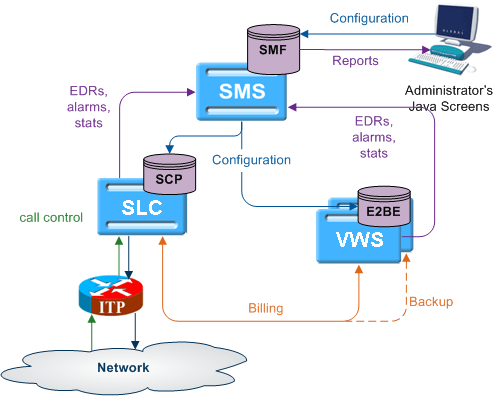
CCS uses the centralized management services of SMS to assist the administration of the services.
Alarms
CCS uses the SMS integrated alarms collection, viewing, and forwarding system. The alarms generated by all components of CCS are consolidated on the SMS and stored in a centralized alarm database.
The operator can:
- View the alarms through the alarm viewer built into the SMS screens
- Forward all alarms to an integrated external fault management system using SNMP v1 or v3
Alarms can be automatically deleted from the SMF alarm database after a configurable period.
For more information about:
- Specific alarms generated by CCS, see Charging Control Services Alarms Guide
- SMS alarms subsystem, see SMS User's Guide
Statistics
Across CCS, statistics are collected at both the system and application levels, which provide information on the performance and load of the platform. All measurements are consolidated on the SMS and stored in a centralized statistics database.
You can view the statistics through the SMS screens.
CCS_Service statistics
This table describes the statistics produced by CCS activity.
Note: These statistics are reported as CCS_Service statistics.
| Statistic | Description |
|---|---|
| CCS_PD_FAIL | Number of failed DAP requests. |
| CCS_PD_SUCS | Number of successful DAP requests. |
| NUM_BE_FAIL | Number of calls rejected due to VWS failure. |
| NUM_BUSY | Number of calls terminated to busy number. |
| NUM_IDP | Number of InitialDP triggering CCS service. |
| NUM_NO_ANSWER | Number of calls terminated but not answered. |
| NUM_NSF | Number of calls rejected for insufficient funds. |
| NUM_RSF | Number of calls causing route selection failure. |
| NUM_TERM | Number of calls terminated successfully. |
E2BE statistics
This table describes the statistics produced or changed by CCS activity on the VWS.
Note: These statistics are reported as E2BE statistics, and not as CCS statistics.
| Statistic | Description |
|---|---|
| NUM_ATC_REQ | Number of Apply Tariff Charge requests (ATC_Req) sent to the VWS. |
| NUM_BPIN_REQ | Number of Bad Password Pin requests (BPIN) that were sent to the VWS. |
| NUM_CARR_REQ | Number of Commit Amount Reservation requests (CARR_Req) made to the VWS. |
| NUM_CNER_REQ | Number of Confirm Named Event Reservation requests (CNER_Req) made to the VWS. |
| NUM_CR_REQ | Number of Commit Reservation requests (CR_Req) made to the VWS. |
| NUM_CVR_REQ | Number of Commit Voucher Redeem requests (CVR_Req) made to the VWS. |
| NUM_DA_REQ | Number of Amount Charge (DA_Req) requests sent to the VWS. |
| NUM_EXTRA_EXPENDITURE_BALANCES_UPDATED |
This counter is incremented when an expenditure plan contribution is made. The statistics counter is incremented with a value of (x-1) where x is the number of expenditure balances being contributed to by the expenditure plan. Examples:
|
| NUM_IARR_REQ | Number of Initial Amount Reservation requests (IARR_Req) made to the VWS. |
| NUM_INER_REQ | Number of Initial Named Event Reservation requests (INER_Req) made to the VWS. |
| NUM_IR_REQ | Number of Initial Reservation requests (IR_Req) made to the VWS. |
| NUM_LDMF_REQ | Number of MFile Reload requests (LDMF) made to the VWS. |
| NUM_NER_REQ | Number of Named Event Rate requests (NER_Req) sent to the VWS. |
| NUM_NE_REQ | Number of Named Event requests (NE_Req) sent to the VWS. |
| NUM_PC_CREDIT_ATTEMPT |
Number of periodic charge credit attempts (Direct Credit (WGR_Req) or Voucher Type Recharge (VTR_Req) sent by ccsVWARSPeriodicCharge as part of a charge attempt. Note: Backlogged charges report a statistic for each credit attempt. |
| NUM_PC_DEBIT_ATTEMPT |
Number of periodic charge debit attempts (NE_Req for.jnl). Note: Backlogged charges report a statistic for each Named Event. Also, a statistic is reported during the first charge attempt following a wallet recharge. |
| NUM_PC_STATE_CHANGE |
Number of periodic charge state changes (that is, when a new VALUE and EXPIRY are written to a periodic charge bucket). Note: Only one statistic is reported when processing backlogged charges. |
| NUM_RARR_REQ | Number of Revoke Amount Reservation requests (RARR_Req) sent to the VWS. |
| NUM_RNER_REQ | Number of Revoke Named Event Reservation requests (RNER_Req) sent to the VWS. |
| NUM_RR_REQ | Number of Revoke Reservation requests (RR_Req) sent to the VWS. |
| NUM_RVR_REQ | Number of Revoke Voucher Redeem requests (RVR_Req) sent to the VWS. |
| NUM_SARR_REQ | Number of Subsequent Amount Reservation requests (SARR_Req) sent to the VWS. |
| NUM_SNER_REQ | Number of Subsequent Named Event Reservation requests (SNER_Req) sent to the VWS. |
| NUM_SR_REQ | Number of Subsequent Reservation requests (SR_Req) sent to the VWS. |
| NUM_TOTAL_REQ |
Total number of requests sent to the VWS. Note: This statistic is produced, not by CCS, but by VWS processes. However, CCS increments it when an expenditure plan contribution is made. The increment is (x-1) as explained above for the statistic, NUM_EXTRA_EXPENDITURE_BALANCES_UPDATED. |
| NUM_USR_REQ | Number of Unit Seconds Rate requests (USR_Req) sent to the VWS. |
| NUM_VI_REQ | Number of Voucher Information requests (VI_Req) sent to the VWS. |
| NUM_VRW_REQ | Number of Voucher Redeem Wallet requests (VRW_Req) sent to the VWS. |
| NUM_VR_REQ | Number of Voucher Redeem requests (VR_Req) sent to the VWS. |
| NUM_VU_REQ | Number of Voucher Update requests (VU_Req) sent to the VWS. |
| NUM_WC_REQ | Number of Wallet Create requests (WC_Req) sent to the VWS. |
| NUM_WD_REQ | Number of Wallet Delete requests (WD_Req) sent to the VWS. |
| NUM_WGR_REQ | Number of Wallet General Recharge requests (WGR_Req) sent to the VWS. |
| NUM_WI_REQ | Number of Wallet Information requests (WI_Req) sent to the VWS. |
| NUM_WR_REQ | Number of Wallet Recharge requests (WR_Req) sent to the VWS. |
| NUM_WU_REQ | Number of Wallet Update requests (WU_Req) sent to the VWS. |
Note: All statistics are collected with a period of 1,800 seconds.
For more information about the request messages these statistics measure, see Voucher and Wallet Server Technical Guide.
Reports
CCS has a set of standard reports which analyze the statistics gathered on the platform.
The statistics can be off-loaded from the database to an external statistical processing platform (for example, a data warehouse) for further analysis.
For more information about reports, see CCS Reports .
EDRs
EDRs are written whenever an action occurs in CCS that affects a wallet or subscriber, including when a:
- Call is processed
- SMS is sent or received
- Recharge is attempted
- Wallet changes state
EDRs are automatically uploaded to the SMS where they are added to a centralized database.
EDRs can be:
- Viewed per subscriber through the SMS screens (see View EDRs )
- Post-processed in a flat file format, including being offload through SFTP
For more information about the EDR format, see Event Detail Record Reference Guide.
For more information about managing EDRs, see EDR Management .