5 About Wallets and Vouchers
This chapter provides an overview of Oracle Communications Convergent Charging Controller wallets and vouchers.
About Wallets and Vouchers
A subscriber's account describes the subscriber, or person, who is purchasing services from the telecommunications provider. An account is identified by a Mobile Subscriber Integrated Services Digital Network (MSISDN) number, or more simply, a telephone number. Each account is also associated with at least a primary wallet but can also have a secondary wallet; for example, a primary wallet for the subscriber and a secondary wallet for the family, or a primary wallet for work and a secondary wallet for personal use. Wallets and vouchers are the mechanisms that Convergent Charging Controller uses to manage the financial transactions for a subscriber's account.
About Wallets
A wallet is a container or group of account balances and periodic services that belongs to a subscriber and is available to pay for prepaid services that the Convergent Charging Controller platform offers. The wallet determines what services the customer can use.
A subscriber, for example, could have a General Cash balance and a Free Notification balance in his or her wallet. Each balance has its own expiration date and any amount that remains after that date will be removed. A balance can also have one or more buckets, which are specific allocations of the balance that have their own value and, optionally, start and expiration dates. For example, a bucket might be ten cents of General Cash, or 20 megabytes of data, or 10 SMS messages.
A shared wallet is a wallet that is associated with a group of subscribers who can charge against it, such as a shared business wallet.
You create a new wallet when you add a new subscriber through the Service Management Service (SMS) Subscriber Management windows, through the Provisioning Interface, or through the ccsAccount utility. A wallet, too, has an expiration date, after which it is not usable, though it might contain balances that have not yet expired.
A wallet resides on a single Voucher and Wallet Server (VWS) pair, or domain.
A wallet has a life cycle that traditionally consists of the following states:
-
Pre-use
The initial state of a wallet after it is created.
-
Active
When a subscriber uses his or her account for any paid service for the first time, the wallet moves from the pre-use state into the active state. The initial expiration dates for the balances and the wallet are set when the wallet is activated. All services can be used in the active state.
-
Dormant
If the subscriber does not use any services for a configurable period of time, the wallet is put in the dormant state. The dormant state is useful for reporting inactive subscribers. All services are still accessible to the subscriber.
-
Frozen
If fraudulent activity is detected on the subscriber account, the subscriber's wallet is placed into the frozen state. All services are disabled until an administrator manually intervenes.
-
Suspended
A subscriber's wallet is placed in the suspended state when an administrator temporarily disables it.
-
Terminated
When a wallet reaches its expiration date, it is placed in the terminated state. All services, except for customer care services, are disabled. Wallets may also be affected by bucket expiration dates. For more information about wallet and bucket expiration, see the discussion on wallet and bucket expiry in Voucher and Wallet Server Technical Guide.
You can also define your own flexible wallet life cycle and specify the duration of the life cycle periods and the services that are available during each period. For example, services could include sending notifications, adding service logic, and adding charge restrictions, as well as others.
About Balances
A subscriber's balance is the amount or value that the subscriber has available in the wallet to pay for services. Balances can have different sorts of values, which are described by balance types. Examples of balance types could be cash, free minutes, free text messages, a data allowance, and so on. You must associate each balance type with the specific services for which it can be used.
Each balance type is also associated with a balance unit that specifies the type of currency, or value, that is used for that balance type. Balance units can be either cash or non-cash. For example, a balance type of free text messages could be associated with a balance unit of SMS (Short Message Service) messages or a balance type of free minutes could have a balance unit of time.
If a balance has an expiration date, any available credit is lost after that date.
About Recharging
Subscribers can recharge their balances in the following ways:
-
Through a voucher, using either interactive voice response (IVR), an SMS message, or direct dial
-
Through a provisioning interface (PI) with an external mechanism such as an ATM, a credit card, or a web application
-
Through a payment gateway that can be integrated through web services with the Convergent Charging Controller SLC
A recharge extends the expiration date of a balance and wallet by the amount of time specified in the voucher, unless the current expiration date is later than the end of the extended period.
To help prevent the fraudulent use of vouchers, you can specify a maximum number of failed recharge attempts to allow within a twenty-four hour period. If the maximum is exceeded, the subscriber's account is placed in the frozen state.
About Vouchers
A voucher is a credit coupon that adds value to a wallet balance. (A scratch card is an older form of a voucher that requires the subscriber to enter a serial number.)
You can create vouchers either by running ccsVoucher scripts or by using the Voucher Manager windows in the SMS GUI. You can also create batches of vouchers through the Voucher Batches tab by specifying starting and ending numbers.
A voucher specifies the product type for which it can be used and the balance type and amount to be credited. It also specifies a period during which it must be used and a point after first use at which any remaining credit expires.
A voucher or a batch of vouchers can have the following states:
-
Created
The voucher has been created but not activated.
-
Active
The voucher has been activated and is available to add value to a wallet.
-
Frozen
The voucher is no longer available for use although this state can be reversed by an operator.
-
Locked
An irreversible state in which the voucher is no longer available for use.
Redeeming a voucher recharges or adds value to the subscriber's wallet.A subscriber can redeem a voucher in a number of ways, depending on what self-care channels the operator has defined and configured. Possible channels could include an interactive voice response (IVR) menu in a control plan, through USSD, an SMS message, or a web application. A subscriber could also call a customer service representative who uses the Voucher Recharge tab in the Voucher Manager screens of the Service Management System.
Convergent Charging Controller does not address the logistics of voucher distribution. It simply allows you to produce an encrypted voucher batch file that you can send to a print shop.
About Managing Wallets and Vouchers
The Voucher and Wallet Server (VWS) manages all of the charging information associated with call processing, including processing of requests that affect wallets and vouchers.
The Voucher and Wallet Server performs the following management tasks:
-
Manages subscriber accounts
-
Manages multiple wallets and balance types
-
Rates services in real-time
-
Provides structure for tariffs on transactions
-
Processes reservation, debit, and credit requests
-
Manages vouchers, including
-
Voucher query and redemption requests
-
Failover and machine redundancy
-
Event detail record (EDR) processing and archiving
-
For more information on the Voucher and Wallet Server, see "About the Voucher and Wallet Server".
About Wallet Management
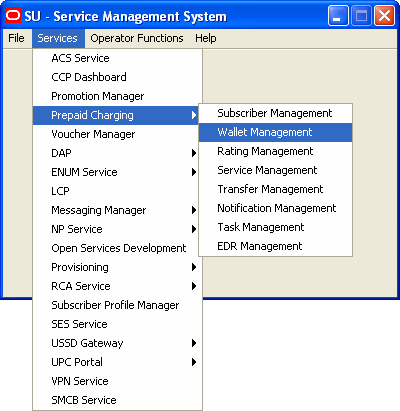
Wallet management services are available from the Services menu in the SMS GUI. Figure 5-1 shows the Wallet Management menu item:
Figure 5-1 Wallet Management Menu Item in SMS
Wallet management services provide the ability to perform the following tasks:
-
Add, edit, or delete tracker plans
Tracker plans allow you to define counters that track a subscriber's usage or expenditure within a configured promotion period, or to reward a subscriber for expenditure either in real time or at the end of a period.
-
Add, edit, or delete balance units
-
Add, edit, or delete balance translations
When Convergent Charging Controller is integrated with an external online charging system (OCS), balance translations allow you to associate Convergent Charging Controller balance type names with the names that are used by the external system. For example, you might associate an Convergent Charging Controller balance type of General Cash with the translation name of Cash Balance, which is used by the external system.
-
Add, edit, or delete reward product translations
Reward product translations allow a service provider to transfer a subscriber from one product type to another based on a reward.
-
Add, edit, or delete wallet name translations
Wallet name translation allows you to translate the wallet type name to the specified language.
-
Add, edit, or delete real-time notifications
Real-time notifications allow you to send notifications to a subscriber, or an external or Convergent Charging Controller-based web service, or an application service provider (ASP) via DAP, for example, based on a wallet event such as a low or expired balance.
-
Perform a free-form recharge
A free-form recharge allows you to recharge a subscriber's wallets when the subscriber has experienced problems with a voucher or credit card recharge.
-
Associate a wallet life cycle with a subscriber
A wallet life cycle provides additional flexibility for the operator to define states around the wallet expiry date. A wallet life-cycle plan is linked with a single subscriber wallet.
-
Add, edit, or delete bonus values
Bonus types use bonus values to define the amount that triggers the award, the value of the award, and the balance that must be recharged to qualify for the reward.
-
Add, edit, or delete, cumulative balance plans
A cumulative balance plan allows you to assign balance categories to your plan and assign balance types to the balance categories.
-
Add, edit, or delete periodic charge groups
Periodic charge groups control which periodic charges a subscriber can transfer between using either the Periodic Charge Transfer feature node or the Charging Control Services (CCS) Customer Care Portal (CCP) GUI.
About Voucher Management
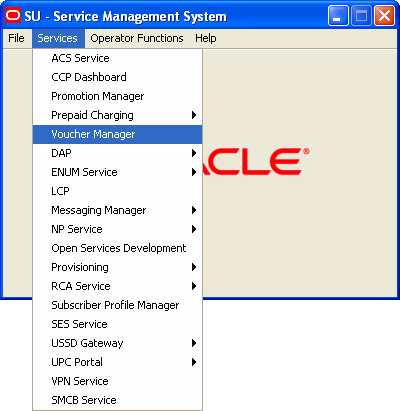
Voucher management services are available through the Voucher Manager item in the Services menu in the SMS GUI. Figure 5-2 shows the Voucher Manager menu item:
Figure 5-2 The Voucher Manager Item on the Services Menu of the SMS GUI
The tabs on the Voucher Manager screen enable you to perform the following tasks:
-
Add, edit, or delete voucher types
The voucher type definition specifies affected product types, expiration dates, restrictions for recharging, affected balance types and tax plans, and so on.
-
Create, edit, search, or delete voucher batches for a specified service provider
When you create a batch of vouchers, you specify an authentication rule and a GPG (GNU Privacy Guard) key, the voucher type and initial state, the start and end voucher numbers, and the name of a remote file where details about the generated vouchers are written.
You can create batches of up to 10,000 vouchers.
-
Change the state of a particular voucher for the specified service provider
-
Test the validity of a particular voucher for the specified service provider
-
Recharge a subscriber's wallet with a specified voucher
The Voucher Recharge tab requires you to specify the service provider, the subscriber's ID, a description, a scenario, and the wallet type (primary or secondary) to be affected.
-
Change the state of a range of vouchers
You must enter a batch number, the new state, and the starting and ending serial numbers to specify the range of vouchers to be changed.
-
Import, verify, or delete public GPG keys
GPG public keys are used for encryption when creating a batch of vouchers.
-
Configure automatic voucher deletion
You can specify the configuration that will be used across all VWS domains for automatic archiving and voucher deletion, which are done at regular intervals by the ccsBeAvd utility.