4 Subscribers
This chapter explains how to create subscribers.
Subscriber Creation
The CCS component of Prepaid Charging provides subscriber account management and tariffing. The VWS provides subscriber account's fund management and implements charging reservations and debiting. The VWS supports these types of subscriber accounts:
- Prepaid
- Postpaid
- Limited Credit
- Prepaid
- Throwaway
A product type is assigned to a subscriber, so this must be first set up before you can create a subscriber. For this example, you will set up a test subscriber account. This will be used to test your product type created in the previous example. You will also use this subscriber for subsequent examples.
Credit Type
A subscriber's credit type is set by its Wallet Limit Type:
- Credit/Postpaid subscriber – Fully postpaid and rechargeable.
- Limited Negative Credit subscriber – Rechargeable subscriber account with a post-paid facility that allows it to go overdrawn to a configurable limit.
- Debit/Prepaid subscriber – Rechargeable prepaid.
- Single User Prepaid Card – Non-rechargeable credit (can be used as a promotional give-away).
Subscribers and MSISDNs
A subscriber account is linked to a specific MSISDN. The MSISDN is identified by one of the following:
- The Calling Line Identifier (CLI), also known as the Calling or Originating Number.
- A prefix dialed by the subscriber before a call.
You can configure a subscriber in the following ways:
- As a subscriber with a single balance.
- As a subscriber with one or more wallets, and multiple balance types.
- As a balance subscriber account used by multiple MSISDNs.
You can link more than one MSISDN to a subscriber.
Subscriber Experience of Making a Call
How a subscriber makes a call depends upon whether the caller is using the subscriber's known phone line (CLI), or making a call from an independent phone.
If using a configured CLI, the subscriber goes off-hook and dials a destination number. The control plan for the product type is triggered based on the CLI.
If the subscriber is making a call from an un-configured CLI, they call the service, (for example, by dialing a dedicated 0800 number) and Oracle Communications Convergent Charging Controller processes the call as follows:
- They are played a beep and must enter their subscriber account ID and PIN.
- If successfully validated, the caller is prompted to enter the intended destination number. The control plan for their product type is triggered on their subscriber account ID.
- The service then checks their balance status and either connects the call as requested, disconnects (in case of no credit), or redirects the call (depending on the control plan).
Subscriber accounts must have product types (which define how the account is charged), and wallets (which hold value). The requests that Prepaid Charging makes on the billing engine contain information about the wallet it is accessing.
Viewing Existing Subscribers
To find all existing subscribers:
-
Select Services, then Prepaid Charging, and then Subscriber Management.
-
Select the Subscriber tab.
-
In the Card Number text field, type % and Search.
Result: The list of subscribers, if any are present, is displayed in the table.
For each you see: wallet reference, card number, and subscriber ID.
Creating a Subscriber Account
To create a new subscriber account:
-
Select Services, then Prepaid Charging, and then Subscriber Management.
-
Select the Subscriber tab.
-
Click New.
Result: The New Subscriber screen is displayed.
-
Enter:
-
Card Number
-
Subscriber ID
-
Language
Click Save.
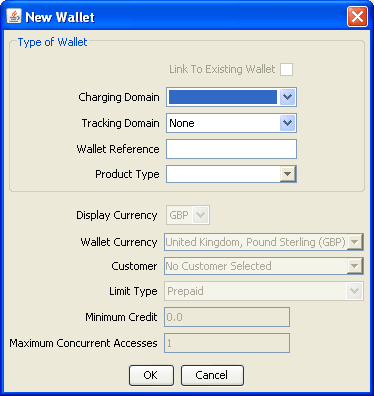
Result: The New Wallet screen is displayed.
-
-
Select the tariff plan created earlier, the billing pair you want it to be on.
This is enough to start doing chargeable calls for this subscriber.
Wallet
A wallet, in concept, is used to hold the balances, for example, for SMS, voice, and general cash. A wallet is allocated to a subscriber to hold their balances. Each subscriber can have a personal and a business wallet (which may be shared). To create or edit wallet data, the SMS must be successfully communicating with the associated VWS. The ccsBeOrb process is used for this communication.
Complete the New Wallet screen. Set up the required data and accept the defaults by clicking OK.
Block a Subscriber
For this task, you will test that a frozen subscriber account cannot make a call.
Change your subscriber’s account to freeze the account:
-
On the Edit Subscriber screen, Subscriber and Wallets option, change the Wallet State to frozen.
-
Apply and Save the changes.
-
Run a Slpit script to emulate the above ‘frozen’ subscriber trying to make a call.