1 System Overview
Overview
Introduction
This chapter provides a high-level overview of the application. It explains the basic functionality of the system and lists the main components.
It is not intended to advise on any specific Oracle Communications Convergent Charging Controller network or service implications of the product.
What is Data Access Pack?
Introduction
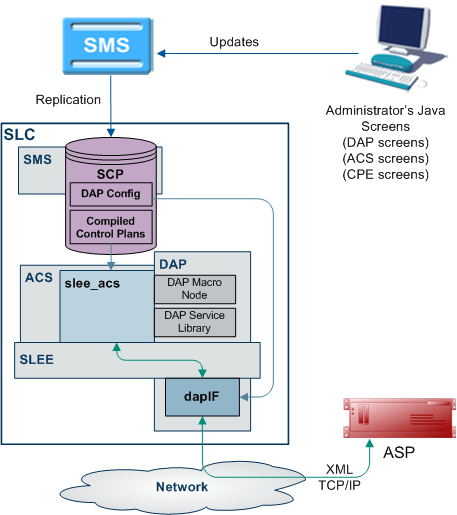
Oracle Communications Convergent Charging Controller Data Access Pack (DAP) provides the capability to send requests to external Application Service Providers (ASP) and optionally receive responses for further processing by the IN platform. The protocol that the system uses is determined by the ACS service library (libacsService).
Synchronous and asynchronous connections
Responses over a connection are expected to be asynchronous if the <!--CORRELATE--> or <!--CORRELATE-ID--> tag is included in the template which specifies the request. In this case, only the ACK is checked in the (initial) synchronous response, and any later responses (using the same <!--CORRELATE--> tag) are not checked. Asynchronous mode is not supported for HTTPS connections. The listening port only supports HTTP connections.
Responses over a connection are expected to be synchronous if the <!--CORRELATE--> tag is not included in the template which specifies the request. In this case, DAP parses the synchronous response for component fields.
"Synchronous" mode for HTTPS is supported. This is done using openssl SSL sockets to encrypt a request/response pair to a remote HTTPS server.
Note: The server does not request any client-side authentication.
For more information about:
- Configuring operations, see Operations .
- The <!--CORRELATE--> tag, see Correlation
Correlation
Correlation is a way to ensure that an asynchronous response is associated with an originating request. Requests that require an asynchronous response are identified by the setting of a correlated flag in the template.
HTTP and HTTPS Connections
DAP supports concurrent connections to multiple ASPs, using either HTTP or HTTPS. More than one of each type of connection can be open at once, including multiple HTTPS connections.
Supported protocols
This table describes the function of each field.
| Protocol | Description |
|---|---|
| SOAP | Over HTTP or HTTPS. For more information about this protocol, see SOAP . |
| XML | Over HTTP or HTTPS. |
| HPSA | HP-SA formatted XML messages over TCP. For more information about HP-SA handling, see HP-SA . |
| PIXML | PI commands using XML. For more information about this protocol, see DAP and the PI. |
| LDAP | Enables DAP to send LDAP requests to the LDAP server and receive response. |
Message flow
This table describes the message flow for a standard DAP message.
| Stage | Description |
|---|---|
| 1 |
When run in a control plan, the DAP Send Request feature node (dapMacroNodes and libdapChassisActions ) sends a request over the SLEE to the interface specified by the InterfaceHandle parameter for the specified protocol (usually dapIF ). The message is populated from the macro node configuration with the:
Note: FAST_KEY parameters are replaced with the actual run-time parameter. For example, the value <aCN> is replaced with the calling number. Other parameters are simply used "as is". |
| 2 |
dapIF receives a DAP request event over the SLEE, and extracts the request template ID. dapIF uses the ID to query its cache or the SLC database for the XML request template details. For each tag name/value pair found in the request, parameter substitution is performed. If dapIF determines a response is required, it searches the script for a correlation parameter. dapIF replaces the correlation tag with a unique ID. The correlation tag is set in the XML template using the XML tag with the string defined by correlationTagName (usually <!--CORRELATION-->). This id will be used to assign the incoming response. For more information about:
|
| 3 |
If a primary TCP/IP connection is already established with the ASP but no ASP interaction is associated with that socket (that is, dapIF is idle), then this connection can be re-used immediately and dapIF sends the message. If no connection is available (and the limit has not yet been reached), dapIF opens a TCP/IP connection to the ASP specified by the host and (optional) port number found in the destination URL. |
| 4 | dapIF wraps the XML in an HTTP header and footer. For more information about how the headers and footers are constructed, see Message Header Construction . |
| 5 |
If the wait flag of the incoming DAP request event was set to false, dapIF immediately sends a DAP response event to slee_acs. The DAP response has Operation Status set to true to indicate success. For HTTP and HTTPS connections, if no response is expected and the request was sent on a secondary connection, it is closed unless there is no primary connection, in which case it becomes the primary connection. For HP-SA connections, the connection is closed. |
| 6 | dapIF starts a timer with the sooner of the value specified in either the template or the socket timeout (connectionTimeout ). |
| 7 |
dapIF checks whether there is any incoming traffic on any of the TCP/IP sockets it has previously opened with ASPs. If a TCP/IP connection is already established with the ASP and there is an ASP interaction currently associated with that socket (that is, we are waiting for a response), then the new request from the ASP is queued. If activity comes from an ASP connection and dapIF is waiting for a response from the ASP, then the incoming TCP/IP traffic is accepted and data is read. The tags are parsed and a DAP response request is constructed. For more information about parsing messages from ASPs, see ASP Message Parsing . For more information about parsing HP-SA messages, see HP-SA response messages . dapIF sends the message back to libdapChassisActions over the SLEE. |
| 8 | When the DAP response event is received by libdapChassisActions, and the node exits based on whether the response was a Success or an Error. |
DAP and the PI
The DAP provides the ability to automatically log in to the PI when using the PIXML protocol. This feature enables PI commands to be triggered from a control plan using the DAP Send Request feature node. The DAP interface will process the PI response before returning it to the DAP Send Request feature node.
For more information on DAP feature nodes, see Feature Nodes Reference Guide.
Introduction to LDAP interface for DAP
Introduction
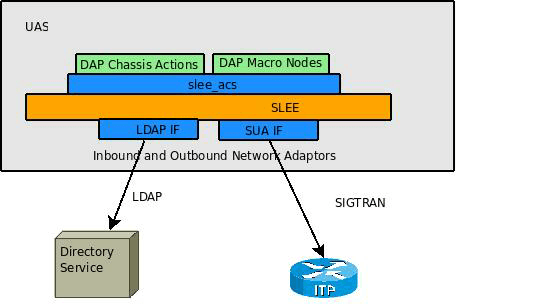
The LDAP interface for DAP (LDAP IF) is an extension to DAP that introduces support for the LDAP protocol. Specifically, it provides the capability to send DAP requests to external ASPs that provide their services using LDAP. This is an enhancement to DAP's existing ability to communicate with ASPs using XML, SOAP, HSPA and PIXML.
LDAP requests are made from within ACS control plans by using the DAP Request macro node located within the Data Access Pack feature node group.
Functionality
The LDAP IF is a protocol translator. The DAP Request node collects the configured request parameters and passes them to the LDAP Interface via the Service Logic Execution Environment (SLEE). The LDAP Interface embeds these per-request parameters into a standard template (stored in XML format). Then the completed template is translated into an ASN.1 format LDAP v2 or v3 request. The request is sent to the LDAP server, and the response is returned to ACS by the same mechanism.
The LDAP Interface then is responsible for:
- Managing LDAP connections (bind/unbind).
- Translating DAP requests into LDAP search requests.
- Relaying valid LDAP search requests to the appropriate LDAP ASP.
- Handling overdue responses.
- Translating LDAP search responses to DAP responses.
- Relaying valid ASP responses to SLEE ACS.
DAP Template Language
Introduction
DAP uses a template language to describe the format of the messages (requests) that are sent to ASPs. This template language controls variable substitution and repetition of subtrees.
Variables
There are two formats that variables can take in the XML document.
- An empty XML element:
<phone_number></phone_number>
This is interpreted as a variable called phone_number
- A specific format of text string:
<<$phone_number>>
This is interpreted as a variable called $phone_number.
In addition to user defined variables, there are several other variables which are substituted automatically by the DAP interface.
| Variable | Description |
|---|---|
| <!--CORRELATE--> | This is substituted with the correlation ID wrapped with an element specified by the correlationTagName configuration value.
|
| <!--CORRELATION_ID--> | This is substituted with the correlation ID. The value of the correlation ID should be treated as an opaque, variable length string. |
| <!--TIMESTAMP--> | This is substituted with the current time, in the format YYYYMMDDHHmmSS, wrapped with an element specified by the timestampTagName .
|
Repetition of subtrees
Using profile fields contained in array profile fields, it is possible to repeat sections of a DAP request template.
This is done through the use of the dap_main_key attribute. When a tree has the dap_main_key specified in the root, the subtree will be duplicated for each instance of the variable in dap_main_key.
For example:
The variable FF_numbers is configured to point to an array of three elements (121, 122, 123), the following template stub:
<number_list><phone_number
dap_main_key="FF_numbers"><<$FF_numbers>></phone_number></number_list>
This will result in the following template being sent to the ASP:
<number_list><phone_number>121</phone_number><phone_number>122</phone_number>
<phone_number>123</phone_number></number_list>
Multiple variables
It is possible to have multiple variables in a repeated subtree. If there are not enough elements to provide each subtree with a different value, the first value in the array will be repeated for the remaining values.
Example:
$FF_number = (121,122,123)
$FF_shortCode = (555,666)
$FF_enabled = "Yes"
<number_details
dap_main_key="FF_number"><phone_number><<$FF_number>></phone_number><short_code><<$FF_shortCode>></short_code><enabled><<$FF_enabled>></enabled></number_details>
Will result in the following:
<number_details><phone_number>121</phone_number><short_code>555</short_code><enabled>Yes</enabled></number_details><number_details><phone_number>122</phone_number><short_code>666</short_code><enabled>Yes</enabled></number_details><number_details><phone_number>123</phone_number><short_code>555</short_code><enabled>Yes</enabled></number_details>
Detailed example
This detailed example shows what is sent to the ASP given the variables and template used.
Variables:
CustomerName "Bill"
$CallTo "5551212"
$CallFrom "5557399"
$FF_list (5550000,5550001,5550002)
Template:
<ProvideDiscount><RequestType>Regular
Call</RequestType><CustomerName></CustomerName><Destination><<$CallTo>></Destination><Source><<$CallFrom>></Source><FriendsAndFamily><PhoneNumber
dap_main_key="$FF_list"><<$FF_list>></PhoneNumber></FriendsAndFamily></ProvideDiscount>
The following will be sent to the ASP:
<ProvideDiscount><RequestType>Regular
Call</RequestType><CustomerName>Bill</CustomerName><Destination>5551212</Destination><Source>5557399</Source><FriendsAndFamily><PhoneNumber>5550000</PhoneNumber><PhoneNumber>5550001</PhoneNumber><PhoneNumber>5550002</PhoneNumber></FriendsAndFamily></ProvideDiscount>
Template contents
This is a list of the various DAP Templates used for real time notifications and their data contents:
Wallet Expiry
- TIMESTAMP
- NOTIFICATION_NAME
- WALLET_NAME
- CLI
- PRODUCT_TYPE
- OLD_STATE
- NEW_STATE
Wallet State Change
- TIMESTAMP
- NOTIFICATION_NAME
- WALLET_NAME
- CLI
- PRODUCT_TYPE
- OLD_STATE
- NEW_STATE
Charging
- TIMESTAMP
- NOTIFICATION_NAME
- WALLET_NAME
- CLI
- PRODUCT_TYPE
- BALANCE_TYPE
- BALANCE_UNIT
- COST
- OLD_BALANCE
- NEW_BALANCE
Recharging
- TIMESTAMP
- NOTIFICATION_NAME
- WALLET_NAME
- CLI
- PRODUCT_TYPE
- BALANCE_TYPE
- BALANCE_UNIT
- AMOUNT
- OLD_BALANCE
- NEW_BALANCE
Balance Expiry
- TIMESTAMP
- NOTIFICATION_NAME
- WALLET_NAME
- CLI
- PRODUCT_TYPE
- BALANCE_TYPE
- BALANCE_UNIT
- EXPIRED_AMOUNT
- OLD_BALANCE
- NEW_BALANCE
Profile Tag Formats
Introduction
The profile block values need to be converted to the receiving application's expected format, so that requests can be transmitted to other systems, and for them to communicate back.
This is impossible without a set of supported types and detailed information about what format the data is sent and received will be in.
Supported tag types
This table describes the formats and meanings of the supported ACS profile tags.
| Format | Description |
|---|---|
| STRING | Any character string. |
| NSTRING | String containing only digits, the letters A-F, and the characters # and *. |
| INTEGER | Signed base 10 integer, range -2147483648 to 2147483647 inclusive. |
| UINTEGER | Unsigned base 10 integer, 0 to 4294967295 inclusive. |
| DATE |
Supported DATE formats include:
|
| BOOLEAN | String containing "1" for true or "0" for false. |
| DISCOUNT | String of the following format: maxCharge,period1Discount,period2Discount |
| VXMLANN |
A plain text string, it is opaque to ACS. ACS expects (but does not enforce) that it is a valid URL that can be used to retrieve a VXML document. For example: http://example.org/ExampleDocument.vxml |
XML and SOAP over HTTP/HTTPS
SOAP
When creating an XML template through the Resources , the XML is parsed at a simple level for syntactical validity against the XML standard. Simple Object Access Protocol (SOAP) messages are formatted XML messages. DAP does not use syntactical parsing to check for properly formatted SOAP messages.
Parameter Substitution
When dapIF is requested to send a message to an ASP, it resolves any variables in the template as follows:
- If the tag name starts with a \ and is then followed by a $, dapIF assumes the $ is part of an existing expression that does not require substitution.
- If the tag name starts with a $, every occurrence of the tag name is replaced by the tag value.
- If the tag name does not start with a $, dapIF looks for XML tags with the given name and sets their value accordingly.
- <date> fields are populated with the date in one of the supported formats listed in the table above.
- If dapIF determines a response is required, it searches the script for a correlation parameter and replaces it with a unique ID. This substitution results in a user-specific version of the template. The correlation tag is set in the XML template using the XML tag defined by correlationTagName (usually <!--CORRELATION-->). This ID is used to assign the incoming response. The ID the CORRELATION takes place on has the form:
<CORRELATION>HHHHHHHHTTTTTTTTSSSSSSSS</CORRELATION>
Where:
- H is the hostID, 8 hex characters in length.
- T is the current time with accuracy of seconds, 8 hex characters in length.
- S is a sequence number from 0 to FFFFFFFF, generated by the macro node each time it is invoked which ensures that the resulting string is unique.
Example: For a correlated message with tag/value pairs of: $1 and 999, and MSISDN and 00441473289900:
<!--CORRELATION--><emergencyNumber>$1</emergencyNumber><msisdn></msisdn>
This results in:
<CORRELATION>abcdef121234561212345678</CORRELATION><emergencyNumber>999</emergencyNumber><msisdn>00441473289900</msisdn>
For more information about overall message handling, see Message flow .
Message Header Construction
When dapIF is constructing a message to send to an ASP it constructs a message from an initial HTTP request line, followed by HTTP headers:
POST path HTTP/1.1Host: host[:port]SOAPAction: urlUser-Agent:
Oracle DAPCache-Control: no-cachePragma: no-cacheContent-Type:
text/html; charset=utf-8Content-Length: lengthclientUrl:
http://<listenHost>:<listenPort>/ACK
Where:
- path has been extracted from the destination URL
- host has been extracted from the destination URL.
- port (if any) has been extracted from the destination URL.
- url is the full destination URL.
- length is the length (in bytes) of the template body
Notes:
- The SOAPAction header line is only sent if the protocol associated with the ASP is set to S (meaning SOAP).
- The clientUrl header is only sent if the listenHost parameter is configured.
- The request line and each of the above HTTP headers is terminated by a CRLF sequence as specified in 5.1 of RFC 2616: Hypertext Transfer Protocol – HTTP/1.1.
The HTTP headers are followed by an empty line, consisting only of the CRLF sequence.
The HTTP body (that is, the request template body), is sent to the ASP.
If the protocol associated with the ASP is set to S (meaning SOAP), the body is surrounded by the following SOAP header:
<?xml version="1.0" encoding="ISO-8859-1" standalone="no"
?><soapenv:Envelope
xmlns:soapenv="http://schemas.xmlsoap.org/soap/envelope/"
xmlns:xsd="http://www.w3.org/2001/XMLSchema"
xmlns:xsi="http://www.w3.org/2001/XMLSchema-instance"><soapenv:Header/><soapenv:Body>
and the following SOAP footer:
</soapenv:Body></soapenv:Envelope>
For more information about overall message handling, see Message flow .
ASP Message Parsing
The first line of the response buffer contains the HTTP response status line (as defined in 6.1 of RFC 2616: Hypertext Transfer Protocol – HTTP/1.1). The HTTP status code is extracted from the HTTP response status line. If it is not 200 (indicating success), an alarm is raised and a DAP response event is returned to libdapChassisActions .
If the original DAP request event contained response tag names, these will have been stored in the ASP queue. dapIF parses the HTTP response body to retrieve the value associated with these tags. The DAP response event will have its Operation Status set to true to indicate success. The DAP response event will be sent on the SLEE dialog which the original DAP request event arrived from.
If there is correlation and the response is the:
- First response, then the socket is still closed but the request is queued using the key of the correlation ID and with a timeout of the timeout value for a response.
- Second response (that is, it contains a correlation ID), then that correlation ID is searched for in the queue. If found, a response is generated using the parameters found in the response XML.
Note: Correlation data is received on a ‘listening’ socket (these are defined by listenPort ).
For more information about overall message handling, see Message flow .
HTTPS Connections
A new SSL connection is made whenever there is a queued request to be sent to the remote HTTPS server (that is, whenever an ASP connection is made on a secure connection). New connections start as HTTP, and are moved to HTTPS if a secure connection is established.
When the connection is opened:
- openssl (if not already initialized):
- Loads our keys
- Seeds the random number generator
- Verifies the location of the certificates directory
- An SSL socket is created
- An SSL handshake is performed
- Server Authentication is optionally performed
Note: An error is reported if a secure connection cannot be made, or server authentication fails. However, dapIF does not terminate on these errors and continues to run for other response/request pairs on other ASPs.
On a database cache reread (if the ASP has been deleted or modified) the secure socket is shut down, and if needed, restarted.
When dapIF exits normally it sends close_notify messages to the server for each open socket.
Certificate Checking
Certificate checking, when performed, is done by checking the hostname from the URL in the ASP against the common name field in the public certificate from the remote server. This check ensures that more than just the names match, by establishing that the server is who it says it is by encrypting something with its private key that matches the locally-held public key in the public certificate. This protects against spoofing-style attacks.
You can configure DAP to verify the full certificate chain. DAP can check ASP certificates against lists of certificates that have been revoked by Certificate Authorities (CAs). These lists are called Certificate Revocation Lists (CRLs). Each CA maintains their own CRL list and publishes it for customers as data files.
When DAP verifies an ASP certificate, it checks whether the certificate appears in any CRL data file. When a match is found, verification fails.
A CA can revoke a certificate for a variety of reasons, such as:
- The CA issued it in error
- The entity it certifies no longer exists
- The certificate is fraudulent
Verifying ASP Certificates
Follow these steps to configure DAP to check ASP certificates against CRLs:
| Step | Action |
|---|---|
| 1 | Set the CARevocationListChecking parameter to true
in the eserv.config file. See
CARevocationListChecking
.
|
| 2 | Establish a process to regularly obtain the CRL data file from each CA. |
| 3 | Load the CRL data files into the same directory as the ASP
certificates. This directory is specified in the
certificatePath parameter. See
certificatePath .
|
| 4 |
Run the dapReadyCertificates.sh utility. See dapReadyCertificates.sh . Result: The utility processes the standard certificates and ASP certificates in the directory. |
Server Authentication
Server authentication against a public certificate provided by the remote HTTPS server is available on a per-ASP basis. If not configured, the SSL connection will only have handshaking performed which ensures a minimum of session keys are used for encrypting the traffic to the HTTPS server. This protects against snoop-style attacks.
Response Validation
Checking of the response from the HTTPS server is limited to checking whether the ACK is returned as HTTP 200. Any further lines of the response are read, but are not parsed.
HP-SA
Introduction
HP-SA messages are generally handled the same way as XML and SOAP messages, though the contents of the messages are different, and HP-SA is not supported over HTTPS.
For more information about overall message handling, see Message flow .
Parameter substitution
When dapIF is requested to send a message to an ASP, it resolves any variables in the template as follows:
- The message_id field (in the header of each request) will be generated as a number in the range 0 to MAXINT. The message_id field will be incremented for each successive request.
- The system time is used at the time of request construction to populate the date_time field.
- All other fields are either hard-coded in the message template, or populated using the profile field values provided as DAP parameters. For more information about how these parameters are populated, see Parameter Substitution .
HP-SA response messages
Response messages will be received on a new connection to the port defined by listenPort . Once received, the connection will be closed. Two responses will be received in the following order for each request:
- Command Received Acknowledgment
- Command Processed Acknowledgment
Both have the same form (activation response).
Each response has a response ID that correlates with the request's message ID.
Response status/details command received
The following response status/details are possible for the command received acknowledgment:
OK/<no details>NOK/Invalid XML
Response status/details command processed
The following response status/details are possible for the command processed acknowledgment:
OK/<no details>NOK/Workload FailureNOK/<platform
name>:Network ProblemRB_OK/<platform name1>:OK | <error
code>; …;<platform nameN>:OK | <error
code>RB_NOK/<platform name1>:OK | <error code>;
…;<platform nameN>:OK | <error code>
XML Interface
Description
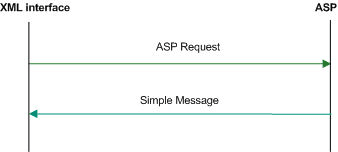
The XML interface is a dedicated DAP interface that allows an XML script to be sent to an ASP as a request and receive another XML script as a response in order to be parsed.
Synchronous message flow
The following table describes the message flow between the XML Interface and ASP.
| Step | Action |
|---|---|
| 1 | The XML interface sends a request to the ASP. |
| 2 | ASP returns an ACK and response on the same socket. |
Note: In this example transaction, a response value is required, however a callback is not needed.
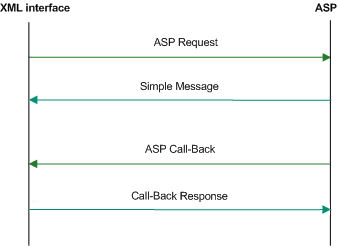
Asynchronous message flow
The following table describes the message flow between the XML Interface and ASP.
| Step | Action |
|---|---|
| 1 |
The XML Interface sends the request to the ASP. The request contains the |
| 2 | The ASP returns an ACK on the same socket. |
| 3 | The ASP initiates a new request back to the XML Interface using
the initial clientUrl information, on a new
socket.
|
| 4 | The XML Interface returns an ACK on the same socket. |
Message contents
The XML interface is responsible for issuing a TCP/IP based message to an ASP when it receives an XML request message from a client. The message contains the specified XML string and any substituted parameters.
The response from the ASP is parsed to retrieve any requested parameter strings and these are sent back to the client in the form of an XML response.
WSDL
SOAP bindings
DAP supports WSDL 1.1 and Simple Object Access Protocol (SOAP) bindings. Since WSDL is a complex specification, some parts of the specification do not match with the capabilities of the DAP SOAP implementation.
The current SOAP implementation only allows templates to be
created that make use of the soap:body and the
soap:fault element. Therefore, the
soap:header and soap:headerfault elements
in the WSDL SOAP bindings are not supported. For more information
on DAP support for SOAP bindings, see Data Access Pack Protocol
Implementation Conformance Statement.
Note: OSD will report an error when soap:header or soap:headerfault is encountered in the WSDL file.
XSD support
XSD is supported by DAP as a type definition language.
WSDL provides an extension format allowing several different type languages to be used to describe the format of the messages used by the services, however it recommends the use of XSD. Since the XSD standard is 300 pages long, DAP only supports the use of XSD as the type definition language.
Note: DAP will report an error if a type definition language other than XSD is encountered in the WSDL file.
WSDL styles
Web Services Description Language <WSDL) allows several different encodings to be specified, each resulting in the message being presented with a different style.
DAP attempts to be as permissive as possible with the style and use declarations in accordance with the WSDL document.
DAP supports the following styles:
- style=rpc
- style=document
DAP supports the following use declarations:
- use=literal
- use=encoded
Other encodings
Since the SOAP specification allows different encodings other than XML to be used to transfer the information, it is necessary to specify which encodings DAP will support. DAP only supports the soap-encoding.
However, even in soap-encoding, there are issues with the protocol. The portions of the standard that define how low-level types are encoded are supported but encoding data as references is not supported.
Note: DAP will report an error if an encodingStyle other than soap-encoding is encountered in the WSDL file.
Transmission services
DAP supports the One-way transmission primitive as well as the Request-response transmission primitive.
WSDL supports the definition of services where the view of the service is from the client. However, SOAP does not typically support these definitions. To determine which side of the protocol is being defined, DAP only supports WSDL files generated for a server in the following cases where the server receives a request:
- With no response
- And provides a response
Statistics
Introduction
The DAP macro-node (dapMacroNodes (on page 2)) collects statistics using the standard Service Management System statistic mechanism and stores them to the SMF database. Refer to SMS Technical Guide for details on how the statistics are collected.
Statistics collected
This table describes the statistics that are collected.
| Statistic | Description |
|---|---|
| OP-SENT | Count of the number of new requests sent to an ASP. This statistic is incremented each time a new request is sent to an ASP. The name of the template used is put in the statistics “details” field. |
| OP-SUCCESS | This statistic is incremented each time an ASP returns a successful response. The name of the template used is put in the statistics “details” field. |
| OP-FAIL | This statistic is incremented each time an ASP returns a failure response. The name of the template used is put in the statistics “details” field. |
Note: These statistics have a period of 300 seconds.
ASP based statistics
ASP is recorded in the detail field for ASP based statistics.
The table describes the ASP statistic generated for each
statistic, if the ASP column indicates "Y". The error
values shown here returned by the XML interface to the node.
| ASP | Statistic | Error |
|---|---|---|
| Y | Success | - |
| Y | Unable to connect to ASP | connectconnect |
| Y | Unable to send request to ASP | cannotwrite |
| Y | ASP Protocol Failure (HTTP Error or ASP closed the connection prior to initial HTTP/ response) | asperror |
| Y | ASP closed the connection while the response is being read | noresponse |
| Y | An operation has timed out waiting for a response | responsetimeout |
| Y | An expected parameter is missing from the response | missingparam |
| Y | A valid correlation ID is missing from the response | malformeddata |
| Y | A reply to the request has been received after the call back is received | sequenceerror |
| Y | A request has been resent | retryattempt |
| Y | Too many requests are waiting for callbacks from an ASP | maxqueuesizereached |
Notes:
- Only external errors will be reported as statistics.
- The total number of requests generated by the system are recorded as a statistic.
- The total number of requests for each ASP are recorded as a statistic.
LDAP IF Statistics
The following table lists and describes the statistics generated by the LDAP IF.
Note:
- These statistics are recorded under the “DAP” application.
- The LDAP IF generates only these LDAP-specific statistics. It does not generate any of the other LDAP statistics.
- These statistics are included in the SMF_STDEF_DAP replication group. If DAP is installed and configured for a SLC node, then these LDAP statistic definitions will automatically also be available on that SLC node with no operation action required.
| Statistic | Description |
| MAX_LDAP_LATENCY | Maximum latency of LDAP responses in milliseconds during the period. |
| MEAN_LDAP_LATENCY | Average latency of LDAP responses in milliseconds during the period. |
| MIN_LDAP_LATENCY | Minimum latency of LDAP responses in milliseconds during the period. |
| NUM_LDAP_DAP_SEARCH_REQUESTS | Total number of DAP search requests received from ACS during the period. |
| NUM_LDAP_MISMATCHED_RESPONSES | Number of unmatched LDAP responses received. These are responses for which we have no matching request recorded. This will typically indicate a late response, where we have timed-out, returned failure to ACS, and discarded the original request. |
| NUM_LDAP_NEGATIVE_RESPONSES | Number of unsuccessful LDAP responses, where the server has not returned subscriber data. This may be due to a malformed request, or to a valid request referencing a subscriber unknown to the ASP. |
| NUM_LDAP_SUCCESS_REQUESTS | Number of requests where processing was successful. |
| NUM_LDAP_TIMED_OUT_RECEIVE | Total time-outs waiting for message reply from the ASP. |
| NUM_LDAP_TIMED_OUT_SEND | Total time-outs received while sending messages. This occurs when the connection set-up process takes so long that the request has timed-out before it is sent. |
LDAP IF Reports
A single SMF report is installed for the LDAP IF. This is a text format report which counts the average LDAP request rate grouped by hour.
Report Name: “DAP LDAP Requests per Second”
Parameter #1: Start Date (YYYYMMDD)
Parameter #2: End Date (YYYYMMDD)
Example Output:
AVERAGE NUMBER OF LDAP REQUESTS PER
SECOND==========================================20 August 2016,
21:16:00Period: 01 January 2016 to 01 January 2017Date/Time
Requests/s---------------- ----------...19/08/2016 05:00
019/08/2016 06:00 019/08/2016 07:00 019/08/2016 08:00 019/08/2016
09:00 < .0119/08/2016 10:00 .0119/08/2016 11:00 <
.0120/08/2016 12:00 < .0120/08/2016 01:00 < .0120/08/2016
02:00 < .0120/08/2016 03:00 < .0120/08/2016 04:00 020/08/2016
05:00 .8720/08/2016 06:00 .3320/08/2016 07:00 020/08/2016 08:00
020/08/2016 09:00 020/08/2016 10:00 0...
Notes:
- For the period, the end date is up to midnight at the start of the day, so, for example, asking for '2016-08-28' to '2016-08-28' will give you data for the whole day.
- The Requests/s number is the average requests per second for the hour up to the given hour, for example 6:00, is for the hour between 5:00 and 6:00.
- The average is calculated by dividing the total for the hour by 3600. 0.01 means about 36 requests were sent in that hour. < 0.01 means less than that number were sent (but more than 0 requests).
Accessing the DAP application
Introduction
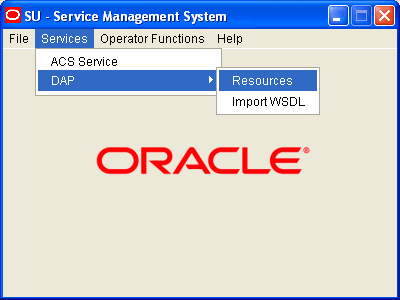
You access the Data Access Pack (DAP) application screens from the Service Management System (SMS) UI.
To begin configuring the DAP application, the SMS screens must first be configured and running. For more information about how to set up the SMS screens, see Service Management System User's Guide.