2 Billing Engine and SMS EDR Definitions
Overview
Introduction
This chapter explains the final format of all existing types of Event Data Records (EDRs) created by the billing engine and the SMS.
EDRs are generated for billing operations that occur as part of a voice call, SMS management interaction or voucher redemption. A number of processes may produce EDRs, and EDRs may be produced on either the billing engine or the SMP.
EDR records are enriched on the SMS by ccsCDRLoader and various plug-in processes.
The ccsCDRLoader has two responsibilities:
- It populates the ccs_be_cdr table of the SMF database on the SMS with formatted EDR records.
- It moves the inputted EDR files into an output EDR file directory structure.
The plug-in processes may add additional fields to EDR records and may also update various tables on the SMF database. A detailed description of all the plug-in processes is beyond the scope of this document.
CCS EDR Files
EDR file names
EDR file names have the following format:
name_of_process-BEID-PIDSecondsSinceEpoch-uSeconds
where:
- name_of_process is the name of the process that generated the EDR. One of the following:
- bewriter - if the EDR was generated on the billing engine
- ccsCDRFileGenerator - if the EDR was generated on the SMS
- BEID is the ID of the billing engine that generated the EDR. This will be '0' if the EDR was generated on the SMS.
- PID is the ID of the process that generated the EDR
- SecondsSinceEpoch indicates the time and date
- uSeconds is microseconds
Example:
beWriter-21-18730-1091693014-151357
EDR lines
Each EDR file consists of a series of single line, newline terminated (Unix style newline - '\n') EDR records.
EDR formats
Each EDR record consists of pipe-separated fields as follows:
field1|field2|field3|…|fieldN
Each EDR field consists of tag-value pairs using a tag=value format. In the case where there are many values to list, the values will be comma separated. An example of this format follows:
tag1=value1|tag2=value2|tag3=value3a,value3b|…|tagN=valueN
Example:
BILLING_ENGINE_ID=21|SCP_ID=366273322|SEQUENCE_NUMBER=487291|CDR_TYPE=1|RECORD_DATE=20040803142342|ACCT_ID=83|ACCT_REF_ID=83|CLI=441234|ACS_CUST_ID=1|BALANCE_TYPES=1|BALANCES=1000|COSTS=1|ACCOUNT_TYPE=1|CASCADE_ID=1|RATES=50,25|LENGTHS=120.00,0.00|DISCOUNTS=0,0|MAX_CHARGE=1|DURATION=60|TN=E441234|TCS=20040803141934|TCE=20040803142034|CS=S|DISCOUNT_TYPE=S*W*R|WALLET_TYPE=1
EDR record content
Each CCS caused EDR record consists of two parts: the "header" tags that exists for all CCS EDR types and additional information that will be different depending on the EDR type. The sequence of all fields in the header and the additional information is not guaranteed.
Non-CCS caused EDR records may have "header" tags, but only as defined in the relevant producing application chapters.
Field formats
Each field in an EDR is in a particular format, summarized in this table.
| Format | Description |
|---|---|
| Boolean |
Value of "TRUE" or "FALSE"
Example:
|
| Date |
A time to the nearest second, in format YYYYMMDDHHmmSS where:
Example: A call answered on 16th May 2004 1
minute and 14 seconds after midnight
|
| Integer |
A decimal number. Will never exceed a 32 bit number (11 digits), but is often shorter. Leading zeros will not normally be present.
Example:
In the case where there are multiple values to list, the values will be comma separated.
Example:
|
| String |
String of characters. Can be any length. Should not contain the characters = or |. May include spaces. When the parameter is a string, the string consists of all the characters after the = sign up to the | separator between this parameter and the next.
Example:
|
| Float | Float is an integer with digits after a decimal point. |
| List | List is a comma separated list of string values. |
Notes:
- Tags may not necessarily be in a fixed order, as the order of processing may vary from one transaction sequence to another.
- Some fields will not be present if the transaction sequence does not reach the state that produces them.
CCS EDR Types
Introduction
The current CCS EDR types created on the Voucher and Wallet Server or the SMS are listed in this topic.
List of EDR types
Each CCS EDR type is summarized in this table.
| Type | EDR No. | Description |
|---|---|---|
| REGULAR_ CALL | 1 |
|
| OPERATOR_ UPDATE | 2 |
|
| EXPIRATION | 3 |
|
| RECHARGE | 4 |
|
| EVENT | 5 |
|
| Voice Calls | 6 |
|
| Control Plan Service Invoke | 7 | |
| FREEFORM_ RECHARGE | 8 |
|
| CREDITCARD_ RECHARGE | 9 |
|
| VOUCHER_ FREEFORM | 10 |
|
| ROAMING | 11 |
This EDR type will only be present if the EDR filter is installed to convert the EDR type from type 1.
|
| SHORT_ MESSAGE Named Event | 12 |
|
| SHORT_ MESSAGE Tariffed | 13 |
|
| PREPAID_ DATA | 14 |
|
| VOUCHER_ REDEEM | 15 |
|
| REWARDS | 16 |
|
| OSA Reservation Amount | 21 |
|
| OSA Direct Amount | 23 |
|
| OSA Reservation Seconds | 24 |
|
| OSA Reservation Named Events | 25 |
|
| OSA Direct Seconds | 26 |
|
| OSA Direct Named Events | 27 |
|
| Friends Number Change | 28 |
|
| Disable Incoming Calls when Roaming | 29 |
|
| Call Barring | 30 |
|
| PRODUCT_ TYPE_SWAP | 31 |
|
| PRODUCT_ TYPE_SWAP_BILLED | 32 |
|
| BAD_PIN | 33 |
|
| Standard voucher type recharge | 47 |
|
| Periodic charge | 49 | Successful or failed recharge and/or charge from a periodic charge. |
| Periodic charge state change | 52 | Successful or failed periodic charge state change. |
| Wallet Migration | 54 | |
| Wallet Life Cycle | 55 | Wallet life cycle plan updates. |
| Voucher Activity | 56 |
Note: These EDR types were accurate when the document was written, but additional types may have been created since publication.
EDR Definition
Introduction
Each EDR record contains common header fields and extra information fields that are service specific.
EDR header fields
Each EDR record contains a set of common header fields. Header fields contain generic information that should be available for every call. The standard header fields are listed here:
- ACCT_ID (changed wallet ID)
- ACCT_REF_ID (changed account ID)
- BILLING_ENGINE_ID (BE where account resides)
- CDR_TYPE (reason for record generation)
- RECORD_DATE (date edr created)
- SCP_ID (where call originated)
- SEQUENCE_NUMBER (call identifier)
Notes
- The sequence of all fields is not guaranteed.
- If the EDR was generated as a result of a change to the account using the SMS UI then the:
- SCP_ID will be zero.
- SEQUENCE_NUMBER will be zero.
- EDR records associated with each wallet expiry contain the MSISDN and product types of all affected subscribers.
Example: A user may have both a mobile and a data card - each with its own SIM. The mobile and data cards are each represented as subscriber records but they share a single wallet.
If the:
- MSISDN of the mobile card is 01234 and that of the data card is 01235
- Product type of the mobile card is 1 (Prepaid Voice) and the product type of the data card is 2 (Prepaid Data).
then the expiry EDR would contain the following fields:
MSISDN=01234,01235
ACCOUNT_TYPE=1,2
EDR extra information fields
The extra information field varies for each type of EDR record and contains additional information specific to the EDR type.
The extra information fields are detailed in the following chapters, based on the type of service provided where for each service the extra information fields are summarized in a table.
EDR Examples
Most of the EDR definitions have one or more examples of what a raw EDR record looks like.
Due to the ever changing use of EDR contents, these examples will usually pertain to the most current version of the software that produces them.
That means tag content examples will not necessarily be correct of previous versions of software.
EDRs
Introduction
This section explains how EDRs are used in CCS. For more information, see CCS Technical Guide.
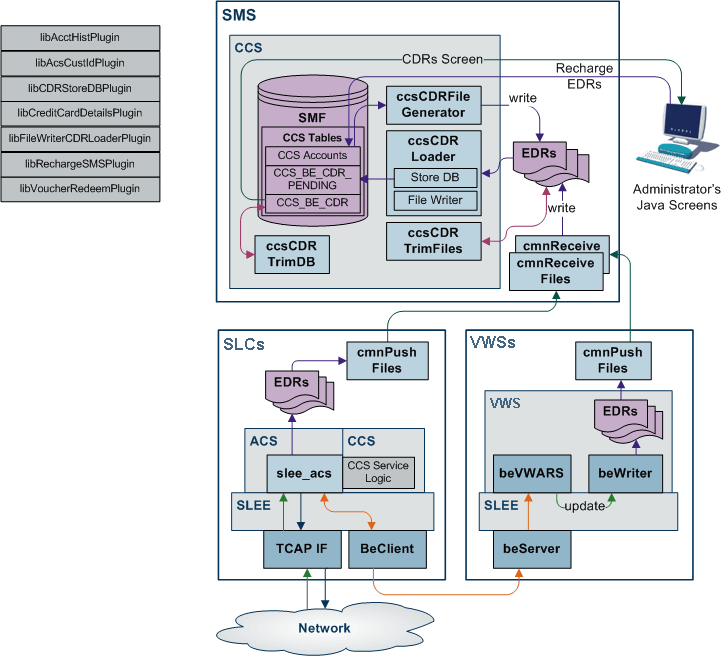
Dataflow
This table shows the process by which EDRs are written and collected to the SMF database.
| Stage | Description |
|---|---|
| 1 | The SLC is the originator of all events that cause Voucher and Wallet Servers to perform tasks during call processing, as the SLC controls how the service responds to network events. The SLC signals events to the VWS Voucher and Wallet Server using the CCS Billing Engine Protocol. The service sends messages to the Voucher and Wallet Servers through the ccsBeClient interface. |
| 2 | EDRs are written out to disk as ASCII files on the VWS. |
| 3 | The files are transfered to the SMS. |
| 4 | The files are indexed and made available to the Java User Screens and external EDR post-processing tools. |
| 5 | CCS screens created EDRs are written by the ccsCDRGenerator process to the same directory the VWS flat files are transfered into. The ccsCDRLoader then loads both the same way. |
Stage 2
On the VWS in /IN/service_packages/eserv.config the following configuration item tells the beWriter which directory to write the finished flat file of EDRs:
BE.beWriter.beCdrOutDirectory = "/IN/service_packages/E2BE/logs/CDR"
Stage 3
On the VWS in /IN/service_packages/eserv.config the following configuration item tells the cmnPushFiles process which directory to upload flat file EDRs from to the SMP:
BE.cmnPushFiles.CDR
# local BE directory for flat file CDRs
"-d", "/IN/service_packages/E2BE/logs/CDR"
# upload files to this directory on the SMP
"-r", "/IN/service_packages/CCS/logs/CDR-in"
# Send files to this SMP hostname
"-h", "ccssmp"
The local directory defined with the -d switch must
match the path defined in the
BE.beWriter.beCdrOutDirectory configuration
parameter.
Stage 4
On the SMS in /IN/service_packages/eserv.config the following configuration item tells the ccsCDRLoader process where to get the uploaded flat file EDRs for processing:
CCS.ccsCDRLoader.inDir = "/IN/service_packages/CCS/logs/CDR-in"
Note: The inDir configuration
parameter must be the same path as the -r switch
defined by the BE.cmnPushFiles.CDR section on the
VWS.
The following configuration item is where the ccsCDRLoader will place the original flat file EDRs once all the plug-ins have been run:
CCS.ccsCDRLoader.outDir = "/IN/service_packages/CCS/logs/CDR-store"
The following configuration section on the SMS tells the ccsCDRLoader which plug-ins to run over every record in the flat file EDRs:
CCS.ccsCDRLoader.pluginLibs = ["libCDRStoreDBPlugin.so", "libFileWriterCDRLoaderPlugin.so"]
The EDR Store DB plug-in loads the EDR record from the input flat file into the CCS_BE_CDR table. The data for each record may have been modified by other plug-ins, so is usually last in the list. If database loading of EDRs is not required, then this plug-in should not be configured to achieve the required behavior.
Other plug-ins may be available, for example, to place modified EDRs into a separate flat file than the original ones or to update the account history.
Stage 5
The ccsCDRFileGenerator process writes SMS produced EDRs to a directory for the ccsCDRLoader process to read. The following parameter value in eserv.config should be a different directory to any the ccsCDRLoader uses, as it stores the partially written files until the finished file will be written:
CCS.ccsCDRFileGenerator.TempOutputDirectory = "/IN/service_packages/CCS/logs/CDR-tmp"
The following parameter should always be set to the same value
of the CCS.ccsCDRLoader.inDir parameter and is where
the ccsCDRFileGenerator writes the finished flat file EDRs for SMS
activity:
CCS.ccsCDRFileGenerator.OutputDirectory = "/IN/service_packages/CCS/logs/CDR-in"
The ccsCDRLoader then reads flat file EDRs produced by the VWS and SMS without knowing where they have come from.
Process descriptions
This table describes the processes involved in EDR creation, transfer and processing in CCS.
| Process | Role | Further information |
|---|---|---|
| beWriter | beWriter writes EDRs on the VWS based on VWS Account, Wallet and Balance transactions. | VWS Technical Guide |
| cmnPushFiles | cmnPushFiles reads EDRs on the VWS and sends them to a configured directory on the SMS. Once the files have been sent, the read files on the VWS are archived by cmnPushFiles. | cmnPushFiles |
| cmnReceiveFiles | cmnReceiveFiles accepts EDRs sent from cmnPushFiles and writes them to the directory on the SMS specified by cmnReceiveFiles. | SMS Technical Guide |
| ccsCDRLoader | ccsCDRLoader scans the input directory written to by cmnReceiveFiles and loads any EDRs into the CCS_BE_CDRS table in the SMF database. | ccsCDRLoader |
| ccsCDRFileGenerator | ccsCDRFileGenerator creates EDRs recording relevant actions taken in the CCS Java Administration screens. Relevant actions include changes to the balances or wallets. | ccsCDRFileGenerator |
| ccsCDRTrimDB | ccsCDRTrimDB periodically scans the CCS_BE_CDR table in the SMF and removes records past a specified age. | ccsCDRTrimDB |
| ccsCDRTrimFiles | ccsCDRTrimFiles periodically scans the EDR archive directory on the SMS and removes files over a specified age. | ccsCDRTrimFiles |
| CCS GUI |
The CCS GUI enables:
|
CCS User's Guide |
EDR triggers
The following messages, among others, cause the beWriter to write EDRs:
- Call End Notification
- Wallet Recharge Request
- Named Event
CCS-VWS Protocol overview
The new CCS-VWS protocol is built upon an extensible self-describing message format called Escher. The new protocol is easily extensible, versioned, and allows additions without breaking backward compatibility. The CCS-VWS protocol definition is defined for internal use only.
Controlling the flow of EDRs
There are configuration items in eserv.config that link where files are read and written to that allow the flow to happen. The out directory of an earlier stage must match the in directory path for the system to function. The defaults at install time are set to work without further modification.
Checking the values in eserv.config
The current value of a configuration item in eserv.config can be checked by using the Configuration Read tool. To use this tool use the following command:
/IN/service_packages/SMS/bin/cmnConfigRead
config_item
Example:
/IN/service_packages/SMS/bin/cmnConfigRead
BE.beWriter.beCdrOutDirectory
gives: /IN/service_packages/E2BE/logs/CDR