1 Feature Nodes and Feature Sets
Overview
Introduction
This chapter describes how customers use feature sets in the Oracle Communications Convergent Charging Controller ACS Control Plan Editor and explains how to use profile blocks and buffers in control plans.
Control plans define where to route calls, based on factors such as the type of service, geographic location, time of day, and so on. For more information about control plans, see CPE User's Guide.
About Feature Sets
About Customer Feature Sets
A feature set is a configurable list of feature nodes. Customers are allocated one or more feature sets by the ACS system administrator and the feature nodes from those feature sets can be used in any control plan that the customer creates. The feature node sets for a customer define which feature nodes will be available in the feature palette in the Control Plan Editor window.
For information on configuring feature sets, see ACS User's Guide.
About the Feature Palette
The feature nodes that are available from the feature palette are organized into feature groups. A feature group is a group of feature nodes that are related to a common function.
The way in which you display a feature group in the feature palette depends on the feature palette style:
- The floating panel style displays feature group names in a list, and the feature nodes within a selected group in a floating panel. This is the default. The floating panel style enables you to quickly locate a feature node in the palette by using the Search Palette feature to filter the available feature nodes.
- The static panel style displays an expandable list of feature node groups from which you select individual feature nodes. The Search Palette feature is not available.
You can configure the Control Plan Editor to use the static
panel style by setting the jnlp.acs.paletteStyle Java
application property in the acsGui.bat/acsGui.sh
and smsGui.bat/smsGui.sh configuration files. For
more information, see ACS Technical Guide.
Profile Blocks and Fields
What is a profile block
A profile block is a piece of binary data that is usually stored in the database in a "long raw" column type. For example, the profile block containing data relevant to an ACS customer is held in the PROFILE field of the ACS_CUSTOMER table.
Profile blocks store data used during session processing.
Profile block definition
Profile blocks and the mapping of profile tags to profile blocks are defined in SMS > Services > ACS Service > Configuration > Profile Tag Details and Profile Tag Mapping tabs. For more information see the discussion on profile tag configuration in ACS User's Guide.
Primary tags
Profile blocks contain a series of different pieces of data called primary tags. Each tag is indexed by a hex tag. Some feature nodes enable you to specify which tag to use. For example, the Profile Branch feature node enables you to compare the value of a specific primary tag with a specified value, and branch on the result.
Profiles are generally maintained by editing the relevant screens in the UI for the application. They can also store data from the session, or be updated by a feature node, such as the Store Profile feature node.
Profile selection through tag#
Various feature nodes use profile blocks as part of their configuration. A profile block and tag can be selected either from the drop down lists of available profile blocks and tags, or in some cases by entering a tag value.
Enter tag value
Where allowed, perform one of the following actions:
- For the profile selection field set, the Data Type drop down list has a Fixed Value option, selection of which replaces the location and field drop down list with the fixed value box for the value to be typed into.
- For previous versions of the profile selection field sets, press Backspace to empty the Location drop down list, and replace the location and field drop down list with the Fixed Value box for the value to be typed into.
Profile block availability
The service loader you are using determines the profile blocks that are available to the control plan. All service loaders include the global profile.
The service loader also specifies the uses of Application Specific profiles 1-8.
| Block Name | Description |
|---|---|
| Application Specific 1 | Subscriber account (CCS_ACCT_REFERENCE). |
| Application Specific 2 | Product type |
| Application Specific 3 | Control plan |
| Application Specific 5 | CCS global configuration |
| Application Specific 6 |
Temporary storage containing:
|
| Application Specific 7 | Temporary storage |
| Application Specific 8 | Temporary storage |
| Customer | Service provider |
Those specified as temporary storage are never written back to the database and are cleared at the end of the session. They can be used for such things as moving data from one application to another within the control plan (for example between a USSD feature node and a DAP feature node).
Whether the CCS profile blocks are updateable or read-only is
specified in the eserv.config configuration file.
If you wish to make a profile updateable back to the database, you
must set the appropriate enableProfile parameter to
true before using any feature nodes that can write
back to a profile. For more information, see CCS Technical
Guide.
Standard profile block list
Here are the profile blocks available with a new installation of ACS.
| Name | Description |
|---|---|
| Any Valid Profile | Allows you to search for relevant tags in all profiles that have been loaded. |
|
App Specific Profile 1 App Specific Profile 2 App Specific Profile 3 App Specific Profile 4 App Specific Profile 5 App Specific Profile 6 App Specific Profile 7 App Specific Profile 8 |
Contains information specific to an application, for example, Messaging Manager. |
| CLI Subscriber Profile |
Contains most of the information you can specify in the CLI tab of the ACS Numbers screen, for example:
Note: Only relevant to the 0800 service. |
| Control Plan Profile | This profile contains current switch node exits only. |
| Customer Profile |
Contains customer information, for example:
|
| Global Profile |
Contains global information, for example:
|
| Incoming Session Data |
Data which comes in over the network, including the list of buffers as described in ACS Buffers . Examples include:
|
| Outgoing Session Data | Data which goes out over the network, including the list of buffers as described in ACS Buffers . |
| Service Number Profile |
Contains most of the information you can specify in the Service Number tab of the ACS Numbers screen, for example:
Note: Only relevant to the 0800 service. |
| Temporary Storage |
Stores the data in memory and does not write it to the database. It exists for the duration of the control plan processing only. |
| VPN Network Profile |
Contains most of the information you can specify in the VPN edit network, for example:
Note: Only relevant if you have the VPN service installed. |
| VPN Station Profile |
Contains most of the information you can specify in the VPN edit station, for example:
Note: Only relevant if you have the VPN service installed. |
CCS Profile Block list
When you install CCS, the application specific profiles (1-8) are updated to show CCS-specific names instead of the ACS defaults, as described in the following table:
| Name | App block | Description |
|---|---|---|
| Account Reference Profile | 1 | Details of a subscriber's account. |
| Product Type Profile | 2 | Details of a product type. |
| Control Plan Profile | 3 | Data associated with a specific control plan. |
| CCS Global Profile | 5 | Data available across the system. |
|
CCS Temporary Profile CCS Temporary Profile CCS Temporary Profile |
6 7 8 |
Temporary storage areas. Not written back to database. |
Note: The CCS temporary profiles are available to provide compatibility with control plans created with earlier versions of ACS. Where possible, use the ACS Temporary Storage profile instead.
Sub-tags
It is possible to store a sub-profile block within a main profile block. For example, the speed dial block contains the list of speed dial numbers:
Tag      Desc                                            Len  HexData...
---------------------------------------------------------------------------
0x000009 Outgoing BA List Type                              1    01
 1
...

0x00001a Speed Dial Block                                   48
SubTags (2):
0x000001 10   01 30 34 39 33 39 33 34 30 34
0x000002 5    02 31 32 33 34
So, the speed dial block is a profile block containing:
- sub-tag 1, the off-net number 049393404
- sub-tag 2, the on-net number 1234
There is a sub-tag variable associated with the call which can be set using the Collect Digits To Sub-tag node and is used to indicate which tag in such a sub-profile block is to be accessed. This variable can be used in the following nodes:
- Copy
- Number Lookup and Translation
- Set Pending TN from Profile
Array tags
Array tags are primary tags that have an array of records, each of which contains a number of sub-tags.
Array tag example
For example, sending short messages to several numbers through a single primary tag can be configured (in ACS > Configuration > Profile Tag Details tab) as follows:

Primary Tag Name = Short Message To Send
Profile Tag Type = Array
Profile Tag location = 2000
Record Sub tag name = Number To Send To
Profile Tag Type = Numeric String
Profile Tag location = 2001
Parent Profile tag = 2000
Record Sub tag name = Message To Send
Profile Tag Type = String
Profile Tag location = 2002
Parent tag = 2000
So, in this example, there might be five records under tag 2000, each of which is a short message to send and the number to send to.
Domains
Introduction
While ACS profiles are usually stored in the local database, it is possible to use third-party stored data in control plans. For example, if a third-party billing engine stores subscriber data which is needed in a control plan, the profile feature nodes can use the domain of the subscriber to direct profile interactions to the third-party billing engine.
Service domains
Part of the call context for ACS control plans includes service domains. While ACS does not populate, configure or use service domains itself, it provides call context slots for service domains which can be populated and used by plug-in services (for example, CCS).
The feature nodes in the plug-in service macro node library will use the service domains to select the correct destination billing engines.
ACS Buffers
What is an ACS buffer?
An ACS buffer is one of a number of ACS session data variables, most of which contain digits. A session data variable is a piece of data associated with a particular session, for example; a redirecting party ID. Session data variables are created at any point during session processing. Some variables are set at the beginning of the session from the values in the InitialDP. For more information about which variables are populated by which parts of the InitialDP, see ACS Technical Guide.
During session processing, session data variables can be used or updated by feature nodes. Feature nodes that use session data variables usually display the available session data in the lists on the feature node's configuration window.
Session data variables are retained only for the duration of the session processing. After a session is processed, ACS deletes any session data variables it may have defined. To store a session data variable permanently, you must write it to a profile field.
Nodes using buffers
You can access the list of buffers in a feature node containing the combination of profile Data Type, Location and Field lists. For example, you can use the Number Matching feature node to match a number in an incoming session data profile field:
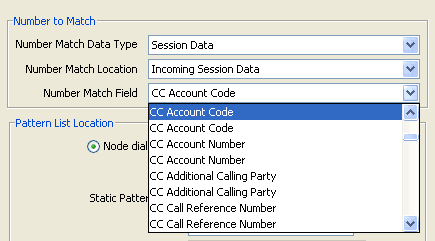
Buffer list
The table describes the buffers that are automatically created when you install ACS, and describes how they are populated. For more information about the available buffers, see the discussion on profile tag configuration in Advanced Control Services User's Guide.
| Name | Description | ||||||||||||||||||||||||||||||||||
|---|---|---|---|---|---|---|---|---|---|---|---|---|---|---|---|---|---|---|---|---|---|---|---|---|---|---|---|---|---|---|---|---|---|---|---|
| Account Code | Account code entered in Account Code Entry feature node. | ||||||||||||||||||||||||||||||||||
| Account Number | Account number of CCS subscriber account. Only use with CCS. | ||||||||||||||||||||||||||||||||||
| Additional Calling Party |
Set from the Additional Calling Party Number parameter in the InitialDP. For more information, see acsChassis ServiceEntry configuration in the ACS Technical Guide. |
||||||||||||||||||||||||||||||||||
| Call Duration Seconds |
From either:
|
||||||||||||||||||||||||||||||||||
| Call ID | The SLEE Call ID. | ||||||||||||||||||||||||||||||||||
| Call Reference Number | Set from the callReferenceNumber parameter from a CAP protocol InitialDP. See 3GPP TS 29.078. | ||||||||||||||||||||||||||||||||||
| Call Start Time Hour | The hour that the InitialDP was received, in local system time (tz variable of slee_acs). | ||||||||||||||||||||||||||||||||||
| Call Start Time Minute | The minute of the hour that the InitialDP was received, in local system time (tz variable of slee_acs). | ||||||||||||||||||||||||||||||||||
| Called IMSI |
Set by the RIMS Query feature nodes. For more information about RIMS Query feature nodes, see MM Technical Guide. |
||||||||||||||||||||||||||||||||||
| Called Location Number |
VMSC Address. Set by the RIMS Query feature nodes. For more information about RIMS Query feature nodes, see MM Technical Guide. |
||||||||||||||||||||||||||||||||||
| Called SGSN |
Set by the RIMS Query feature nodes. For more information about RIMS Query feature nodes, see MM Technical Guide. |
||||||||||||||||||||||||||||||||||
| Calling IMSI |
Set by the RIMS Query feature nodes. For more information about RIMS Query feature nodes, see MM Technical Guide. |
||||||||||||||||||||||||||||||||||
| Calling Logical Number |
Set from the InitialDP for the call. For more information, see acsChassis ServiceEntry configuration in ACS Technical Guide. |
||||||||||||||||||||||||||||||||||
| Calling Network Address |
Set from the InitialDP for the call. For information about how this buffer is set, see acsChassis ServiceEntry configuration in ACS Technical Guide. |
||||||||||||||||||||||||||||||||||
| Calling Party Category |
Set from the InitialDP for the call. (callingPartysCategory parameter from the IDP in ETSI INAP, Called partysCategory in CAP). These standards refer to ETSI ISUP which refers to ITU-T ISUP (Q763) which has the following codes used in the calling party's category parameter field:
|
||||||||||||||||||||||||||||||||||
| Calling Party ID |
Set from the Calling Party Number parameter in the InitialDP. For information about how this buffer is set, see acsChassis ServiceEntry configuration in ACS Technical Guide. |
||||||||||||||||||||||||||||||||||
| Calling Private Network Address | For VPN. Available if VPN is installed. | ||||||||||||||||||||||||||||||||||
| Calling SGSN |
Set by the RIMS Query feature nodes. For more information about RIMS Query feature nodes, see MM Technical Guide. |
||||||||||||||||||||||||||||||||||
| Carrier Code | Set in Set Carrier Code node. | ||||||||||||||||||||||||||||||||||
| Cell ID | Set from the Cell Identity parameter in the CAMEL InitialDP. CAMEL IDP.LocationInformation.cellGlobalIdOrServiceAreaIdOrLAI.Cell Identity | ||||||||||||||||||||||||||||||||||
| Current Time Hour | Current hour, in local system time (tz variable of slee_acs). | ||||||||||||||||||||||||||||||||||
| Current Time Minute | Current minute of the hour, in local system time (tz variable of slee_acs). | ||||||||||||||||||||||||||||||||||
|
Extension Digits 0 Extension Digits 1 Extension Digits 2 Extension Digits 3 Extension Digits 4 Extension Digits 5 Extension Digits 6 Extension Digits 7 Extension Digits 8 Extension Digits 9 |
Set from corresponding extension parameter in the InitialDP. For information about how this buffer is set, see acsChassis ServiceEntry configuration in ACS Technical Guide. |
||||||||||||||||||||||||||||||||||
| First Redirecting Party |
Set from the original called party ID parameter in the InitialDP. For information about how this buffer is set, see acsChassis ServiceEntry configuration in ACS Technical Guide. |
||||||||||||||||||||||||||||||||||
| Last Redirecting Party |
Set from the redirecting party ID parameter in the InitialDP. For information about how this buffer is set, see acsChassis ServiceEntry configuration in ACS Technical Guide. |
||||||||||||||||||||||||||||||||||
| Last Termination Number | Last number used in destination Routing address (DRA) in INAP connect operation. | ||||||||||||||||||||||||||||||||||
| Location Area Code | Set from Location Area Code parameter in CAMEL InitialDP. CAMEL IDP.LocationInformation.cellGlobalIdOrServiceAreaIdOrLAI.Location Area Code | ||||||||||||||||||||||||||||||||||
| Location Info Location Number | Set from locationNumber parameter in the locationInformation parameter in a CAP InitialDP. This parameter is optional in the InitialDP. | ||||||||||||||||||||||||||||||||||
| Location Number |
Set from locationNumber parameter in the InitialDP. For information about how this buffer is set, see acsChassis ServiceEntry configuration in ACS Technical Guide. |
||||||||||||||||||||||||||||||||||
| Max Permitted Call Duration | Set by a feature node in the control plan, such as the Set Profile Field feature node, to define the maximum permitted duration of a call. | ||||||||||||||||||||||||||||||||||
| Mobile Country Code | Set from Country Code parameter in CAMEL InitialDP. CAMEL IDP.LocationInformation.cellGlobalIdOrServiceAreaIdOrLAI.Country Code | ||||||||||||||||||||||||||||||||||
| Mobile Network Code | Set from Network Code parameter in CAMEL InitialDP. CAMEL IDP.LocationInformation.cellGlobalIdOrServiceAreaIdOrLAI.Network Code | ||||||||||||||||||||||||||||||||||
| Mobile Originating Cell ID |
Cell ID, from one of:
|
||||||||||||||||||||||||||||||||||
| Mobile Originating Country Code |
Country Code, from one of:
|
||||||||||||||||||||||||||||||||||
| Mobile Originating Location Code |
Location Code, from one of:
|
||||||||||||||||||||||||||||||||||
| Mobile Originating Network Code |
Network Code, from one of:
|
||||||||||||||||||||||||||||||||||
| Mobile Terminating Cell ID |
Cell ID, from one of:
|
||||||||||||||||||||||||||||||||||
| Mobile Terminating Country Code |
Country Code, from one of:
|
||||||||||||||||||||||||||||||||||
| Mobile Terminating Location Code |
Location Code, from one of:
|
||||||||||||||||||||||||||||||||||
| Mobile Terminating Network Code |
Network Code, from either:
|
||||||||||||||||||||||||||||||||||
| MSC Address | Set from the mscAddress parameter from a CAP protocol InitialDP. See 3GPP TS 29.078. | ||||||||||||||||||||||||||||||||||
| MSG TYPE | Set from the eventtypeBCSM parameter in the InitialDP. | ||||||||||||||||||||||||||||||||||
| Original Called Number |
Set from Original Called Party ID parameter in the InitialDP. For information about how this buffer is set, see acsChassis ServiceEntry configuration in ACS Technical Guide. |
||||||||||||||||||||||||||||||||||
| Pending Termination Number |
Set from Destination Routing Address parameter in InitialDP. For information about how this buffer is set, see acsChassis ServiceEntry configuration in ACS Technical Guide. |
||||||||||||||||||||||||||||||||||
| PIN Digits | Set from PIN entered in PIN Authorisation node | ||||||||||||||||||||||||||||||||||
| Pending TN Type |
Type of number stored in Pending Termination Number buffer. Note: Not available in Call Context drop down list. For more information about this buffer, see Pending termination number variables. |
||||||||||||||||||||||||||||||||||
| Private Network Address | Only relevant with VPN. For example, my private network address would be 3404, it is a number which only makes sense within a private network. | ||||||||||||||||||||||||||||||||||
| SCCP Calling Party Address GT | Global Title from SCCP Calling Party Address InitialDP. | ||||||||||||||||||||||||||||||||||
| Service Key |
Set from ServiceKey parameter in InitialDP. This is the only compulsory parameter from an InitialDP. This is true for all flavours of INAP. For information about how this buffer is set, see acsChassis ServiceEntry configuration in ACS Technical Guide. |
||||||||||||||||||||||||||||||||||
| Service Number | Normalised called party number from InitialDP. | ||||||||||||||||||||||||||||||||||
| Subscriber State | Subscriber state from the CAMEL InitialDP. | ||||||||||||||||||||||||||||||||||
| VLR Number | Set from the VLR Number parameter in the CAMEL InitialDP. CAMEL IDP.locationInformation.VLR Number. |
Pending termination number variables
There are two pending termination number variables:
- PendingTN.
- PendingTNType.
PendingTN contains a number which is used as the TN when a call is terminated. PendingTNType defines the type of number contained in PendingTN.
PendingTNType can classify the contents of PendingTN in one of six ways as listed in the following table.
| Identification number | Classification of the number held in PendingTN |
|---|---|
| 0 | A number of an unknown type. |
| 1 | A number that accesses the PSTN directly (sometimes called an Off-Net number). |
| 2 | A number that passes through a private network on its way to the PSTN - the 'dial 1 to get out' scenario (sometimes called an On-Net number). |
| 3 | A speed-dial number. For example 754 assigned to the TN 64493934919. |
| 4 | A service number. |
| 5 | A calling line identification (CLI). |
When a control plan starts:
- PendingTN is set from a value determined by the
pendingTNSourceparameter in a ServiceEntry configuration line in the acs.conf file. For information about ServiceEntry lines, see the acsChassis ServiceEntry Configuration (SLC) section of ACS Technical Guide. - PendingTNType is set to 'unknown'.
PendingTN corresponds to CC Pending Termination Number in the drop down lists in the screens. PendingTNType is not available from the drop down lists (it is set by the Type of Digits to Collect drop down list).
ACS feature nodes that interact with pending termination number variables are listed below:
- The Collect Digits to Buffer feature node changes the value of PendingTN and PendingTNType.
- Test Pending TN Type can read PendingTNType.
Note: PendingTN is also known as Pending TN Buffer.
Messaging Manager Profile Fields
About Messaging Manager Temporary Storage Profile
When a message enters Messaging Manager Multigate, the data in the message is used to populate Messaging Manager profile fields in the temporary storage profile. You can manipulate or use the values stored in these profile fields by using the feature nodes that use profile tags in control plans. Feature nodes that use profile tags include:
- Copy
- Extract Content
- Message Attribute Branching
For more information about profiles, see Profile Blocks and Fields .
For more information about Messaging Manager feature nodes see:
- XMS Content Feature Nodes
- XMS Control Feature Nodes
- XMS Parameters Feature Nodes
Temporary Storage Profile Fields
This table lists the profile field names, tag numbers (in decimal), and tag types for the Messaging Manager profile fields held in the temporary storage profile.
| Profile Field Name | Tag Number | Tag Type | Remarks |
|---|---|---|---|
| MMX Adaptations | 3932475 | Integer | MMS request. Whether the originator allows adaptation of the content. |
| MMX Adapter Name | 3932426 | String | NA |
| MMX Allow Alternate Delivery | 3932425 | Integer | NA |
| MMX Alt Dest Address | 3932233 | String | NA |
| MMX Autoreply Active | 3932184 | Boolean | NA |
| MMX Autoreply History | 3932185 | String | NA |
| MMX Autoreply History Clear Time | 3932219 | Date | NA |
| MMX Autoreply Replied Address List | 3932208 | Limited Ordered Prefix Tree | NA |
| MMX Autoreply Text | 3932183 | String | NA |
| MMX Aux Application | 3932472 | String | MMS request. Auxiliary application addressing information. |
| MMX Barring Active | 3932180 | Boolean | NA |
| MMX Barring Default Action | 3932182 | Integer | NA |
| MMX Barring History | 3932181 | String | NA |
| MMX Barring List 1 | 3932173 | Limited Ordered Prefix Tree | NA |
| MMX Barring List 1 Name | 3932171 | String | NA |
| MMX Barring List 1 Type | 3932172 | Integer | NA |
| MMX Barring List 2 | 3932176 | Limited Ordered Prefix Tree | NA |
| MMX Barring List 2 Name | 3932174 | String | NA |
| MMX Barring List 2 Type | 3932175 | Integer | NA |
| MMX Barring List 3 | 3932179 | Limited Ordered Prefix Tree | NA |
| MMX Barring List 3 Name | 3932177 | String | NA |
| MMX Barring List 3 Type | 3932178 | Integer | NA |
| MMX Billing Identifier | 3932458 | String | Message request. Additional billing information for the SMSC/MMSC from the ASP/VASP. |
| MMX Charged Party | 3932478 | Integer |
MMS request. Who is charged:
|
| MMX Content Class | 3932473 | Integer | MMS request. Classifies the content of the MM to the smallest content class to which the message belongs. |
| MMX Content Type | 3932467 | String | MIME request. The media types of content contained in the message. |
| MMX Copied List | 3932245 | String | NA |
| MMX Copy Notify Active | 3932220 | Boolean | NA |
| MMX Current Alphabet | 3932438 | String | Message request. The user data character set that the User Data field is currently using. |
| MMX Current Recipient | 3932441 | Integer | Message request. Current delivery destination being processed. |
| MMX Delivery Succeeded | 3932449 | Integer | Message request. Status of original message for delivery reports. |
| MMX Desired Alphabet | 3932439 | String | Message request. The user data character set that should be used if possible when delivering the message. |
| MMX Destination Address | 3932235 | String | NA |
| MMX Destination Application | 3932470 | String | MMS request. Identification of the destination application. |
| MMX Destination Domain | 3932428 | String | NA |
| MMX Destination IMSI | 3932450 | String | Message request. Identifies the destination MS. |
| MMX Destination LMSI | 3932451 | String | Message request. Additional identification of the destination MS when roaming. |
| MMX Destination MSC | 3932452 | String | Message request. Destination MSC or SGSN. |
| MMX Destination NPI Incoming | 3932488 | Byte | Read only profile field, derived from the number plan indicator (NPI) part of the MMX Destination Address profile field. Enables operators to branch based on NPI by using the Profile Branching feature node in control plans. |
| MMX Destination TON Incoming | 3932486 | Byte | Read only profile field, derived from the type of number (TON) part of the MMX Destination Address profile field. Enables operators to branch based on TON by using the Profile Branching feature node in control plans. |
| MMX DRM Content | 3932474 | Integer | MMS request. Whether the MM contains DRM-protected content. |
| MMX Drop Original Message | 3932186 | Boolean | NA |
| MMX Earliest Delivery Time | 3932455 | Integer | Message request. |
| MMX Email Address 0 | 3932198 | String | NA |
| MMX Email Address 1 | 3932199 | String | NA |
| MMX Email Address 2 | 3932200 | String | NA |
| MMX Email Address 3 | 3932201 | String | NA |
| MMX Email Address 4 | 3932202 | String | NA |
| MMX Email Address 5 | 3932203 | String | NA |
| MMX Email Address 6 | 3932204 | String | NA |
| MMX Email Address 7 | 3932205 | String | NA |
| MMX Email Address 8 | 3932206 | String | NA |
| MMX Email Address 9 | 3932207 | String | NA |
| MMX Enhanced SMS to Email Shortcode | 3932243 | Numeric String | NA |
| MMX Enhanced SMS to IM Shortcode | 3932241 | Numeric String | NA |
| MMX Failed Copy List | 3932244 | String | NA |
| MMX Failure Cause | 3932454 | Integer | Message request. The cause code from message source to allow errors or reasons to be translated through different protocols. |
| MMX Forwarding Address 0 | 3932187 | String | NA |
| MMX Forwarding Address 1 | 3932188 | String | NA |
| MMX Forwarding Address 2 | 3932189 | String | NA |
| MMX Forwarding Address 3 | 3932190 | String | NA |
| MMX Forwarding Address 4 | 3932191 | String | NA |
| MMX Forwarding Address 5 | 3932192 | String | NA |
| MMX Forwarding Address 6 | 3932193 | String | NA |
| MMX Forwarding Address 7 | 3932194 | String | NA |
| MMX Forwarding Address 8 | 3932195 | String | NA |
| MMX Forwarding Address 9 | 3932196 | String | NA |
| MMX Forwarding Setting | 3932197 | Integer | NA |
| MMX Global Barring Notify | 3932165 | Boolean | NA |
| MMX Global Barring Response | 3932164 | Integer | NA |
| MMX Global Default Domain | 3932168 | String | NA |
| MMX Global Temp Access Number Range End | 3932170 | Numeric String | NA |
| MMX Global Temp Access Number Range Start | 3932169 | Numeric String | NA |
| MMX Global Unique Autoreply Interval | 3932167 | Integer | NA |
| MMX Global Wait For Hunting Result | 3932166 | Boolean | NA |
| MMX IM Address 0 | 3932209 | String | NA |
| MMX IM Address 1 | 3932210 | String | NA |
| MMX IM Address 2 | 3932211 | String | NA |
| MMX IM Address 3 | 3932212 | String | NA |
| MMX IM Address 4 | 3932213 | String | NA |
| MMX IM Address 5 | 3932214 | String | NA |
| MMX IM Address 6 | 3932215 | String | NA |
| MMX IM Address 7 | 3932216 | String | NA |
| MMX IM Address 8 | 3932217 | String | NA |
| MMX IM Address 9 | 3932218 | String | NA |
| MMX Integer Scratchpad | 3932239 | Integer | NA |
| MMX Message Centre Name | 3932430 | String | NA |
| MMX Message Contents | 3932423 | Integer | NA |
| MMX Message ID | 3932436 | String |
Message response. Identifies a message in some protocol-specifc format. Message request. Delivery receipt? |
| MMX Message Protocol | 3932420 | Integer | NA |
| MMX Message Reference | 3932447 | Integer | Message request. From MS, for correlation purposes. |
| MMX Message Size | 3932456 | Integer | Message request. |
| MMX Message Type | 3932236 | Integer | NA |
| MMX Message Waiting Group | 3932459 | Integer | SMS request. GSM Message Waiting Indication Group (Discard, Store), SMPP, ms_validity. |
| MMX Message Waiting Indicator | 3932460 | Integer | SMS request. GSM MessageWaiting Indication Sense, SMPP, ms_msg_wait_facilities. |
| MMX Message Waiting Type | 3932461 | Integer | SMS request. GSM Message Waiting Indication Type, SMPP, ms_msg_wait_facilities. |
| MMX MMS Message Class | 3932468 | String | MMS request. The class of the MM (for example: personal, advertisement, information service). Present if specified by the originator MMS User Agent. |
| MMX More Messages | 3932453 | Integer | Message request. |
| MMX Next Temp Access Number | 3932232 | Numeric String | NA |
| MMX Number of Recipients | 3932440 | Integer | Message request. Total number of delivery destinations. |
| MMX Numeric String Scratchpad | 3932238 | Numeric String | NA |
| MMX Oldest Temp Access Number | 3932231 | Integer | NA |
| MMX Originating Address | 3932234 | String | NA |
| MMX Originating Domain | 3932427 | String | NA |
| MMX Originating IMSI | 3932433 | String | Message request. Identifies the calling MS. |
| MMX Originating NPI Incoming | 3932487 | Byte | Read only profile field, derived from the number plan indicateor (NPI) part of the MMX Originating Address profile field. Enables operators to branch based on NPI by using the Profile Branching feature node in control plans. |
| MMX Originating TON Incoming | 3932485 | Byte | Read only profile field, derived from the type of number (TON) part of the MMX Originating Address profile field. Enables operators to branch based on TON by using the Profile Branching feature node in control plans. |
| MMX Originator System Address | 3932476 | String | MMS request. The Address of the origination MMS Relay/Server. |
| MMX Priority | 3932424 | Integer | NA |
| MMX Privacy Indicator | 3932442 | Integer | Message request. None, restricted, confidential, secret. |
| MMX Protocol Identifier | 3932446 | Integer | Message request. This is defined in GSM 03.40 (TP-PID). Also used by SMPP and EMI for sending to GSM. |
| MMX Protocol Version | 3932421 | String | NA |
| MMX Provide Reply Path | 3932448 | Integer | Message request. |
| MMX Read Reply Request | 3932457 | Integer | Message request. Whether the originator wants a read reply. |
| MMX Reject Duplicates | 3932445 | Integer | Message request. |
| MMX Reply Application | 3932471 | String | MMS request. 'Reply-path' to this MM. |
| MMX Scratchpad | 3932237 | String | NA |
| MMX Segment Count | 3932463 | Integer | SMS request. The number of segments in a concatenated message. Zero if not concatenated. |
| MMX Segment Number | 3932464 | Integer | SMS request. Segment of a concatenated message that is currently being processed. First segment is number 1. |
| MMX Segment Reference | 3932465 | Integer | SMS request. Reference number linking together the segments of a concatenated message |
| MMX Sender Visibility | 3932469 | Integer | MMS request. A request to show or hide the sender's identity when the message is delivered to the MM recipient. |
| MMX Service Centre Timestamp | 3932434 | Integer | Message request. The time at which the message was received by the message centre. Will be set by MMX for early ack or FDA. |
| MMX Single Shot | 3932444 | Integer | Message request. |
| MMX SMS Message Class | 3932462 | Integer | SMS request. Message class part of GSM DCS, SMPP, dest_addr_subunit. |
| MMX SMS to Email Shortcode | 3932242 | Numeric String | NA |
| MMX SMS to IM Shortcode | 3932240 | Numeric String | NA |
| MMX SMSC Address | 3932422 | String | NA |
| MMX Source Location Information | 3932479 | String | Message request. Passed in IDP (Location Number), but not Connect. |
| MMX Status Report Request | 3932437 | Integer |
Message request. Who requested a delivery receipt:
|
| MMX Storage Requested | 3932477 | Integer | MMS request. |
| MMX Subject | 3932466 | String | MIME request. The title of the whole MM if specified by the originator MMS User Agent. |
| MMX Teleservice | 3932429 | Integer | NA |
| MMX Temp Access Address 0 | 3932226 | String | NA |
| MMX Temp Access Address 1 | 3932227 | String | NA |
| MMX Temp Access Address 2 | 3932228 | String | NA |
| MMX Temp Access Address 3 | 3932229 | String | NA |
| MMX Temp Access Address 4 | 3932230 | String | NA |
| MMX Temp Access Number 0 | 3932221 | Numeric String | NA |
| MMX Temp Access Number 1 | 3932222 | Numeric String | NA |
| MMX Temp Access Number 2 | 3932223 | Numeric String | NA |
| MMX Temp Access Number 3 | 3932224 | Numeric String | NA |
| MMX Temp Access Number 4 | 3932225 | Numeric String | NA |
| MMX User Timezone | 3932443 | String | Message request. |
| MMX Validity Period | 3932435 | Integer | Message request. How long the message is valid for. |
| MMX Validity Period Type | 3932480 | Integer | NA |
| MMX VAS ID | 3932432 | String | Message request. Identifies an Value-Added Service (application). |
| MMX VASP ID | 3932431 | String | Message request. Identifies a Value-Added Service Provider (or Application Service Provider). Taken from inbound path name for SMS IP adapters. |
NPI and TON Override Profile Fields
You can override the number plan indicator (NPI) values, or type of number (TON) values sent by Messaging Manager in outgoing messages. You set the override values by using the Set, or the Copy feature node, before sending the outgoing message by using the Send Short Message Notification feature node. Possible values are in the range of 0 (zero) to 255.
If you do not specify an override value, then Messaging Manager sends the original value from the incoming message in the outgoing message.
This table lists the names, tag numbers (in decimal), and tag types for the profile fields that override NPI and TON values in outgoing messages.
| Profile Field Name | Tag Number | Tag Type | Description |
|---|---|---|---|
| SSMN Destination NPI Override | 3932484 | Byte | Overrides the destination NPI value in the outgoing message. |
| SSMN Destination TON Override | 3932482 | Byte | Overrides the destination TON value in the outgoing message. |
| SSMN Originating NPI Override | 3932483 | Byte | Overrides the originating NPI value in the outgoing message. |
| SSMN Originating TON Override | 3932481 | Byte | Overrides the originating TON value in the outgoing message. |