1 System Overview
What is Messaging Manager?
Introduction
Messaging Manager (MM) is a messaging system for mobile networks. It acts as a Virtual Message Point (VMP) for a variety of different messaging traffic (for example: SIP, email, and SMS). Depending upon the role that it is performing, the VMP can act as any of the following:
- Message Service Center (MSC)
- Short Message Entity (SME) that terminates and/or originates messaging traffic
- Email host.
Messaging Manager integrates advanced routing and protocol delivery options with extended service control, in order to support all forms of traditional MO SMS and MT SMS services while retaining flexible support for new types of messaging.
Processing model
Messaging Manager's architectural approach as a Virtual Message Point means that all messaging involves transactions that can combine real time charging with direct delivery to the destination. This is the "new messaging model" that is aligned with the Internet age, and replaces the previous "store-and-forward" model with higher value and lower cost infrastructure.
The VMP processes all message services in real time, but it can integrate transparently with an existing SMSC for store-and-forward processing when real time delivery is not possible. It delivers:
- High capacity messaging on low cost infrastructure
- Very flexible switching and routing serving a multiple purposes
- Proven efficiencies using real time charging and delivery
- Enhanced message services using a service creation environment (SCE)
- Performance gains over existing SMSC infrastructure
- An enhanced customer experience
Messaging Manager provides a broad range of message processing capabilities at both the network layer and at the service layer. To the network it presents standard signaling interfaces to act in the role of:
- SMS-IWMSC (SMS Inter-Working MSC)
- SMS-GMSC (SMS Gateway MSC)
- HLR (proxy and emulation services)
- Email host (with SEI)
By performing multiple functions in one system, Messaging Manager simplifies the messaging infrastructure and frees up resources.
Messaging Manager components operating at the network layer can route traffic from one communication path to another and will automatically perform protocol translation based on the inbound and outbound communication paths. This can be statically configured through the management UI but can be dynamically overridden during transaction processing by the service control layers. Typically all message traffic arriving at the VMP is processed for charging (if necessary) then immediately directed to the destination. This process of delivering directly to a destination is known as First Delivery Attempt (or FDA).
When huge traffic spikes occur (such as during holiday peaks, or events such as televoting) Messaging Manager can absorb the load and groom traffic to provide smooth processing and near real time delivery.
Messaging Manager features
Messaging Manager provides the following features:
- FDA (First Delivery Attempt). SMS are directly delivered (through SS7) without going through an SMSC.
- Overload protection from SMS traffic peaks, for example, special events (New Year) or application peaks time (televoting). MM, enables you to offload your SMSCs and protect them from traffic peaks. This enables you to extend your capability to handle extreme traffic peaks in an efficient way.
- Value-added SMS services. These include:
- Flash messaging
- Auto-reply
- Anti-spam
- SMS copy to mobile or email
- SMS-MT forwarding
- Voting campaigns
- Real-time charging
- The ability to provide SPOC (Single Point of Contact) to ASPs to attract more ASPs on your networks and to differentiate your offering on value-added interactive applications
Messaging Manager Components
Messaging Manager components
The major Messaging Manager components are:
| Component | Description |
| Messaging Manager Multigate | A multi-protocol gateway and multi-function router that can receive and send short messages. Its layered architecture allows all signaling and IP protocols to connect to a common set of service logic, maintaining independence between transport protocols and the user-defined routing scheme that defines the messaging model. For a full description of this component, see Messaging Manager Technical Guide. |
| Messaging Manager Navigator | A Mobile Station location service that can perform and/or emulate HLR lookups by other components or network elements, caching the results to optimize network signaling and direct SMS transmission toward service logic. For a full description of this component, see Messaging Manager Navigator Technical Guide. |
| Messaging Manager Director | A set of service control feature nodes that run as a message control plan and provide enhanced logic for message delivery, routing, and charging and offers extended message attribute controls. For a full description of this component, see Messaging Manager Technical Guide. |
| Messaging Manager Manager | A central UI for management of routing schemes and message control plans that are used to configure and control all service logic components. This component is fully described in this guide. |
Messaging Manager Director
Messaging Manager Director provides complete control over all aspects of the VMP services. Its advanced service control facilities enable extended and customised SMS processing, including real-time billing interaction, by supporting user defined message control plans.
Message control plans can be triggered from Messaging Manager Multigate and include service logic based many properties, such as:
- Incoming path names (that is, protocols and connections)
- Transaction types, such as Submit, Deliver, Notify or Route Info messages
- Originating and/or destination address
- Location of originating and/or destination mobile station
- Message content
- Time of day.
A message can be triggered from Multigate to a specific message control plan to provide extended (customer specific) service logic. For example, Messaging Manager Director may modify any routing options before signalling to Multigate to continue delivery so that Multigate routes the message according to the new options.
Messaging Manager Director can ensure that delivery proceeds only if charging is satisfied, such that delivery and charging proceeds as a single transaction.
Messaging Manager Multigate
Multigate is the core VMP component that provides multi-protocol message handling. It employs a “message model” abstraction that gives enormous power to the service designer in classifying, filtering and routing message traffic. Multigate provides the message delivery and retry logic driven by the message model and dynamic changes made by Messaging Manager Director. The following features are provided:
- Routing for all types of SMS, including protocol translation
- High speed criteria-based classification/filtering/switching
- First Delivery Attempt (FDA) to a destination handset or ASP
- Alternate delivery options for conditional and/or optimal routing
- Forwarding to a specified SMSC or ASP through a load weighted group
- Service logic triggering for charging and enhanced message services
- Service level OA&M support (statistics and alarms) and EDR management
Messaging Manager Multigate can trigger to a message control plan based on different criteria:
- Incoming path (and hence protocol)
- Originating address (or address "domain"), and/or
- Destination address (or address "domain").
Adapters
Messaging Manager Multigate utilizes a set of adapters to provide support for different messaging protocols. Available adapters include:
| Adapter | Used For |
| MAP Adapter | GSM networks |
| IS41 Adapter | CDMA and TDMA networks |
| SMPP Adapter | ASP/SMSC proxy connections |
| UCP/EMI Adapter | ASP/SMSC proxy connections |
| SCA Adapter | SIP connections |
During inbound processing, adapters identify the arrival path and translate received messages into a common format used by Messaging Manager.
During outbound processing, routing is based on the path and the message's details and drives the adapter for that path. Each path can have a single connection to a specific machine or it can support multiple connections to the same destination and provide weighted load-sharing across several machines.
Messaging Manager Navigator
Messaging Manager Navigator provides location services for Messaging Manager and performs the following roles.
- HLR location query and cache
- HLR location query proxy with caching
- HLR emulation
Navigator can be called by other Messaging Manager components to query the HLR for the destination switch address for real time delivery of SMS. It then caches the results to reduce loads on the HLR when there is a subsequent query for the same information.
Navigator can also accept HLR query traffic, such as from a foreign SMSC attempting to locate a mobile station, and proxy the request to the actual HLR. On the return path it caches the switch address returned, then substitutes its own Messaging Manager node address as the switch address in order that the foreign SMSC will forward any stored SMS to Multigate for processing. This allows "termination services" to be applied to SMS, and, for example, anti-spam checks, to be made.
Stale cache entries are detected on delivery failure, automatically refreshed, allowing the delivery operation to retry.
Messaging Manager Manager
Messaging Manager Manager is the GUI-based design and deployment system that allows all service configuration to be created and updated for processing. This component is the major focus of this user guide.
The two main instruments for configuring Messaging Manager are:
- Routing schemes
- Message control plans
Routing schemes define the message model to Multigate and Navigator, including all message classification, filtering, triggering and routing rules. The key to configuring the full functionality of Messaging Manager is understanding the message model and routing scheme concepts described within this guide.
Message control plans leverage off Advanced Control Services (ACS), which is an underlying platform technology for service control. This is where you can customize services by placing conditional logic for service processing within the message control plan. It is also where the transaction management occurs for locking real-time charging with message delivery. You create control plans in the Control Plan Editor. For more information, see CPE User's Guide. For information about the available feature nodes, see Feature Nodes Reference Guide.
Configuration Overview
Introduction
Messaging Manager processing falls into three logical parts. Understanding the different parts is important to understand how to configure an MM service. The three parts are:
- Incoming classification (addressing)
- Message processing
- Outbound routing
Routing schemes
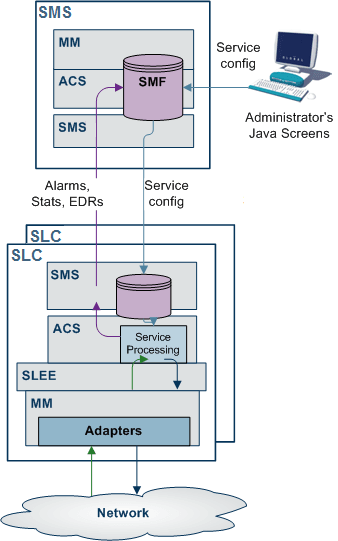
Routing schemes provides configuration which is concerned with service design and message control. Routing schemes are managed from Messaging Manager Manager (hosted on the SMS).
Note: The configuration in eserv.config provides only the Messaging Manager configuration parameters that are global to the software (or SLC).
Routing schemes define and control the following aspects of SMS processing:
- Adapters
- Interfaces
- Paths and Connections
- Transaction types
- Routing class
- Address Domains
- Congestion Control
- Screening
- Triggering
- Routing
Incoming classification (addressing)
This table describes how Messaging Manager processes inbound messages.
| Stage | Description |
|---|---|
| 1 |
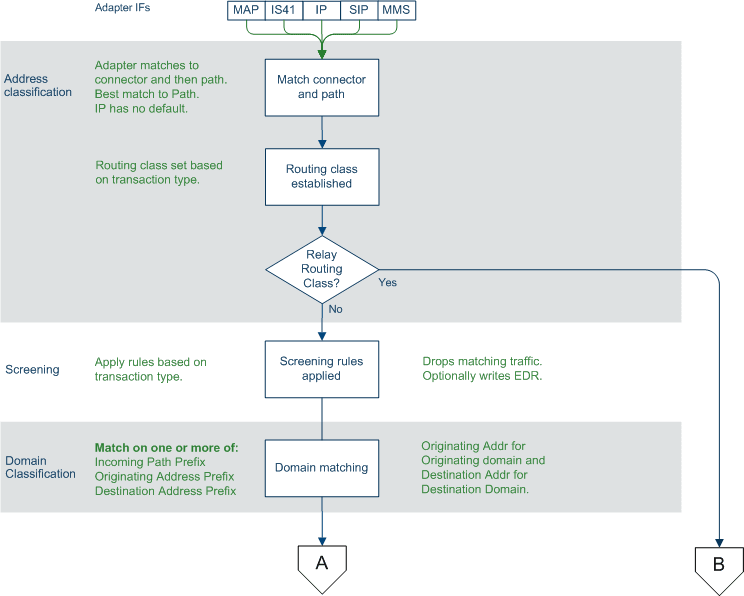
Messages are received over a protocol-specific adapter. The configuration of which adapter will be used is done in eserv.config. For more information about eserv.config, see Messaging Manager Technical Guide. For signaling protocols, the PC, SSN, GT and potentially the setting of the GPRS support parameters, are used to direct the inbound message to the correct adapter. |
| 2 |
The adapter establishes the inbound connection and path for the message using the configuration in the currently deployed routing scheme. Notes:
For more information about paths and connections, see Paths and Connections . |
| 3 |
A default routing class is assigned to the message, based on its transaction type. Each transaction is classified as one of Submit, Deliver, Notify, Route Info or Command. Exception: If the message has a command routing class, it will be forwarded directly to the configured default path for that protocol. For more information, see Default routing . For more information about routing classes, see Routing Class . |
| 4 |
Each message is assigned to a default SMSC. Operations performed by Messaging Manager will take place in a fashion consistent with the assigned SMSC name. For more information, see SMSCs . |
| 5 |
Screening options are applied, which potentially filter out undesired messages. For more information about screening configuration, see Screening Rules . |
| 6 |
The originating address and destination addresses are matched against address rules to determine the originating domain name and the destination domain names. For more information about addressing rules, see Address Domains . |
Incoming classification diagram
This diagram shows the logic involved in processing incoming messages.
Message processing
This table describes how Messaging Manager processes messages.
| Stage | Description |
|---|---|
| 1 |
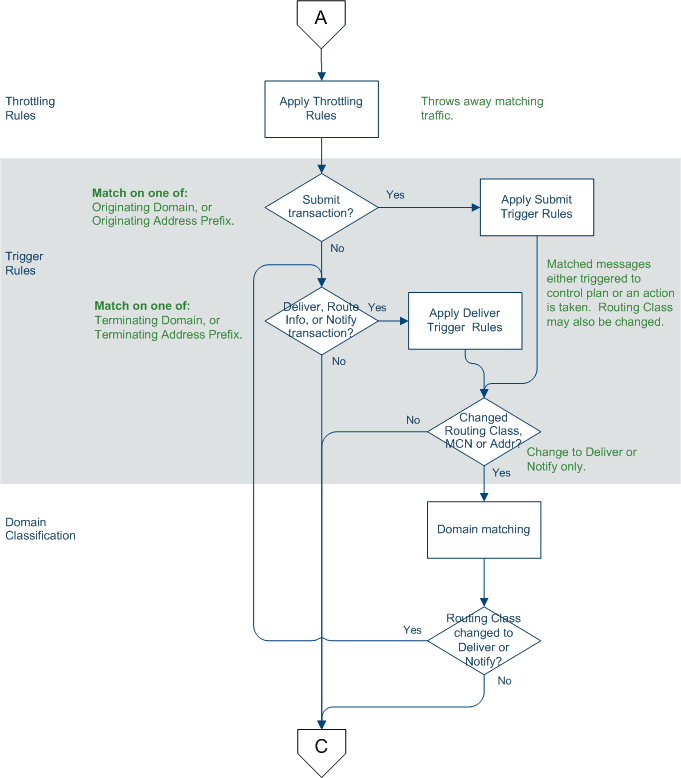
Based on the criteria assigned by the classification rules, the message is checked by congestion control. This may result in transactions being throttled. For more information about throttling, see Congestion Control . |
| 2 |
Based on the transaction type, messages are then directed to one of four sets of trigger rules, for Submit, Deliver, Notify or Route Info transactions. This may result in triggering to ACS to run a message control plan in order to control delivery processing options. Control plans can change message parameters. Having selected a best match trigger rule it is possible to modify the transaction's routing class from its default value (assigned during incoming classification). A matching trigger rule may be one of the following:
For more information about triggering, see Triggering . |
| 3 |
If the message was triggered to a control plan, and the control plan returned a release INAP (that is, the control plan exited after a Disconnect node, or an error exit), the ACS release cause is mapped to an action or error code. The action or error code is added to a Nack which is returned to the source of the message. For more information about action and error codes, see Messaging Manager Action and Error Codes . |
Outbound routing
This table describes how Messaging Manager processes outbound message routing.
| Stage | Description |
|---|---|
| 1 |
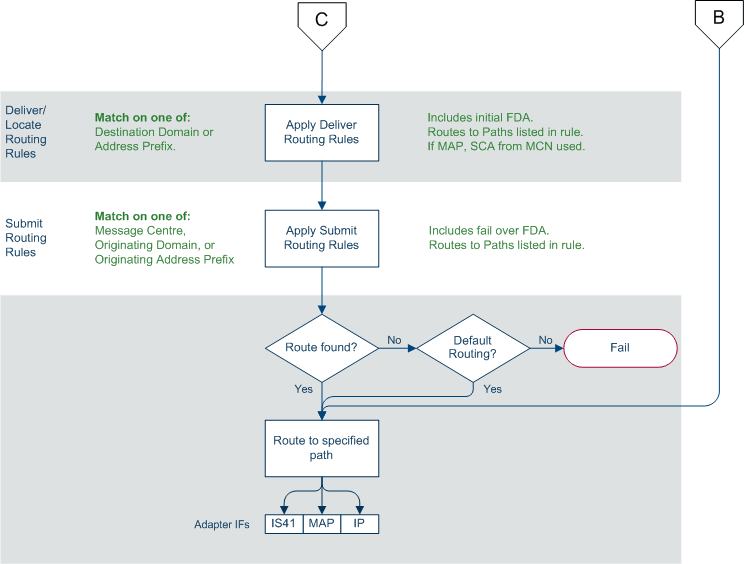
Outbound routing takes place based on the routing class. When applying:
For more information about routing, see Routing . |
| 2 | One or more outbound paths may be selected by the routing rule. If there is more than one, then each is tried in turn, until "success" occurs, or a permanent error is encountered. |
| 3 | The adapter for each selected path will build the appropriate PDU, based on the path protocol, and select a connection within the path for transmission. |
| 4 | If a message control plan is active, it will be notified of the outcome from outbound routing to complete any service logic, such as finalize charging, retry by switching to an alternate route. |
Interfaces and nodes
Routing nodes can provide connections for one of the following:
- All IP connections of a routing scheme
- Connections only for certain ASPs
This means a connection does not need to support all the capabilities of its associated routing scheme in order to be a valid connection.
Routing schemes can be configured with interface records. An interface record is a virtual IP connection that may be supplied or instantiated by real IP addresses on one or more routing nodes. Each node can assign a different IP address to an interface record.
Routing nodes are configured with a list of real 'IP addresses'. When a routing scheme is assigned to a routing node, you can map any of the routing scheme interfaces to the node's IP addresses. This defines what (if any) contribution that node makes to the scheme's routing interface requirements.
When is a Delivery Report produced?
Delivery Reports are generated and sent as a completely separate transaction (like other SMSs that Messaging Manager handles). That means existing routing and retry functionality can be used to deliver the DR.
Messaging Manager generates a delivery report (DR) in the following conditions:
- An ‘early acknowledged’ message is subsequently
unable to be delivered. Messaging Manager can be configured to
generate a delivery report regardless of whether or not the
originator requested it (through the
alwaysProduceNonDeliveryReceiptparameter). - If Messaging Manager successfully delivers a message by FDA and the originating party requested a delivery receipt, then a delivery report is generated and sent to the originator
Platform Support
ACS description
Advanced Control Services (ACS) provides a call state model and service control platform for the message control plans used by MM Director to provide enhanced services.
ACS is an application support platform that allows many different types of service logic to be implemented in a common fashion. ACS runs on the Service Logic Execution Environment (SLEE). It provides the container for service logic execution in the form of user defined service control plans, as well as providing various mobile and telephony support functions. Hence ACS provides a foundation technology for users to develop and execute customer specific service logic for all forms of voice, messaging, and data services.
Service logic developed by the user is executed as an ACS service control plan. In MM service control plans are referred to as a message control plans. Message control plans are created through the ACS ACS Control Plan Editor.
CPE description
The ACS Control Plan Editor (CPE) is a graphical interface that allows the user to build service control plans. This allows the user to define multiple message control plans to implement the various message services. The CPE provides many tools that allow the user to route messages according to such factors as originating and destination addresses, MNP information, geographic location, time of day, and to collect statistical information from the message during delivery processing.
For information about the features available in the CPE, see CPE User's Guide.
For information about the Messaging Manager feature nodes, see Feature Nodes Reference Guide.
Message control plan
A message control plan is similar to a flow chart. It defines the decisions and actions made to determine the routing of a message. Exactly the same technology is used in routing voice and data calls.
A message control plan consists of multiple different decision points or actions called feature nodes. Each feature node has one entry point that is invoked after exiting a previous feature node, but may have multiple output paths. Each output path can be connected to different “next” feature node so that a directed graph is created where there are many different paths possible. Based on decisions made at run time, each message delivery transaction will follow just one path. This means that it is simple to create services for message processing with user defined branches and actions, (that is, conditional service logic).
A message control plan can be as simple or as complex as required.
Preconfigured Packages
Introduction
Upon installation, you can install each of the following pre-configured packages automatically on each target machine. You can use the default services provided as-is, or as examples.
- EDR - Express Delivery Routing
- PME - Personal Message Exchange
- SAF - SMS Anti Fraud
- VAS - Value Added Services
Package structure
This table describes the components configured with each package.
| Component | EDR | PME | Home Routing | SAF |
|---|---|---|---|---|
| SS7 | Yes | Yes | Yes | Yes |
| Inbound MO | Yes | Yes | ||
| Outbound MO | Yes | Yes | ||
| VAS | Yes | Yes | ||
| Inbound MT | Yes | Yes | Yes | |
| Outbound MT | Yes | Yes | Yes | Yes |
| Internet | Yes | |||
| EDR | Yes | |||
| PME | Yes | |||
| SAF | Yes |
Components
This table describes the function of each field.
| Component | Description |
|---|---|
| SS7 | MAP/CDMA adapter. |
| Inbound MO |
|
| Inbound MT |
|
| Outbound MO | MAP/CDMA MC Out path, set as default routing path for corresponding SME path. |
| Outbound MT | MAP/CDMA SME path (already created by SS7 component). |
| VAS |
|
| Internet | Email / IM adapters and paths, configured to match the SCA and SEI applications. |
| PME |
For more information, refer to Personal Message Exchange. |
| EDR | Trigger all MO to control plan that does FDA. |
| SAF |
|
Default control plans
This table describes the function of each default control plan.
| Control Plan | Description | More Information |
|---|---|---|
| Direct_Delivery | Sets message routing class to 'Deliver' and then attempts to deliver it. | Routing Class . |
| EDR | Sets message routing class to 'FDA' and then attempts to deliver it. | Routing Class . |
| Email_to_SMS | Takes incoming email messages and translates parameters and addresses in order to allow SMS delivery. Included as a sub-control plan in PME_Delivery. | |
| Enhanced_SMS_to_Email | Looks up the last digit of the destination address (number) and sends the message as an email to the corresponding email address book entry. | MM IM/Email. |
| Enhanced_SMS_to_IM | Looks up the last digit of the destination address (number) and sends the message as an IM to the corresponding IM address book entry. | MM IM/Email. |
| IM_to_SMS | Takes incoming IM messages and translates parameters and addresses in order to allow SMS delivery. Included as a sub-control plan in PME_Delivery. | Instant Messaging |
| PME_Delivery | General delivery control plan with PME functionality. | PME Delivery. |
| PME_Provisioning | Interprets the SMS and sets PME configuration items for the subscriber. | PME Provisioning. |
| SMS_Submit | Classifies incoming submit messages by type (SMS, IM or email) and processes IM and email addresses for messages of those types. | |
| SMS_to_Email | Takes the first word of the message body as an email address, and sends an email to that address with the rest of the SMS message body as the email message body. | SEI Technical Guide |
| SMS_to_IM | Takes the first word of the message body as an IM address, and sends an IM to that address with the rest of the SMS message body as the IM message body. | Instant Messaging |
| SMS_to_IM_via_TAN |
This control plan will be set to trigger on numbers in the temporary access number range. The destination address (temporary access number) is looked up, and the associated IM address is used to send the message on as an IM. Included as a sub-control plan in SMS_Submit. |
Refer to PME Control Plan Scenarios for examples of these control plans.