2 Message Routing and Processing
Paths and Connections
Introduction
All message traffic entering and leaving the VMP does so through a communication channel known as a path. A path is a logical entity that contains one or more connections of the same type.
Paths
Paths are a simple abstraction concept which is used when configuring the rest of the system. By mapping connections to paths the complexity of each connection is encapsulated and hidden within the path itself. The path then becomes the "communication port" visible to other parts of the messaging processing model.
Each path has a name. Using a naming convention for paths helps to manage the configuration (for example: paths are the means of identifying where traffic is being routed, and paths are also the lowest level at which statistics can be collected).
Inbound paths
All inbound traffic is assigned an inbound path based on the path configuration and the message details (including which adapter the message arrived over). The inbound path enables the user to categorize and manage the message in the Messaging Manager configuration. Inbound paths can be used to treat message services in different ways, even where the messages are almost identical to those arriving on other paths.
Example: Given a specific address (such as the short code "123") it is possible to assign a different address domain name based on the inbound path, effectively providing multiple address spaces.
Outbound paths
All outbound routing functions take through a selected path.
Warning: Since a path may have multiple connections, it is important that each connection within an outbound path can be used to reach the same destination(s), otherwise the configuration may result in frequent routing failures.
Connections
Connections define the details required to connect to another entity on the network which handles short messages. All short message traffic in or out of the VMP will occur through a connection.
Because Messaging Manager supports multiple messaging protocols which require different configuration, connections have complex configuration, which is different depending on the protocol used.
Connections may be:
- Socket-based IP connections, as are used for communication between an ASP and SMSC. Socket-based protocols (such as SMPP and EMI) are straightforward. Each connection corresponds to a TCP connection in the underlying transport layer.
- Signaling-based virtual connections that are used between network elements. Signaling protocols are considered virtual connections because they do not correspond to the underlying (SUA/SIGTRAN) transport layer connections. Instead, they relate to network elements addressed within the SCCP layer (and above) and the ability to use a TCAP transaction as a temporary connection for the purpose of message transmission.
IP paths
Each IP connection is associated with a path, but a path may have many connections that can provide the same service.
For example, an ASP may have several machines that can be used to provide a common set of content-based services. Messaging Manager Multigate can have a separate connection configured to each server so that any load can be shared across these servers. If one server is unavailable, this is transparent to the system as a whole, and hence the service is not impacted. To achieve transparent failover, all IP connections available to an ASP should be configured in a single path. As long as one connection is open, then the path is available and the service is also available. Load distribution is defined by setting a weighting for each server in the path.
To simulate ASP connections to an SMSC, each separate ASP service may need its own path and connection(s) defined between Messaging Manager Multigate and the SMSC. By doing this, Messaging Manager will appear to be a range of ASPs to the SMSC and the administrator can define how the ASP-Multigate paths map to the Multigate-SMSC paths. This may be one of:
- 1:1, to proxy traffic through from a "real" ASP to the SMSC and vice versa
- N:1 to aggregate ASP traffic down to one (or a few) connections to an SMSC
Signalling paths
Because all destinations can be reached through the signaling network, connections and paths can be used to partition communication across all the network elements into separately-manageable streams. These are known as signaling paths.
Outbound
Example: A network has several SMSCs that can be used for store-and-forward processing. To configure them correctly, you need to decide how you want to control the traffic that is sent to each individual SMSC.
- If the SMSCs are to be used as a group of redundant store-and-forward nodes, then they can be represented as connections on a single path. Each SMSC connection can be given a weighting so that the path will be used to distribute traffic according to available capacity. In this manner it is simple to process the "submit" traffic and route it for store-and-forward processing while hiding the complex details about the SMSC cluster from the Messaging Manager system behind a single path.
- To route traffic to SMSCs based on specific transaction properties, each SMSC should be configured on a separate path. This enables routing decisions to be made and traffic to be conditionally directed to the appropriate path.
For other network destinations (predominantly traffic direct to subscriber handsets through an MSC), it is possible to have a single path that can reach all destinations. However, this traffic can also be arbitrarily split into more than one path, to enable other functionality such as collecting statistics for different destinations.
Inbound
Many inbound classification and filtering rules use the inbound path as a discriminator. Consequently inbound paths must be defined with downstream service logic in mind.
Example: Subscribers may be given a Service Center Address (SCA) as part of the subscribed service profile. This is then transmitted in each SMS sent through the VMP. The SCA value can be used to match a signaling connection, and hence an inbound path. Other SCCP parameters, such as the SSN, the Point Code, or the Global Title Address can also be used to match incoming traffic onto virtual connections and inbound paths. So, although all signalling is received over a set of SIGTRAN links, the traffic can be divided into various streams by the administrator and assigned to different inbound paths. So Messaging Manager can implement a "Virtual SMSC" by mapping the incoming SCA onto a path, then treating traffic arriving over that path in a special manner.
Connection and path identification
Each adapter instance receives messages on one of many different connections defined for that adapter instance. Whenever an inbound message is received, the adapter must determine which connection the message arrived on, and map the connection to the associated inbound path.
For IP protocols (SMPP, EMI, and SIP), this is straightforward because the TCP connection on which a message is received correlates directly with a configured logical connection. A relationship between the TCP connection and the logical connection is established when the TCP connection is created.
For SS7 protocols (IS41 and MAP), there is no persistent connection across messages, so instead, Messaging Manager matches a logical connection to a message by comparing the SCCP address of the originating node (contained in the message) with the list of defined connections. Once the best match is established, it is used to identify the inbound path for that message.
A MAP connection is considered a match for an:
- MO-FSM message if its:
- GT, SSN, PC match the message's SCCP CgPA parameter
- SCA is a exact match of the message's RP-DA parameter
- MT-FSM message if its:
- GT, SSN, PC match the message's SCCP CgPA parameter
- SCA is an exact match of the message's RP-OA parameter
Only one path and connection can be assigned.
SS7 connection matching rules
Since Messaging Manager allows the value "ANY" to be used in a connection's GT, SSN and PC specification, the potential exists for many matches. This table shows the set of rules for identifying the best match on a connection.
| Precedence |
RP-DA (MO-FSM) RP-OA (MT-FSM) |
CgPA PC | CgPA SSN | CgPA GT |
| 1 (best match) | Exact Match | Exact Match | Exact Match | Prefix Match |
| 2 | Exact Match | Exact Match | Exact Match | ANY |
| 3 | Exact Match | Exact Match | ANY | Prefix Match |
| 4 | Exact Match | Exact Match | ANY | ANY |
| 5 | Exact Match | ANY | Exact Match | Prefix Match |
| 6 | Exact Match | ANY | Exact Match | ANY |
| 7 | Exact Match | ANY | ANY | Prefix Match |
| 8 | Exact Match | ANY | ANY | ANY |
| 9 | ANY | Exact Match | Exact Match | Prefix Match |
| 10 | ANY | Exact Match | Exact Match | ANY |
| 11 | ANY | Exact Match | ANY | Prefix Match |
| 12 | ANY | Exact Match | ANY | ANY |
| 13 | ANY | ANY | Exact Match | Prefix Match |
| 14 | ANY | ANY | Exact Match | ANY |
| 15 | ANY | ANY | ANY | Prefix Match |
| 16 (worst match) | ANY | ANY | ANY | ANY |
Transaction Types
Introduction
The Messaging Manager Multigate system handles inbound messages slightly differently based on the transaction type, and assigns a different default routing class to each one. The routing class is the primary control value for determining how the message will be subsequently handled for onward routing.
Regardless of which path is assigned, all inbound messages are classified as being one of the transaction types in this table.
| Transaction Type | Description |
| Submit | MO SMS from a handset or Submit from an ASP. |
| Deliver |
Any of:
|
| Notify | All delivery receipts. |
| Route Info | HLR every request to determine the MSC that is serving a handset. |
| Command | All other message types. |
Note: IP protocols use terms Submit and Deliver, SS7 uses MO and MT.
Submit type
A Submit transaction refers to a message that is being introduced into the messaging network (for example: MAP MO_FSM, IS41 SMDPP (Submit), SMPP submit_sm or EMI). These messages originate from a subscriber on the network or from an external ASP connected to the network. Typically these messages need to be authorized and are subject to charging operations.
When the message first passes through the detection point in Messaging Manager Multigate, Submit transactions are assigned a routing class of “Submit”.
To provide extended service control for Submit transactions, including charging and/or routing control, the customer may implement one or more message control plans that are triggered through the Submit trigger rules.
Deliver type
A Deliver transaction refers to any attempt to deliver a message directly to the destination address (for example: MAP MT_FSM, IS41 SMDPP (Deliver), SMPP deliver_sm or EMI). This may occur during the First Delivery Attempt (FDA) that takes place from within Messaging Manager Multigate during a Submit transaction processing, or due to any subsequent delivery attempt that is intercepted from the network. Messages that are delivery attempts from a foreign SMSC may be redirected to Multigate by Navigator and will enter the system as a Deliver transaction.
When the message first passes through the detection point in Messaging Manager Multigate, Deliver transactions are assigned a routing class of “Deliver”.
To provide extended service control for Deliver transactions, the customer may implement one or more message control plans that are triggered through the Deliver trigger rules.
Notify type
A Notify transaction refers to a delivery receipt (DR) message. These are typically intercepted by Messaging Manager Multigate after an SMSC completes its final delivery attempt (successful or not) and purges the SMS.
When the message first passes through the Detection Point in Messaging Manager Multigate, Notify transactions are assigned a routing class of “Deliver”.
To provide extended service control for Notify transactions (including refunds on non-delivery), the customer may implement one or more SMS Service Plans that are triggered through the Notify trigger rules.
RouteInfo
The RouteInfo transaction is a request which is sent to an HLR to determine information regarding a destination handset prior to send SS7 deliver transactions. Information can include:
- The address of the MSC currently serving the handset
- GPRS subscription information
- IMSI
- LMSI
- MIN
- ESN
Routing Class
Introduction
Routing classes are the message attribute which has the greatest impact on outbound routing control. The routing class is first assigned a default value based on the transaction type (for more information, see Transaction Types ). The default routing class can be overridden by subsequent service logic and set to a new value. Assigning new routing classes enables dynamic control over routing.
Although outbound routing is one of the last events in the message model, it is useful to understand routing classes when setting up inbound configuration because a lot of the inbound configuration is used to set up the transaction for its eventual outbound routing treatment.
Routing class overview
There are five defined routing classes, and each class has its own method of determining “how” and “where” to send a message. All routing classes ultimately result in external operations.
| Routing Class | Method Description |
|---|---|
| Default routing | Uses the default routing path attached to the inbound path. |
| Submit | Applies almost exclusively to Submit transactions and indicates to Multigate that it should attempt to "submit" (or forward) the message to an SMSC. From the SMSC viewpoint the message arrives in exactly the same manner as if it came directly from the network switch, or a connected ASP. Hence Messaging Manager stands in the submission path to apply enhanced services and acts as an SMS Proxy between the originating party and the SMSC. |
| Deliver | Can be applied to Submit, Deliver and Notify transactions and indicates to Multigate that it should attempt to "deliver" (or forward) the message directly to the destination. From the destination viewpoint the message arrives in exactly the same manner as if it were being forwarded by the SMSC. Hence Messaging Manager provides enhanced services and acts as an SMSC. |
| FDA | Applies mainly to Submit transactions and indicates to Multigate that it should perform First Delivery Attempt routing. This means a new Deliver transaction is created and this will drive the Deliver method as described above. However, in the event the Deliver does not succeed, the Submit method is driven for the transaction. Hence the FDA routing class makes use of the Deliver and Submit routing classes in order to drive service logic and external operations. |
| Locate | Causes the RouteInfo (MAP SRI4SM or IS41 SMSRequest) message to be sent to an HLR, using the configured Locate routing rules. |
Behaviour
When performing routing, Messaging Manager behaves in the manner appropriate for that routing class and as expected by the destination. For:
- Signaling paths, where the destination is an:
- SMSC, Messaging Manager appears to be an MSC
- MSC, Messaging Manager appears to be an SMSC.
- IP connections, where the destination is an:
- SMSC, Messaging Manager appears to be an ASP
- ASP, Messaging Manager appears to be an SMSC.
Default routing
Messages with the Default routing class are routed directly to the default outbound path configured for the inbound path they arrived on. The outbound path will have the same protocol, but must be a different path.
Default routing rules are configured in the path definition. Any given path may have a "Default routing path" assigned, and (to support aggregation) more than one inbound path can use the same outbound Default routing path.
If outbound routing is called upon to perform "Default routing" routing and no outbound Default routing path is defined for the inbound path, then the transaction is failed.
Default routing routing is used for Command transaction types. When the message arrives, the outbound routing is actioned immediately. Such transactions do not pass through the upper layers of the message model, but are simply transferred from the inbound to the outbound path. Messaging Manager does not process these messages.
It is possible for an inbound path to have no associated outbound "Default routing" path (that is, Default routing routing is disabled for this path). Transactions attempting a Default routing operation from such an inbound path will fail with a Permanent Error and a message is logged to Intensive Logging.
Submit
For the Submit routing class, Multigate expects to send a "submit" PDU to a message center. The type of PDU will depend on the outbound path selected, and hence the actual protocol to be used. It does not depend on the inbound protocol.
For example, if it is a:
- MAP path, then a MAP MO_FORWARD_SHORT_MESSAGE will be constructed
- SMPP, a submit_sm PDU will be constructed
The PDU is then sent over one of the connections available for that path.
In either case, an SMSC is expected as the end-point. The path(s) to be used are configured as Submit rules in the Routing table. These rules mean that a "best match" is made to select the routing entry. More than one path can be defined for a routing entry, and each will be tried until one of the following occurs:
- "submit" is successful
- A permanent error occurs
- The path list is exhausted
If there is no "best match" Submit rule in the Routing table rule, Multigate will attempt a Default routing operation.
Note that Submit routing really only makes sense for Submit transactions.
Deliver
For the Deliver routing class, Multigate expects to send a "deliver" PDU to the final destination. The type of PDU will depend on the path selected, and hence the actual protocol to be used.
For example, if it is a:
- MAP path, then a MAP MT_FORWARD_SHORT_MESSAGE (MAP v3), or FORWARD_SHORT_MESSAGE (MAP v1 or v2) will be constructed
- SMPP, a deliver_sm PDU will be constructed
The PDU is then sent over one of the connections available for that path.
In either case, an SME (that is, either an MSC or ASP) is expected as the end-point. The path(s) to be used are configured as Deliver rules in the Routing table. These rules mean that a "best match" is made to select the routing entry. More than one path can be defined for each given routing entry, and each will be tried until one of the following occurs:
- "deliver" is successful
- A permanent error occurs
- The path list is exhausted
If there is no matching Deliver rule in the Routing table, Multigate will attempt a Default routing operation.
Note: The Deliver routing class can be used from a Submit, Deliver or Notify transaction.
Submit transactions
When used from a Submit transaction, the Deliver routing class requests what is sometimes referred to as a "single shot" delivery. In this case the current transaction is suspended and a new transaction is invoked with:
- The same Inbound Path
- The same Originating and Destination Address domains
- A routing class of Deliver
This new Deliver transaction proceeds through inbound processing to trigger control and may trigger Deliver service logic.
If the Deliver transaction:
- Succeeds, the original Submit transaction is deemed successful
- Fails, the original Submit transaction fails as well
This is why it is referred to as single shot delivery.
Deliver and Notify transactions
The Deliver routing class is the standard mode of delivery for a Deliver or Notify transaction. The transaction is synchronous with the delivery of the message to its final destination. If the Deliver processing is successful, the Deliver transaction is deemed successful, otherwise the Deliver transaction fails. The originating party is then notified of the outcome through a protocol level acknowledgment.
Locate
For the Locate routing class, Multigate expects to send a "RouteInfo" to the HLR. The type of message will depend on the path selected, and hence the actual protocol to be used.
For example, if it is a:
- MAP path, then a SEND_ROUTING_INFO_FOR_SM will be constructed
- CDMA, a SMSRequest will be constructed
The message is then sent over one of the connections available for that path.
In either case, an SME (that is, an HLR) is expected as the end-point. The path(s) to be used are configured as Locate rules in the Routing table. These rules mean that a "best match" is made to select the routing entry. More than one path can be defined for each given routing entry, and each will be tried until one of the following occurs:
- "RouteInfo" is successful
- A permanent error occurs
- The path list is exhausted
If there is no matching Locate rule in the Routing table, Multigate will attempt a Default routing operation.
FDA
For the FDA routing class, Multigate expects to perform a first delivery attempt of a "deliver" style protocol unit over a path that has an SME (ASP) as the end-point.
Note: The FDA routing class can be set for a Submit, Deliver or Notify transaction.
Submit transactions
When used from a Submit transaction the FDA routing class requests what is commonly referred to as a "first delivery attempt". In this case the current transaction is suspended and a new Deliver transaction is invoked with:
- The same Inbound Path
- The same Originating and Destination Address domains
- A routing class of Deliver
This new Deliver transaction proceeds through inbound processing to trigger control and may trigger Deliver service logic.
If the Deliver transaction:
- Succeeds, the original Submit transaction is deemed successful and completes normally without further external operations.
- Fails, then the original Submit transaction resumes by invoking the Submit routing class. If this is successful then the Submit transaction completes normally.
Only in very rare cases will both the Deliver and Submit routing classes fail and result in Submit transaction failure.
Deliver and Notify transactions
The Deliver routing class is the standard mode of delivery for a Deliver or Notify transaction. The transaction is synchronous with the delivery of the message to its final destination. If the Deliver processing succeeds, the Deliver transaction is deemed successful, otherwise the Deliver transaction fails. The originating party is then notified of the outcome through a protocol level acknowledgment.
SMSCs
Introduction
Based on the incoming path, all messages arriving at the VMP are assigned to an SMSC. This is a key aspect of Messaging Manager as it acts as a Virtual Message Point (VMP). For each Submit transaction it can attempt to deliver messages as though they came from the SMSC assigned to the transaction and will it will use this SMSC to store undelivered messages, if necessary.
Defining SMSCs
Within a routing scheme the administrator may define as many SMSCs as required. Each SMSC record should correspond to an actual SMSC, or a group of network elements (each may be a separate SMSC) that together implement an SMSC.
The main consideration is that an SMSC has a Global Title Address that is used as the Service Center Address (SCA) in various network transactions. For example, when Messaging Manager attempts delivery to a handset, it will perform an HLR lookup. This is a MAP SEND_ROUTING_INFORMATION_FOR_SM in GSM networks and carries the SCA. If the device is not available then the SCA is placed in the MWD (Message Waiting Data) in the HLR and when later the device becomes available the HLR sends an alert to the SCA. Hence this same SMSC is also where the message will be stored by the Submit method.
The SMSC is assigned based on the incoming path, but more than one path (even all paths) can be assigned to a single SMSC. During message control and processing it is possible to change the assigned SMSC, but this is then preserved throughout a Delivery routing and (if required) the Submit routing process.
ASP Groups and Parameters
ASP accounts
An ASP account contains information about an Application Service Provider (ASP). It records the services it provides and the limits which restrict how it can use the system. ASP accounts are a type of ACS customer, and use the ACS customer profile. For more information about ACS customers, see ACS User's Guide.
ASP groups and templates
Every ASP account belongs to an ASP group. ASP groups define the default information for all the ASP accounts within that group. This can be used to streamline configuration by allowing a common parameter to be changed at one point, and automatically propagate that change to all appropriate ASP accounts.
Similarly, ASP accounts can be constructed as a templates. Templates are incomplete ASPs which can be cloned into one or more fully-functional ASP accounts. An ASP account template cannot be used as an ASP account (that is, it cannot be used to create paths and connections in a routing scheme). An ASP account cannot be used as a template for creating other ASP accounts, only templates can be used for this purpose.
ASP groups and parameter defaults
Any ASP account parameter that is editable at group level can be defaulted to group level (that is, a value is not required for it at the ASP account level). All parameter widgets which can be edited at the group level will be displayed with a Default to group level check box. If the parameter cannot be edited at group level, the check box will not be displayed. If the Default to group level check box is selected, the parameter at the ASP account level will be defaulted to the value set at the ASP group level. This value is not saved in the ASP account profile, and any value already there will be removed if and when the dialog is saved.
Tip: The value stored at the ASP group level is displayed in a tool tip when the mouse is hovered over the default check box.
Screening Rules
Screening rule list
The set of screening rules available is different for each transaction type as shown in the following table.
| Rule Type | Submit | Deliver | Notify | RouteInfo |
|---|---|---|---|---|
| Calling Party Filter | Y | Y | Y | Y |
| Delivery Sequence Correlation | Y | Y | ||
| Destination Address Screening | Y | Y | Y | Y |
| Isolated Delivery | Y | Y | ||
| Layer Address Correlation (GSM only) | Y | Y | Y | Y |
| Originating Address Screening | Y | Y | Y | |
| Roaming Location Validation | Y |
Notes:
- Screening rules are not applied to traffic from any path which has the This is a trusted path check box selected. For more information about this check box, see Path screen fields .
- To use the full screening capabilities, a valid screening license must be purchased. Unlicensed users will only have access to the originating address screening and destination address screening rules.
Monitoring screening rules
If a screening rule is in monitoring state, the rule is not applied. Instead an EDR is written recording the SMS/call details, and the screening rule ID for the rule which would have blocked the SMS/call.
Note: If a rule is in monitoring state, an EDR will be written regardless of whether the Write EDR check box is selected for that rule.
For more information about EDR post-processing, see EDR Reference Guide.
Calling Party Filter
This check is used to:
- Screen out (blocklist) known rogue entities on the network (pirates)
- Allow (allow list) known safe entities
A message will be screened if all of the following apply:
- It is received on a path that is does not have the This is a trusted path check box selected
- The “Calling Party Filter” rule is configured for the message's transaction type
- The message's SCCP calling party global title is matched by the screened global title list
When this rule is selected the Global Title Screening Rules panel is displayed on the screen.
Delivery Sequence Correlation
If an inbound deliver or notify message is received on a path that is not flagged as trusted and the “Delivery Sequence Correlation” rule is specified, Messaging Manager will compare the message parameters with the corresponding RouteInfo that was previously received. Message parameters are matched as follows, and the message is screened out if any of the comparisons fail:
| MT SMS Field | Expected Value |
|---|---|
| SCCP Calling Party | SCCP calling party of the RouteInfo |
| SCCP Called Party | GT returned by Messaging Manager in response to the RouteInfo |
| SCA | SCCP calling party of the RouteInfo |
Destination Address Screening
Destination address screening rules check the digits of the destination address against a configured list of prefixes. For each address prefix, an address rule will specify that the message has either passed or failed screening.
If the address rule is a:
- 'pass' rule, it will assign a destination domain for subsequent processing.
- 'fail' rule, it will specify the action to take.
When this rule is selected the Destination Screening Rules panel is displayed in the bottom part of the screen.
Isolated Delivery
When a mobile-terminated SMS (MAP MT-ForwardSM and IS41 SMDPP) is received, the isolated delivery rule checks that a RouteInfo message (HLR lookup) was received before the SMS. If a delivery sequence correlation rule (described above) is also used, Messaging Manager will check that the details in the two requests match up.
If MSID masking is on, or an Accept action is used, MM responds to incoming RouteInfo messages with a temporary IMSI (or MIN). This means that when a subsequent deliver or notify message is received, it will use the MM-generated IMSI, so can be linked with the previous RouteInfo.
If an inbound deliver or notify message is received on a path that is not flagged as trusted, the “Isolated Delivery” rule will check that the IMSI corresponds to one that was previously generated in response to a RouteInfo. The message will be screened out if this is not the case.
Layer Address Correlation
When a message is received, MM can do a basic check to ensure that the parameters provided in the SCCP layer and MAP layer are consistent.
If this rule is used and a MAP message is received on a path that is not flagged as trusted, MM will verify that the prefixes of the following MAP and SCCP address match:
| Message Type | SCCP Field | MAP Field |
|---|---|---|
| RouteInfo | CallingParty | Service Centre Address |
| Deliver / Notify | CallingParty | SM-RP-OA |
| Submit | CalledParty | SM-RP-DA |
The number of digits to compare for the SCA Consistency check is determined by finding the longest country prefix matching the address, in the SCA Consistency Rules panel displayed in the bottom part of the screen.
Originating Address Screening
This rule checks the digits of the originating address against a configured list of prefixes. For each address prefix, an address rule will specify that the message has either passed or failed screening.
If the address rule is a:
- 'Pass' rule, it will assign an originating domain for subsequent processing
- 'Fail' rule, it will specify the action to take
When this rule is selected the Originating Screening Rules panel is displayed in the bottom part of the screen.
Roaming Location Validation
An additional correlation check can be applied to mobile-originated SMSs (MAP MO-ForwardSM and IS41 SMDPP) to validate that when a message comes from a local subscriber via a foreign network, that subscriber is actually known to be roaming.
If a mobile-originated SMS is received on a path that is not flagged as trusted, this rule will force Navigator to query the HLR to determine the MSC serving the originating subscriber. A message will pass if the Calling Party SCCP Address and MSC address from the HLR match, to the determined number of digits.
When this rule is selected the RLV Prefix Rules panel is displayed in the bottom part of the screen.
Address Domains
Introduction
Each message transaction involves an originating address as the message sender, and a destination address as the message receiver. These are generally E.164 or Short Dial Code (SDC) digit strings.
Messaging Manager enables you to assign an originating domain and a destination domain for each message based on the originating and destination address and/or incoming path. Messaging Manager uses domains as one of the criteria for matching when performing throttling, triggering and routing.
Note: If no domain is configured, the message will use the default domain.
By setting up domains to group addresses subsequent message processing and routing configuration can be simplified.
Examples:
- By using one or more address or path prefix matches you may group together all the numbers that belong to a specific operator into a single domain, and then name the domain so the ownership of the numbers is obvious.
- A domain can be defined to contain all "foreign international" numbers.
- For an ASP the same approach can be used to group any SDC numbers into a domain that is named to reflect the service provider.
Domain classification
Here is a simple diagram showing an inbound message going through the domain classification process.
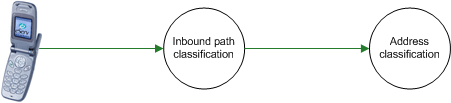
Example: If a message arrives with an Originating address of 021 185 3821, Messaging Manager looks up originating address screening and destination address screening rules to find a match.
Example address classification
This table shows a typical address classification table.
| Path Prefix | Address Prefix | Address Domain |
|---|---|---|
| Foreign | 1 | USA |
| Foreign | 61 | Australia |
| * | 031 | Telefony |
| * | 035 | Teleco 3 |
| Test | 0219 | Test |
Using the above table, Messaging Manager uses the path and originating address to find a match on the listed prefixes. When a match is found, the originating domain will be assigned from the Address domain for the rule. In this example, the path name of "any" and prefix of 035 results in an originating domain of Teleco 3 being selected.
By using the inbound path name as a qualifier there can actually be many "address spaces" set up for the same numbering scheme. For example, even where the originating address is the same for two messages, depending upon which path the message takes into Messaging Manager it can be placed into a different domain.
As another example, based on the SCA, an inbound path can be assigned (described as "virtual SMSC" support above) and then the terminating address (say 333) can be assigned to a different terminating domain name - one may be "Sport" and another "Weather". This means that the same destination number (333) can be routed to a different application as they "appeared" to be sent to a different SCA and hence Messaging Manager can implement behavior associated with the different SMSCs.
The originating domain name is significant in Submit processing rules and the terminating domain name is used for Deliver processing rules.
Congestion Control
Throttling rules
Throttling rules match on domain and transaction type. A "best match" throttling rule is selected by the transaction and this rule will specify the congestion point for such a transaction.
For a matched domain, it starts to drop traffic when the total traffic is above the specified limit. Matching on domain enables Messaging Manager to throttle different services at different congestion points.
Applying throttling
The throttling congestion point is simply a percentage value and indicates the point at which this type of transaction is considered to reach a point of congestion in the system and be throttled. The value relates to the overall concurrent transaction limit for the system.
Example: By setting a value of 75%, for a given domain (like Televoting) then, in effect, the administrator is ensuring there is a 25% headroom for other types of transactions. Televoting transactions will be throttled when the system has reached 75% capacity and hence a Televoting event cannot cause disruption to all other types of messaging.
Triggering
Introduction
Triggering rules provide the core message processing functionality. Messages which match transaction type and domain and/or address prefix are processed in one of the following ways:
- By using a specified control plan.
- By performing a specified action. Available actions are: route, route unchanged, relay, accept, reject, or discard.
Matching messages can also have their routing class changed.
By triggering to a message control plan, extended service logic can be applied to perform more detailed checks and processing on the message; for example, to filter out unwanted transactions (anti-spam function), or to apply charging or alternate routing controls.
The trigger rule also provides the first opportunity to select a transaction in order to apply a new action or routing class, thus changing the default value.
Example: If you require all Submit messages to undergo a First Delivery Attempt (FDA), then it makes sense to set the routing class to FDA on the appropriate Submit trigger rules. This means that the message control plan does not need to set the routing class, and if a control plan is not used the processing will continue with the routing class changed to FDA.
Trigger rules
Messaging Manager triggers based on the best match against domain name and address prefix.
- Submit transactions match on originating domain name and address prefix.
- Deliver, Notify and RouteInfo transactions match on destination domain name and address prefix.
Message Control Plan options
Trigger rules which specify that the message is triggered to ACS, nominate or guide the selection of the message control plan to process. When the control plan returns signaling to Multigate, it can indicate which transaction processing action to take.
| Signal | Description |
| Release |
Perform one of:
|
| Continue (or no control plan matched) |
Progress to outbound routing with parameters unchanged. Will be one of:
|
| Connect |
Progress to outbound routing with modified parameters. Will be one of:
|
Note: Actions can be specified directly without the need to invoke a control plan.
Accept action
The Accept action sends the release cause code 127 to Messaging Manager.
The Accept action does nothing with the message, but tells the caller that it was accepted.
For control plan configuration details see Accept feature node.
Discard action
The Discard action sends the release cause code 126 to Messaging Manager.
The Discard action drops the message without sending any response to the caller.
For control plan configuration details see Discard feature node.
Reject action
The Reject action sends a specified (default configured value, or feature node configured value, see Reject feature node.) Release cause code to Messaging Manager. The Reject action sends an error back to the caller.
If this is a:
- Submit transaction, the subscriber will see a "Message not sent" indication on their handset.
- Deliver, Notify, or RouteInfo transaction, then the caller (an SMSC) will keep the message for a subsequent retry unless a permanent error is signaled.
Route action
For the Route action, various parameters may have been changed by the service logic within the message control plan. By dynamically modifying parameters in the message control, Messaging Manager provides flexible control over transaction processing. The parameters that may be changed and the effects of changing the value are described in this table.
| Parameter | Effects of modification |
|---|---|
| Originating address | Used to mask or alter the identity of the sender. |
| Originating domain | Used to modify any routing rules that are based on the originating domain name. |
| Destination address | Used to alter the destination service address. |
| Destination domain | Used to modify any routing rules that are based on the destination domain name (perform alternate routing) |
| Routing class | The routing class can be changed under service logic. This is most effective for Submit transactions to attempt as “single shot” by assigning the routing class to “Deliver”, or for performing a First Delivery Attempt by assigning the routing class to FDA. |
| Message Centre | Used to modify the SMSC name that is used for Submit processing to an SMSC. |
Route Unchanged action
The Route Unchanged action passes messages back to the originating network without modification, for delivery to the subscriber by the originating network. The Route Unchanged action applies only to RouteInfo transactions only. It differs from Route actions only in the following ways:
- When analysing the result of a RouteInfo transaction request, the identity of the sender stays the same, it is not altered or masked.
- Mobile Switching Center (MSC) information is not set in the RouteInfo transaction response.
Routing
Introduction
Outbound routing is based on:
- Routing class
- Domain and/address prefix (destination and/or originating depending on routing class)
- (for Submit routing class only) SMSC
In general, outbound routing of messages proceeds according to the assigned routing class for the transaction.
Note: Failure either due to delivery failure or due to no path being specified does not necessarily mean that the message will not be delivered. If a control plan has been triggered, and has an active NoAnswer trigger, then we will return to the control plan and it may determine to re-attempt delivery using an other mechanism, or even to retry using the same mechanism.
Default routing
When Messaging Manager needs to force relay a message, it routes it down the default routing path. For more information, see Default routing .
Default routing paths are used when Messaging Manager has determined that the message can only be delivered through the same protocol it was received on. For example, if a message utilizes protocol-specific features, Messaging Manager ignores the allocated routing class and default routing is performed. Default routing paths always use the same protocol as the inbound path.
Submit routing
Each routing rule is defined in terms of an originating domain (or address prefix), destination domain (or prefix), and routing class (for example: Submit, Deliver).
Deliver routing
This table describes the criteria Messaging Manager uses to determine the best match for routing which doesn't follow the default routing rules.
| Best Match | Routing Class | Originating | Destination |
|---|---|---|---|
| 1 (Best) | Deliver | Longest Prefix | Longest Prefix |
| 2 | Deliver | Exact Domain | Longest Prefix |
| 3 | Deliver | “ANY” Domain | Longest Prefix |
| 4 | Deliver | Longest Prefix | Exact Domain |
| 5 | Deliver | Longest Prefix | “ANY” Domain |
| 6 | Deliver | Exact Domain | Exact Domain |
| 7 | Deliver | “ANY” Domain | Exact Domain |
| 8 | Deliver | Exact Domain | “ANY” Domain |
| 9 (Worst) | Deliver | “ANY” Domain | “ANY” Domain |
Determining the best match submit routing rule
This table shows the criteria Messaging Manager uses to determine the best match for Submit message which don't use the default routing rules.
| Best Match | Routing Class | Message Center name | Originating |
|---|---|---|---|
| 1 (Best) | Submit | Exact Match | Longest Prefix |
| 2 | Submit | Exact Match | Exact Domain |
| 3 (Worst) | Submit | Exact Match | “ANY” Domain |