6 Short Message Charging Feature Node
Feature Node Access Setup
Configuring access to SM Charging Feature Node
Follow these steps to configure access to the Short Message Charging feature node on a per Service Provider basis.
| Step | Action |
|---|---|
| 1 | On the ACS Main screen, click Customer. |
| 2 | On the ACS Customer screen, select the Resource Limits tab. |
| 2 | Select the customer from the table and click Edit. |
| 3 | On the Edit Customer Resources screen, in the Allocate Feature Sets box of the Public Set Access area, select the CCS Full check box. |
| 4 | Click Save to return to the ACS Main screen. |
| 5 | On the ACS Main screen, click Configuration. |
| 6 | On the ACS Configuration screen, select the Feature Sets tab. |
| 7 | In the Feature Node Set drop down list, select
CCS Full.
|
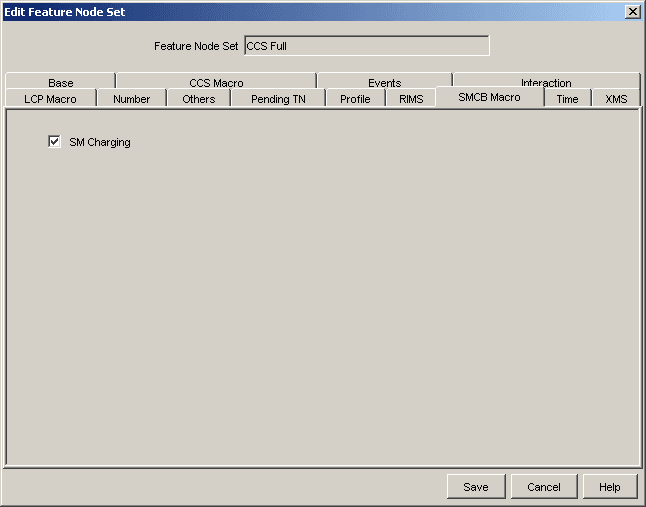
| 8 | In the Edit Feature Set screen, select the SMCB Macro tab. |
| 9 | Select the SM Charging check box. |
|
|
| 10 | Press Save. |
For detailed information on Feature Sets, refer to Advanced Control Services User's Guide.
Message Call Plan Setup
Procedure
Access to the Short Message Charging Control Plans are set on a per product type basis in the Product Type screen in the Prepaid Charging UI. Use the following steps to set up an Originating or Termination Message control plan.
| Step | Action |
|---|---|
| 1 | On the Prepaid Charging UI select the menu options Resources->Product Type->Edit Product Type. |
| 2 | Select Control Plans from the panel list of the left. Refer to Resources - Product Type in Charging Control Services User's Guide. |
| 3 | Associate a control plan with the following CCS Capabilities - SMS_MO, SMS_MT and RSMS_MT, by creating (or editing) entries in the Capability List. |
| 4 | Click Save. |
Using Other Feature Nodes
Introduction
The Short Message Charging feature node is designed to work with the following feature nodes:
| Application | Feature Node | Use to |
|---|---|---|
| ACS | Terminate Unchanged | Send a Continue back to the trigger application |
| ACS | Disconnect | Send a Release back to the trigger application |
| CCS | Set Wallet Type | Set whether to use the primary or secondary wallet in the CCS service loader. Should be used before the SMCB feature node. |
Other compatible nodes
This table lists other compatible nodes.
| Application | Feature Node |
|---|---|
| ACS | Start |
| ACS | End |
| ACS | Dynamic Switch |
| ACS | Attempt Termination |
| ACS | Unconditional Termination |
| CCS | Account Activation |
| CCS | Account State Branch |
| CCS | Account State Text Message |
| CCS | Balance State Branch |
| CCS | Billable Event |
| CCS | Business Prefix Branch |
| CCS | Friend and Family/Friend and Destination Discount |
| CCS | Set Discount |
| ACS | Event Branching |
| ACS | Event Counting |
| ACS | Event Setting |
| ACS | Calling Party Filter |
| ACS | Called Party Filter |
| ACS | Number Matching |
| ACS | Prefix Tree Filtering |
| ACS | Profile Branching |
| ACS | Store Profile |
| ACS | Day of Week |
| ACS | Day of Year |
| ACS | Time of Day |
| ACS | Time of Week |
| CCS | Declined Billing Cause |