2 Configuration
This chapter explains how to configure the Oracle Communications Convergent Charging Controller application.
Configuration Overview
UCAI is configured by the following components:
| Component | Locations | Description | Further Information |
| vssp.config | all SLC | Required to configure the UCAI process. | UCAI Configuration File |
| vssp.sh | all SLC | Sets UCAI process's command line startup parameters. | Configuring the Environment |
| m3ua.config | all SLC | Required to provide M3UA configuration. Not required if this version of UCAI does not support M3UA. | M3UA Configuration |
| keyfile | all SLC | Required if UCAI has a circuit limit. | Editing the vssp.sh file |
| tdp.conf | all SLC | Configures the IN Call Model library. Required for interaction with the SLEE. | Configuring IN Call Model Triggers |
| SLEE.cfg | all SLC | Sets up SLEE interfaces and applications. | SLEE Technical Guide |
Configuring the Environment
The UCAI environmental variables are set in the vssp.sh file.
The file vssp.sh is used to set environment variables and command line parameters before the UCAI executable is started. There are potential stack-specific environment variables as well as UCAI-generic command line options.
Editing the vssp.sh file
There are three possible command line parameters in the format:
vssp [-c] dir/filename [-k] dir/filename [-m] dir/filename The only mandatory option is the name of the vssp configuration file. This can either be specified by the -c flag or it is the first non- flagged parameter. For more information about setting up this file, see UCAI Configuration File.
In UCAI builds which require a license key file, the name of the file may be specified on the command line. This may be specified either using the -k flag or it is the second non-flagged parameter. If it is not given, UCAI will default to using the file called keyfile in the same directory as the vssp.config file.
In UCAI builds which use the M3UA protocol, the M3UA configuration file name can be given. This can either be set using the -m flag or it is the third non-flagged parameter. If no file name is given, UCAI will default to using a file called m3ua.config in the same directory as the vssp.config file.
UCAI Configuration File
The main UCAI configuration file is vssp.config. It configures the UCAI process and is located in:
/IN/service_packages/VSSP/etc
vssp.config has two sections:
- Parameters
- Point Code routing (Circuit Loops)
Configuring circuit loops
Circuit loops are described using the connect statement. In their simplest form connects take the form of:
connect circuit to circuit
Note: Each command in vssp.config must end with one of the following:
Period (.)
Semi-colon (;)
The circuit in the above example is composed of three parts in the format:
a/b/c
Where:
- a = the point code of the UCAI end
- b = the point code of the remote end
- c = the circuit identification code
Example 1
A circuit loop has two circuits:
- Incoming circuit to point code 1 from remote point code 2 on cic 1
- Outgoing circuit from point code 1 to remote point code 2 on cic 2
This setup would be configured in vssp.config as:
connect 1/2/1 to 1/2/2.
Example 2
A single 2.048 Mbps ‘E1’ link has 32 timeslots (0-31), of which:
- timeslot 0 is used for link management
- timeslots 1-15 are where incoming calls have their speech arrive
- timeslot 16 for signalling
- timeslots 17-31 are used by outgoing calls
The point codes are the same as in Example 1, so vssp has point code 1 and the attached switch has point code 2.
The circuit loop section of the vssp.config for this scenario would appear as follows:
connect 1/2/1 to 1/2/17.
connect 1/2/2 to 1/2/18.
connect 1/2/3 to 1/2/19.
connect 1/2/4 to 1/2/20.
connect 1/2/5 to 1/2/21.
connect 1/2/6 to 1/2/22.
connect 1/2/7 to 1/2/23.
connect 1/2/8 to 1/2/24.
connect 1/2/9 to 1/2/25.
connect 1/2/10 to 1/2/26.
connect 1/2/11 to 1/2/27.
connect 1/2/12 to 1/2/28.
connect 1/2/13 to 1/2/29.
connect 1/2/14 to 1/2/30.
connect 1/2/15 to 1/2/31.
Signalling is in timeslot 16. This will need to be sent out to UCAI.
Speech sent out on timeslot 1 must return on timeslot 17, so that the called party can hear the calling party. Similarly, the speech sent out on timeslot 17 must return on timeslot 1, so the caller can hear the called party. This is repeated with timeslot 2 and 18 and so on, up to timeslot 15 and 31.
Shorthand configuration
This can also be written as:
connect 1/2/1 to 1/2/17 for 15.
The “for 15” on the end instructs the UCAI that the connect is to be repeated for a total of 15 times, including the one specified in the line. Each time, UCAI adds 1 to the cics for both the incoming and the outgoing circuits.
The number after the “for” indicates the total number of circuits generated and not the number of additional circuits. It includes the circuit number specified in the line it is set in.
Care must be taken, as it is very easy to get the count of the circuits wrong. The final number of cics used is the first one, plus the number of repetitions minus one. For example, if you are starting at cic 1 and specify "for 2”, the final cic will be 2 and not 3.
Mistakes in this configuration will result in mismatches of conversations, for example:
- A one-way call (where one party can hear the other, but not the other way round)
- Different calls connected together
- (Most commonly) total silence at both ends
Diagram
The diagram shows the logical structure of how a loop box should be set up to handle Example 2. The speech paths are looped but the signalling is extracted and passed onto UCAI. The exact method for doing this will be very site-specific (several methods may even be employed in the same site).
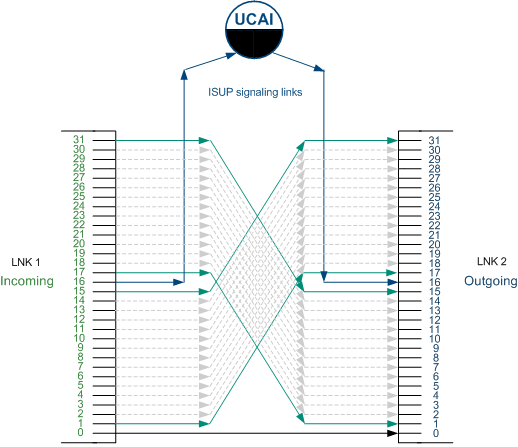
Note: The connections for incoming timeslots 2 to 14 and 18 to 30 have been omitted, so the diagram is less cluttered.
Example configuration
This is an example of the vssp.config file (comments have been removed).
set option slee.
set option syslog.
set option stats.
set cdr file="cdr.log";
#set option debug.
#set option mtp debug.
set ica iam cpc 10;
connect 1/2/1 to 1/2/17 for 15;
Optimal configuration
Optimal configuration for the network depends on many variables, including:
- Types of service to be implemented
- Detailed estimates of the calling pattern to each service
- Trunking a call between switches
- Cost of trunk and signalling interfaces
- Network topology
- UCAI costs
It is beyond the scope of this document to detail the modeling required to produce an optimal solution.
The basic requirements for installation of the UCAI are the same regardless of the configuration chosen for a network. The requirements may be broken into the connection to the originating exchange, and the connection to the terminating exchange.
These may be subtly different from a signalling perspective, since each call arriving at the UCAI from the originating exchange may result in multiple sequential calls being made to the terminating exchange. For example, a call may be routed to an announcement prior to be routing to the eventual destination.
M3UA Configuration
This section introduces the configuration of the UCAI M3UA interface.
We will give a very simplified example of a M3UA network and its configuration to illustrate the fundamental concepts of UCAI's M3UA configuration.
In our example network we consider the last switch in a chain of SS7 switches. Everything further away from the UCAI will be pure SS7. For this example it will have a switch point code of 1.
Note: This chapter is not a substitution for a detailed knowledge of M3UA. A thorough understanding of the principles and techniques of M3UA is a vital prerequisite to successful configuration of the UCAI M3UA interface.
Switch configuration
As with standard configuration, UCAI needs loopbacks to be set up on the switch.
For this example, we will use two E1 links which are looped back to each other. (In other words, the transmit of the first link is connected to the receive of the second link and vice versa.) Signalling is not carried in the traditional timeslot 16, this timeslot is unused.
Elsewhere on the switch are signalling links that connect to the SS7-sigtran gateway (the signalling gateway (SG), commonly a Cisco ITP). It will have a point code of 2. These links have signaling on timeslot 16 but the other timeslots (1–15 and 17–31) are unused.
The switch has a link to the SG on local point code 1 and remote point code 2. It has 60 circuits. The first 30 are bi-directional, the second 30 are incoming only. These circuits are on the loopback that we built previously and not anything to do with the unused timeslots on the link to the SG. Although the linkset is between point codes 1 and 2, the point code of the remote end at the ISUP level is that of the UCAI (which we will define to be 3). This is the configuration normally used for ISUP if the traffic is being routed via some sort of SS7 router.
To summarize the configuration of the switch it has:
- Two E1 ports being used for the loopback (only carries speech, no signalling)
- A port being used signal to the SG (only carries signalling, no speech)
- Signaling is configured with a local point code of 1 and a remote point code of 2
- ISUP on the switch is configured to use the 60 speech circuits of the looped links
- ISUP DPC is set to be 3
- Point code of the UCAI and the switch is configured to route to DPC 3 via point code 2 (the SG)
SG (ITP) Configuration
The SG is assumed to be a Cisco ITP. To set it up, configure the baseline internet and the SS7 link. This provides the core SS7 and IP routing functions.
First set the port and IP address for the M3UA SCTP port, that is, the Signalling gateway Point (SGP) as follows:
| Command | UCAI Mode |
cs7 m3ua 5000local-ip 192.168.1.1
|
Loop Back Mode: The M3UA is configured on the SG. In this example:
|
|
Basic Inline Mode: In this mode, we define 2 local M3UA stacks. |
VSSP configuration
The vssp.config for this example is:
connect 3/1/1 to 3/1/33 for 15;
connect 3/1/17 to 3/1/49 for 15;
This configuration indicates that the circuit with local (to the UCAI) point code 3, remote (to the UCAI) point code 1 and cic 1 is looped to circuit local 3, remote 1 and cic 33. This is repeated for the other 29 circuits skipping the unused timeslot 16.
When using M3UA, a second configuration file is also needed. This details the M3UA-specific configuration. For this example, it could be:
asp port 5000 addrs {192.168.1.2};
sgp itp1 port 5000 addrs {192.168.1.1};
gateway sg1
{
sgp itp1 key 1234;
pc {2, 1};
}
as pc 3 gateway {sg1};
This shows a local ASP on SCTP port 5000 with local address 192.168.1.2.
Note: There can only be a single port but it can be on multiple addresses. All the addresses given must belong to the local machine.
It also shows an ITP called itp1 with a port number of 5000 on the remote address of 192.168.1.1. Again, multiple addresses can be given and they must all belong to the remote SGP.
It also shows a signalling gateway called sg1. This contains the single SGP itp1 and identifies the routing key on the peer SGP. It also shows a list of point codes. The first is the point code of the SG itself (in this case 2) and any following point codes are those which can be reached via the SG. For this example, we specify that point code 1 may be reached via this SG.
It also shows our local AS. For this example, it has a point code of 3 and is peered with SG sg1.
M3UA configuration file syntax
The M3UA configuration file supports two sorts of comments:
- comment to end of line is indicated by a double forward slash (// with no space in between them).
Example:
Comment to end of line // This is the M3UA configuration file for the test
network. - comments that run over several lines are introduced by a /* and ended with a */.
Example:
/*
* Now we set up the various SGPs in our network. There are three of
* them.
*
* sgp1 --- located in The Fort this deals with its local area.
* sgp2 --- located in The Hoist this is a hot standby for sgp1.
* sgp3 --- located in Heaven this handles all international traffic.
*/
Whitespace
Whitespace is only used to separate other lexical items. Otherwise it is ignored.
Example: The following methods of defining an asp are identical.
asp port 5000 addrs {192.168.1.2};
asp
;
port 5000
addrs { 192.168.1.2 }
Example M3UA configuration file
This text shows an example M3UA configuration:
#start file
asp port 6969 addrs {192.168.26.117};
sgp itp1 port 2905 addrs {192.168.26.215};
gateway sg1
{
sgp itp1 key 6969;
pc {999, 4805, 4807};
}
as pc 4701 gateway {sg1};
#end file
Using more whitespace, this file could also be displayed as follows:
#start file
asp
port 6969
addrs {192.168.26.117}
;
sgp itp1
port 2905
addrs {192.168.26.215}
;
gateway sg1
{
sgp itp1 key 6969;
pc {999, 4805, 4807};
}
as
pc 4701
gateway {sg1}
;
#end file
Routing Options
It is possible for attached switches to be configured so calls are only presented to the UCAI on circuits designated as “incoming” to the UCAI. There may be switches that do not allow routing on a per cic basis, and this section deals with several possible workarounds for this problem.
These options are necessarily, highly switch-specific, but one or more of them should be effective.
Per link fix
Some switches do not perform their routing based on point code. Instead they route based on sending calls down a specific link or linkset. In this case, the fix is fairly simple.
Routing should be configured so an entire link or linkset is designated as either all “incoming” to the UCAI or “outgoing” from the UCAI. Routing is then configured so calls are only routed down the links or link sets designated as “incoming” to the UCAI.
Example: A hypothetical mml command might be of the form:
ROUTE:PREFIX=0800,LINKS=LNK1,LNK3;
where the links LNK1 and LNK3 are designated as “incoming” to the UCAI and the unreferenced links (LNK2 and LNK4) are for the “outgoing” from the UCAI circuits. This would lead us to a loop-back structure looking something like this diagram.
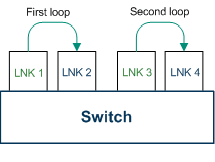
Quite how the signalling would work in this situation is somewhat unclear. However, it is possible to do it with just the one signalling link, provided care is taken to assign the cics correctly.
One possible method would be to have LNK1 using cics in the range 1 to 31 (based on the timeslots) and then to have the rest shifted up by 32, so LNK2 would be 33 to 63, LNK3 65 to 95 and LNK4 97 to 127.
This would lead to a vssp.config file which looks like:
connect 1/2/1 to 1/2/33 for 31 except 15.
connect 1/1/65 to 1/2/97 for 31.
This assumes:
- The UCAI has point code 1 and the attached switch point code 2
- timeslot 16 of LNK1 carries the signaling.
Multiple point code fix
Another possible option to work around routing problems in an attached switch, is to use multiple point codes on the attached switch. This means a switch may be able to support multiple links between itself and the UCAI.
These links may have different sets of point codes at the switch end. In this case, calls can be routed out from the switch to the UCAI from one point code, and be sent back into the switch from the UCAI on another point code.
Example:
If the UCAI has point code 1 and the switch has point codes 2 and 3, our network diagram would look something like this diagram.
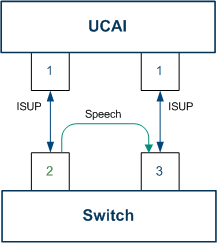
Note: The major difference between this and the ‘per link’ fix is there are now two signalling links involved. The signalling for the traffic from the switch to the UCAI uses one link, while the signalling for the traffic coming from the UCAI to the switch uses the other.
Routing should be configured so this is the case. All traffic to the UCAI should be routed out of the switch’s point code 2 link, to the UCAI’s point code 1. No traffic should be routed out of the switch’s point code 3.
A hypothetical mml command might be of the form:
ROUTE:PREFIX=0800,OPC=2,DPC=1;
Both signalling links must also be configured so they can send signalling information. This is usually a lower-level operation than setting up routing information. The configuration for UCAI only requires connecting the inputs to the outputs:
connect 1/2/0 to 1/3/0 for 32 except 0 and 16.
This assumes timeslot 16 carries the signalling on both the links.
Two switch fix
This method solves the problem of dealing with routing issues, by placing the UCAI between two switches (called ‘A’ and ‘B’ in this example).
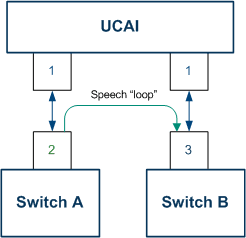
In this case, UCAI is simply modifying the signalling on an otherwise ordinary link between two switches. The timeslots associated with link management and speech (usually, all except 16) are left intact. UCAI takes the signalling out to be processed.
To implement this method, configure all the nodes to have their signalling point codes allocated according to the signalling requirements.
In the example:
- switch ‘A’ talks with its point code of 2 to a remote point code of 1
- switch ‘B’ talks with its point code of 3 to a remote point code of 1, and
- UCAI talks with its point code of 1 to both 2 and 3.
Switch ‘B’ is configured to route no calls to point code 1 and switch ‘A’ is configured to route calls to UCAI to point code 1.
This configuration can be performed on either a point code or a link basis (as illustrated in the previous examples). There is no requirement for excluding any timeslots from use (apart from the management and signaling ones, usually 0 and 16).
Configure UCAI with just 30 incoming and outgoing circuits, as follows:
connect 1/2/0 to 1/3/0 for 32 except 0 and 16.
Configuring UCAI
The following two case studies illustrate the configuration modes of the UCAI.
Loop back UCAI
A GSM mobile operator has invested in a network that does not support CS-1 IN features. To allow it to provide a prepaid function, the operator deploys a service node solution that requires all prepaid calls to be trunked to the service node platform for service logic and then back to the eventual destination.
This solution has obvious cost and scalability issues, but allows entry to the emerging prepaid mobile market. The operator is caught out by the unforeseen rapid growth of prepaid mobiles combined with the drastic reduction in charges due to strong competition. He now finds that the solution is prohibitively expensive and the limit of the solution’s scalability is reached.
Two UCAIs are installed (co-resident on hardware with prepaid service logic SLC), connected to the operator’s SS7 network through STPs. Loop-back trunks are deployed on each of the operator’s mobile service switching centers (MSC), and signalling for these trunks is routed to UCAIs. The GSM HLR (Home Location Register) is configured with a service flag, to route calls from prepaid mobiles to UCAI trunks, allowing service logic to be invoked.
For mobile to mobile calls, the eventual destination of the call is not known, so routing between switches may be counter-productive, since the destination switch may need to route the call back or on to another switch. A possibility exists that, for calls to fixed phones or other mobile operators’ phones, the call could be triggered at the point of interconnect between the operators using an in-line UCAI. This would reduce the number of loop-backs required. However, the complexities of configuring switch routes that are based on calling party (being prepaid) and called party (whether fixed or other operator mobile), are considered too complex and costly in terms of man-power to be worth the saving in loop-back trunks.
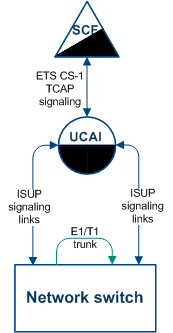
Loop back UCAI example
This example shows a loop-back UCAI configuration. This configuration is optimal for triggering services:
- That often result in the call being terminated on the same switch from which it originated
- When the eventual destination for the call is unpredictable
In line UCAI
An application service provider (ASP), offering advanced services to other operators via their own switch, wishes to offer services beyond the capabilities of the AIN build of software currently available on the switch. The vast majority of the ASP’s traffic originates from other networks, and traverses their switch to offer the service and route the call.
In this case, in-line UCAIs are very helpful, as most of the traffic is via points of interconnection. A UCAI placed on the signalling line of the other operator’s switch and the ASP’s network can control all incoming calls, avoiding loop-backs on the ASP switch entirely. Some loop-backs may be required for traffic originating on the ASP’s network.
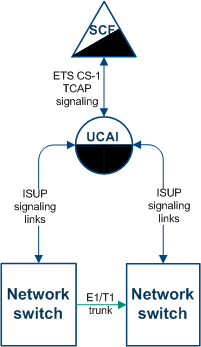
In line UCAI example
This example shows an in line or inter-switch UCAI configuration. This type of configuration is optimal for calls for which the vast majority of calls requiring UCAI processing originate from, or are eventually routed to, a network address that is not on the originating network switch, but which can be efficiently reached via the destination network switch.
Example: This diagram shows a network where:
- the originating switch is a local exchange (end office)
- the destination switch is a trunk level or international switch (central office), and
- the service to be triggered via the UCAI is a national or international freephone service.
Configuring IN Call Model Triggers
This introduces the generic configuration requirements of the Convergent Charging ControllerConvergent Charging Controller IN Call Model.
The Convergent Charging Controller IN Call Model is not a separate product, rather it is a set of libraries that is bound into a final usable interface (such as the UCA-ISUP).
Environment variables
This table describes the UNIX shell environment variables to be configured.
| Environment Variable Name | Description | Example Value |
|---|---|---|
| TDP_DEFINITIONS | Defines the full path name of the Trigger Detection Point definition file. | /IN/service_packages/SLEE/etc/tdp.conf |
Trigger detection point (TDP) definition file
The tdp.conf file has two sections:
- A number of configuration parameters.
- The trigger tables used to determine when to trigger a call to the SCF.
Example: This text shows an example tdp.conf file:
# A commentKEEP SDETC RULES=6 33 1 3 request all 123 64 2 4
notify all 222 keep3 1 3 request 2:122 3:222 5 keep
Note: All lines starting with # are treated as comments. If no TDP definition file is defined, a default action is taken where:
- ALL calls are triggered to the SCF with a service key of 1 (one) and a trigger point of 3 (analyzedInformation.)
- None of the global configuration parameters are considered set.
Global configuration parameters
The following configuration parameters may be set once on individual lines in the TDP definition file.
| Global Parameter | Description |
|---|---|
| KEEP SD |
If defined ALL all stop digits (defined by the BCD digit ’F’) on the end of called party numbers are kept in the called party number. By default the stop digit is stripped from ALL triggered numbers. |
| CAMEL |
This parameter is intended for CAMEL testing purposes only and should not be defined under normal usage. If defined, the called party number is also copied into the intialDP's calledPartyBCDNumber CAMEL parameter. The NOA of the called party number becomes the BCD number type. |
| ADDITIONALNUMS |
If defined, the IN Call Model will request all additional numbers available from the underlying protocol and insert them into the InitialDP message sent to the SLC. All these additional numbers are placed into a G8 extension in the InitialDP except any additional calling party number that is placed in the additionalCallingPartyNumber field. |
|
ETC RULES= c or ETC RULES= c s |
If defined then additional EstablishTemporaryConnection (ETC) rules are used. If the integer c is defined, the correlationID in all ETC messages from the SCF are appended on to the end of the assistingSSPIPRoutingAddress that is used, the digits are padded to a width of c digits. If s is also defined, then the scfID of the ETC is also appended on afterwards in the same way. For example: With "ETC RULES=6 4" and an ETC message with: assistingSSPIPRoutingAddress =1111, correlationID =55, scfID =0x42 Then the actual assistingSSPIPRoutingAddress used will be "11110000550042". |
| USER LIB = library | If defined the call model will use the user written shared object library specified by the full pathname library when dealing with ApplyCharging operations. |
| AC=a,b,c.... | Sets the TCAP application context used by the call model to the comma separated list of OIDs supplied. |
| ORIG_PC= pc |
If defined, all InitialDPs will be sent with an SCCP calling party (origination) address that includes a Point Code defined by the integer pc. If not defined, and ORIG_SSN and ORIG_GT are not defined, all InitialDPs will be sent without an SCCP calling party address. Note: This value may be defined in hex using a prefix of 0x. |
| ORIG_SSN= ssn |
If defined, all initialDPs will be sent with an SCCP calling party (origination) address that includes a subsystem number defined by the integer ssn. If not defined, and ORIG_PC and ORIG_GT are not defined, all InitialDPs will be sent without an SCCP calling party address. |
|
ORIG_GT=1, n, addr or ORIG_GT=2, t, addr or ORIG_GT=3, t, p, addr or ORIG_GT=4, t, p, n, addr |
If defined, all initialDPs will be sent with an SCCP calling party (origination) address that includes a Global Title defined by the integers n, t, p and the number string addr. The initial value (1 to 4) identifies the Global Title type:
If not defined, and ORIG_PC and ORIG_SSN are not defined, all InitialDPs will be sent without an SCCP calling party address. |
| DEST_PC= pc |
If defined, all initialDPs will be sent with an SCCP called party (destination) address that includes a Point Code defined by the integer pc. Note: This value may be defined in hex using a prefix of 0x. |
| DEST_SSN= ssn | If defined, all initialDPs will be sent with an SCCP called party (destination) address that includes a subsystem number defined by the integer ssn. |
|
DEST_GT=1, n, addr or DEST_GT=2, t, addr or DEST_GT=3, t, p, addr or DEST_GT=4, t, p, n, addr |
If defined all initialDPs will be sent with an SCCP called party (destination) address that includes a Global Title defined by the integers n, t, p and the number string addr. The initial value (1 to 4) identifies the Global Title type:
|
| ACH WARN PERIOD=period | Sets the default ApplyCharging warning to occur period seconds before the end of the call. |
| ACH RESOURCE=ad |
Sets the default ApplyCharging warning announcement/tone to use the resource identified by the address digits ad. Note: This is only applicable if the underlying controlled call supports the ability to play announcements or tones. |
| ACH ANNOUNCE=messageId |
Causes the default ApplyCharging warning to use the announcement with message identifier messageId. Note: This is only applicable if the underlying controlled call supports the ability to play announcements or tones. |
| ACS TONE=id,dur |
Causes the default ApplyCharging warning to use tone with identifier id for a duration of dur seconds. Note: This is only applicable if the underlying controlled call supports the ability to play announcements or tones. |
Note 1
If none of these entries is defined all InitialDPs will be sent without an SCCP calling party address.
Trigger detection point definitions
After any global parameters have been set, the configuration file may take one or more trigger detection point (TDP) definitions.
Each line defines a single trigger; its trigger parameter values that get sent and the conditions under which it gets sent.
Each line takes the following form:
tdp svcKey eventType msgType cgPn cdPn [wild] [keep] The table below defines the meanings and forms of these parameters.
| Global Parameter Value | Type | Description |
|---|---|---|
tdp
|
integer |
This integer value defines the point that the TDP is triggered at. Together with See the TDP event type table for a list of valid values and meanings. |
svcKey
|
integer | This parameter defines the serviceKey value that will be inserted into the initialDP message when this trigger fires. |
eventType
|
integer |
This parameter defines the eventTypeBCSM value that will be inserted into the InitialDP message when this trigger fires. See the TDP event type table for a list of valid values and meanings. Generally this will be the same value as
|
msgType
|
request or notify | This parameter defines whether the TDP is sent as a TDP-R (request) or TDP-N(notify). Generally request is used here. |
cgPn
|
num or nat:num or all |
This parameter defines the calling party numbers that will trigger the TDP. Together with
If all is defined then ALL calling party numbers will match. |
cdPn
|
num or nat:num or all |
This parameter defines the called party numbers that will trigger the TDP. Together with
If all is defined then ALL called party numbers will match. |
wild
|
integer |
This optional parameter defines the number of digits that must be present in the called party numbers before the TDP will trigger. Together with If set the trigger will not fire until the called party number has this number of digits.
Note: The |
keep
|
- | If this optional flag is defined then all numbers triggered by this TDP will keep their stop digits (if they have one). |
TDP event type values
The following table defines the list of TDPs as defined by the CS-1 standard. It also defines the point at which the trigger will be instantiated by the Convergent Charging Controller IN Call Model.
| TDP | CS-1 Trigger Name | Call Model TDP Creation Point |
|---|---|---|
| 1 | origAttemptAuthorized | digitsReceived |
| 2 | collectedInfo | digitsReceived |
| 3 | analyzedInformation | digitsReceived |
| 4 | routeSelectFailure | released (cause != 16, 17, 18, 19, 21 or 31) |
| 5 | oCalledPartyBusy | released (Aparty, cause==17) |
| 6 | oNoAnswer | released (Aparty, cause==18, 19 or 21) |
| 7 | oAnswer | answered(Aparty) |
| 8 | oMidCall | not supported |
| 9 | oDisconnect | released (Aparty, cause==16 or 31) |
| 10 | oAbandon | released (Aparty, cause==16 or 31) |
| 12 | termAttemptAuthorized | digitsReceived |
| 13 | tCalledPartyBusy | released (Bparty, cause==17) |
| 14 | tNoAnswer | released (Bparty, cause==18, 19 or 21) |
| 15 | tAnswer | answered(Bparty) |
| 16 | tMidCall | not supported |
| 17 | tDisconnect | released (Bparty, cause==16 or 31) |
| 18 | tAbandon | released (Bparty, cause==16 or 31) |
| 100 | n/a | ringing (Aparty) |
| 101 | n/a | ringing (Bparty) |