1 System Overview
This chapter provides a high-level overview of the application. It explains the basic functionality of the system and lists the main components.
It is not intended to advise on any specific Oracle Communications Convergent Charging Controller network or service implications of the product.
UCAI Introduction
The Universal Call Agent for ISUP (UCAI) is a signaling element which provides Intelligent Network functionality, without having to upgrade or replace non-SS7 capable switches.
It does this by using fixed connections between incoming and outgoing calls.
UCAI controls call signaling, while internally looping the speech circuits of the call. Without the heavy load that speech traffic creates, UCAI is able to handle more calls than a service node solution.
Features
Using only the Call Set-Up Protocol ISUP, it can offer:
- Advanced number translation services such as Free phone and Number portability
- Call monitoring services such as Prepaid
Features include:
- Support for standard protocols (INAP, ISUP)
- Support for all ISUP messages, including maintenance messages (for example: blocking, unblocking, reset, and circuit group messages).
- Provides basic (CS1) IN functionality
- Leg control can be used for more advanced solutions
- Can originate both legs of a call (for example, a call can be originated from a web page)
- Each transient switch can have its own UCAI for increased network performance and resilience
- Failover and load balancing can be easily supported by configuring the network routing to send messages between mated UCAIs
- INAP between UCAI and SLC can be over TCP/IP (reducing signaling costs)
- UCAI runs on low cost general purpose hardware
Network architecture
This diagram shows how UCAI is installed within a network. There may be one or more UCAI, each connected to one or more exchanges.
The UCAI communicates with the SCF over SS7, using either ETSI/ITU-T INAP or AIN0.x. An operator may manage its configuration and alarms by SMS, or via a Q.3 agent using Q.751.
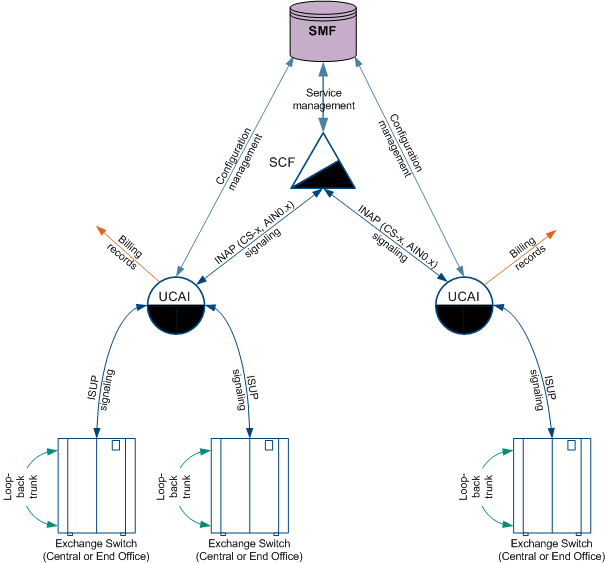
Note: Although the UCAI is shown as a separate physical entity in this diagram, it may also co-exist on the SLCs. If so, it will still communicate with the SCF over INAP (though this may not leave the SS7 stack).
Call processing
UCAI achieves SSP functionality by:
- Effectively splitting a single physical switch into 2 logical switches.
- Using the routing plan of the network, the UCAI appears as another Transient switch to the original switch for signaling routing purposes.
- Voice circuits are looped back to provide the speech path.
UCAI uses ISUP to control calls made to looped-back ISUP speech trunks.
- Each speech circuit going out of the switch has a permanently mapped circuit going into the switch.
- Consequently, the UCAI can make a call on the egress circuit that is effectively a continuation of the original call (even if mapped to a destination determined by an SLC via an INAP protocol).
UCAI controls processing of the whole call, or control of an individual leg.
- It can be used to implement most IN services.
- The type of processing is specified on a per service basis.
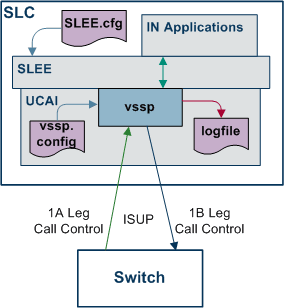
UCAI Operation - Loop Back Mode
Here is an example of how UCAI works in its simplest configuration. A single incoming circuit and a single outgoing circuit.
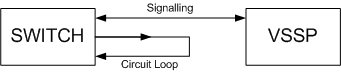
As shown in the example, the only actual connection to UCAI is the signaling link. No speech paths are routed. All signaling, for both the incoming and outgoing circuits on the loop, are carried on the signaling link. The speech path is looped with very low visibility to the switch. This may be achieved by using a static configuration of the switch matrix, or by an external piece of hardware. In either case, the switch's call process is unaware of the loop.
Calls to UCAI must only be routed down an incoming leg. Calls routed down a UCAI incoming leg that are not intended for UCAI, are still sent to the SCF for processing. This almost always results in that call being rejected.
Calls routed to a UCAI outgoing leg are rejected.
A full understanding of this is essential to correct configuration of a UCAI into a Telco’s network.
Call processing
The following steps describe what happens when a call arrives on the incoming leg to the UCAI.
Note: This process description assumes the network is configured as described above.
- The call is routed to UCAI.
Notes:
- Before this can happen, the external network must have been correctly configured to route the call into UCAI.
- The last part of the host network on which the call appears is the switch which is directly connected to UCAI. This is the switch which sends the ISUP IAM message to UCAI, indicating the call is being made.
- The specific circuit (that is, timeslot) which the call arrives on must be specified as “incoming”. If a call arrives on a leg designated as "outgoing", it will be rejected.
- UCAI queries an SCF to determine how the call is to be processed. This example assumes a simple number translation (for example, translating a free or premium rate phone number into its final destination).
- UCAI sends an outgoing ISUP IAM message on the outgoing leg that corresponds to the incoming leg on which the call arrived. The IAM contains the translated number. It may also have other parameters modified by the SCF. UCAI automatically selects a circuit on to route the outgoing call on. Because it contains no switch matrix, the only circuit the call's speech can be present is the one to which the incoming leg is looped.
- Call processing continues as it would with any other SSP. The ISUP messages are acted on by the SSP under SCF control, exactly as would happen with a conventional SSP. The SCF is unaware UCAI is different from any other sort of SSP.
Important installation planning
In order to correctly plan, install and configure a working installation you must be aware of the following issues:
- Signaling
- Loop Back
- UCAI configuration
These issues are discussed further below.
Signaling
Signaling configuration is very important to the correct functioning of UCAI. The example network configuration above only has a single signaling link. That link is the only connection between UCAI and the attached network.
Signaling for both the incoming and outgoing legs is carried on the same link. This can cause some complex issues for the configuration of the attached switch, and these must be carefully addressed.
The signaling link is set up in a completely standard manner, with point codes allocated to both ends and an agreement on the allocation of cics to specific timeslots. However, the two circuits involved are looped without the switch's knowledge. This has a major effect on the routing policy that must be configured on the attached switch.
In the example, two circuits are used. However, the switch may only make calls to the UCAI down the incoming leg. This requires the switch to be configured so routing is allocated not only on a point code basis (which permits the switch to route calls down any circuit), but also on a per circuit basis (so that calls are only routed down those circuits designated as "incoming" to the UCAI).
The details of this are highly switch-specific, but must be provided to ensure correct operation.
Configuration example
This example extends the previous example.
Assumptions:
- UCAI has point code 1
- Switch has point code 2
- Single incoming circuit is assigned cic 1
- Single outgoing circuit has cic 2
- Calls should be processed with the prefix 0800
Required Configuration:
The switch must be configured so it will route calls with the 0800 prefix to point code 1, but only on cic 1. A switch-specific example is an mml command of the form:
ROUTE:PREFIX=0800,DPC=1,CICS=1;
This command indicates calls prefixed with 0800 should be sent to point code 1, and the only available cic is 1.
If the switch does not offer this degree of routing control, there are several options discussed in Routing Options .
Loop back
Ideally, the loop back is performed by the switch. However, it must be possible to do this without interfering with the switch's call processing. If this is impossible, some external form of loop back device must be employed. This may be possible with whatever device is used to extract the signaling information and pass it onto the UCAI.
UCAI configuration
UCAI must also be configured. Given the point codes and cics detailed in Configuration , the configuration file need only contain:
connect 1/2/1 to 1/2/2.
Note:
The full stop at the end of every configuration statement is essential.Throttling
UCAI uses a sliding window of one second to measure load. If an initial address message (IAM) arrives less than one second after the one <CAPS limit> IAMs before it, it is rejected.
Example:
UCAI is set with a limit of 20 CAPS. This means in any single second window UCAI will allow 20 call attempts and the 21st will be rejected.
- If the IAMs arrive exactly at 1/20th of a second intervals, there will be 20 CAPS.
- If an IAM arrives even one microsecond 'early' it causes a peak of 21 CAPS and is rejected.
So, even if traffic is sent at 20 CAPS and a 20 CAPS limit is set, the occasional call will still be rejected.
Supported Messages Overview
This table describes UCAI's main message groups:
| Component | Description |
| Call Processing |
The basic call processing package is composed of a group of simple messages to progress the call. For more information, see Call processing messages below. |
| Additional Call Set-up |
Call setup may be made more complex by the use of extra, more complex messages to progress the call. For more information, see Additional call setup messages below. |
| Continuity Testing |
Some networks support use of ISUP’s continuity testing procedures. UCAI is able to handle all such situations correctly. For more information, see Continuity testing messages below. |
| Maintenance |
The UCAI supports single circuit maintenance messages, or group messages, to allow for blocking, unblocking, or resetting of circuits. For more information, see Maintenance messages below. |
Call processing messages
This table lists the basic call processing messages which are supported by the UCAI.
| Message Type | Description |
|---|---|
| Initial Address Message (IAM) |
The Initial Address Message has five mandatory parameters and 42 optional parameters (for more information, see Table 32 of ITU-T. Q.763, Signalling System No. 7 — ISDN User Part formats and codes). The mandatory parameters are:
The UCAI handles all the mandatory and optional parameters. However, some filtering may take place, in order to ensure correct operation of the UCAI. In addition, certain pathological values for some parameters may cause rejection of the call in some cases. Note: If a hop counter occurs on the incoming leg and its value is zero, the call is rejected. If its value is greater than zero, the value is decremented and used on the outgoing leg. If no hop counter was provided, one is inserted with a default value. Use of the hop counter is very important. It avoids the possibility of a routing error in the network resulting in a ‘circular call’ that ‘bounces’ between the UCAI and its attached switches. Such an occurrence is a very dangerous network event, as it consumes very large amounts of processing power and signaling bandwidth. |
| Address Complete Message (ACM) |
The Address Complete Message has one mandatory parameter and 19 optional parameters (for more information, see Table 21 of ITU-T. Q.763, Signalling System No. 7 — ISDN User Part formats and codes). The mandatory parameter is backward call indicators. As with the Initial Address Message, some filtering of the message parameters may take place. |
| Answer (ANM) |
The Answer message has no mandatory parameters and 21 optional parameters (for more information, see Table 22 of ITU-T. Q.763, Signalling System No. 7 — ISDN User Part formats and codes). As with the Initial Address message, some filtering of the message parameters may take place. |
| Release (REL) |
The Release message has one mandatory parameter, and up to seven optional ones (for more information, see Table 33 of ITU-T. Q.763, Signalling System No. 7 — ISDN User Part formats and codes). The mandatory parameter is cause indicators. As with the Initial Address message, some filtering of the message parameters may take place. |
| Release Complete (RLC) |
The Release complete message has one optional parameter (for more information, see Table 34 of ITU-T. Q.763, Signalling System No. 7 — ISDN User Part formats and codes). The optional parameter is cause indicators. As with the Initial Address message, some filtering of the message parameters may take place. |
Additional call setup messages
Call setup may be made more complex by the use of some of the more complex messages to progress the call. This table describes these message types supported by the UCAI.
| Message type | Description |
|---|---|
| Subsequent Address Message (SAM) |
The Subsequent Address Message has one mandatory parameter (for more information, see Table 35 of ITU-T. Q.763, Signalling System No. 7 — ISDN User Part formats and codes). The mandatory parameter is subsequent number. The UCAI will handle use of SAM messages (also known as ‘overlap’ sending). However, the service itself should be made aware that this form of signalling may be in use, as it can confuse some services, if they assume all the digits are to be presented at once. This can usually be avoided by careful use of network, UCAI and service configuration, but care should be taken to avoid it. In addition, use of SAM or overlap signalling results in increased network traffic and processing overhead. It should therefore be avoided, wherever possible. |
| Call Progress |
The Call Progress has one mandatory parameter and 25 optional ones (for more information, see Table 23 of ITU-T. Q.763, Signalling System No. 7 — ISDN User Part formats and codes). The single mandatory parameter is event information. |
| Connect |
The Connect message has one mandatory parameter and 19 optional ones (for more information, see Table 27 of ITU-T. Q.763, Signalling System No. 7 — ISDN User Part formats and codes). The mandatory parameter is backward call indicators. The UCAI treats the Connect message in a very similar manner to an Address Complete followed by an Answer. |
| Identification Request | The Identification Request message has no mandatory parameters and three optional ones (for more information, see Table 47 of ITU-T. Q.763, Signalling System No. 7 — ISDN User Part formats and codes). |
| Identification Response | The Identification Response message has no mandatory parameters and seven optional ones (for more information, see Table 48 of ITU-T. Q.763, Signalling System No. 7 — ISDN User Part formats and codes.). |
| Information Request |
The Information Request message has one mandatory parameter and three optional ones (for more information, see Table 31 of ITU-T. Q.763, Signalling System No. 7 — ISDN User Part formats and codes). The single mandatory parameter is information request indicators. |
| Information |
The Information message has one mandatory parameter and six optional ones (for more information, see Table 30 of ITU-T. Q.763, Signalling System No. 7 — ISDN User Part formats and codes). The single mandatory parameter is information indicators. |
| Suspend and Resume |
The Suspend and Resume messages have one mandatory parameter and one optional (for more information, see Table 38 of ITU-T. Q.763, Signalling System No. 7 — ISDN User Part formats and codes). The single mandatory parameter is suspend/resume indicators. The UCAI processes Suspend and Resume requests as required by §9.1.3 of ETR 164, Integrated Services Digital Network (ISDN); Intelligent Network (IN); Interaction between IN Application Protocol (INAP) and ISDN User Part (ISUP) version 2. |
Continuity testing messages
Some networks support use of ISUP’s continuity testing procedures. UCAI handles the following cases correctly:
- Testing after an Initial Address message (this may occur after every IAM, or some form of statistical sampling may be employed).
- Testing an idle circuit.
- A call can be placed that is waiting for the results of a continuity test on a previous circuit.
Note: In theory, there should be no need for continuity checks in a modern network. The lower-level signalling should detect the failure of a speech or signalling link, and block use of those circuits. However, it can be useful for testing for correct configuration of the UCAI.
A major feature of the UCAI is speech circuits do not pass through it. Consequently, the UCAI (though able to detect failures in the signalling links) is unable to detect problems with the associated speech circuits. Instead it relies upon the attached switches to detect problems.
If the UCAI's speech circuits are mis-configured, the usual result is for the call to be made and appear to work (including billing) but no speech is heard.
Continuity testing can help guard against these problems. Periodic and/or statistical testing is recommended, unless the operator has taken great care in the configuration of the UCAI and its attached switches.
The UCAI handling of continuity testing is in accordance with §2.1.8 of ITU-T. Q.764, Signalling System No. 7 — ISDN User Part signalling procedures.
Continuity check request
The Continuity Check Request message has no parameters (for more information, see Table 39 of ITU-T. Q.763, Signalling System No. 7 — ISDN User Part formats and codes).
Use of CCR is only valid on idle incoming circuits, and the CCR message is passed onto the corresponding outgoing circuit.
Continuity
The Continuity message has one mandatory parameter and no optional ones (for more information, see Table 28 of ITU-T. Q.763, Signalling System No. 7 — ISDN User Part formats and codes).
The mandatory parameter is continuity indicators.
Maintenance messages
BThis table describes the single circuit and group circuit maintenance messages supported by UCAI.
| Message Type | Description |
|---|---|
| Single circuit maintenance messages |
Several single circuit maintenance messages are defined in ITU-T. Q.763, Signalling System No. 7 — ISDN User Part formats and codes. Those supported by the UCAI are:
None of these have any parameters. The functionality the same as is described in ITU-T. Q.764, Signalling System No. 7 — ISDN User Part signalling procedures, but with one addition imposed by the UCAI. As the UCAI ties incoming and outgoing circuit together, any blocking or unblocking coming into the UCAI on an outgoing circuit causes a similar message to be reflected on the corresponding incoming circuit. Similarly, if any problem occurs with an outgoing leg, the UCAI blocks the corresponding incoming leg, to avoid being given calls it cannot process. |
| Circuit group maintenance messages |
It is often more efficient to use one of the group messages defined in ITU-T. Q.763, Signalling System No. 7 — ISDN User Part formats and codes, than to use a number of the corresponding single circuit maintenance message. The UCAI currently supports the following group messages:
The functionality is the same as is described in ITU-T. Q.764, Signalling System No. 7 — ISDN User Part signalling procedures, but with one addition imposed by the UCAI. As the UCAI ties incoming and outgoing circuit together, any blocking or unblocking coming into the UCAI on an outgoing circuit causes a similar message to be reflected on the corresponding incoming circuit. Handling of some circuit group messages can be problematical in some networks. In addition, due to the potentially arbitrary nature in which incoming and outgoing circuits can be tied together for the UCAI, a circuit group block on an outgoing leg is repeated through to the incoming side, as a series of single circuit blocks. A similar technique is used in handling circuit group resets and unblocking. Therefore, the UCAI only sends circuit group messages in response to circuit group messages received. If the network does not support circuit group messages, none will arrive at the UCAI and so the UCAI will not use them in response. |
Overlap Sending
Overlap Sending or Signalling can be used in a fixed line environment where a call set up can begin even before the caller has dialed all digits of the intended destination number. This is achieved when the caller has dialed enough digits for an originating exchange using the Overlap Sending method, to determine the target exchange. The originating exchange packs the digits collected from the calling party so far, into an Initial Address Message (IAM) and sends it to the next exchange.
Subsequent digits dialed by the caller are contained within the Subsequent Address Message (SAM). Each new SAM contains additional digits dialed by the caller. UCAI invokes appropriate IN services within the call setup path based on predefined triggering rules.
Note: Overlap sending is not possible in a mobile environment since the calling party must dial all the digits of the intended destination before initiating a call setup attempt.
How Overlap Sending works
Here is an example of how UCAI supports the Overlap Sending method of setting up a call.
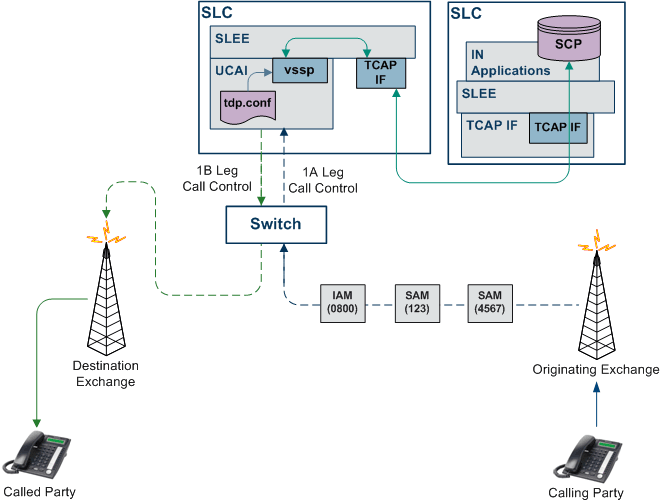
The originating exchange will attempt to set up a call once it has collected sufficient digits from the calling party to identify the next target exchange (tandem or ultimate destination exchange) in the call flow. It will generate an IAM (Initial Address Message) with all the digits the calling party has dialed until then, and route it along the network.
Subsequent digits dialed by the caller will be contained within the Subsequent Address Message (SAM). Depending on the caller's dialing speed, one or more SAMs may be generated. Each SAM will contain any new digits dialed since the last SAM (or the initial IAM) was sent.
IN services within the signalling path are activated based on the triggering rules used by UCAI. Currently, these triggering rules are defined in the tdp.conf file.
Triggering Rules
In the Overlap Sending method, the call setup begins even before the caller dials all the digits of the intended destination. However, in such a scenario, IN systems involved in the call signalling path cannot determine when to trigger the IN services. Currently, UCAI uses the triggering rules defined in the tdp.conf. This file is processed by the IN call model component of the UCAI.
UCAI triggers IN services when the incoming digits dialled so far trigger a matching rule in the tdp.conf. The decisive digits invoking the rule may be contained in:
- The IAM received from the originating exchange
- The IAM + one or more SAM messages received from the originating exchange
tdp.conf
Here is an example of the tdp.conf file.
KEEP SDETC RULES=6 33 1 3 request all 3:01473222
Stop digit
Typically, when the caller dials a local/national number, the originating exchange will lookup the configured numbering plan information to determine if sufficient digits have been dialed to identify the target exchange. If it recognizes the numbering pattern of the dialed digits, the originating exchange will insert a stop digit into the called number signaling sequence.
UCAI triggers the IN service when a stop digit is detected and an appropriate rule in tdp.conf is found. The stop digit may be contained in either of the following:
- The IAM received from the originating exchange, that is at the end of the IAM
- The IAM + one or more SAM messages received from the originating exchange, that is, at the end of the last SAM
SAM timer
Sometimes, due to a lack of numbering plans available, a local or transit exchange within a country may not correctly decipher the numbering pattern of the dialed digits (typically an international number). Consequently, the originating exchange fails to insert the stop digit. This results in the UCAI waiting an indefinite period of time for the overlap sequence to end, not knowing when to trigger the IN service. To safeguard against this situation, the UCAI is equipped with a timer, known as SAM timer. The SAM timer is used for initiating IN services when Overlap Sending is invoked for a number with an unrecognizable numbering scheme.
The UCAI waits for a fixed period of time to receive the first or next SAM in an overlap sequence before activating the IN services. When this timer has expired the UCAI assumes that the caller has completed the dialing sequence for the intended destination number and ignores any additional dialed digits. This means no new digits will be accepted from the caller/network after the timer expires.
The UCAI starts the SAM timer for a call when it receives an IAM not containing the stop digit. The SAM timer is restarted each time a new SAM is received for the call.
Note: The SAM timer will not be started if the digits contained within the IAM or the SAM are sufficient for the UCAI to trigger an IN service.
Forced trigger scenario
If the SAM timer expires and an IN Service has not been triggered, then the UCAI adds a stop digit to the dialed overlap sequence. This is known as a "forced trigger" scenario.
One of the following results may occur in a forced trigger scenario:
- A matching rule in the tdp.conf file is found which triggers an IN service
- A matching rule is not found and the UCAI releases the call by sending a REL message on the A-leg
IN Service Processing
After an IN service is triggered, it returns any one of the following results:
- Continue
- Connect ("cut and paste" option not set)
- Connect ("cut and paste" option set)
- ETC (treated as 'Connect' by UCAI)
- Release
- Error
After the UCAI has sent an IAM on the B-leg of the call and BEFORE an ACM message is received from the B-leg, it is possible that additional SAM messages may be received on the A-leg.
Before an IAM is sent on the B-leg
This table describes how the UCAI treats different message scenarios before an IAM is sent on the B-leg.
| Scenario | Result |
|---|---|
| Additional digits are received in SAM messages while IN service is treating the request. | UCAI will store the digits. |
| In a forced trigger scenario, additional digits are received in SAM messages while IN service is treating the request. | UCAI will ignore the digits. |
| 'Continue' message is received from IN service. | All digits received by UCAI (including digits received/stored when the IN service was processing the call) will be used in the calledPartyAddress field of the IAM sent on the B-leg. |
| 'Connect' message is received from IN service with the "cut and paste” field NOT set. |
The number specified in the destinationRoutingAddress field of the 'Connect' message shall be used in the calledPartyAddress field of the IAM sent on the B-leg Any additional digits received in the period when the IN service was processing the call will be ignored. |
| 'Connect' message is received from IN service with the "cut and paste” field set. |
All digits received by UCAI (including digits received/stored when the IN service was processing the call) will be used. Based on the options set in the “cut and paste” field, the required number of digits will be cut from the beginning of the calledPartyAddress received in the IAM and all the SAM messages. The cut number is then pasted to the number received in the destinationRoutingAddress. The resultant number from the cut and paste operation will be used in the calledPartyAddress field of the IAM which is sent on the B-leg. Note: In a forced trigger scenario any additional digits received during the IN service processing will be ignored and not be included in the resultant number when the "cut and paste" field is set. |
| An 'ETC' operation is received from IN service. |
The number specified in that operation will be used in the calledPartyAddress field of the IAM sent on the B-leg. Any additional digits received in the period when the IN service was processing the call will NOT be used in the calledPartyAddress and will be ignored. |
After an IAM is sent on the B-leg
After the UCAI has sent an IAM on the B-leg of the call and BEFORE an ACM message is received from the B-leg, it is possible that additional SAM messages may be received on the A-leg. Any SAM messages received on the A-leg of the call after the IAM has been sent on the B-leg of the call shall be transparently sent onto the B-leg of the call.
The following cases are some exceptions to this transparent sending:
- ACM is received on the B-leg.
- IN services issues a 'Connect' message with the "cut and paste" option not set.
- IN services issues an 'ETC' message.
- IN service was triggered in a forced trigger scenario.
In case 2 and 3, the UCAI will add a stop digit to the number if one is not already present. The UCAI then ignores all subsequent messages if:
- A stop digit is encountered on either the IAM or SAM message sent on the B-leg
- The IN service was triggered in a forced trigger scenario
If the UCAI has been instructed by the IN service to route the call to a totally different number/address than as intended by the caller, the SAM being relayed onto the B-leg may have an undesirable affect on the destination (or transit exchange).
For example: The IN service routes the call to an IVR number where the caller was expecting to be connected to an international party.
Transparent Passing of ISUP Messages
During call setup, the UCAI allows certain messages to be transparently passed between the A and B legs, even after the call has been established.
Here, the following ISUP messages are notable as examples:
- The call progress message (CPG) can be passed transparently between the A and B leg of a call after it has been established, that is, after the ANM message is received from B-leg.
- Facility (FAC) messages received on either A or B leg can be transparently passed onto the other leg without triggering the IN service.
Handling Called Party Suspends
In this situation, the called party suspends a call by replacing the receiver back on the hook, in order to change the physical phone that is currently connected to the call. The called party then physically attends the call from another phone on the same line. The UCAI handles this functionality by providing an appropriate safeguard that allows the B-leg to stay connected, even if the call has been suspended for a specific period of time.
On receiving a SUS (suspend) message on the B-leg, the UCAI starts a 'suspend' timer for the call. Currently, the T6 timer is implemented as the suspend timer. The UCAI will stop the suspend timer on receiving a RES (resume) message on the suspended B leg.
When the suspend timer expires, the UCAI sends a REL message on the B-leg of the call and waits for a RLC message. On receiving the RLC message, the IN call model is notified that the B-leg has been disconnected. If the IN service has armed an event for B-leg disconnect, it will be informed by the IN call model that the called party has disconnected. It is possible to configure the length of time used by the suspend timer in seconds.