1 System Overview
What is USSD Gateway?
Introduction
The USSD GW provides the following functions:
- interaction using USSD messages between the subscriber's handset and
the platform:
- processing fast access, single string (typeahead) requests
- presenting information to mobile users using USSD messages
- complex interaction through navigation of menus based on user input (interactive USSD)
- IMSI Management:
- different services can be configured for different IMSI prefixes
- barring by IMSI or IMSI prefix
- logging forbidden attempts to use the service
- tracing for all calls from an IMSI or IMSI prefix
- CDR Viewing screen provides full information about a call and provides EDR searching support for both USSD phase 1 / MAP1 and USSD phase 2 / MAP2, and roaming USSD Session Control
- separate control plans for charging and call monitoring
- with Location Capabilities Pack, session can be initiated directly back to a roaming subscriber.
Control plans
Advanced Control Services (ACS) and the ACS Control Plan Editor (CPE) provide GUI tools to create control plans for USSD-based services. You can use a rich suite of feature nodes in USSD control plans, which enable decision making, interactive dialogue and more.
For more information on managing control plans, see CPE User's Guide. For more information about the USSD GW feature nodes, see Feature Nodes Reference Guide.
USSD Interactive Services Gateway
The USSD Interactive Services Gateway (UIS) enables operators to provide interactive menu-based portal services to end users.
UIS translates between the network USSD messages received from handsets to the INAP messages used to communicate with ACS. UIS also determines the service that should handle in the incoming service initiation request.
UIS enables operators to provide a range of services using USSD messages from (and to) a subscriber's handset. Interaction is configured using ACS control plans. UIS can also process fast access, single-string requests to trigger platform functionality, including:
- Subscriber account detail reports (with CCS)
- Voucher recharges (with CCS), and
- USSD Roaming call back.
USSD Gateway Portal Service
USSD GW's USSD Portal Service (UPC) is an optional part of USSD GW that provides extended interactivity through the UPC Portal Screens and USSD GW feature nodes.
The UPC Portal Screens are used to extend the interactive USSD menus created using the UIS screens (for example by providing menu branching).
Handset integration
USSD GW uses the USSD protocol as defined by GSM phase 1 & 2. This means the majority of subscribers can use the menus without needing to upgrade their handsets.
This approach is an alternative delivery mechanism to WAP, as WAP support is still limited to middle- and higher-tier handsets.
Triggering to different services
Using the USSD GW SMS screens, you can configure USSD GW to trigger USSD messages containing different trigger prefixes to different services. Each trigger corresponds to a different service in ACS.
This table shows an example of setting up calls from different prefixes to trigger different ACS services.
-
In the USSD Gateway Base Configuration Screens, Trigger Prefix tab, configure two records:
- Trigger1 has a prefix of *123*.
- Trigger2 has a prefix of *124*.
-
In the USSD Gateway Service Configuration Screen , configure two records:
- ServiceTrigger1 uses Trigger1 and has a Dest Service Key of 123.
- ServiceTrigger2 uses Trigger2 and has a Dest Service Key of 124.
-
In SLEE.cfg, ensure there are SERVICE and SERVICEKEY entries for both service keys.
Example:
SERVICEKEY=INTEGER 123 CallBack
SERVICEKEY=INTEGER 124 CollectCall
SERVICE=CallBack 1 slee_acs CallBack
SERVICE=CollectCall 1 slee_acs CollectCall
APPLICATION=slee_acs slee_acs /IN/service_packages/ACS/bin/ 1 1
-
In acs.conf, ensure there are ServiceEntry lines for each service key.
Example:
acsChassis
 ServiceEntry (CallBack,ccsSvcLibrary.so)
 ServiceEntry (CollectCall,ccsSvcLibrary.so)
Notes:
- These ServiceEntry lines do not show the source selection configuration which would be expected for a CallBack or CollectCall service. For more information about source selection, see ACS Technical Guide.
- For more information about how the service entries are processed by CCS, see CCS User's Guide, Capabilities tab.
Callback
Introduction
USSD GW can be used to enable USSD message-initiated call back. There are a number of ways this can be configured, but the main elements are:
- subscriber initiates the call back using a USSD message
- the system initiates the A leg of the call, then
- the system completes the call by initiating the B leg.
Callback initiation
The subscriber can initiate a callback using:
- a single string which is parsed by the ussdgw process, or
- an initial message followed by interaction defined in a control plan.
A leg
A-leg call initiation is done from a control plan using ACS's Call Initiation feature node. The Call Initiation node attempts to establish the A leg of the call by:
- arming the switch to inform the platform when the A party answers the call (by sending an RRBCSM (oAnswer)), and
- sending an Initiate Call Attempt (ICA) to the switch (the switch then sets up the call).
Note: The Call Initiation node can initiate a call with any destination number using any profile block or a hard coded value. The A leg is selected using the Call Initiation node's configuration.
Because the A leg setup is done in a control plan, any function which is available in the control plan can be used, including:
- checking subscriber's account state or balance, and
- normalising the calling party number.
After Call Initiation node is called, initiating control plan continues when the A leg has answered and the IDP been sent. Further processing should continue in the new call generated by the IDP.
For more information about the Call Initiation feature node, see Feature Nodes Reference Guide.
B leg
When the A party answers, the switch returns an ERBCSM (oAnswer) to the control plan and a new forked control plan starts. The new call can use any control plan functionality, including:
- monitoring the new call, and
- using a retrieved details (including MSRN) for charging.
The new forked call is responsible for connecting to the B leg (for example, by using an AT or a UATB node).
Control plan example
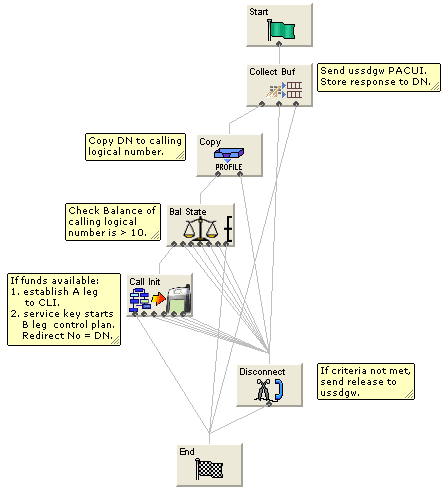
Here is an example of a control plan which provides a very simple call back based on a fast-access USSD string.
Note: This control plan only shows the call back functionality. To complete any validation or billing functions, additional configuration will be required.
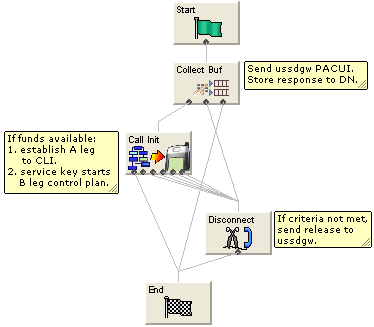
The Call Initiation node will start a simple control plan which connects the A leg based on the CLI. A second control plan is started when the A leg answers and a new IDP arrives at slee_acs with the service key from the Call Initiation node. The second control plan connects the B leg normally (for example by using an Attempt Terminate node).
For information about the message flows produced by this control plan, see USSD GW Technical Guide.
Handset Interaction
Introduction
Menus are created by presenting information to mobile users using USSD messages. The user navigates the menus by selecting options and sending back USSD messages (interactive USSD). Service can send specific messages for different services statuses.
Menus can be set up quickly using wizards. Menus can come from a number of sources, including ACS and CPE control plans. Advanced Control Services (ACS) and the ACS Control Plan Editor (CPE) provide GUI tools which enable the user to use a rich suite of Feature Nodes to define menus which enable decision making, interactive dialogue and more.
Language selection
Users can select the language they want to use for the call from a list of available languages which is defined by the operator.
Status messages
USSD GW can send status messages to a handset when:
- a subscriber's session is ended by the gateway (session cut off).
- a session is put in suspended mode (reconnect) (except when the handset is entering MAP 1 disconnect mode)
Notes:
- If there is no other status cause when the session ends, the display message will have a status cause that maps to “session ending”.
- When a session is suspended, the last display must be preserved otherwise it will always be overwritten with the status display.
UPS menus
In general, to use the concept of menu IDs within ACS, menu sets are provided which allow menus to be grouped together in a logical block that may represent a service or a type of service.
- USSD GW feature nodes control extended interaction (including menu branching) and other specific functions.
- Menu sets enable menus to be grouped in logical blocks.
Performance Reports
Description
Performance Reports are generated by the USSD GW application on the SCP. They are single line events that are only output as NOTICE-type Alarm messages.
These reports are designed to have minimal impact on the performance of the SCP. This includes the ability for the output of these reports to be disabled or only activated for specific USSD Trigger Prefixes.
Report timing
The report must be consistently aligned with the system clock on the SLC. To achieve this, only an integer value that can be computed to be a factor of 60 or 3600, must be used.
Example:
30 or
300
See Example values for a list of allowed values that can be specified to accurately align reports generation to the SLC system clock.
Warning: A warning message will be displayed if a value NOT divisible by 60 or 3600 is entered. This means the report is not aligned to the system clock and hence reports cannot be generated at fixed intervals.
Example values
This table highlights a list of example values for the Performance Report Period field on the Trigger Prefix tab and the corresponding time interval they will produce.
| Value | Interval |
|---|---|
| 30 | 30 seconds |
| 60 | 1 minute |
| 300 | 5 minutes |
| 900 | 15 minutes |
| 1800 | 30 minutes |
| 3600 | 1 hour (use for hourly reports) |
Accessing performance reports
Performance reports are generated as single-line alarm messages that can be viewed on one of the following:
- SMS in Operator Functions -> Alarm Management Panel
- SLC in the
ussdgwlog file
Example
Here are a few examples of Performance Report.
Example 1:
Feb 23 22:23:30.007958 cmnError(24758) NOTICE: USSD Performance:
Trigger Prefix '*999#' Period=11; Requests=5; Responses=5; Timeouts=0; Others=0;
Latency: Min=0.158024, Mean=0.165843, Max=0.177295
Example 2:
Feb 23 22:24:00.033720 cmnError(24758) NOTICE: USSD Performance:
Trigger Prefix '*999#' Period=30; Requests=23; Responses=22; Timeouts=0; Others=0;
Latency: Min=0.137390, Mean=0.161867, Max=0.219761
Example 3:
Feb 23 22:24:30.002919 cmnError(24758) NOTICE: USSD Performance:
Trigger Prefix '*999#' Period=30; Requests=2; Responses=3; Timeouts=0; Others=0;
Latency: Min=0.137340, Mean=0.152989, Max=0.174586
Example 4:
Feb 23 22:25:00.001234 cmnError(24758) NOTICE: USSD Performance:
Trigger Prefix '*999#' Period=30; Requests=12; Responses=12; Timeouts=1; Others=0;
Latency: Min=0.122345, Mean=0.154529, Max=0.174236
Result:
On the Trigger Prefix tab screen, the Performance Report Period is set to 30 seconds for each of the above examples. Therefore, the following timestamps are generated by the respective alarm message:
- Example 1: 22:23:30.007958
- Example 2: 22:24:00.033720
- Example 3: 22:24:30.002919
- Example 4: 22:25:00.001234