E6-2L Back Panel Features
The following figure shows the Oracle Communications Server E6-2L back panel and the location of status indicators (LEDs), connectors, and PCIe slots.
For information about how to interpret the status indicators (LEDs), refer to Oracle Communications Server E6-2L Service Manual.
Figure 3-2 E6-2L Back Panel Features
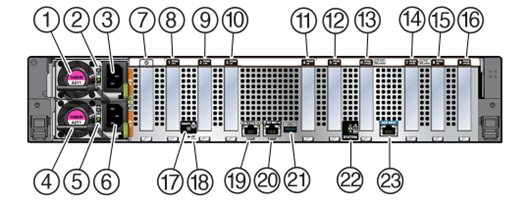
| Call Out | Description |
|---|---|
| 1 | Power supply (PS1) |
| 2 | Power Supply 1 (PS1) status indicators: Fault-Service Required LED: amber; AC OK LED: green |
| 3 | Power Supply 1 (PS1) AC Power Inlet (AC1) |
| 4 | Power supply (PS0) |
| 5 | Power Supply (PS0) status indicators: Fault-Service Required LED: amber; AC OK LED: green |
| 6 | Power Supply (PS0) AC Power Inlet (AC0) |
| 7 | (Oracle internal use only) Dedicated Root-of-Trust (RoT) card slot |
| 8 | PCIe slot 1 (PCIe5, x16 electrical interface) |
| 9 | PCIe slot 2 (PCIe5, x16 electrical interface) |
| 10 | PCIe slot 3 (PCIe5, x8 electrical interface) |
| 11 | PCIe slot 4 (PCIe5, x8 electrical interface) |
| 12 | PCIe slot 5 (x16 electrical interface) |
| 13 | PCIe slot 6 (PCIe5, x8 electrical interface, x16 electrical interface with MB PCIe Flyover cable) |
| 14 | PCIe slot 7 (PCIe5, x8 electrical interface with PCIe Flyover cable) |
| 15 | PCIe slot 8 (PCIe5, x8 electrical interface) |
| 16 | PCIe slot 9 (PCIe5, x8 electrical interface, x16 electrical connector) |
| 17 | LOCATE: Server Locate Button/LED |
| 18 | SP: Reset service processor (SP) |
| 19 | NET 0: Network (NET) 1GbE 100/1000BASE-T RJ-45 Gigabit Ethernet (GbE) port |
| 20 | NET MGT: Oracle Integrated Lights Out Manager (ILOM) service processor (SP) network management (NET MGT) 1GbE RJ-45 100/1000BASE-T port |
| 21 | USB 3.1 connector |
| 22 | SYSTEM: Fault-Service Required: amber; System OK: green. |
| 23 | SER MGT: Serial management (SER MGT) RJ-45 serial port |
Note:
Single-processor systems: PCIe slots 1-4 are nonfunctional in single-processor systems.Related Topics