MDM-Enabled Device Monitoring
In Oracle Enterprise Communications Platform (Oracle ECP), users can onboard different types of MDM-enabled devices as supported by the selected device profile, device operating system, and device connectivity type. Oracle ECP enables users to monitor and manage MDM-enabled devices according to the level of support provided through the external MDM.
Oracle ECP displays information for an MDM-enabled device in different sections of the Device Details page. The Ivanti Neurons for MDM Solution reports the following details to ECP for MDM-enabled devices when the information is available based on external platform capabilities for the device and operating system.
| Operating System | Operating System Version | Remaining Battery Percent | Storage Usage Percent | Compliance Status | Latitude | Longitude |
|---|---|---|---|---|---|---|
| Android | Yes | Yes | Yes | Yes | Yes | Yes |
| iOS | Yes | No | Yes | Yes | Yes | Yes |
| Windows OS | Yes | Yes | Yes | Yes | Yes | Yes |
MDM-Enabled Device Information
Administrators who manage Devices on Oracle Enterprise Communications Platform (Oracle ECP) can identify Mobile Device Management-enabled Devices (MDM) in Inventory and display Oracle ECP lifecycle states and device information that reflects activities performed on the MDM platform.
Administrators can review information for MDM-enabled devices in Oracle ECP as follows:
On the Device Inventory Page
| Identify table rows that describe an MDM-enabled device. | Check for a value of Yes in the MDM Enabled column. Click the Hide or Show Columns icon to add the MDM Enabled column. |
| Filter the table results to show MDM-enabled devices. | Click the MDM Enabled filter chip to add it to the Search field. Set the filter to Yes to display MDM-enabled devices. |
| Navigate to the Device Details page to drill down and see more device information. | Click the link in the Name column to navigate to the Device Details page. |
On the Device Details Page
The following table outlines the available MDM data fields, their descriptions, and where each can be found.
Table 6-1 MDM Data Fields and Locations in the Device Details Page
| Attributes | Details | Location |
|---|---|---|
| MDM Device Status |
|
More Information > Status tab |
| Compliance Status | Displays a value of Compliant or Noncompliant to indicate whether the device adheres to policy defined on the MDM platform. Policies and requirements for handling non-compliance in MDM-enabled devices vary by Global Business Unit (GBU) and customer. The GBU Administrator and ECP Administrator roles can take actions in the MDM platform to address non-compliance according to GBU guidelines. | More Information > Status tab |
| Device Location | The Latitude and Longitude values of the device's location. | More Information > Status tab |
| Remaining Battery Charge Percentage | Indicates the percentage of the battery's charge available. | Overview tab |
| Storage Usage Percentage | Indicates the percentage of storage capacity in use for the device. | Overview tab |
| Last Updated from MDM time stamp | Indicates how recently the device information in Oracle ECP was synchronized with device information from the MDM platform. | More Information > Status tab |
| GBU Application section | Shows the name, version, installation date and time stamp for each GBU application installed on the MDM-enabled device. | Applications tab |
The MDM Tab
Oracle Enterprise Communications Platform (Oracle ECP) provides users with a view of Mobile Device Management (MDM) enabled device information on the MDM tab of the Device Details page.
Note:
An external platform issue prevents the display of the remaining battery charge for MDM-enabled devices that use the iOS operating system.MDM-enabled devices display the following MDM device status information on the MDM tab:
- Active: Device is on-boarded and is in working state.
- Wipe Sent: Wipe command has been issued to the device.
- Wipe Pending: Wipe command has been pending for the execution on the device.
- Pending MDM-Wiped: Device has been wiped and can be re-onboarded to MDM.
- Pending MDM: Device is not enrolled on the MDM platform.
The Fully Managed management profile indicates that an MDM-enabled device is owned by the company and fully controlled remotely by the external MDM. The Work Profile management profile indicates a corporate-owned device that includes a device user’s personal data separate from corporate applications and data.
The Compliant state indicates that an MDM-enabled device adheres to policies defined on the Ivanti Neurons for MDM Solution. GBU Administrators can access the external MDM to investigate and resolve concerns related to MDM-enabled device compliance.
The GBU Applications section lists the Oracle Global Industry Unit (GIU) applications installed on the MDM-enabled device with the version and date installed for each. ECP updates the list of applications periodically and when you use the Refresh MDM Data action.
Wipe and Deactivate an MDM-managed Device
You can wipe and deactive an MDM-managed device directly from the device details page in Oracle Enterprise Communications Platform (Oracle ECP) to remove applications and data.
- To remove applications and data from an MDM-managed Device, you must identify the device in your inventory and then drill down to the device details page.
- Wipe the applications and data only - leaving the device in the Active lifecycle state.
- Additionally deactivate the device which requires the device be re-enrolled into the MDM platform.
Note:
When a user deletes an MDM-managed device directly from the MDM Platform (Ivanti Neurons), the MDM data is removed from Oracle ECP and the MDM tab. The MDM Device Status moves to "Pending MDM" meaning that the device is not yet registered on the MDM platform. A notification is generated at this point.- Click the Actions menu (ellipsis) and select
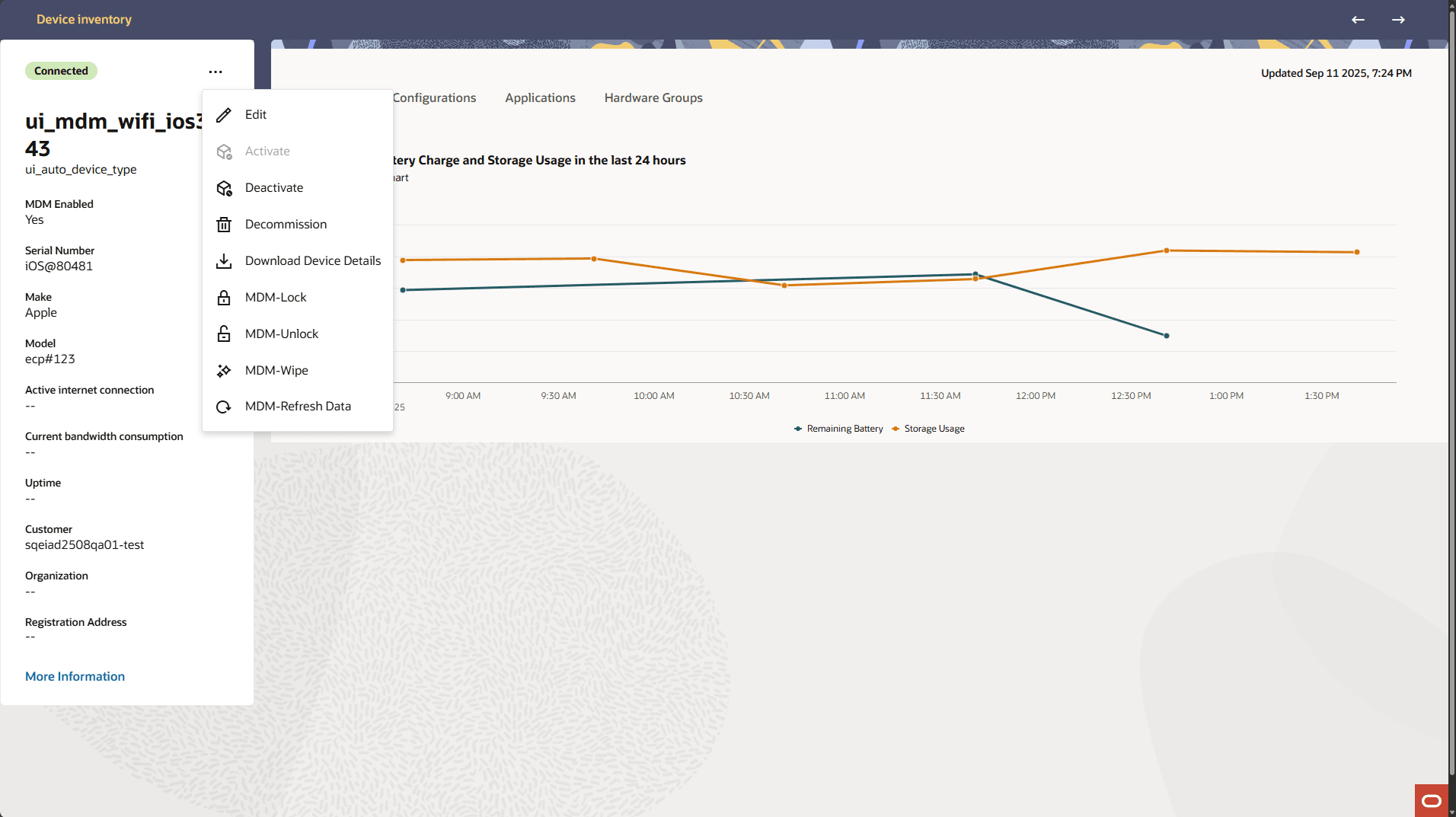
MDM-Wipe.The confirmation message displays: Wipe device <device name>? This will permanently remove all data from the device and return the device to factory default settings, requiring onboarding to MDM.
Lock or Unlock an MDM-Enabled Device
ECP users can access MDM-enabled devices from the Inventory page to lock and unlock the device screen for an MDM-enabled device.
- To lock or unlock the screen of an MDM-enabled device, you must have the device name assigned during onboarding or the International Mobile Equipment Identity (IMEI) number to identify the device on the Devices Inventory page.
Use the lock and unlock functionality from the MDM platform to lock and unlock MDM-enabled devices to resolve user lock-out scenarios and when no screen lock passcode is set. The Unlock action sets the passcode to the default Personal Identification Number (PIN).
- On the Device Details page, click the Actions menu (ellipsis) and select the
action to perform:
- MDM-Lock: To lock the selected MDM-enabled device.
- MDM-Unlock: To unlock the selected MDM-enabled device.
The appropriate confirmation message displays: This will lock the device. Do you want to proceed? or This will unlock the device. Do you want to proceed?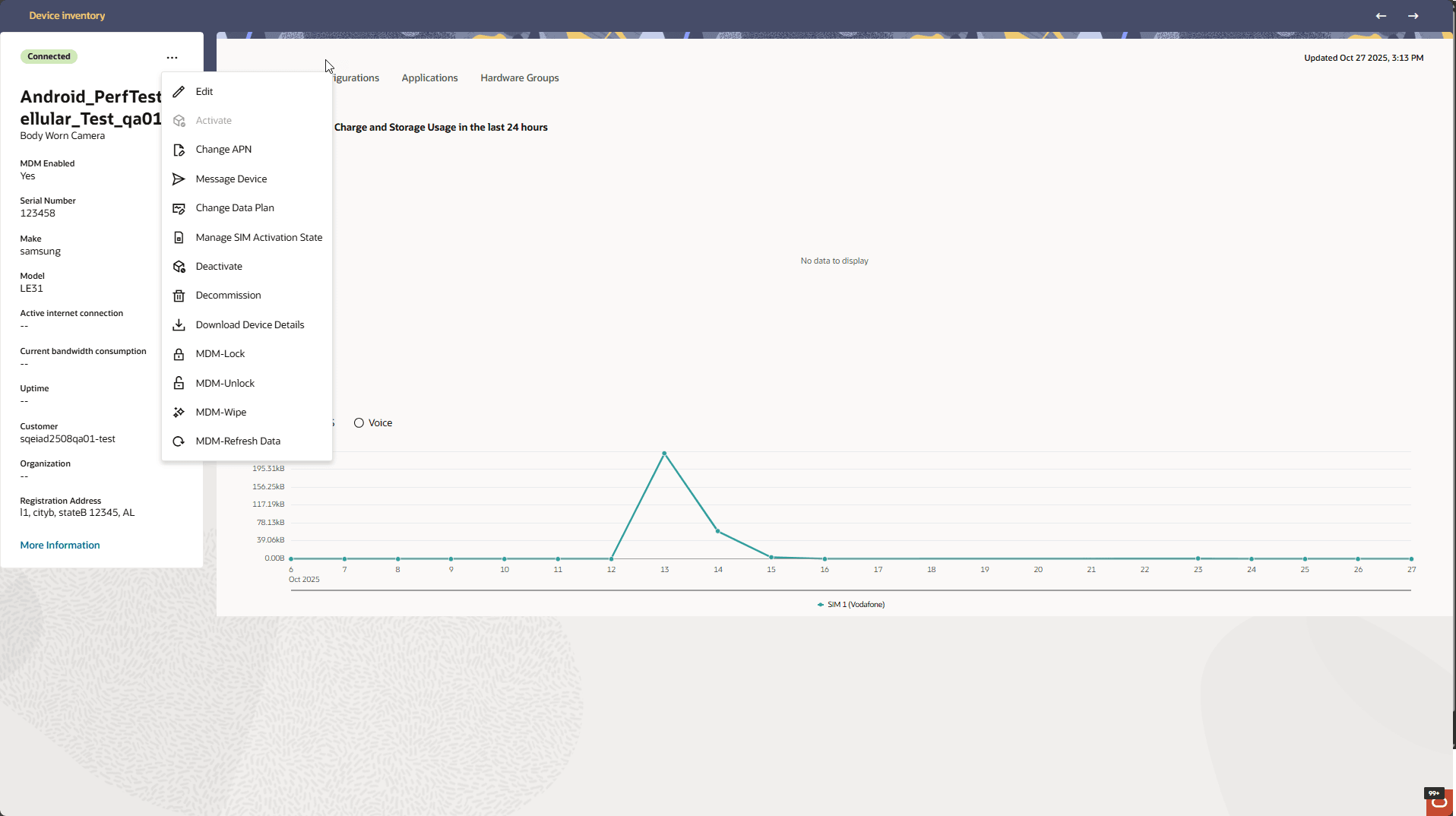 After you lock a device, a message displays: Successfully submitted lock request. When you lock an MDM-enabled device, it is inaccessible until the device user enters the passcode that unlocks the screen. Unlock sets the default screen lock passcode automatically. After you unlock a device a message displays: Successfully submitted unlock request. If Oracle ECP is unable to submit the request for the lock or unlock action, a message details the error at the top of the page. When you unlock an MDM-enabled device, it is accessible until a user locks the screen, or until the screen locks automatically after the configured time interval. For security reasons, the user of the MDM-enabled device is responsible for setting a new password immediately to replace the default passcode.
Refresh MDM Data
All roles can access MDM-enabled devices from the Devices Inventory page to refresh the device information from the Mobile Device Management (MDM) platform.
Device information changes on the MDM platform can affect the state information of MDM-enabled devices onboarded to Oracle ECP. Administrators can update the device state information from the MDM platform to display the latest device state information in Oracle ECP.
- To update state information for an MDM-enabled device, you must have the device name assigned during onboarding or the International Mobile Equipment Identity (IMEI) number associated with the SIM card to identify the device on the Devices Inventory page.