Subscriptions
The Subscriptions page displays subscription details and subscribed-service usage.
For information on the latest subscriptions offered, see Device and Cloud Connector Subscriptions in What's New.
Optionally, users can download the subscription information currently displayed in the table by selecting the Download icon.
The following screen capture shows Subscriptions on the Settings page.
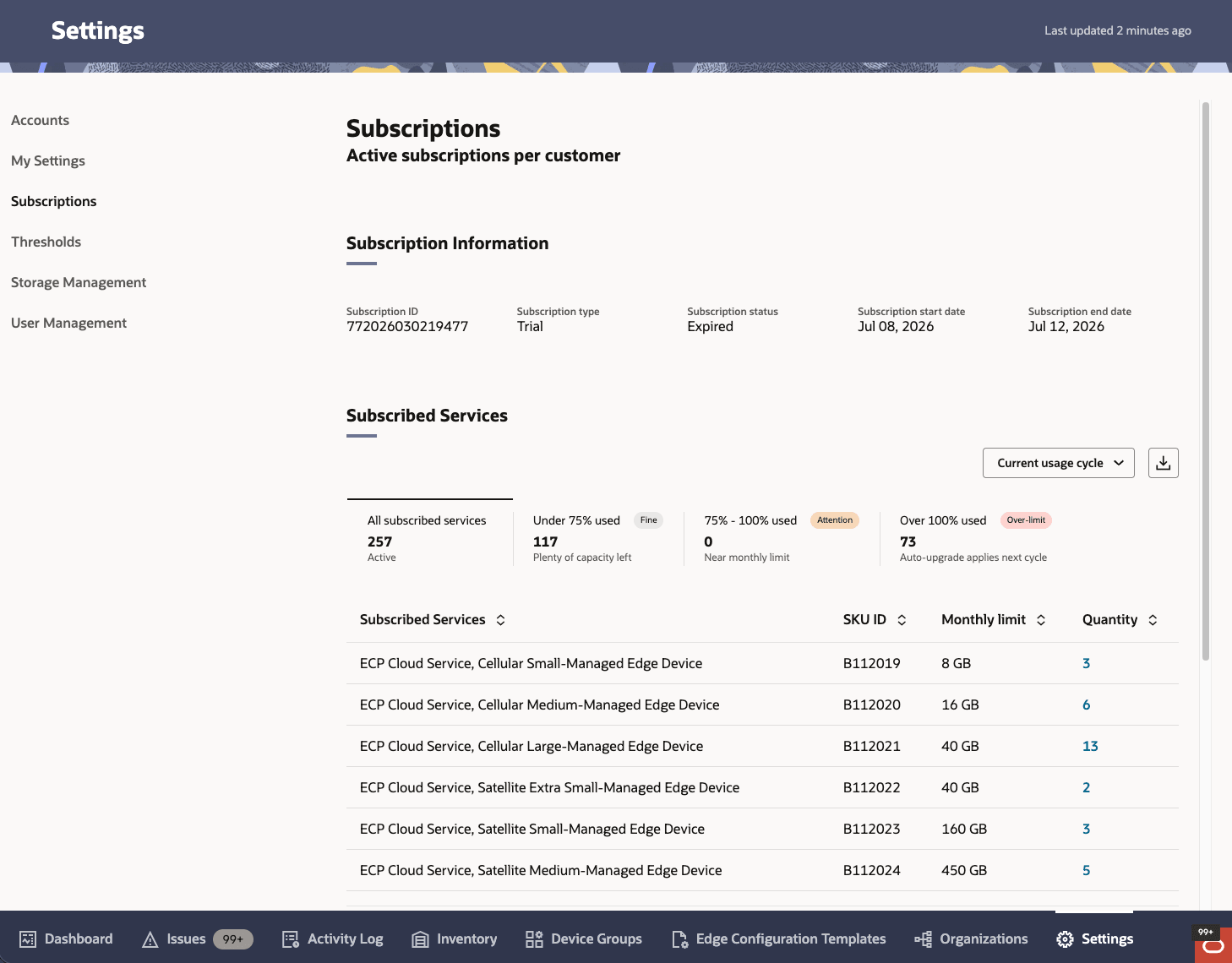
| Element Name | Description |
|---|---|
| Subscription ID | Unique identifier associated with the subscription. |
| Subscription type | Type of subscription plan, such as Trial or Commercial. |
| Subscription Status | Current state of the subscription, such as:
|
| Subscription start date | Date on which the subscription became active. |
| Subscription end date | Date on which the subscription expires or expired. |
When Current usage cycle is selected, the section includes usage scorecards and the subscribed-services table.
Usage Scorecards
| Scorecard | Description |
|---|---|
| All subscribed services | Displays the total number of subscribed services. The scorecard status is Active. |
| Under 75% used | Displays the number of subscribed services using less than 75% of their monthly limit. The scorecard includes a Fine badge and the status Plenty of capacity left. |
| 75% - 100% used | Displays the number of subscribed services using 75% through 100% of their monthly limit. The scorecard includes an Attention badge and the status Near monthly limit. |
| Over 100% used | Displays the number of subscribed services using more than 100% of their monthly limit. The scorecard includes an Over-limit badge and the status Auto-upgrade applies next cycle. |
Selecting a scorecard filters the table to display the subscribed services in that usage category. Selecting All subscribed services displays all subscribed services.
Mobile Device Management (MDM) subscriptions are included in the All subscribed services total. Because these subscriptions do not have a monthly limit, they are not included in the usage-based scorecards.
| Column | Description |
|---|---|
| Subscribed Services | Services Displays the name of the subscribed service. |
| SKU ID | Identifies the subscribed service. |
| Monthly limit | Displays the monthly connectivity-usage limit for the subscribed service. |
| Quantity | Displays the number of devices or edges associated with the subscribed service. A linked quantity opens a drawer listing the associated inventory. |
The Total row displays the total quantity of subscribed services.
Subscription Details
Select a linked quantity to open the Subscription Details drawer. The drawer lists the inventory associated with the selected subscribed service.
The drawer title identifies the inventory type and subscribed service, and displays the total number of associated inventory items.
| Column | Description |
|---|---|
| Name | Displays the name of the device or Cloud Connector. |
| Connectivity | Displays the connectivity service associated with the device or Cloud Connector. |
| Usage threshold | Displays the current usage status for the device or Cloud Connector, such as Fine. |
For the Under 75% Used, 75%–100% Used, and Over 100% Used scorecards, the drawer does not display the Usage Threshold column. Instead, the usage status is displayed as a badge at the top of the drawer.
For MDM-related SKU IDs, the drawer does not display usage threshold or usage limit information.
The usage scorecards and subscription details drawer are available only for Current usage cycle. For one of the previous 11 months, the scorecards do not appear and the table displays the SKUs billed for the selected month.
Note:
After a device is activated, it may take some time for the changes to appear in the Subscriptions Usage table.Subscription Status
Oracle Enterprise Communications Platform (Oracle ECP) displays subscription-status messages when a subscription is expired or suspended.
For an expired subscription, this message displays on the Subscriptions page.
For an expired subscription, this message displays on all Oracle ECP pages and directs the user to contact their sales representative. If the subscription is suspended, Oracle ECP also displays a message. A suspended subscription does not prevent the user from using existing devices or Cloud Connectors, including activating an already onboarded Cloud Connector. However, the user cannot onboard a new device or Cloud Connector.