Thresholds
The Thresholds page on the Oracle Enterprise Communications Platform (Oracle ECP) Settings page displays a table where you can view thresholds for generating Data, SMS, and Voice usage notifications when usage exceeds the specified threshold.
The following screen capture shows an example of the Thresholds page.
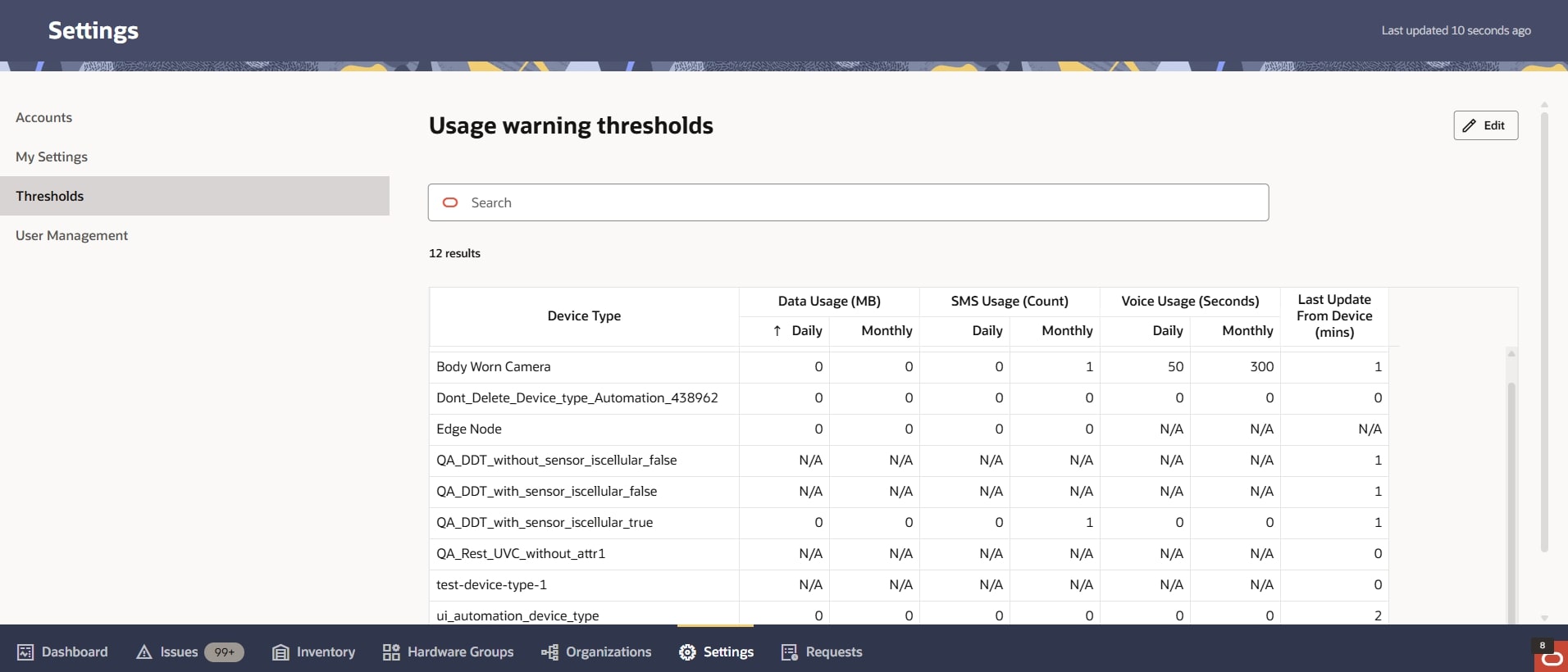
Table 12-7 Thresholds
| Column Header | Description |
|---|---|
| Device Type | Lists all the device types you use with Oracle ECP, followed by any Daily and Monthly usage thresholds you set for Data, SMS, Voice, and Last Update From Device. |
| Data Usage | The Megabytes of daily and monthly data you set as the usage threshold for a device type. With the threshold set to zero (0), Oracle ECP provides no Data Usage notification. |
| SMS Usage | The number of daily and monthly SMS messages allowed for the Device Type. With the threshold set to zero (0), Oracle ECP provides no SMS Usage notification. |
| Voice Usage | The seconds of daily and monthly Voice Usage allowed for the Device Type. With he threshold set to zero (0), Oracle ECP provides no Voice Usage notification. |
| Last Update from Device | The number of minutes that can elapse between transmissions of device information to the cloud before Oracle ECP sends a notification. Device Types with the value zero (0) specified for Last Update from Device provide no usage notifications with regard to the device information updates sent to the cloud for devices onboarded with the Device Type. |
Note:
All fields on the Thresholds panel are initially "Read-Only". To edit the options in the panel, click the "Edit" icon on the top right corner of the screen. Select "Update" to apply any changes. "Cancel" will return to the read only mode.
Set Device Usage Thresholds
Oracle Enterprise Communications Platform (Oracle ECP) Administrators can set usage thresholds to trigger events and notifications. You can see the events details on the Issues page and you can see the notifications on the Ask Oracle page.
- Calculate a usage estimate for each device type based on customer plans or recent SIM card usage details. If necessary, adjust the estimates to accommodate customer business goals and monitoring strategy, then specify maximum usage estimates for the device types you want to monitor.
In the following procedure, you set the thresholds for triggering events and notifications for Data, SMS, and Voice usage. You can set thresholds for Daily usage-only, Monthly usage-only, or both. When you enter zero (0) for Daily or Monthly, Oracle ECP generates no events or notifications for that time period. You do not need to set thresholds for every Device Type or Usage type.