3 Integration with Service Catalog and Design (SCD)
Telecommunications catalogs fall into two broad categories: commercial catalogs and technical catalogs.
The commercial catalog is customer-facing. Launch is the commercial catalog application. It defines what you sell and how you present it across engagement channels. It manages commercial products and services, promotions, pricing, rules, and terms.
The technical catalog is internal-facing. Oracle Communications Service Catalog and Design (SCD) is the application that manages the technical catalog. It defines the services and resources (physical and logical) required to fulfill and operate the commercial offerings.
Together, Launch and SCD provide an end-to-end catalog foundation that helps you bring compelling offers to market. The prebuilt integration between Launch and SCD enables centralized, design-time modeling of both commercial and technical catalog portfolios across your ecosystem.
Related Guides
Table 3-1 contains information about other useful sources of information for the integration process.
Table 3-1 Related Guides
| References | Description |
|---|---|
| Launch Cloud Service User's Guide | Describes how you can create, publish, and manage product offers. |
| REST API Reference for Launch Cloud Service | Provides the REST API reference document for Launch Cloud Service. |
| Oracle Digital Experience for Communications Industry Fabric Implementation Guide | Describes the setup and implementation of the CX Industries Framework required to deploy Launch Cloud Service. |
| Service Catalog and Design External Product Catalog Integration Guide | Describes how to integrate Oracle Communications Service Catalog and Design Solution Designer with an external product catalog such as Launch. |
Supported Integration and Mapping
Table 3-2 shows all the entities that are released from SCD and published from Launch.
Table 3-2 Supported Integration and Mapping
| Launch Entity | SCD Entity | What can you sync? |
|---|---|---|
| Product Specification | Product Specification |
|
| Service Specification | Customer Facing Service (CFS) |
|
Setting Up Launch SCD Integration
Table 3-3 lists the setup tasks you need to perform in Launch, Industry Framework, and SCD for bringing CFS and its design parameters from SCD to Launch and subsequent publishing from Launch to SCD.
Table 3-3 Setup Task List
| No. | Application | Task | Mandatory? | Description |
|---|---|---|---|---|
| 1. | Industry Framework | Create Integration User | Yes | This is required to facilitate the integration between the two applications. |
| 2. | Industry Framework | Configure the spoke systems | Yes | This is required to ensure to configure the spoke system instance for receiving publishing events. |
| 3. | Industry Framework | Patch GKR to configure Json Schema's | Yes | This is required to claim the resources and configure JSON schemas to validate the incoming data. |
| 4. | Launch | Register destinations | Yes | This is required to configure the right spoke instance to publish the launch or projectPublishEvent to SCD. |
| 5. | Launch | Configure Feature Profile | Yes | This is required to restrict CFS creation in Launch UI when SCD is part of solution |
| 6. | SCD | Create client credentials and security requirements | Yes | N/A |
Ownership and Consumption Pattern
Table 3-4 outlines the responsibilities of Launch and SCD regarding the consumption and publishing of key entities in the integration process.
Table 3-4 Ownership and Consumption Responsibilities
| Launch Entity | Ownership | Consumer |
|---|---|---|
| Product Spec to CFS Spec mapping and its characteristics | Launch | SCD |
| Product Specification | Launch | SCD |
| Service Specification | SCD | Launch |
Setup Task Details
- Create a new user on the security console with the username FABRIC_SYSTEM_USER and assign the role Communications Catalog Administrator. If this user was already created during the Launch setup, no further action is required.
- Configure your external application in the Industry Framework for each instance. For more information, refer to the topic Integrate External Applications to add a Spoke End Point in the article Implement CX Industries Framework, on My Oracle Support, Doc ID 2720527.1.
Note:
When creating theConnectionDescriptor, ensure to use the DNS-mapped address instead of the raw IP address (for example,100.111.86.234) for setting<oidc-client-credentials> and <endpoint-url>in theConnectionDescriptor. - Once the connection descriptor (TIC) is created, an empty GatekeepingRule is automatically generated with an ID in the format
gkr-<connectionDescriptorId>.For example, if the connection descriptor ID is scdl59zt, the GatekeepingRule ID will be gkr-scdl59zt.
We need to update this empty gkr to claim the resources and configuring Json Schemas to validate eventing payload coming from SCD app. Please follow below steps to update the gkr-
Retrieve the GatekeepingRule (GKR), make a GET request passing
gkr-<connectionDescriptorId>.Endpoint: {{FA_APIGW}}/admin/gatekeepingRules/{gkr-
<connectionDescriptorId>}Method Type: GET
Sample GKR - GET Call Response
{
  "endpoint-name": "<auto-generated using endpoint-name from TIC>",
  "rule-name": "Generated gatekeeping rule for endpoint scd",
  "id": "<generated gkr-id>"
}
Note:
Ensure to replace the gkr id correctly in above endpoint request. FA_APIGW in URI is Fusion Application Gateway.Next step is to update the GatekeepingRule response retrieved in above get call response by manually adding the "destination-selection" section from below sample request body. Once the request body to update gkr is prepared, please use below endpoint to update the gkr.
Endpoint: {{FA_APIGW}}/admin/gatekeepingRules/{gkr-
<connectionDescriptorId>}Method Type: PUT
Sample Request Body
{
    "endpoint-name": "<auto generated using endpoint-name from TIC>",
    "rule-name": "Generated gatekeeping rule for endpoint scd",
    "destination-selection": [
        {
            "api-id": "tmf-633",
            "api-version": "v4",
            "criteria": [
                {
                    "rank": 10,
                    "resource-ids": [
                        "serviceSpecification"
                    ],
                    "event-schemas": {
                        "ServiceSpecificationReleaseEvent": {
                            "json-schema-ref": "service-specification-release-event.schema.json"
                        },
                        "ProjectStateChangeEvent": {
                            "json-schema-ref": "project-state-change-event.schema.json"
                        }
                    }
                }
            ]
        }
    ],
    "id": "<generated gkr-id>"
}
Note:
Ensure to replace the gkr id correctly in above endpoint request. FA_APIGW in URI is Fusion Application Gateway. - Register the destination in Launch for publishing to the SCD instance. You must set up the SCD instance in Launch to ensure that the publishing is directed correctly.
- Configure destinations in Launch to the appropriate lifecycle status for which you want to publish to the external application. For example, configure the test instance destination to the Ready to Publish lifecycle status and the production instance destination to the In Design status.
- While creating SCD destination, use the following settings:
Name: The target pre-selection key from the Connection Descriptor in the Industry Framework
Type: The target name used in the Catalog Sync configuration.
Internal: Set to OFF.
Exclude References: Set to OFF.
Design Time: Set to ON
Dual Acknowledgement: Set to ON
Note:
- A Design Time flag is used to differentiate design-time destinations from runtime destinations within the Launch app.
- Dual Acknowledgment indicates that Launch expects two acknowledgments from SCD for its /projectPublishEvent
- First acknowledgment: When SCD consumes the /projectPublishEvent
- Second or Final acknowledgment: When Launch provided initiative in SCD moves to Functional testing indicating Launch that SCD is ready for publishing to its RunTime app.
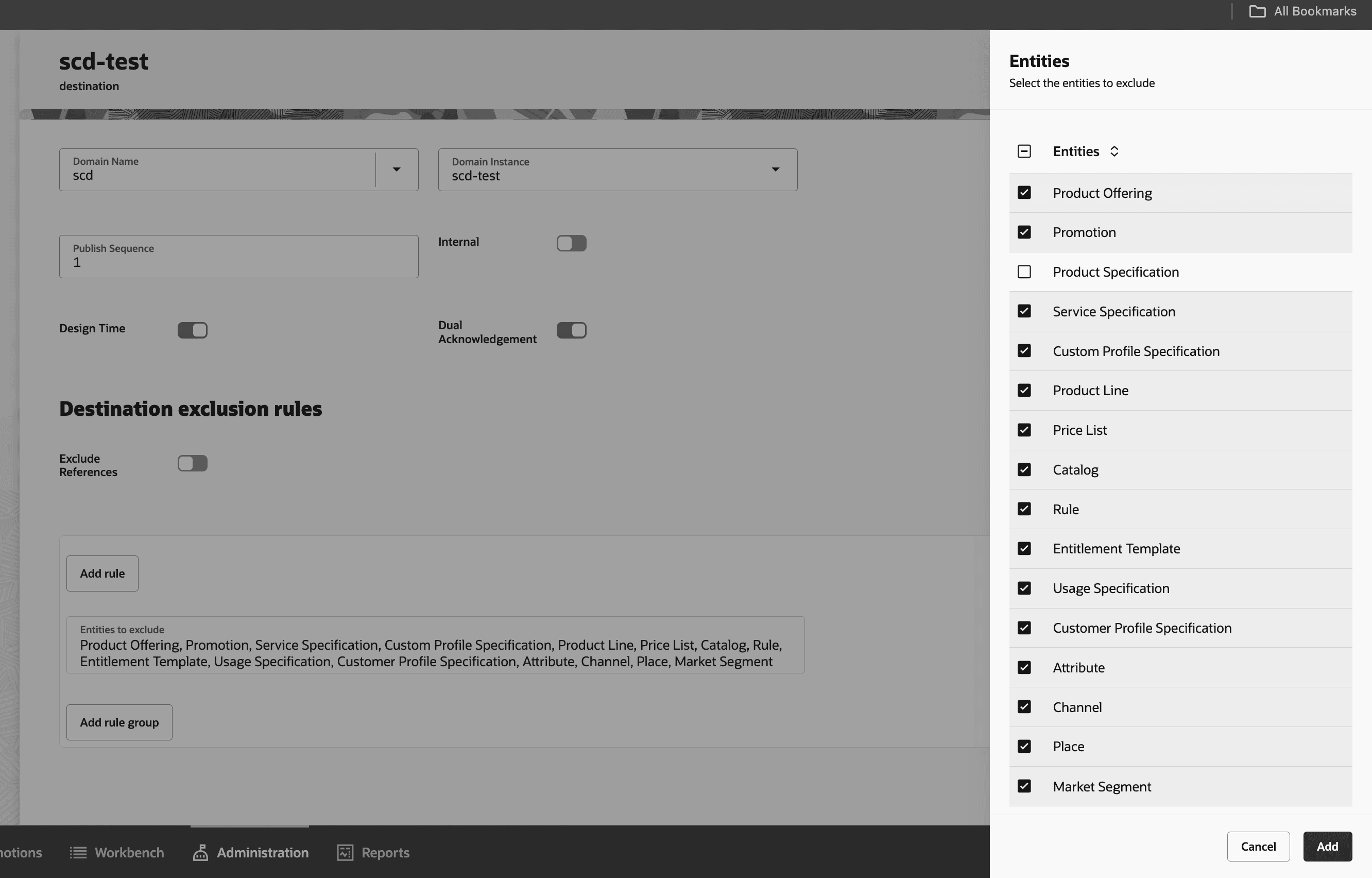
- Create a rule to exclude all entities except Product Specification (i.e select all entities except Product Specification). Please refer below snapshot.
- To configure a lifecycle status for SCD destination,
- Navigate to the Launch user interface, click the Administration tab, then click Lifecycle Status.
- Select the new lifecycle configuration version in the PENDING state.
- Choose Edit for the Ready To Publish status and click Add Destination.
- Provide the Name, Type, and Publish Sequence. Click Add.
Note:
The SCD sequence value should be set to a value before any other runtime application sequences, as it is a design-time app. Both Launch and SCD configurations should co-develop the technical configuration first. Subsequent sequences for PDC, Siebel, and other runtime systems should be set accordingly. When assigning publishing sequences, it is recommended to leave intentional gaps between them to allow easy addition in the future without disrupting the existing sequence. - Select the SCD destination name in the Destinations field and save.
- Choose Activate for the PENDING lifecycle configuration version.
- Verify that the lifecycle configuration version status changes to ACTIVE.
For more information on how to configure the Destination in Launch, see REST API Reference for Launch Cloud Service and Publish Catalog Entities in Launch Cloud Service Implementation Guide.
- Make feature flag inactive to restrict CFS creation in Launch UI when SCD is part of the solution.
Method Type: POST
Endpoint: {{FA_APIGW}}/api/productCatalogManagement/v1/featureProfile
Request Body{ "CFS_CREATION": "Inactive" }Note:
Once the feature flag is set to Inactive, it cannot be changed back to Active. FA_APIGW in URI is Fusion Application Gateway. - Create client credentials and define the security requirements for Oracle Communications Service Catalog and Design (SCD). See the REST API for Oracle Communications Service Catalog and Design for detailed instructions and configuration steps.
Supported Scenarios
Table 3-5 lists the supported integration scenarios.
Table 3-5 Supported Scenarios
| S.No | Emitting App | Receiving App | Use Case | Description |
|---|---|---|---|---|
| 1. | SCD | Launch | Release an initiative with Customer Facing Service (CFS) to Launch | Release an initiative with CFS and its associated attributes by changing the initiative lifecycle status from "Definition" to "Released" state in SCD. |
| 2. | Launch | SCD | Publish an Initiative with Product Specification (PS) | Publish an initiative with Product Specification (PS), associated attributes, and Product Specification (PS) to Customer Facing Service (CFS) mapping to SCD. |
| 3. | SCD | Launch | Revision of Customer Facing Service (CFS) | Revise the CFS in the new initiative by making changes to associated attributes or to the definition, and release the new initiative to Launch from SCD. |
| 4. | Launch | SCD | Revision of Product Specification (PS) | Revise the PS in the new initiative by making changes to the associated attributes, the definition, or the PS-CFS characteristic mapping, and publish the new initiative to SCD. |
Launch-SCD Integration Events
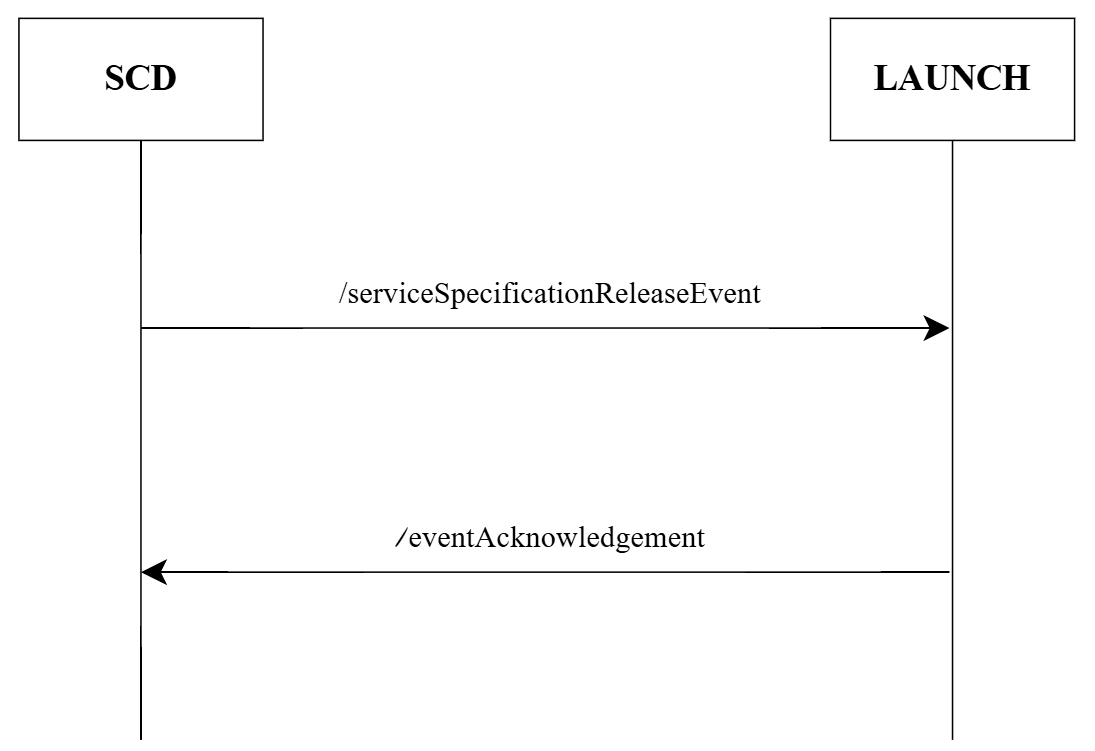
Figure 3-1 shows the Launch-SCD integration events. The SCD admin releases an initiative with the Customer Facing Service (CFS) using the serviceSpecificationReleaseEvent. After which, Launch sends an acknowledgment (either FAILURE or SUCCESS) to confirm the event has been received.
Figure 3-1 serviceSpecificationReleaseEvent
The Launch admin publishes the Product Specification (PS) using the projectPublishEvent. Then, the SCD admin sends an initial acknowledgment, publishingAcknowledgement, confirming that the event was received. Later, the SCD admin sends a projectStateChangeEvent, indicating that the event has been consumed and is ready to be published to the runtime systems.
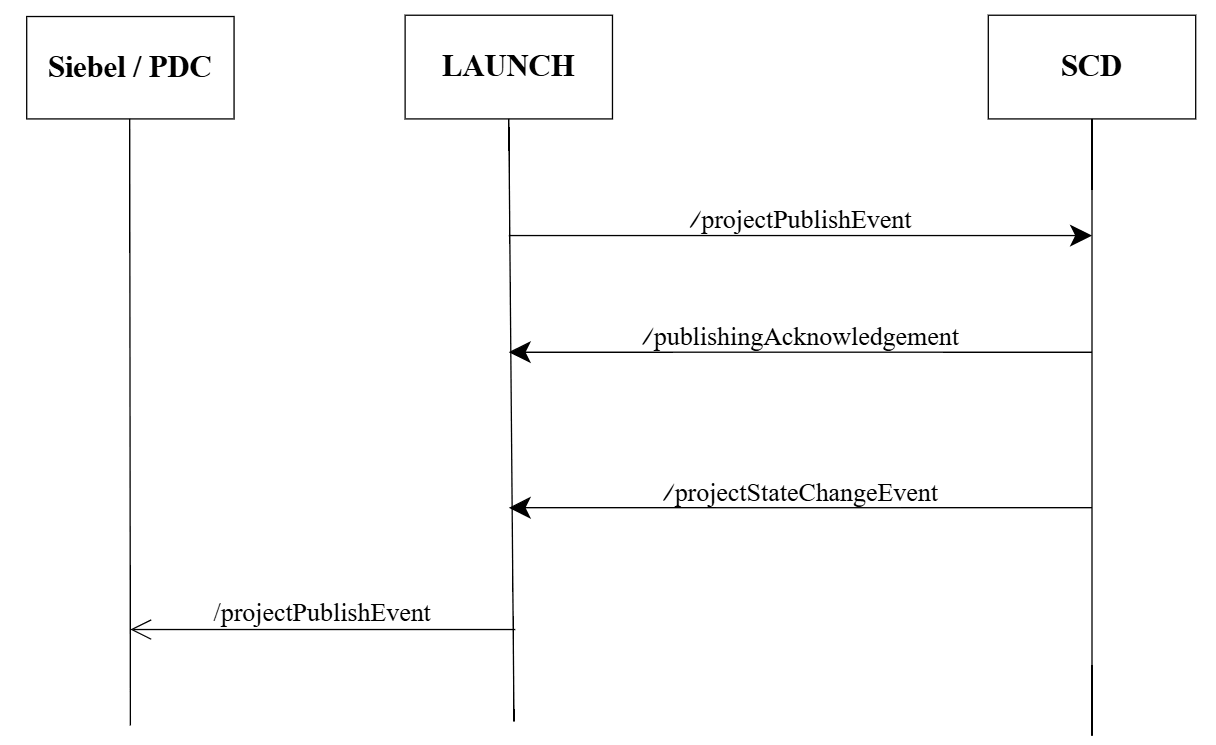
Table 3-6 describes the list of events that are triggered for the flow of data between Launch and SCD.
Table 3-6 Supported Events for Launch-SCD Integration
| S.No | Emitting App | Receiving App | Event Endpoint | Description |
|---|---|---|---|---|
| 1. | SCD | Launch | /serviceSpecificationReleaseEvent | The SCD Admin creates a new initiative, adds Customer Facing Service (CFS) with its associated attributes, and releases the initiative using the /serviceSpecificationReleaseEvent event. |
| 2. | Launch | SCD | /eventAcknowledgement | The Launch app, after receiving the /serviceSpecificationReleaseEvent, sends an event acknowledgment to SCD indicating whether the event released was consumed or not, by sending a success or failure acknowledgment using the /eventAcknowledgement event. |
| 3. | Launch | SCD | /projectPublishEvent | The Launch Admin creates a new initiative, creates Product Specification (PS) with associated attributes, performs Product Specification (PS) to Customer Facing Service (CFS) characteristic mapping, and publishes it to SCD using the /projectPublishEvent event. The CFS released from SCD is to be associated with the Product Specification (PS). |
| 4. | SCD | Launch | /publishAcknowledgement | The SCD app, after receiving the /projectPublishEvent, sends an acknowledgment to Launch indicating whether the event released was consumed or not, by sending a success or failure acknowledgment using the /publishAcknowledgement event. |
| 5. | SCD | Launch | /projectStateChangeEvent | After the Launch app consumes the /publishAcknowledgement event from SCD, the SCD app sends the /projectStateChangeEvent event to indicate its readiness to publish to respective runtime apps. |
| 6. | Launch | Run Time Apps | /projectPublishEvent | The Launch Catalog Admin publishes Initiative to the rest of its runtime destinations (Siebel and PDC) using the /projectPublishEvent event. |
Troubleshooting Tips
Table 3-7 lists the troubleshooting tips for integration with SCD..
Table 3-7 Troubleshooting Tips
| S.No | Issue | Reason | Resolution Tip |
|---|---|---|---|
| 1. | An attribute with the matching ID {attribute_id} already exists in Launch. | The attribute with this specific ID is either already created in Launch or migrated from its runtime apps. An attribute can only be created if it was originally brought from SCD, or if no attribute already exists with the same ID in Launch. | Ensure that the attribute was originally brought from SCD or that no other attribute with the same ID exists in Launch. |
| 2. | Attributes are not created in Launch even if the event is successful. | There are attribute data types not supported in Launch, such as ['HEXBINARY', 'FEATUREGROUP', 'TIME']. Therefore, Launch ignores these and only creates attributes with supported data types. Download the error log file to view the validation message, which will indicate which CFS (CFS_name) have unsupported data type attributes. | Check the data types of the attributes. If unsupported types like ['HEXBINARY', 'FEATUREGROUP', 'TIME'] are present, modify them. Download the error log file for more details. |
| 3. | The [attribute_value] values for the [attribute_name] attribute can't be deleted once they've been created. | Attribute values cannot be deleted during revision or update in Launch once they have been created and used across other entities. | Ensure the attribute value is not deleted during the revision or update of attributes once they are created in Launch. |