3.3.2 Procedure 5 BACKUP EUIDB
This section lists the procedures, in order, that must be performed to backup the system prior to Full upgrade. Save the backup to third-party server instead of ELAP-A/B which are to be upgraded.
Table 3-9 Procedure 5 BACKUP EUIDB
| STEP # | This procedure backs up the EuiDB. Note: Estimated time of completion is 5 minutes. Check off (✓) each step as it is completed. Boxes have been provided for this purpose under each step number. Should this procedure fail, Contact Oracle technical services and ask for FULL UPGRADE ASSISTANCE. | |
|---|---|---|
|
1. ☐ |
Active ELAP: Login to the Active ELAP server as user “elapdev”. |
|
|
2. ☐ |
Active ELAP: Stop the ELAP Application |
|
|
3. ☐ |
Active ELAP: Switch user to root. |
|
|
4. ☐ |
Active ELAP: Switch user to elapconfig. |
|
|
5. ☐ |
Active ELAP: Login as “elapconfig” to start the ELAP Configuration utility. Select option “6” and press enter. |
|
|
6. ☐ |
Active ELAP: 1) Select “3” and press return to start the MySQL Backup. 2) Select “Y” when prompted and press return. NOTE: Th MyISAM backup taken in this step, will be used, if in any case the full upgrade from ELAP 10.2 to ELAP 11.0 fails. For ELAP 11.0 we will use the InnoDB mysql backup for EuiDB taken at step 10 after changing the mysql engine. |
|
|
7. ☐ |
Active ELAP: Select “e” and press Enter to exit the Platform Menu. |
|
|
8. ☐ |
Active ELAP: Enter e to exit the ELAP Configuration Menu. |
|
|
9. ☐ |
ACTIVE ELAP |
Note that the alter mysql engine step must run while upgrading ELAP 10.x to 11.x. After upgrading from 11.x to 11.y, the engine will already be updated to InnoDB. Verify the mysql engine using the below command before running the alter_Table_Elap_11.0.pl
Example: The example below contains a snapshot of only one table in EuiDB. The actual output will show all the tables present in EuiDB. 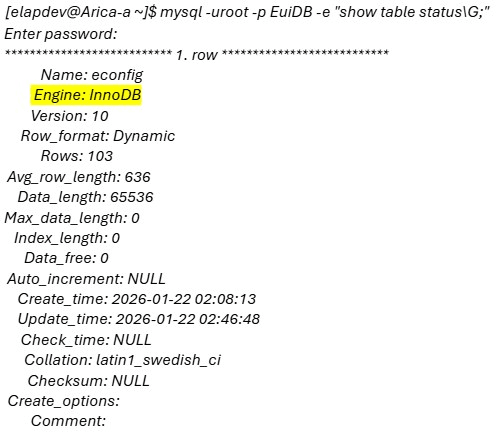 If the command output shows the engine as InnoDB, we don't need to run the alter_table_Elap_11.0.pl. If the engine is already InnoDB, then skip steps 10, 11, 12 and then restart Elap application. If the engine is MyISAM, proceed with the next steps in this procedure. |
|
10. ☐ |
ACTIVE ELAP: |
Follow the steps mentioned below to change the mysql engine from MyISAM to InnoDB:
|
|
11. ☐ |
Active ELAP: Check the update by logging in to EuiDB: |
|
|
12. ☐ |
Active ELAP: Take the EuiDB backup again after converting the engine from MyISAM to InnoDB. |
Repeat Steps 3 to 8 of this Procedure 5 to take the EuiDB backup again for InnoDB. |
|
13. ☐ |
Active ELAP: Re-start the ELAP Application for Active ELAP. |
|
|
14. ☐ |
Active ELAP: Note down the timestamp in log. |
Run the following command:
|
This procedure is complete!