3.5.2 Procedure 5 Disconnect NPAC from LSMS
Table 3-10 Procedure 5 - Disconnect NPAC from LSMS
| STEP # | This procedure disconnects NPAC from LSMS. Estimated time: 5 minutes | |
|---|---|---|
|
☐1. |
LSMS Active server: Log in to the server as the user “lsmsadm”. |
|
|
☐2. |
LSMS Active server: Stop all connected NPAC regions |
Run the following command to list the active NPAC regions Note: The above output shall vary depending on LSMS configuration. Note: Store this output as it will be required during DB restore phase post upgrade. Run the following command to stop an NPAC region. Run the above command for all active regions. |
|
☐3. |
LSMS Active server: Login to LSMS GUI |
Login to LSMS Active GUI through VIP as ‘lsmsall’ user. |
|
☐4. |
LSMS Active server: Deactivate all active regions |
Click on the NPAC region. Go to the menu Configure -> LNP System -> NPAC -> Modify -> Primary Uncheck the ‘Activate Region’ checkbox and click ‘OK’. |
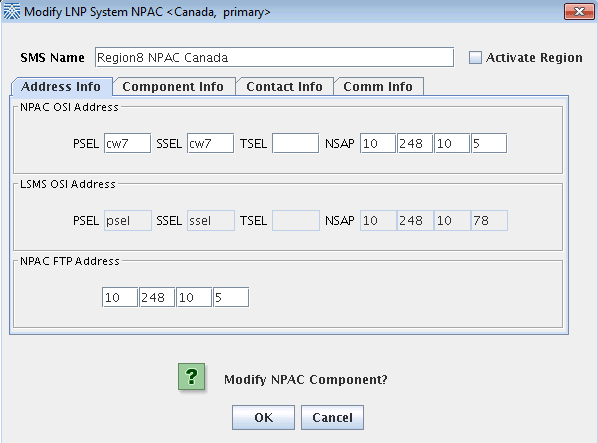 Note: Similarly, Deactivate all the active NPAC regions. |
||
|
This procedure is complete! |
||