3 OCNADD Features and Feature Specific Limits
This chapter details all major OCNADD features, features specific limits, and their functional behaviors.
3.1 Feature Specific Limits
This section defines capacity boundaries and limitations associated with the features.
The current release does not support Diameter configuration and visualization through the UI.
Table 3-1 OCNADD Feature Specific Limits
| Description | Limit Value |
|---|---|
| Maximum number of worker groups supported in a Centralized Site | 1 |
| Maximum number of Kafka feeds for Diameter xDR per
worker group:
Maximum three Correlation feeds including all ACL feeds |
2 |
| Maximum number of vCollector configurations per
worker group.
Note: Each worker group will have a separate vCollector deployment |
1 |
Note:
The limits are controlled through Helm parameters. For more information, refer to the section "Global Parameters" of the Oracle Communications Network Analytics Data Director Installation, Upgrade, and Fault Recovery Guide.3.2 Features List
This section details OCNADD features and their functional behaviors.
3.2.1 Data Governance
OCNADD provides data governance by managing the availability and usability of data in enterprise systems. It also ensures that the integrity and security of the data are maintained by adhering to all Oracle-defined data standards and policies for data usage rules.
3.2.2 High Availability
OCNADD supports a microservice-based architecture, and OCNADD instances are deployed in Cloud Native Environments (CNEs), which ensure high availability of services and auto-scaling based on resource utilization. In the case of pod failures, new service instances are spawned immediately.
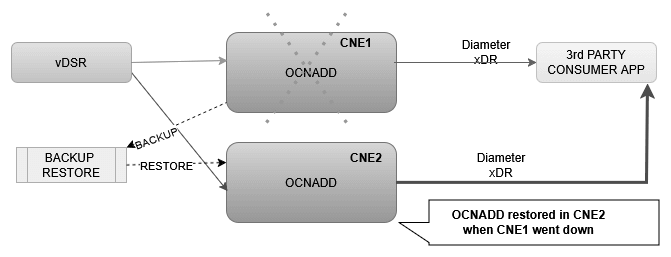
In the event of a Kubernetes (K8s) cluster failure, the OCNADD deployment is restored to a different cluster using fault recovery mechanisms. For more information about fault recovery procedures, see the Oracle Communications Network Analytics Data Director Installation, Upgrade, and Fault Recovery Guide.
3.2.3 Data Filtering
OCNADD performs data filtering of Diameter messages on vCollector and sends only the filtered messages to the DD Relay Agent.
Figure 3-1 Diameter xDR Replication

Data filtering is managed only on vCollector in the current release for Diameter. Refer to the vCollector section in the OCNADD Features section.
Note:
In the case of an upgrade, rollback, service restart, or if a configuration is created with the same name, duplicate messages will be sent by the aggregation and correlation service to avoid data loss.3.2.4 vCollector
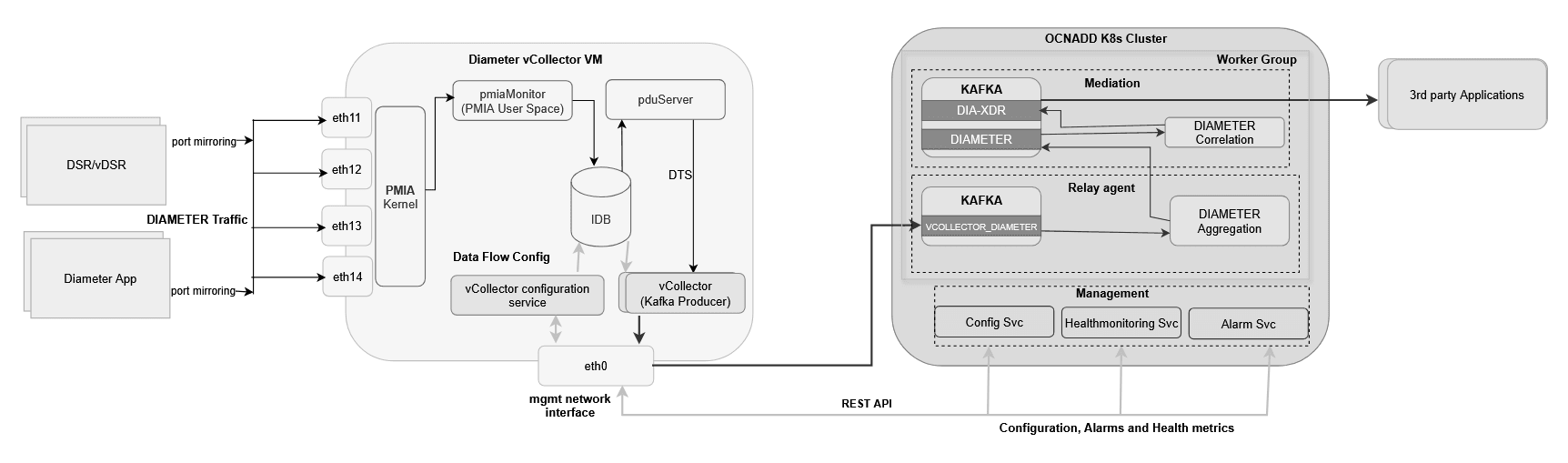
The vCollector provides a mechanism to acquire Diameter traffic from various network nodes, such as the Diameter Signaling Router (DSR) or any other Diameter application. Packet capturing is enabled via port mirroring to the virtual machine running Oracle proprietary software. The virtual machine solution is known as Diameter vCollector. This functionality includes:
- Software that provides packet capture and filtering capabilities.
- A Kafka-based producer client interface that transfers the captured packets to the Oracle packet broker solution over Kafka.
- A configuration REST API to configure the traffic flow on the vCollector.
- An in-memory database to store the configuration and serve as an intermediary buffer for the captured packets.
The Diameter vCollector reuses the OCPIC Probed Message Feeder (PMF) for packet capture and filtering capabilities. The following deployment modes for the vCollector are possible:
- It can support up to four capturing interfaces.
- The PMF software can be installed inside a virtual machine on the OpenStack cloud, with a virtual interface created on the virtual machine for capturing traffic. The vDSR and vCollector can run inside the same OpenStack cloud, and the port mirroring feature of the OpenStack cloud can be used to copy Diameter traffic from vDSR to vCollector.
Figure 3-2 vCollector Architecture
3.2.4.1 vCollector Integration with Data Director
This section describes the steps to integrate vCollector with Data Director to acquire Diameter traffic from vDSR using port mirroring. It requires that vCollector be installed and its initial topology configured.
See Installing vCollector chapter from the Oracle Communications Network Analytics Data Director vCollector Installation Guide.
After installing and initially configuring vCollector, continue with the creation of a Diameter feed using the section "vCollector Configuration" from the Oracle Communications Network Analytics Data Director vCollector Installation Guide.
3.2.4.2 vCollector Configuration
Note:
- Only one configuration is supported in the current release.
- The name of the traffic flow in the configuration should not be in block letters and should not contain any special characters except "-".
- When the management gateway service lacks load balancer enablement, the APIRoot defaults to the service name; conversely, if load balancing is enabled, the APIRoot will be the LoadBalancer IP associated with the gateway service.
A. Create Configuration
Rest End Point: <apiRoot>/ocnadd-configuration/{version}/configure/vcollector
curl -k --location --cert-type P12 --cert /var/securityfiles/keystore/serverKeyStore.p12:$OCNADD_SERVER_KS_PASSWORD --request PUT 'https://ocnaddmanagementgateway:12889/ocnadd-configuration/v1/configure/vcollector' \
--header 'Content-Type: application/json' \
--data-raw '{
    "trafficFlowName": "<traffic-flow-name>",
    "vCollectorName": "<vcollector-config-name>",
    "userName": "<dd-ui-user-name>",
    "workerGroup": "<worker-group-name>",
    "relayAgentMediationGroup": {
        "<siteName>:<workerGroupName>:<relayAgentNamespace>:<relayAgentClusterName>": [
            "<siteName>:<workerGroupName>:<mediationNamespace>:<mediationClusterName>"
        ]
        },
    "relayAgent": "agent-1",
    "tcInfo": {
        "tcName": "<traffic-flow-name>",
        "interfaces": [
            "vCollector_traffic_interface1",
            "vCollector_traffic_interface2"
        ],
        "filter": "<Diameter_Filter_Condition>",
        "enableDupIpPktSuppression": true,
        "enableSctpDechunking": false,
        "enableTcpFlowMng": false
    },
    "dfInfo": {
        "dfName": "<traffic-flow-name>",
        "wayMgmntAddr": [
            "<way_managemnt_IP1>",
            "<way_managemnt_IP2>"
        ]
    },
    "kafkaClusters": {
        "siteName": "SiteA",
        "primary": {
            "bootstrapServer": [
                "dd_kafka-bootstrap-IP1:9094",
                "dd_kafka-bootstrap-IP2:9094"
            ],
            "status": "Active",
            "topicName": "<vcollector-topic-name'>",
            "availableCapacity": 1234.56,
            "producerConfig": {
                "securityProtocol": "PLAINTEXT",
                "sslEnabledProtocol": "TLSv1.3",
                "ack": "0",
                "compression": "none",
                "maxRequestSize": 1048576,
                "batchSize": 500,
                "lingerMs": 100,
                "bufferMemory": 33554432,
                "retries": 3,
                "retryBackoffMs": 100,
                "requestTimeoutMs": 5000
            }
        },
        "secondary": null,
        "tertiary": null
    }
}'
Example:
curl -k --location --cert-type P12 --cert /var/securityfiles/keystore/serverKeyStore.p12:$OCNADD_SERVER_KS_PASSWORD --request POST 'https://ocnaddmanagementgateway:12889/ocnadd-configuration/v1/configure/vcollector' \
--header 'Content-Type: application/json' \
--data-raw '{
    "trafficFlowName": "diameter-flow",
    "userName": "admin",
    "workerGroup": "wg-1",
    "vCollectorName": "vcollector-config",
    "relayAgentMediationGroup": {
        "BLR:wg1:dd-relay:cluster.local": [
            "BLR:wg1:dd-med:cluster.local"
        ]
        },
    "relayAgent": "agent-1",
    "tcInfo": {
        "tcName": "diameter-flow",
        "interfaces": [
            "pmf-vc-01a_eth11",
            "pmf-vc-01a_eth12"
        ],
        "filter": "(src host 10.233.108.0 or src host 10.192.130.2 or src host 10.192.130.3 or src host 10.192.130.4 or src host 10.192.130.5 or src host 10.192.130.6 or src host 10.192.130.7 or src host 10.192.130.8)",
        "enableDupIpPktSuppression": false,
        "enableSctpDechunking": false,
        "enableTcpFlowMng": false
    },
    "dfInfo": {
        "dfName": "diameter-flow",
        "wayMgmntAddr": null
    },
    "kafkaClusters": {
        "siteName": "SiteA",
        "primary": {
            "bootstrapServer": [
                "10.10.10.11:9094",
                "10.10.10.12:9094"
            ],
            "status": "Active",
            "topicName": "vcollector",
            "availableCapacity": 1234.56,
            "producerConfig": {
                "securityProtocol": "PLAINTEXT",
                "sslEnabledProtocol": "TLSv1.3",
                "ack": "0",
                "compression": "none",
                "maxRequestSize": 1048576,
                "batchSize": 500,
                "lingerMs": 100,
                "bufferMemory": 33554432,
                "retries": 3,
                "retryBackoffMs": 100,
                "requestTimeoutMs": 5000
            }
        },
        "secondary": null,
        "tertiary": null
    }
}'
B. Update Configuration
Rest End Point: <apiRoot>/ocnadd-configuration/{version}/configure/vcollector/{traffic-flow-name}
curl -k --location --cert-type P12 --cert /var/securityfiles/keystore/serverKeyStore.p12:$OCNADD_SERVER_KS_PASSWORD --request PUT 'https://ocnaddmanagementgateway:12889/ocnadd-configuration/v1/configure/vcollector/<traffic-flow-name>' \
--header 'Content-Type: application/json' \
--data-raw '{
    "trafficFlowName": "<traffic-flow-name>",
    "vCollectorName": "<vcollector-config-name>",
    "userName": "<dd-ui-user-name>",
    "workerGroup": "<worker-group-name>",
    "relayAgentMediationGroup": {
        "<siteName>:<workerGroupName>:<relayAgentNamespace>:<relayAgentClusterName>": [
            "<siteName>:<workerGroupName>:<mediationNamespace>:<mediationClusterName>"
        ]
        },
    "relayAgent": "agent-1",
    "tcInfo": {
        "tcName": "<traffic-flow-name>",
        "interfaces": [
            "vCollector_traffic_interface1",
            "vCollector_traffic_interface2"
        ],
        "filter": "<Diameter_Filter_Condition>",
        "enableDupIpPktSuppression": true,
        "enableSctpDechunking": false,
        "enableTcpFlowMng": false
    },
    "dfInfo": {
        "dfName": "<traffic-flow-name>",
        "wayMgmntAddr": [
            "<way_managemnt_IP1>",
            "<way_managemnt_IP2>"
        ]
    },
    "kafkaClusters": {
        "siteName": "SiteA",
        "primary": {
            "bootstrapServer": [
                "dd_kafka-bootstrap-IP1:9094",
                "dd_kafka-bootstrap-IP2:9094"
            ],
            "status": "Active",
            "topicName": "<vcollector-topic-name'>",
            "availableCapacity": 1234.56,
            "producerConfig": {
                "securityProtocol": "PLAINTEXT",
                "sslEnabledProtocol": "TLSv1.3",
                "ack": "0",
                "compression": "none",
                "maxRequestSize": 1048576,
                "batchSize": 500,
                "lingerMs": 100,
                "bufferMemory": 33554432,
                "retries": 3,
                "retryBackoffMs": 100,
                "requestTimeoutMs": 5000
            }
        },
        "secondary": null,
        "tertiary": null
    }
}'curl -k --location --cert-type P12 --cert /var/securityfiles/keystore/serverKeyStore.p12:$OCNADD_SERVER_KS_PASSWORD --request PUT 'https://ocnaddmanagementgateway:12889/ocnadd-configuration/v1/configure/vcollector/diameter-flow' \
--header 'Content-Type: application/json' \
--data-raw '{
"trafficFlowName": "diameter-flow",
"userName": "admin",
"workerGroup": "wg-1",
"vCollectorName": "vcollector-config",
"relayAgentMediationGroup": {
"BLR:wg1:dd-relay:cluster.local": [
"BLR:wg1:dd-med:cluster.local"
]
},
"relayAgent": "agent-1",
"tcInfo": {
"tcName": "diameter-flow",
"interfaces": [
"pmf-vc-01a_eth11",
"pmf-vc-01a_eth12"
],
"filter": "(src host 10.233.108.0 or src host 10.192.130.2 or src host 10.192.130.3 or src host 10.192.130.4 or src host 10.192.130.5 or src host 10.192.130.6 or src host 10.192.130.7 or src host 10.192.130.8)",
"enableDupIpPktSuppression": false,
"enableSctpDechunking": false,
"enableTcpFlowMng": false
},
"dfInfo": {
"dfName": "diameter-flow",
"wayMgmntAddr": null
},
"kafkaClusters": {
"siteName": "SiteA",
"primary": {
"bootstrapServer": [
"10.10.10.11:9094",
"10.10.10.12:9094"
],
"status": "Active",
"topicName": "vcollector",
"availableCapacity": 1234.56,
"producerConfig": {
"securityProtocol": "PLAINTEXT",
"sslEnabledProtocol": "TLSv1.3",
"ack": "0",
"compression": "none",
"maxRequestSize": 1048576,
"batchSize": 500,
"lingerMs": 100,
"bufferMemory": 33554432,
"retries": 3,
"retryBackoffMs": 100,
"requestTimeoutMs": 5000
}
},
"secondary": null,
"tertiary": null
}
}'
C. Delete Configuration
Rest End Point: <apiRoot>/ocnadd-configuration/{version}/configure/vcollector/{trafficflowName}
curl -k --location --cert-type P12 --cert /var/securityfiles/keystore/serverKeyStore.p12:$OCNADD_SERVER_KS_PASSWORD --request DELETE 'https://ocnaddmanagementgateway:12889/ocnadd-configuration/v1/configure/vcollector/<traffic-flow-name>'
curl -k --location --cert-type P12 --cert /var/securityfiles/keystore/serverKeyStore.p12:$OCNADD_SERVER_KS_PASSWORD --request DELETE 'https://ocnaddmanagementgateway:12889/ocnadd-configuration/v1/configure/vcollector/diameter-flow'D. Get vCollector Configuration
Rest End Point:{ apiRoot}/ocnadd-configuration/{version}/configuration/vcollector
curl -k --location --cert-type P12 --cert /var/securityfiles/keystore/serverKeyStore.p12:$OCNADD_SERVER_KS_PASSWORD --request GET 'https://ocnaddmanagementgateway:12889/ocnadd-configuration/v1/configuration/vcollector'
3.2.4.3 vCollector Filter
Note:
In the current release, Diameter message filtering is supported only on vCollector with vCollector feed configuration.((((((dcppi 47 or dcppi 46) or (dcppi 0 and (port 3868 or port 3871))) and sctp(dia_appid 16777251)))
or
((tcp and (port 3868 or port 3871)) and tcp(dia_appid 16777251)))
or
(((((dcppi 47 or dcppi 46) or (dcppi 0 and (port 3868 or port 3871))) and sctp(dia_appid 16777238)))
or
((tcp and (port 3868 or port 3871)) and tcp(dia_appid 16777238))))((((dcppi 47 or dcppi 46) or (dcppi 0 and (port 3868 or port 3871))) and sctp(dia_appid 16777251))) or ((tcp and (port 3868 or port 3871)) and tcp(dia_appid 16777251))((((dcppi 47 or dcppi 46) or (dcppi 0 and (port 3868 or port 3871))) and sctp(dia_appid 16777238))) or ((tcp and (port 3868 or port 3871)) and tcp(dia_appid 16777238))
Condition 1 and 2: Both conditions have a similar structure, with the only
difference being the dia_appid value (16777251 vs 16777238)..
Breaking down Condition 1 (similarly for Condition 2)
(((dcppi 47 or dcppi 46) or (dcppi 0 and (port 3868 or port 3871))) and sctp(dia_appid 16777251))- This part captures Diameter messages over SCTP (Stream Control
Transmission Protocol) with
dia_appid16777251. - The conditions are:
dcppi 47 or dcppi 46: Capture packets with DCPPI (Diameter Credit-Control Protocol Identifier) values 47 or 46.dcppi 0 and (port 3868 or port 3871): Capture packets with DCPPI value 0 and destination port 3868 or 3871 (common ports for Diameter).sctp(dia_appid 16777251): Ensure the packet is SCTP and has a Diameter Application ID of 16777251.
- This part captures Diameter messages over SCTP (Stream Control
Transmission Protocol) with
((tcp and (port 3868 or port 3871)) and tcp(dia_appid 16777251))- This part captures Diameter messages over TCP (Transmission Control
Protocol) with
dia_appid16777251. - The conditions are:
tcp: Ensure the packet is TCP.port 3868 or port 3871: Capture packets with destination port 3868 or 3871.tcp(dia_appid 16777251): Ensure the Diameter Application ID is 16777251.
- This part captures Diameter messages over TCP (Transmission Control
Protocol) with
In Summary: The filter captures Diameter messages with specific Application IDs (16777251 and 16777238) over both SCTP and TCP, targeting ports 3868 and 3871, and considering different DCPPI values. The filter is designed to be flexible and capture a range of Diameter messages based on the specified conditions.
Diameter Application IDs:
- 16777251 is associated with the 3GPP (3rd Generation Partnership Project) Rx interface.
- 16777238 is associated with the 3GPP Gx interface.
This filter is targeting Diameter traffic related to these interfaces, possibly for monitoring or analysis purposes in a telecommunications network.
3.2.5 Data Replication
OCNADD allows data replication functionality. The xDR data streams from OCNADD services can be replicated to multiple third-party applications simultaneously.
The following diagram depicts OCNADD data replication:
Figure 3-3 Diameter xDR Replication

Note:
The configuration of replication is not currently possible using the UI; the user can create another feed. Configuring multiple feeds may impact performance and increase latency.3.2.6 Backup and Restore
OCNADD supports backup and restore to ensure high availability and quick recovery from failures such as cluster failure, database corruption, and so on. Two types of backup methods are supported: automated and manual backup. For more information on backup and restore, see the Oracle Communications Network Analytics Data Director Disaster Recovery Guide.
The following diagram depicts backup and restore supported by OCNADD:
Figure 3-4 Backup and Restore
3.2.7 Secure Transport
OCNADD provides secure data communication between producer NFs and third-party consumer applications. All incoming and outgoing data streams from OCNADD are TLS encrypted.
The following diagram provides a secure transport by OCNADD:
Figure 3-5 Diameter Security

3.2.8 Operation Dashboard
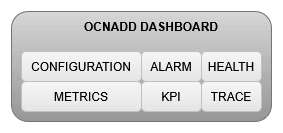
OCNADD provides an operational dashboard that offers rich visualization of various metrics, KPIs, and alarms.
The dashboard can be depicted as follows:
Figure 3-6 Dashboard
3.2.9 Health Monitoring
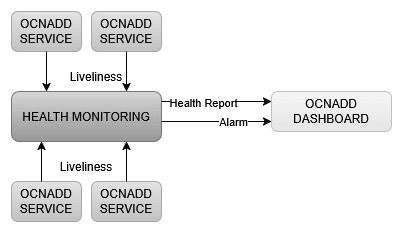
OCNADD performs health monitoring to check the readiness and liveliness of each OCNADD service and raises alarms in case of service failure.
OCNADD conducts monitoring based on a heartbeat mechanism, where each OCNADD service instance registers with the Health Monitoring service and exchanges heartbeats with it. If a pod instance goes down, the Health Monitoring service raises an alarm. A few important scenarios when an alarm is raised are as follows:
- When the maximum number of replicas for a service has been instantiated
- When a service is in a down state
- When the CPU or memory threshold is reached
The health monitoring functionality allows OCNADD to generate a health report for each service on a periodic basis or on demand. These reports can be accessed using the OCNADD Dashboard. For more information about the dashboard, see Operation Dashboard.
The health monitoring service is depicted in the diagram below:
Figure 3-7 Health Monitoring
The health monitoring functionality also supports the collection of various metrics related to service resource utilization. It stores these metrics in the metric collection database tables. The health monitoring service generates alarms for missing heartbeats, connection breakdowns, and exceeding thresholds.
3.2.10 External Kafka Feeds
OCNADD supports external xDR Kafka consumer applications using external Kafka feeds. This enables third-party consumer applications to consume xDR directly from the Data Director Kafka xDR topic without the need for any egress adapter. OCNADD allows only those third-party applications that are authenticated and authorized by the Data Director Kafka service. The authorization of the applications is managed using the KAFKA ACL functionality. Access control for the external feed is defined at the time of Kafka feed creation, and currently, third-party applications are only allowed to consume (READ) from a particular topic using a specified consumer group.
Figure 3-8 External Kafka Feeds
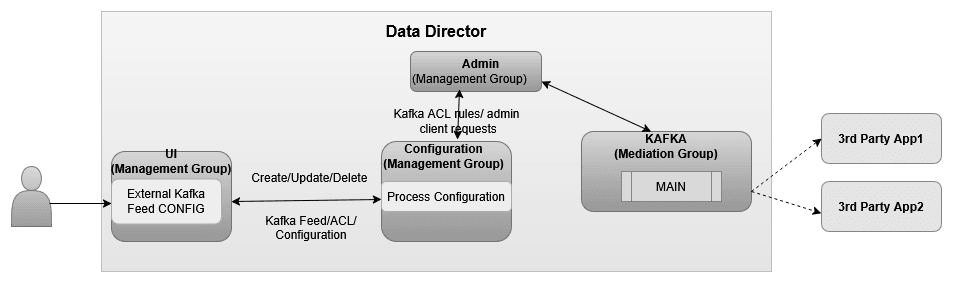
The Data Director supports only the following for Diameter xDR external Kafka feeds:
- Create, update, and delete the external Kafka feed using the UI.
- Authorization of the third-party Kafka consumer application for a particular user, consumer group, and optional hostname.
- Status reporting of the third-party Kafka consumer application using the external Kafka feed on the UI.
- Consumption rate reporting of the third-party Kafka consumer application using the external Kafka feed on the UI.
Authorization by Kafka requires clients to be authenticated by either SASL or SSL (mTLS). Therefore, external Kafka feed support requires certain settings to be enabled in the Kafka broker so that the Kafka service mandatorily authenticates Kafka clients. These properties are not enabled by default and must be configured in the Kafka service before any Kafka feed can work. See the "Enable Kafka Feed Configuration Support" section before creating any Kafka feed from the OCNADD UI.
3.2.11 Centralized Deployment
The OCNADD centralized deployment modes provide the separation of configuration and administration PODs from the traffic processing PODs. A single management POD group can serve multiple traffic processing POD groups (called Worker Groups), thereby saving resources for management PODs in very large customer deployments spanning multiple individual OCNADD sites. The Management Group of PODs maintains configuration and administration, health monitoring, alarms, and user interaction for all the individual worker groups.
Figure 3-9 Centralized Deployment
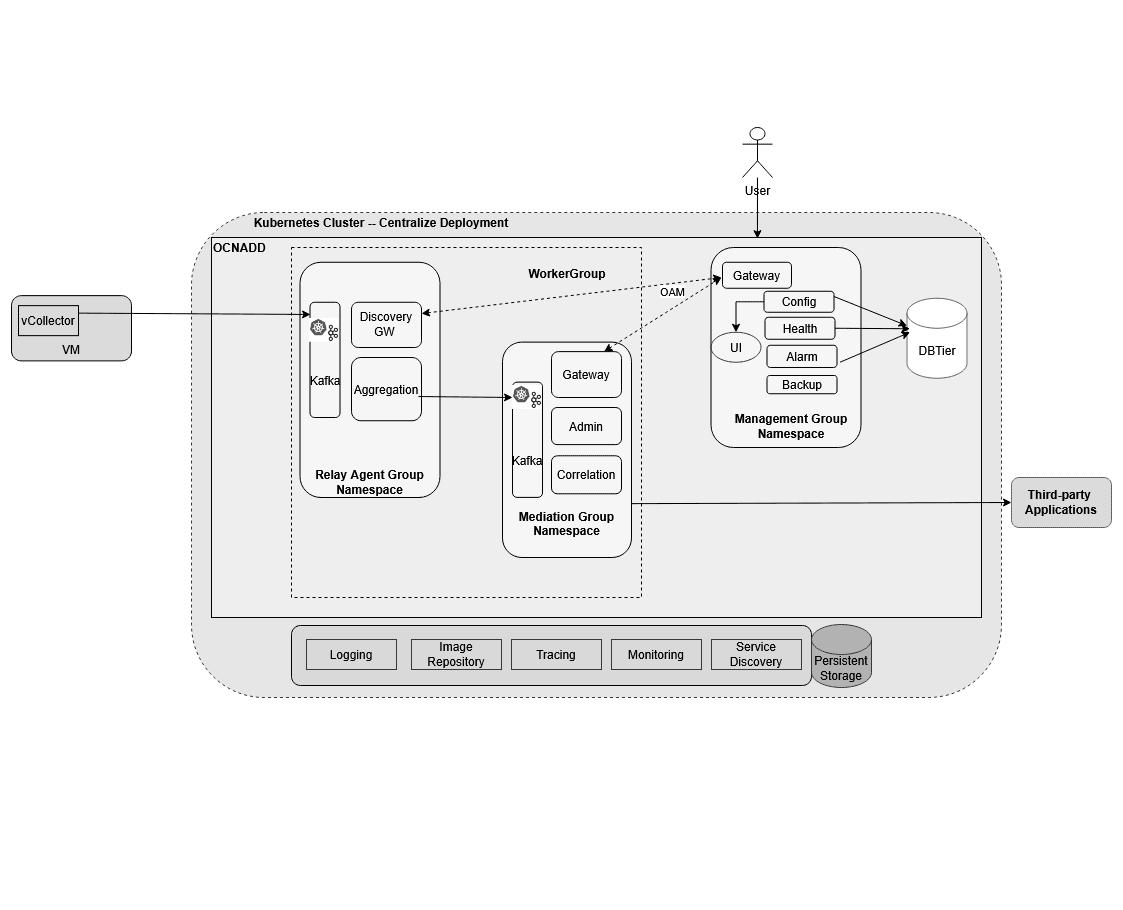
Management Group: A logical collection of the configuration and administration functions. It consists of Configuration, Alarm, Health Monitoring, Backup, and UI services.
Worker Group: A logical collection of traffic processing functions. The Worker Group represents the traffic processing functions and services, providing features like aggregation, filtering, correlation, and data feeds for third-party applications.
The worker group has evolved into a logical entity that retains the same functionality as before, now encompassing both the DD Relay Agent and DD Mediation components.
- Data Director Relay Agent: The Data Director Relay Agent is engineered to
handle high-volume data streams from 5G Network Functions (NFs) with a low data
retention policy, while ensuring scalability and efficient data processing.
The Data Director Relay Agent is a composite component consisting of:
- Discovery Service Gateway: Monitors the health of the Kafka cluster across multiple Data Director sites, facilitating communication between 5G Network Functions (NFs) and Data Director to retrieve and/or notify Kafka cluster information and its status.
- Kafka Cluster (low retention): A Kafka cluster designed for high-throughput, providing low-latency, fault-tolerant, and scalable data processing. With a low retention period, it reduces dependency on underlying data storage to process and forward large amounts of data, ensuring high throughput by reducing performance degradations due to storage bottlenecks. This design enables the Kafka cluster to scale horizontally to accommodate increasing data volumes, making it ideal for handling high data ingestion rates typical of 5G networks.
- Aggregation Service: Consumes traffic feed data produced by 5G Network Functions (NFs) from the Kafka cluster, providing a centralized processing point. It applies configurable ingress filtering to refine the data, sequences messages for proper ordering, and enriches the data with additional information. The processed data is then load-shared to different Data Director mediation instances for further processing, retention, and secured, reliable delivery to third-party consumers.
- Data Director Mediation: The Data Director Mediation is a vital component of
the Data Director, leveraging high-data-retention Kafka clusters to integrate
multiple data sources. It enables secure data delivery to third-party endpoints,
supporting a range of data formats, including feeds, xDRs, trace, and KPIs.
The Data Director Mediation is a composite component consisting of:
- Kafka Cluster: Provides high-throughput, low-latency, fault-tolerant, and scalable data processing with higher retention.
- Correlation Service: Enables the correlation of xDRs (eXtended Detail Records) for advanced data analysis.
- Gateway Service: Facilitates secure communication with OAM (Operations, Administration, and Maintenance) systems.
Worker group names are formed using the worker group namespace and site or cluster name
in the format "worker_group_namespace:site_name", where the site or
cluster name is a global parameter in the Helm charts.
It is controlled by the global.cluster.name parameter.
Important points to consider for the Centralized deployment:
- In Centralized deployment mode, configuration management is decoupled from traffic processing, allowing traffic processing units to scale independently.
- Each worker group within a Centralized Data Director (DD) site can be configured with different capacities, but the maximum supported capacity for each worker group must be the same, encompassing both Relay Agent and Mediation components.
- There can be multiple worker groups in a centralized DD site, but in the current release, only one is recommended. Each worker group will support a traffic rate depending on the resource profiles of the worker group PODs. For example, if the worker group is dimensioned for processing 100K MPS traffic and the Centralized DD site needs to support 300–400K MPS, an additional worker group should be created on the centralized DD site.
- Metrics and alarms are generated separately for each worker group, including Relay Agent and Mediation components.
- The current release supports a fixed number of worker groups per Centralized DD site, limited to one.
- Fresh deployments in Centralized mode are supported with the new architecture.
- Upgrades from previous releases to Centralized deployment mode are recommended.
- The UI allows for the configuration of correlation configurations specific to each worker group. Refer to the UI guide for more information.
3.2.12 Diameter Correlation Feature
Figure 3-10 Diameter Correlation Feature
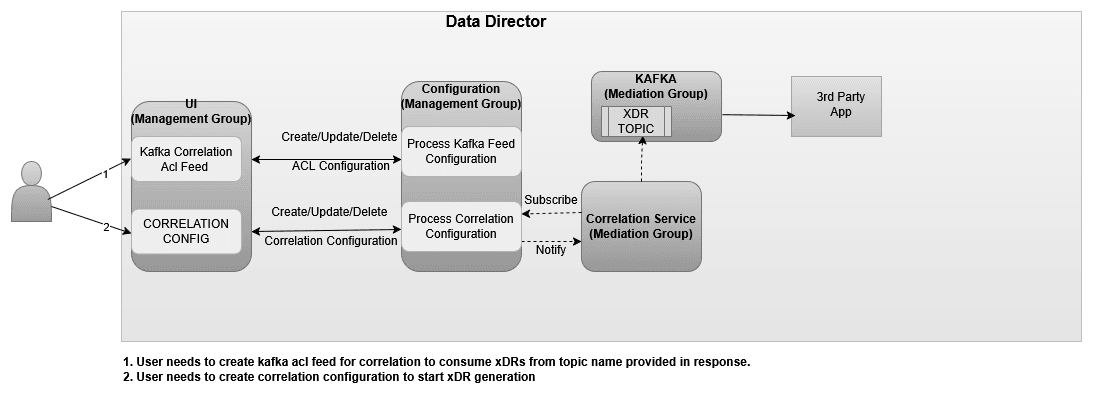
The Diameter correlation feature provides the capability to correlate messages of a network scenario that can be represented by a transaction, call, or session and generate a summary record. This summary record is known as an xDR. The generated summary records can provide deep insights and visibility into the customer network and can be useful in features such as:
- Network troubleshooting
- Revenue assurance
- Billing and CDR reconciliation
- Network performance KPIs and metrics
- Advanced analytics & observability
Network troubleshooting is one of the key features of the monitoring solution. The correlation capability helps the Data Director provide applications and utilities to perform troubleshooting of failing network scenarios, trace network scenarios across multiple Diameter nodes, and generate KPIs to provide network utilization and load. This feature enables network visibility and observability, as the KPIs and threshold alerts generated from the xDRs can be used to provide intuitive insights such as network efficiency reports in the form of network dashboards.
The xDRs generated by the Data Director can facilitate advanced descriptive and predictive network analytics. The correlation output in the form of xDRs can be fed into network analytics frameworks such as DAF to provide AI/ML capabilities that can be helpful in fraud detection and in predicting and preventing network spoofing and DOS attacks.
Note:
In case of an upgrade, rollback, service restart, or if a configuration is created with the same name, duplicate messages/xDRs will be sent by the correlation service to avoid data loss.3.2.12.1 Kafka Feed Configuration for Correlation
This section provides the details of the Kafka Feed configuration for correlation.
Prerequisites
It is mandatory to enable intra TLS for Kafka and create Kafka feed configuration with CORRELATED Feed Type to consume xDR (Extended Detailed Record) from OCNADD using Correlation Configurations.
3.2.12.1.1 Create ACL USER
Create ACL user prior to creating Kafka feeds. See Enable Kafka Feed Configuration Support.
3.2.12.1.2 Create Kafka Feed Configuration
To create Kafka Feed configuration, see Enable Kafka Feed Configuration Support.
3.2.12.1.3 Feed Type
- CORRELATED Feed Type:
When the feed type is selected CORRELATED, aggregated data without a filter is used by the Correlation service to generate the xDRs.
The source topic for correlation service would be the DIAMETER topic.
The destination topic to consume data by third-party consumers is prefixed as <kafka-feed-name>-CORRELATED topic.
Note:
The user needs to trigger the corresponding Kafka ACL feed delete manually to delete the corresponding Topic, correlation config delete will not delete the topic. - CORRELATED_FILTERED Feed Type
CORRELATED_FILTERED Feed Type is not supported in the current release.
3.2.12.1.4 Diameter Feed Configuration
Note:
CLI based configuration is supported for Diameter correlation configuration in the current release.Configuration Parameters
Table 3-2 Configuration Parameters
| Attribute Name | Data Type | P | Cardinality | Description |
|---|---|---|---|---|
| configurationName | String | M | 1 | The name of the configuration provided by the user for the correlation. This should be a unique name. It shall be mapped with Kafka ACL feed with CORRELATED type. |
| workerGroup | String | M | 1 | The name of the worker group in which the correlation configuration should be applied. |
| userName | String | M | 1 | The username provided by Dashboard GUI who is configuring the OCNADD correlation configuration. |
| dataStreamStartPoint | Enum | M | 1 | This parameter defines data stream points for correlation service
from inbound topic.
Options: EARLIEST: Start data stream from the beginning or resume from point of failure. LATEST: Proceed data stream from the current offset. Default: LATEST |
| inboundDataStreamName | String | M | 1 | Name of the source data stream from where the correlation service
will start processing data.
Example: DIAMETER: For aggregated data consumption with ACL feed type CORRELATED. |
| outboundDataStreamName | String | M | 1 | Name of the destination data stream from where the correlation
service will write an xDR, and a 3rd-party consumer app will start
xDR
streaming.
Example:
Note: Filter (CORRELATED-FILTERED) is not supported in the current release. |
| protocol | Enum | M | 1 | DIAMETER |
| xdrType | Enum | M | 1 |
Type of xDR. SUDR (SINGLE UNIT DETAILED RECORD) – An xDR shall be generated for each message received in the correlation service. TDR (TRANSACTION DETAILED RECORD) – An xDR shall be generated for each transaction, including all messages of the transaction received in the correlation service. Options:
Default: SUDR |
| supportedOptionalXdrContents | String[XdrContents] | M | 1 to N |
This configurable parameter provides an option to select xDR contents from the list of supported optional xDR contents. The xDR shall be generated with the selected xDR content, and the same will be sent to the 3rd-party app/written into the outbound Kafka topic.
|
| correlationMode | Enum | C | 1 |
This provides an option to select the mode of transaction correlation for xDRs. The following definitions outline the correlation keys that will be maintained separately for each protocol type: Protocol Type: DIAMETER Default mode: SESSION_ID + ENDTOEND_ID + COMMAND_CODE Options:
|
| maxTransactionWaitTime | Int | C | 1 |
Maximum duration to wait for a response message for a transaction in milliseconds. Range: [2000–60000] Default: 30000 |
| includeMessageWithxDR | Enum | M | 1 |
This property provides an option for the user to select whether a message will be included with the xDR or not, and if included, which part of the message. Default: NONE Protocol Type: DIAMETER
|
| supportedKpis | String[KPIs] | O | 1 to N | This provides an option to the user to select a list of available supported KPIs. |
| storeXdrInDB | Boolean | O | 1 | It shall be set to false by default. The extended storage feature is not supported for Protocol Type: DIAMETER. |
| retentionTimeInDb | Int | C | 1 | It will be used for xDR records retention in DB. The value is in
minutes.
It must be provided when storeXdrInDB = True. Not supported for Protocol Type: DIAMETER. |
Note:
Create, update, and delete of Diameter Correlated Feed configurations is not supported from the UI.A. Create Configuration
Rest End Point: {apiRoot}/ocnadd-configuration/{version}/correlation
curl -k --location --cert-type P12 --cert /var/securityfiles/keystore/serverKeyStore.p12:$OCNADD_SERVER_KS_PASSWORD --request POST 'https://ocnaddmanagementgateway:12889/ocnadd-configuration/v2/correlation' \
--header 'Content-Type: application/json' \
--data-raw '{
    "configurationName": "<diameter-feed-name>",
    "correlationConfig": {
        "configurationName": "<diameter-feed-name>",
        "userName": "<dd-ui-user-name>",
        "workerGroup": "<worker-group-name>",
        "relayAgentMediationGroup": {
   		   "<siteName>:<workerGroupName>:<relayAgentNamespace>:<relayAgentClusterName>": [
   		   "<siteName>:<workerGroupName>:<mediationNamespace>:<mediationClusterName>"
           ]
        },
        "dataStreamStartPoint": "LATEST",
        "inboundDataStreamName": "DIAMETER",
        "outboundDataStreamName": "<diameter-feed-name-in-block-letters>-CORRELATED",
        "supportedOptionalXdrContents": [
            "srcIp",
            "dstIp",
            "srcPort",
            "dsPort",
            "applicationId",
            "commandCode",
            "endToEndId",
            "imsi",
            "msisdn",
            "resultCode",
            "originalHost",
            "originalRealm",
            "destinationHost",
            "destinationRealm",
            "sessionId",
            "routeRecord",
            "vendorId",
            "authApplicationId",
            "subscriberStatus",
            "ratType",
            "visitedPlmnId",
            "serviceSelection",
            "absoluteTime",
            "relativeTime",
            "priorityLevel",
            "userLocationInfo3gpp",
            "mcc",
            "mnc",
            "imei",
            "sgsnMccMnc",
            "ggsnMccMnc",
            "qosClassIdentifier",
            "qosPriority",
            "tac",
            "cellId",
            "latitutde",
            "longitude",
            "way",
            "cancellationType",
            "addrType",
            "requestFlag",
            "answerFlag",
            "accApplicationId",
            "reqHeaderFlag",
            "ansHeaderFlag",
            "equipmentStatus",
            "alertReason",
            "sgsnNumber",
            "terminalInfo",
            "featureList",
            "userId",
            "mIPHomeAgentAddrType",
            "mipHomeAgentHost",
            "mIPHomeAgentAddress",
            "mIPHomeAgentRealm",
            "networkAccessMode",
            "visitedNetworkId",
            "requestCause",
            "terminationCause",
            "reAuthRequestType",
            "eventTrigger",
            "sessionReleaseCause",
            "ipCanType",
            "pdnType",
            "userLocation",
            "userLocationMNC",
            "userLocationECI",
            "userLocationLAC",
            "userLocationCISAC",
            "userLocationTAC",
            "preEmptionCapability",
            "preEmptionVulnerability",
            "pdnAddressV4",
            "pdnAddressV6",
            "apn",
            "ruleSpaceDecision",
            "ruleSpaceSuggestion",
            "nodeType",
            "transactionId"
        ],
        "xdrType": "TDR",
        "correlationMode": "<correlation-mode>",
        "maxTransactionWaitTime": 2000,
        "includeMessageWithxDR": "NONE",
        "ddMetadataRequired": false,
        "storeXdrInDB": false,
        "supportedKpis": [
            "TOTAL_TRANSACTION",
            "TOTAL_FAILED_TRANSACTION_PER_APPLICATION_ID",
            "TOTAL_SUCCESSFUL_TRANSACTION",
            "TOTAL_FAILED_TRANSACTION_PER_RESULT_CODE"
        ],
        "sourceFeedCorrCriteria": [],
        "retentionTimeInDb": 60,
        "diameterResponseIncluded": true,
        "corrProtocol": "DIAMETER"
    },
    "readyToStreamData": true
}'
curl -k --location --cert-type P12 --cert /var/securityfiles/keystore/serverKeyStore.p12:$OCNADD_SERVER_KS_PASSWORD --request POST 'https://ocnaddmanagementgateway:12889/ocnadd-configuration/v2/correlation' \
--header 'Content-Type: application/json' \
--data-raw '{
    "configurationName": "diameter-feed",
    "correlationConfig": {
        "configurationName": "diameter-feed",
        "userName": "admin",
        "workerGroup": "ocnadd-test:site-1",
        "relayAgentMediationGroup": {
           "BLR:wg1:dd-relay:cluster.local": [
              "BLR:wg1:dd-med:cluster.local"
           ]
        },
        "dataStreamStartPoint": "LATEST",
        "inboundDataStreamName": "DIAMETER",
        "outboundDataStreamName": "DIAMETER-FEED-CORRELATED",
        "supportedOptionalXdrContents": [
            "srcIp",
            "dstIp",
            "srcPort",
            "dsPort",
            "applicationId",
            "commandCode",
            "endToEndId",
            "imsi",
            "msisdn",
            "resultCode",
            "originalHost",
            "originalRealm",
            "destinationHost",
            "destinationRealm",
            "sessionId",
            "routeRecord",
            "vendorId",
            "authApplicationId",
            "subscriberStatus",
            "ratType",
            "visitedPlmnId",
            "serviceSelection",
            "absoluteTime",
            "relativeTime",
            "priorityLevel",
            "userLocationInfo3gpp",
            "mcc",
            "mnc",
            "imei",
            "sgsnMccMnc",
            "ggsnMccMnc",
            "qosClassIdentifier",
            "qosPriority",
            "tac",
            "cellId",
            "latitutde",
            "longitude",
            "way",
            "cancellationType",
            "addrType",
            "requestFlag",
            "answerFlag",
            "accApplicationId",
            "reqHeaderFlag",
            "ansHeaderFlag",
            "equipmentStatus",
            "alertReason",
            "sgsnNumber",
            "terminalInfo",
            "featureList",
            "userId",
            "mIPHomeAgentAddrType",
            "mipHomeAgentHost",
            "mIPHomeAgentAddress",
            "mIPHomeAgentRealm",
            "networkAccessMode",
            "visitedNetworkId",
            "requestCause",
            "terminationCause",
            "reAuthRequestType",
            "eventTrigger",
            "sessionReleaseCause",
            "ipCanType",
            "pdnType",
            "userLocation",
            "userLocationMNC",
            "userLocationECI",
            "userLocationLAC",
            "userLocationCISAC",
            "userLocationTAC",
            "preEmptionCapability",
            "preEmptionVulnerability",
            "pdnAddressV4",
            "pdnAddressV6",
            "apn",
            "ruleSpaceDecision",
            "ruleSpaceSuggestion",
            "nodeType",
            "transactionId"
        ],
        "xdrType": "TDR",
        "correlationMode": "IP+PORT+HOPBYHOP_ID+ENDTOEND_ID+COMMAND_CODE",
        "maxTransactionWaitTime": 2000,
        "includeMessageWithxDR": "NONE",
        "ddMetadataRequired": false,
        "storeXdrInDB": false,
        "supportedKpis": [
            "TOTAL_TRANSACTION",
            "TOTAL_FAILED_TRANSACTION_PER_APPLICATION_ID",
            "TOTAL_SUCCESSFUL_TRANSACTION",
            "TOTAL_FAILED_TRANSACTION_PER_RESULT_CODE"
        ],
        "sourceFeedCorrCriteria": [],
        "retentionTimeInDb": 60,
        "diameterResponseIncluded": true,
        "corrProtocol": "DIAMETER"
    },
    "readyToStreamData": true
}'
B. Update Configuration
Rest End Point: <apiRoot>/ocnadd-configuration/{version}/correlation/{config-name}
curl -k --location --cert-type P12 --cert /var/securityfiles/keystore/serverKeyStore.p12:$OCNADD_SERVER_KS_PASSWORD --request PUT 'https://ocnaddmanagementgateway:12889/ocnadd-configuration/v2/correlation/<diameter-feed-name>' \
--header 'Content-Type: application/json' \
--data-raw '{
    "configurationName": "<diameter-feed-name>",
    "correlationConfig": {
        "configurationName": "<diameter-feed-name>",
        "userName": "<dd-ui-user-name>",
        "workerGroup": "<worker-group-name>",
        "relayAgentMediationGroup": {
   		   "<siteName>:<workerGroupName>:<relayAgentNamespace>:<relayAgentClusterName>": [
   		   "<siteName>:<workerGroupName>:<mediationNamespace>:<mediationClusterName>"
           ]
        },
        "dataStreamStartPoint": "LATEST",
        "inboundDataStreamName": "DIAMETER",
        "outboundDataStreamName": "<diameter-feed-name-in-block-letters>-CORRELATED",
        "supportedOptionalXdrContents": [
            "srcIp",
            "dstIp",
            "srcPort",
            "dsPort",
            "applicationId",
            "commandCode",
            "endToEndId",
            "imsi",
            "msisdn",
            "resultCode",
            "originalHost",
            "originalRealm",
            "destinationHost",
            "destinationRealm",
            "sessionId",
            "routeRecord",
            "vendorId",
            "authApplicationId",
            "subscriberStatus",
            "ratType",
            "visitedPlmnId",
            "serviceSelection",
            "absoluteTime",
            "relativeTime",
            "priorityLevel",
            "userLocationInfo3gpp",
            "mcc",
            "mnc",
            "imei",
            "sgsnMccMnc",
            "ggsnMccMnc",
            "qosClassIdentifier",
            "qosPriority",
            "tac",
            "cellId",
            "latitutde",
            "longitude",
            "way",
            "cancellationType",
            "addrType",
            "requestFlag",
            "answerFlag",
            "accApplicationId",
            "reqHeaderFlag",
            "ansHeaderFlag",
            "equipmentStatus",
            "alertReason",
            "sgsnNumber",
            "terminalInfo",
            "featureList",
            "userId",
            "mIPHomeAgentAddrType",
            "mipHomeAgentHost",
            "mIPHomeAgentAddress",
            "mIPHomeAgentRealm",
            "networkAccessMode",
            "visitedNetworkId",
            "requestCause",
            "terminationCause",
            "reAuthRequestType",
            "eventTrigger",
            "sessionReleaseCause",
            "ipCanType",
            "pdnType",
            "userLocation",
            "userLocationMNC",
            "userLocationECI",
            "userLocationLAC",
            "userLocationCISAC",
            "userLocationTAC",
            "preEmptionCapability",
            "preEmptionVulnerability",
            "pdnAddressV4",
            "pdnAddressV6",
            "apn",
            "ruleSpaceDecision",
            "ruleSpaceSuggestion",
            "nodeType",
            "transactionId"
        ],
        "xdrType": "TDR",
        "correlationMode": "<correlation-mode>",
        "maxTransactionWaitTime": 2000,
        "includeMessageWithxDR": "NONE",
        "ddMetadataRequired": false,
        "storeXdrInDB": false,
        "supportedKpis": [
            "TOTAL_TRANSACTION",
            "TOTAL_FAILED_TRANSACTION_PER_APPLICATION_ID",
            "TOTAL_SUCCESSFUL_TRANSACTION",
            "TOTAL_FAILED_TRANSACTION_PER_RESULT_CODE"
        ],
        "sourceFeedCorrCriteria": [],
        "retentionTimeInDb": 60,
        "diameterResponseIncluded": true,
        "corrProtocol": "DIAMETER"
    },
    "readyToStreamData": true
}'
curl -k --location --cert-type P12 --cert /var/securityfiles/keystore/serverKeyStore.p12:$OCNADD_SERVER_KS_PASSWORD --request PUT 'https://ocnaddmanagementgateway:12889/ocnadd-configuration/v2/correlation/diameter-feed' \
--header 'Content-Type: application/json' \
--data-raw '{
    "configurationName": "diameter-feed",
    "correlationConfig": {
        "configurationName": "diameter-feed",
        "userName": "admin",
        "workerGroup": "ocnadd-test:site-1",
        "relayAgentMediationGroup": {
            "BLR:wg1:dd-relay:cluster.local": [
              "BLR:wg1:dd-med:cluster.local"
           ]
        },
        "dataStreamStartPoint": "LATEST",
        "inboundDataStreamName": "DIAMETER",
        "outboundDataStreamName": "DIAMETER-FEED-CORRELATED",
        "supportedOptionalXdrContents": [
            "srcIp",
            "dstIp",
            "srcPort",
            "dsPort",
            "applicationId",
            "commandCode",
            "endToEndId",
            "imsi",
            "msisdn",
            "resultCode",
            "originalHost",
            "originalRealm",
            "destinationHost",
            "destinationRealm",
            "sessionId",
            "routeRecord",
            "vendorId",
            "authApplicationId",
            "subscriberStatus",
            "ratType",
            "visitedPlmnId",
            "serviceSelection",
            "absoluteTime",
            "relativeTime",
            "priorityLevel",
            "userLocationInfo3gpp",
            "mcc",
            "mnc",
            "imei",
            "sgsnMccMnc",
            "ggsnMccMnc",
            "qosClassIdentifier",
            "qosPriority",
            "tac",
            "cellId",
            "latitutde",
            "longitude",
            "way",
            "cancellationType",
            "addrType",
            "requestFlag",
            "answerFlag",
            "accApplicationId",
            "reqHeaderFlag",
            "ansHeaderFlag",
            "equipmentStatus",
            "alertReason",
            "sgsnNumber",
            "terminalInfo",
            "featureList",
            "userId",
            "mIPHomeAgentAddrType",
            "mipHomeAgentHost",
            "mIPHomeAgentAddress",
            "mIPHomeAgentRealm",
            "networkAccessMode",
            "visitedNetworkId",
            "requestCause",
            "terminationCause",
            "reAuthRequestType",
            "eventTrigger",
            "sessionReleaseCause",
            "ipCanType",
            "pdnType",
            "userLocation",
            "userLocationMNC",
            "userLocationECI",
            "userLocationLAC",
            "userLocationCISAC",
            "userLocationTAC",
            "preEmptionCapability",
            "preEmptionVulnerability",
            "pdnAddressV4",
            "pdnAddressV6",
            "apn",
            "ruleSpaceDecision",
            "ruleSpaceSuggestion",
            "nodeType",
            "transactionId"
        ],
        "xdrType": "TDR",
        "correlationMode": "IP+PORT+HOPBYHOP_ID+ENDTOEND_ID+COMMAND_CODE",
        "maxTransactionWaitTime": 2000,
        "includeMessageWithxDR": "NONE",
        "ddMetadataRequired": false,
        "storeXdrInDB": false,
        "supportedKpis": [
            "TOTAL_TRANSACTION",
            "TOTAL_FAILED_TRANSACTION_PER_APPLICATION_ID",
            "TOTAL_SUCCESSFUL_TRANSACTION",
            "TOTAL_FAILED_TRANSACTION_PER_RESULT_CODE"
        ],
        "sourceFeedCorrCriteria": [],
        "retentionTimeInDb": 60,
        "diameterResponseIncluded": true,
        "corrProtocol": "DIAMETER"
    },
    "readyToStreamData": true
}'
C. Delete Configuration
Rest End Point: <apiRoot>/ocnadd-configuration/{version}/correlation/{configurationName}
curl -k --location --cert-type P12 --cert /var/securityfiles/keystore/serverKeyStore.p12:$OCNADD_SERVER_KS_PASSWORD --request DELETE 'https://ocnaddmanagementgateway:12889/ocnadd-configuration/v2/correlation/<diameter-feed-name>' \
curl -k --location --cert-type P12 --cert /var/securityfiles/keystore/serverKeyStore.p12:$OCNADD_SERVER_KS_PASSWORD --request DELETE 'https://ocnaddmanagementgateway:12889/ocnadd-configuration/v2/correlation/diameter-feed' \D. Get Diameter Correlation Configuration
Rest End Point: { apiRoot}/ocnadd-configuration/{version}/correlation/configurations
curl -k --location --cert-type P12 --cert /var/securityfiles/keystore/serverKeyStore.p12:$OCNADD_SERVER_KS_PASSWORD --request GET 'https://ocnaddmanagementgateway:12889/ocnadd-configuration/v2/correlation/configurations' \E. Get Specific Diameter Correlation Configuration
Rest End Point: { apiRoot}/ocnadd-configuration/{version}/correlation/{config-name}
curl -k --location --cert-type P12 --cert /var/securityfiles/keystore/serverKeyStore.p12:$OCNADD_SERVER_KS_PASSWORD --request GET 'https://ocnaddmanagementgateway:12889/ocnadd-configuration/v2/correlation/<diameter-feed-name> \
curl -k --location --cert-type P12 --cert /var/securityfiles/keystore/serverKeyStore.p12:$OCNADD_SERVER_KS_PASSWORD --request GET 'https://ocnaddmanagementgateway:12889/ocnadd-configuration/v2/correlation/diameter-feed' \3.2.12.1.5 XDR Content
This section provides the details of the xDR mandatory and optional xRD content.
Mandatory xDR Content
Table 3-3 Mandatory xDR Content
| Field | Data Type | Presence | Description |
|---|---|---|---|
| version | String | M |
Version number of xDR content. |
| configurationName | String | M |
Correlation configuration name. This can be used by a 3rd-party consumer to distinguish between multiple configuration xDRs when the same outbound Kafka topic is used. |
| beginTime | String(UTC time) | M |
Date and time in milliseconds of the first message of the xDR. Example: "2023-01-23T07:03:36.311Z" |
| endTime | String(UTC time) | M |
Date and time of the last event in the transaction (last message or timeout). Example: "2023-01-23T07:03:39.311Z" |
| xdrStatus | Enum | M |
xDR status of the correlated transaction. Value: SUDR, COMPLETE, TIMER_EXPIRY, NOT_MATCHED |
Optional xDR Content
Note:
The mandatory fields will always be present in xDRs and optional fields will be present based on their availability in the message.Table 3-4 Optional xDR Content
| Field Name | Data Type | Presence | Description | ||||||||||||||||||||||||||||||||||||||||||||||||||||||||||||||||||||||||||||||||||||||||||||||||||||||||||||||||||||||||||||||||||||||||||||||||||||||||||||||||||||||||||||||||||||||||||||||||||||||||||||||||||||||||||||||||||||||||||||||||||||||||||||||||||||||||||||||||||||||||||||||||||||||||
|---|---|---|---|---|---|---|---|---|---|---|---|---|---|---|---|---|---|---|---|---|---|---|---|---|---|---|---|---|---|---|---|---|---|---|---|---|---|---|---|---|---|---|---|---|---|---|---|---|---|---|---|---|---|---|---|---|---|---|---|---|---|---|---|---|---|---|---|---|---|---|---|---|---|---|---|---|---|---|---|---|---|---|---|---|---|---|---|---|---|---|---|---|---|---|---|---|---|---|---|---|---|---|---|---|---|---|---|---|---|---|---|---|---|---|---|---|---|---|---|---|---|---|---|---|---|---|---|---|---|---|---|---|---|---|---|---|---|---|---|---|---|---|---|---|---|---|---|---|---|---|---|---|---|---|---|---|---|---|---|---|---|---|---|---|---|---|---|---|---|---|---|---|---|---|---|---|---|---|---|---|---|---|---|---|---|---|---|---|---|---|---|---|---|---|---|---|---|---|---|---|---|---|---|---|---|---|---|---|---|---|---|---|---|---|---|---|---|---|---|---|---|---|---|---|---|---|---|---|---|---|---|---|---|---|---|---|---|---|---|---|---|---|---|---|---|---|---|---|---|---|---|---|---|---|---|---|---|---|---|---|---|---|---|---|---|---|---|---|---|---|---|---|---|---|---|---|---|---|---|---|---|---|---|---|---|---|---|---|---|---|---|---|---|---|---|---|---|---|---|
| totalPduCount | Integer | O |
The total number of messages are present in transaction. It must be selected in xDR when correlation mode is not set to SUDR.
|
||||||||||||||||||||||||||||||||||||||||||||||||||||||||||||||||||||||||||||||||||||||||||||||||||||||||||||||||||||||||||||||||||||||||||||||||||||||||||||||||||||||||||||||||||||||||||||||||||||||||||||||||||||||||||||||||||||||||||||||||||||||||||||||||||||||||||||||||||||||||||||||||||||||||
| totalLength | Integer | O |
Total sum of messages is present in transaction and It will be in bytes format. It will be updated when includeMessageWithxDR is not NONE. |
||||||||||||||||||||||||||||||||||||||||||||||||||||||||||||||||||||||||||||||||||||||||||||||||||||||||||||||||||||||||||||||||||||||||||||||||||||||||||||||||||||||||||||||||||||||||||||||||||||||||||||||||||||||||||||||||||||||||||||||||||||||||||||||||||||||||||||||||||||||||||||||||||||||||
| transactionId | String | O |
The unique identifier of transaction. It must be selected in xDR when correlation mode is not set to SUDR. |
||||||||||||||||||||||||||||||||||||||||||||||||||||||||||||||||||||||||||||||||||||||||||||||||||||||||||||||||||||||||||||||||||||||||||||||||||||||||||||||||||||||||||||||||||||||||||||||||||||||||||||||||||||||||||||||||||||||||||||||||||||||||||||||||||||||||||||||||||||||||||||||||||||||||
| transactionTime | String | O |
Duration of the complete transaction(endTime-beginTime ). In case of timeout the transaction time will be calculated between transactions begin time and timeout event. It must be selected in xDR when correlation mode is not set to SUDR. It will be in milisecond. Example: 1000 |
||||||||||||||||||||||||||||||||||||||||||||||||||||||||||||||||||||||||||||||||||||||||||||||||||||||||||||||||||||||||||||||||||||||||||||||||||||||||||||||||||||||||||||||||||||||||||||||||||||||||||||||||||||||||||||||||||||||||||||||||||||||||||||||||||||||||||||||||||||||||||||||||||||||||
| way | String | O |
The direction of the TCP connection relative to the observation point, as indicated by the source. The data will be extracted from header 'Flags' and populated from the first occurrence of the relevant information in the message. The mapped label value will be present in the xDRs.
|
||||||||||||||||||||||||||||||||||||||||||||||||||||||||||||||||||||||||||||||||||||||||||||||||||||||||||||||||||||||||||||||||||||||||||||||||||||||||||||||||||||||||||||||||||||||||||||||||||||||||||||||||||||||||||||||||||||||||||||||||||||||||||||||||||||||||||||||||||||||||||||||||||||||||
| srcIp | String | O |
The source IP address of the initial message in the session or transaction. The data will be extracted from metadata-list and populated from the first occurrence of the relevant information in the message. |
||||||||||||||||||||||||||||||||||||||||||||||||||||||||||||||||||||||||||||||||||||||||||||||||||||||||||||||||||||||||||||||||||||||||||||||||||||||||||||||||||||||||||||||||||||||||||||||||||||||||||||||||||||||||||||||||||||||||||||||||||||||||||||||||||||||||||||||||||||||||||||||||||||||||
| dstIp | String | O |
The destination IP address of the initial message in the session or transaction. The data will be extracted from metadata-list and populated from the first occurrence of the relevant information in the message. |
||||||||||||||||||||||||||||||||||||||||||||||||||||||||||||||||||||||||||||||||||||||||||||||||||||||||||||||||||||||||||||||||||||||||||||||||||||||||||||||||||||||||||||||||||||||||||||||||||||||||||||||||||||||||||||||||||||||||||||||||||||||||||||||||||||||||||||||||||||||||||||||||||||||||
| srcPort | String | O |
The TCP port used by the application on the originating IP address. The data will be extracted from metadata-list and populated from the first occurrence of the relevant information in the message. |
||||||||||||||||||||||||||||||||||||||||||||||||||||||||||||||||||||||||||||||||||||||||||||||||||||||||||||||||||||||||||||||||||||||||||||||||||||||||||||||||||||||||||||||||||||||||||||||||||||||||||||||||||||||||||||||||||||||||||||||||||||||||||||||||||||||||||||||||||||||||||||||||||||||||
| dstPort | String | O |
The TCP port used by the application on the destination IP address. The data will be extracted from metadata-list and populated from the first occurrence of the relevant information in the message. |
||||||||||||||||||||||||||||||||||||||||||||||||||||||||||||||||||||||||||||||||||||||||||||||||||||||||||||||||||||||||||||||||||||||||||||||||||||||||||||||||||||||||||||||||||||||||||||||||||||||||||||||||||||||||||||||||||||||||||||||||||||||||||||||||||||||||||||||||||||||||||||||||||||||||
| applicationId | String | O |
The applicationId is used to identify which diameter Interface the message is applicable for. The data will be extracted from header 'ApplicationId' and populated from the first occurrence of the relevant information in the message. The mapped label value will be present in the xDRs.
|
||||||||||||||||||||||||||||||||||||||||||||||||||||||||||||||||||||||||||||||||||||||||||||||||||||||||||||||||||||||||||||||||||||||||||||||||||||||||||||||||||||||||||||||||||||||||||||||||||||||||||||||||||||||||||||||||||||||||||||||||||||||||||||||||||||||||||||||||||||||||||||||||||||||||
| commandCode | String | O |
A Command Code is a unique identifier that is used to identify a specific Diameter command and It is used in order to communicate the command associated with the message. It will be populated from the first occurrence of the relevant information in the message and populated from the first occurrence of the relevant information in the message. The mapped label value will be present in the xDRs.
|
||||||||||||||||||||||||||||||||||||||||||||||||||||||||||||||||||||||||||||||||||||||||||||||||||||||||||||||||||||||||||||||||||||||||||||||||||||||||||||||||||||||||||||||||||||||||||||||||||||||||||||||||||||||||||||||||||||||||||||||||||||||||||||||||||||||||||||||||||||||||||||||||||||||||
| endToEndId | String | O |
The End-to-End Identifier is used to detect duplicate messages. The data will be extracted from header 'End-to-End' and populated from the first occurrence of the relevant information in the message. |
||||||||||||||||||||||||||||||||||||||||||||||||||||||||||||||||||||||||||||||||||||||||||||||||||||||||||||||||||||||||||||||||||||||||||||||||||||||||||||||||||||||||||||||||||||||||||||||||||||||||||||||||||||||||||||||||||||||||||||||||||||||||||||||||||||||||||||||||||||||||||||||||||||||||
| resultCode | String | O |
Result-Code data field contains the Result Code or Experimental Result values as defined in RFC 3588 (7.1 - 7.7) and TS 29.212 (5.5). Naming convention "E_" signifies the corresponding value is an Experimental-Result code. It will be populated from the first occurrence of the relevant information in the message and populated from the first occurrence of the relevant information in the message. The mapped label value will be present in the xDRs, The data will be extracted from either of AVPs:
|
||||||||||||||||||||||||||||||||||||||||||||||||||||||||||||||||||||||||||||||||||||||||||||||||||||||||||||||||||||||||||||||||||||||||||||||||||||||||||||||||||||||||||||||||||||||||||||||||||||||||||||||||||||||||||||||||||||||||||||||||||||||||||||||||||||||||||||||||||||||||||||||||||||||||
| sessionId | String | O |
A session is a logical concept at the application layer, and is shared between an access device and a server, and is identified via the Session-Id. The data will be extracted from AVP 'Session-Id' and populated from the first occurrence of the relevant information in the message. |
||||||||||||||||||||||||||||||||||||||||||||||||||||||||||||||||||||||||||||||||||||||||||||||||||||||||||||||||||||||||||||||||||||||||||||||||||||||||||||||||||||||||||||||||||||||||||||||||||||||||||||||||||||||||||||||||||||||||||||||||||||||||||||||||||||||||||||||||||||||||||||||||||||||||
| originHost | String | O |
It identifies the endpoint that originated the Diameter message. The data will be extracted from AVP 'Origin-Host' and populated from the first occurrence of the relevant information in the message. |
||||||||||||||||||||||||||||||||||||||||||||||||||||||||||||||||||||||||||||||||||||||||||||||||||||||||||||||||||||||||||||||||||||||||||||||||||||||||||||||||||||||||||||||||||||||||||||||||||||||||||||||||||||||||||||||||||||||||||||||||||||||||||||||||||||||||||||||||||||||||||||||||||||||||
| originRealm | String | O |
Origin Domain of the request message. The data will be extracted from AVP 'Origin-Realm' and populated from the first occurrence of the relevant information in the message. |
||||||||||||||||||||||||||||||||||||||||||||||||||||||||||||||||||||||||||||||||||||||||||||||||||||||||||||||||||||||||||||||||||||||||||||||||||||||||||||||||||||||||||||||||||||||||||||||||||||||||||||||||||||||||||||||||||||||||||||||||||||||||||||||||||||||||||||||||||||||||||||||||||||||||
| destinationHost | String | O |
It identifies the endpoint to which the Diameter message is intended. The data will be extracted from AVP 'Destination-Host' and populated from the first occurrence of the relevant information in the message. |
||||||||||||||||||||||||||||||||||||||||||||||||||||||||||||||||||||||||||||||||||||||||||||||||||||||||||||||||||||||||||||||||||||||||||||||||||||||||||||||||||||||||||||||||||||||||||||||||||||||||||||||||||||||||||||||||||||||||||||||||||||||||||||||||||||||||||||||||||||||||||||||||||||||||
| destinationRealm | String | O |
Destination Realm contains the realm the message is to be routed to. The data will be extracted from AVP 'Destination-Realm' and populated from the first occurrence of the relevant information in the message. |
||||||||||||||||||||||||||||||||||||||||||||||||||||||||||||||||||||||||||||||||||||||||||||||||||||||||||||||||||||||||||||||||||||||||||||||||||||||||||||||||||||||||||||||||||||||||||||||||||||||||||||||||||||||||||||||||||||||||||||||||||||||||||||||||||||||||||||||||||||||||||||||||||||||||
| imsi | String | O |
The International Mobile Subscriber Identity (IMSI) is a unique number associated with a mobile phone user. It's used to identify a subscriber to a cellular network. The data will be extracted from following AVP and populated from the first occurrence of the relevant information in the message.
|
||||||||||||||||||||||||||||||||||||||||||||||||||||||||||||||||||||||||||||||||||||||||||||||||||||||||||||||||||||||||||||||||||||||||||||||||||||||||||||||||||||||||||||||||||||||||||||||||||||||||||||||||||||||||||||||||||||||||||||||||||||||||||||||||||||||||||||||||||||||||||||||||||||||||
| msisdn | String | O |
The Mobile Station International Subscriber Directory Number (MSISDN) is a unique number assigned to a mobile phone subscriber. It's essentially the phone number associated with a SIM card or mobile device. The data will be extracted from following AVP and populated from the first occurrence of the relevant information in the message.
|
||||||||||||||||||||||||||||||||||||||||||||||||||||||||||||||||||||||||||||||||||||||||||||||||||||||||||||||||||||||||||||||||||||||||||||||||||||||||||||||||||||||||||||||||||||||||||||||||||||||||||||||||||||||||||||||||||||||||||||||||||||||||||||||||||||||||||||||||||||||||||||||||||||||||
| impu | String | O |
It contains the public identity of a user. The data will be extracted from following AVP and populated from the first occurrence of the relevant information in the message.
|
||||||||||||||||||||||||||||||||||||||||||||||||||||||||||||||||||||||||||||||||||||||||||||||||||||||||||||||||||||||||||||||||||||||||||||||||||||||||||||||||||||||||||||||||||||||||||||||||||||||||||||||||||||||||||||||||||||||||||||||||||||||||||||||||||||||||||||||||||||||||||||||||||||||||
| impi | String | O |
It contains the private identity of a user. The data will be extracted from AVP 'User-Name' and populated from the first occurrence of the relevant information in the message. |
||||||||||||||||||||||||||||||||||||||||||||||||||||||||||||||||||||||||||||||||||||||||||||||||||||||||||||||||||||||||||||||||||||||||||||||||||||||||||||||||||||||||||||||||||||||||||||||||||||||||||||||||||||||||||||||||||||||||||||||||||||||||||||||||||||||||||||||||||||||||||||||||||||||||
| routeRecord | String | O |
It contains the route-record field of the message. The data will be extracted from AVP 'Route-Record' and populated from the last occurrence of the relevant information in the message. |
||||||||||||||||||||||||||||||||||||||||||||||||||||||||||||||||||||||||||||||||||||||||||||||||||||||||||||||||||||||||||||||||||||||||||||||||||||||||||||||||||||||||||||||||||||||||||||||||||||||||||||||||||||||||||||||||||||||||||||||||||||||||||||||||||||||||||||||||||||||||||||||||||||||||
| vendorId | String | O |
It contains the Vendor Id extracted from 'Vendor-Id' AVP present inside Grouped AVP 'Vendor-Specific-Application-Id'. It populated from the first occurrence of the relevant information in the message. |
||||||||||||||||||||||||||||||||||||||||||||||||||||||||||||||||||||||||||||||||||||||||||||||||||||||||||||||||||||||||||||||||||||||||||||||||||||||||||||||||||||||||||||||||||||||||||||||||||||||||||||||||||||||||||||||||||||||||||||||||||||||||||||||||||||||||||||||||||||||||||||||||||||||||
| authApplicationId | String | O |
It contains the Authentication Application Id extracted from the Auth-Application-Id AVP. The data will be extracted from AVP 'Auth-Application-Id' and populated from the last occurrence of the relevant information in the message. The mapped label value will be present in the xDRs.
|
||||||||||||||||||||||||||||||||||||||||||||||||||||||||||||||||||||||||||||||||||||||||||||||||||||||||||||||||||||||||||||||||||||||||||||||||||||||||||||||||||||||||||||||||||||||||||||||||||||||||||||||||||||||||||||||||||||||||||||||||||||||||||||||||||||||||||||||||||||||||||||||||||||||||
| subscriberStatus | String | O |
It indicates the current status of a subscriber. it is typically used in User-Data-Request (UDR) and User-Data-Answer (UDA) diameter messages. The data will be extracted from AVP 'Subscriber-Status' and populated from the last occurrence of the relevant information in the message. |
||||||||||||||||||||||||||||||||||||||||||||||||||||||||||||||||||||||||||||||||||||||||||||||||||||||||||||||||||||||||||||||||||||||||||||||||||||||||||||||||||||||||||||||||||||||||||||||||||||||||||||||||||||||||||||||||||||||||||||||||||||||||||||||||||||||||||||||||||||||||||||||||||||||||
| ratType | String | O |
It indicates which Radio Access Technology is currently serving the UE. To differentiate between RAT-Type and 3GPP-RAT-Type AVPs "(3GPP)" has been introduced in the names. The data will be extracted from AVP 'RAT-Type' and populated from the last occurrence of the relevant information in the message. The mapped label value will be present in the xDRs.
|
||||||||||||||||||||||||||||||||||||||||||||||||||||||||||||||||||||||||||||||||||||||||||||||||||||||||||||||||||||||||||||||||||||||||||||||||||||||||||||||||||||||||||||||||||||||||||||||||||||||||||||||||||||||||||||||||||||||||||||||||||||||||||||||||||||||||||||||||||||||||||||||||||||||||
| visitedPlmnId | String | O |
It refers to the identifier of the Public Land Mobile Network (PLMN) that a mobile device is currently visiting or connected to. The data will be extracted from AVP 'Visited-PLMN-Id and populated from the last occurrence of the relevant information in the message. |
||||||||||||||||||||||||||||||||||||||||||||||||||||||||||||||||||||||||||||||||||||||||||||||||||||||||||||||||||||||||||||||||||||||||||||||||||||||||||||||||||||||||||||||||||||||||||||||||||||||||||||||||||||||||||||||||||||||||||||||||||||||||||||||||||||||||||||||||||||||||||||||||||||||||
| userLocationInfo3gpp | String | O |
It refers to information related to the location of a user in a 3GPP (3rd Generation Partnership Project) network The data will be extracted from AVP '3GPP-User-Location-Info' and populated from the last occurrence of the relevant information in the message. |
||||||||||||||||||||||||||||||||||||||||||||||||||||||||||||||||||||||||||||||||||||||||||||||||||||||||||||||||||||||||||||||||||||||||||||||||||||||||||||||||||||||||||||||||||||||||||||||||||||||||||||||||||||||||||||||||||||||||||||||||||||||||||||||||||||||||||||||||||||||||||||||||||||||||
| qosClassIdentifier | String | O |
It used in cellular networks to identify the Quality of Service (QoS) characteristics of a data flow or a service. The data will be extracted from AVP 'QoS-Class-Identifier' and populated from the last occurrence of the relevant information in the message. The mapped label value will be present in the xDRs.
|
||||||||||||||||||||||||||||||||||||||||||||||||||||||||||||||||||||||||||||||||||||||||||||||||||||||||||||||||||||||||||||||||||||||||||||||||||||||||||||||||||||||||||||||||||||||||||||||||||||||||||||||||||||||||||||||||||||||||||||||||||||||||||||||||||||||||||||||||||||||||||||||||||||||||
| cancellationType | String | O |
Cancellation type defined in cancel Location. The data will be extracted from AVP 'Cancellation-Type' and populated from the last occurrence of the relevant information in the message. The mapped label value will be present in the xDRs.
|
||||||||||||||||||||||||||||||||||||||||||||||||||||||||||||||||||||||||||||||||||||||||||||||||||||||||||||||||||||||||||||||||||||||||||||||||||||||||||||||||||||||||||||||||||||||||||||||||||||||||||||||||||||||||||||||||||||||||||||||||||||||||||||||||||||||||||||||||||||||||||||||||||||||||
| addrType | String | O |
This field indicates the Address Type come in IP source and Destination Address is either IPv4 or IPv6 format. The data will be extracted from AVP '' and populated from the first occurrence of the relevant information in the message. The mapped label value will be present in the xDRs.
|
||||||||||||||||||||||||||||||||||||||||||||||||||||||||||||||||||||||||||||||||||||||||||||||||||||||||||||||||||||||||||||||||||||||||||||||||||||||||||||||||||||||||||||||||||||||||||||||||||||||||||||||||||||||||||||||||||||||||||||||||||||||||||||||||||||||||||||||||||||||||||||||||||||||||
| accApplicationId | String | O |
It contains the Accounting Application Id extracted from the Acct-Application-Id AVP. The data will be extracted from AVP 'Acct-Application-Id' and populated from the first occurrence of the relevant information in the message. The mapped label value will be present in the xDRs.
|
||||||||||||||||||||||||||||||||||||||||||||||||||||||||||||||||||||||||||||||||||||||||||||||||||||||||||||||||||||||||||||||||||||||||||||||||||||||||||||||||||||||||||||||||||||||||||||||||||||||||||||||||||||||||||||||||||||||||||||||||||||||||||||||||||||||||||||||||||||||||||||||||||||||||
| reqHeaderFlag | String | O |
It contains the Request flag coming in Diameter header. The data will be extracted from request message header 'Flags' and populated from the first occurrence of the relevant information in the message. The mapped label value will be present in the xDRs.
|
||||||||||||||||||||||||||||||||||||||||||||||||||||||||||||||||||||||||||||||||||||||||||||||||||||||||||||||||||||||||||||||||||||||||||||||||||||||||||||||||||||||||||||||||||||||||||||||||||||||||||||||||||||||||||||||||||||||||||||||||||||||||||||||||||||||||||||||||||||||||||||||||||||||||
| ansHeaderFlag | String | O |
It contains the Response flag coming in Diameter header. The data will be extracted from response message header 'Flags' and populated from the first occurrence of the relevant information in the message. The mapped label value will be present in the xDRs.
|
||||||||||||||||||||||||||||||||||||||||||||||||||||||||||||||||||||||||||||||||||||||||||||||||||||||||||||||||||||||||||||||||||||||||||||||||||||||||||||||||||||||||||||||||||||||||||||||||||||||||||||||||||||||||||||||||||||||||||||||||||||||||||||||||||||||||||||||||||||||||||||||||||||||||
| equipmentStatus | String | O |
Equipment Status extracted from ME-identity-Check-Answer AVP. The data will be extracted from AVP 'Equipment-Status' and populated from the first occurrence of the relevant information in the message. The mapped label value will be present in the xDRs.
|
||||||||||||||||||||||||||||||||||||||||||||||||||||||||||||||||||||||||||||||||||||||||||||||||||||||||||||||||||||||||||||||||||||||||||||||||||||||||||||||||||||||||||||||||||||||||||||||||||||||||||||||||||||||||||||||||||||||||||||||||||||||||||||||||||||||||||||||||||||||||||||||||||||||||
| alertReason | String | O |
It indicates the reason for the alert message. The data will be extracted from AVP 'Alert-Reaosn' and populated from the first occurrence of the relevant information in the message. The mapped label value will be present in the xDRs.
|
||||||||||||||||||||||||||||||||||||||||||||||||||||||||||||||||||||||||||||||||||||||||||||||||||||||||||||||||||||||||||||||||||||||||||||||||||||||||||||||||||||||||||||||||||||||||||||||||||||||||||||||||||||||||||||||||||||||||||||||||||||||||||||||||||||||||||||||||||||||||||||||||||||||||
| sgsnNumber | String | O |
ISDN number of the SGSN. The data will be extracted from AVP 'SGSN-Number' and populated from the first occurrence of the relevant information in the message. |
||||||||||||||||||||||||||||||||||||||||||||||||||||||||||||||||||||||||||||||||||||||||||||||||||||||||||||||||||||||||||||||||||||||||||||||||||||||||||||||||||||||||||||||||||||||||||||||||||||||||||||||||||||||||||||||||||||||||||||||||||||||||||||||||||||||||||||||||||||||||||||||||||||||||
| terminalInfo | String | O |
IMEI of the user equipment, It refers to information related to a mobile device or terminal, such as a smartphone, tablet, or other cellular-enabled device The data will be extracted from AVP 'IMEI' which is present inside Terminal-Information and populated from the first occurrence of the relevant information in the message. |
||||||||||||||||||||||||||||||||||||||||||||||||||||||||||||||||||||||||||||||||||||||||||||||||||||||||||||||||||||||||||||||||||||||||||||||||||||||||||||||||||||||||||||||||||||||||||||||||||||||||||||||||||||||||||||||||||||||||||||||||||||||||||||||||||||||||||||||||||||||||||||||||||||||||
| featureList | String | O |
List of supported features of the Origin Host. The data will be extracted from AVP 'Feature-List' and populated from the first occurrence of the relevant information in the message. |
||||||||||||||||||||||||||||||||||||||||||||||||||||||||||||||||||||||||||||||||||||||||||||||||||||||||||||||||||||||||||||||||||||||||||||||||||||||||||||||||||||||||||||||||||||||||||||||||||||||||||||||||||||||||||||||||||||||||||||||||||||||||||||||||||||||||||||||||||||||||||||||||||||||||
| serviceSelection | String | O |
It indicates the name of the service or external network with which the mobility service should be associate. The data will be extracted from AVP 'Service-Selection' and populated from the first occurrence of the relevant information in the message. |
||||||||||||||||||||||||||||||||||||||||||||||||||||||||||||||||||||||||||||||||||||||||||||||||||||||||||||||||||||||||||||||||||||||||||||||||||||||||||||||||||||||||||||||||||||||||||||||||||||||||||||||||||||||||||||||||||||||||||||||||||||||||||||||||||||||||||||||||||||||||||||||||||||||||
| userId | String | O |
It contains the leading digits of an IMSI formatted as a character string. It identifies a set of subscribers. Each with identical leading IMSI digits. The data will be extracted from AVP 'User-Id' and populated from the first occurrence of the relevant information in the message. |
||||||||||||||||||||||||||||||||||||||||||||||||||||||||||||||||||||||||||||||||||||||||||||||||||||||||||||||||||||||||||||||||||||||||||||||||||||||||||||||||||||||||||||||||||||||||||||||||||||||||||||||||||||||||||||||||||||||||||||||||||||||||||||||||||||||||||||||||||||||||||||||||||||||||
| mIPHomeAgentAddrType | String | O |
This field indicates the Address Type comes in MIP Home Agent Address AVP is either IPv4 or IPv6 format. The data will be extracted from AVP 'Mip-Home-Agent-Addr-Type' and populated from the first occurrence of the relevant information in the message. The mapped label value will be present in the xDRs.
|
||||||||||||||||||||||||||||||||||||||||||||||||||||||||||||||||||||||||||||||||||||||||||||||||||||||||||||||||||||||||||||||||||||||||||||||||||||||||||||||||||||||||||||||||||||||||||||||||||||||||||||||||||||||||||||||||||||||||||||||||||||||||||||||||||||||||||||||||||||||||||||||||||||||||
| mIPHomeAgentHost | String | O |
It refers to the hostname or Fully Qualified Domain Name (FQDN) of a Mobile IP Home Agent (HA). The data will be extracted from AVP 'Destination-Host' which is present inside MIP-Home-Agent-Host and populated from the first occurrence of the relevant information in the message. |
||||||||||||||||||||||||||||||||||||||||||||||||||||||||||||||||||||||||||||||||||||||||||||||||||||||||||||||||||||||||||||||||||||||||||||||||||||||||||||||||||||||||||||||||||||||||||||||||||||||||||||||||||||||||||||||||||||||||||||||||||||||||||||||||||||||||||||||||||||||||||||||||||||||||
| mIPHomeAgentAddress | String | O |
It refers to the IP address of a Mobile IP Home Agent (HA) in a Mobile IP network. The data will be extracted from AVP 'MIP-Home-Agent-Address' and populated from the first occurrence of the relevant information in the message. |
||||||||||||||||||||||||||||||||||||||||||||||||||||||||||||||||||||||||||||||||||||||||||||||||||||||||||||||||||||||||||||||||||||||||||||||||||||||||||||||||||||||||||||||||||||||||||||||||||||||||||||||||||||||||||||||||||||||||||||||||||||||||||||||||||||||||||||||||||||||||||||||||||||||||
| mIPHomeAgentRealm | String | O |
It refers to the realm or domain associated with a Mobile IP Home Agent (HA). The data will be extracted from AVP 'Destination-Realm' which is present inside MIP-Home-Agent-Host and populated from the first occurrence of the relevant information in the message. |
||||||||||||||||||||||||||||||||||||||||||||||||||||||||||||||||||||||||||||||||||||||||||||||||||||||||||||||||||||||||||||||||||||||||||||||||||||||||||||||||||||||||||||||||||||||||||||||||||||||||||||||||||||||||||||||||||||||||||||||||||||||||||||||||||||||||||||||||||||||||||||||||||||||||
| networkAccessMode | String | O |
This field indicates whether the traffic is Packet or Circuit or combination of both. The data will be extracted from AVP 'Network-Access-Mode' and populated from the first occurrence of the relevant information in the message. The mapped label value will be present in the xDRs.
|
||||||||||||||||||||||||||||||||||||||||||||||||||||||||||||||||||||||||||||||||||||||||||||||||||||||||||||||||||||||||||||||||||||||||||||||||||||||||||||||||||||||||||||||||||||||||||||||||||||||||||||||||||||||||||||||||||||||||||||||||||||||||||||||||||||||||||||||||||||||||||||||||||||||||
| visitedNetworkId | String | O |
It refers to an identifier that represents the visited network that a user is currently connected to. The data will be extracted from AVP 'Visited-Network-Identifier' and populated from the first occurrence of the relevant information in the message. |
||||||||||||||||||||||||||||||||||||||||||||||||||||||||||||||||||||||||||||||||||||||||||||||||||||||||||||||||||||||||||||||||||||||||||||||||||||||||||||||||||||||||||||||||||||||||||||||||||||||||||||||||||||||||||||||||||||||||||||||||||||||||||||||||||||||||||||||||||||||||||||||||||||||||
| requestCause | String | O |
It contains the reason for sending the credit-control request message. It must be present in all Credit-Control-Request messages. The data will be extracted from AVP 'CC-Request-Type' and populated from the first occurrence of the relevant information in the message. The mapped label value will be present in the xDRs.
|
||||||||||||||||||||||||||||||||||||||||||||||||||||||||||||||||||||||||||||||||||||||||||||||||||||||||||||||||||||||||||||||||||||||||||||||||||||||||||||||||||||||||||||||||||||||||||||||||||||||||||||||||||||||||||||||||||||||||||||||||||||||||||||||||||||||||||||||||||||||||||||||||||||||||
| terminationCause | String | O |
It contains the reason the credit control session terminated. The data will be extracted from AVP 'Termination-Cause' and populated from the first occurrence of the relevant information in the message. The mapped label value will be present in the xDRs.
|
||||||||||||||||||||||||||||||||||||||||||||||||||||||||||||||||||||||||||||||||||||||||||||||||||||||||||||||||||||||||||||||||||||||||||||||||||||||||||||||||||||||||||||||||||||||||||||||||||||||||||||||||||||||||||||||||||||||||||||||||||||||||||||||||||||||||||||||||||||||||||||||||||||||||
| reAuthRequestType | String | O |
It contains the action expected upon expiration of the Authorization-Lifetime.It must be present in Re-auth answer message if message contains a positive value for Authorization-Lifetime. The data will be extracted from AVP 'Re-Auth-Request-Type' and populated from the first occurrence of the relevant information in the message. The mapped label value will be present in the xDRs.
|
||||||||||||||||||||||||||||||||||||||||||||||||||||||||||||||||||||||||||||||||||||||||||||||||||||||||||||||||||||||||||||||||||||||||||||||||||||||||||||||||||||||||||||||||||||||||||||||||||||||||||||||||||||||||||||||||||||||||||||||||||||||||||||||||||||||||||||||||||||||||||||||||||||||||
| eventTrigger | String | O |
It indicates the triggered event sent by PCEF to PCRF as part of Event-Report-Indication AVP.For each of the values mentioned below, the corresponding bit of this field is set. The data will be extracted from AVP 'Event-Trigger' and populated from the first occurrence of the relevant information in the message. The mapped label value will be present in the xDRs.
|
||||||||||||||||||||||||||||||||||||||||||||||||||||||||||||||||||||||||||||||||||||||||||||||||||||||||||||||||||||||||||||||||||||||||||||||||||||||||||||||||||||||||||||||||||||||||||||||||||||||||||||||||||||||||||||||||||||||||||||||||||||||||||||||||||||||||||||||||||||||||||||||||||||||||
| sessionReleaseCause | String | O |
It determines the cause of release the IP-CAN session by the PCRF. The data will be extracted from AVP 'Session-Release-Cause' and populated from the first occurrence of the relevant information in the message. The mapped label value will be present in the xDRs.
|
||||||||||||||||||||||||||||||||||||||||||||||||||||||||||||||||||||||||||||||||||||||||||||||||||||||||||||||||||||||||||||||||||||||||||||||||||||||||||||||||||||||||||||||||||||||||||||||||||||||||||||||||||||||||||||||||||||||||||||||||||||||||||||||||||||||||||||||||||||||||||||||||||||||||
| priorityLevel | String | O |
Defines the relative importance of a resource request. The data will be extracted from AVP 'Priority-Level' and populated from the first occurrence of the relevant information in the message. |
||||||||||||||||||||||||||||||||||||||||||||||||||||||||||||||||||||||||||||||||||||||||||||||||||||||||||||||||||||||||||||||||||||||||||||||||||||||||||||||||||||||||||||||||||||||||||||||||||||||||||||||||||||||||||||||||||||||||||||||||||||||||||||||||||||||||||||||||||||||||||||||||||||||||
| ipCanType | String | O |
It indicates the type of Connectivity Access Network in which the user is connected.It indicates the type of Connectivity Access Network in which the user is connected. The data will be extracted from AVP 'IP-CAN-Type' and populated from the first occurrence of the relevant information in the message. The mapped label value will be present in the xDRs.
|
||||||||||||||||||||||||||||||||||||||||||||||||||||||||||||||||||||||||||||||||||||||||||||||||||||||||||||||||||||||||||||||||||||||||||||||||||||||||||||||||||||||||||||||||||||||||||||||||||||||||||||||||||||||||||||||||||||||||||||||||||||||||||||||||||||||||||||||||||||||||||||||||||||||||
| pdnType | String | O |
It indicates the IP Address Type (IPv4 or IPv6) of the PDN. The data will be extracted from AVP 'PDN-Type' and populated from the first occurrence of the relevant information in the message. The mapped label value will be present in the xDRs.
|
||||||||||||||||||||||||||||||||||||||||||||||||||||||||||||||||||||||||||||||||||||||||||||||||||||||||||||||||||||||||||||||||||||||||||||||||||||||||||||||||||||||||||||||||||||||||||||||||||||||||||||||||||||||||||||||||||||||||||||||||||||||||||||||||||||||||||||||||||||||||||||||||||||||||
| locationType | STRING | 0 |
To identify Cell Identity or Service area code or Routing area code where the MS is currently located for a given MNC and LAC The data will be extracted from 1st byte(Geographic Location Type) of AVP '3GPP-User-Location-Info' and populated from the first occurrence of the relevant information in the message. The mapped label value will be present in the xDRs.
|
||||||||||||||||||||||||||||||||||||||||||||||||||||||||||||||||||||||||||||||||||||||||||||||||||||||||||||||||||||||||||||||||||||||||||||||||||||||||||||||||||||||||||||||||||||||||||||||||||||||||||||||||||||||||||||||||||||||||||||||||||||||||||||||||||||||||||||||||||||||||||||||||||||||||
| mcc | String | O |
It refers to the Mobile Country Code, a 3-digit code that identifies the country where a mobile network is located SIP_URI, The data will be extracted from AVP '3GPP-Uset-Location-Info' and populated from the last occurrence of the relevant information in the message. From AVP: 3GPP-User-Location-Info
|
||||||||||||||||||||||||||||||||||||||||||||||||||||||||||||||||||||||||||||||||||||||||||||||||||||||||||||||||||||||||||||||||||||||||||||||||||||||||||||||||||||||||||||||||||||||||||||||||||||||||||||||||||||||||||||||||||||||||||||||||||||||||||||||||||||||||||||||||||||||||||||||||||||||||
| mnc | String | O |
It refers to the Mobile Network Code, a code that identifies a specific mobile network operator within a country or region. The data will be extracted from AVP '' and populated from the last occurrence of the relevant information in the message. From AVP: 3GPP-User-Location-Info
|
||||||||||||||||||||||||||||||||||||||||||||||||||||||||||||||||||||||||||||||||||||||||||||||||||||||||||||||||||||||||||||||||||||||||||||||||||||||||||||||||||||||||||||||||||||||||||||||||||||||||||||||||||||||||||||||||||||||||||||||||||||||||||||||||||||||||||||||||||||||||||||||||||||||||
| eci | String | O |
It refers to the E-UTRAN Cell Global Identifier (ECGI), which is a unique identifier for a cell in an Evolved Universal Terrestrial Radio Access Network (E-UTRAN). The data will be extracted from "EUTRAN Cell Global Identifier" present in AVP '3GPP-User-Location-Info' and populated from the last occurrence of the relevant information in the message. |
||||||||||||||||||||||||||||||||||||||||||||||||||||||||||||||||||||||||||||||||||||||||||||||||||||||||||||||||||||||||||||||||||||||||||||||||||||||||||||||||||||||||||||||||||||||||||||||||||||||||||||||||||||||||||||||||||||||||||||||||||||||||||||||||||||||||||||||||||||||||||||||||||||||||
| lac | String | O |
It refers to the Location Area Code, a unique identifier used in cellular networks to identify a group of cells within a network. The data will be extracted from AVP '3GPP-User-Location-Info' and populated from the last occurrence of the relevant information in the message. From AVP: 3GPP-User-Location-Info
|
||||||||||||||||||||||||||||||||||||||||||||||||||||||||||||||||||||||||||||||||||||||||||||||||||||||||||||||||||||||||||||||||||||||||||||||||||||||||||||||||||||||||||||||||||||||||||||||||||||||||||||||||||||||||||||||||||||||||||||||||||||||||||||||||||||||||||||||||||||||||||||||||||||||||
| sac | String | O |
Service area code or Routing area code where the MS is currently located, for a given (MNC, LAC). The data will be extracted from "Service Area Identifier" present in AVP '3GPP-User-Location-Info' and populated from the last occurrence of the relevant information in the message. |
||||||||||||||||||||||||||||||||||||||||||||||||||||||||||||||||||||||||||||||||||||||||||||||||||||||||||||||||||||||||||||||||||||||||||||||||||||||||||||||||||||||||||||||||||||||||||||||||||||||||||||||||||||||||||||||||||||||||||||||||||||||||||||||||||||||||||||||||||||||||||||||||||||||||
| tac | String | O |
Tracking Area Code of where the MS is currently located, for a given (MNC). The data will be extracted from "Tracking Area Identifier" present in AVP '3GPP-User-Location-Info' and populated from the last occurrence of the relevant information in the message. |
||||||||||||||||||||||||||||||||||||||||||||||||||||||||||||||||||||||||||||||||||||||||||||||||||||||||||||||||||||||||||||||||||||||||||||||||||||||||||||||||||||||||||||||||||||||||||||||||||||||||||||||||||||||||||||||||||||||||||||||||||||||||||||||||||||||||||||||||||||||||||||||||||||||||
| cellId | String | O |
It refers to the Cell Identity, a unique identifier for a cell within a cellular network. The data will be extracted from "Cell Global Identifier" present in AVP '3GPP-User-Location-Info' and populated from the last occurrence of the relevant information in the message. |
||||||||||||||||||||||||||||||||||||||||||||||||||||||||||||||||||||||||||||||||||||||||||||||||||||||||||||||||||||||||||||||||||||||||||||||||||||||||||||||||||||||||||||||||||||||||||||||||||||||||||||||||||||||||||||||||||||||||||||||||||||||||||||||||||||||||||||||||||||||||||||||||||||||||
| sgsnMccMnc | String | O |
It refers to a parameter that contains the Mobile Country Code (MCC) and Mobile Network Code (MNC) of the Serving GPRS Support Node (SGSN) in a 3GPP (3rd Generation Partnership Project) network. The data will be extracted from AVP '3GPP-SGSN-MCC-MNC' and populated from the last occurrence of the relevant information in the message. |
||||||||||||||||||||||||||||||||||||||||||||||||||||||||||||||||||||||||||||||||||||||||||||||||||||||||||||||||||||||||||||||||||||||||||||||||||||||||||||||||||||||||||||||||||||||||||||||||||||||||||||||||||||||||||||||||||||||||||||||||||||||||||||||||||||||||||||||||||||||||||||||||||||||||
| ggsnMccMnc | String | O |
It refers to a parameter that contains the Mobile Country Code (MCC) and Mobile Network Code (MNC) of the Gateway GPRS Support Node (GGSN) in a 3GPP (3rd Generation Partnership Project) network. The data will be extracted from AVP '3GPP-GGSN-MCC-MNC' and populated from the last occurrence of the relevant information in the message. |
||||||||||||||||||||||||||||||||||||||||||||||||||||||||||||||||||||||||||||||||||||||||||||||||||||||||||||||||||||||||||||||||||||||||||||||||||||||||||||||||||||||||||||||||||||||||||||||||||||||||||||||||||||||||||||||||||||||||||||||||||||||||||||||||||||||||||||||||||||||||||||||||||||||||
| preEmptionCapability | String | O |
Defines whether a service data flow can get resources that were already assigned to another service data flow with a lower priority level. The data will be extracted from AVP 'Pre-emption-Capability' and populated from the first occurrence of the relevant information in the message. The mapped label value will be present in the xDRs.
|
||||||||||||||||||||||||||||||||||||||||||||||||||||||||||||||||||||||||||||||||||||||||||||||||||||||||||||||||||||||||||||||||||||||||||||||||||||||||||||||||||||||||||||||||||||||||||||||||||||||||||||||||||||||||||||||||||||||||||||||||||||||||||||||||||||||||||||||||||||||||||||||||||||||||
| preEmptionVulnerability | String | O |
Defines whether a service data flow can lose the resources assigned to it in order to admit a service data flow with higher priority level. The data will be extracted from AVP 'Pre-emption-Vulnerability' and populated from the first occurrence of the relevant information in the message. The mapped label value will be present in the xDRs.
|
||||||||||||||||||||||||||||||||||||||||||||||||||||||||||||||||||||||||||||||||||||||||||||||||||||||||||||||||||||||||||||||||||||||||||||||||||||||||||||||||||||||||||||||||||||||||||||||||||||||||||||||||||||||||||||||||||||||||||||||||||||||||||||||||||||||||||||||||||||||||||||||||||||||||
| pdnAddressV4 | String | O |
It indicates the IPv4 address(if available) of the access node gateway (SGW for 3GPP and AGW for non-3GPP networks) contained in Framed-IP-Address AVP. The data will be extracted from AVP 'Framed-IP-Address' and populated from the first occurrence of the relevant information in the message. |
||||||||||||||||||||||||||||||||||||||||||||||||||||||||||||||||||||||||||||||||||||||||||||||||||||||||||||||||||||||||||||||||||||||||||||||||||||||||||||||||||||||||||||||||||||||||||||||||||||||||||||||||||||||||||||||||||||||||||||||||||||||||||||||||||||||||||||||||||||||||||||||||||||||||
| pdnAddressV6 | String | O |
It indicates the IPv6 address(if available) of the access node gateway (SGW for 3GPP and AGW for non-3GPP networks) contained in Framed-IPv6-Prefix AVP. The data will be extracted from AVP 'Framed-IPv6-Prefix' and populated from the first occurrence of the relevant information in the message. |
||||||||||||||||||||||||||||||||||||||||||||||||||||||||||||||||||||||||||||||||||||||||||||||||||||||||||||||||||||||||||||||||||||||||||||||||||||||||||||||||||||||||||||||||||||||||||||||||||||||||||||||||||||||||||||||||||||||||||||||||||||||||||||||||||||||||||||||||||||||||||||||||||||||||
| apn | String | O |
It indicates the PDN connection to which specific information refers e.g. APN. The data will be extracted from AVP 'Called-Station-Id' and populated from the first occurrence of the relevant information in the message. |
||||||||||||||||||||||||||||||||||||||||||||||||||||||||||||||||||||||||||||||||||||||||||||||||||||||||||||||||||||||||||||||||||||||||||||||||||||||||||||||||||||||||||||||||||||||||||||||||||||||||||||||||||||||||||||||||||||||||||||||||||||||||||||||||||||||||||||||||||||||||||||||||||||||||
| nodeType | String | O |
Type of Node (Rule, Bearer, Session, Transaction). The data will be extracted from AVP 'Node-Type' and populated from the first occurrence of the relevant information in the message. The mapped label value will be present in the xDRs.
|
Note:
In case of SUDR, if xDR attributes' values are present in the inbound message, they will be added in the xDR records.3.2.12.1.6 Correlation Mode
This section provides the details of the correlation modes supported by OCNADD.
SUDR xDR
Figure 3-11 SUDR xDR
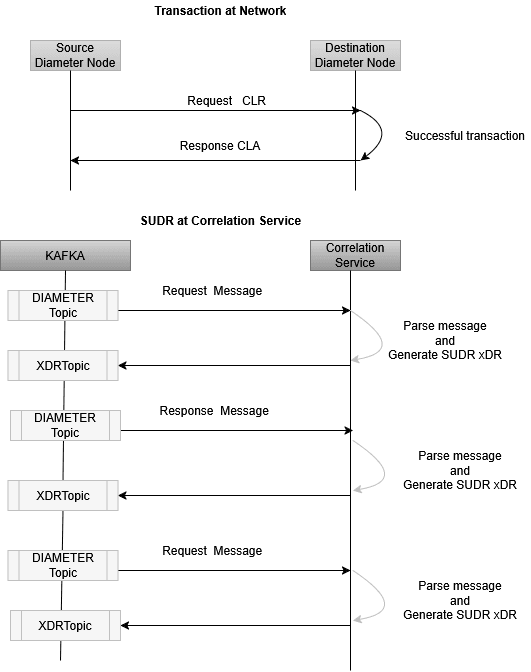
TRANSACTION XDR
Note:
Note:
- When messages received in Data Director (DD) are not in order, transaction correlation may be impacted, and correlation will be performed as per the order in which messages are received in DD.
- In case of an upgrade, service restart, or re-balancing, some duplicate xDRs with correlation impact may get written into the xDR topic.
- End-to-end latency of the Diameter feed is not applicable for Correlation Feed. End-to-end latency of TDR will be based on the completion of transactions.
Complete Transaction
When both the request message and response message have been received, a successful transaction xDR is generated with xDR status = Complete.
Figure 3-12 Complete Transaction
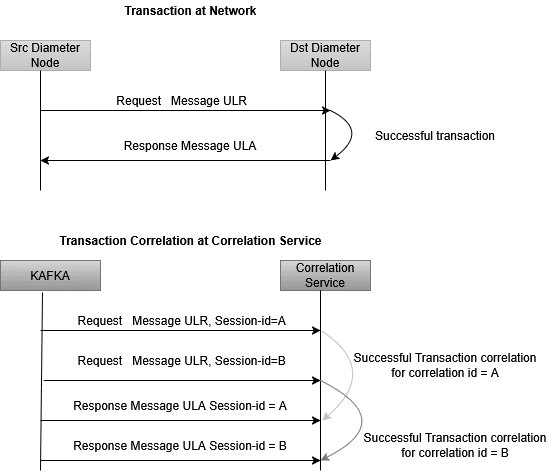
Complete Re-transmission Transaction
Figure 3-13 Complete Re-transmission Transaction
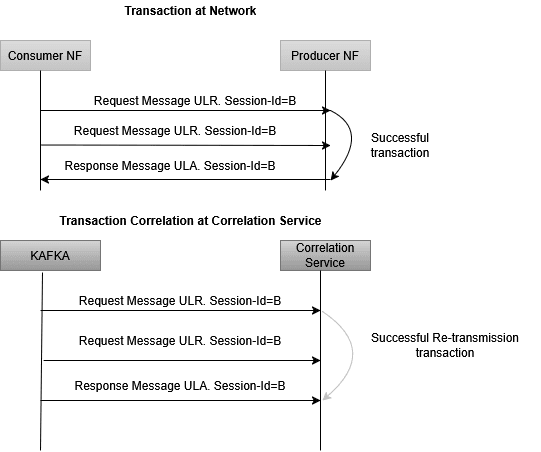
Timer Expiry Transaction
Figure 3-14 Timer Expiry Transaction
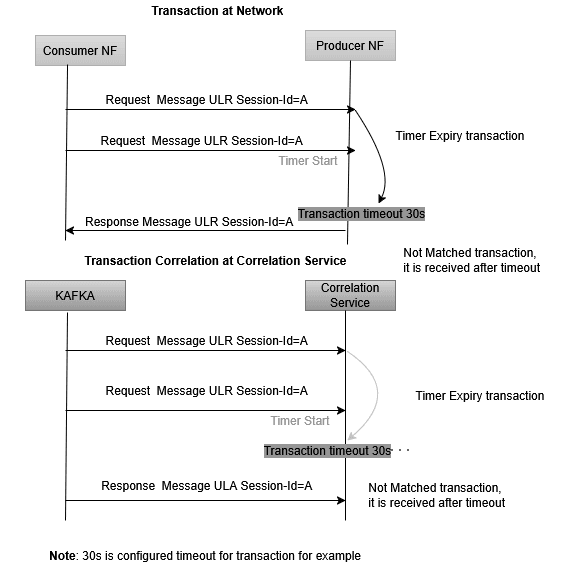
Timer Expiry Re-transmission Transaction
Figure 3-15 Timer Expiry Re-transmission Transaction
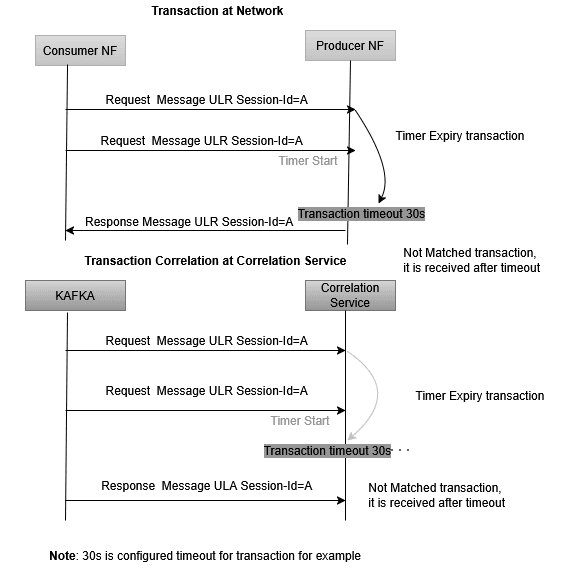
Not Matched Transaction
Figure 3-16 Not Matched Transaction
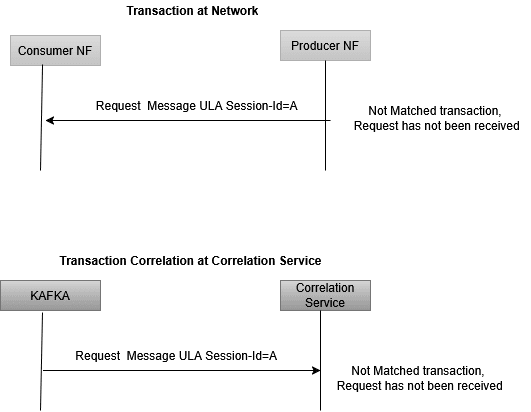
3.2.12.1.7 Correlation KPIs
These KPIs can be configured with correlation configuration. The selected KPIs in correlation configuration can be visualized in DD UI through the KPI dashboard.
Table 3-5 Supported KPIs
| Metric Type | Details |
|---|---|
| TOTAL_TRANSACTION | Metrics Name: ocnadd_total_transactionsTag: app, mediationGroup, relayAgent, protocol, xdrStatus |
| TOTAL_SUCCESSFUL_TRANSACTION_PER_RESULT_CODE | Metrics Name: ocnadd_total_transactionsTag: app, resultCode, status, mediationGroup, relayAgent, xdrStatus, protocol |
| TOTAL_SUCCESSFUL_TRANSACTION_PER_APPLICATION_ID | Metrics Name: ocnadd_total_transactionsTag: app, applicationId, status, mediationGroup, relayAgent, xdrStatus, protocol |
| TOTAL_SUCCESSFUL_TRANSACTION | Metrics Name: ocnadd_total_transactionsTag: app, status, mediationGroup, relayAgent, xdrStatus, protocol |
| TOTAL_FAILED_TRANSACTION_PER_RESULT_CODE | Metrics Name: ocnadd_total_transactionsTag: app, resultCode, status, mediationGroup, relayAgent, xdrStatus, protocol |
| TOTAL_FAILED_TRANSACTION_PER_APPLICATION_ID | Metrics Name: ocnadd_total_transactionsTag: app, applicationId, status, mediationGroup, relayAgent, xdrStatus, protocol |
| TOTAL_FAILED_TRANSACTION | Metrics Name: ocnadd_total_transactionsTag: app, status, mediationGroup, relayAgent, xdrStatus, protocol |
| DIAMETER_TRANSACTION_LATENCY_PER_APPLICATION_ID | Metrics Name:
ocnadd_diameter_transcation_latencyTag: app, resultCode, applicationId, status, mediationGroup, relayAgent, xdrStatus, protocol, sessionId, transactionTime Note: Enable for debugging only for a short duration. Metrics will be pegged only for those transactions whose latency is more than the helm-configured latency threshold value (default: 5s). |
3.2.13 Message Sequencing
This feature enables message sequence delivery for messages of a Diameter transaction from Data Director (DD) to a third-party application.
Note:
- Key/custom based message writing from vCollector must be enabled.
- It is recommended to use RF > 1 for Kafka topics to avoid data loss in case of broker or topic partition failure.
- In the case of an upgrade, rollback, or service restart, duplicate messages will be sent by the aggregation service to avoid data loss, and message sequencing will be impacted during that time.
Figure 3-17 Diameter Message Sequencing

There are 2 modes to do message sequencing:
- Time Based Message Sequencing (Windowing)
- Transaction Based Message Sequencing
Helm Parameters
Table 3-6 Helm Parameters
| Parameter | Description | Value |
|---|---|---|
| MESSAGE_SEQUENCING_TYPE |
|
|
| WINDOW_MSG_SEQUENCING_EXPIRY_TIMER |
|
Range: 5ms-500ms
Default: 10ms |
| TRANSACTION_MSG_SEQUENCING_EXPIRY_TIMER |
|
Range: 20ms-60s Default: 200ms |
| MESSAGE_REORDERING_INCOMPLETE_TRANSACTION_METRICS_ENABLE |
|
Range: true/false Default: false |
- Time-Based Message Sequencing (Windowing)
This mode enables re-ordering of unordered messages based on the timestamp present in the message. The group of messages received within the window time for each partition separately will be considered for message sequencing.
For each partition, when time-based sequencing is completed, all the sequenced messages will stream to the mediation's Kafka DIAMETER topic.
Helm Parameters:
- MESSAGE_SEQUENCING_TYPE: TIME_WINDOW
- WINDOW_MSG_SEQUENCING_EXPIRY_TIMER: 10(ms), range: [5ms-500ms]
Note:
- This will add or increase the end-to-end message latency to the
configured value of
WINDOW_MSG_SEQUENCING_EXPIRY_TIMERand the processing time. - Older timestamp messages from a different window can be seen in the partition, as multiple threads will be writing data into the same partition in parallel (source topic partition count < target topic partition count). The aim is to achieve transaction sequencing.
Figure 3-18 Time Based Message Sequencing

- Transaction Based Message Sequencing
This mode enables re-ordering of unordered messages based on the transaction (RxRequest, TxRequest, RxResponse, TxResponse).
Sequencing Rule:
- Transaction order: Request, Response
- When all messages of a transaction (RxRequest, TxRequest, RxResponse, TxResponse) are received in order, the message will be streamed to the mediation's Kafka DIAMETER topic without any delay.
- When TxRequest is received before RxRequest for a transaction, it will
be sent in order when RxRequest is received or after
TRANSACTION_EXPIRY_TIMEexpires. - When RxRequest and TxRequest are received in order and TxResponse is
received before RxResponse, the RxRequest and TxRequest will be sent
without any delay, and TxResponse shall be sent in order when RxResponse
is received or after
TRANSACTION_EXPIRY_TIMEexpires. - When RxResponse is received first, it will be sent when RxRequest and
TxRequest are received or after
TRANSACTION_EXPIRY_TIMEexpires. - When TxResponse is received first, it will be sent when RxRequest,
TxRequest, and TxResponse are received or after
TRANSACTION_EXPIRY_TIMEexpires.
Helm Parameters:
MESSAGE_SEQUENCING_TYPE: TRANSACTIONTRANSACTION_MSG_SEQUENCING_EXPIRY_TIMER: 200 ms, range: [20 ms – 120 s]
Note:
This will add or increase the end-to-end message latency up to the configured value ofTRANSACTION_MSG_SEQUENCING_EXPIRY_TIMERand the processing time.
Figure 3-19 Transaction Based Message Sequencing
