15 Enabling or Disabling Traffic Segregation Through CNLB in OCNADD
The section defines the procedure to enable or disable traffic segregation in the Data Director (OCNADD). These procedures are applicable only when CNLB is supported in the OCCNE. The Data Director currently supports traffic segregation and external access using CNLB for the following:
- Consumer Adapter Feeds via Egress NADs
- Ingress Adapter via Ingress NADs
- Redundancy Agent syncing via Ingress-Egress NADs
- Kafka Cluster external access using CNLB ingress NADs and external IPs
The subsequent sections define the procedures for enabling and disabling traffic segregation for the features listed above.
15.1 Enabling Traffic Segregation in OCNADD
The necessary Egress and Ingress NADs must be created for the Data Director. Ensure that the prerequisites are met before continuing further in this section.
15.1.1 Creating a CNLB Annotation Generation Job
The OCNADD fetches the information about the ingress and egress NADs from the CNE with
the help of the job ocnaddcnlbannotationgen. The job must be created
before any type of traffic segregation can be enabled for egress or ingress
communication.
Caution:
The jobocnaddcnlbannotationgen will require a few
elevated privileges, for example clusterrole and rolebindings, for fetching egress and
ingress network attachment definitions. The privileges are restricted to this job and
must not be used by any other OCNADD microservices.
The job
ocnaddcnlbannotationgen can be a one-time job or a cronjob. The
job must be executed whenever a new network definition is added for the OCNADD and
the same needs to be used during feed creation. The cronjob will fetch the network
definitions every hour.
The user can choose either a single-time job or a cronjob. The following points should be kept in mind:
- Single Job: The job must be executed after a new network definition has been added. It is recommended to delete the job as it requires elevated privileges.
- Cronjob: The job will run every hour to update the newly added network definitions; however, it must be noted that elevated privileges will remain as long as the job is not deleted.
Step 1: Update the ocnadd_cnlb_annotation_gen_job.yaml or
ocnadd_cnlb_annotation_gen_cronjob.yaml with the indicated
changes:
- Edit the file
ocnadd_cnlb_annotation_gen_job.yamlorocnadd_cnlb_annotation_gen_cronjob.yamlin the custom-templates directory.# All the lines with the management namespace for the OCNADD deployment namespace: dd-med #change this mediation namespace as per the OCNADD deployment. # All the lines with the OCCNE namespace used in the CNE deployment namespace: occne-infra #change this occneinfra namespace as per the CNE deployment. # Don't make any changes to the following lines namespace: default - Save the file.
Step 2: Create the ocnaddcnlbannotationgen job.
Caution:
The config mapocnadd-cnlbini-configmap creation
requires admin or root access; otherwise, the job creation will fail. Please work with
the cluster administrator to arrange admin or root access for creating the config map
ocnadd-cnlbini-configmap.
- Create config map
ocnadd-cnlbini-configmap.# kubectl create configmap ocnadd-cnlbini-configmap -n <ocnadd-mediation-namesapce> --from-file=/var/occne/cluster/<cluster_name>/cnlb.iniExample:
kubectl create configmap ocnadd-cnlbini-configmap -n dd-med --from-file=/var/occne/cluster/cnlb-shared/cnlb.ini - Run the following command:
Single Time Job
# kubectl apply -f custom-templates/ocnadd_cnlb_annotation_gen_job.yamlor
Cronjob
# kubectl apply -f custom-templates/ocnadd_cnlb_annotation_gen_cronjob.yaml
Step 3: Verify if the job ocnaddcnlbannotationgen is created.
- Run the following
command:
kubectl get jobs -n <ocnadd-mediation-namespace>The output should list the following job:
NAME COMPLETIONS DURATION AGE ocnaddcnlbannotationgen 0/1 71s 2d22h - Run the following command:
kubectl get cm -n <ocnadd-mediation-namesapce>Verify that the following two config maps are listed along with other config maps:
ocnadd-configmap-cnlb-ingressExample:
kubectl describe cm -n dd-med ocnadd-configmap-cnlb-ingressName: ocnadd-configmap-cnlb-ingress Namespace: dd-med Labels: <none> Annotations: <none> Data ==== ingressNaddto: ---- {"ingressCnlbNetworks":["nf-sig6-int1/10.121.44.173","nf-sig5-int1/10.121.44.167","nf-sig2-int1/10.121.44.149","nf-sig1-int1/10.121.44.143","nf-sig4-int1/10.121.44.161","nf-sig3-int3/10.121.44.157"]} BinaryData ==== Events: <none>ocnadd-configmap-cnlb-egressExample:
kubectl describe cm -n dd-med ocnadd-configmap-cnlb-egressName: ocnadd-configmap-cnlb-egress Namespace: dd-med Labels: <none> Annotations: <none> Data ==== egressNaddto: ---- {"egressNadResponseDto":[{"egressNadName":"nf-oam-egr1","egressNadDstInfo":"[Route [dst=0.0.0.0/0, gw=172.16.110.193]]"},{"egressNadName":"nf-oam-egr2","egressNadDstInfo":"[Route [dst=0.0.0.0/0, gw=172.16.110.194]]"},{"egressNadName":"nf-sig1-egr1","egressNadDstInfo":"[Route [dst=0.0.0.0/0, gw=172.16.111.193]]"},{"egressNadName":"nf-sig1-egr2","egressNadDstInfo":"[Route [dst=0.0.0.0/0, gw=172.16.111.194]]"},{"egressNadName":"nf-sig2-egr1","egressNadDstInfo":"[Route [dst=0.0.0.0/0, gw=172.16.112.193]]"},{"egressNadName":"nf-sig2-egr2","egressNadDstInfo":"[Route [dst=0.0.0.0/0, gw=172.16.112.194]]"},{"egressNadName":"nf-sig3-egr1","egressNadDstInfo":"[Route [dst=0.0.0.0/0, gw=172.16.113.193]]"},{"egressNadName":"nf-sig3-egr2","egressNadDstInfo":"[Route [dst=0.0.0.0/0, gw=172.16.113.194]]"},{"egressNadName":"nf-sig4-egr1","egressNadDstInfo":"[Route [dst=0.0.0.0/0, gw=172.16.114.193]]"},{"egressNadName":"nf-sig4-egr2","egressNadDstInfo":"[Route [dst=0.0.0.0/0, gw=172.16.114.194]]"},{"egressNadName":"nf-sig5-egr1","egressNadDstInfo":"[Route [dst=0.0.0.0/0, gw=172.16.115.193]]"},{"egressNadName":"nf-sig5-egr2","egressNadDstInfo":"[Route [dst=0.0.0.0/0, gw=172.16.115.194]]"},{"egressNadName":"nf-sig6-egr1","egressNadDstInfo":"[Route [dst=0.0.0.0/0, gw=172.16.116.193]]"},{"egressNadName":"nf-sig6-egr2","egressNadDstInfo":"[Route [dst=0.0.0.0/0, gw=172.16.116.194]]"}]} BinaryData ==== Events: <none>
- Describe the config maps to verify further that egress and ingress NADs are updated
in the config
maps:
# kubectl describe cm ocnadd-configmap-cnlb-ingress -n <ocnadd-mediation-namesapce> # kubectl describe cm ocnadd-configmap-cnlb-egress -n <ocnadd-mediation-namesapce> - Fetching the ingress NADs
- Run the following
command:
kubectl exec -ti -n <ocnadd-mgmt-namespace> ocnaddmanagementgateway-xxxx -- bash - If mTLS is
enabled:
curl -k --location --cert-type P12 --cert /var/securityfiles/keystore/serverKeyStore.p12:$OCNADD_SERVER_KS_PASSWORD --request GET "https://ocnaddmanagementgateway:12889.dd-mgmt/ocnadd-configuration/v2/cnlb/ingress/nads" - If mTLS is
disabled:
curl -v -k --location --request GET "http://ocnaddmanagementgateway:12889.dd-mgmt/ocnadd-configuration/v2/cnlb/ingress/nads"Output:
{"ingressCnlbNetworks":["nf-sig2-int10/10.123.155.32,nf-sig1-int11/10.123.155.13,nf-sig4-int2/10.123.155.60,nf-sig3-int3/10.123.155.57"]}
- Run the following
command:
- Fetching the egress NADs
- Run the following
command:
kubectl exec -ti -n <ocnadd-mgmt-namespace> ocnaddmanagementgateway-xxxx -- bash - If mTLS is
enabled:
curl -k --location --cert-type P12 --cert /var/securityfiles/keystore/serverKeyStore.p12:$OCNADD_SERVER_KS_PASSWORD --request GET "https://ocnaddmanagementgateway:12889.dd-mgmt/ocnadd-configuration/v2/cnlb/egress/nads" - If mTLS is
disabled:
curl -v -k --location --request GET "http://ocnaddmanagementgateway:12889.dd-mgmt/ocnadd-configuration/v2/cnlb/egress/nads"Output:
{"egressNadResponseDto":[{"egressNadName":"nf-sig1-egr1","egressNadDstInfo":"[Route [dst=10.123.155.55/32, gw=192.168.20.193], Route [dst=10.123.155.56/32, gw=192.168.20.193], Route [dst=10.123.155.53/32, gw=192.168.20.193], Route [dst=10.123.155.63/32, gw=192.168.20.193], Route [dst=10.123.155.73/32, gw=192.168.20.193], Route [dst=10.75.180.0/24, gw=192.168.20.193], Route [dst=10.75.212.124/32, gw=192.168.20.193], Route [dst=10.75.212.154/32, gw=192.168.20.193], Route [dst=10.75.236.0/22, gw=192.168.20.193]]"},{"egressNadName":"nf-sig1-egr2","egressNadDstInfo":"[Route [dst=10.123.155.55/32, gw=192.168.20.194], Route [dst=10.123.155.56/32, gw=192.168.20.194], Route [dst=10.123.155.53/32, gw=192.168.20.194], Route [dst=10.123.155.63/32, gw=192.168.20.194], Route [dst=10.123.155.73/32, gw=192.168.20.194], Route [dst=10.75.180.0/24, gw=192.168.20.194], Route [dst=10.75.212.124/32, gw=192.168.20.194], Route [dst=10.75.212.154/32, gw=192.168.20.194], Route [dst=10.75.236.0/22, gw=192.168.20.194]]"}]}
- Run the following
command:
Step 4: Delete the job ocnaddcnlbannotationgen (optional)
- Run the following command:
- Single Time
Job:
# kubectl delete -f custom-templates/ocnadd_cnlb_annotation_gen_job.yaml - Cronjob:
# kubectl delete -f custom-templates/ocnadd_cnlb_annotation_gen_cronjob.yaml
- Single Time
Job:
Note:
This procedure must be followed again whenever a new ingress or egress NAD is added.15.1.2 Enabling Egress Traffic Segregation for Consumer Adapter Feeds
The user needs to enable the egress NAD annotation support in the consumer adapter feeds.
The parameter cnlb.consumeradapter.enabled must be set to
true for egress NAD annotation support in the consumer adapter
feeds.
Perform the following steps to enable cnlb support in consumer adapter
feeds if not already enabled at the time of OCNADD installation.
Step 1: Update the ocnadd-common-custom-values.yaml
- Edit the
ocnadd-common-custom-values.yaml. - Update the parameter
cnlb.consumeradapter.enabledas indicated below:cnlb.consumeradapter.enabled: false ====> the value of the parameter must be changed to "true" - Save the file.
Step 2: Upgrade management group in the OCNADD deployment
Perform helm upgrade using the management group charts folder, see Updating Management Group Service Parameters section.
Step 3: Upgrade mediation group in the OCNADD deployment
Perform helm upgrade using the mediation group charts folder, see Update Mediation Group Service Parameters section.
Step 4: Continue with the new consumer feed creation or update existing consumer feeds using the UI
At the Step 2: Add Destination & Distribution Plan screen of the consumer feed, the user can select the new egress network attachment
definition and verify its dst information as per the third-party
destination endpoint, then submit the feed create/update request.
Step 5: Verify that all the consumer adapters are re-spawned
For example:
# kubectl get po -n dd-med
15.1.3 Enabling Ingress Traffic Segregation for the Ingress Adapter
Non-Oracle NFs forward traffic to the OCNADD via the Ingress Adapter. If non-Oracle NFs are deployed in the same cluster as OCNADD, there is no need to enable the CNLB configuration for the Ingress Adapter, as the service name or FQDN can be used.
When non-Oracle NFs are in a separate cluster, ingress traffic segregation can be
achieved by enabling cnlb support for the Ingress Adapter in the
OCNADD.
Note:
- Currently, a single segregation network will be attached to each Ingress Adapter configuration. If more than one non-Oracle NF wants to connect to the same Ingress Adapter feed, then ingress traffic segregation will not be possible.
- To achieve ingress traffic segregation for all non-Oracle NFs that are ingesting data to the OCNADD, a separate Ingress Adapter feed configuration must be created for each non-Oracle NF.
In this configuration, all non-Oracle NFs must share the same dedicated network to forward traffic to OCNADD. Communication between non-Oracle NFs and OCNADD will occur over a single dedicated network, using the external IP of the Ingress Adapter.
The user needs to enable the ingress NAD annotation support in the ingress adapters. The
parameter cnlb.ingressadapter.enabled must be set to
true for ingress NAD annotation support in the ingress adapter.
Perform the following steps to enable cnlb support in ingress adapter
feeds if not already enabled at the time of OCNADD installation.
Step 1: Update the ocnadd-common-custom-values.yaml
- Edit the
ocnadd-common-custom-values.yaml. - Update the parameter
cnlb.ingressadapter.enabledas indicated below:cnlb.ingressadapter.enabled: false ====> the value of the parameter must be changed to "true" - Save the file.
Step 2: Upgrade management group in the OCNADD deployment
Perform helm upgrade using the management group charts folder, see Updating Management Group Service Parameters section.
Step 3: Upgrade mediation group in the OCNADD deployment
Perform helm upgrade using the mediation group charts folder, see Update Mediation Group Service Parameters section.
Step 4: Continue with the new ingress adapter feed creation or update existing ingress adapter feeds using the UI
In the UI, create or update new or existing Ingress Adapter feeds to add the ingress NAD from the drop-down selection.
Step 5: Verify that all the ingress adapters are re-spawned
For example:
# kubectl get po -n <mediation-namespace>
15.1.4 Enabling External IPs for the Redundancy Agent via CNLB
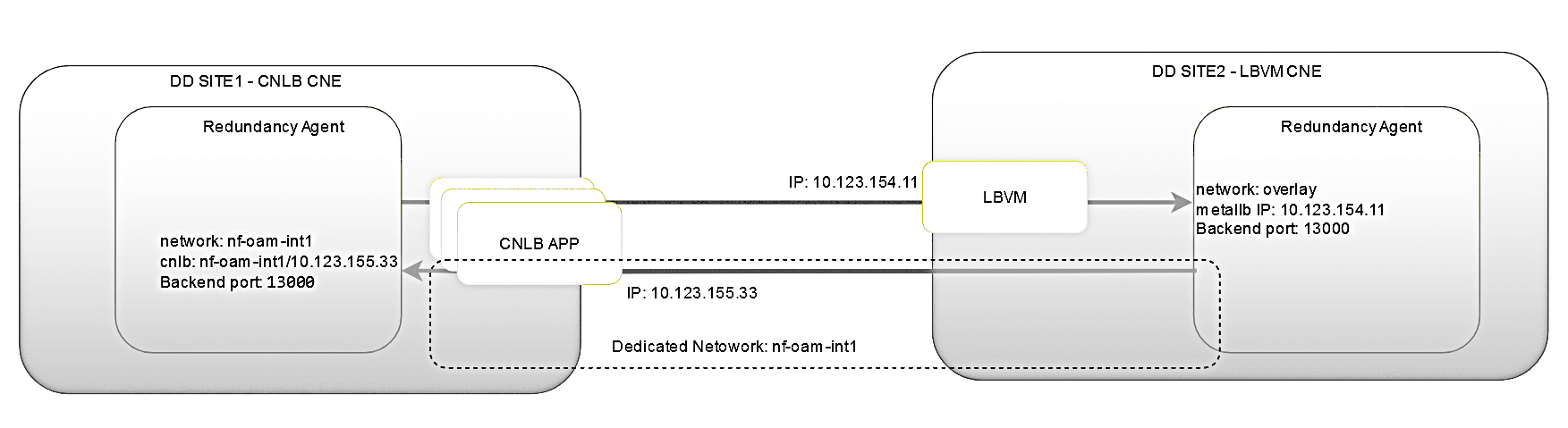
In the two-site redundancy feature, two Redundancy Agents communicate with each other to sync configuration based on the redundancy configuration. If one or both sites are deployed in a CNLB CNE environment, the Redundancy Agents must be enabled for CNLB to provide external access. In this case, network and CNLB annotations need to be configured in the Redundancy Agents as well. The Redundancy Agents use the ingress NAD with a single network for ingress communication and external access.
Refer to the following scenarios for deploying redundancy agents across two sites:
a) Both sites are deployed in the CNLB-enabled cluster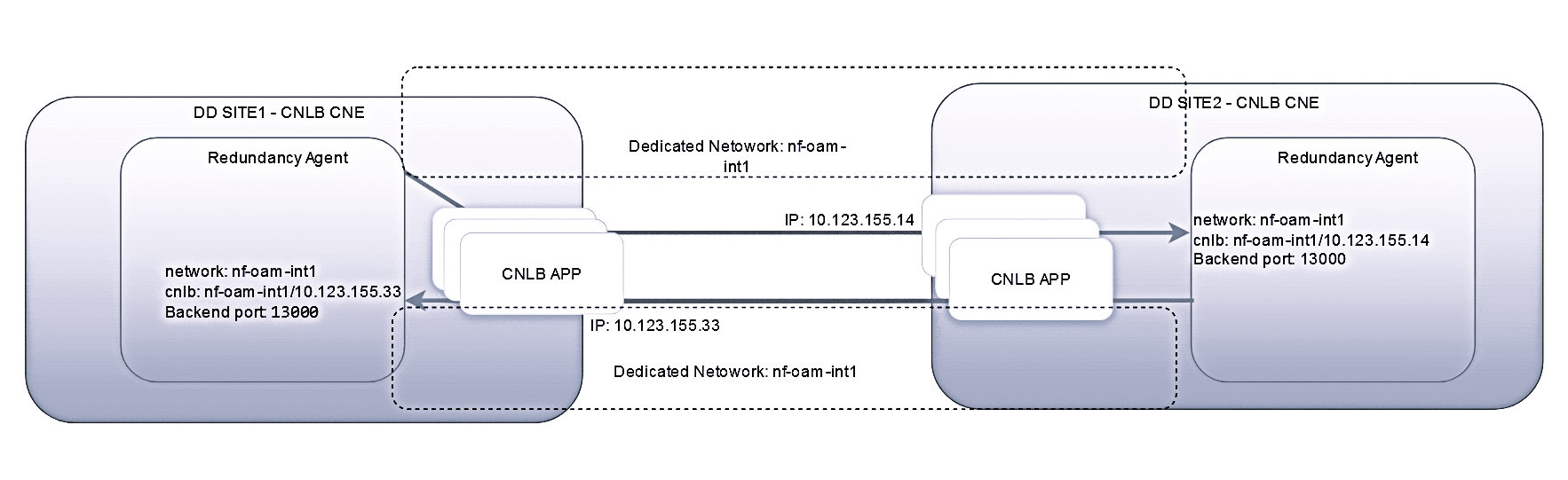
Note:
The following points should be considered:The two sites should have the same name for the egress NAD definitions, else the consumer adapter may stop processing the data if the NAD name is not present in the site.
b) One site is deployed in the CNLB-enabled cluster, and the other in an LBVM-based CNE cluster
Note:
The following points should be considered:- The bi-directional configuration sync will not work if the primary site is CNLB enabled and secondary site is not CNLB enabled. In this case on the primary site, the consumer adapter feed configuration should be modified to include the NAD name in the feed.
- Discrepancy alarm is expected when the configuration sync is unidirectional and Primary site is CNLB enabled and Secondary site is non CNLB.
c) Both sites are deployed in an LBVM-based CNE cluster
Skip to the section "Enable Two-Site Redundancy Support" to continue with enabling the two-site redundancy feature in the Data Director.
15.1.4.1 Enabling CNLB in the Redundancy Agent
In the Primary Site (Site 1):
If the Redundancy Agent (RA) in the Data Director is deployed within a CNLB CNE environment, follow the steps below:
Step 1: Extract the Network and NAD Information for the Ingress-Egress NAD
Caution:
The script/var/occne/cluster/$OCCNE_CLUSTER/artifacts/cnlbGenAnnotations.py
can be run by a user with admin privileges or the root user.
- Either get the necessary admin privileges from the cluster administrator before running the step below.
- Or have the command run by an admin user and note down the output, which will be used in Step 2.
Extract NADs:
- Run the script
/var/occne/cluster/$OCCNE_CLUSTER/artifacts/cnlbGenAnnotations.pyin CNE to fetch the available ingress-egress network information as per the inputs provided (Network Name: OAM, Segregation Type: INT, Network Type: SN, and Port Name: any value likehttp,8080).# python3 /var/occne/cluster/$OCCNE_CLUSTER/artifacts/cnlbGenAnnotations.pyExample inputs and outputs:
# python3 /var/occne/cluster/$OCCNE_CLUSTER/artifacts/cnlbGenAnnotations.py
Network Names that application will use? Valid Choice example - oam OR comma seperated values - oam,sig,sig1 = oam
Application pod external communication ? Valid choice - IE(Ingress/Egress) , EGR(Egress Only), INT(Ingress Only) = INT
Pod ingress network type ? Valid choice - SI(Single Instance -DB tier only) , MN(Multi network ingress / egress) , SN(Single Network) = SN
Provide container ingress port name for backend from pod spec  , external ingress load balancing port? Valid choice - Example (http,80) = http,80
...
...
-------------------------------------------------
Pod network attachment annotation , add to application pod spec
-------------------------------------------------
k8s.v1.cni.cncf.io/networks: default/nf-oam-int7@nf-oam-int7
oracle.com.cnc/cnlb: '[{"backendPortName": "http", "cnlbIp": "10.121.44.138","cnlbPort": "80"}]'
Step 2: Update the
ocnadd-management-custom-values.yaml
- Copy the
cnlbIpandnetworksvalues from the script output and update theocnadd-management-custom-values.yamlfile as shown below:ocnaddmanagement.cnlb.redundancyagent.enabled: true ocnaddmanagement.cnlb.redundancyagent.network: "default/nf-oam-int7@nf-oam-int7" ocnaddmanagement.cnlb.redundancyagent.externalIPs: "10.121.44.138"
Step 3: Follow the procedure in the section Enable Two-Site Redundancy Support to continue enabling the two-site redundancy feature in the Data Director.
In the Secondary Site (Site 2):
Note:
If the Redundancy Agent (RA) in the Data Director is deployed in an LBVM CNE environment, skip the steps below and follow the Enable Two-Site Redundancy Support section to continue with enabling the two-site redundancy feature.If the Redundancy Agent (RA) in the Data Director is deployed within a CNLB CNE environment, follow the steps below:
Step 1: Extract the Network and NAD Information for the Ingress-Egress NADCaution:
The same script/var/occne/cluster/$OCCNE_CLUSTER/artifacts/cnlbGenAnnotations.py
can be run by a user with admin privileges or the root user.
- Either obtain admin privileges from the cluster administrator before running the script.
- Or have the command executed by an admin user and note down the output for use in Step 2.
Extract NADs:
- Run the script
/var/occne/cluster/$OCCNE_CLUSTER/artifacts/cnlbGenAnnotations.pyin CNE to fetch the available ingress-egress network information (similar inputs as in the primary site).# python3 /var/occne/cluster/$OCCNE_CLUSTER/artifacts/cnlbGenAnnotations.py Network Names that application will use? Valid Choice example - oam OR comma separated values - oam,sig,sig1 = oam Application pod external communication ? Valid choice - IE(Ingress/Egress) , EGR(Egress Only), INT(Ingress Only) = INT Pod ingress network type ? Valid choice - SI(Single Instance -DB tier only) , MN(Multi network ingress / egress) , SN(Single Network) = SN Provide container ingress port name for backend from pod spec , external ingress load balancing port? Valid choice - Example (http,80) = http,9188 ... ... ------------------------------------------------- Pod network attachment annotation, add to application pod spec ------------------------------------------------- k8s.v1.cni.cncf.io/networks: default/nf-oam-int7@nnf-oam-int7 oracle.com.cnc/cnlb: '[{"backendPortName": "http", "cnlbIp": "10.121.44.138","cnlbPort": "9188"}]'
Step 2: Update the
ocnadd-management-custom-values.yaml and
ocnadd-common-custom-values.yaml
- Copy the
cnlbIpandnetworksvalues from the script output and update theocnadd-management-custom-values.yamlandocnadd-common-custom-values.yamlfiles as shown below:Update inocnadd-management-custom-values.yaml:ocnaddmanagement.cnlb.redundancyagent.enabled: true ocnaddmanagement.cnlb.redundancyagent.network: "default/nf-oam-int7@nf-oam-int7" ocnaddmanagement.cnlb.redundancyagent.externalIPs: "10.123.155.34"Update inocnadd-common-custom-values.yaml:global.deployment.primary_agent_ip: 10.10.10.10 ====> should be updated with ip 10.123.155.33 as extracted from CNLB on the primary site
Step 3: Follow the procedure in the section Enable Two-Site Redundancy Support to continue enabling the two-site redundancy feature in the Data Director.
15.1.5 Enabling CNLB External IPs in The Kafka Cluster
On CNLB-enabled OCCNE K8s cluster, when Kafka is deployed with external access, then Kafka brokers shall become externally accessible via external IPs exposed using ingress NADs. In this case, network and CNLB annotations should be configured in the Kafka brokers.
The section describes the procedure to extract the external IPs and ingress NADs from the configured and available CNLB network definitions and update the CNLB annotations in the Kafka brokers. This procedure is applicable to all the deployed worker groups.
OCNADD and NF sites are deployed in the CNLB-enabled clusters.
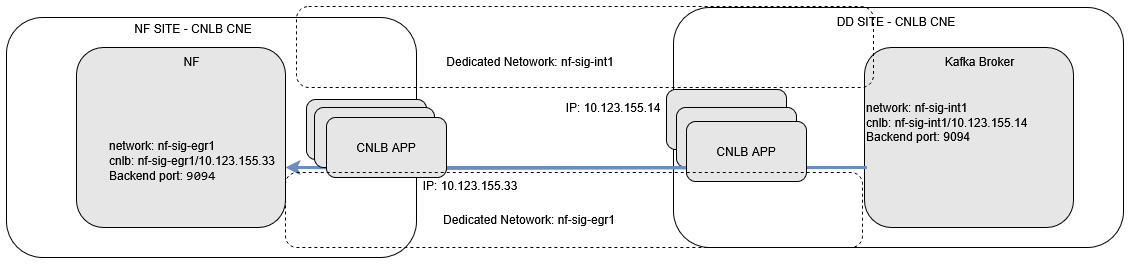
The NF can also be deployed in a non-CNLB-enabled cluster; however, the procedure remains the same on the Data Director.
Follow the procedure to enable Kafka external access on the CNLB-enabled Data Director OCCNE Kubernetes cluster.
15.1.5.1 Enabling Kafka External Access on CNLB Enabled Cluster
Enable Kafka external access for RelayAgent Group
Step 1: Extract the network and NAD information for the ingress NAD
Note:
The script/var/occne/cluster/$OCCNE_CLUSTER/artifacts/cnlbGenAnnotations.py
used in the step below must be run by a user with admin privileges or the root
user.
- Either get the admin-privileged user with cluster administrator rights before running the step below.
- Or get the command executed by the admin user and note down the output that is going to be used in Step 2.
Extract NADs
- Run the script
/var/occne/cluster/$OCCNE_CLUSTER/artifacts/cnlbGenAnnotations.pyin CNE to fetch the available ingress network information as the inputs shown below (Network Name — sigx, Segregation Type — INT, Network Type — SN, and the port name can be any value in the format http,8080).# python3 /var/occne/cluster/$OCCNE_CLUSTER/artifacts/cnlbGenAnnotations.py Network Names that application will use? Valid Choice for example - oam OR comma separated values - oam,sig,sig1 = sig1,sig2,sig3,sig4,sig5,sig6 Application pod external communication? Valid choice - IE (Ingress/Egress), EGR (Egress Only), INT (Ingress Only) = INT Pod ingress network type? Valid choice - SI (Single Instance - DB tier only), MN (Multi network ingress / egress), SN (Single Network) = SN Provide container ingress port name for backend from pod spec, external ingress load balancing port? Valid choice - for example (http,80) = http,80 ... ... ==================================================================================================== NETWORK NAME oam AVAILABLE EXTERNAL IPS -------- ['10.148.197.139'] ==================================================================================================== ==================================================================================================== NETWORK NAME sig3 AVAILABLE EXTERNAL IPS -------- ['10.148.197.158'] ==================================================================================================== ==================================================================================================== NETWORK NAME sig4 AVAILABLE EXTERNAL IPS -------- ['10.148.197.161', '10.148.197.162', '10.148.197.163', '10.148.197.164'] ==================================================================================================== ==================================================================================================== NETWORK NAME sig5 AVAILABLE EXTERNAL IPS -------- ['10.148.197.168', '10.148.197.169', '10.148.197.170'] ==================================================================================================== ==================================================================================================== NETWORK NAME sig6 AVAILABLE EXTERNAL IPS -------- ['10.148.197.173', '10.148.197.174', '10.148.197.175', '10.148.197.176'] ==================================================================================================== ==================================================================================================== AVAILABLE NETWORK ATTACHMENT NAMES --- ['default/nf-oam-int1@nf-oam-int1', 'default/nf-oam-int2@nf-oam-int2', 'default/nf-oam-int3@nf-oam-int3', 'default/nf-oam-int4@nf-oam-int4', 'default/nf-oam-int5@nf-oam-int5', 'default/nf-oam-int6@nf-oam-int6', 'default/nf-oam-int7@nf-oam-int7', 'default/nf-oam-int8@nf-oam-int8', 'default/nf-oam-int9@nf-oam-int9', 'default/nf-sig1-int1@nf-sig1-int1', 'default/nf-sig1-int2@nf-sig1-int2', 'default/nf-sig1-int3@nf-sig1-int3', 'default/nf-sig1-int4@nf-sig1-int4', 'default/nf-sig2-int1@nf-sig2-int1', 'default/nf-sig2-int2@nf-sig2-int2', 'default/nf-sig2-int3@nf-sig2-int3', 'default/nf-sig2-int4@nf-sig2-int4', 'default/nf-sig3-int1@nf-sig3-int1', 'default/nf-sig3-int2@nf-sig3-int2', 'default/nf-sig3-int3@nf-sig3-int3', 'default/nf-sig3-int4@nf-sig3-int4', 'default/nf-sig4-int1@nf-sig4-int1', 'default/nf-sig4-int2@nf-sig4-int2', 'default/nf-sig4-int3@nf-sig4-int3', 'default/nf-sig4-int4@nf-sig4-int4', 'default/nf-sig5-int1@nf-sig5-int1', 'default/nf-sig5-int2@nf-sig5-int2', 'default/nf-sig5-int3@nf-sig5-int3', 'default/nf-sig5-int4@nf-sig5-int4', 'default/nf-sig6-int1@nf-sig6-int1', 'default/nf-sig6-int2@nf-sig6-int2', 'default/nf-sig6-int3@nf-sig6-int3', 'default/nf-sig6-int4@nf-sig6-int4'] ==================================================================================================== ==================================================================================================== POD NETWORK ATTACHMENT / CNLB ANNOTATION, ADD TO POD SPEC UPDATE AS NEEDED ---- k8s.v1.cni.cncf.io/networks: default/nf-oam-int1@nf-oam-int1 oracle.com.cnc/cnlb: '[{"backendPortName": "http", "cnlbIp": "10.148.197.139", "cnlbPort": "80"}]' ====================================================================================================
Step 2: Update the ocnadd-relayagent-custom-values.yaml for
the corresponding relayagent group
Update Custom Values
- Select the available network names and external IPs.
- Copy the
cnlbIpandnetworksvalues and update them in theocnadd-relayagent-custom-values.yamlfile as shown below:`ocnaddrelayagent.cnlb.kafkabroker.enable`: false =========> set it to true `ocnaddrelayagent.cnlb.kafkabroker.networks`: "default/nf-sig-int7@nf-sig-int7" ===========> set the selected networks from the command output `ocnaddrelayagent.cnlb.kafkabroker.networks_extip`: "nf-sig-int7/10.123.155.34" ===========> set the selected networks from the command outputExample:
The example below assumes 6 Kafka Brokers are deployed in the Kafka cluster. The user has selected the ingress NAD
nf-sig4-intXandnf-sig5-intXand corresponding available IPs from these networks.There should be a one-to-one mapping between the network name and external IPs.
`cnlb.kafkabroker.enable`: true `cnlb.kafkabroker.networks`: 'default/nf-sig4-int1@nf-sig4-int1', 'default/nf-sig4-int2@nf-sig4-int2', 'default/nf-sig4-int3@nf-sig4-int3', 'default/nf-sig4-int4@nf-sig4-int4', 'default/nf-sig5-int1@nf-sig5-int1', 'default/nf-sig5-int2@nf-sig5-int2' `cnlb.kafkabroker.networks_extip`: "nf-sig4-int1/10.148.197.161, nf-sig4-int2/10.148.197.162, nf-sig4-int3/10.148.197.163, nf-sig4-int4/10.148.197.164, nf-sig5-int1/10.148.197.168, nf-sig5-int2/10.148.197.169" - Update the following parameters to enable external access in Kafka, under the
Kafka section in
ocnadd-relayagent-custom-values.yaml:`ocnaddrelayagent.ocnaddkafka.ocnadd.kafkaBroker.externalAccess.enabled`: false ======> set it to true `ocnaddrelayagent.ocnaddkafka.ocnadd.kafkaBroker.externalAccess.autoDiscovery`: false ======> set it to true
Step 3: Upgrade the corresponding relayagent group
Perform the helm upgrade using the helm charts folder created for the corresponding relayagent group.
Refer to the section Update Relay Agent Group Service Parameters to perform the helm upgrade.
Step 4: Verify the upgrade of the corresponding relay agent group is successful
Check the status of the upgrade, monitor the pods to return to the RUNNING state, and wait for the traffic rate to stabilize to the same rate as before the upgrade. Run the following command to check the upgrade status:
helm history <release_name> --namespace <namespace-name>
For the relay agent group, use:
helm history ocnadd --namespace ocnadd-relay
Sample output:
The description should be upgrade complete.
Enable Kafka external access for Mediation Group
Step 1: Extract the network and NAD information for the ingress NAD
Note:
The script/var/occne/cluster/$OCCNE_CLUSTER/artifacts/cnlbGenAnnotations.py
used in the step below must be run by a user with admin privileges or the root
user.
- Either get the admin-privileged user with cluster administrator rights before running the step below.
- Or get the command executed by the admin user and note down the output that is going to be used in Step 2.
Extract NADs
Step 1: Run the script
/var/occne/cluster/$OCCNE_CLUSTER/artifacts/cnlbGenAnnotations.py
in CNE to fetch the available ingress network information as the inputs shown below
(Network Name — sigx, Segregation Type — INT, Network Type — SN, and the port name
can be any value in the format http,8080).
# python3 /var/occne/cluster/$OCCNE_CLUSTER/artifacts/cnlbGenAnnotations.py
Network Names that application will use? Valid Choice for example - oam OR comma separated values - oam,sig,sig1 = sig1,sig2,sig3,sig4,sig5,sig6
Application pod external communication? Valid choice - IE (Ingress/Egress), EGR (Egress Only), INT (Ingress Only) = INT
Pod ingress network type? Valid choice - SI (Single Instance - DB tier only), MN (Multi network ingress / egress), SN (Single Network) = SN
Provide container ingress port name for backend from pod spec, external ingress load balancing port? Valid choice - for example (http,80) = http,80
...
...
====================================================================================================
NETWORK NAME oam
AVAILABLE EXTERNAL IPS -------- ['10.148.197.139']
====================================================================================================
====================================================================================================
NETWORK NAME sig3
AVAILABLE EXTERNAL IPS -------- ['10.148.197.158']
====================================================================================================
====================================================================================================
NETWORK NAME sig4
AVAILABLE EXTERNAL IPS -------- ['10.148.197.161', '10.148.197.162', '10.148.197.163', '10.148.197.164']
====================================================================================================
====================================================================================================
NETWORK NAME sig5
AVAILABLE EXTERNAL IPS -------- ['10.148.197.168', '10.148.197.169', '10.148.197.170']
====================================================================================================
====================================================================================================
NETWORK NAME sig6
AVAILABLE EXTERNAL IPS -------- ['10.148.197.173', '10.148.197.174', '10.148.197.175', '10.148.197.176']
====================================================================================================
====================================================================================================
AVAILABLE NETWORK ATTACHMENT NAMES ---

['default/nf-oam-int1@nf-oam-int1', 'default/nf-oam-int2@nf-oam-int2', 'default/nf-oam-int3@nf-oam-int3', 'default/nf-oam-int4@nf-oam-int4', 'default/nf-oam-int5@nf-oam-int5', 'default/nf-oam-int6@nf-oam-int6', 'default/nf-oam-int7@nf-oam-int7', 'default/nf-oam-int8@nf-oam-int8', 'default/nf-oam-int9@nf-oam-int9', 'default/nf-sig1-int1@nf-sig1-int1', 'default/nf-sig1-int2@nf-sig1-int2', 'default/nf-sig1-int3@nf-sig1-int3', 'default/nf-sig1-int4@nf-sig1-int4', 'default/nf-sig2-int1@nf-sig2-int1', 'default/nf-sig2-int2@nf-sig2-int2', 'default/nf-sig2-int3@nf-sig2-int3', 'default/nf-sig2-int4@nf-sig2-int4', 'default/nf-sig3-int1@nf-sig3-int1', 'default/nf-sig3-int2@nf-sig3-int2', 'default/nf-sig3-int3@nf-sig3-int3', 'default/nf-sig3-int4@nf-sig3-int4', 'default/nf-sig4-int1@nf-sig4-int1', 'default/nf-sig4-int2@nf-sig4-int2', 'default/nf-sig4-int3@nf-sig4-int3', 'default/nf-sig4-int4@nf-sig4-int4', 'default/nf-sig5-int1@nf-sig5-int1', 'default/nf-sig5-int2@nf-sig5-int2', 'default/nf-sig5-int3@nf-sig5-int3', 'default/nf-sig5-int4@nf-sig5-int4', 'default/nf-sig6-int1@nf-sig6-int1', 'default/nf-sig6-int2@nf-sig6-int2', 'default/nf-sig6-int3@nf-sig6-int3', 'default/nf-sig6-int4@nf-sig6-int4']
====================================================================================================
====================================================================================================
POD NETWORK ATTACHMENT / CNLB ANNOTATION  , ADD TO POD SPEC UPDATE AS NEEDED ----

k8s.v1.cni.cncf.io/networks: default/nf-oam-int1@nf-oam-int1
oracle.com.cnc/cnlb: '[{"backendPortName": "http", "cnlbIp": "10.148.197.139","cnlbPort": "80"}]'
====================================================================================================
Step 2: Update the ocnadd-mediation-custom-values.yaml for
the corresponding mediation group
- Select the available network names and external IPs.
- Copy the
cnlbIpandnetworksvalues and update them in theocnadd-mediation-custom-values.yamlfile as shown below:`ocnaddmediation.cnlb.kafkabroker.enable`: false =========> set it to true `ocnaddmediation.cnlb.kafkabroker.networks`: "default/nf-sig-int7@nf-sig-int7" ===========> set the selected networks from the command output `ocnaddmediation.cnlb.kafkabroker.networks_extip`: "nf-sig-int7/10.123.155.34" ===========> set the selected networks from the command outputExample:
The example below assumes 6 Kafka Brokers are deployed in the Kafka cluster. The user has selected the ingress NAD
nf-sig4-intXandnf-sig5-intXand corresponding available IPs from these networks.There should be a one-to-one mapping between the network name and external IPs.
`cnlb.kafkabroker.enable`: true `cnlb.kafkabroker.networks`: 'default/nf-sig4-int1@nf-sig4-int1', 'default/nf-sig4-int2@nf-sig4-int2', 'default/nf-sig4-int3@nf-sig4-int3', 'default/nf-sig4-int4@nf-sig4-int4', 'default/nf-sig5-int1@nf-sig5-int1', 'default/nf-sig5-int2@nf-sig5-int2' `cnlb.kafkabroker.networks_extip`: "nf-sig4-int1/10.148.197.161, nf-sig4-int2/10.148.197.162, nf-sig4-int3/10.148.197.163, nf-sig4-int4/10.148.197.164, nf-sig5-int1/10.148.197.168, nf-sig5-int2/10.148.197.169" - Update the following parameters to enable external access in Kafka, under the
Kafka section in
ocnadd-mediation-custom-values.yaml:`ocnaddmediation.ocnaddkafka.ocnadd.kafkaBroker.externalAccess.enabled`: false ======> set it to true `ocnaddmediation.ocnaddkafka.ocnadd.kafkaBroker.externalAccess.autoDiscovery`: false ======> set it to true
Step 3: Upgrade the corresponding mediation group
Perform the helm upgrade using the helm charts folder created for the corresponding mediation group.
Refer to the section Update Mediation Group Service Parameters to perform the helm upgrade.
Step 4: Verify the upgrade of the corresponding mediation group is successful
Check the status of the upgrade, monitor the pods to return to the RUNNING state, and wait for the traffic rate to stabilize to the same rate as before the upgrade. Run the following command to check the upgrade status:
helm history <release_name> --namespace <namespace-name>
For the mediation group, use:
helm history ocnadd --namespace ocnadd-med
Sample output:
The description should be upgrade complete.
15.1.6 Enable OCNADD Gateways External Access in CNLB Enabled Cluster
The external access should be enabled for
ocnaddmanagementgateway,
ocnaddrelayagentgateway, and
ocnaddmediationgateway.
OCNADD Management Gateway External Access in CNLB
Step 1: Extract the network and NAD information
Note:
The script/var/occne/cluster/$OCCNE_CLUSTER/artifacts/cnlbGenAnnotations.py
used in the step below must be run by a user with admin privileges
or the root user.
- Either get the admin-privileged user with cluster administrator rights before running the step below.
- Or get the command executed by the admin user and note down the output that is going to be used in subsequent steps.
Extract NADs
Step 1: Run the script
/var/occne/cluster/$OCCNE_CLUSTER/artifacts/cnlbGenAnnotations.py
in CNE to fetch the available ingress network information as shown
below (Network Name — sigx, Segregation Type — INT, Network Type —
SN, and port name can be any value in the format http,8080).
# python3 /var/occne/cluster/$OCCNE_CLUSTER/artifacts/cnlbGenAnnotations.py
Network Names that application will use? Valid Choice for example - oam OR comma separated values - oam,sig,sig1 = oam
Application pod external communication? Valid choice - IE (Ingress/Egress), EGR (Egress Only), INT (Ingress Only) = IE
Pod ingress network type? Valid choice - SI (Single Instance - DB tier only), MN (Multi network ingress / egress), SN (Single Network) = SN
Provide container ingress port name for backend from pod spec, external ingress load balancing port? Valid choice - for example (http,80) = http,12889
...
...
====================================================================================================
NETWORK NAME oam
AVAILABLE EXTERNAL IPS -------- ['10.148.197.139', '10.148.197.140', '10.148.197.141']
====================================================================================================

====================================================================================================
AVAILABLE NETWORK ATTACHMENT NAMES ---

['default/nf-oam-ie1@nf-oam-ie1', 'default/nf-oam-ie1@nf-oam-ie2', 'default/nf-oam-ie1@nf-oam-ie3']
====================================================================================================
====================================================================================================
POD NETWORK ATTACHMENT / CNLB ANNOTATION, ADD TO POD SPEC UPDATE AS NEEDED ----

k8s.v1.cni.cncf.io/networks: default/nf-oam-ie1@nf-oam-ie1
oracle.com.cnc/cnlb: '[{"backendPortName": "http", "cnlbIp": "10.148.197.139", "cnlbPort": "12889"}]'
====================================================================================================
Step 2: Update the Helm parameters for
ocnaddmanagementgateway
- Edit
ocnadd-management-custom-values.yaml:`ocnaddmanagement.cnlb.ocnaddmanagementgateway.enable`: false ====================> this should be true `ocnaddmanagement.cnlb.ocnaddmanagementgateway.network`: "default/nf-oam-ie1@nf-oam-ie1" ==============> this should be changed to identified network `ocnaddmanagement.cnlb.ocnaddmanagementgateway.externalIP`: "10.10.10.10" ============> change it to external IP 10.148.197.139 - Edit
ocnadd-common-custom-values.yaml:`management_info.management_gateway_ip`: x.x.x.x ==============> This should be set to the management gateway loadbalancer IP
Step 3: Helm Upgrade Management group
Refer to the section Updating Management Group Service Parameters.
OCNADD Relay Agent Gateway External Access in CNLB
Step 1: Extract the network and NAD information
Note:
The script/var/occne/cluster/$OCCNE_CLUSTER/artifacts/cnlbGenAnnotations.py
used in the step below must be run by a user with admin privileges
or the root user.
- Either get the admin-privileged user with cluster administrator rights before running the step below.
- Or get the command executed by the admin user and note down the output that is going to be used in subsequent steps.
Extract NADs
Step 1: Run the script
/var/occne/cluster/$OCCNE_CLUSTER/artifacts/cnlbGenAnnotations.py
in CNE to fetch the available ingress network information as below
inputs (Network Name — sigx, Segregation Type — INT, Network Type —
SN, and port name can be any value in the format http,8080).
# python3 /var/occne/cluster/$OCCNE_CLUSTER/artifacts/cnlbGenAnnotations.py
Network Names that application will use? Valid Choice for example - oam OR comma separated values - oam,sig,sig1 = oam
Application pod external communication? Valid choice - IE (Ingress/Egress), EGR (Egress Only), INT (Ingress Only) = IE
Pod ingress network type? Valid choice - SI (Single Instance - DB tier only), MN (Multi network ingress / egress), SN (Single Network) = SN
Provide container ingress port name for backend from pod spec, external ingress load balancing port? Valid choice - for example (http,80) = http,12888
...
...
====================================================================================================
NETWORK NAME oam
AVAILABLE EXTERNAL IPS -------- ['10.148.197.139', '10.148.197.140', '10.148.197.141']
====================================================================================================

====================================================================================================
AVAILABLE NETWORK ATTACHMENT NAMES ---

['default/nf-oam-ie1@nf-oam-ie1', 'default/nf-oam-ie1@nf-oam-ie2', 'default/nf-oam-ie1@nf-oam-ie3']
====================================================================================================
====================================================================================================
POD NETWORK ATTACHMENT / CNLB ANNOTATION, ADD TO POD SPEC UPDATE AS NEEDED ----

k8s.v1.cni.cncf.io/networks: default/nf-oam-ie1@nf-oam-ie3
oracle.com.cnc/cnlb: '[{"backendPortName": "http", "cnlbIp": "10.148.197.141", "cnlbPort": "12888"}]'
====================================================================================================
Step 2: Update the Helm parameters for
ocnaddrelayagentgateway
- Edit
ocnadd-relayagent-custom-values.yaml:`ocnaddrelayagent.cnlb.ocnaddrelayagentgateway.enable`: false ====================> this should be true `ocnaddrelayagent.cnlb.ocnaddrelayagentgateway.network`: "default/nf-oam-ie1@nf-oam-ie3" ==============> this should be changed to identified network `ocnaddrelayagent.cnlb.ocnaddrelayagentgateway.externalIP`: "10.10.10.10" ============> change it to external IP 10.148.197.141
Step 3: Helm Upgrade Management group
Refer to the section Update Relay Agent Group Service Parameters.
OCNADD Mediation Gateway External Access in CNLB
Step 1: Extract the network and NAD information
Note:
The script/var/occne/cluster/$OCCNE_CLUSTER/artifacts/cnlbGenAnnotations.py
used in the step below must be run by a user with admin privileges
or the root user.
- Either get the admin-privileged user with cluster administrator rights before running the step below.
- Or get the command executed by the admin user and note down the output that is going to be used in subsequent steps.
Extract NADs
Step 1: Run the script
/var/occne/cluster/$OCCNE_CLUSTER/artifacts/cnlbGenAnnotations.py
in CNE to fetch the available ingress network information as below
inputs (Network Name — sigx, Segregation Type — INT, Network Type —
SN, and port name can be any value in the format http,8080).
# python3 /var/occne/cluster/$OCCNE_CLUSTER/artifacts/cnlbGenAnnotations.py
Network Names that application will use? Valid Choice for example - oam OR comma separated values - oam,sig,sig1 = oam
Application pod external communication? Valid choice - IE (Ingress/Egress), EGR (Egress Only), INT (Ingress Only) = IE
Pod ingress network type? Valid choice - SI (Single Instance - DB tier only), MN (Multi network ingress / egress), SN (Single Network) = SN
Provide container ingress port name for backend from pod spec, external ingress load balancing port? Valid choice - for example (http,80) = http,12890
...
...
====================================================================================================
NETWORK NAME oam
AVAILABLE EXTERNAL IPS -------- ['10.148.197.139', '10.148.197.140', '10.148.197.141']
====================================================================================================

====================================================================================================
AVAILABLE NETWORK ATTACHMENT NAMES ---

['default/nf-oam-ie1@nf-oam-ie1', 'default/nf-oam-ie1@nf-oam-ie2', 'default/nf-oam-ie1@nf-oam-ie3']
====================================================================================================
====================================================================================================
POD NETWORK ATTACHMENT / CNLB ANNOTATION, ADD TO POD SPEC UPDATE AS NEEDED ----

k8s.v1.cni.cncf.io/networks: default/nf-oam-ie1@nf-oam-ie2
oracle.com.cnc/cnlb: '[{"backendPortName": "http", "cnlbIp": "10.148.197.140", "cnlbPort": "12890"}]'
====================================================================================================
Step 2: Update the Helm parameters for
ocnaddmediationgateway
- Edit
ocnadd-mediation-custom-values.yaml:`ocnaddmediation.cnlb.ocnaddmediationgateway.enable`: false ====================> this should be true `ocnaddmanagement.cnlb.ocnaddmediationgateway.network`: "default/nf-oam-ie1@nf-oam-ie2" ==============> this should be changed to identified network `ocnaddmanagement.cnlb.ocnaddmediationgateway.externalIP`: "10.10.10.10" ============> change it to external IP 10.148.197.140
Step 3: Helm Upgrade Management group
Refer to the section Update Mediation Group Service Parameters.
15.2 Disabling Traffic Segregation in OCNADD
This section provides instructions on how to disable traffic segregation in the OCNADD environment.
15.2.1 Disabling Egress Traffic Segregation for Consumer Adapter Feeds
The egress traffic segregation will not be possible if the egress traffic segregation is disabled in the consumer adapter feed. All the external traffic will go out via the default overlay network provided by K8s.
Perform the following steps to disable cnlb support in consumer adapter
feeds.
Step 1: Update the ocnadd-common-custom-values.yaml
- Edit the
ocnadd-common-custom-values.yaml. - Update the parameter
cnlb.consumeradapter.enabledas indicated below:cnlb.consumeradapter.enabled: true ====> the value of the parameter must be changed to false - Save the file.
Step 2: Upgrade management group in the OCNADD deployment
Perform helm upgrade using the management group charts folder. Refer to section Updating Management Group Service Parameters.
Step 3: Upgrade mediation group in the OCNADD deployment
Perform helm upgrade using the mediation group charts folder. Refer to section Update Mediation Group Service Parameters.
Step 4: Delete the consumer adapter feed and recreate the new consumer adapter feed using UI.
Step 5: Verify that all the consumer adapters are respawned.
For example:
# kubectl get po -n dd-med
15.2.2 Disabling Ingress Traffic Segregation for the Ingress Adapter
The ingress traffic segregation will not be possible if the ingress traffic segregation is disabled in the ingress adapter feed. All the traffic will come via the default overlay network provided by K8s.
Perform the following steps to disable cnlb support in ingress adapter
feeds.
Step 1: Update the ocnadd-common-custom-values.yaml
- Edit the
ocnadd-common-custom-values.yaml. - Update the parameter
cnlb.ingressadapter.enabledas indicated below:cnlb.ingressadapter.enabled: true ====> the value of the parameter must be changed to false - Save the file.
Step 2: Upgrade management group in the OCNADD deployment
Perform helm upgrade using the management group charts folder. Refer to section Updating Management Group Service Parameters.
Step 3: Upgrade mediation group in the OCNADD deployment
Perform helm upgrade using the mediation group charts folder. Refer to section Update Mediation Group Service Parameters.
Step 4: Delete the ingress adapter feed and recreate the new ingress adapter feed using UI.
Step 5: Verify that all the ingress adapters are respawned.
For example:
# kubectl get po -n dd-med
15.2.3 Disabling External IPs (Access) for the Redundancy Agent via CNLB
Caution:
The redundancy agent configuration on the CNLB-enabled CNE cluster will not work if thecnlb.redundancyagent.enabled parameter is false. The
external IPs will not be assigned and the corresponding annotation will not be set up in
the redundancy agent deployment.
The following steps should be performed to disable external IPs (access) in the redundancy agent.
Step 1: Update the ocnadd-management-custom-values.yaml
- Update the parameter
below:
ocnaddmanagement.cnlb.redundancyagent.enabled: true =================> should be updated to false
Step 2: Continue to section Disable Two-Site Redundancy Support.
15.2.4 Disabling Kafka External Access in CNLB Enabled Cluster
Disable Kafka external access for relayagent group
Step 1: Update the ocnadd-relayagent-custom-values.yaml for
the corresponding relayagent group
- Update the parameters below in the
ocnadd-relayagent-custom-values.yamlfile:ocnaddrelayagent.cnlb.kafkabroker.enable: true =========> set it to false ocnaddrelayagent.ocnaddkafka.ocnadd.kafkaBroker.externalAccess.enabled: true ======> set it to false ocnaddrelayagent.ocnaddkafka.ocnadd.kafkaBroker.externalAccess.autoDiscovery: true ======> set it to false
Step 2: Upgrade the corresponding relay agent group
Perform Helm upgrade using the Helm charts folder created for the corresponding relay agent group.
Refer to section Update Relay Agent Group Service Parameters to perform the Helm upgrade.
Step 3: Verify the upgrade of the corresponding relay agent group is successful
Check the status of the upgrade, monitor the pods to return to the RUNNING state, and wait for the traffic rate to stabilize to the same rate as before the upgrade. Run the following command to check the upgrade status:
helm history <release_name> --namespace <namespace-name>
For the relaya gent group, use:
helm history ocnadd --namespace dd-relay
Sample output:
The description should be "upgrade complete".
Disable Kafka external access for mediation group
Step 1: Update the ocnadd-mediation-custom-values.yaml for
the corresponding mediation group
- Update the parameters below in the
ocnadd-mediation-custom-values.yamlfile:ocnaddmediation.cnlb.kafkabroker.enable: true =========> set it to false ocnaddmediation.ocnaddkafka.ocnadd.kafkaBroker.externalAccess.enabled: true ======> set it to false ocnaddmediation.ocnaddkafka.ocnadd.kafkaBroker.externalAccess.autoDiscovery: true ======> set it to false
Step 2: Upgrade the corresponding mediation group
Perform Helm upgrade using the Helm charts folder created for the corresponding mediation group.
Refer to section Update Mediation Group Service Parameters to perform the Helm upgrade.
Step 3: Verify the upgrade of the corresponding mediation group is successful
Check the status of the upgrade, monitor the pods to return to the RUNNING state, and wait for the traffic rate to stabilize to the same rate as before the upgrade. Run the following command to check the upgrade status:
helm history <release_name> --namespace <namespace-name>
For the mediation group, use:
helm history ocnadd --namespace dd-med
Sample output:
The description should be "upgrade complete".