16 Druid Cluster Integration with OCNADD
The Druid cluster has been proposed to be deployed as a centralized storage cluster that can be shared with multiple OCNADD sites. The customer shall deploy and manage the Druid cluster, and the Data Director shall provide the necessary integration with the Druid database to store and retrieve the xDRs.
The Data Director charts shall provide parameter support to integrate with the already installed Druid cluster. The Data Director proposes the following deployment model for the Druid cluster:
16.1 Druid Cluster Deployment
- A centralized Druid cluster either in a separate K8s cluster or deployed external to a K8s cluster (VM-based) only for extended storage. It could co-locate with any of the Data Director sites.
- The deep storage can be any of the supported deep storage types.
- A Druid cluster with version 33.0.0 or later should be used.
- DD sites will share this Druid cluster amongst them.
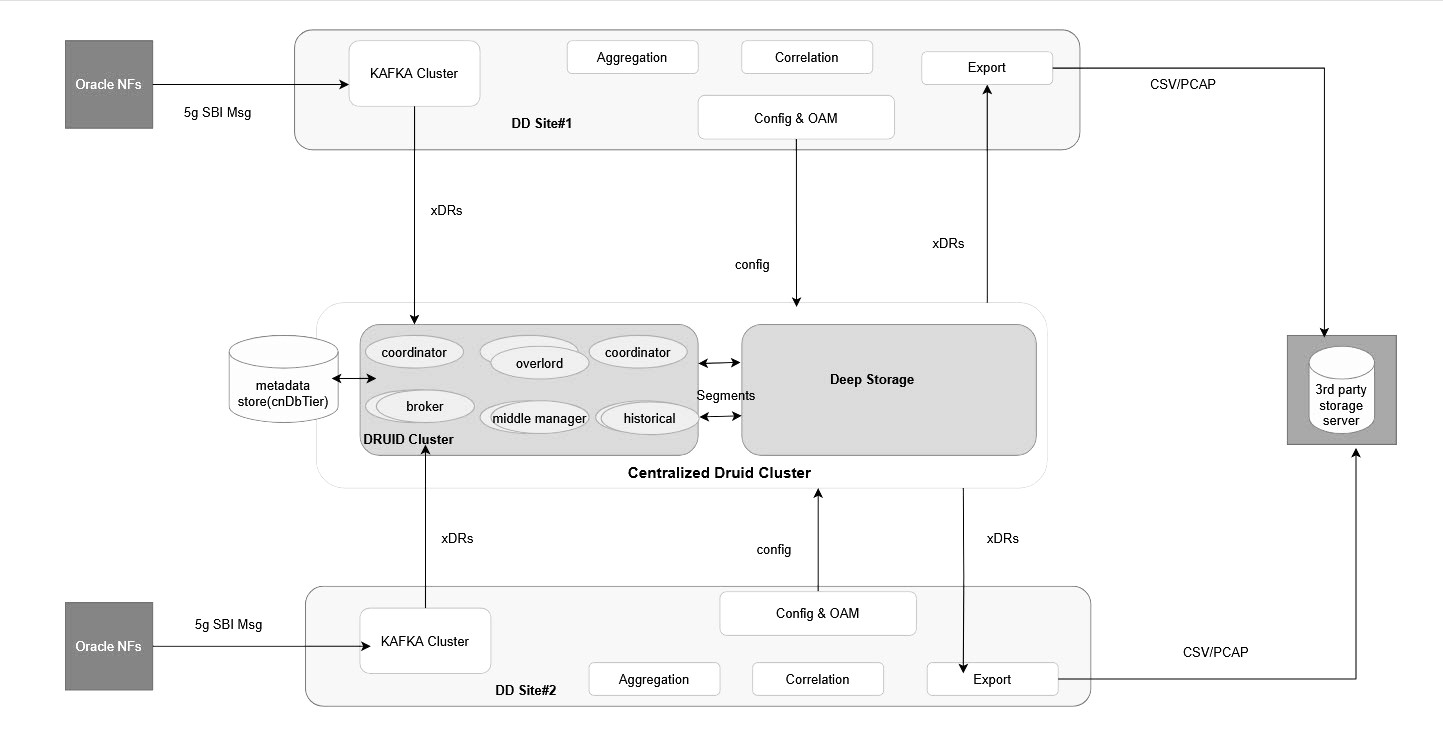
Druid also supports HDFS, S3, GCP, and Azure as deep storage. However, the Data Director has not verified the Druid integration with these options as deep storage. If the customer provides such deep storage options with the Druid cluster, then Data Director should be able to store and retrieve xDRs from the Druid database without any modifications in Data Director.
16.2 Druid Cluster Prerequisities for Integration with Data Director
Druid installation should support the following extensions, see Druid Extensions for more details.
Table 16-1 Druid Cluster Prerequisities for Integration with Data Director
| Extension Name | Required/Optional | Description |
|---|---|---|
| druid-kafka-indexing-service | Required |
The extension required for ingesting data from Kafka using indexing service. |
|
druid-multi-stage-query
|
Required |
Support for the multi-stage query architecture for Apache Druid and the multi-stage query task engine. |
| druid-hdfs-storage | - |
Required if HDFS is used as deep storage option. |
| druid-s3-extensions | - |
Required if AWS S3 is used as deep storage option. See S3 Deep Storage |
| druid-google-extensions | - |
Required if Google Cloud Storage is used as deep storage option. |
| druid-azure-extensions | - |
Required if Microsoft Azure is used as deep storage option. |
|
mysql-metadata-storage
|
Optional |
MySQL is used as metadata store. |
|
druid-basic-security
|
Optional | Support for Basic HTTP authentication and role-based access control. |
| druid-datasketches | Optional | Support for approximate counts and set operations with Apache Data sketches. |
| druid-stats | Optional | Statistics related module including variance and standard deviation. |
| druid-kubernetes-extensions | Optional | Druid cluster deployment on Kubernetes without Zookeeper. |
| druid-kubernetes-overlord-extensions | Optional | Support for launching tasks in Kubernetes without Middle Managers. |
| simple-client-sslcontext | Optional | It is required if the TLS communication with Druid Cluster is needed. |
- Druid Cluster must already be installed with deep storage.
- Druid Cluster must be available with sufficient deep storage to retain the xDRs for 30 days. For the xDR storage requirement, see the Oracle Communications Network Analytics Data Director Benchmarking Guide.
- The certificates for Druid, if TLS is enabled in the Druid cluster, should also be created; however, it must be noted that the same CA should be used for generating the Druid certificates as used for other Data Director services.
16.3 Druid Cluster Integration with OCNADD Site
The Druid cluster integration with the OCNADD site requires the following to be completed:
- Creation of the ocnadd user in Druid with relevant permissions
- Creation of secrets for Druid access
- Enabling Druid as extended storage in the OCNADD site
Create user for the Data Director in the Druid Cluster
Refer to the section "Druid User Management" in the Oracle Communications Network Analytics Suite Security Guide.
Create Secrets for the Data Director to access Druid Cluster
kubectl create secret generic -n <mgmt-group-namespace> <dd-druid-api-secret> \
  --from-literal=username="<user_name>" --from-literal=password="<password>"
Where,
- mgmt-group-namespace: the namespace where the management group is deployed
- dd-druid-api-secret: the secret name defined in custom values
for
global.extendedStorage.druid.secret_name, for example,"ocnadd-druid-api-secret" - user_name: the Data Director username created in the Druid cluster (refer to the previous step)
- password: the password corresponding to the Data Director username created in the Druid cluster
kubectl create secret generic -n ocnadd-mgmt ocnadd-druid-api-secret --from-literal=username="ocnadd" --from-literal=password="secret"Create Secrets for the Druid Cluster to Access Data Director
Create the secrets for all available Mediation groups
where,
<mediationGroup> =
                    <siteName>:<workerGroupName>:<mediationNamespace>:<mediationClusterName>
If the namespace or any name contains - , remove the hyphen in the secret name.
OCNADD secret to access Druid Cluster:
# kubectl create secret generic -n <mgmt-group-namespace> druid-sasl-<mediationGroup>-<ip-address-of-druid-server-without-dots> \
  --from-literal=sasl-mechanism=SCRAM-SHA-256 \
  --from-literal="sasl-jaas-config=org.apache.kafka.common.security.scram.ScramLoginModule required username=\"<user_name>\" password=\"<password>\";"
Where:
mgmt-group-namespace: the namespace where the management group is deployeddruid-sasl-<mediationGroup>-<ip-address-of-druid-server-without-dots>: the secret name generated using themediationGroupand Druid server IP addressuser_name: the external user name on the Druid cluster to access OCNADD Kafka clusterpassword: the password for the user on the Druid cluster to access OCNADD Kafka cluster
Example:
For the following details:
mediationGroup =
                        BLR:ddworker1:dd-mediation-ns:dd-mediation-cluster
druid-server-ip-address = 10.148.212.138
The generated secret name is:
druid-sasl-BLR-ddworker1-ddmediationns-ddmediationcluster-10148212138
Command:
kubectl create secret generic -n ocnadd-deploy druid-sasl-BLR-ddworker1-ddmediationns-ddmediationcluster-10148212138 \
  --from-literal=sasl-mechanism=SCRAM-SHA-256 \
  --from-literal="sasl-jaas-config=org.apache.kafka.common.security.scram.ScramLoginModule required username=\"extuser1\" password=\"extuser1\";"
Enable Druid as extended storage in OCNADD site
Follow the steps to enable the Druid as the extended storage, the Druid cluster should already be installed and running fine
global:

  #######################
  # EXTENDED XDR STORAGE-#
  #######################
  extendedStorage:
    druid:
      enabled: false                             ==========> This should be set to "true"
      druidTlsEnabled: true                      ==========> This should be set to "true" if TLS is enabled in Druid cluster

      namespace: ocnadd-druid                    ==========> This should be set to the namespace where druid cluster is deployed
      service_ip: 1.1.1.1                        ==========> This should be set to the Druid Router Service LB IP address, else leave it as is
      service_port: 8080                         ==========> This should be set to the Druid Router Service port
      secret_name: "ocnadd-druid-api-secret"     ==========> This should be set to the name of the secret created for the Druid services
Step 2: Upgrade the OCNADD management group
Refer to section "Updating Management Group Service Parameters" to upgrade the management group services
kubectl get po -n <mgmt-namespace>
It should show that config and export PODs in RUNNING
state and the pods that have respawned after the upgrade, have the latest age ( in
secs )
Step 4: Upgrade the OCNADD mediation group
Refer to section "Update Mediation Group Service Parameters" to upgrade the mediation group services
Step 5: Verify the upgrade of the mediation group is successful
- Check the status of the upgrade, monitor the pods to come back to
the RUNNING state, and wait for the traffic rate to be stabilized to the same
rate as before the upgrade. Run the following command to check the upgrade
status:
helm history <release_name> --namespace <namespace-name>Example:helm history ocnadd --namespace dd-medSample output:
The description should be "
upgrade complete".
Step 6: Continue with Correlation Feature, Trace, and Export configuration on the OCNADD.