3 OCNADD Features and Feature Specific Limits
This section describes OCNADD features and limits specific to these features.
3.1 OCNADD Feature Specific Limits
This chapter provides a list of the limits defined for specific features in OCNADD.
Table 3-1 OCNADD Feature Specific Limits
| Description | Limit Value |
|---|---|
| Maximum number of worker groups support in a Centralized Site | 2 |
| Maximum number of parallel filters support per worker group | 4 |
| Maximum number of chaining filters support per worker group | 2 |
| Maximum number of replicated adapter feeds per worker group | 2 |
|
Maximum number of Kafka feeds per worker group
|
3 |
| Maximum number of global L3L4 mapping rules supported per worker group | 500 |
| Maximum number of export configurations supported | 3 |
| Maximum number of Trace configurations supported | 1 |
Note:
The limits are controlled through the helm parameters. For more information, see section "Global Parameters" of Oracle Communications Network Analytics Data Director Installation, Upgrade, and Fault Recovery Guide.3.2 OCNADD Features
This section explains Oracle Communications Network Analytics Data Director (OCNADD) features.
3.2.1 Data Governance
OCNADD provides data governance by managing the availability and usability of data in enterprise systems. It also ensures that the integrity and security of the data are maintained by adhering to all the Oracle-defined data standards and policies for data usage rules.
3.2.2 High Availability
OCNADD supports microservice-based architecture, and OCNADD instances are deployed in Cloud Native Environments (CNEs), which ensure high availability of services and auto-scaling based on resource utilization. In the case of pod failures, new service instances are spawned immediately.
In case of a K8s cluster failure, the OCNADD deployment is restored to a different cluster using the disaster recovery mechanisms. For more information about the disaster recovery procedures, see Oracle Communications Network Analytics Data Director Disaster Recovery Guide.
3.2.3 Data Aggregation
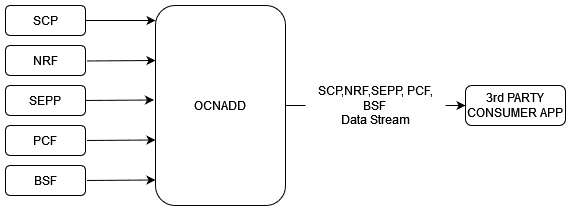
OCNADD performs data aggregation of the network traffic coming from different NFs, such as NRF, SEPP, PCF, BSF, and SCP. It aggregates the data coming from the relay agent's Kafka Broker and provides aggregated traffic to mediation's Kafka Broker via feed to the third-party consumer applications.
The following diagram shows a high-level architecture of the OCNADD data aggregation feature:
For information about creating data feeds using CNC Console, see Configuring OCNADD Using CNC Console.
3.2.4 SCP Model-D Support
Prerequisite: The SCP User Agent Info must be enabled on the SCP NF before running Model-D traffic.
Steps: CNCC, SCP UI, SCP Features, SCP User Agent Info, then enabled:
true
Refer: SCP Features Enable Disable REST API and search for
scp_user_agent_info.
The SCP in Model-D takes over the entire process of NF discovery and selection. In addition, the discovery and selection processes are performed using one request, unlike Model-C, which requires two separate requests.
In the Model-D flow, a new header was added in R16 called 3GPP-SBI-DISCOVERY.
The use of 3gpp-Sbi-Discovery enables the indirect communication
mode for discovery and selection.
- The consumer NF includes discovery parameters and directly sends the service
request to the SCP with
3GPP-SBI-DISCOVERY:Authority= SCP3GPP-SBI-DISCOVERY= Producer NF discovery parameters
- The SCP performs delegated discovery and selects the best producer NF to address the request based on location, load, capacity, priority, and the health of the producer NFs.
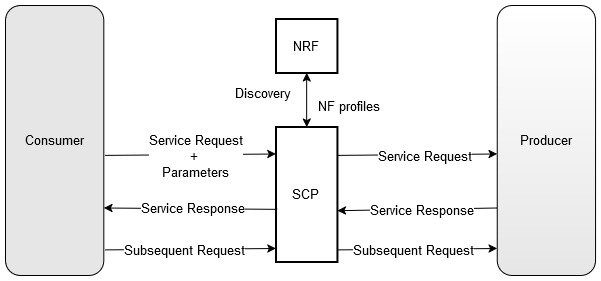
Model-D Support Added in the Following OCNADD Features:
3.2.5 Data Filtering
OCNADD performs data filtering on messages and sends only the filtered messages to the next hop or feed. OCNADD supports filtering on both ingress (relay agent) and egress (mediation) gateways. It allows filtering packets sent on the N12 interface between AMF and AUSF and the N13 interface between AUSF and UDM. The SCP is the data source of traffic (or data) captured between AMF and AUSF. OCNADD is placed between both the ingress and egress flows; therefore, filtering can be applied to both flows, as depicted in the diagram below:
Figure 3-1 Data Filtering
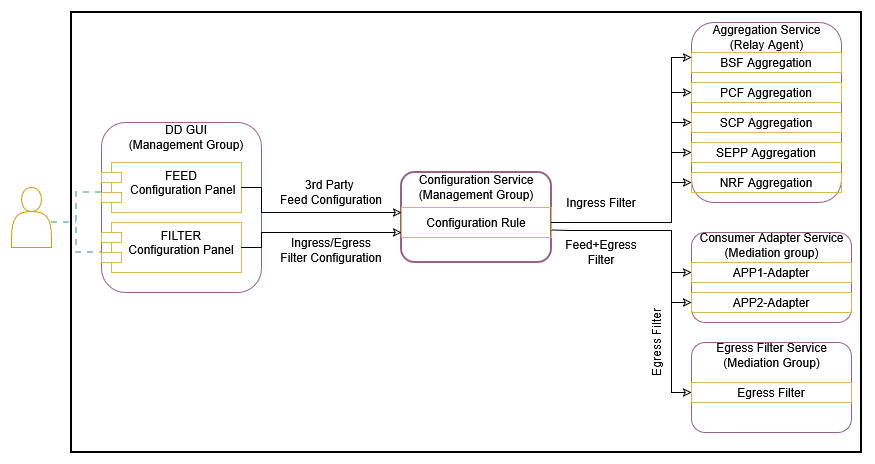
Configure the data filters through the CNC Console UI. Egress filters can be configured
based on filter conditions such as Service name,
User
        agent
, Consumer ID,
Producer ID, Consumer
FQDN, and
Producer FQDN. Ingress filters can be configured based on filter
conditions such as Consumer ID,
Producer ID, Consumer
FQDN, and
Producer FQDN. The operator can also configure any combination of
the filter conditions. When more than one filter condition is configured, filtering
rules can be defined using keywords such as “or” or “and”. For example,
consumer-id or producer-id.
For more information about creating, editing, or deleting a filter, see Data Filters section in Configuring OCNADD Using CNC Console.
The data filtering is managed either inside the consumer adapter or inside the separate filter service. The filter service is used for filtering the data for the direct Kafka feeds, and the filters will be configured in the same way; however, the association of the filters will be done to the Kafka feeds created for the filtered data feeds.
In the case of an upgrade, rollback, service restart, or when a configuration is created with the same name, duplicate messages will be sent by the adapter service or the filter service to avoid data loss.
In the case where two SEPPs (roaming included) stream data to the same OCNADD, it is
recommended to add feed-source-nf-instance-id or
feed-source-nf-fqdn in the filter condition with
AND.
3.2.5.1 Filter Enhancement
This section explains filter enhancements done in this release.
Table 3-2 Filter Enhancement
| Attribute Name | Description |
|---|---|
| path |
The value for attribute Priority List
Example:
It can be used to match any specific value from the
Note: Not applicable for ingress filter. It is applicable for transaction filter; when a match is found in the request message and the attribute is missing in the response message, it will still be considered. |
user-agent |
The value for the attribute 'user-agent' is taken from the user-agent attribute present in the header-list or dd-metadata-list. Priority List:
Example:
Note: Not applicable for Ingress Filter. It is applicable for the transaction filter. When a match is found in the Request message, and the attribute is missing in the Response message, it will still be considered. |
consumer-id |
The value for the attribute 'consumer-id' is taken from the consumer-id attribute present in the metadata-list. When the value of the field is empty or null, it shall be treated as false in the filter condition. Example:
|
producer-id |
The value for the attribute 'producer-id' is taken from the producer-id attribute present in the metadata-list. When the value of the field is empty or null, it shall be treated as false in the filter condition. Example:
|
consumer-fqdn |
The value for the attribute 'consumer-fqdn' is taken from the consumer-fqdn attribute present in the metadata-list. When the value of the field is empty or null, it shall be treated as false in the filter condition. Example:
|
producer-fqdn |
The value for the attribute 'producer-fqdn' is taken from the producer-fqdn attribute present in the metadata-list. When the value of the field is empty or null, it shall be treated as false in the filter condition. Example:
|
message-direction |
The value for the attribute 'message-direction' is taken from the message-direction attribute present in the metadata-list. When the value of the field is empty or null, it shall be treated as false in the filter condition. Values:
Note: When |
reroute-cause |
The value for the attribute 'reroute-cause' is taken from the reroute-cause attribute present in the metadata-list. When the value of the field is empty or null, it shall be treated as false in the filter condition. Example:
reroute-cause is sent only by the SCP NF.
|
feed-source-nf-type |
The value for the attribute 'feed-source-nf-type' is taken from the feed-source attribute present in the metadata-list. When the value of the field is empty or null, it shall be treated as false in the filter condition. It represents Oracle NF
types (SCP, NRF, SEPP, PCF, BSF,
Example: "feed-source": {
"nf-type": "SCP", } feed-source-nf-type = SCP |
feed-source-nf-fqdn |
The value for the attribute 'feed-source-nf-fqdn' is taken from the feed-source attribute present in the metadata-list. When the value of the field is empty or null, it shall be treated as false in the filter condition. It represents the Oracle NF's FQDN. Example: "feed-source": { "nf-fqdn":
"scp-worker.scpsvc.svc.ocnadd-tanzu.local" }
feed-source-nf-fqdn = "scp-worker.scpsvc.svc.ocnadd-tanzu.local"
|
feed-source-nf-instance-id |
The value for the attribute 'feed-source-nf-instance-id' is taken from the feed-source attribute present in the metadata-list. When the value of the field is empty or null, it shall be treated as false in the filter condition. It represents the Oracle NF's instance ID. Example: "feed-source": { "nf-instance-id":
"6faf1bbc-6e4a-4454-a507-a14ef8e1bc5e" }
feed-source-nf-instance-id = "6faf1bbc-6e4a-4454-a507-a14ef8e1bc5e"
|
feed-source-pod-instance-id |
The value for the attribute 'feed-source-pod-instance-id' is taken from the feed-source attribute present in the metadata-list. When the value of the field is empty or null, it shall be treated as false in the filter condition. It represents the Oracle NF pod's instance ID. Example: "feed-source": {
"pod-instance-id": "scpsvc-scp-worker-7d599cc56f-x5t62" }
feed-source-pod-instance-id = "scpsvc-scp-worker-7d599cc56f-x5t62"
|
supi |
It is supported from release 24.1.0. The value for the attribute 'supi' is taken for matching from the supported header-list and/or message body attributes. When the value of the field is empty or null, it shall be treated as false in the filter condition. It provides an option for an exact value match or a pattern-based match from specific supported attributes or from all supported attributes using the priority table.
See Priority Table Supported Supi: imsi, nai, gci, or gli Note:
|
method |
It is supported from release 24.2.0. The value for attribute 'method' is taken for match from ":method" attributes present header-list or dd-metadata-list. Priority List:
It applies to the transaction filter; the response message is considered when a match is found in the request message. When the value of the field is empty or null,it is treated as false in the filter condition. Values: [GET, POST, PUT, DELETE, PATCH, CONNECT, OPTIONS, TRACE]. Example:
Note: Not applicable for Ingress Filter. |
Priority Table
The following table lists the priorities with the corresponding attribute and location information:
Table 3-3 Priority Table
| 1st Priority | 2nd Priority | 3rd Priority | 4th Priority | 5th Priority | |||||
|---|---|---|---|---|---|---|---|---|---|
| Attribute name | Location | Attribute name | Location | Attribute name | Location | Attribute name | Location | Attribute name | Location |
| PATH | dd-metadata list ( path) | PATH | header-list ( :path) | 3GPP_SBI_DISCOVERY_SUPI | header-list(3gpp-sbi-discovery-supi) | LOCATION | header-list(location) | MESSAGE_BODY | 5g-sbi-message (supiOrSuci, supi, ueId, supiRm, varUeId) |
3.2.6 Weighted Load Balancing Based on Correlation ID
OCNADD supports the weighted load balancing of mediation’s data feeds among the different
endpoints of the third-party consumer application. A new load balancing method,
Weighted Load Balancing, is introduced. All incoming messages to OCNADD have
a correlation ID, and with the introduction of weighted load balancing, the request and
response having the same correlation ID are delivered to the same destination endpoint.
The operator can configure weighted load balancing through the CNC Console UI. The
default load balancing method is Round Robin. The operator can allocate load
factors (in percentage) to each destination endpoint, and the total of the load factors
assigned to the destination endpoints must be 100%. By default, load sharing is equally
distributed among the endpoints. The maximum number of destination endpoints allowed is
2. Weighted load balancing can be applied to HTTP, HTTPS, and
synthetic packet traffic. In case of an endpoint failure, OCNADD distributes the
response to the available endpoints in an equal percentage or as per the configured
percentage. At present, only two endpoints are supported, so if one endpoint fails, the
complete traffic is sent to the available endpoint.

For information about configuring load balancing using CNC Console, see Configuring OCNADD Using CNC Console
3.2.7 Synthetic Packet Data Generation
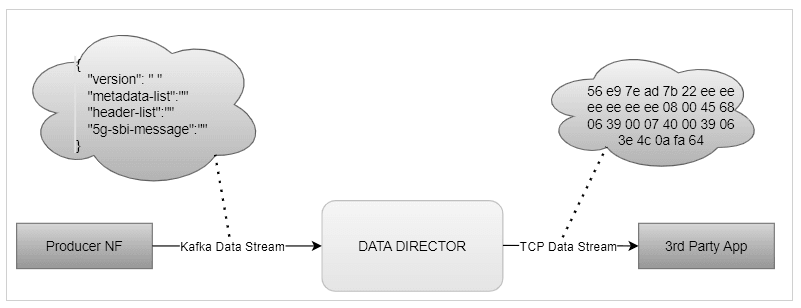
OCNADD converts incoming JSON data into network transfer wire format and sends the converted packets to third-party monitoring applications in a secure manner. The third-party probe then feeds the synthetic packets to the internal monitoring applications. The feature helps third-party vendors eliminate the need to create additional applications to receive JSON data and convert the data into a probe-compatible format, thereby saving critical compute resources and associated costs.
The following diagram shows a high-level architecture of the OCNADD data aggregation feature:
Figure 3-2 Synthetic Packet Data Generation
3.2.7.1 L3-L4 Information for Synthetic Packet Feed
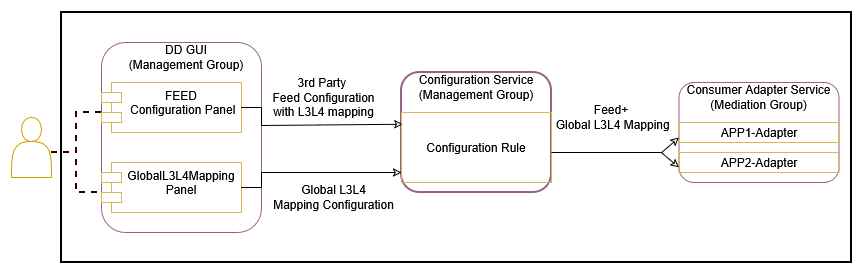
The OCNADD allows users to configure the L3-L4 mapping rule in the feed and the Global L3-L4 configuration to fetch L3-L4 information when the rule defined in the feed matches the incoming data.
Figure 3-3 Global L3-L4 Configuration
Note:
OCNADD supports GUI-based configuration of L3-L4 information:- For feed level L3L4 configuration using GUI, see Creating Standard Feed and Editing Feed Level L3L4 Configuration.
- For global L3L4 configuration using GUI, see Configuring Global L3L4 Mapping.
Global L3-L4 Mapping Configuration
OCNADD users can configure a list of L3–L4 attribute rules (a combination of rules) by specifying the attribute names and values mapped to IP addresses and port numbers. These configuration rules are used to obtain the L3 and L4 addresses from the global mapping configuration during synthetic packet encoding. Only the global L3–L4 mapping configuration is applicable for all synthetic feeds.
Table 3-4 Global L3-L4 Configuration
| Attribute 1 | Value | Attribute 2 | Value | IP Address | Port |
|---|---|---|---|---|---|
| consumer-fqdn | 1244 | - | - | 10.10.10.100 | 8080 |
| feed-source-nf-fqdn | <FQDN> | message-direction | RxRequest | 100.100.100.101 | 8181 |
| producer-fqdn | <FQDN> | api-name | nausf-auth | 100.100.100.102 | 8182 |
Note:
- Only two attributes are supported in each row.
- Two attributes in a row are combined with the condition
ANDduring internal processing to identify a match. - IPv6 is not supported.
- The attribute values are case sensitive.
api-name: The user must add theapi-nametaken from the:pathheader as the value for this attribute in the global L3–L4 configuration.nausf-authornausf*or*nausf*formats are supported and will have the same matching output.For example: When the
api-nameisnausf*, the value present in metadata —nausf-auth,nausf-sorprotection, ornausf-upuprotection— matches.This fulfills the requirement of L3 and L4 mapping when the same AUSF NF is serving all services.
nausf*-auth: It is recommended not to add*between the attribute values for matching, as the condition may or may not be matched based on value.For example:
- When the
api-nameisnausf*-auth, and the value present in metadata isnausf-auth,nausf-sorprotection, ornausf-upuprotection, a different value is matched and only the first value matches. - When the
api-nameisnausf*-test, and the value present in metadata isnausf-auth,nausf-sorprotection, ornausf-upuprotection, a different value is matched and none of the other values match.
- When the
Feed L3-L4 Mapping Configuration
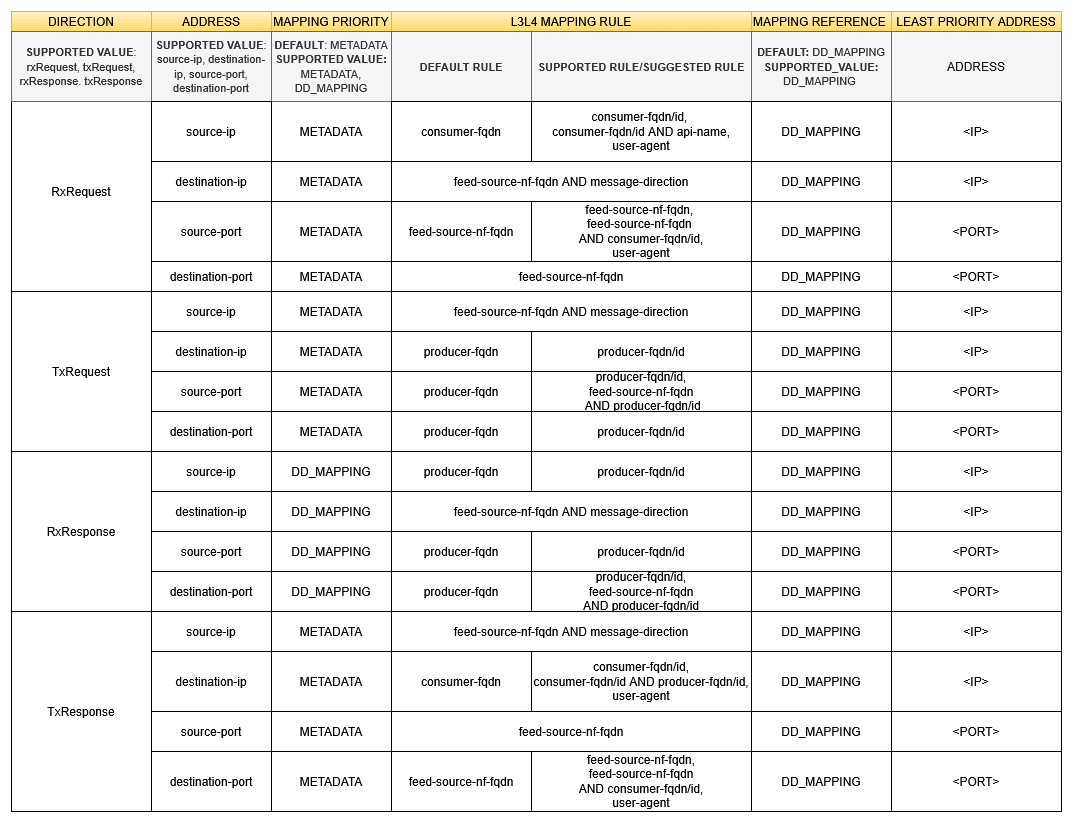
This configuration allows the user to add L3-L4 mapping rule in the synthetic feed configuration that is verified during synthetic packet encoding to obtain L3-L4 mapping information.
The following table depicts the feed L3-L4 mapping configuration:
Note:
Two mapping rules should be combined only with the operator AND, no other operator is supported.
Figure 3-4 Feed L3-L4 Mapping Configuration
Note:
Two mapping rules should be combined only with the operator AND, no other operator is supported.Supported L3-L4 Attributes
Table 3-5 Supported L3-L4 Attributes
| Attribute | Description |
|---|---|
| user-agent |
The user-agent will always be
considered from the Supported From: Release 24.2.0 Prerequisites:
Incoming Message Value
|
| source-ip |
The source-ip will always be considered from
the Supported From: Release 25.1.0 |
| producer-id |
The producer-id will always be considered
from the Supported From: Release 23.3.0 |
| producer-fqdn | The producer FQDN will always be considered from
"metadata-list" for matching with global L3L4
config. If it matches, the IP and/or port will be mapped in the
synthetic message; otherwise, it will be taken from the least
priority address (default mapping).
|
| message-direction | The message direction will always be considered from
"metadata-list" for matching with global L3L4
config. If it matches, the IP and/or port will be mapped in the
synthetic message; otherwise, it will be taken from the least
priority address (default mapping).
|
| ingress-authority |
Ingress-authority will always be considered from the
Supported From: Release 25.1.0 Prerequisite:
|
| feed-source-nf-fqdn | feed-source-nf-fqdn will always be considered from
"metadata-list" for matching with global l3l4
config, if it matches, ip and/or port will be mapped in synthetic
message else it will be taken from least priority address (default
mapping).
|
| destination-ip | The destination IP will always be considered from
"metadata-list" for matching with global L3L4
config. If it matches, the IP and/or port will be mapped in the
synthetic message; otherwise, it will be taken from the least
priority address (default mapping).
Supported From: Release 25.1.0 |
| consumer-id | The consumer ID will always be considered from
"metadata-list" for matching with global L3L4
config. If it matches, the IP and/or port will be mapped in the
synthetic message; otherwise, it will be taken from the least
priority address (default mapping).
|
| consumer-fqdn | The consumer FQDN will always be considered from
"metadata-list" for matching with global L3L4
config. If it matches, the IP and/or port will be mapped in the
synthetic message; otherwise, it will be taken from the least
priority address (default mapping).
|
| api-name |
|
| egress-authority |
The If This feature is supported from release 25.1.200 and
is not available in the Prerequisites:
|
| previous-hop |
The If This is supported from release 25.1.200. Prerequisites:
|
L3-L4 Mapping Rule Priority
Table 3-6 L3-L4 Mapping Rules Priority
| Mapping Priority | First Priority | Second Priority | Third Priority |
|---|---|---|---|
| DD_MAPPING | Global L3-L4 Mapping Configuration | Least Priority Address (from feed configuration) | - |
| METADATA | Metadata list (incoming message from NF to DD) | Global L3-L4 mapping configuration | Least Priority Address (from feed configuration) |
Note:
- Layer 2 (Ethernet address) information must always be taken from L2-L4 information attributes present in the feed configuration.
- When L3-L4 mapping configuration is absent in feed configuration, the value present in L2-L4 information attributes for feed configuration is used in synthetic packet encoding for Layer3 (IP) and Layer4 (Port).
3.2.7.2 TCP Seq/Ack
Note:
- This feature is available starting from the OCNADD release 23.4.0 and can be enabled through the Helm chart, with the default setting being off in the 23.4.0 release.
- Starting from OCNADD release 24.1.0, this feature is always enabled, and there is no Helm parameter to enable or disable it.
- The source port of the request message and the destination port of the response message will be changed, and they may not align with the L3L4 Global Mapping configuration in synthetic packet encoding data sent to the 3rd party.
- Users must ensure that the IP and PORT combinations for each connection are configured uniquely and with variance in global L3L4 configuration to avoid collisions.
- During service restart or upgrade, the TCP sequence (Seq) and acknowledgment (Ack) counters will be reset, and the evaluation will restart.
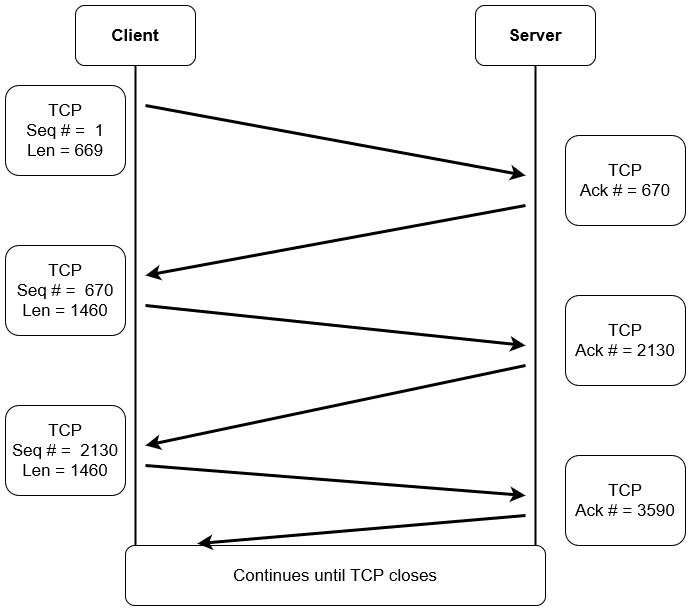
TCP Sequence Number (Seq)
- The TCP sequence number is a 32-bit number crucial for providing a sequence that aligns with other transmitting bytes of the TCP connection.
- It allows the unique identification of each data byte.
- Helps in the formation of TCP segments and reassembling them.
- Maintains a record of the amount of data transferred and received.
- In cases where data is received out of order, it ensures the correct order is maintained.
- If data is lost in the transmission process, it facilitates the request for the retransmission of the lost data.
TCP Acknowledgment Number (Ack)
The acknowledgment number is a counter tracking every byte received in a TCP connection.
TCP Seq & Ack Flow
3.2.7.3 TCP And HTTP2 Connection Message
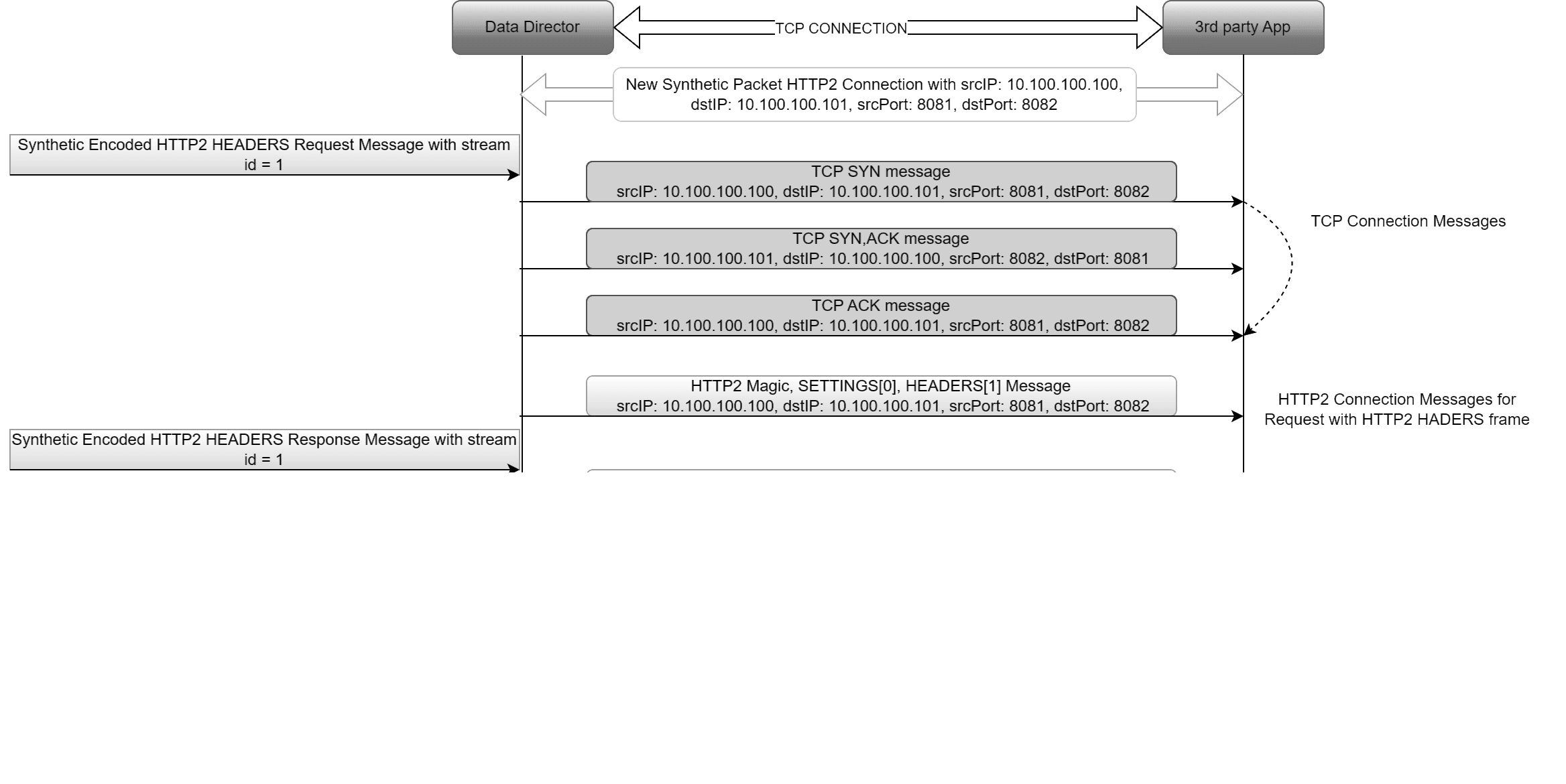
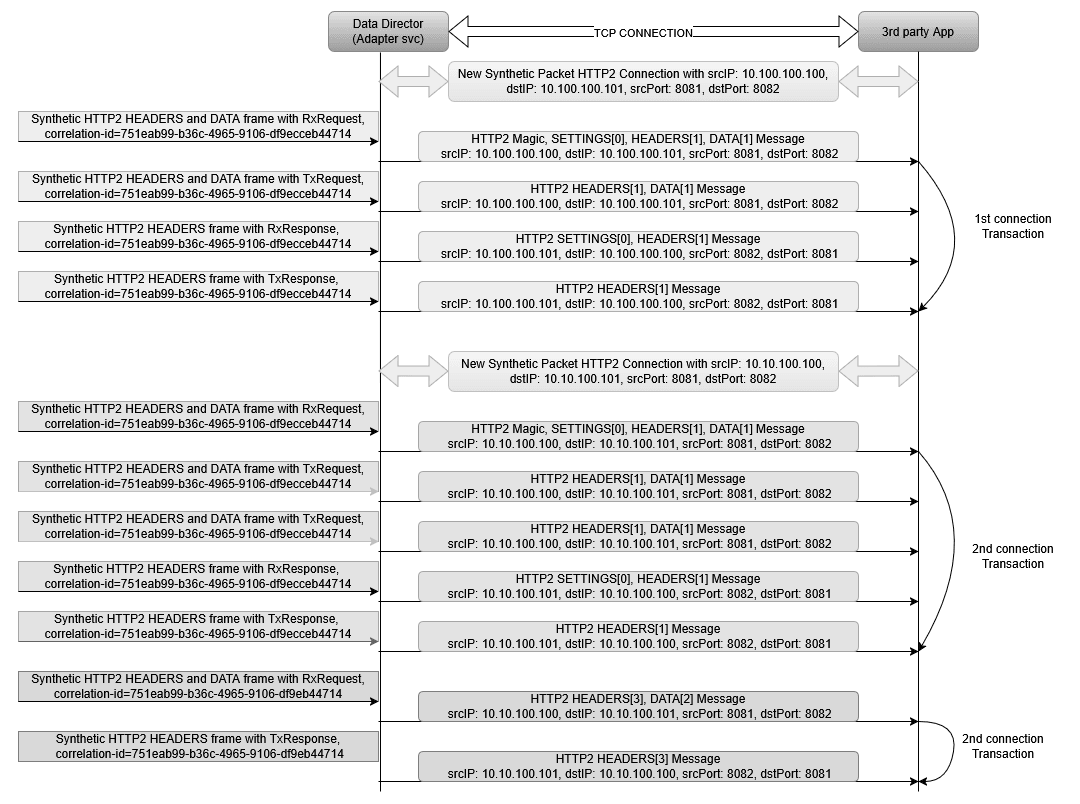
This feature enables the addition of TCP and HTTP2 connection messages at the beginning of HTTP2 frames for each new connection.
- The first outgoing direction message of a new connection will include the TCP SYN message, TCP SYN ACK message, TCP ACK message, HTTP2 magic frame, HTTP2 SETTINGS frame, and HTTP2 HEADERS frame (DATA frame if present).
- The first incoming direction message of a new connection will include the HTTP2 SETTINGS frame and HTTP2 HEADERS frame (DATA frame if present).
- Subsequent outgoing and incoming messages of the connection will not include any TCP and HTTP2 connection messages; they will send only HTTP2 HEADERS and/or DATA frames.
This feature can be disabled or enabled in the synthetic feed configuration. By default, it is enabled.
Unique connection identifier: srcIP + dstIP + srcPort + dstPort
Note:
- This feature is available starting from the OCNADD release 24.1.0.
- The addition of TCP and HTTP2 connection messages on top of actual HTTP2 HEADERS frames for the initial connection of a message is a customer-specific requirement.
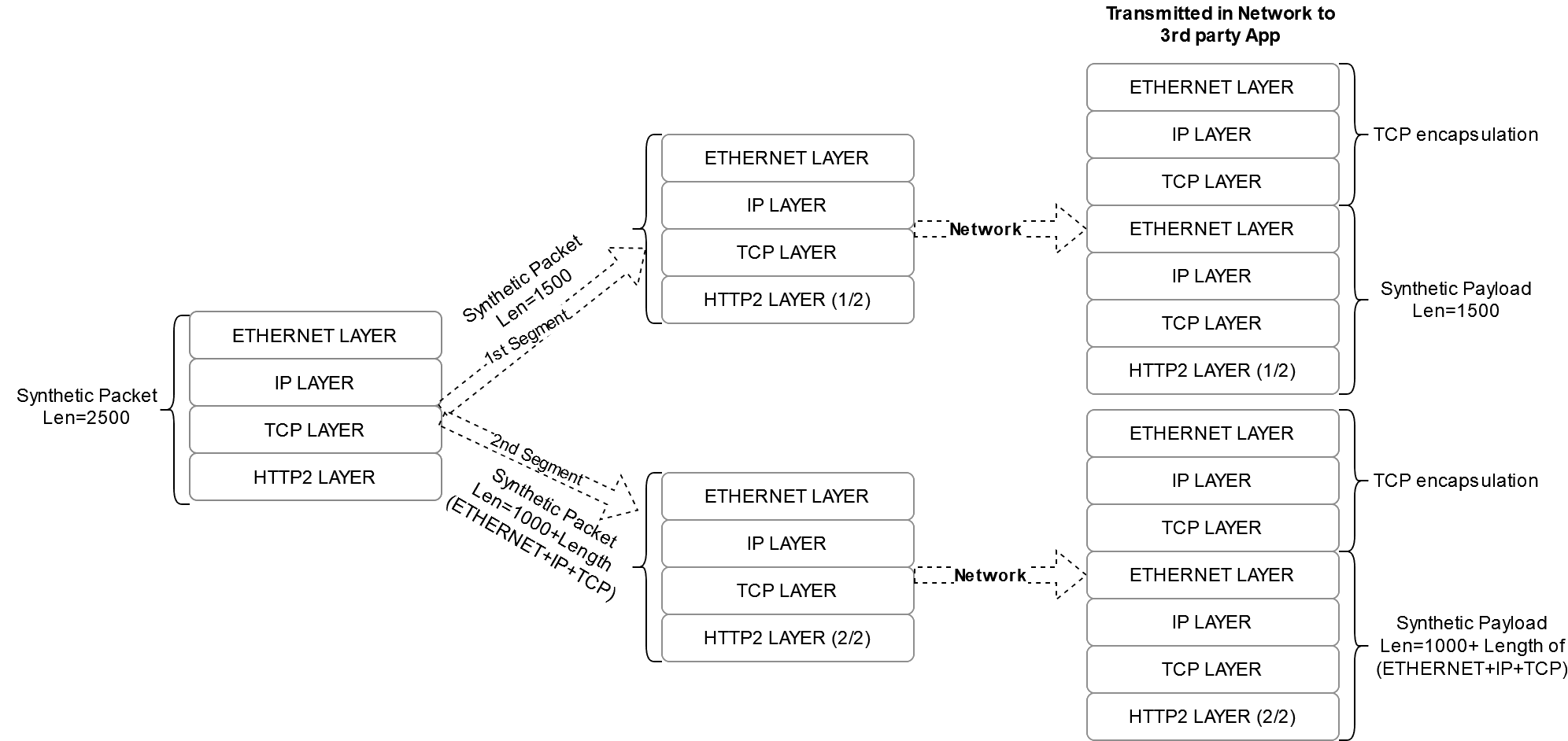
3.2.7.4 Synthetic Packet Segmentation
The synthetic packet segmentation is a customer-specific requirement for their third-party app. By default, this feature shall be disabled.
The synthetic packet segmentation length is configured through synthetic feed configuration. Based on the configured length, the synthetic packet shall be segmented and transmitted to the third-party app.
Note:
It is recommended to provide a segmentation length within the range [1000-5000] whensegmentationRequired is set to true in the
synthetic feed configuration.
3.2.7.5 HTTP2 Connection based STREAM-ID
This feature enables OCNADD to generate a stream-id instead of using a
correlation-id in place for synthetically encoded HTTP2
packets.
stream-idstarts from 0 for the HTTP2 connection message and 1 for HTTP2 HEADERS and DATA frames for each new HTTP2 connection.stream-idgets incremented in incremental order within a connection for each new transaction.stream-idwill be the same for all messages of a transaction, including request messages and response messages.- A context is maintained for the
stream-idin OCNADD, which shall get cleared after the configured timeout. If a message is received after the timeout, it shall have a newstream-id. - The transaction identifier is the
correlation-id, which is present in the metadata list in the incoming message from Oracle NFs.
HTTP2 connection identifier = srcIP + dstIP + srcPort + DstPort
Figure 3-5 HTTP2 Connection based STREAM-ID
3.2.8 Data Replication
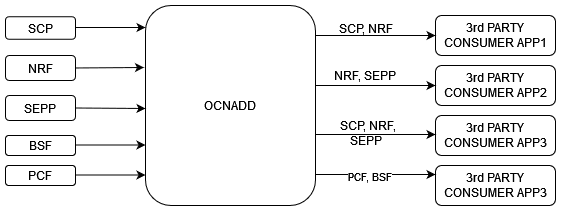
OCNADD allows data replication functionality. The data streams from OCNADD services can be replicated to multiple third party applications simultaneously.
The following diagram depicts OCNADD data replication:
3.2.9 Backup and Restore
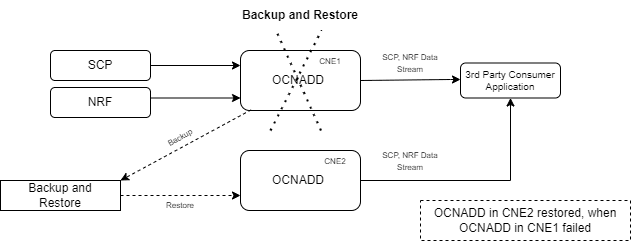
OCNADD supports backup and restore to ensure high availability and quick recovery from failures such as cluster failure, database corruption, and so on. The supported backup methods are automated and manual backups. For more information on backup and restore, see Oracle Communications Network Analytics Data Director Installation, Upgrade, and Fault Recovery Guide.
The following diagram depicts backup and restore supported by OCNADD:
Figure 3-6 Backup and Restore
3.2.10 Secure Transport
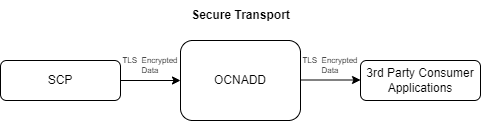
OCNADD provides secure data communication between producer NFs and third party consumer applications. All the incoming and outgoing data streams from OCNADD are TLS encrypted.
The following diagram provides a secure transport by OCNADD:
Figure 3-7 Secure Transport
3.2.11 Operational Dashboard
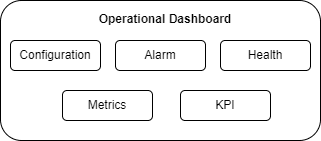
OCNADD provides an operational dashboard which provides a rich visualization of various metrics, KPIs, and alarms.
The dashboard can be depicted as follows:
Figure 3-8 Operational Dashboard
For more information about accessing the dashboard through CNC Console, see OCNADD Dashboard.
3.2.12 Health Monitoring
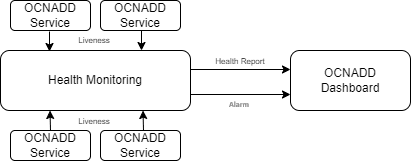
OCNADD performs health monitoring to check the readiness and liveness of each OCNADD service and raises alarms in case of service failure.
OCNADD performs the monitoring based on the heartbeat mechanism where each of the OCNADD service instances registers with the Health Monitoring service and exchanges heartbeat with it. If the pod instance goes down, the health monitoring service raises an alarm. Few of the important scenarios when an alarm is raised, are as follows:
- When maximum number of replicas for a service have been instantiated.
- When a service is in down state.
- When CPU or memory threshold is reached.
The health monitoring functionality allows OCNADD to generate health reports of each service on a periodic basis or on demand. You can access the reports through the OCNADD Dashboard. For more information about the dashboard, see OCNADD Dashboard.
The health monitoring service is depicted in the diagram below:
The health monitoring functionality also supports collection of various metrics related to the service resource utilization. It stores them in the metric collection database tables. The health monitoring service generates alarms for the missing heartbeat, connection breakdown, and the exceeding threshold.
3.2.13 External Kafka Feeds
OCNADD supports the external Kafka consumer applications using the external Kafka Feeds. This enables third-party consumer applications to directly consume data from the Data Director Kafka topic, eliminating the need for any egress adapter. OCNADD only permits only those third-party applications that are authenticated and authorized third-party by the Data Director Kafka service, which is handled using the KAFKA ACL (Access Control List) functionality.
Access control for the external feed is established during Kafka feed creation. Presently, third-party applications are exclusively allowed to perform consumption (READ) from a specific topic using a designated consumer group.
Figure 3-9 External Kafka Feed
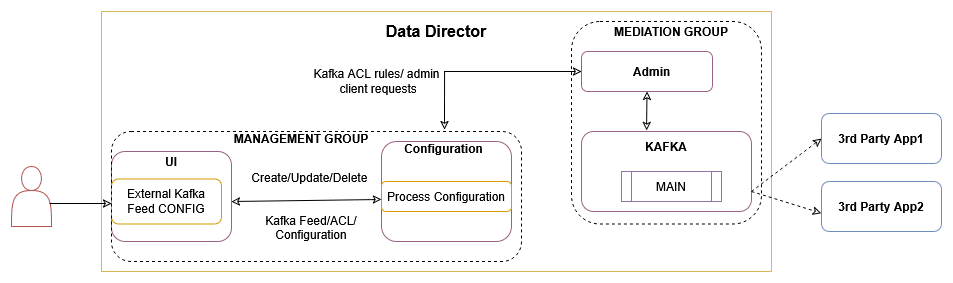
The Data Director provides the following support for external Kafka feeds:
- Creation, updating, and deletion of external Kafka Feeds using OCNADD User Interface (UI).
- Authorization of third-party Kafka consumer applications based on specific user, consumer group, and optional hostname.
- Display of status reports from third-party Kafka consumer applications utilizing external Kafka Feeds in the UI.
- Presentation of consumption rate reports from third-party Kafka consumer applications utilizing external Kafka Feeds in the UI.
Authorization by Kafka requires clients to undergo authentication through either SASL or SSL (mTLS). As a result, enabling external Kafka feed support requires specific settings to be activated within the Kafka broker. This ensures mandatory authentication of Kafka clients by the Kafka service. These properties are not enabled by default and must be configured in the Kafka Service before any Kafka feed can function.
See Enable Kafka Feed Configuration Support section before creating any Kafka Feed using OCNADD UI.
For Kafka Consumer Feed configuration using OCNADD UI, see Kafka Feed section in Configuring OCNADD Using CNC Console.
3.2.14 Centralized Deployment
The OCNADD centralized deployment modes provide the separation of the configuration and administration PODs from the traffic processing PODs. The single management PODs group can serve multiple traffic processing PODs groups (called worker groups), thereby saving the resources for management PODs for very large customer deployments spanning multiple individual OCNADD sites. The management group of PODs maintains the configuration and administration, health monitoring, alarms, and user interaction for all the individual worker groups.
Figure 3-10 Centralized Deployment
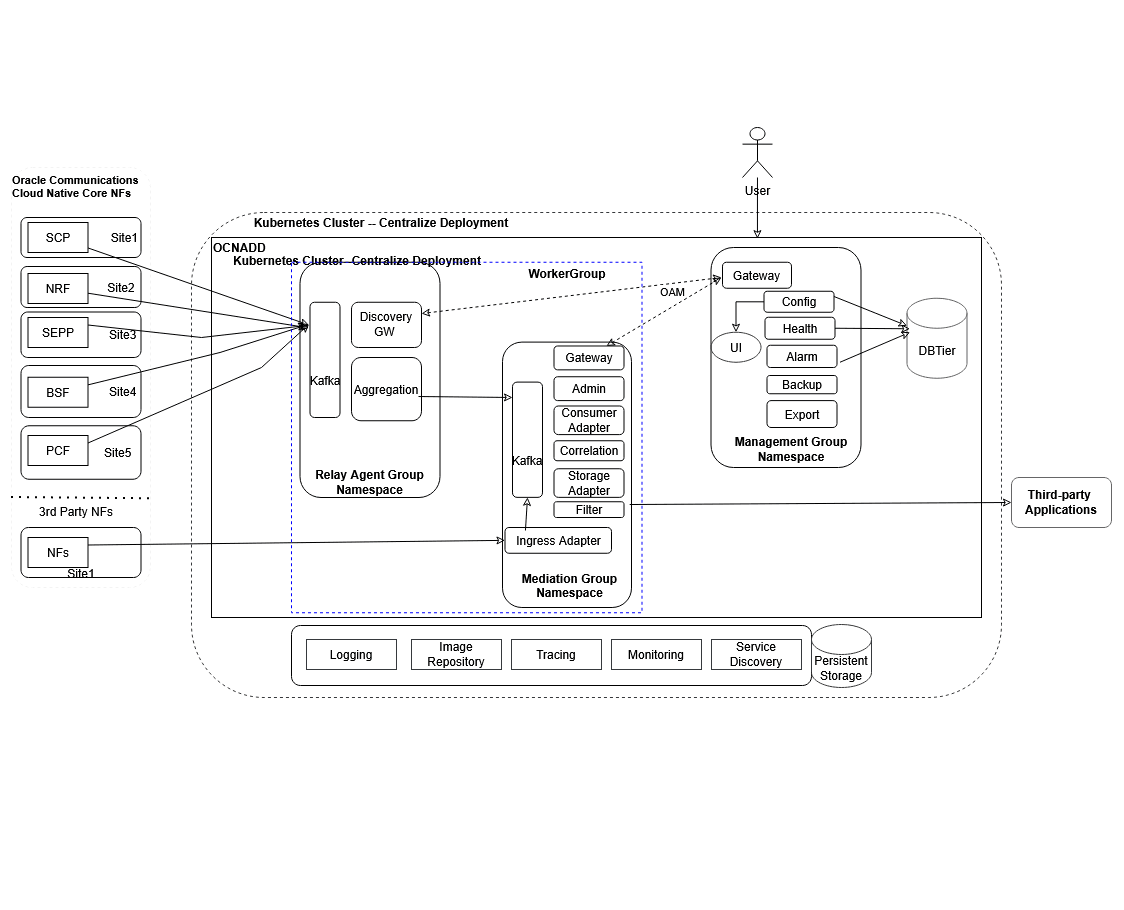
Management Group: A logical collection of the configuration and administration functions. It consists of Configuration, Alarm, HealthMonitoring, Backup, and UI services.
Worker Group: A logical collection of the traffic processing functions. The worker group represents the traffic processing functions and services and provides features like aggregation, filtering, correlation, and data feeds for third-party applications. The worker group has evolved into a logical entity that retains the same functionality as before, now encompassing both the OCNADD Relay Agent and OCNADD Mediation components.
Data Director Relay Agent: The Data Director Relay Agent is engineered to handle high-volume data streams from 5G Network Functions (NFs) with a low data retention policy, while ensuring scalability and efficient data processing.
The Data Director Relay Agent is a composite component consisting of:
- Discovery Service Gateway: The Discovery Service Gateway monitors the health of the Kafka cluster across multiple OCNADD sites, facilitating communication between 5G Network Functions (NFs) and OCNADD to retrieve and/or notify Kafka cluster information along with its status.
- Kafka Cluster (low retention): A Kafka cluster is a distributed streaming platform designed to handle high throughput and provide low-latency, fault-tolerant, and scalable data processing. With a low retention period, the Kafka cluster can reduce the dependency on underlying data storage to process and forward large amounts of data, thereby ensuring high throughput by reducing performance degradation due to storage bottlenecks. This design enables the Kafka cluster to scale horizontally to accommodate increasing data volumes, making it an ideal solution for handling the high data ingestion rates typical of 5G networks.
- Aggregation Service: The Aggregation Service consumes traffic feed data produced by 5G Network Functions (NFs) from the Kafka cluster, providing a centralized processing point. It applies configurable ingress filtering to refine the data, sequences messages to ensure proper ordering, and enriches the data with additional information. The processed data is then load-shared to different OCNADD mediation instances for further processing of NF feed data, retention, and secured and reliable delivery of data to third-party consumers.
Data Director Mediation: The Data Director Mediation is a vital component of OCNADD, leveraging high-data-retention Kafka clusters to integrate multiple data sources. It enables secure data delivery to third-party endpoints, supporting a range of data formats, including feeds, xDRs, trace, and KPIs.
The Data Director Mediation is a composite component consisting of:
- Kafka Cluster: Provides high-throughput, low-latency, fault-tolerant, and scalable data processing with higher retention.
- Adapters Service: Supports various data feeds, allowing for diverse data ingestion.
- Correlation Service: Enables the correlation of xDRs (extended detail records) for advanced data analysis.
- Storage Service: Provides persistent storage for xDRs, ensuring data is retained for further processing and analysis.
- Egress Filter: Utilizes the Adapter Service and/or Filter Service to filter and refine data for output.
- Gateway Service: Facilitates secure communication with OAM (Operations, Administration, and Maintenance) systems.
The worker group names are formed by worker group namespaces and site or cluster name:
worker_group_namespace:site_name, where:
- The site or cluster name is a global parameter in the helm charts. It is
controlled by the
global.cluster.nameparameter.
The important points to consider for the centralized deployment are:
- In centralized deployment mode, configuration management is decoupled from traffic processing, allowing traffic processing units to scale independently.
- Each worker group within a centralized OCNADD site can be configured with different capacities, but the maximum supported capacity for each worker group must be the same, encompassing both Relay Agent and Mediation components.
- There can be multiple worker groups in a centralized OCNADD site, but in the current release only one is recommended, and each worker group will support traffic rate depending on the resource profiles of the worker group PODs. If the worker group is dimensioned for processing 100K MPS traffic and the centralized OCNADD site has a requirement to support 300–400K MPS, then an additional worker group should be created on the centralized OCNADD site.
- Metrics and alarms are generated separately for each worker group, including Relay Agent and Mediation components.
- The current release supports a fixed number of worker groups per centralized OCNADD site, limited to one.
- Fresh deployments in centralized mode are supported with the new architecture.
- Upgrades from previous releases to centralized deployment mode are recommended.
- The UI allows for configuration of data feeds, filters, and correlation configurations specific to each worker group. Refer Configuring OCNADD Using CNC Console section for more information.
3.2.15 Correlation Feature
Figure 3-11 Correlation Service
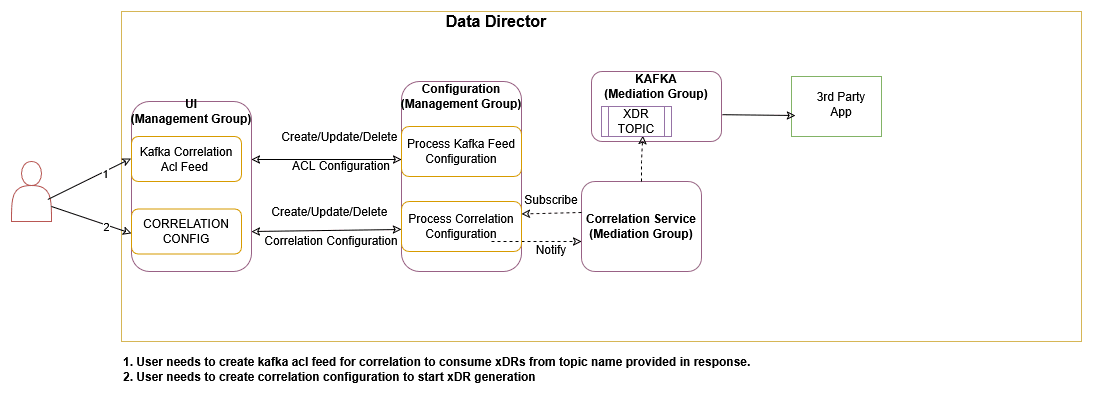
The correlation feature provides the capability to correlate messages of a network scenario that can be represented by a transaction, call, or session and generate a summary record; this summary record is known as an xDR. The generated summary records can provide deep insights and visibility into the customer network and can be useful in features such as:
- Network troubleshooting
- Revenue assurance
- Billing and CDR reconciliation
- Network performance KPIs and metrics
- Advanced analytics and observability
Network troubleshooting is one of the key features of the monitoring solution, and the correlation capability helps the Data Director provide applications and utilities to perform troubleshooting of failing network scenarios, trace network scenarios across multiple NFs, and generate the KPIs to provide network utilization and load. This feature enables network visibility and observability, as the KPIs and threshold alerts generated from the xDRs can provide intuitive insights such as network efficiency reports in the form of network dashboards.
The xDRs generated by the Data Director can facilitate advanced descriptive and predictive network analytics, as the correlation output in the form of xDRs can be fed into network analytics frameworks such as NWDAF or Insight Engine to provide AI/ML capabilities that can be helpful in fraud detection and in predicting and preventing network spoofing and DOS attacks.
Note:
In the case of an upgrade, rollback, service restart, or configuration created with the same name, duplicate messages/xDRs will be sent by the correlation service to avoid data loss.
In the case where two SEPPs (roaming included) stream data to the same OCNADD, it is
recommended to select
correlationMode=CORRELATION_ID+FEED_SOURCE_NF_INSTANCE_ID.
For more details about Correlation configuration and xDR, see Correlation Feature Configuration and xDR Format.
For information about Kafka feed creation, correlation configuration, and xDR generation using OCNADD UI, see Creating Kafka Feed, Correlation Configurations, and OCNADD Dashboard sections.
3.2.15.1 Correlation Feature Configuration and xDR Format
This chapter provides the details Kafka feed configuration, correlation configuration, and xDR generation.
3.2.15.1.1 Kafka Feed Configuration for Correlation
This section provides the details of the Kafka Feed configuration for correlation.
Prerequisites
It is mandatory to enable intra TLS for Kafka and create Kafka feed configuration with CORRELATED or CORRELATED_FILTERED Feed Type to consume xDR (Extended Detailed Record) from OCNADD using Correlation Configurations.
Hence, the following prerequisites are crucial for correlation configuration and xDR generation:
- Create ACL User
- Create Kafka Feed Configuration
- Feed Type
- CORRELATED Feed Type
When the feed type is selected
CORRELATED, aggregated data without a filter is used by the correlation service to generate the xDRs.The source topic for the correlation service is the
MAINtopic, which is present in the mediation group's Kafka.The destination topic to consume data by third-party consumers is prefixed as
<kafka-feed-name>-CORRELATED, and it will be present in the mediation group's Kafka.Note:
The user needs to trigger the corresponding Kafka ACL feed deletion manually to delete the topic. Correlation configuration deletion will not delete the topic. - CORRELATED_FILTERED Feed Type
When the feed type is selected
CORRELATED_FILTERED, filtered data is used by the correlation service to generate the xDRs.In this type, a filter topic with the name
<kafka-feed-name>-FILTEREDis created along with<kafka-feed-name>-CORRELATED-FILTERED. The<kafka-feed-name>-FILTEREDtopic is used by the filter service to write the filtered data and acts as the source topic for the correlation service. Therefore, it is mandatory to create a filter and add<kafka-feed-name>in the egress association name of the filter.If the filter is not configured, then the xDR will not be generated by the correlation service.
The destination topic to consume data by third-party consumers is prefixed as
<kafka-feed-name>-CORRELATED-FILTERED, and it will be present in the mediation group's Kafka.The number of partitions for the topic
<kafka-feed-name>-FILTERED(filter service’s destination topic for feed typeCORRELATED_FILTERED) is controlled by the parameterKAFKA_TOPIC_NO_OF_PARTITIONS. The parameter can be updated based on the partition number mentioned in the planning guide for the correlation service.Note:
The user needs to trigger the corresponding Kafka ACL feed deletion manually to delete the topic. Correlation configuration deletion will not delete the topic.
- CORRELATED Feed Type
3.2.15.1.2 XDR Content
This section provides the details of the xDR mandatory and optional xRD content.
Mandatory xDR Content
Table 3-7 Mandatory xDR Content
| Field | Data Type | Presence | Description |
|---|---|---|---|
| version | String | M |
Version number of xDR content. Version is 1.0.0 in release 23.3.0 with SUDR support. Version is 2.0.0 in release 23.4.0 with TDR and new attributes support. |
| configurationName | String | M |
Correlation configuration name. This can be used by 3rd party consumers to distinguish between multiple configuration xDR |
| beginTime | String(UTC time) | M |
Date and time in milliseconds of the first message of the xDR. Example: "2023-01-23T07:03:36.311Z" |
| endTime | String(UTC time) | M |
Date and time of the last event in the transaction (last message or timeout). Example: "2023-01-23T07:03:39.311Z" |
| xdrStatus | Enum | M |
xDR status of the correlated transaction. Value: SUDR, COMPLETE, TIMER_EXPIRY, NOT_MATCHED |
Optional xDR Content
Note:
The mandatory fields will always be present in xDRs and optional fields will be present based on their availability in the message.Table 3-8 Optional xDR Content
| Field | Data Type | Presence | Description |
|---|---|---|---|
| totalPduCount | Integer | O |
The total number of messages are present in the transaction. It must be selected in xDR when correlation mode is not set to SUDR.
|
| totalLength | Integer | O |
Total sum of the message size of all the messages present in the transaction. It will be in bytes. |
| transactionId | String | O |
The unique identifier of the transaction. It must be selected in xDR when correlation mode is not set to SUDR. |
| transactionTime | String | O |
Duration of the complete transaction(endTime-beginTime ). In case of a timeout the transaction time will be calculated between transaction begin time and the timeout event. It must be selected in xDR when correlation mode is not set to SUDR. It will be in milliseconds. Example: 1000 |
| userAgent | String | O |
The User-Agent identifies which equipment made the Request. It is taken from the header list and also populated from the first occurrence of RxRequest, or TxRequest in case NRF/BSF/PCF transactions are TxRequest and RxResponse. Example: UDM-26740918-e9cd-0205-aada-71a76214d33c udm12.oracle.com |
| path | String | O |
The path and query parts of the target URI. It is present in the HEADERS frame. It is taken from the header list and also populated from the first occurrence of RxRequest, or TxRequest in case NRF/BSF/PCF transactions are TxRequest and RxResponse. Example: /nausf-auth/v1/ue-authentications/reg-helm-charts-ausfauth-6bf59-kx.34/5g-aka-confirmation" |
| supi | String | O |
It contains either an IMSI or an NAI. Pattern: '^(imsi-[0-9]{5,15}|nai-.+|.+)$' It is populated from the first occurrence in the message(header-list/5g-sbi-message). |
| gpsi | String | O |
It contains either an External ID or an MSISDN. Pattern: '^(msisdn-[0-9]{5,15}|extid-.+@.+|.+)$' It is populated from the first occurrence in the message(header-list/5g-sbi-message). |
| pei | String | O |
Permanent equipment identifier and it contains an IMEI or IMEISV. Pattern: '^(imei-[0-9]{15}|imeisv-[0-9]{16}|.+)$' It is populated from the first occurrence in the message(header-list/5g-sbi-message). |
| methodType | Enum | O |
It represents the type of request for the transaction. Value: POST, PUT, DELETE, PATCH It is taken from the header list and also populated from the first occurrence RxRequest, or TxRequest in case NRF/PCF/BSF transactions are TxRequest and RxResponse. |
| statusCode | String | O |
It represents the status type of response for a request in a transaction. Value: 2XX, 3XX, 4XX, 5XX It is taken from the header list and also populated from the last occurrence of TxResponse, or RxResponse in case NRF/PCF/BSF transactions are TxRequest and RxResponse. |
| feedSourceNfType | String | O |
The type of Oracle NF that copies 5G messages to DD. It is taken from the header list and also populated from the last occurrence of RxRequest, or TxRequest in case NRF/PCF/BSF transactions are TxRequest and RxResponse. In 23.3.0: The attribute name was producerNfType. Example: SCP, SEPP, NRF |
| feedSourceNfFqdn | String | O |
The FQDN of Oracle NF copies messages to DD for the transaction. It is taken from the header list and also populated from the last occurrence of RxRequest, or TxRequest in case NRF/PCF/BSF transactions are TxRequest and RxResponse. Example: sepp1.5gc.mnc001.mcc101.3gppnetwork.org |
| feedSourceNfId | UUID | O |
The ID of Oracle NF which copies messages to DD for the transaction. It is taken from the header list and also populated from the last occurrence of RxRequest, or TxRequest in case NRF/PCF/BSF transactions are TxRequest and RxResponse. Example: 23f32960-7443-1122-90d6-0242ac120003 |
| consumerId | UUID | O |
The unique identifier of the consumer sends the request message and receives the response message. It is taken from the header list and also populated from the last occurrence of RxRequest, or TxRequest in case NRF/PCF/BSF transactions are TxRequest and RxResponse. Example: 23f32-7443-1122-90d6-0242ac120003 |
| producerId | UUID | O |
The unique identifier of the producer receives the request message and sends a response message to the consumer. It is taken from the header list and also populated from the last occurrence of TxRequest. Example: 32960-7443-1122-90d6-0242ac120003 Note: When feedSourceNfType is SEPP /NRF/PCF/BSF and the data stream point is Egress Gateway, it will not be present in the metadata list. |
| consumerFqdn | String | O |
The fqdn address of the consumer who sends the request message and receives the response message. It is taken from the header list and also populated from the last occurrence of RxRequest, or TxRequest in case NRF/PCF/BSF transactions are TxRequest and RxResponse. Example: AMF.5g.oracle.com |
| consumerNfType | String | O |
The type of consumer that sends the request message and receives the response message. It is populated from the header list of RxRequest User-Agent, or TxRequest in case NRF/PCF/BSF transactions are TxRequest and RxResponse. Example: AMF, NRF Only the NF name extracted from the user-agent header. user-agent: UDM-26740918-e9cd-0205-aada-71a76214d33c udm12.oracle.com consumerNfType: "UDM" |
| producerFqdn | String | O |
The fqdn address of the producer receives the request message and sends a response message to the consumer. It is taken from the header list and also populated from the last occurrence of TxRequest. Example: UDM.5g.oracle.com |
| contentType | String | O |
It represents the type of message payload (data is DATA frames) that is exchanged in a transaction. It is taken from the header list and also populated from the first occurrence RxRequest, or TxRequest in case NRF/PCF/BSF transactions are TxRequest and RxResponse. Example: application/json |
| ingressAuthority | String | O |
Node's local IP/FQDN on the ingress side. It is taken from the header list and also populated from the last occurrence of RxRequest. Example: 172.19.100.5:9443 |
| egressAuthority | String | O |
Node Next hop's local IP/FQDN on the egress side It is taken from the header list and also populated from the last occurrence of TxRequest. Example: 33.19.10.17:443 |
| consumerVia | String | O |
It contains a branch unique in space and time identifying the transaction with the next hop. It is taken from the header list and also populated from the first occurrence RxRequest, or TxRequest in case NRF/PCF/BSF transactions are TxRequest and RxResponse. Example: SCP-scp1.5gc.mnc001.mcc208.3gppnetwork.org |
| producerVia | String | O |
It contains a branch unique in space and time identifying the transaction with the next hop. It is taken from the header list and also populated from the first occurrence of RxResponse. Example: sepp02.5gc.mnc002.mcc276.3gppnetwork.org |
| consumerPlmn | String | O |
Public Land Mobile Networkis a mobile operator's cellular network in a specific country. Each PLMN has a unique PLMN code that combines an MCC (Mobile Country Code) and the operators' MNC (Mobile Network Code) It is taken from 5g-sbi-data and also populated from the last occurrence of RxRequest. Example: consumerPlmn: "208-001" 208: MCC 001: MNC |
| producerPlmn | String | O |
Public Land Mobile Networkis a mobile operator's cellular network in a specific country. Each PLMN has a unique PLMN code that combines an MCC (Mobile Country Code) and the operators' MNC (Mobile Network Code) It is taken from 5g-sbi-data and also populated from the last occurrence of TxRequest. Example: consumerPlmn: "276-002" 276: MCC 002: MNC |
| registrationTime | String | O |
Registration time of NF instance with NRF. It is taken from 5g-sbi-data and also populated from the first occurrence in the message. |
| ueId | String | O |
It represents the subscription identifier, pattern: "(imsi-[0-9]{5,15}|nai-.+|msisdn-[0-9]{5,15}|extid-.+|.+)" It is populated from the first occurrence in the message(header-list/5g-sbi-message). Example: imsi-208014489186000 |
| pduSessionId | Integer | O |
Unsigned integer identifying a PDU session. It is taken from 5g-sbi-data and also populated from the first occurrence in the message. Example: 1 |
| smfInstanceId | String | O |
Unique identifier for SMF instance It is taken from 5g-sbi-data and also populated from the first occurrence in the message. Example: 8e81-4010-a4a0-30324ce870b2 |
| smfSetId | String | O |
Identifier of SMF set id. It is taken from 5g-sbi-data and also populated from the first occurrence in the message. |
| snssai | String | O |
The set of Network Slice Selection Assistance Information. It is taken from 5g-sbi-data and also populated from the first occurrence in the message. Example: "snssai": "{\"sst\":1,\"sd\":\"000001\"}" |
| dnn | String | O |
Data Network Name, It is used to identify and route traffic to a specific network slice. It is taken from 5g-sbi-data and also populated from the first occurrence in the message. |
| pcfInstanceId | String | O |
Unique identifier for PCF instance It is taken from 5g-sbi-data and also populated from the first occurrence in the message. Example: 9981-4010-a4a0-30324ce870b2 |
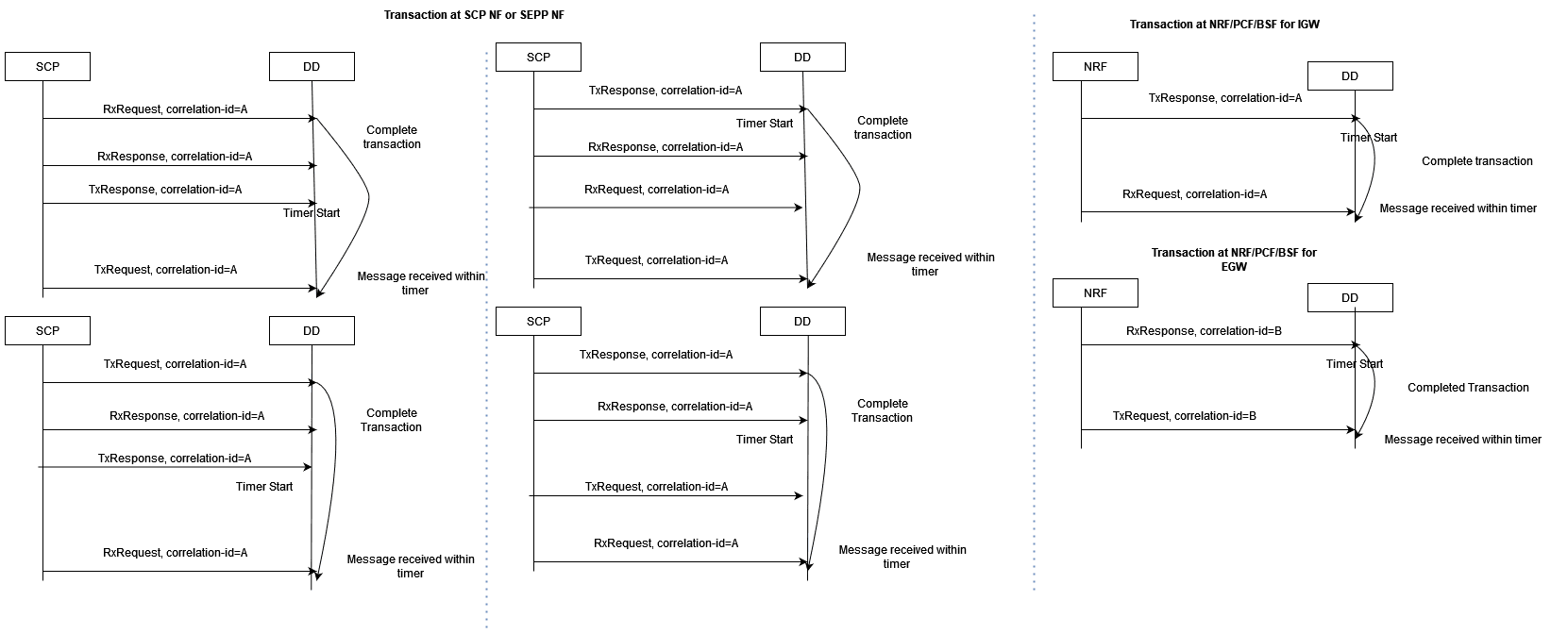
3.2.15.1.3 Correlation Modes
This section provides the details of the correlation modes supported by OCNADD.
SUDR xDR
OCNADD generates an SUDR type xDR for each message.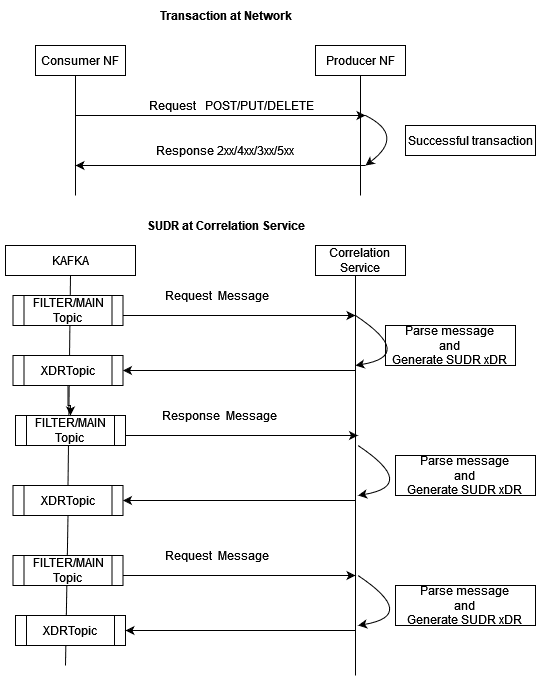
TRANSACTION XDR
Complete Transaction
Once both the request and response messages have been received and
processed, a successful transaction xDR is generated with xDR status =
Complete.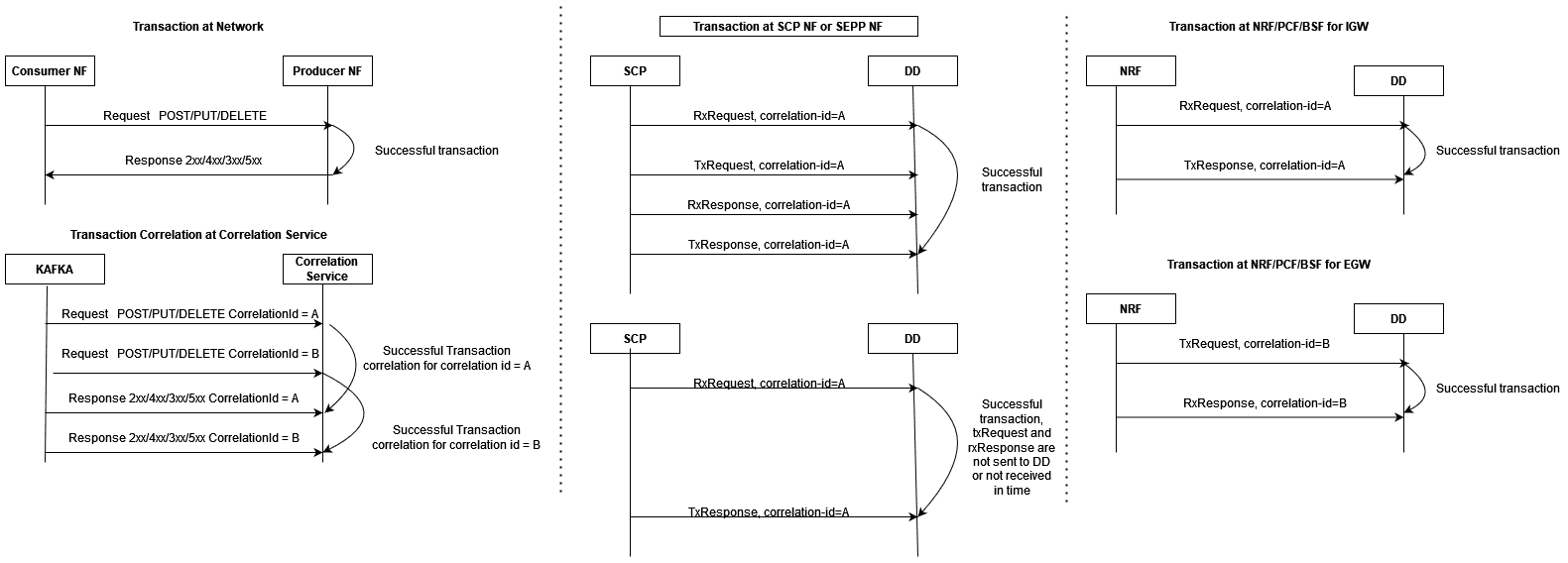
Complete Re-transmission Transaction
When a request message is resent or re-transmitted within the duration of
a transaction, it is referred to as re-transmission.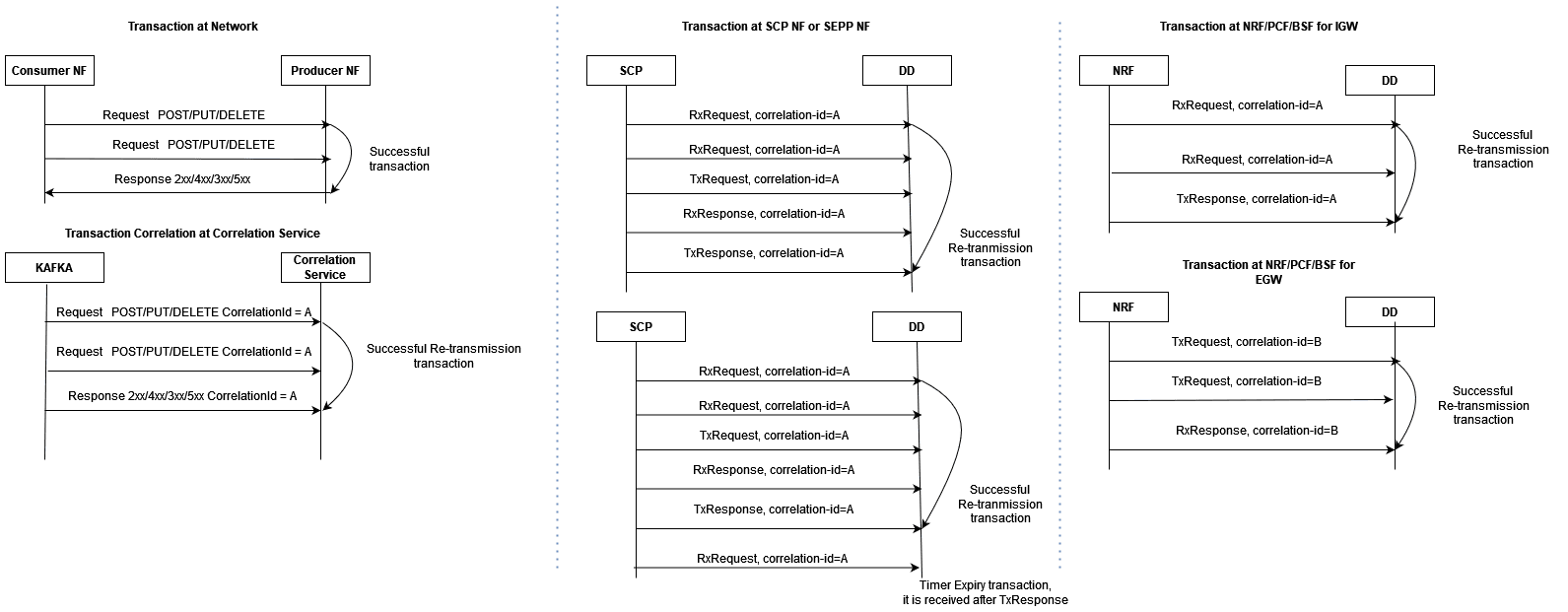
Timer Expiry Transaction
When the request message has only been received and the response message
has either not been received or received after transaction duration, Timer expiry
xDR is generated with xDR status = TimerExpiry.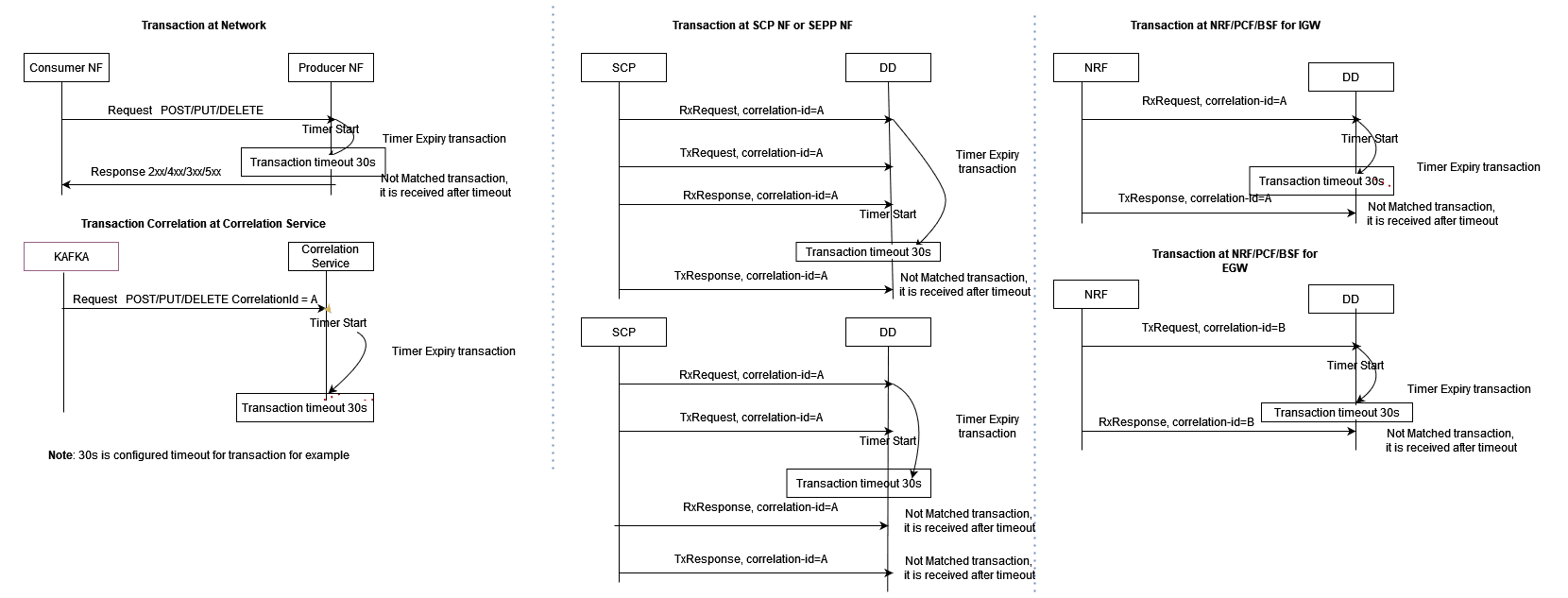
Timer Expiry Re-transmission Transaction
When a request message has not been received with multiple retries but
response message has either not been received or received after transaction
duration, Timer expiry xDR is generated with xDR status = TimerExpiry.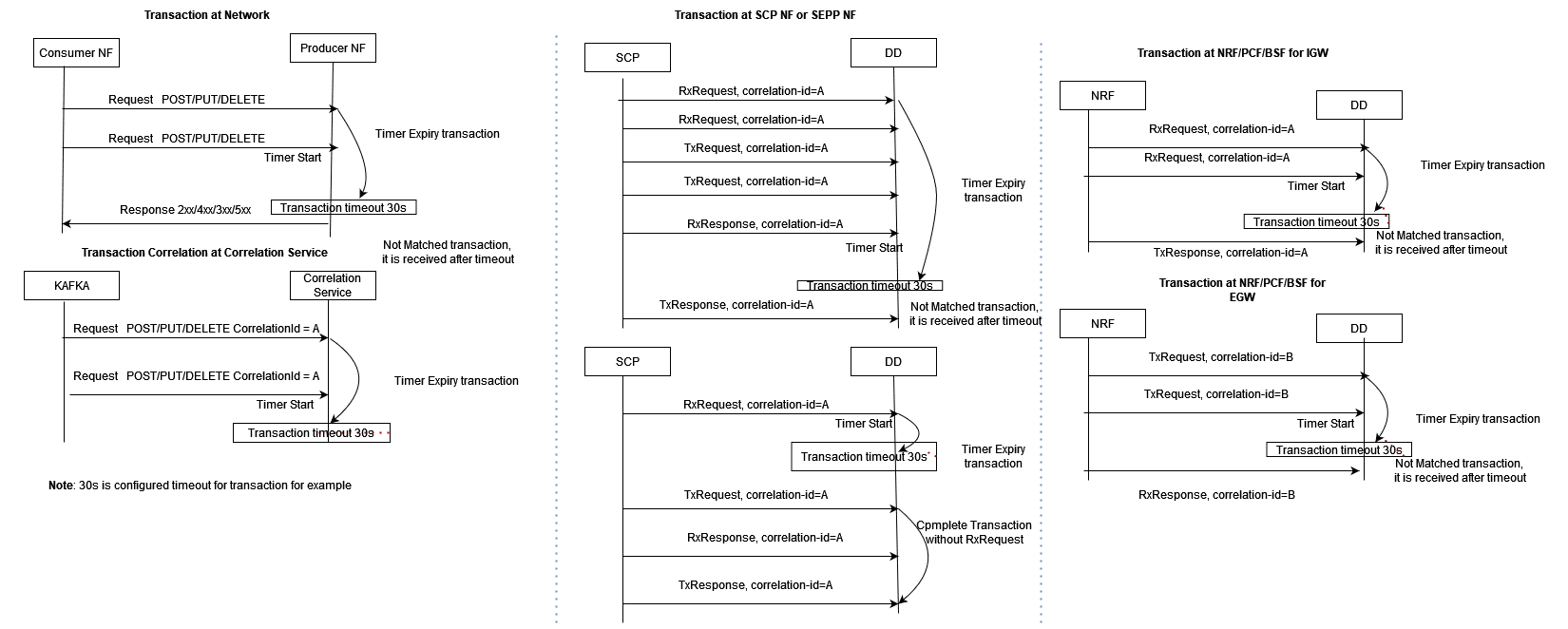
Not Matched Transaction
When a request message has not been received due to a network issue and
only a response message has been received, Not Matched xDR is generated with xDR
status = Not Matched.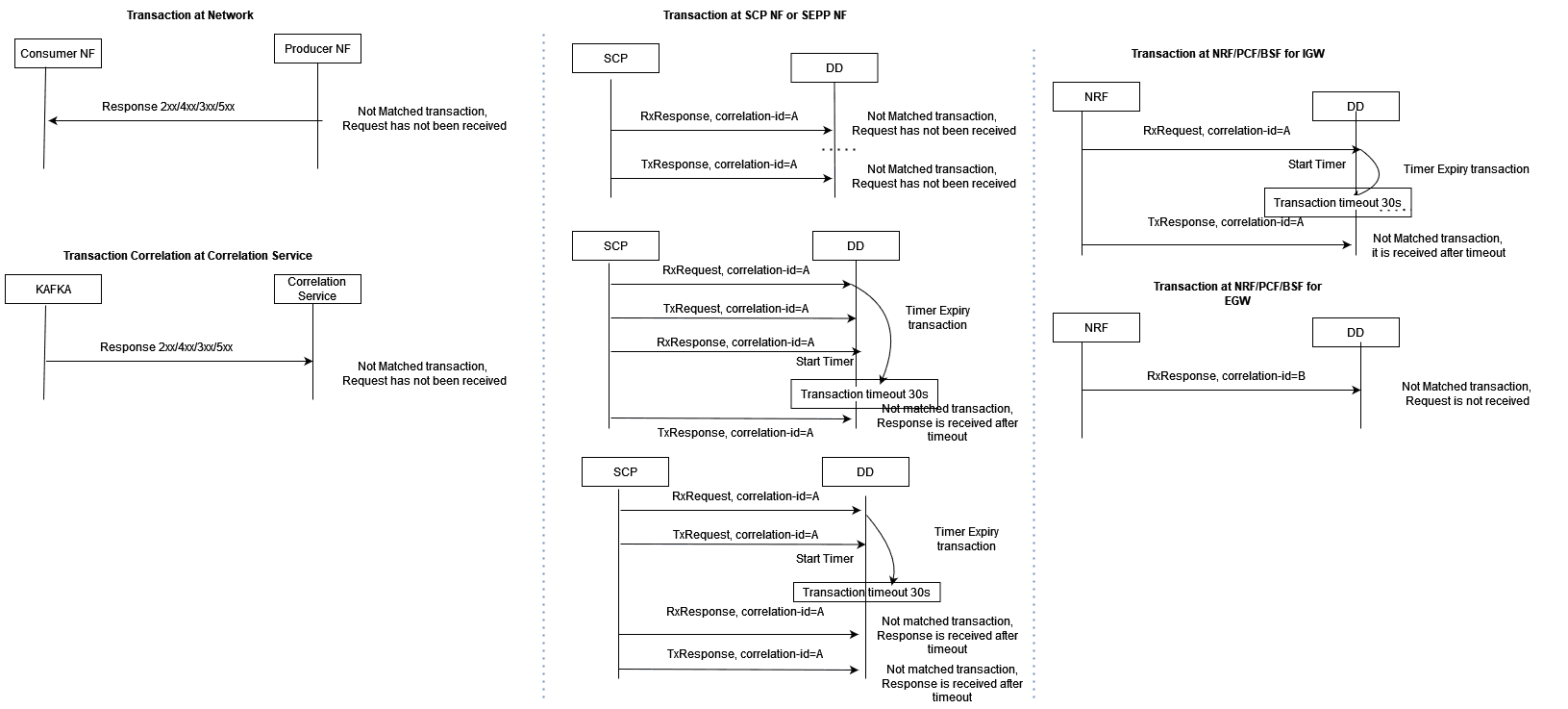
Un-ordered Transactions
In the case of unordered transactions, if not all messages within a transaction arrive in sequence, a timer, governed by the configured maxTransactionWaitTime in the correlation configuration, will activate to wait for the remaining messages of the transaction.
If the pending messages arrive within the timer's duration, they're included in an existing transaction xDR. Otherwise, new xDRs are generated based on message type.
Note:
When the timestamp of a response message precedes the timestamp of the corresponding request message, the transaction time recorded in the xDR will be a negative value. This discrepancy signals an issue within the network since the response message's timestamp should naturally be later than the request message's timestamp, indicating a potential anomaly.
3.2.15.1.4 Correlation KPIs
These KPIs can be configured with correlation configuration. The selected KPIs in correlation configuration can be visualized in DD UI through the KPI dashboard.
Supported KPIs
- TOTAL_FAILED_NF_DEREGISTRATIONS
- TOTAL_FAILED_NF_DEREGISTRATIONS_PER_NFTYPE
- TOTAL_FAILED_NF_REGISTRATIONS
- TOTAL_FAILED_NF_REGISTRATIONS_PER_NFTYPE
- TOTAL_FAILED_TRANSACTION
- TOTAL_FAILED_TRANSACTION_PER_NFTYPE
- TOTAL_FAILED_TRANSACTION_PER_RESPCODE_CAUSEVALUE
- TOTAL_FAILED_TRANSACTION_PER_SERVICETYPE
- TOTAL_N12_TRANSACTION
- TOTAL_N13_TRANSACTION
- TOTAL_SUCCESSFUL_NF_DEREGISTRATIONS
- TOTAL_SUCCESSFUL_NF_DEREGISTRATIONS_PER_TYPE
- TOTAL_SUCCESSFUL_NF_REGISTRATIONS
- TOTAL_SUCCESSFUL_NF_REGISTRATIONS_PER_NFTYPE
- TOTAL_SUCCESSFUL_TRANSACTION
- TOTAL_SUCCESSFUL_TRANSACTION_PER_NFTYPE
- TOTAL_SUCCESSFUL_TRANSACTION_PER_SERVICETYPE
- TOTAL_TRANSACTION
3.2.15.1.5 SCP Model-D TDR xDR
Reference: For details on SCP Model-D, see SCP Model-D Support section.
In this release, the correlation configuration includes an option to exclude SCP-originated messages from TDR xDRs. Use the following configuration parameter to enable this option:
Attribute: sourceFeedCorrCriteria
This attribute provides a configuration option to exclude SCP-originated messages (e.g., delegated discovery, OAuth2 token, etc.) from TDR xDRs.
- When enabled: SCP-originated messages are excluded from TDR xDRs to reduce unnecessary data, optimizing the information for third-party applications.
- Default setting: Disabled. This means all SCP-originated messages will be included in TDR xDRs.
Example Configuration: To exclude the SCP-originated messages
sourceFeedCorrCriteria: [{"SCP": "EXCLUDE_SCP_ORIGINATED_MESSAGES"}]3.2.16 Two-Site Redundancy
The 2-site redundancy feature provides the functionality of high availability. This feature processes the data at a different OCNADD site in case of any site failure. A mated pair of worker groups manages the service redundancy between the sites. There can be one or more mated pairs of worker groups, and this should be managed using the mate group configuration. The configuration sync is managed between the worker groups of the mated pair, and the Redundancy Agent service manages the communication between the mated sites. In the case of any failover, NFs should sense the failure and fail over to the standby OCNADD site and send the data to the mate worker group.
The two-site redundancy feature has two sites: one is configured as the
Primary site, and the other as the Secondary site. The Primary
site will remain in ACTIVE mode, while the Secondary site can be in
STANDBY or ACTIVE mode. When site redundancy way
is set to UNIDIRECTIONAL, the configuration flow will always be
from Primary to Secondary. When the way is set to
BIDIRECTIONAL, the configuration will flow in both directions,
from Primary to Secondary and from Secondary to Primary.
The Data Director mate hosts a different Kafka cluster, and the NFs should configure bootstrap addresses of both Kafka clusters and configure one as primary and the other as standby. Data redundancy is not in the current scope; only service redundancy is supported in this release.
Redundancy Agent: This is a new service introduced to manage site configuration sync between the two mated sites. The UI sends the mate configuration to the configuration service, and the configuration service relays it to the Redundancy Agent.
Figure 3-12 Enable Redundancy
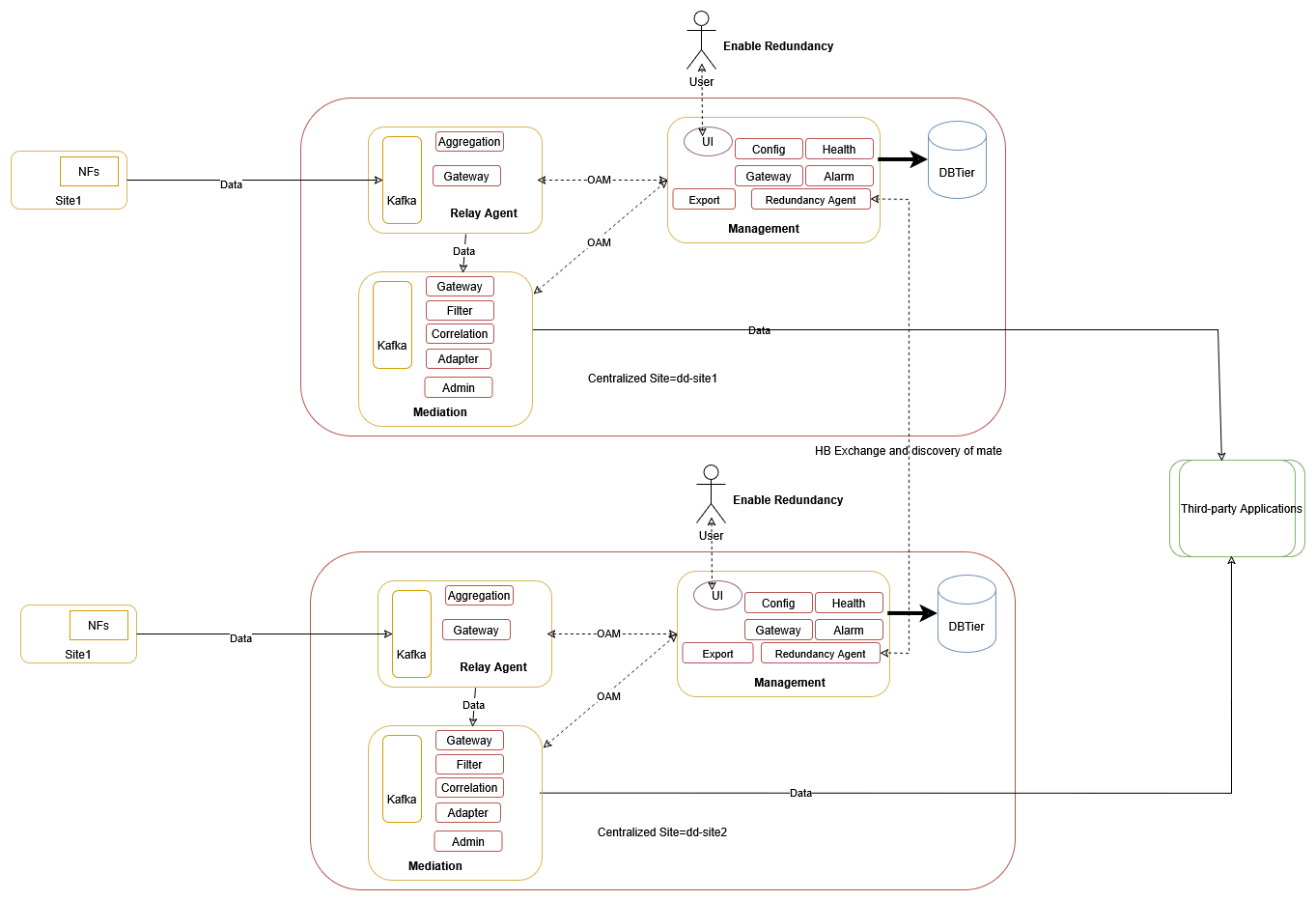
Enable Redundancy
To enable Two-Site Redundancy, see Enable or Disable Two-Site Redundancy Support section.
Two-Site Redundancy Configuration Details
The following table explains the configuration details of various types of feeds.
Table 3-9 Supported Feed Sync
| Feed Type | Parameter | Values | AllowConfigSync | Description |
|---|---|---|---|---|
| Kafka | None | None | Always | Sync will always happen. |
| Consumer | feed | true or false | Conditional | Sync will happen when UI Site Redundancy Configuration "feed" is set to true. |
| Filter | filter | true or false | Conditional | Sync will happen when UI Site Redundancy Configuration "filter" is set to true. |
| Correlation | correlation | true or false | Conditional | Sync will happen when UI Site Redundancy Configuration "correlation" is set to true. |
Table 3-10 Syncing Rules
| Feed Type | Rules Description |
|---|---|
| Kafka | List of Kafka Feed Parameters Validated During Sync
When Feed Names Match:
Rule: If the Kafka feed name is the same, then check for the Kafka Feed Type and ACL configuration. If the feed type is not the same or the ACL configuration is different, a discrepancy alarm is raised, and feed sync is not performed. |
| Consumer | List of Consumer Feed Parameters Validated During
Sync When Feed Names Match:
Rule: If the Consumer feed name is the same, then check for the other attributes listed above. If any of the attributes listed above is different, a discrepancy alarm is raised, and consumer feed sync is not performed. |
| Filter | List of Filter Parameters Validated During Sync When
Filter Names Match:
Rule: If the filter name is the same, then check for the other attributes listed above. If any of the attributes listed above is different, a discrepancy alarm is raised, and filter sync is not performed. |
| Correlation | List of Correlation Feed Parameters Validated During
Sync When Correlation Feed Names Match:
Rule: If the Correlation Feed name is the same, then check for the other attributes listed above. If any of the attributes listed above is different, a discrepancy alarm is raised, and correlation feed sync is not performed. |
Two-Site Redundancy Configuration Sync Scenarios
Note:
For more information on Discrepancy Alarms, see Operational Alarms.Table 3-11 Two Site Redundancy Configuration Sync Scenarios
| Config Sync | Mode | Way | Description | Discrepancy Alarms |
|---|---|---|---|---|
|
Consumer Feed: True Filter: True Correlation: True |
ACTIVE | UNIDIRECTIONAL | The consumer feed, filter and correlation configuration will be synced to the secondary site as per the Consumer Feed Sync Rules, Correlation Config Sync Rules and Filter Sync Rules if no discrepancy is reported. |
OCNADD050018, OCNADD050019, OCNADD050020, OCNADD050021 and OCNADD050022 could be raised in Secondary |
|
Consumer Feed: True Filter: True Correlation: True |
ACTIVE | BIDIRECTIONAL | The consumer feed, filter and correlation configuration will be synced from primary to the secondary site and vice-versa as per the Consumer Feed Sync Rules, Filter Sync Rules and Correlation Config Sync Rules if no discrepancy is reported. |
OCNADD050018, OCNADD050019, OCNADD050020, OCNADD050021 and OCNADD050022 could be raised in both primary and secondary sites |
|
Consumer Feed: True Filter: True Correlation: True |
STANDBY | UNIDIRECTIONAL | The consumer feed, filter and correlation configuration will be synced to the secondary site as per the Consumer Feed Sync Rules, Correlation Config Sync Rules and Filter Sync Rules is no discrepancy is reported. |
OCNADD050018, OCNADD050019, OCNADD050020, OCNADD050021 and OCNADD050022 could be raised in Secondary |
|
Consumer Feed: True Filter: True Correlation: True |
STANDBY | BIDIRECTIONAL | Not Applicable | Not Applicable |
|
Consumer Feed: True Filter: True Correlation: False |
ACTIVE | UNIDIRECTIONAL | The consumer feed and filter configuration will be synced to the secondary site as per the Consumer Feed Sync Rules and Filter Sync Rules if no discrepancy is reported. |
OCNADD050018, OCNADD050019, OCNADD050020 and OCNADD050022 could be raised in Secondary |
|
Consumer Feed: True Filter: True Correlation: False |
ACTIVE | BIDIRECTIONAL | The consumer feed and filter configuration will be synced from primary to the secondary site and vice-versa as per the Consumer Feed Sync Rules and Filter Sync Rules if no discrepancy is reported. |
OCNADD050018, OCNADD050019, OCNADD050020 and OCNADD050022 could be raised in both primary and secondary sites |
|
Consumer Feed: True Filter: True Correlation: False |
STANDBY | UNIDIRECTIONAL | The consumer feed and filter configuration will be synced to the secondary site as per the Consumer Feed Sync Rules and Filter Sync Rules if no discrepancy is reported. |
OCNADD050018, OCNADD050019, OCNADD050020 and OCNADD050022 could be raised in Secondary |
|
Consumer Feed: True Filter: True Correlation: False |
STANDBY | BIDIRECTIONAL | Not Applicable | Not Applicable |
|
Consumer Feed: True Filter: False Correlation: True |
ACTIVE | UNIDIRECTIONAL | The consumer feed and correlation configuration will be synced to the secondary site as per the Consumer Feed Sync Rules and Correlation Config Sync Rules if no discrepancy is reported. |
OCNADD050018, OCNADD050019, OCNADD050021 and OCNADD050022 could be raised in Secondary |
|
Consumer Feed: True Filter: False Correlation: True |
ACTIVE | BIDIRECTIONAL | The consumer feed and correlation configuration will be synced from primary to the secondary site and vice-versa as per the Consumer Feed Sync Rules and Correlation Config Sync Rules if no discrepancy is reported. |
OCNADD050018, OCNADD050019, OCNADD050021 and OCNADD050022 could be raised in both |
|
Consumer Feed: True Filter: False Correlation: True |
STANDBY | UNIDIRECTIONAL | The consumer feed and correlation configuration will be synced to the secondary site as per the Consumer Feed Sync Rules and Correlation Config Sync Rules if no discrepancy is reported. |
OCNADD050018, OCNADD050019, OCNADD050021 and OCNADD050022 could be raised in Secondary |
|
Consumer Feed: True Filter: False Correlation: True |
STANDBY | BIDIRECTIONAL | Not Applicable | Not Applicable |
|
Consumer Feed: True Filter: False Correlation: False |
ACTIVE | UNIDIRECTIONAL | The Consumer feed configuration will be synced to the secondary site as per the Consumer Feed Sync Rules if no discrepancy is reported. |
OCNADD050018, OCNADD050019, and OCNADD050022 could be raised in Secondary |
|
Consumer Feed: True Filter: False Correlation: False |
ACTIVE | BIDIRECTIONAL | The Consumer feed configuration will be synced from primary to the secondary site and vice-versa as per the Consumer Feed Sync Rules if no discrepancy is reported. |
OCNADD050018, OCNADD050019, and OCNADD050022 could be raised in both sites |
|
Consumer Feed: True Filter: False Correlation: False |
STANDBY | UNIDIRECTIONAL | The Consumer feed configuration will be synced to the secondary site as per the Consumer Feed Sync Rules if no discrepancy is reported. |
OCNADD050018, OCNADD050019, and OCNADD050022 could be raised in Secondary |
|
Consumer Feed: True Filter: False Correlation: False |
STANDBY | BIDIRECTIONAL | Not Applicable | Not Applicable |
|
Consumer Feed: False Filter: True Correlation: True |
ACTIVE | UNIDIRECTIONAL | The filter and the correlation configuration will be synced to the secondary site as per the Correlation Config Sync Rules and Filter Sync Rules if no discrepancy is reported. |
OCNADD050019, OCNADD050020, OCNADD050021, and OCNADD050022 could be raised in Secondary |
|
Consumer Feed: False Filter: True Correlation: True |
ACTIVE | BIDIRECTIONAL | The filter and the correlation configuration will be synced from primary to the secondary site and vice-versa as per the Correlation Config Sync Rules and Filter Sync Rules if no discrepancy is reported. |
OCNADD050019, OCNADD050020, OCNADD050021, and OCNADD050022 could be raised in both primary and secondary sites |
|
Consumer Feed: False Filter: True Correlation: True |
STANDBY | UNIDIRECTIONAL | The filter and the correlation configuration will be synced to the secondary site as per the Correlation Config Sync Rules and Filter Sync Rules if no discrepancy is reported. |
OCNADD050019, OCNADD050020, OCNADD050021, and OCNADD050022 could be raised in Secondary |
|
Consumer Feed: False Filter: True Correlation: True |
STANDBY | BIDIRECTIONAL | Not Applicable | Not Applicable |
|
Consumer Feed: False Filter: True Correlation: False |
ACTIVE | UNIDIRECTIONAL | The filter configuration will be synced to the secondary site as per the Filter Sync Rules if no discrepancy is reported and all the filter association will be removed in secondary site. |
OCNADD050019, OCNADD050020, and OCNADD050022 could be raised in Secondary site |
|
Consumer Feed: False Filter: True Correlation: False |
ACTIVE | BIDIRECTIONAL | The filter configuration will be synced from primary to the secondary site and vice-versa as per the Filter Sync Rules if no discrepancy is reported and filter association will be removed from secondary site if syncing happened from primary to secondary and from primary site if syncing happened from secondary to primary. |
OCNADD050019, OCNADD050020, and OCNADD050022 could be raised in both primary and secondary sites |
|
Consumer Feed: False Filter: True Correlation: False |
STANDBY | UNIDIRECTIONAL | The filter configuration will be synced to the secondary site as per the Filter Sync Rules if no discrepancy is reported and all the filter association will be removed in secondary site. |
OCNADD050019, OCNADD050020, and OCNADD050022 could be raised in Secondary |
|
Consumer Feed: False Filter: True Correlation: False |
STANDBY | BIDIRECTIONAL | Not Applicable | Not Applicable |
|
Consumer Feed: False Filter: False Correlation: True |
ACTIVE | UNIDIRECTIONAL | The correlation configuration will synced to the secondary site as per the Correlation Config Sync Rules if no discrepancy is reported. |
OCNADD050019, OCNADD050021 and OCNADD050022 could be raised in Secondary site |
|
Consumer Feed: False Filter: False Correlation: True |
ACTIVE | BIDIRECTIONAL | The correlation configuration will synced from primary to the secondary site and vice-versa as per the Correlation Config Sync Rules if no discrepancy is reported. |
OCNADD050019, OCNADD050021 and OCNADD050022 could be raised in both primary and secondary sites |
|
Consumer Feed: False Filter: False Correlation: True |
STANDBY | UNIDIRECTIONAL | The correlation configuration will synced to the secondary site as per the Correlation Config Sync Rules if no discrepancy is reported. |
OCNADD050019, OCNADD050021 and OCNADD050022 could be raised in Secondary site |
|
Consumer Feed: False Filter: False Correlation: True |
STANDBY | BIDIRECTIONAL | Not Applicable | Not Applicable |
|
Consumer Feed: False Filter: False Correlation: False |
- | - | This is not applicable as one of the option must be selected. | - |
Note:
Sync Config Update/DeleteScenario: Way set to "BIDIRECTIONAL"
If a user deletes or updates the Consumer Feed, Filter, Correlation, or Kafka Feed, a discrepancy alarm will be raised in sync. The primary will also be deleted or updated accordingly.
Check the alarm and verify if the sync discrepancy is corrected or not.
Two-Site Redundancy worker group Name Restriction
The
workerGroup serves as a unique identifier, formed by combining
the "siteName" and "worker group namespace" with a colon (:)
separator. The workerGroup parameter needs to be unique for primary site and
secondary site, where "siteName" is the clusterName of the setup and "worker group
namespace" is the current worker group namespace.
Site 1
If the siteName is "occne-ocdd," and
the workerGroup namespaces are "ocnadd-wg1" and
"ocnadd-wg2," then the "workerGroup" attribute will
be:
"workerGroup": "ocnadd-wg1:occne-ocdd" or "workerGroup": "ocnadd-wg2:occne-ocdd"Site 2
If the siteName is
"occne-ocdd," and the workerGroup namespaces are
"ocnadd-wg1" and "ocnadd-wg2," then the
"workerGroup" attribute will
be:
"workerGroup": "ocnadd-wg1:occne-ocdd" or "workerGroup": "ocnadd-wg2:occne-ocdd"If Site Redundancy is mapped for Site 1 as
"ocnadd-wg1:occne-ocdd" and Site 2 as
"ocnadd-wg1:occne-ocdd," both the Primary site and Mate Site
will have the same "workerGroup." This results in similar entries for both Primary
and Mate sites.
It is recommended that
"siteName" should be unique for both sites. If unique site names for the sites are
not feasible, mapping of Site 1 "ocnadd-wg1:occne-ocdd" and Site 2
"ocnadd-wg2:occne-ocdd" should be done to maintain unique
entries while creating and saving the mate configuration.
3.2.17 Message Sequencing
The Message Sequencing feature enhances transactional message delivery from Data Director (OCNADD) to third-party applications. This capability ensures the ordered and reliable transmission of messages, contributing to a more robust and dependable communication mechanism.
Note:
- Supported from 24.1.0.
- Key-based message writing from Oracle NFs must be enabled.
- It is recommended to use RF > 1 for Kafka topics to avoid data loss in case of broker or topic partition failure.
- In case of an upgrade, rollback, or service restart, duplicate messages will be sent by the aggregation service to avoid data loss, and message sequencing will be impacted during that time.
- In the 25.1.0 release, SCP Model-D support has been added, which is applicable for all types of SCP message sequencing. See SCP Model-D Support.
- In case request messages are not in order (e.g., TxRequest of
oauth2 message comes before TxRequest of discovery
messages, etc.) in a transaction, it is recommended to check the network as
well as SCP message copy behavior. Until this is resolved, follow these
steps:
- Enable ENQUEUE_SCP_ORIGIN_MESSAGES=true in the value.yaml file of the ocnaddaggregation service for SCP.
- Perform a Helm update.
- When the parameter is enabled, DD will hold all SCP-originated messages until the NF-origin RxResponse or TxResponse messages are received, or the transaction timer expires to handle the scenario. This will also add some latency in message delivery. Enable this parameter only when the above scenario or issue is occurring frequently.
Figure 3-13 Message Sequencing Overview

The Message Sequencing feature offers three distinct modes, each catering to specific use cases and providing flexibility in managing the order and timing of message delivery. The three modes are:
- Time Based Message Sequencing (Windowing)
- Transaction Based Message Sequencing
- Request/Response Based Message Sequencing
Helm Parameters
Table 3-12 Helm Parameters
| Parameter | Description | Value |
|---|---|---|
| MESSAGE_SEQUENCING_TYPE |
|
|
| WINDOW_MSG_SEQUENCING_EXPIRY_TIMER |
|
Range [5ms-500ms]; default: 10ms |
| REQUEST_RESPONSE_MSG_SEQUENCING_EXPIRY_TIMER |
|
Range [5ms-500ms]; default: 10ms. |
| TRANSACTION_MSG_SEQUENCING_EXPIRY_TIMER |
|
Range [20ms-30s]; default: 200ms |
| MESSAGE_REORDERING_INCOMPLETE_TRANSACTION_METRICS_ENABLE |
|
true or false Default: false |
- Time-Based Message Sequencing (Windowing)
This mode enables the reordering of unordered messages based on the timestamp present in each message. The group of messages received within the window time for each partition separately will be considered for message sequencing. For each partition, when time-based sequencing is completed, all the sequenced messages will stream to the Kafka MAIN topic.
Helm Parameters:
- MESSAGE_SEQUENCING_TYPE: TIME_WINDOW
- WINDOW_MSG_SEQUENCING_EXPIRY_TIMER: 10(ms), range: [5ms-500ms]
Note:
- This will add or increase the end-to-end message latency to the configured value of WINDOW_MSG_SEQUENCING_EXPIRY_TIMER and processing time.
- The older timestamp messages of different windows can be seen in the partition, as, in parallel, multiple threads will be writing data into the same partition (assuming source topic partition count < target topic partition count). The aim is to achieve transaction sequencing.
Figure 3-14 Time Based Message Sequencing (Windowing)

- Request/Response Based Message Sequencing
This mode enables the reordering of unordered messages based on request (RxRequest, TxRequest) and response (RxResponse, TxResponse) pairs for each transaction.
Sequencing Rule:
- NRF/PCF/BSF:
- Not applicable for feed-type=NRF, PCF, BSF as we receive messages of transactions in pairs (RxRequest and TxResponse, TxRequest and RxResponse), and if configured, it will be ignored.
- SCP/SEPP:
- When TxRequest is received before RxRequest for a transaction, it shall wait for RxRequest. When RxRequest is received, the messages will stream to the Kafka MAIN topic in order (RxRequest, TxRequest).
- When RxRequest is received first, the message will stream to the Kafka MAIN topic without any delay.
- When TxResponse is received before RxResponse for a transaction, it shall wait for RxResponse. When RxResponse is received, the messages will stream to Kafka MAIN topic in order (RxResponse, TxResponse).
- When RxResponse is received first, the message will stream to Kafka MAIN topic without any delay.
Helm Parameters:
- MESSAGE_SEQUENCING_TYPE: REQUEST_RESPONSE
- REQUEST_RESPONSE_MSG_SEQUENCING_EXPIRY_TIMER: 10 ms (range: 5 ms - 500 ms)
Note:
This will add or increase the end-to-end message latency up to the configured value of REQUEST_RESPONSE_MSG_SEQUENCING_EXPIRY_TIMER and processing time.Figure 3-15 Request/Response Based Message Sequencing

- NRF/PCF/BSF:
- Transaction Based Message Sequencing
This mode enables the reordering of unordered messages based on transactions (RxRequest, TxRequest, RxResponse, TxResponse).
Sequencing Rule:
- NRF/PCF/BSF:
Transaction order: 'RxRequest and TxResponse' or 'TxRequest and RxResponse'
- When all messages of a transaction (RxRequest and TxResponse or TxRequest and RxResponse) are received in order, the message will be streamed to Kafka MAIN topic without any delay.
- When RxResponse is received before TxRequest for a transaction, it will be sent in order when TxRequest is received or after TRANSACTION_EXPIRY_TIME expires.
- When TxResponse is received before RxRequest for a transaction, it will be sent in order when RxRequest is received or after TRANSACTION_EXPIRY_TIME expires.
- SCP/SEPP:
Transaction order: RxRequest, TxRequest, RxResponse, TxResponse
- When all messages of a transaction (RxRequest, TxRequest, RxResponse, TxResponse) are received in order, the message will be streamed to Kafka MAIN topic without any delay.
- When TxRequest is received before RxRequest for a transaction, it will be sent in order when RxRequest is received or after TRANSACTION_EXPIRY_TIME expires.
- When RxRequest & TxRequest are received in order, and TxResponse is received before RxResponse, the RxRequest and TxRequest will be sent without any delay, and TxResponse shall be sent in order when RxResponse is received or after TRANSACTION_EXPIRY_TIME expires.
- When RxResponse is received first, it will be sent when RxRequest and TxRequest are received or after TRANSACTION_EXPIRY_TIME expires.
- When TxResponse is received first, it will be sent when RxRequest, TxRequest, and TxResponse are received or after TRANSACTION_EXPIRY_TIME expires.
Helm Parameters:
- MESSAGE_SEQUENCING_TYPE: TRANSACTION
- TRANSACTION_MSG_SEQUENCING_EXPIRY_TIMER: 200 ms (range: 20 ms - 30 s)
Note:
This will add or increase the end-to-end message latency up to the configured value of TRANSACTION_MSG_SEQUENCING_EXPIRY_TIMER and processing time.Figure 3-16 Transaction Based Message Sequencing

- NRF/PCF/BSF:
3.2.18 Third-party NF Data Processing Through Ingress Adapter
The ingress adapter is a component of the Data Director mediation group that extends the capabilities to allow data processing from various third-party Network Functions. The third-party NFs provide data in HTTP2 format along with predefined custom headers, and the ingress adapter transforms the data into OCNADD supported format, which can then be utilized by internal OCNADD services for further processing.
Figure 3-17 Third-party NF Data Processing Through Ingress Adapter
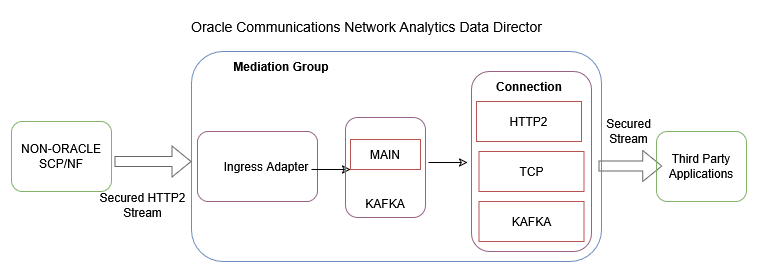
To enable or disable third-party NF data processing through Ingress Adapter, see Enabling or Disabling Third-party NF Data Processing.
3.2.18.1 Data Transformation
The message transformation functionality will allow data conversion and mapping from Thirdparty NF to Oracle NF data which will be consumed by OCNADD internal services for data processing. The conversion framework will provide capabilities to map the following metadata fields into OCNADD format (OracleNfFeedDto) for processing.
Metadata Mapping
Table 3-13 Metadata Mapping
| Parameter | Description |
|---|---|
| correlation-id |
Range: <Ingress-attribute-name> Condition: M Default Value: NA Description: Correlation ID is mandatory to correlate all mirrored request and response messages of a transaction. If a custom correlation ID is not provided, OCNADD will attempt to retrieve this from the 3gpp-Sbi-Correlation-Info header if available. It must be present in either of the two attributes. |
| timestamp |
Range: <Ingress-attribute-name> Condition: M Default Value: NA Description: This property defines the timestamp of the request when it is initiated. If a non-Oracle NF is not sending the timestamp, then OCNADD will generate it. However, the end-to-end latency calculation will not be accurate in that case. |
| message-direction |
Range: <Ingress Attribute name(list)> Condition: M Default Value: NA Description: It consists of both the message direction (ingress or egress) and the message type (Request or Response). The non-Oracle feeds may send message direction and message type in different custom headers. The Oracle ingress adapter will combine both and map it to the supported OracleNfFeedDto. |
| consumer-fqdn |
Range: <Ingress Attribute name> Condition: O Default Value: NA Description: The consumer FQDN will be mapped with the received value of the configured ingress attribute name in custom headers. If the value is not present, then it will be skipped. |
| consumer-id |
Range: <Ingress Attribute name> Condition: O Default Value: NA Description: The consumer ID will be mapped with the received value of the configured ingress attribute name in custom headers. If the value is not present, then it will be skipped. |
| hop-by-hop-id |
Range: <Ingress Attribute name> Condition: O Default Value: NA Description: The hop-by-hop ID will be mapped with the received value of the configured ingress attribute name in custom headers. If the value is not present, then it will be skipped. |
| producer-fqdn |
Range: <Ingress Attribute name> Condition: O Default Value: NA Description: The producer FQDN will be mapped with the received value of the configured ingress attribute name in custom headers. If the value is not present, then it will be skipped. |
| producer-id |
Range: <Ingress Attribute name> Condition: O Default Value: NA Description: The producer ID will be mapped with the received value of the configured ingress attribute name in custom headers. If the value is not present, then it will be skipped. |
| reroute-cause |
Range: <Ingress Attribute name> Condition: O Default Value: NA Description: The reroute cause will be mapped with the received value of the configured ingress attribute name in custom headers. If the value is not present, then it will be skipped. |
| feed-source-nf-type |
Range: <Ingress Attribute name>, use feed-source Host Address mapping Condition: M Default Value: <default-nf-type> The "nf type" for OracleNfFeedDto will be mapped from the ingress attribute name provided during feed creation. However, if the attribute name is not present in the custom headers, then the feed-source host IP address will be taken from the "custom-forward-for" or "x-forwarded-for" header if present. A lookup will then be performed from the feed source host address mapping to get the nf-type. If the x-forwarded-for header is not present, then the source IP of the request will be used. If the source IP is not present in the feed source host address map, then a default value will be used for mapping. However, it is recommended to use the default value when only one NF is producing data. |
| feed-source-nf-instance-id |
Range: <Ingress Attribute name>, Use feed-source Host Address mapping Condition: C Default Value: <default-nf-instance-id> Description: The "nf instance id" for OracleNfFeedDto will be mapped from the ingress attribute name provided during feed creation. However, if the attribute name is not present in the custom headers, then the feed-source host IP address will be taken from the "custom-forward-for" or "x-forwarded-for" header if present. A lookup will then be performed from the feed source host address mapping to get the nf-instance-id. If the x-forwarded-for header is not present, then the Source IP of the request will be used. If the source IP is not present in the feed source host address map, then a default value will be used for mapping. However, it is recommended to use the default value when only one NF is producing data. |
| feed-source-nf-fqdn |
Range: <Ingress Attribute name>, Use feed-source Host Address mapping Condition: C Default Value: <default-nf-fqdn> Description: The "nf instance fqdn" for OracleNfFeedDto will be mapped from the ingress attribute name provided during feed creation. However, if the attribute name is not present in the custom headers, then the feed-source host IP address will be taken from the "custom-forward-for" or "x-forwarded-for" header if present. A lookup will then be performed from the feed source host address mapping to get the nf-fqdn. If the x-forwarded-for header is not present, then the Source IP of the request will be used. If the source IP is not present in the feed source host address map, then a default value will be used for mapping. However, it is recommended to use the default value when only one NF is producing data. |
| feed-source-nf-pod-instance-id |
Range: <Ingress Attribute name> Condition: O Default Value: <default-nf-pod-instance-id> Description: The "nf pod instance id" for OracleNfFeedDto will be mapped from the ingress attribute name provided during feed creation. However, if the attribute name is not present in the custom headers, then a default value will be used for mapping. It is recommended to use the default value when only one NF is producing data. |
The metadata fields from Thirdparty NFs can be present either in "MESSAGE_HEADER" or "MESSAGE_BODY". Depending on the value of the parameter "metadataLocation" supplied during configuration creation, the ingress adapter will retrieve the attributes and perform the transformation of these fields to the OracleNfFeedDto. If metadata is present in the message body, additional fields such as "metadataFormat" and "metadataMappingAttrName" need to be configured.
Headers and Payload Mapping
The ingress adapter will also map the incoming headers (SBI Message headers) and payload (5G SBI Message) information to the data format supported by Data Distribution (DD). Currently, the SBI Message headers are extracted from the message body and mapped to the OCNADD supported data format.
3.2.19 Data Director Metadata Enrichment
Metadata is the additional information about the message that can be used in the processing of the messages without going deep into the message by the applications. The applications use this metadata for the enrichment of other messages, filtering the messages, and in the correlation of the transactions. The data enriched using metadata can help in enhanced troubleshooting of the network scenario by the third-party applications taking the feed from the Data Director.
The Data Director metadata enrichment framework is useful when the metadata from the NFs is not complete or the NFs are not capable of providing the additional information about the message. The Data Director inspects the message headers or message body to provide this additional information and enrich the information in the messages belonging to the same transactions. The additional metadata from the Data Director is provided as a separate JSON construct in the message. It is possible to enable or disable the metadata enrichment and also to include or exclude the metadata from the messages being delivered as part of the Data Director message feeds.
Figure 3-18 Data Director Metadata Enrichment
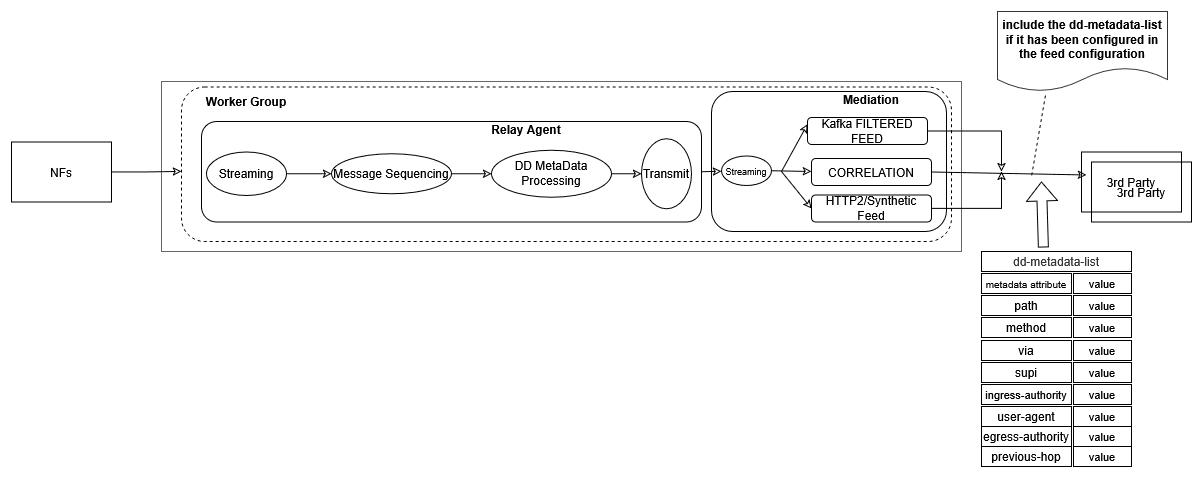
The following key points should be considered for the metadata enrichment in the Data Director:
- The metadata enrichment shall be configured using the UI.
- The metadata attributes will be populated from the
RxReq/TxReqmessage for the given keycorrelation-id + nf-instance-id. The table will then be looked up further to add or update thedd-metadata-listfor the other messages of the transaction (having the same correlation key).- SCP/SEPP Source NfType:
- RxRequest: The
RxRequestmessage will be used to create the entry in the Metadata Table. The metadata attributes will be extracted from either the NF metadata or the header list in the incoming message. The extracted attributes will be populated in the metadata table. Thedd-metadata-listwill be created using the metadata table and added in theRxReqmessage. - TxReq: The metadata table will be looked up and the metadata
attributes will be used to create the
dd-metadata-listand add it to theTxReqmessage.- For some
dd-metadataattributes, theTxRequestmessage will be used to create the entry in the Metadata Table and, in that case, enriched attributes will not be added in thedd-metadata-listinRxRequestmessages.
- For some
- TxResp: The metadata table will be looked up and the metadata
attributes will be used to create the
dd-metadata-listand add it to theTxRespmessage. - RxResp: The metadata table will be looked up and the metadata
attributes will be used to create the
dd-metadata-listand add it to theRxRespmessage.
- RxRequest: The
- NRF/BSF/PCF Source NfType:
- Option 1:
- RxReq: The
RxReqmessage will be used to create the entry in the Metadata Table. The metadata attributes will be extracted from either the NF metadata or the header list in the incoming message. The extracted attributes will be populated in the metadata table. Thedd-metadata-listwill be created using the metadata table and added in theRxReqmessage. - TxResp: The metadata table will be looked up and the
metadata attributes will be used to create the
dd-metadata-listand add it to theTxRespmessage.
- RxReq: The
- Option 2:
- TxReq: The
TxReqmessage will be used to create the entry in the Metadata Table. The metadata attributes will be extracted from either the NF metadata or the header list in the incoming message. The extracted attributes will be populated in the metadata table. Thedd-metadata-listwill be created using the metadata table and added in theTxReqmessage. - RxResp: The metadata table will be looked up and the
metadata attributes will be used to create the
dd-metadata-listand add it to theRxRespmessage.
- TxReq: The
- Option 1:
- SCP/SEPP Source NfType:
- The Aggregation service shall add the
dd-metadata-listin the original incoming message before writing into theMAINtopic of the mediation group. However, the consumer feeds (HTTP2 or Synthetic) or Kafka feeds (filtered feed, correlated, correlated filtered) will have the option to remove thedd-metadata-listfrom the original packet. - The entries in the metadata table are kept for a configurable period of time, after which the entries will be purged from the metadata table. This value is the same as that for the message ordering feature; the message ordering feature is required for metadata enrichment.
- The aggregated Kafka feed will always have the
dd-metadata-listif the metadata feature is enabled on the Data Director. - The
dd-metadata-list, even if not enabled in the consumer or Kafka feeds, will be used for filtering, L3–L4 mapping, and correlation features. Priority will be given to thedd-metadata-listover the NF metadata for filtering as well as L3–L4 mapping for synthetic packets. - If message sequencing and metadata enrichment are enabled, additional compute resources such as CPU and memory will be required.
- Message sequencing will be enabled through helm chart parameters in the Aggregation services of the Relay Agent.
3.2.19.1 Data Director Metadata Attributes
The following attributes are supported in the Data Director metadata list:
Note:
The priority mapping rule can be reordered, but adding or removing a rule is prohibited.Attribute:
path
Description: The path and query parts of the target URI. It is present in the HEADERS frame.
Feed Source Mapping – Priority Mapping Rule:
Table 3-14 Feed Source Mapping – Priority Mapping Rule
| NF Type | Message Direction (source of attribute population) | Rule Name | Location |
|---|---|---|---|
| SCP/SEPP | First occurrence of RxRequest |
:path
|
header-list |
| NRF/PCF/BSF | First occurrence of RxRequest or TxRequest |
Example:
/nausf-auth/v1/ue-authentications/reg-helm-charts-ausfauth-6bf59-kx.34/5g-aka-confirmation
Attribute: user-agent
Description: The User Agent identifies which equipment made the request. It is present in the HEADERS frame.
Feed Source Mapping – Priority Mapping Rule:
Table 3-15 Feed Source Mapping – Priority Mapping Rule
| NF Type | Message Direction (source of attribute population) | Rule Name | Location |
|---|---|---|---|
| SCP/SEPP | First occurrence of RxRequest |
user-agent
|
header-list |
| NRF/PCF/BSF | First occurrence of RxRequest or TxRequest |
Example:
UDM-26740918-e9cd-0205-aada-71a76214d33c udm12.oracle.com
Attribute:
method
Description: Represents the type of request for the transaction. It is present in the HEADERS frame.
Feed Source Mapping – Priority Mapping Rule:
Table 3-16 Feed Source Mapping – Priority Mapping Rule
| NF Type | Message Direction (source of attribute population) | Rule Name | Location |
|---|---|---|---|
| SCP/SEPP | First occurrence of RxRequest |
:method
|
header-list |
| NRF/PCF/BSF | First occurrence of RxRequest or TxRequest |
Value: POST, PUT,
DELETE, PATCH
Attribute:
consumer-via
Description: Contains a branch unique in space and time, identifying the transaction with the next hop.
Feed Source Mapping – Priority Mapping Rule:
Table 3-17 Feed Source Mapping – Priority Mapping Rule
| NF Type | Message Direction (source of attribute population) | Rule Name | Location |
|---|---|---|---|
| SCP/SEPP | First occurrence of RxRequest |
via
|
header-list |
| NRF/PCF/BSF | First occurrence of RxRequest or TxRequest |
Note: In case of an array of via in a message,
the last occurrence from the list will be used.
Example:
SCP-scp1.5gc.mnc001.mcc208.3gppnetwork.org
Attribute:
ingress-authority
Description: Node's local IP/FQDN on the ingress side.
Feed Source Mapping – Priority Mapping Rule:
Table 3-18 Feed Source Mapping – Priority Mapping Rule
| NF Type | Message Direction (source of attribute population) | Rule Name | Location |
|---|---|---|---|
| SCP/SEPP | Last occurrence of RxRequest |
:authority
|
header-list |
| NRF/PCF/BSF | Last occurrence of RxRequest or TxRequest |
Example:
172.19.100.5:9443
Attribute:
supi
Description: Represents the subscription identifier. Pattern:
^(imsi-[0-9]{5,15}|nai-.+|gci-.+|gli-.+|.+)$
Feed Source Mapping – Priority Mapping Rule:
Table 3-19 Feed Source Mapping – Priority Mapping Rule
| NF Type | Message Direction (source of attribute population) | Rule Name | Location |
|---|---|---|---|
| SCP/SEPP | Last occurrence of RxRequest | :path |
header-list |
| NRF/PCF/BSF | Last occurrence of RxRequest or TxRequest | 3gpp-Sbi-Discovery-supi |
header-list |
Example:
imsi-208014489186000
Attribute:
previous-hop
Description: Represents a portion of the network path between the source NF and the destination NF.
Feed Source Mapping – Priority Mapping Rule:
Table 3-20 Feed Source Mapping – Priority Mapping Rule
| NF Type | Message Direction (source of attribute population) |
|---|---|
| SCP/SEPP | Last occurrence of RxRequest |
| NRF/PCF/BSF | Last occurrence of RxRequest or TxRequest |
Table 3-21 Priority Mapping Rule
| Rule Name | Location |
|---|---|
via |
header-list |
3gpp-Sbi-NF-Peer-Info |
header-list |
3gpp-Sbi-Discovery-requester-nf-instance-fqdn |
header-list |
3gpp-Sbi-Discovery-requester-nf-instance-id |
header-list |
consumer-fqdn |
metadata-list |
user-agent |
header-list |
Format of previous-hop value in
dd-metadata-list:
Table 3-22 Format of previous-hop value in dd-metadata-list
| Default Priority Order | DD Metadata Attribute Name | DD Metadata Value Format |
|---|---|---|
| 1 |
via
|
via_<value>
|
| 2 |
3gpp-Sbi-NF-Peer-Info
|
nf-info_<value>
|
| 3 |
3gpp-Sbi-Discovery-requester-nf-instance-fqdn
|
nf-fqdn_<value>
|
| 4 |
3gpp-Sbi-Discovery-requester-nf-instance-id
|
nf-id_<value>
|
| 5 |
consumer-fqdn
|
con-fqdn_<value>
|
| 6 |
user-agent
|
usr-agnt_<value>
|
- The priority rule order can be changed in the
dd-metadataconfiguration. - A prefix (short name of the attribute) will be added before the value to identify the source attribute.
- In L3L4 mapping, Filter, and other processing features using
dd-metadata, the prefix will be removed from the value before applyingprevious-hopconditions.
Example (populated from via):
previous-hop: "via_SCP-scp1.5gc.mnc001.mcc208.3gppnetwork.org"
Attribute:
egress-authority
Description: Node's local IP/FQDN on the egress side.
Feed Source Mapping – Priority Mapping Rule:
Table 3-23 Feed Source Mapping – Priority Mapping Rule
| NF Type | Message Direction (source of attribute population) | Rule Name | Location |
|---|---|---|---|
| SCP/SEPP | Last occurrence of TxRequest |
:authority
|
header-list |
| NRF/PCF/BSF | Last occurrence of RxRequest or TxRequest |
Example:
172.19.100.5:9443
Note:
egress-authority
is supported from release 25.1.200 release. It shall not be
populated in the RxRequest message's dd-metadata-list header for
SCP/SEPP.
3.2.19.2 Data Director Metadata Configuration
Data Director Metadata Consumer Feed Configuration
- A parameter
ddMetadataRequiredto include the DD Metadata List shall be provided in the adapter feeds for both synthetic and HTTP/2 feed types. - If this parameter is enabled, the consumer adapter will include the
dd-metadata-listin the message; otherwise, it will exclude it from the message.
Data Director Metadata Kafka Feed Configuration
- A parameter
ddMetadataRequiredto include the DD Metadata List shall be provided in the Kafka feeds for the AGGREGATED-FILTERED feed type. This parameter should only be provided for theAGGREGATED-FILTEREDfeed type and should not be provided for other Kafka feed types. - If this parameter is enabled, the Filter service will include the
dd-metadata-listin the message; otherwise, it will exclude it from the message while writing it to the filtered topic. - The
AGGREGATEDfeed type will always include thedd-metadata-listin the message.
Data Director Metadata Correlation Configuration
- A parameter
ddMetadataRequiredto include the DD Metadata List shall be provided in the correlation configuration. - If this parameter is enabled in the correlation configuration, the corresponding
correlation service will include the
dd-metadata-listin the message; otherwise, it will exclude it from the message while writing to the xDR topic.
For more information on the Data Director Metadata List, See Oracle Communications Network Analytics Data Director Outbound Specification Document.
3.2.19.3 SCP Model-D Support
Reference: For details on SCP Model-D, see SCP Model-D Support section.
The dd-metadata support is introduced for the SCP Model-D scenario with the following rules:
- Rule 1: The dd-metadata from the
RxRequestis copied only to NF-originated messages within the transaction. It will not be included in SCP-originated messages. - Rule 2: The dd-metadata from SCP-originated
TxRequestmessages is copied to the same hop'sRxResponsetransaction message. This applies to theTxRequestandRxResponsepair with the same hop-by-hop ID in a transaction.
Table 3-24 NF Message Meta Data Attributes
| Message Direction | Time Stamp | Message Type | Hop-by-hop-id | consumer-fqdn == feed-source-nf-fqdn | path |
|---|---|---|---|---|---|
| RxRequest | 1727130533265522369 | NF Originated | NA_cp-scp-worker-5fc7cc4d9b-8x2vs | no | /USEast/nudm-uecm/... |
| TxRequest | 1727130533365522369 | SCP Originated (Discovery) | cp-scp-worker-56df9944b6-kxthp_udm1svc.scpsvc.svc.cluster.loc_3 | yes | /discovery-path/... |
| RxResponse | 1727130533465522369 | SCP Originated (Discovery) | cp-scp-worker-56df9944b6-kxthp_udm1svc.scpsvc.svc.cluster.loc_3 | yes | /discovery-path/... |
| TxRequest | 1727130533515522369 | SCP Originated (Oauth2) | cp-scp-worker-56df9944b6-kxthp_udm1svc.scpsvc.svc.cluster.loc_1 | yes | /oauth2-path/... |
| RxResponse | 1727130533535522369 | SCP Originated (Oauth2) | cp-scp-worker-56df9944b6-kxthp_udm1svc.scpsvc.svc.cluster.loc_1 | yes | /oauth2-path/... |
| TxRequest | 1727130533545522369 | NF Originated | cp-scp-worker-56df9944b6-kxthp_udm1svc.scpsvc.svc.cluster.loc_6 | no | /USEast/nudm-uecm/... |
| RxResponse | 1727130533555522369 | NF Originated | cp-scp-worker-56df9944b6-kxthp_udm1svc.scpsvc.svc.cluster.loc_6 | no | /USEast/nudm-uecm/... |
| TxResponse | 1727130533565522369 | NF Originated | NA_cp-scp-worker-5fc7cc4d9b-8x2vs | no | /USEast/nudm-uecm/... |
Table 3-25 DD Meta Data Attributes
| Message Direction | user-agent | method | consumer-via | producer-via | ingress-authority | egress-authority | supi |
|---|---|---|---|---|---|---|---|
| RxRequest | udm | POST | 2.0 SCP-scp1 | amf | - | udmocscp | 100001101 |
| TxRequest | nrf | PUT | nrf | nrf | nrfocscp | - | 123344 |
| RxResponse | nrf | PUT | nrf | nrf | nrfocscp | - | 123344 |
| TxRequest | nrf1 | POST | scp2 | nrf | - | ocscpnrf2 | - |
| RxResponse | nrf1 | POST | scp3 | nrf | - | ocscpnrf3 | - |
| TxRequest | udm | POST | 2.0 SCP-scp1 | amf | - | udmocscp | 100001101 |
| RxResponse | udm | POST | 2.0 SCP-scp1 | amf | - | udmocscp | 100001101 |
| TxResponse | udm | POST | 2.0 SCP-scp1 | amf | - | udmocscp | 100001101 |
Note:
- Metadata from NF-originated RxRequest messages is enriched as dd-metadata on NF-originated TxRequest, RxResponse, and TxResponse messages.
- Metadata from SCP-originated TxRequest discovery is enriched as dd-metadata on SCP-originated TxResponse discovery messages.
- Metadata from SCP-originated TxRequest OAuth2 is enriched as dd-metadata on SCP-originated TxResponse OAuth2 messages.
3.2.20 Extended xDR Storage
Data Storage feature adds the capability in Data Director to persist xDR records along with PDUs in the database, which can be exported to NFS or external file storage in CSV/PCAP format.
The persisted xDR records can provide deep insights and visibility into the customer network and can be useful in features such as:
- Network troubleshooting
- CDR reconciliation
- Network performance KPIs and metrics
- Advanced analytics & observability
The persisted xDR records can facilitate advanced descriptive and predictive network analytics, as xDRs can be fed into network analytics tools to provide AI/ML capabilities that can be helpful in fraud detection, predicting and preventing network spoofing, and DoS attacks.
In prior releases, extended storage was provided by integrating with the cnDBTier-based storage; however, the retention was limited to a maximum of 24 hours. In the current release, Druid as an extended storage option has also been added. This option will enable higher retention of the data. Data Director shall provide integration with the Druid database deployed in the same or a different cluster than Data Director. The Druid database cluster shall be managed by the customer, and Data Director shall only provide the integration to store and retrieve the xDRs from the Druid database. The deep storage in the Druid database can be any of the supported deep storage options. The Druid cluster can be shared by multiple DD sites for xDR storage.
cnDBTier as Extended Storage
Figure 3-19 Extended xDR Storage
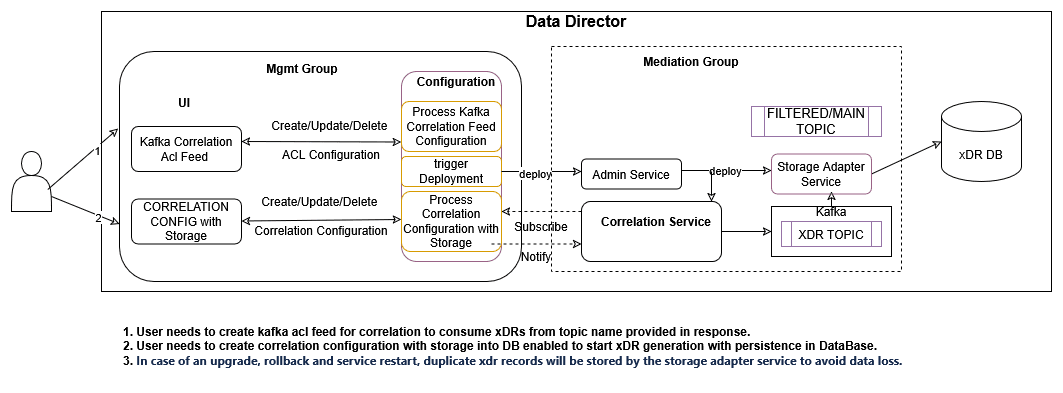
Steps to Delete/Stop Purge Job for Each Correlation Configuration When Extended Storage is Enabled
- Exec into any management service pod:
First, gain access to the management service pod by executing the following command:
curl -k --location --request DELETE \ 'http://ocnaddexportservice:12595/ocnadd-export/v1/event/<correlation configuration name>' \ --header 'Content-Type: application/json' - Run the command to delete/stop the purge job:
Use the following
curlcommand to delete/stop the purge job for the corresponding correlation configuration when extended storage is enabled:curl -k --location \ --cert-type P12 \ --cert /var/securityfiles/keystore/serverKeyStore.p12:$OCNADD_SERVER_KS_PASSWORD \ --request DELETE \ 'https://ocnaddexportservice:12595/ocnadd-export/v1/event/<correlation configuration name>' \ --header 'Content-Type: application/json'Replace
<correlation-configuration-name>with the actual name of your correlation configuration.
Note:
- In the current release, 1K MPS inbound DD rate is supported in correlation feed for extended storage with a maximum of 24 hours of retention.
- IPv6/FQDN is not supported in SFTP server IP.
- File path should be relative; absolute is not supported.
- In case there is no data (either data not present or for some interval it is not present) or very little data due to which the maximum file size is not reached, then a file will be generated when the maximum file size is reached, or an existing file has some data from the past and currentTimeStamp+interval does not have data.
- In case of an upgrade, rollback, service restart, or configuration created with the same name, duplicate messages/xDRs will be sent by the storage adapter service to avoid data loss.
Druid as Extended Storage
Figure 3-20 Druid as Extended Storage
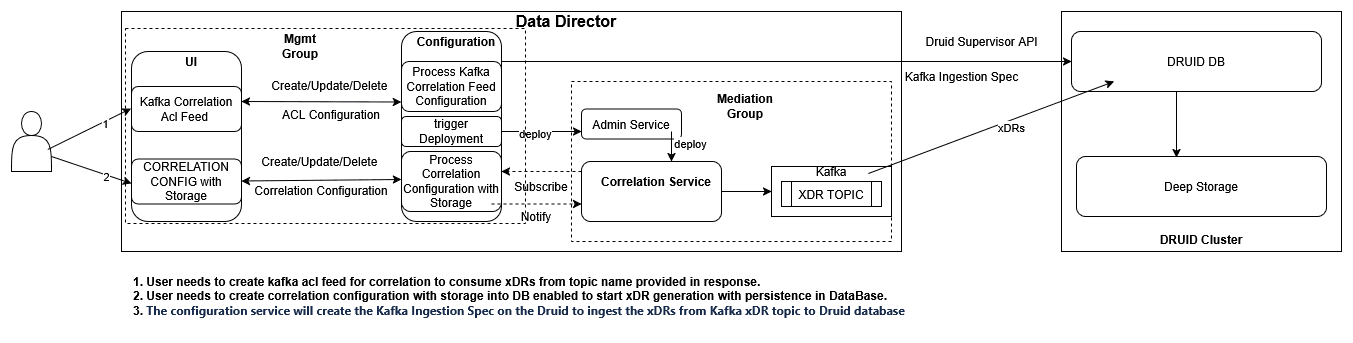
For more information about Druid as Extended Storage, see "Druid Cluster Integration with OCNADD" section.
3.2.21 Trace
The Data Trace feature provides the capability to visualize the trace of records with or without messages in the OCNADD UI. A list of transactions, calls, or sessions can represent this visualization. The generated trace of records can offer deep insights and visibility into the customer network and can be useful in various features, including:
Data Trace feature provides the capability to visualize trace of records with or without messages in OCNADD UI, which can be represented by a list of transactions, calls, or a session. The generated trace of records can provide deep insights and visibility into the customer network and can be useful in features such as:
- network troubleshooting
- revenue assurance
- advanced analytics and observability
Network troubleshooting is one of the key features of the monitoring solution, and the correlation capability will help Data Director provide applications and utilities to perform troubleshooting of failing network scenarios, tracing of network scenarios across multiple NFs, and generating the KPIs to provide network utilization and load. This feature is an enabler for network visibility and observability as the trace of records.
Figure 3-21 Trace
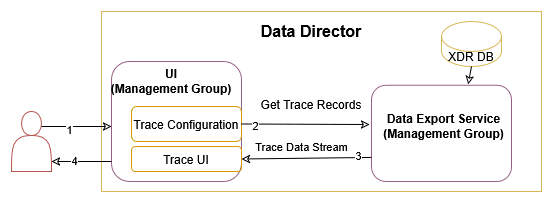
Note:
XDR DB can be either cnDBTier database or Druid Database.For Trace configuration using OCNADD GUI, see Trace Criteria for xDR.
3.2.22 Export
Data Export Service provides the capability to export xDRs with or without messages in CSV or PCAP format, which can be represented by a list of transactions, calls, or a session. The generated export records can provide deep insights and visibility into the customer network and can be useful in features such as:
- network troubleshooting
- revenue assurance
- advanced analytics and observability
Network troubleshooting is one of the key features of the monitoring solution, and the correlation capability will help Data Director provide applications and utilities to perform troubleshooting of failing network scenarios, tracing of network scenarios across multiple NFs, and generating the KPIs to provide network utilization and load. This feature is an enabler for network visibility and observability as the trace of records.
For Export configuration using OCNADD GUI, see Create Export Configuration.
Prerequisites
- Steps to create SFTP credential for SFTP
server
kubectl create secret generic sftpuser-10148214139 --from-literal=credential=password123 -n <management-namespace>
For example:
- Secret Name: sftpuser-10148214139: username-ipaddress( without '.' and '-' is mandatory)
- Username: sftpuser
- SFTP Server IP Address: 10.148.214.139
- Credential: password123 (password of the SFTP server)
Note:
- In case of an upgrade, rollback, service restart, or configuration created with the same name, duplicate reports (CSV/PCAP/trace) will be sent by the export service to avoid data loss.
- PCAP export will only work when
includeMessageWithxDR=METADATA_HEADERS_DATAin correlation configuration. - XDR DB can be either cnDBTier database or Druid database.
Figure 3-22 Export
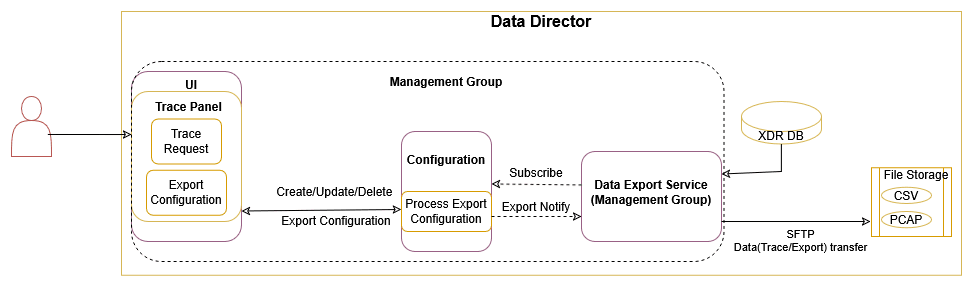
Enhancement from OCNADD Release 24.3.0
In case exportType=PCAP, the user will have an option to derive L2L4
and L3L4 information from the available synthetic feed name.
This will reduce manual effort if it is already provided in the synthetic feed configuration and the same needs to be used in the export configuration.
- In case a synthetic feed is not available or not selected by the user, manual entry for L2L4 and L3L4 will be allowed.
- In case the already selected synthetic feed's L2L4 information and/or L3L4 information is updated, deleted, or recreated, the change will not be updated in the export configuration, as update of export configuration is not supported currently. Recreating the export configuration will be required if the latest changes of L2L4 and L3L4 need to be fetched from the synthetic feed.
- The user will have to recreate the export configuration to map updated L2L4 and L3L4 information from the synthetic feed to the export configuration.
- Update for L2L4 and L3L4 information from the synthetic feed will be considered when export configuration updates are supported.
3.2.23 Traffic Segregation Using CNLB
In the current combined stack (OC-CNE, Data Director, CN BRM/ECE), it is not possible to logically separate IP traffic of different profiles, for example, latency-sensitive traffic from configuration and management traffic. All the traffic is internally handled through a single network (K8s overlay). The requirement is to ensure that these networks (for example, OAM, Signaling, and data replication) are never cross-connected or share the same routes on the NFVI provider side. This is to avoid congestion in the network. In the cloud-native environment, it will be helpful if the traffic between applications could be segregated across different network interfaces.
In Data Director, the customer is looking for segregation of its traffic to external feeds and applications. Currently, all external traffic goes via the same external network. The egress traffic from the Data Director adapter pods should be sent via a non-default network to third-party applications, allowing the traffic to be segregated. This is achieved by leveraging cloud-native infrastructure and intelligent load-balancing algorithms of the OC-CNE.
The configuration of separate networks, Network Attachment Definitions (NADs), and CNLB is essential for enabling the use of the cloud-native load-balancing feature for egress traffic separation and load balancing in Data Director. The CNLB feature and support can only be leveraged in Data Director if CNE is installed with the CNLB feature enabled. See the Oracle Communications Cloud Native Environment Installation Guide for more details on CNLB support in CNE.
Figure 3-23 Traffic Segregation using CNLB
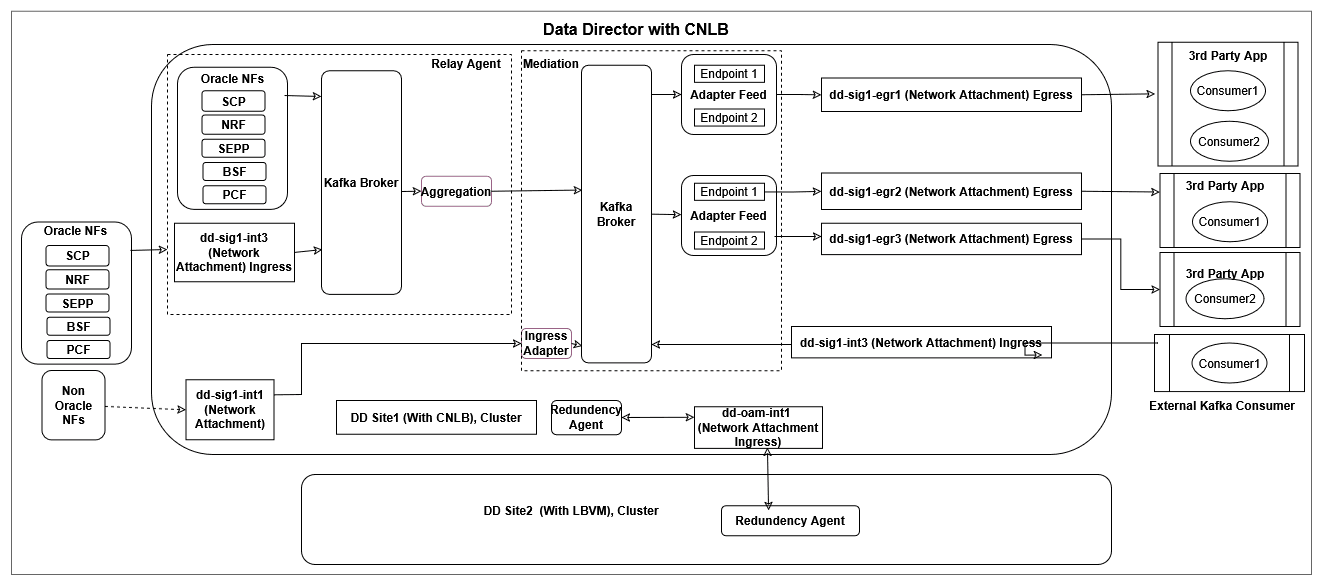
In the current release, the OCNADD is supporting traffic segregation only for the following:
- Egress traffic for the adapter HTTP2 and Synthetic feeds
- Ingress traffic for the ingress adapter of Mediation for the non-Oracle NFs
The OCNADD shall provide the mechanism for external communication between:
- The two Redundancy Agents in the Two Site redundancy feature via CNLB external IP support
- NFs and OCNADD running in separate clusters using the external relay agent's Kafka access via CNLB external IP support
- Third-party applications and OCNADD running in separate clusters using external Kafka access via CNLB external IP support
Prerequisites for Installing CNLB Supported OCCNE Cluster
The following pre-requisites must be met before CNLB-supported OCCNE cluster installation:
- Customer/User must create the required ingress NADs and egress NADs according to the OCNADD services and their third-party feed endpoints requirements before CNLB CNE cluster installation.
- Customer/User must know the required CNLB IPs (external IPs) and ingress NAD for the OCNADD services like the Ingress Adapter (Mediation), Kafka (Relay agent), and Redundancy Agent (Management).
- Based on the ingress traffic segregation requirement for non-Oracle NFs, the
required CNLB IPs (external IPs) and ingress NAD need to be configured for the
Ingress Adapter (Mediation) in advance in
cnlb.inifile of CNLB. - Customers/Users must know their third-party endpoint traffic segregation
requirements in advance, which can be:
- Egress NAD per Feed per third-party endpoint: Each OCNADD consumer feed will have a separate egress NAD (separate egress network from Mediation) to segregate egress traffic for its third-party endpoint.
- Egress NAD per Feed: Each OCNADD consumer feed will have a separate egress NAD from Mediation, which has all third-party endpoint destination routes information. (In this case, the OCNADD feed will use the same egress network for egress traffic segregation for its third-party endpoints.)
- Egress NAD per OCNADD: Only a single egress NAD can be configured, which can have all possible third-party destination route information. (In this case, a common egress network will be used by all consumer applications.)
- Customer must create or use ingress NAD for the Redundancy Agent communication of Management group.
- Customer must create or use ingress NAD for the external Kafka communication of Relay agent group.
Limitations
- In the current release, the CNLB external IPs for the Kafka service work
correctly only if the NFs or third-party applications connect from outside the
cluster where Data Director is deployed.
- If the NFs are deployed in the same cluster as the Data Director, they should use the Kafka service name instead of CNLB external IPs. This connection should be made using the SSL protocol over port 9093. If ACL is enabled, a client ACL using the SSL certificate’s common name as the user should be created; see the Creating Client ACL with CN Name from SSL Client Certificate section.
- The third-party consumer applications are always expected to connect to the Kafka service from outside the Data Director cluster. All direct Kafka feeds, such as aggregated, filtered, and correlated, can only be accessed using the Kafka service from outside the cluster for traffic consumption. The third-party applications cannot connect to the Kafka service from inside the same cluster as Data Director.
- Upgrade or migration from LBVM to the CNLB-based cluster is not supported; in this case, the only option is to perform a fresh install of the CNLB-based OCCNE cluster.
- The CNLB network configuration is only supported at the time of fresh site deployment; no runtime or dynamic CNLB network update is possible.
- IPv6 support is not available for the CNLB feature.
- External access is only possible for the Ingress adapter, Kafka service, and redundancy agent using the CNLB feature.
For more information, see Enabling or Disabling Traffic Segregation Through CNLB in OCNADD section.