10 Modeling a TMF Solution (Cloud Native Only)
This chapter describes how to model a TMF solution.
Before learning how to model a TMF solution, see the chapter about TMF concepts in OSM Concepts.
Note:
TMF solution modeling is supported for OSM cloud native deployments only.About Specifications
The first consideration when modeling a TMF solution is to define the specification to be used.
- Orders cannot be suspended or resumed
- Orders cannot be aborted
- Existing orders cannot be revised (amended)
- TMF has no state to indicate fallout
Because of this, it is strongly recommended to start with the OSM extended specifications which align with OSM's advanced order management capabilities.
- Does your billing system need extra information that is not found in the existing billingAccountRef schema?
- Does your productOrder need to track shipment tracking information?
- Are you integrating with an edge system that requires data that does not exist inside the specification of interest?
These are the types of questions that you need to answer and then modify the schema of the specification accordingly. See OpenAPI Specification documentation as well.
All schema changes that you make must result in a version increase inside the specification. The 5th digit of the version is provided for your use.
About Cancelling or Revising an Inflight Order
The canonical TMF 622 and 641 specifications include support for order cancellations but not for revisions. When support for revisions is a requirement, then the OSM extended specifications must be used (either directly or as the base for customer schema extensions).
Cancel and revise are both implemented using the TMF pattern of a task resource. Refer to the TMF 630 guidelines for further details.
Cancel Specific Behavior
Requested cancellation date in the cancel payload is not supported. You cannot request a future date for cancellation via this field. All requests are processed immediately.
Revise Specific Behavior
Revisions to a future-dated order (that are in a TMF state of Pending) are processed immediately. The waiting base order would be updated with the revised data.
The task resource representing the revision request will complete, the OSM revision order will complete and the base order will reflect the amended data and will remain in TMF pending state (OSM waiting state), until the future-dated date arrives.
Design-time Considerations
For TMF cartridges, cancellations are processed as an amendment with no order lines, which would trigger undo mode of all completed tasks.
- The cancel fulfillment mode does not need to be created in Design Studio.
- Amendment tab configuration for an order (will be read only for TMF orders).
Automation tasks still need to configure the various execution modes.
Runtime Considerations
OSM Gateway exposes endpoints for cancelling or revising a product or service order and all existing cancel or revise mechanisms (Task Web client, SOAP webservice, and so on) are no longer permitted.
OSM Gateway rejects cancels or revisions where the base order contains any order item in a final TMF state (partial, failed, completed).
Order Key
In Freeform cartridges, order key configuration is needed as a way to correctly identify the base order the revision is applied to. It did not reflect the OSM order id but a piece of data inside the order payload that could be used as a unique identifier of the base order.
REVISE
    ReviseProductOrderOSM_Create:
      required:
      - baseOrderRef
      - productOrder
      type: object
      description: OSM extension to create the ReviseProductOrder resource. This represents an OSM revision request.
      properties:
        baseOrderRef:
          $ref: '#/components/schemas/BaseOrderRefOSM'
        productOrder:
          $ref: '#/components/schemas/ProductOrder_Create'
.......
In the above example, the BaseOrderRefOSM has the id of the targetted base order.
CANCEL
    CancelProductOrder_Create:
      required:
      - productOrder
      type: object
      properties:
        cancellationReason:
          type: string
          description: Reason why the order is cancelled.
        productOrder:
          $ref: '#/components/schemas/ProductOrderRef'
In the example above, the ProductOrderRef has the id of the targetted base order.
Version
Version is still an important piece of the amendment functionality. However, the handling is different for TMF Orders. Instead of the order carrying the version information inside the payload, it is passed as the HTTP header "X-VERSION". Providing this header is optional for cancels, but mandatory for revise operations.
Callers can supply the HTTP header X-VERSION on the create request, but if omitted (as is generally the case for create), then OSM starts versioning at 1. When a GET is invoked, the header "X-VERSION" indicating the version of the order currently being processed, is returned to the caller.
Once the caller has this information, any subsequent requests for revise or cancel can include an incremented count.
While the mechanism to pass the version information is different for TMF orders, the logic that dictates acceptance or rejection is the same. Orders with a version higher than the order currently processing version are accepted and those with a version lower are rejected.Impact of PoNR
When a cancel request is received, OSM verifies whether any order items in the order are in a final state or if Point of No Return (PoNR) has been reached for any of them. If either condition is met, the request is rejected, and the cancel operation cannot be performed.
When a revision request is received, OSM performs the same validation, but only for the order items affected by the revision order. If any of those affected order items are in a final state or have reached PoNR, the request is rejected, and the revision operation cannot be performed.
If OSM accepts the cancel or revision request, the cartridge's order lifecycle policy (OLP) may still reject it based on custom logic, including the order or order items having reached PoNR. See Modeling a Point of No Return in Freeform Cartridges for details on how the lifecycle policy can impact order rejections.
Grace Period
A grace period refers to a configurable period of time that OSM will wait for currently processing tasks to complete, before transitioning an order. In Freeform cartridges, you can pass a grace value during Web Service API invocation.
TMF orders do not allow you to supply a grace period when invoking the REST APIs. Grace period must be defined within the cartridge for TMF orders.
Events about Cancel and Revise Task Resource
The following events are emitted automatically to the event target system in response to lifecycle milestones of the task resource.
Table 10-1 Cancel and Revise Task Resource Events
| OSMGW Endpoint | Task Resource Events |
|---|---|
| /cancelProductOrder |
cancelProductOrderCreateEvent cancelProductOrderStateChangeEvent |
| /reviseProductOrder |
reviseProductOrderCreateEvent reviseProductOrderStateChangeEvent |
| /cancelServiceOrder |
cancelServiceOrderCreateEvent cancelServiceOrderStateChangeEvent |
| /reviseServiceOrder |
reviseServiceOrderCreateEvent reviseServiceOrderStateChangeEvent |
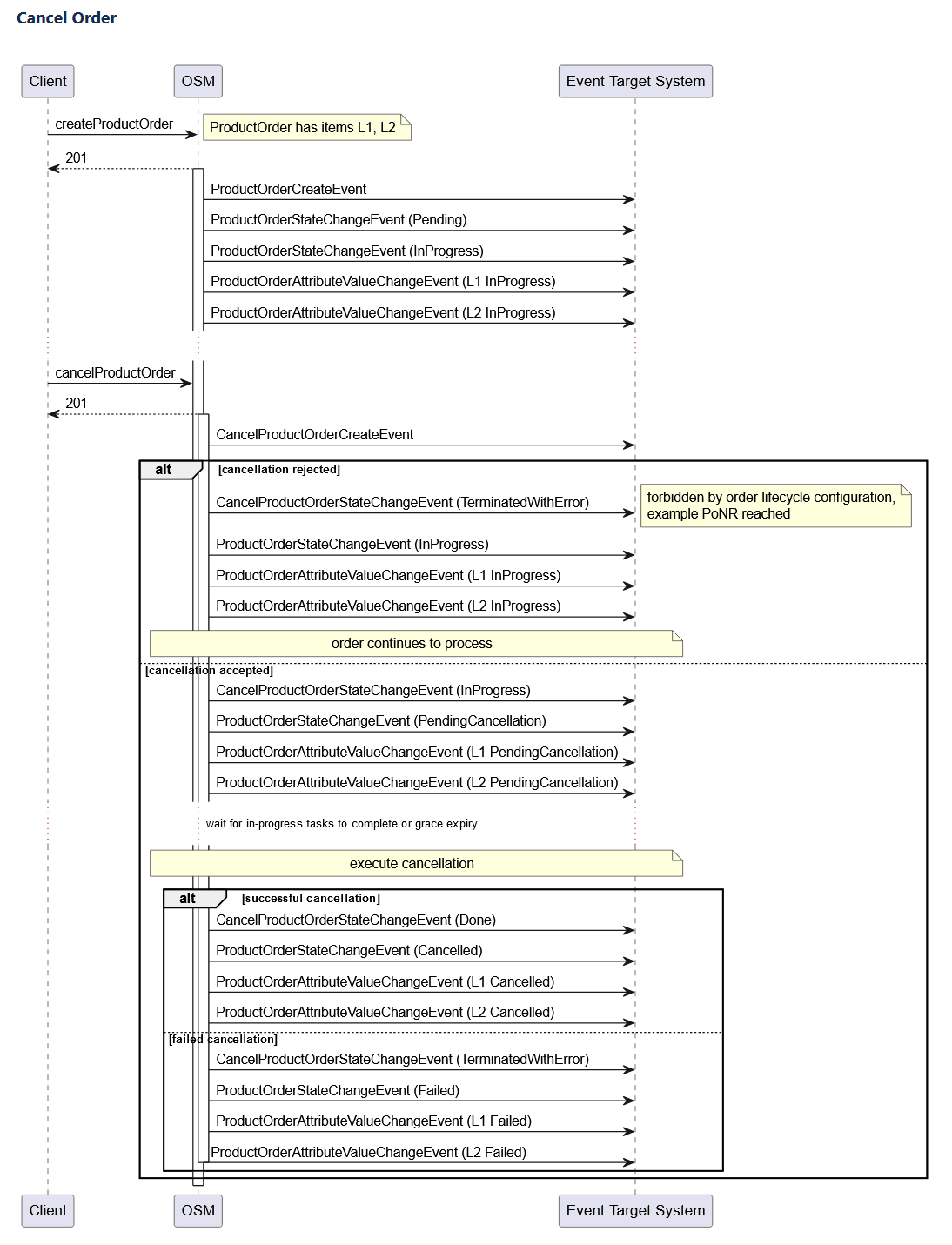
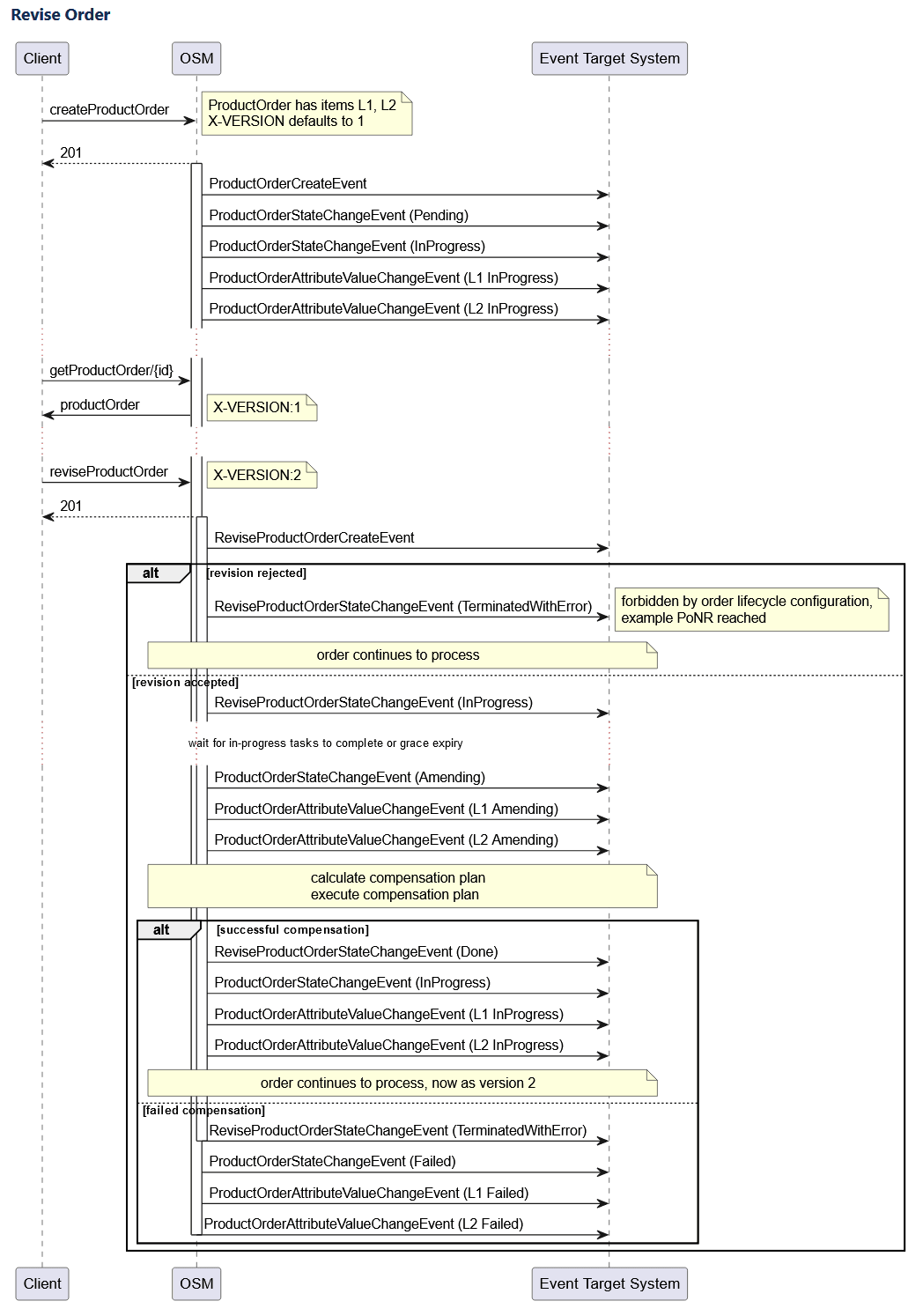
Task Resource Sequence Diagram
The lifecycle of a task resource is different from the main resource. The following diagrams show how the two lifecycles interact and when events are delivered in relation to the main resource events.
Modeling PoNR
For TMF orders, the modeling pattern with respect to the Point of No Return (PoNR) of an order or order item is different.
- PoNR detection
- Propagation of the PoNR to the upstream system
- Order amendment and cancellation handling for PoNR
PoNR detection
PoNR is included as a modeled field in the OSM Extended TMF schema in v4.0.0.2.0 and later for ProductOrderItem and in v4.1.0.2.0 and later for TMF641 ServiceOrderItem. Populating this field signals that PoNR has been reached. OSM automation provides an API called setPONRReached, which cartridge developers can use to set PoNR when their logic determines that PoNR has been reached for some or all order line items in the current processing step. Once you set PoNR to True, it cannot be changed back.
setPONRReached comes in two variants:
setPONRReached(): This flavor sets the PoNR to True for all the line items in the current processing component for the order. The following example shows the implementation of thesetPONRReachedAPI to set PoNR to True for all line items.declare namespace context = "java:com.mslv.oms.automation.TaskContext"; declare variable $context external; context:setPONRReached($context)setPONRReached(Element ponrLineIds): This is the selective flavor which takes in a set of lineIDs wrapped in an XML element, called theoms:PONRUpdates, as the argument and sets the PoNR to True only for those lineIDs as a subset of all line items in the current processing component. The following example shows the implementation of the selective flavor ofsetPONRReachedAPI to set PoNR to True for the selected line items:
If you provide invalid lineIDs or if lineIDs are not a part of the component being processed, then andeclare namespace context = "java:com.mslv.oms.automation.TaskContext"; declare namespace oms="urn:com:metasolv:oms:xmlapi:1"; declare variable $context external; (: An XML argument containing a PONRUpdates element that wraps one or more LineId elements, representing the set of lineIds for which PoNR should be set. :) let $ponrChanges:= <oms:PONRUpdates> <LineId>OCX-1JMDPG</LineId> <LineId>0CX-1YNHCR</LineId> </oms:PONRUpdates> context:setPONRReached($context,$ponrChanges)AutomationExceptionis created. AnAutomationExceptionis also created if you provide a blank element. This ensures that only valid and relevant lineIDs are processed.
setPONRReached when the external state indicates that your order has reached PoNR.
Note:
You can only set PoNR using the automation API. Any attempts or requests to update PoNR through alternative methods, such as via XML APIs, manual updates in the Task Client UI, etc., will be silently processed. However, the PoNR value will not be updated and a warning message will be logged in the application logs.Propagation of PoNR to upstream system
TMF cartridges rely on the AttributeValueChangeEvent for both Product and Service, to inform upstream systems of a change to the characteristic representing the PoNR status. Since attribute events are triggered for changes to any monitored order field, it is the responsibility of the event listener to identify the field holding the status of the PoNR and check its value.
AttributeValueChangeEvent generated for a change in the PoNR value: {"eventId":"c42e34be-d3d6-4909-9825-4921ef9cada5","eventTime":"2025-07-25T07:19:43.326Z","eventType":"ProductOrderAttributeValueChangeEventOSM","fieldPath":[{"change":"add","path":"$..productOrderItem[?(@.id=='0CX-1Z8QSX')].ponr","oldValue":""}],"event":{"productOrder": ... (productOrder details) ... }}Order amendment and cancellation handling for PoNR
For TMF cartridges, the current approach simplifies the configuration process by utilizing the automation API, setPONRReached. This API enables the cartridge to set PoNR to True at any stage that the business logic deems suitable. Once set, the platform automatically disallows any amendments or cancellations for the affected order items, eliminating the need for manual configuration.
Implicit PoNR
Note:
The latest PoNR capabilities for TMF cartridges are available in Oracle OSM extended APIs TMF622-OSM version 4.0.0.2.0 and TMF641-OSM version 4.1.0.2.0 and later. To use these, TMF cartridges must be created with these specification versions as the hosted specification. Existing cartridges on prior API versions that model PoNR as an order item characteristic will continue to work as intended. PoNR is modeled as an order item characteristic within the product model and populating that field signals PoNR has been reached.Change Order Support
- The entire order is included in the change request, lines that have changed as well as lines that have not
- Only the content that has changed is included (and often the necessary parent lines)
Choosing between the two depends on many variables including the product model and capabilities of the edge systems. Neither TMF nor OSM are prescriptive about which modeling pattern is used. However, there are some details within the specifications that may influence which technique is ultimately employed.
Canonical TMF
TMF ordering specifications support action codes on a line item to identify whether it holds a change. Beyond that, there is no support inherent in the TMF specification for identifying what the change is. When there is no indicator as to the specific change, the downstream systems must be idempotent, which implies that those systems own the data and therefore have a view of the current state of the object. When passed a new set of data, they can determine what the change is and what action to take. This puts the onus on the systems that OSM talks to, for determining what data is changed and whether it requires an action or not.
This pattern can be expensive for systems and whether or not external systems in the ecosystem behave according to the TMF view, cannot be dictated by the Product Ordering layer.
OSM Extended Specifications
On lines with an action code of "modify", changes are often contained within the characteristic set - new ones added, characteristics no longer required or simply a change of value on an existing characteristic. Examples include an upgrade from 5MB to 10MB bandwidth, or an upgrade to a premium service which results in new characteristics for callWaiting and callForwarding.
OSM recognizes this and offers optimized handling of characteristic changes via the OSM extended specification.
OSM schema extensions have been made to provide additional details about a characteristic - an action code as well as the previous value. This of course relies on the upstream system to populate this data, but if utilized, it can relieve pressure on the downstream systems to calculate the exact nature of the change.
See the TMF 622 REST Specification for change order modeling examples.
Order Fulfillment Modes
The runtime handling for fulfillment mode is different for TMF orders. With Freeform cartridges, something in the order data would need to map to the right fulfillment mode. With TMF orders, the fulfillment mode does not need to be embedded into the payload and for order creation nor for order cancellations, The calling system in fact does not need to do anything at all. OSM has assumed responsibility for mapping these two order operations properly.
If an additional fulfillment mode was modeled in the TMF cartridge (for example, TSQ), then the calling system would need to supply this value through the HTTP header "X-Fulfillment-Mode". OSM Gateway would forward the FF mode to OSM and would match against deployed fulfillment modes.
Upstream Listener
- An Event Target System must be defined on the hosted order specification in Design Studio.
- Only a single system can be configured. It is expected that this single listener will either consume the events itself, or serve it to a message broker (for example, Kafka).
- The event target system would be the intended recipient of all events that are emitted. The upstream system can ignore messages it is not interested in.
Fault tolerance configuration for target systems is available in the toolkit's specification files. See OSM Cloud Native Deployment Guide for details on configuring target systems.
About TMF Order Events For the External Event Listener
The events for TMF orders run by OSM are listed in the REST API reference guide. See REST API reference guide for the details of the events offers and the schema of the events.
- OSM has restricted the changes that will trigger the AtributeValueChange event. Changes are limited to the order item state or the order item characteristic fields.
- OSM will include multiple updates in a single event. All updates - whether within a single line item or across multiple line items - will be included in an event, so long as they are all made within the same orderUpdate call to OSM core.