Realm Patterns Table
The Realm Pattern Definitions page shows the panel used for defining realm patterns. Selecting a realm pattern and then clicking the toolbar Edit button, or double-clicking an entry opens an editing window.
This table describes the fields found in the Add new realm pattern table:
Table 7-11 Add a New Realm Pattern Fields
| Field | Description |
|---|---|
|
Rid |
The ID of the realm. |
|
Realm |
The name of the realm. The edit select menu of the field offers the previous used realms, but also allows entering a new name. By entering a new name and pressing the Create button, a realm with that name is created immediately. |
|
First number |
The first phone number from a number range realm. If this is specified, then the Last number must also be specified. The realm will contain all numbers from the range. |
|
Last number |
The last phone number from a number range realm. If this is specified, then the First number must also be specified. The realm will contain all numbers from the range. |
|
Domain |
The domain from a domain restricted realm. The realm will contain all the users from the given domain. This can be combined with the First number and Last number options in which case all restrictions apply. If the First number and the Last number are provided, the caller or callee number must be in the range between those values. If Domain (optional) is provided, then the number must be in between the First number and Last number. Additionally, the domain must match the value provided in the Domain field. Therefore, between First number, Last number, and Domain, there exists an AND relationship. The caller or callee information must fulfill all the conditions to be assigned to the realm. |
|
Custom Pattern |
Give a custom header pattern for matching of calls to this pattern. If a call's invite contains this header pattern then it is counted in the realm. For more information, see Realms Header Specification. You can also provide a Custom Pattern. For Custom Pattern, either the First number, Last number, and Domain OR the Custom Pattern must match. For a Custom Pattern, there exists an OR relationship. |
|
Creator |
The user who created this realm. |
|
Comment |
(Optional) Comment line, only for convenience. |
Note:
In order for the domain restricted realms to work, Operations Monitor needs to be configured to consider the domains in the user identifiers. Set the Use User Domains to true. For more information, see Use User Domains.Note:
Configuring a large number of realm patterns will affect the performance of the server.Figure 7-46 The Add or Edit Realm Pattern Window
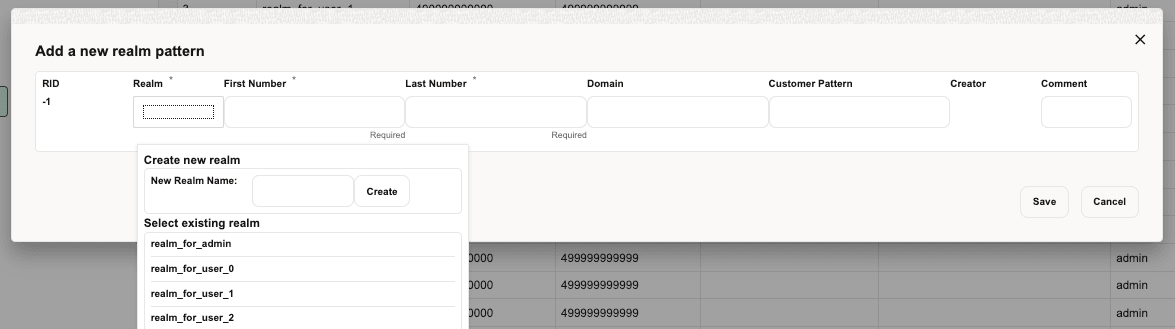
Figure 7-47 Realm Patterns Definitions
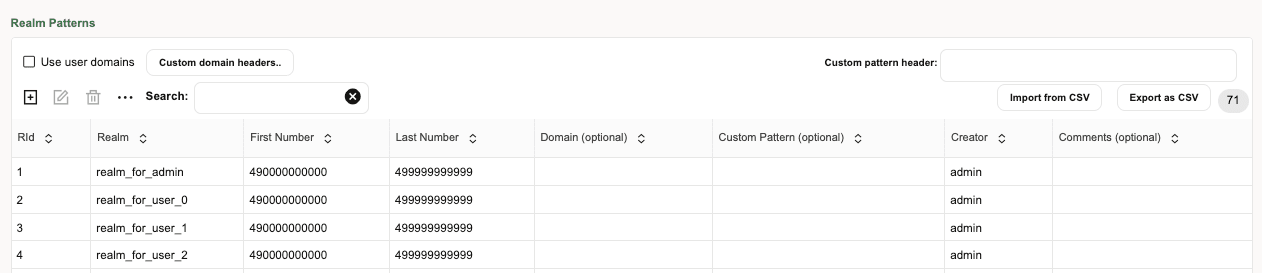
For example, the configuration from the Realms Patterns page defines the realm reseller A to contain:
-
The phone number range 00491234000 to 00491234999, regardless of the domain name.
-
The phone number range 0301234000 to 0301234555, regardless of the domain name.
-
All users that have a.sip.palladion.net as their domain name.
The realms configuration can be exported to and imported from CSV files. This simplifies the realms maintenance in case of many realms patterns. For example, the configuration in Realm Pattern Definitions would be exported to:
name,min,max,domain,comments
reseller A,00491234000,00491234999,,
reseller A,0301234000,0301234555,,
reseller B,0301234556,0301234999,,
reseller B,,,b.sip.palladion.net,
reseller A,,,a.sip.palladion.net,
test,00445213000,00445213500,,Test realm with a single number.
The realms patterns can also be provisioned automatically by uploading a similar CSV file via FTP.