Realms Header Specification
There are two System Settings that modify the way Operations Monitor assigns Realms to Calls/Registrations. By default Operations Monitor checks the To: and From: header for each SIP invite/SIP Registration message and matches this Call/Registration with all matching Realms (“or").
You can specify additional header fields in the System Setting named Headers in which to look for realm URIs. Diversion or P-Asserted-Identity could be useful values, depending on the configuration. Operations Monitor generally checks all the occurrences of each of these fields in each SIP Invite/Registration message. Exceptions are possible for header fields whose repetition is forbidden by the SIP standard.
- Matching a custom pattern against an arbitrary header field.
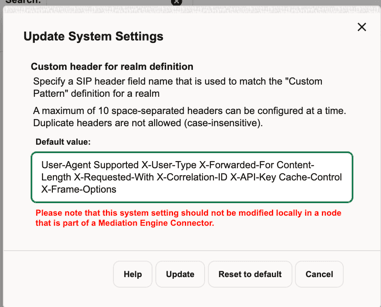
- Use the Custom header for realm definition System setting to specify which header to search for.
Figure 7-48 Custom header for realm definition
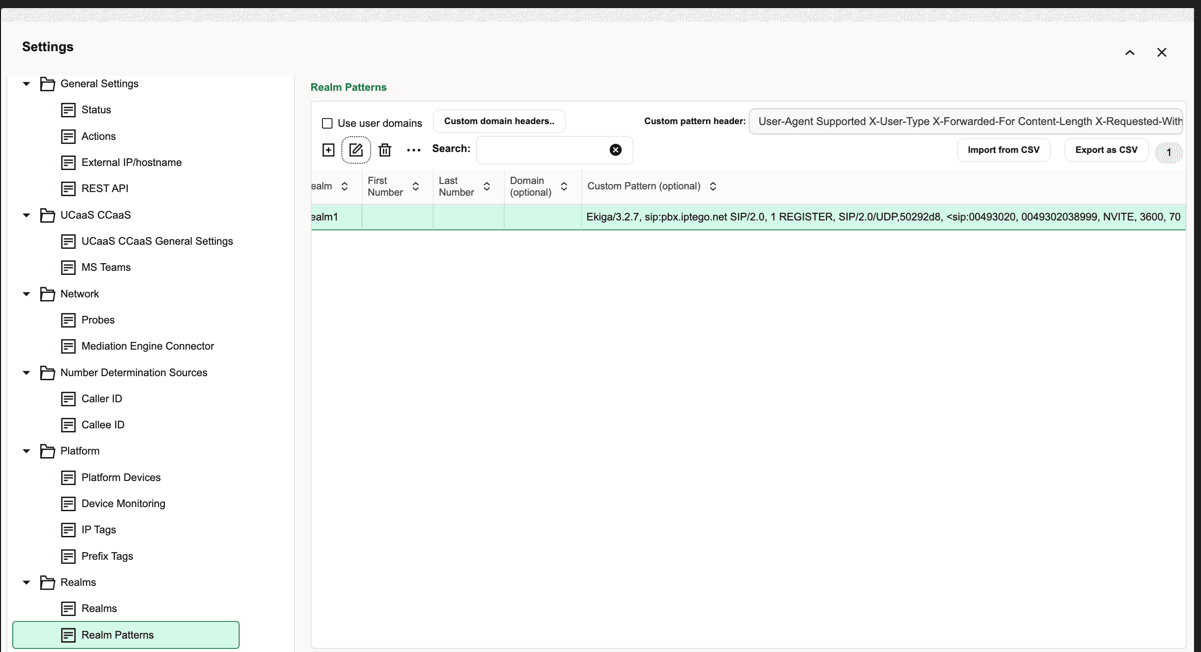
- Use the Custom Header Pattern (optional) column on the Realms Patterns page to specify a pattern for each Realm. The pattern matching works similar to the number matching.
Figure 7-49 Custom Header Pattern (optional)
Caution:
Each additional header and custom header matching affect the Operations Monitor's performance.