System Management
Operations Monitor's system is configurable and maintainable through the System Management section of the Settings link in the upper right corner. The System Management section includes the following:
-
System Settings: Use the System Settings page to configure Operations Monitor system parameters by adjusting the default values to meet your business needs. For example, you can adjust the session-timeout value that defines how long Operations Monitor keeps a call active if no SIP messages are received for the call.
-
Oracle SBC Config Upload: Use the Oracle SBC Config Upload page to import the device configurations from an Oracle SBC configuration file into Operations Monitor or update existing Oracle SBC configurations.
-
Language Settings: Use the Language Settings page to configure the default display language for all Operations Monitor users.
List of System Settings
Table 7-14 System Settings
| Header 1 | Header 2 |
|---|---|
| 302 Redirected: From-URI suffix length | How many suffix characters of the user part of the From URI to compare when trying to find a match between a SIP leg that got redirected (received a 300, 301 or 302 resonse) and the new INVITE. If set to 0 the full user part is compared.
|
| Alerting delay after core restart | Alerting delay after core restart The length of time alerts are suppressed after a core restart, in minutes.
|
| Allow No of Notification | Flag to limit the number of NOTIFY to be seen in the ladder diagram. Value '0' depicts none of the Notify messages can be seen in the ladder diagram
|
| Allow No of Publish | Flag to limit the number of NOTIFY to be seen in the ladder diagram. Value '0' depicts none of the Notify messages can be seen in the ladder diagram
|
| Allow No of Refresh subscription | Flag to limit the number of Refresh SUBSCRIBE to be seen in the ladder diagram.(Initial Subscription not included) Value '0' depicts none of the Refresh Subscribe messages can be seen in the ladder diagram
|
| Allow regeneration of registration events for user updates. | If a user is registered in core once, its realm will not be re-checked till the registration expires and gets re-newed. If realms are changed continuously and/or customer needs to have registrations always matched to the current realms configuration, enable this option. Be aware that this has some performance impacts on core registration processing.
|
| Allow regeneration of subscription events for user updates | If a user is Subscribed in core once, its realm will not be re-checked till the Subscription expires and gets re-newed. If realms are changed continuously and/or customer needs to have subscriptions always matched to the current realms configuration, enable this option. Be aware that this has some performance impacts on core subscription processing.
|
| APID request interval for querying SBCs | Number of seconds interval for retrieving information about autodiscoverd SBCs. It's not recommended to alter this value.
|
| Append a string at the end of User Tracking searches | When using User Tracking, also look for aliases that have this suffix appended to the number. |
| Authentication token (shared secret between Mediation Engine Connector and Mediation Engine) | Secret used by the Mediation Engine Connector to sign requests proxied to this Mediation Engine. |
| Auto-refresh interval for grids | Number of seconds between auto-refresh (if enabled) for grids with this feature
|
| B2B backlog search for merging 3PCC calls | The number of seconds to search for outgoing call legs in the past when an outgoing leg is received for 3PCC.
|
| B2B incoming backlog search for merging | The number of seconds to search the outgoing call leg in the past when an incoming leg is received.
|
| B2B outgoing backlog search for merging | The number of seconds to search the outgoing call leg in the past when an incoming leg is received.
|
| Bind user sessions to IP addresses | Bind each session to an IP address.
|
| Bulk counters/KPIs maximum limit | The maximum limit of counters being added in bulk.
|
| Cache time interval in minutes for User Agent statistics | When a panel for User Agent statistics is active, its result would be stored in an internal cache and it will be refreshed at the interval defined in this system setting (in minutes). A value of less than 5 minutes disables the cache (not recommended).
|
| Call flow max height | The maximum height of the call flow diagram in pixels.
|
| Call flow max width | The maximum width of the call flow diagram in pixels.
|
| Call flow messages | The maximum number of messages displayed in a call flow.
|
| Call flow parallel loading | When set, the in-browser call flow diagrams will be loaded in several stages, with progressively more information for some messages. This might improve rendering performance.
|
| Call flow timestamp for fragmented messages | Use last fragment's timestamp as the timestamp for the message.
|
| Call flow tree's expanded levels | Expanded levels in the popup for a message. If set to -1, all levels will be expanded.
|
| Call Report Maximum Messages | Maximum number of messages to include in the call report messages section
|
| Call Report Style | Additional Cascading Style Sheet (CSS) rules can be defined here that will be included when generating a call report PDF. |
| Call Report Theme Color | Color of the headings and footer on PDF call reports. Can be the name of a color: red, or a hexadecimal representation of the color: #ff0000 Default value: #446498 |
| Call Transfer: correlate using Replaces | Set to true to match calls involved in a call transfer using the Replaces header. Default value: False |
| Call Transfer: Seconds for correlating calls using REFER | The number of seconds the Mediation Engine looks back for calls containing a REFER causing the current call. If 0, correlating the referred and referring call is disabled for the Call Transfer information.
|
| CDR Custom SIP headers length | Size of the buffer for cdr custom sip headers. It denotes the size of a custom sip header value that is to be written in the csv file. For example, if there are multiple values of a particular custom sip header configured, the cumulative size of the string can be big.
|
| CDR Interim Update Interval | This value represents the interval in minutes for which partial CDR data will be created. The allowed range of this interval is from 0 - 10 minutes. If 0 is given then the partial CDR generation feature is turned off. Warning: Turning on this feature has an impact in performance.
|
| Cleanup Actions Syslog logging facility | Which logging facility should be used for the Mediation Engine's cleanup actions. Leave negative if this should be disabled. Allowed values are zero through to seven.
|
| Close Legs on SIP 202 Message | If enabled, legs receiving 202 messages will be marked as finished (closed) as no further messages are expected on the leg.
|
| CPM Transaction time range | The default limit in minutes to cutoff CPM transaction queries. A value of 600 will result in the transactions grid showing transactions in the range of [ NOW(), NOW() - 10 Hours ].
|
| Custom header for realm definition | Specify a SIP header field name that is used to match the "Custom Pattern" definition for a realm.
Caution: This system setting should not be modified locally in a node that is part of a Mediation Engine Connector. |
| Custom SIP headers in CDR file | A space separated list of custom SIP headers to be included in CDRs |
| Day on which the week should begin | Day on which the week should begin Defines the day at which the week should begin. A page reload is required for this setting to take effect. Default value: Sunday |
| Days until inactive account expires | Expire inactive accounts after the given number of days.
|
| Device Map Limit | The value decides the maximum number of Platform Devices for which Device Map can be enabled. The permissible values can range from 2 to 50
|
| Digest delay time | The time between sending out digests of recurring alerts in minutes
|
| Disable logo changes | If enabled, users cannot make logo changes. Default value: False |
| Disable user changes | If enabled, users cannot make password or logo changes. Default value: False |
| Dumper raw buffer size | The size of the raw buffer in MB. This buffer is used for creating traces starting in the past. Warning: Increasing this setting might require adjusting memory quotas. Please contact Oracle or your system integrator.
|
| Enable CDR writer | Enable if you want the Mediation Engine to generate CDR files. Please see the user manual for details about the format used and how to get the files. Make sure you have a valid CDR Extension license. Default value: True |
| Enable MEGACO BGF | Enables the processing of BGF messages in MEGACO. Default value: False |
| Enable sharing saved calls | If enabled, saved calls can be shared globally. If you run a multi-tenancy setup, this feature should be DISABLED. Default value: True |
| Enabled Device Map | If enabled , Operations Monitor can display a real-time map of the configured platform devices and of the interactions between them. In order to configure the maximum number of devices supported, adjust the 'Device Map Limit' in System Settings. |
| Enforce stringent password rules | A set of higher security rules for user passwords. Default value: True |
| Expire passwords periodically | If enabled, non-admin users will be required to change their passwords periodically. This option can be overridden from the Mediation Engine Connector. Default value: True
Caution: Do not be modify this setting locally in a node that is part of a Mediation Engine Connector. |
| Export metrics to OCDM | Enable to export selected KPIs via the OCDM file based integration Default value: False |
| Extend calls by hash inspection | During call legs discovery across multiple sites, a neighboring Mediation Engine can be interrogated multiple times, rather than only once. Default value: True |
| External authentication enabled | Enable or disable HTTP header authentication driven by the reverse proxy (nginx or Apache) Default value: False |
| External IP/hostname | External base IP or hostname for deep links (used by alerting emails) Default value: |
| Find similar aliases in User Tracking by using a suffix of this many characters | If this value is non-zero, the User Tracking page first searches the alias list for similar usernames/phone numbers and then displays the calls, registration and subscription events for all of them. To usernames/phone numbers are considered similar if the last N number of characters are identical, where N is the value of this setting. Default value: 0 Minimum value: 0
|
| Future maximum search | Time a search searches in the future (in seconds)
|
| Get updated call states | If enabled, the fronted will query the core process on each request to get the very latest state information. This can increase the delay before the answer is made, but generally makes the information more up to date. Default value: False |
| Global partitions size | How many hours a database partition should hold. There can be at most 1024 partitions.
|
| Grey out non-preferred numbers | Numbers that haven't been derived from a configured number determination source will be displayed in grey in the calls table. Default value: False |
| Group new registrations from the same user. | Group new registrations from the same user. Default value: True |
| Group Non-Call Subscriptions from the same user. | Group Non-Call Subscriptions from the same user and event type. Default value: True
|
| Guarantee sorting of VSI traces | Due to the distributed nature of the Mediation Engine, it is possible that the packets in the traces buffer are out of order. If this option is enabled, the Mediation Engine will re-sort the packets by their timestamp. Default value: True |
| Headers in which to look for realm URIs | A space separated list of SIP header fields, ie. "Diversion P-Asserted-Identity". Realm matching will include these fields (in addition to To and From). Default value: |
| Hide active user sessions | Hide active user session info when limit is reached. Default value: True
|
| Hide hardware addresses input from devices configuration | If set to true, the hardware addresses field will be hidden from the platform devices wizard Default value: True |
| Hide Megaco messages before off-hook | This option helps if the MEGACO transactions IDs are reused very quickly. It will hide the messages that are assigned to the leg before the off-hook event Default value: False |
| High threshold for Jitter | The high threshold for determining the Jitter
|
| High threshold for MOS | The high threshold for determining the MOS
|
| High threshold for Packet Loss Rate | The high threshold for determining the Packet Loss Rate
|
| HTTP address of the Mediation Engine Connector | HTTP address where to reach the Mediation Engine Connector. This is automatically set from the Mediation Engine Connector. |
| Ignore internal registrations | If disabled, registrations from inside the platform will be recorded. This might make some REGISTER transactions to be incorrectly considered unauthorized because the 401/407 answer is seen more than once. Default value: False. |
| Ignore internal registrations for User Devices statistics | If disabled, registrations from inside the platform will be recorded. This might make some REGISTER transactions to be incorrectly considered unauthorized because the 401/407 answer is seen more than once. Default value: False.
|
| Ignore mismatch on contact URI (registrations) | Some registrars change the Contact URI in a reply to a REGISTER. This tells the Mediation Engine to ignore mismatching URIs, but might lead to merging multiple registrations into one. Default value: False. |
| Ignore non RFC 3261 params in SIP URI username | If set to true, the Mediation Engine will remove the params appended to the username before matching the SIP URI username. Default value: False. |
| Ignore plus prefix number when matching realms | By default the "+" number prefix is ignored in realm matching, when turned on, this option will assign numbers containing + only to the default realm. Default value: False. |
| Initial search range | The initial search range (in seconds) for calls, registrations etc to search before asking if the search should continue. If 'Paging query range' is bigger, that value will be used.
|
| KPI - RTCP Jitter threshold | Defines a threshold for jitter kpis (in ms) based on RTCP. Any jitter value above this threshold is ignored for the kpi computation. 0 means no threshold.
|
| Limit select queries to this many seconds | Stop SELECT queries if they take more than this many seconds. Set to 0 to disable.
|
| Log user authentication failures | Log information when a user fails to login. Default value: False. |
| Login Splash Page | A splash page which is shown after login. Removing all content will disable the splash page. |
| Loose user searching | If enabled, when searching users by using the live search feature, the last digits of the number act as wildcards to suggest similar numbers from the same range. Default value: False. |
| Low threshold for Jitter | The low threshold for determining the Jitter
|
| Low threshold for MOS | The low threshold for determining the MOS
|
| Low threshold for Packet Loss Rate | The low threshold for determining the Packet Loss Rate
|
| Match registration events by comparing a suffix of the username | The Mediation Engine matches the related registration attempts by the SIP username. If this value is zero, then the whole username is used. If more than zero, the number defines how many digits/characters must match.
|
| Match Subscription events by comparing the username suffix | The Mediation Engine matches the related subscription attempts by the SIP username. If this value is zero, then the whole username is used. If more than zero, the number defines how many digits/characters must match.
|
| Max concurrent sessions | The maximum number of times a user can log in in parallel.
|
| Max concurrent users | The maximum number of users that can be logged in at the same time.
|
| Maximum concurrent traces | The maximum number of traces that can be running at the same time.
|
| Maximum frequency for raising alerts | Determines at what point raised alerts that are not read can be raised again. If an alert has been continuously raised for more than this amount of seconds, it is eligible for being raised again. This setting only applies to alerts based on Generic Metrics and Device/Tag Metrics.
|
| Maximum lines of a CDR file | The maximum number of lines that a CDR file can contain. When this limit is reached, the Mediation Engine automatically creates a new CDR file.
|
| Maximum lines of a MDR file | The maximum number of lines that a MDR file can contain. When this limit is reached, the Mediation Engine automatically creates a new MDR file.
|
| Maximum number of calls exported with bulk export | The maximum number of calls that can be exported with one bulk export.
|
| Maximum number of items returned by each request to the REST interface | Maximum number of items returned by each request to the REST interface.
|
| Maximum number of legs in one call | If a call already has this many calls, the Mediation Engine won't merge new legs in the same call, even if they match according to the merging algorithm. The purpose of setting a maximum is to avoid infinite calls.
|
| Maximum number of lines exported with CSV export | The maximum number of lines that can be exported with one csv export.
|
| Maximum number of messages per leg | Configure maximum number of messages to be stored per leg.
|
| Maximum number of number alert definitions per user | Maximum number of number alert definitions that a user can create.
|
| Maximum script output size | The maximum output size by script run in bytes that is shown. It's stored in memory. A value of 0 buffer all output.
|
| Maximum simultaneous script runs | The maximum number of script runs that can run simultaneously.
|
| Maximum stored script runs | The maximum number of script runs that are stored. If this number is exceeded the oldest script runs are removed as needed to stay under this limit.
|
| ME path enabled | ME path enabled Enable or disable the /me path from the URL Default value: False. |
| Mediation Engine Connector hash on P-Charging-Vector icid-value parameter | Mediation Engine Connector call merging is done by hashing the INVITE message of the corresponding leg. By default, the Mediation Engine hashes the full invite message. If this option is enabled, and the INVITE message contains a P-Charging-Vector header with an icid-value parameter, then the value of that parameter will be used for matching instead of a hash of the entire message. Default value: False. |
| Mediation Engine Connector hash on P-Charging-Vector icid-value parameter and Source-Dest IP | Mediation Engine Connector call merging is done by hashing the INVITE message of the corresponding leg, where full invite is used. If this option is enabled, and the INVITE message contains a P-Charging-Vector header with an icid-value parameter, then the value of that parameter, source IP and destination IP of the calls leg, will be used to create hash instead of the entire INVITE message. The source and destination IP is additionally used here with icid-value, because there could be many call legs whose P-Charging-Vector icid-value would be same, but actually the calls would be different. This flag and P-Charging-Vector icid-value flag are independent. In case both the flags are enabled, P-Charging-Vector icid-value flag will be honored. Default value: False. |
| Mediation Engine Connector hash search on all external legs | Mediation Engine Connector call merging is done by hashing the INVITE message of the corresponding leg. By default, a Mediation Engine hashes all the call legs that traverse between a neighboring Mediation Engine. If this option is enabled, additionally all call legs to or from unknown IP addresses are hashed. This will have a negative impact on performace and should not be necessary on a properly configured system. Default value: False. |
| Merge globally by Call-ID | If this setting is enabled, Mediation Engine will merge two legs that have the same Call-ID even if they are not incoming/outgoing to the same device Default value: False. |
| Name of this Mediation Engine, as received from the Mediation Engine Connector | Name of this Mediation Engine, as received from the Mediation Engine Connector. |
| Newest search cache | Cache expiration time for the newest date in a search query (in seconds)
|
| Obfuscate Details in Message-flow Exports | If enabled, Session Monitor obfuscates sensitive call details like IP addresses, MAC addresses, contacts and device names in the downloaded artifacts like message-flow, SVG and PDF. You can also configure headers to be obfuscated in the message header from the Obfuscate Details in Message-flow Exports page. User in any user group or roles can enable this feature. Any User can enable and configure the feature. Default value: False |
| Oldest search cache | Oldest search cache Cache expiration time for the oldest value in a search query (in seconds)
|
| Omit Gray Bars | Omit Gray Bars Omit the gray bars in charts. Default value: True. |
| Paging query range | Time range a query covers in a single paging request (in seconds)
|
| Partitions to display in Recent calls | Number of partitions to display at once in Recent calls
|
| Partitions to display in User tracking | Number of partitions to display at once in User tracking calls
|
| Passwords expire duration for non-sensitive enabled users | Number of days after which users without access to sensitive information are required to change their password.
|
| Passwords expire duration for sensitive enabled users | The number of days after which users with access to sensitive information are required to change their password.
|
| Passwords expire duration for stringend mode | The number of days after which users with access to sensitive information are required to change their password.
|
| Recurrent alerts threshold | Days during which a new alert identical to a raised unread one will not be created.
|
| Refer: Merging calls requires full Contact match | If call merging on REFER is enabled this option controls whether the full Contact URI must match between the INVITEs of the original call and the referred one. If enabled the complete Contact URIs of both INVITEs are compared, if disabled only the user name parts are compared. Default value: True |
| Refer: Seconds for merging calls | The number of seconds the Mediation Engine looks back for calls containing a REFER causing the current call. If 0, merging the referred and referring call is disabled.
|
| Refer: To-URI suffix length | How many characters of the user part of Refer-To: and To: must match to merge a call. Set to 0 to compare the full user part.
|
| Refresh interval for portlets | The refresh interval in seconds that overrides the default one in each portlet when the user reloads the dashboard. Set to 0 to use each portlet's default interval.
|
| Registrations expired events | If enabled, an "Expired" event will be generated if a registration binding expires (a contact is not refreshed nor deregistered). Default value: True. |
| Registrations gone events | If enabled, a REGISTER transaction in which not all previous known contacts of the user are seen in the successful answer generates gone events for the missing contacts. Leave disabled if this is expected in your network. Default value: False. |
| Registrations Match Source | Registrations Match Source Correlation of registration happens based on the Contact URI, destination IP address and VLAN. If enabled, correlation happens based on the Contact URI, source IP address and VLAN. Default value: False. |
| Rotate CDR files every N seconds | If this option is non-zero, the CDR files are rotated every N seconds, where N is the value of the setting.
|
| Rotate MDR files every N seconds | If this option is non-zero, the MDR files are rotated every N seconds, where N is the value of the setting
|
| RUDP quick push | Choose the RUDP decoding mode: when 'quick push' mode is activated, the data chunks will be processed as soon as they are read, rather then waiting for the corresponding ACK. This allows better operation of the Mediation Engine in cases where ACKs are delayed excessively, but it will also prevent the detection of some malfunctions in the protocol (like lost packets). Default value: False. |
| SCTP quick push | Choose the SCTP decoding mode: when 'quick push' mode is activated, the data chunks will be processed as soon as they are read, rather then waiting for the corresponding SACK. This allows better operation of the Mediation Engine in cases where SACKs are delayed excessively, but it will also prevent the detection of some malfunctions in the protocol (like lost packets). Default value: False. |
| Search for matching Non-Call subscription segments | When viewing the diagram of a Non-Call Subscription event, Mediation Engine will search for other Non-Call subscription events that are related. This option controls the time span in which it searches, in seconds. If set to 0, the searching of related Non-Call subscription events is disabled.
|
| Search for matching registration segments | When viewing the diagram of a Registration event, Mediation Engine will search for other registration events that are related. This option controls the time span in which it searches, in seconds. If set to 0, the searching of related registration events is disabled.
|
| Seconds for merging 302 calls | The number of seconds the Mediation Engine looks back for related 'redirected by 302' calls. If 0, merging the redirected calls is disabled.
|
| Seconds for remembering INVITE when merging 302 and REFER calls | The number of seconds the Mediation Engine looks forward for an INVITE if merging calls on 302 and REFER messages. Keep this value low. 0 disables just the forward-looking functionality.
|
| Secure passwords policy | This option specifies the password algorithm policy. Value 3 indicates a strong hashing algorithm.
|
| Session-timeout for calls | The number of seconds after which the Mediation Engine will consider a call as Timed-Out if no SIP messages are received
|
| Show ISUP abnormal termination in details | For certain Q850 codes, add '- abnormal termination' on the details field Default value: False. |
| Show OCDM widget | Display data gathered from the Oracle Communications Data Model in the User tracking page Default value: False. |
| SIP packet deduplication | This option sets & enables packet deduplication for SIP on the ME. The value represents the time limit (in ms) for which a packet is considered duplicate. 0 means off. Warning: enabling de-duplication has performance impacts.
|
| SS7 default flavor | Choose the default standard for the MTP3/ISUP protocols. Supported are ITUT and ANSI. Default value: ITUT. |
| SS7: Prefer ported number to callee (in IAM) | If IAM contains GAP for Ported number, display this as callee number. The matching algorithm is not affected by this setting. Default value: False. |
| SS7: Show network-provided number as P-Asserted-Identity | If IAM contains a network-provided Calling Party Number, display it as P-Asserted-Identity. The matching algorithm is not affected by this setting. Default value: False. |
| Stir/Shaken Response Timeout Interval | The duration(in seconds) to wait for the HTTP Stir/Shaken response once the request is received.
|
| Strict SIP CSeq handling for unauthorized calls | Flag to indicate if the meta data of the UCaaS CCaaS calls to be correlated at Mediation Engine. On Disable meta data of the UCaaS CCaaS calls will not be seen on the Call Info window. (NOTE: This Flag changes will be effective only if UCaaS CCaaS is Enabled in PSA.) Default value: False. |
| Subscriptions expired events | If enabled, an "Expired" event will be generated if a subscription binding expires. Default value: True. |
| Suffix length (H.248, MGCP, Diameter, ENUM correlation) | Define the suffix length for correlation on DIAMETER Public ID, H.248/Megaco, MGCP and ENUM. Set to 0 to only remove leading + from the Request URI/the Public ID.
|
| Support correlation of hairpin call | If set to True, Mediation Engine will detect a hairpin call, if any, by checking whether the ingress and egress device of a correlated call is one and same. For hairpin call, Call state will be updated from terminating(instead of originating) leg of a call. If 'Number Determination Sources'(NDS) is set for Caller and Callee then correlated call will have respective Caller and Callee values as per the NDS configured. Otherwise, Caller and Callee will be updated from originating leg of a call. Note: This setting is applicable only for SIP calls. Default value: False. |
| Support for BICC Protocol | If set to True BICC protocol messages are decoded and processed further similar to how ISUP messages are handled in the ME. If set to False then BICC protocol messages are simply discarded in ME. Warning: Enabling BICC protocol support has performance impacts. Default value: False. |
| Support for Non-Call Messages | Flag to indicate if the Non-Call Messages to be processed at Mediation Engine. On Disable Non-Call messages will not be seen on the Subscription Panel. (NOTE: This Flag changes will be effective only if Non-Calls is Enabled in PSA.) Default value: False. |
| Support Stir/Shaken calls | If enabled, STIR/SHAKEN traffic will be processed, enabling the correlation of SIP and HTTP messages. (NOTE: This Flag changes will be effective only if Stir/Shaken is Enabled in PSA.) Default value: False. |
| Support UCaaS CCaaS calls | Flag to indicate if the meta data of the UCaaS CCaaS calls to be correlated at Mediation Engine. On Disable meta data of the UCaaS CCaaS calls will not be seen on the Call Info window. (NOTE: This Flag changes will be effective only if UCaaS CCaaS is Enabled in PSA.) Default value: False. |
| TCP quick push | Choose the TCP decoding mode: when 'quick push' mode is activated, the data chunks will be processed as soon as they are read, rather then waiting for the corresponding ACK. In normal operation, you should not activate this option. If Agents see only one half of TCP traffic (and hence no ACKs are received), enable this option. Default value: False. |
| TDR enabled | Enable the Transaction Data Record. Default value: False. |
| Time difference in probes that will trigger an alert | Time difference in milliseconds between a probe and the ME that will trigger an alert.
|
| Time window for each chunk of records when exporting | Number of seconds defining the interval for sql-querying a chunk of records to be exported.
|
| Time window for records when exporting | Number of seconds (back from the last record) used for limiting the records to export. The maximum call retention limit supported is 3,628,800 seconds (i.e. 42 days).
|
| Timeout for Mediation Engine querying | Number of seconds to wait for an answer from the Mediation Engine peers. If one of them becomes unavailable, the timeout ensures that the local results are still available.
|
| Timeout for Restore Savepoint | The number of seconds after which the Mediation Engine will consider restore configuration savepoint as Timed-Out if no response is received
|
| Timezone Offset Alignment to Hourly Boundary | When enabled, this setting aligns CSV exports and metric intervals with the customer's local timezone, especially useful for partial-hour offsets like UTC+5:30 or UTC+1:30. Upon toggling, it may take up to 30–90 minutes to realign intervals to local full-hour timestamps (e.g., 1–2 PM, 2–3 PM). Recommendation: Enable only if timezone has partial-hour UTC offsets (like UTC+5:30 or UTC+1:30) and local timestamps are not aligned to whole hours (e.g., 1–2 PM, 2–3 PM). Default value: False. |
| Trace delay time | The time to wait between starting a new trace from the same alert definition, in minutes
|
| Transport MAC aware | This setting is used when matching a message to an existing call leg. If this setting is 'true', in case the source IP or destination IP of a new message is not configured as a device, Operations Monitor checks the MAC address before matching this packet to an existing call leg. However, if both source and destination IPs of the new packets can be matched to an existing device, this setting will be ignored and the device MAC address configuration will have precedence when matching the packets to the call leg. Default value: False. |
| Transport ports aware | Consider ports when comparing packet and device addresses. Default value: False. |
| Transport VLAN aware | Consider ports when comparing packet and device addresses. Default value: False. |
| Use the hash of preferred number config to link it to Caller/Callee. | If enabled the hash of a Preferred Number config will be used to link it to numbers in calls. If you delete a config, and then re-create it with the same parameters, the link between the Caller or Callee and the Device+HeaderType will be re-established in the UI. If this option is disabled the Database ID of the config will be used to link. In this case if the Preferred Number source config is modified at all the relation will be lost for all historical call data. Default value: True. |
| Use user domains | Set to true to match users based on the SIP URI (domain name), in addition to the user name (number). Changing this value restarts the core process. Default value: False
Caution: Please note that this system setting should not be modified locally in a node that is part of a Mediation Engine Connector. |
| User Actions File logging | Whether or not the Mediation Engine's user action should be logged into the dedicated file logging facility. Default value: True. |
| User Actions Syslog logging facility | Which logging facility should be used for the Mediation Engine's user action. Set to -1 if this should be disabled. Allowed values are zero through to seven.
|
| User default locale | Assign newly created users this locale Default value: en-us
Caution: Please note that this system setting should not be modified locally in a node that is part of a Mediation Engine Connector |
| User devices chart history limit | Fetches only calls not older than specified number of seconds
|
| User Roles | Assign users roles containing predefined permissions. Default value: False. |
| User tracking calls paging query range for | Time range a query covers in a single paging request (in seconds) for user tracking calls. Should typically be larger than the normal paging query range.
|
| Validate Packet Inspector filters in real time | Enables validation of Packet Inspector filters as they are being entered. Default value: True. |
| Voice Quality Chart scale in minutes/minute | If true, the Voice Quality Chart scale will be minutes/minute instead of minutes/15 minutes. Default value: false. |
| Web Session Timeout | Default value for Web Session Timeout is 30 minutes .When Web Session Timeout is set to "0" session timeout functionality is disabled .The maximum Web Session timeout value allowed in the system 30 minutes.
|
System Settings
System settings allows you to configure Operations Monitor's internal parameters and several advanced settings.
Note:
Some of these settings may affect the performance and stability of Operations Monitor. Please consult with Oracle or your system integrator if you are unsure about a configuration.The Only Custom toggle switch is located on the right-side corner of the page. When you click this toggle switch you can view only the custom system settings are displayed.
System Settings shown here is an example of possible system settings. A short description about every system option is displayed when you hover with the mouse over the name of the option.
Figure 7-60 System Settings
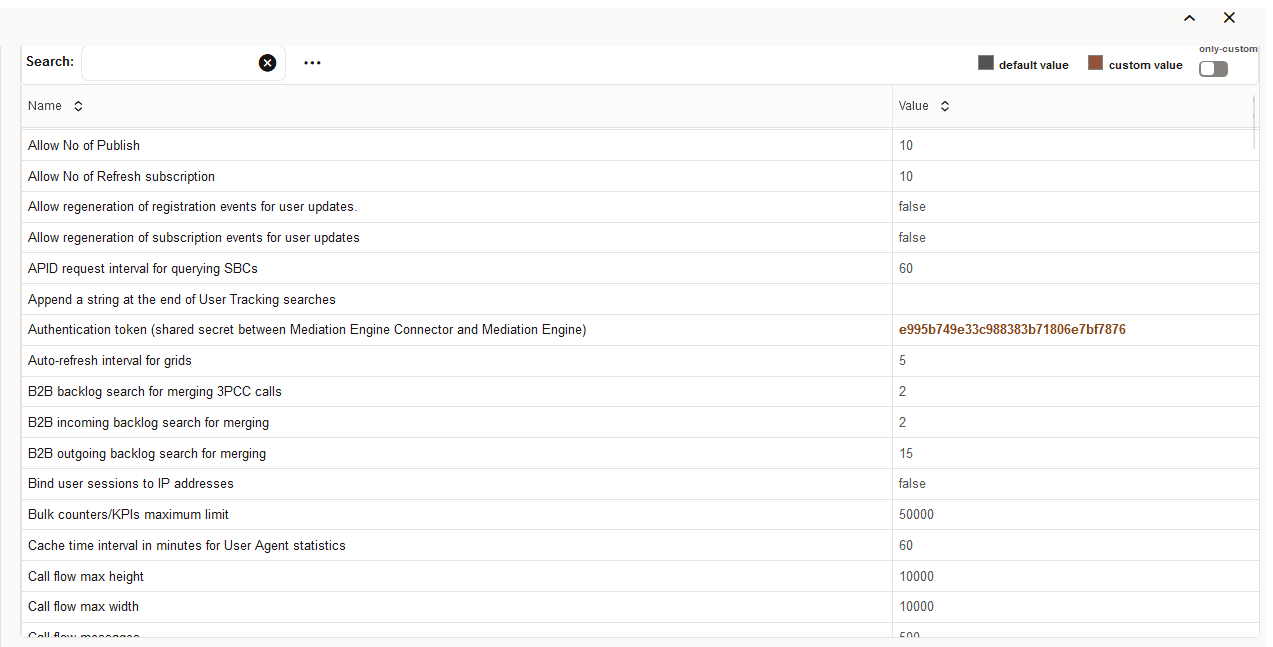
This table describes the system options:
Table 7-15 System Options
| Option | Description |
|---|---|
|
Name |
The name of the system option. |
|
Status |
Can be user defined if the option was changed by the administrator, or default if the option has the factory default value. |
|
Type |
The type of the system option. There are three types defined:
|
|
Value |
The current value of the setting. |
To change the value for a setting, double-click the table row. For example when you double-click the Session-timeout for calls setting, the Update System Settings window is shown. The Update System Settings window contains a short description of the system option, the default value, a maximum value in case of a number type option, and a value box or a check box in case of a Boolean type option. The Update button is for changing the system option to the new given value, and Reset to default resets the current value to the default one.
Figure 7-61 Update System Settings
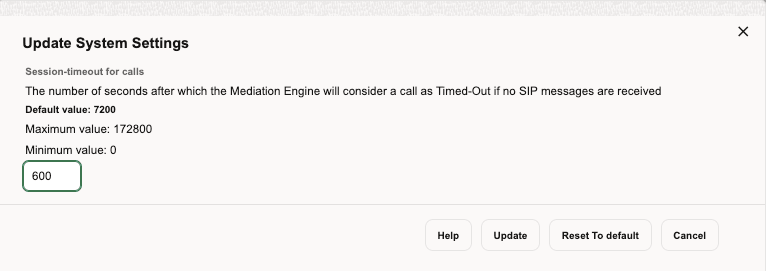
For a list of all system settings, see List of System Settings.
B2B Backlog Search for Merging 3PCC Call
When merging calls across B2B/SBC, the Operations Monitor searches for the matching call in the recent outgoing calls on that device. This parameter sets the default number of seconds in the past to search when an outgoing leg is received. The range is from 1 to 5; the default is 2.
Note:
If the call merging algorithm for 3PCC calls uses thetime_diff
function, then the values defined by it take precedence over this system
setting.
B2B Incoming Backlog Search for Merging
When doing call merging across B2B/SBC or Proxy device types, Operations Monitor is searching for the matching call in the recent calls going to or from that device. This options sets the default number of seconds to search the incoming call leg in the past when an outgoing leg is received.
Note:
If the call merging algorithm uses the time_diff function, then the values defined by it take precedence over this system setting.
Because the outgoing leg is normally seen by Operations Monitor after the incoming leg, we recommend setting a small value for this option.
B2B Outgoing Backlog Search for Merging
When doing call merging across B2B/SBC or Proxy device types, Operations Monitor is searching for the matching call in the recent calls going to or from that device. This options sets the default number of seconds to search the outgoing call leg in the past when an incoming leg is received.
Note:
If the call merging algorithm uses the time_diff function, then the values defined by it take precedence over this system setting.
Call Flow Messages
The maximum number of messages displayed in a Message Flow window. This number should be limited as a large amount of messages can significantly slow down the web browser. When the number is exceeded, a warning icon is displayed. By default, it is set to 100. The maximum value is 5000 messages.
Call Flow Maximum Height/Width
The maximum number of pixels (height or width) for rendered Message Flow. Limit the number of pixels if the diagrams take too long to render.
Call Flow Parallel Loading
If enabled, the Message Flow will render progressively, instead of all at once.
Calls Partition Size
As of release 2.10.0 the calls table in Operations Monitor is partitioned into several partitions. Operations Monitor only writes to one partition at a time. When this partition reaches its size limit, a new partition is created and subsequent calls are written to this partition. This setting gives the partition size limit in number of calls.
Call Report Maximum Number of Messages
The maximum number of messages to include in a Message Flow that is part of a call report (PDF).
Enabled Device Map
Operations Monitor can display a real-time map of the traffic going through the configured platform devices with respect to Call Attempts and Active Calls KPIs. Set it to True and from Platform devices settings, enable the devices to be displayed in the device map. Adjust the Device Map Limit setting as required.
Future Maximum Search
Sets a range of time in which new incoming calls can be included in a search you have initiated. Since new incoming calls can occur after a search has been initiated, this setting allows a range of time in which these incoming calls will be included in search results. The default setting is 10 seconds.
High Threshold for MOS
The upper threshold for good voice quality MOS value. Estimated MOS values higher than this threshold will be displayed in green in the Calls table. Lower values will be displayed in orange or red.
Group New Registrations from the Same User
If enabled, new registrations from the same user will be grouped together. However, the grouping is done per requested chunk, sometimes leading to duplicates still being displayed in the grid if the grid needs to do multiple requests to fill up a page. This is mostly notable when navigating back and forth through recent registration events, sometimes displaying different results for the same page.
Ignore Internal Registrations
A REGISTER SIP message exchanged between two devices from the platform is considered an internal registration. If disabled, registrations from inside the platform will be recorded. Otherwise, only the registrations between the end points and the first device from the platform are recorded. The default value is disabled. The value of this option must be the same as the Registrations Gone Events both enabled or both disabled.
Low Threshold for MOS
The lower threshold for good voice quality MOS value. Estimated MOS values lower than this threshold are displayed in red in the Calls table. Higher values are displayed in orange or green.
Match Registration Events by Comparing a Suffix of the Username
Operations Monitor matches the related registration attempts by the SIP username. If this value is 0, then the whole username is used. If non-zero, only that many of the last digits/characters are compared.
Set this to a non-zero if the Registration device is changing the SIP username/phone number when forwarding the message.
See also "Search for Matching Registration Segments".
Matching a Message to a Device
When a new message arrives, Operations Monitor tries to match it to a source device and to a destination device. The match is made based on the IP address, but there are some additional checks:
-
If the message has VLAN tag N: in order for the message to be matched to a device, the device must have either VLAN=N or no VLAN configured.
-
If source has specific MAC address(es) configured: in order for the message to be matched, the source MAC address of the message must match one of the MAC addresses configured for the device.
-
If destination has specific MAC address(es) configured: in order for the message to be matched, the destination MAC address of the message must match one of the MAC addresses configured for the device.
Matching a Message to an Existing Call Leg
When a new message arrives, Operations Monitor tries to match it to an existing call leg. In order for it to match, the following conditions have to be fulfilled:
-
In case both source IP and destination IP of the new message are configured as a device, the match to the existing leg is successful only if BOTH source and destination devices matched by the new message match the ones of the existing leg. For more information, see "Matching a Message to a Device".
-
In case the source IP or destination IP of a new message is not configured as a device, the following settings are also checked:
-
Transport VLAN aware
If this setting is 'true', Operations Monitor checks that the VLAN tag is the same (or that there is no VLAN tag) before matching this packet to an existing call leg. If this setting is 'false', the VLAN tag is ignored.
Note:
If the device is defined with VLAN=0 or VLAN=off, then the check only matches packets with no VLAN. See "Device Identification" for more information on VLAN tag matching in device definitions.
-
Transport MAC aware
If this setting is true, Operations Monitor checks that both source and destination MAC addresses are the same before matching this packet to an existing call leg. If one of the endpoints was already matched via device lookups, the MAC address check for that endpoint is skipped. If this setting is 'false', the MAC address is ignored.
-
Maximum Concurrent Sessions
The maximum number of parallel sessions a user can be logged into. If the limit is reached, the user cannot start additional sessions. In case the user has the permission to always log in, the user will still be able to log in, but for every new session that exceeds the limit the oldest of the user's existing sessions will be destroyed. For a description of permissions, see "User Management".
Maximum Stored Script Runs
The maximum number of stored app runs. Before an app is executed, scheduled or run manually, we check to make sure we are not violating this limit. The oldest stored app runs are removed as needed. This prevents frequently running or large result producing apps from depleting resources.
Maximum Script Output Size
The maximum size a script output can show. It is defined in bytes and limits the size that can be shown during a script run.
Newest Search Cache
Checks how often the newest date in the search cache is refreshed. The default setting is 1 second.
Note:
Changing this system setting can result in a loss of incoming calls.
Oldest Search Cache
Checks how often the oldest date in the search cache is refreshed. The default setting is 60 seconds.
Recurrent Alerts Threshold
Operations Monitor compares the time difference between a new alert and any previous unread alert that is identical (same definition and message) to avoid the creation of similar alerts within that period. You can specify the number of days for that period.
Registrations Gone Events
If enabled, when a REGISTER transaction occurs and not all previous known contacts of the user are seen in the successful answer, generates 'Gone' registration events for the missing contacts. In other words, if the subscriber registers a new SIP contact without explicitly de-registering the old one, a registration 'Gone' event is generated for the old contact. By default, this option is disabled.
Note:
In some networks in which the REGISTER messages are routed by intermediate devices that change the Contact header, this option can cause false Gone events. In this case, Oracle recommends you disable this option.
Search for Matching Registration Segments
When viewing the diagram of a Registration event, Operations Monitor searches for other related registration events. This option controls the time span during which Operations Monitor searches. If set to 0, the searching of related registration events is disabled.
This is useful for getting the flow of the registration request inside the platform. If you have devices that forward registration requests or that register themselves on behalf of the customer (as some SBC devices do), set this option to a non zero value. Also, make sure to disable the Ignore Internal Registrations option.
Session-Timeout For Calls
Session-timeout defines the number of seconds that Operations Monitor keeps a call active if no SIP messages are received for it. When the session timer expires, Operations Monitor marks the call with the state Timed out.
If the calls are not periodically refreshed in the monitored SIP network at SIP level, you might consider increasing this value. The default value is 2 hours (7200 seconds).
Timeout for Mediation Engine Querying
This setting gives a timeout for requests made by this Mediation Engine to its peer Mediation Engines. Ignore, if you use this Mediation Engine in standalone mode.
Timeout for Restore Savepoint
The number of seconds after which, if no response is received, the Mediation Engine will consider the restore configuration savepoint as timed out.
Note:
Use this setting when restoring large save points that require extra time for processing.User Devices Ignore Internal Registrations
Similar as Ignore Internal Registrations, but for the User Devices statistics. There are cases when it is desirable to take the internal registration into account but not to count them for the User Devices statistics. An example of this is when all the internal registrations use the same User-Agent string. If the Ignore Internal Registrations option is enabled, this option is ignored.
Users Loose Searching
If enabled, when searching users by using the live search feature, the last digits of the number act as wildcards to suggest similar numbers from the same range. By default it is disabled.
Use User Domains
Note:
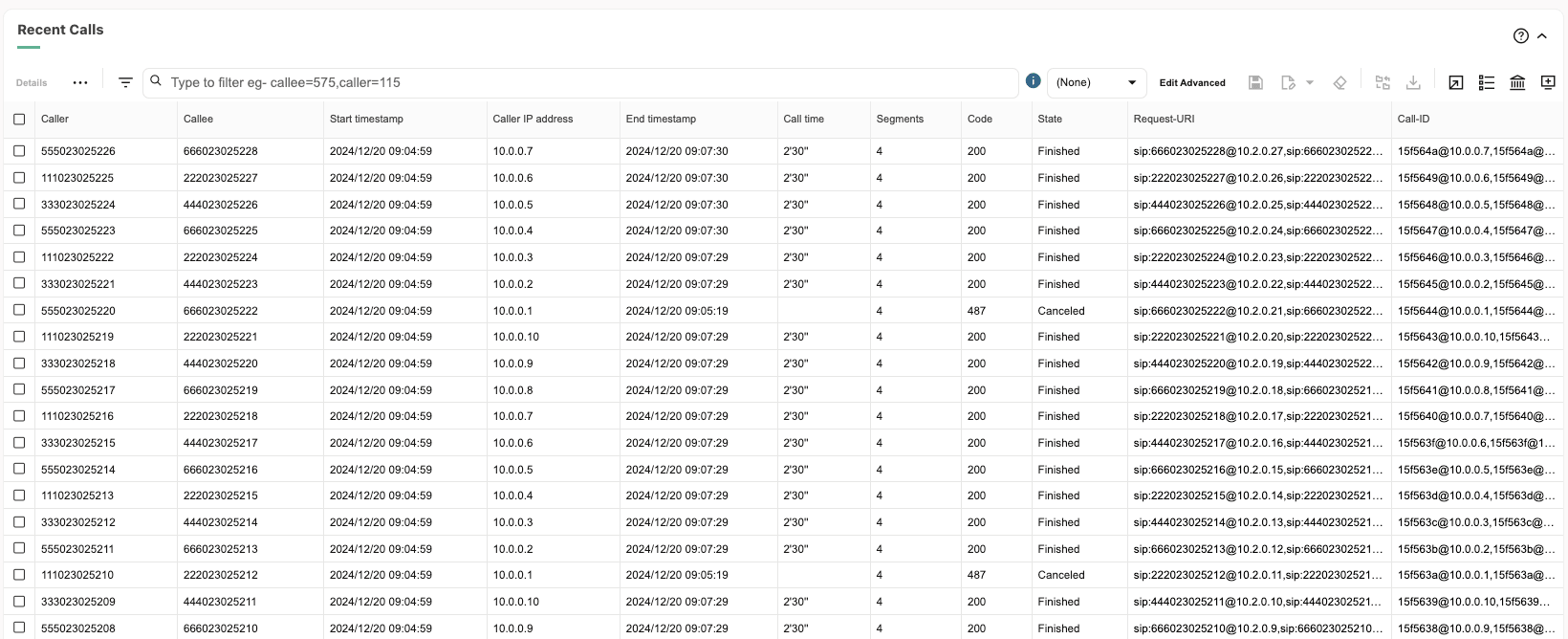
Changing this system setting requires a core restart, which causes a temporary drop in all metrics.If enabled, Operations Monitor uses the domain part of the SIP URI to differentiate the subscribers, in addition to the user name part/phone number. If the option is enabled, Operations Monitor also displays the domain part of the AOR of the subscribers in the web interface. See the graphics for comparative examples. By default, this option is disabled.
Figure 7-62 Calls Panel with Use Users Domains Disabled
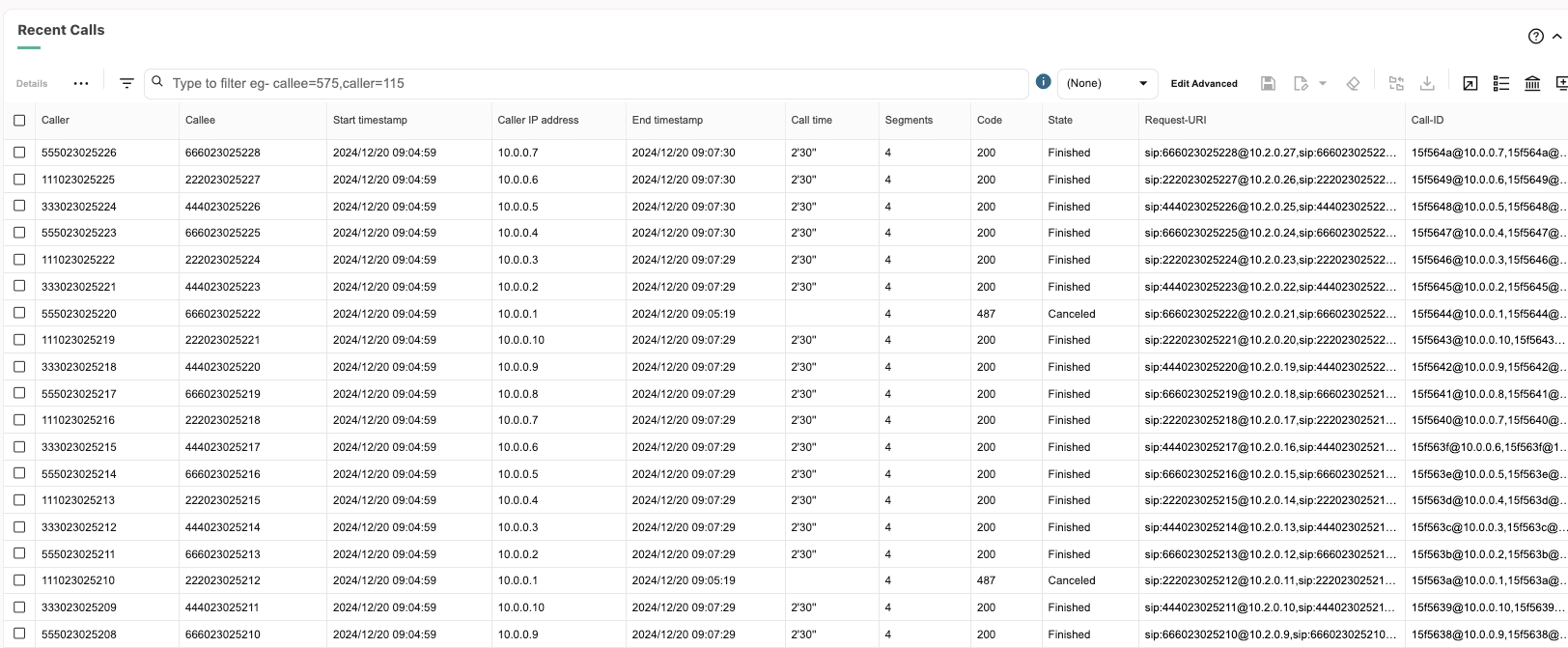
Figure 7-63 Calls Panel with Use Users Domains Enabled
Note:
Realms definitions delimited by domain names only work if this setting is enabled.Voice Quality Chart Scale in Minutes/Minute
Determines the scale of the Voice Quality chart. If true, the scale will be minutes/minute instead of minutes/15 minutes. Default is false (minutes/15 minutes).
Oracle SBC Config Upload
You can create new SIP trunks and devices based on an SBC configuration with the Oracle SBC Config function. The Oracle SBC Config function can also update existing SBC configurations. Every data point (for example, a trunk) that is added from an SBC configuration is marked in the configuration. This allows that all trunks created via an SBC configuration can be identified and later removed.
This graphic shows the Oracle SBC Config Upload page.
Figure 7-64 Oracle SBC Config Upload Page
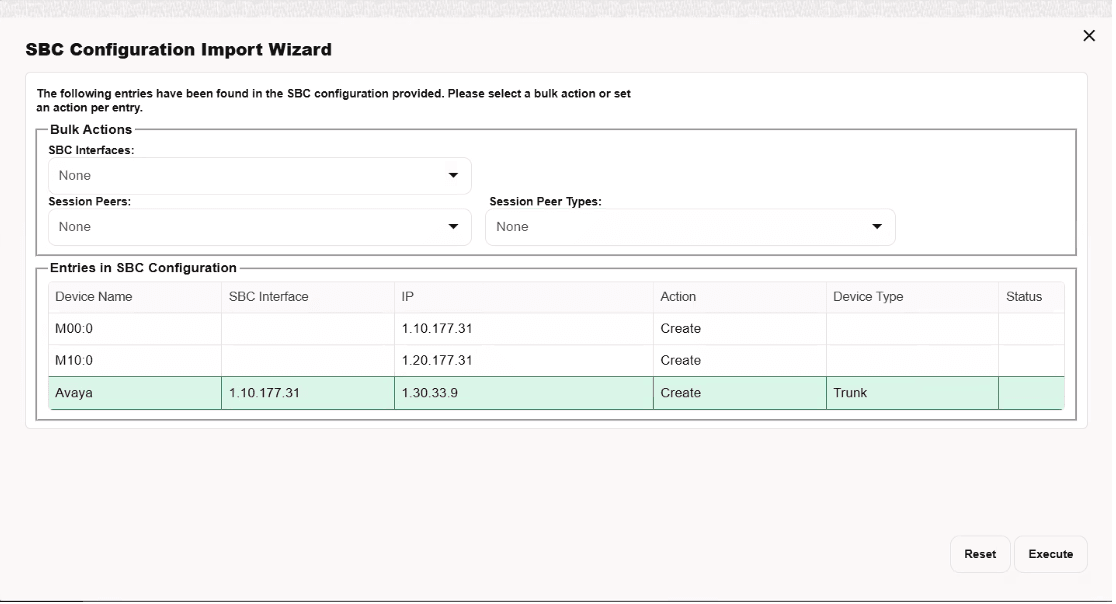
The SBC Configuration upload section contains the following check boxes:
-
Add device groups as single device
If this check box is selected before an upload, the session agents in the configuration file that are part of a session agent group are added to Operations Monitor as a single device with multiple IPs.
-
Resolve hostnames
By default, devices that do not have a numeric IP address specified in the configuration file, are skipped. If the Resolve hostnames check box is selected before an upload, Operations Monitor will try to resolve the hostnames for those devices.
Note:
This will increase the processing time for the change.Import Window
The import window shows all the changes that could be committed based on the given SBC configuration.
Figure 7-65 SBC Configuration Import Wizard Page
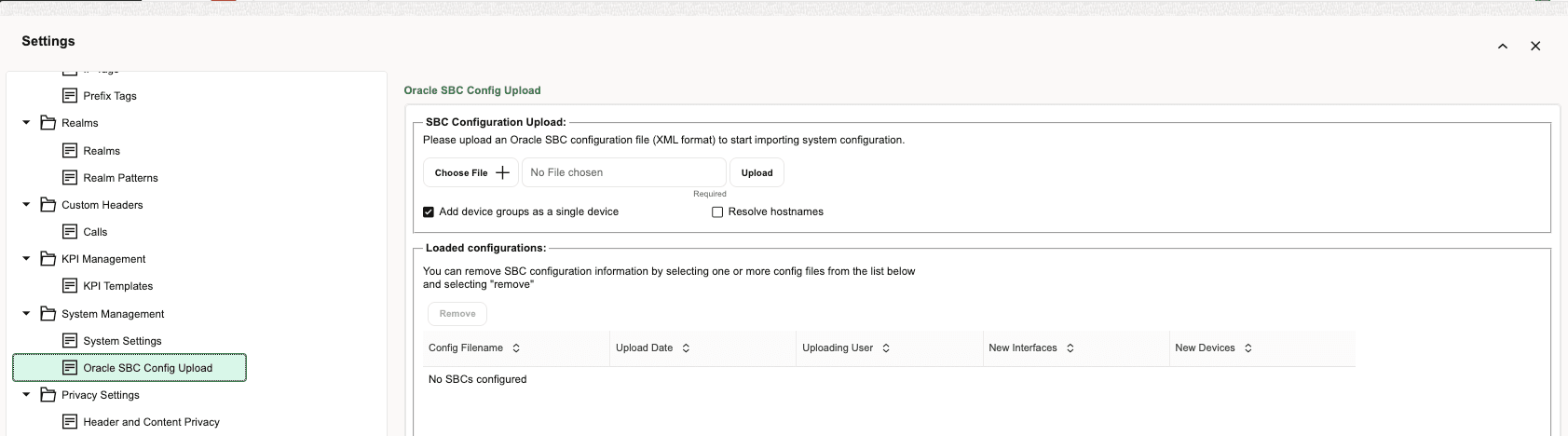
The SBC Configuration Import Wizard dialog box contains the following:
-
Bulk Actions section
Bulk actions set the per data point action to be applied. It does not automatically execute the action but sets the action for the given data points accordingly.
The Bulk Actions section contains the following fields:
-
SBC Interfaces
-
Session Peers
-
Session Peer Types
-
-
Entries in SBC Configuration table
This table lists all the entries that were found in the configuration.
Existing entries are marked with the Create check box disabled so that duplicates cannot be created. Valid options are Create and Ignore. All entries are identified by their IP or IP pair (in case of trunks) address.
The user can double-click a device to rename it.
-
Execute/Reset buttons
The Execute and Reset buttons at the bottom of the page are used to execute all actions on the page or reset to the default values.