Home Tab (Home Workspace)
The Home  tab displays your tasks, E-Signature tasks, notifications, emails from various workspaces, daily reports, and so on. In addition, depending on your permissions, the Home tab displays the Master Log - Business Processes grouping node.
Note:
The Home tab does not support Admin mode.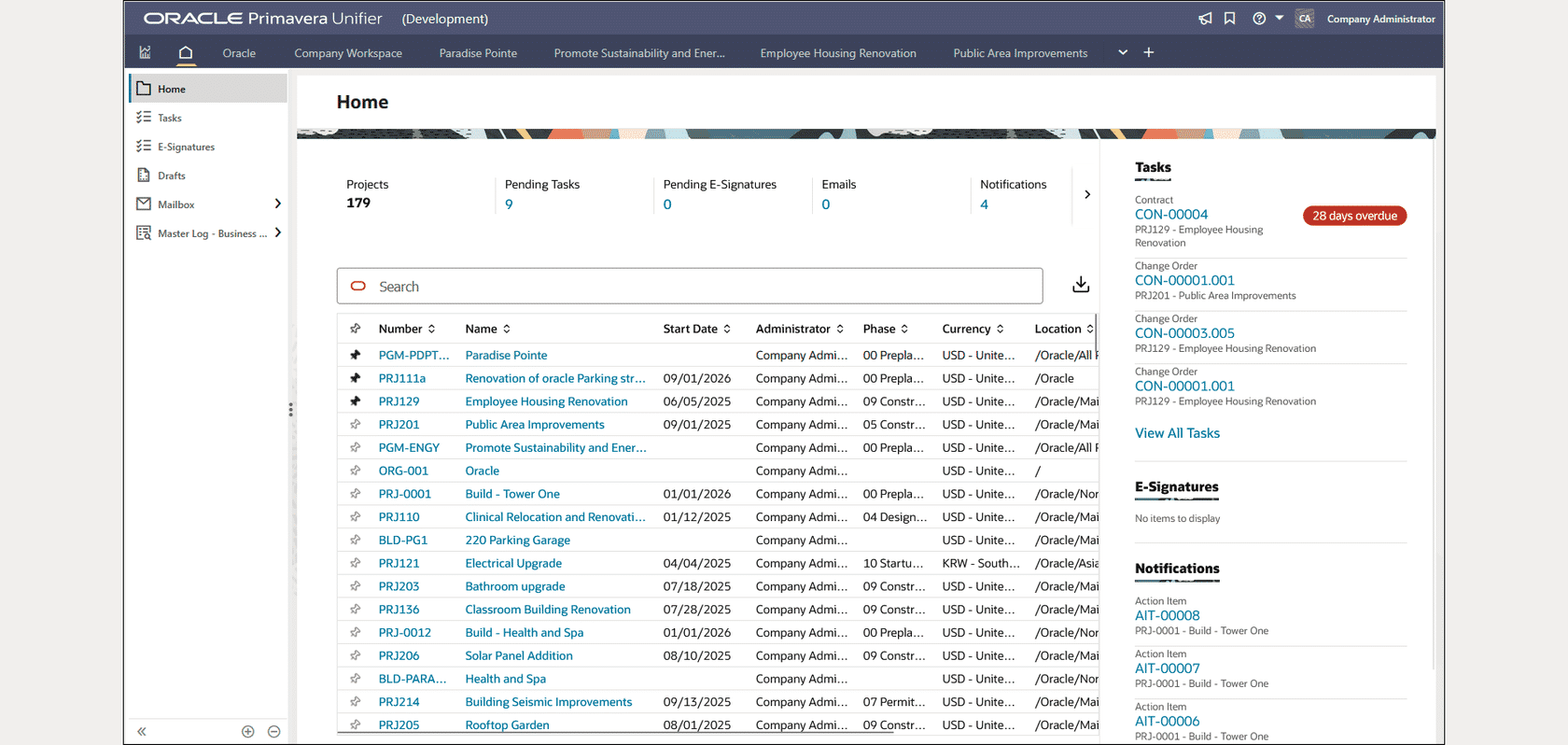
The Home tab contains the following:
-
Key Performance Indicator (KPI) cards display metrics for the following:
- Projects: The total number of active projects you have access to. Does not include inactive projects.
- Pending Tasks: The total number of pending tasks assigned to you. Selecting this link displays the Tasks log.
- Pending E-Signatures: The total number of pending e-signatures associated with your account. Selecting this link displays the E-signature Requests log.
- Emails: The total number of emails sent to you. Selecting this link displays the Inbox.
- Notifications: The total number of notifications you have received. Selecting this link displays the Notifications log.
- Search Bar: Enter your filter criteria to focus on a subset of projects you have access to.
-
Project List: A tabular list of projects with relevant details such as the project number, project name, status, and so on.
-
You can pin a maximum of five projects to display at the top of the project list.
-
Select the Project Number or Project Name to navigate to the landing page of the project in a new tab.
-
-
Download link: Select this link to download the projects to an Excel file.
-
The right panel displays the following sections:
- Tasks: Displays a maximum of five overdue and upcoming tasks by due date. Select View All Tasks to access the Tasks log.
- E-Signatures: Displays a maximum of five overdue and upcoming E-signature requests by due date. Select View All E-Signatures to access the E-Signature Requests log.
- Notifications: Displays a maximum of five overdue and upcoming Notifications by due date. Select View All Notifications to access the Notifications log.
-
The left Navigator contains the following nodes:
Note:
Your Navigator setup may differ, but the basic functionality is the same.Node or Sub-node Description Home In the Home log, you can see a list of tasks in your workspaces, by business process (BP) type and status. You can select a BP name to go to the BP log, within the corresponding workspace (company or project).
Tasks Select this node to access the Tasks log and attend to the tasks assigned to you. E-signatures Select this node to access the E-signature Requests log and attend to any requests you have received. Notifications Select this node to access the Notifications log and attend to the notifications you have received. Inbox Select this node to access the Inbox log and attend to the emails you have received. Drafts Select this node to access the Drafts log and continue your work with items in draft mode. Sent Items Select this node to access the Sent Items log and check for any emails that you had sent. Daily Reports Select this node to access the Daily Reports log and attend to reports that you have permission to access. Contracts Select this node to access the Contracts log and review the contracts that you have permission to access. Master Log - Business Processes Depending on your permissions, select this node to access all the BP types at the project/shell level, in separate functional nodes for each type. This includes workflow, non-workflow, and multiple record BPs.
The following provides more details for the Home tab nodes: