Savings Hub Program Details
The Savings Hub Program Details page provides customers with the opportunity to learn more about a particular assistance program highlighted in their Savings Hub Program Results page. The goal is to ensure that the customer receives all of the information they need to confirm their eligibility for a given program and to enroll in it successfully. Customers can access the program details for a specific program by clicking the More Details button located on each program card.
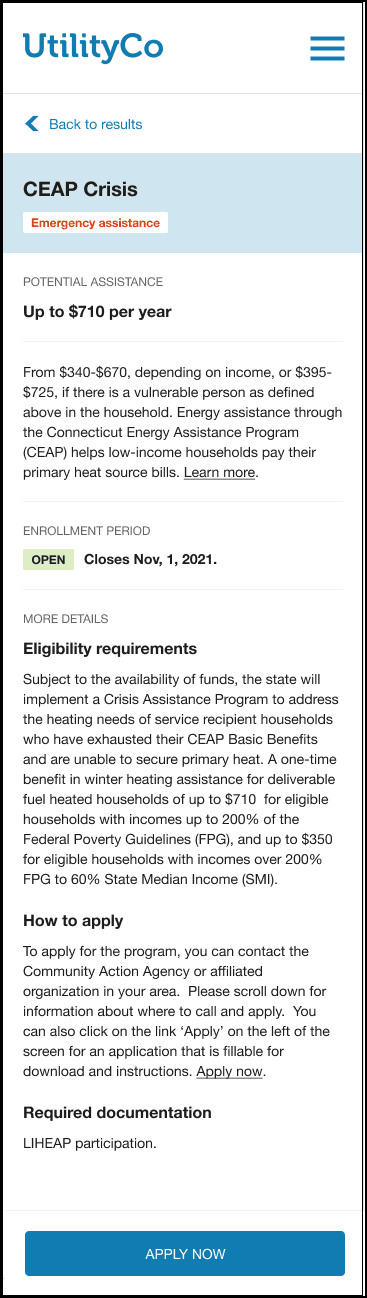
Configuration Options
For each element listed in the table, indicate the desired configuration in the Input Value column. If you do not provide an input for optional configurations, the default will be used.
| Configuration Option | Input Value |
|---|---|
|
Program Name The name of the program the customer is eligible for. Program names must be provided by the utility. Default: N/A. Note: This element must match what is configured in the Savings Hub Program Results page. |
Required Contact Your Delivery Team about customizing this element. |
|
Program Key Benefit A label that identifies the key benefit of the program to the customer in order to motivate them to enroll in the program. Note: This element must match what is configured in the Savings Hub Program Results page. Default:
|
Optional
|
|
Program card - Bill Assistance Estimator or Rebate Amount Provides an estimated range of savings if the customer participates in the program. Default: $xx - $xx Note: This element must match what is configured in the Savings Hub Program Results page. |
Required Contact Your Delivery Team about customizing this element. |
|
How to Apply Header Instructions for eligible customers to apply to the program in-person, by mail, or online. Default: How to Apply |
Optional
|
|
Required documentation Any additional documentation that must be supplied with the customer's application. Default: Possible documents may include one or more the following:
|
Required Contact Your Delivery Team about customizing this element. |
|
FAQs Sub-header The FAQs section has a maximum of five frequently asked questions and their answers. Default: FREQUENTLY ASKED QUESTIONS |
Optional
|
|
FAQ headings and answers A maximum of five frequently asked questions and their answers can be added to the program details. FAQs do not repeat content that is elsewhere in the program card or program details. For example, How soon does the discount take effect? Default: N/A. |
Required Contact Your Delivery Team about customizing this element. |
User Experience Variations
The user experience varies for customers depending upon their service types, available data, costs, and locale. Note that the following list indicates the primary user experience variations, not all possible variations.
Recommended program
If the customer is viewing the program details for the program that was recommended on the Affordability Savings Hub Program Results page, a recommended header appears above the program header to remind the user that this is the best program for them as they review the program details.
Enrollment Closed
When a program is not currently accepting applications (closed), the enrollment information is marked as closed and the call-to-action button, Apply Now, is removed.