Integration Points
This integration supports the following integration points:
• AP Data
General Ledger
For general ledger transactions, Oracle Utilities Customer Care and Billing is considered the sub-ledger and Oracle E-Business Suite Financials for General Ledger and Accounts Payable considered the general ledger:
• The General Ledger transactions are written in one direction; from Oracle Utilities Customer Care and Billing to Oracle E-Business Suite Financials for General Ledger and Accounts Payable.
• The financial transactions are moved from the sub-ledger to the general ledger when two consecutive Oracle Utilities Customer Care and Billing batch processes, GLASSIGN and GLS, are run according to a set schedule. These are standard processes released with Oracle Utilities Customer Care and Billing.
• The GLASSIGN and GLS processes group all the financial transactions in Oracle Utilities Customer Care and Billing that must be included in a batch. The Integration Point looks for batches of financial transactions that are ready to be sent, extracts and summarizes the data, translates the data from a sub-ledger format to the format required by the general ledger, and writes it to the Oracle E-Business Suite Financials for General Ledger and Accounts Payable General Ledger integration table. The standard General Ledger integration table released with the Oracle E-Business Suite Financials for General Ledger and Accounts Payable product is used.
• Once the entries are created in Oracle E-Business Suite Financials for General Ledger and Accounts Payable staging tables, the journal creation, editing and posting to the ledger must be executed within Oracle E-Business Suite Financials for General Ledger and Accounts Payable. The standard Journal Import process must be executed to create the necessary journal entries within the General Ledger.
You can accomplish this by scheduling the standard Oracle E-Business Suite Financials for General Ledger and Accounts Payable Journal Import process or by manually running this process through the Standard Request Submission (SRS) provided within the Oracle E-Business Suite Financials for General Ledger and Accounts Payable product.
Note: Refer to the Oracle Utilities Customer Care and Billing documentation for more information on GLASSIGN and GLS.
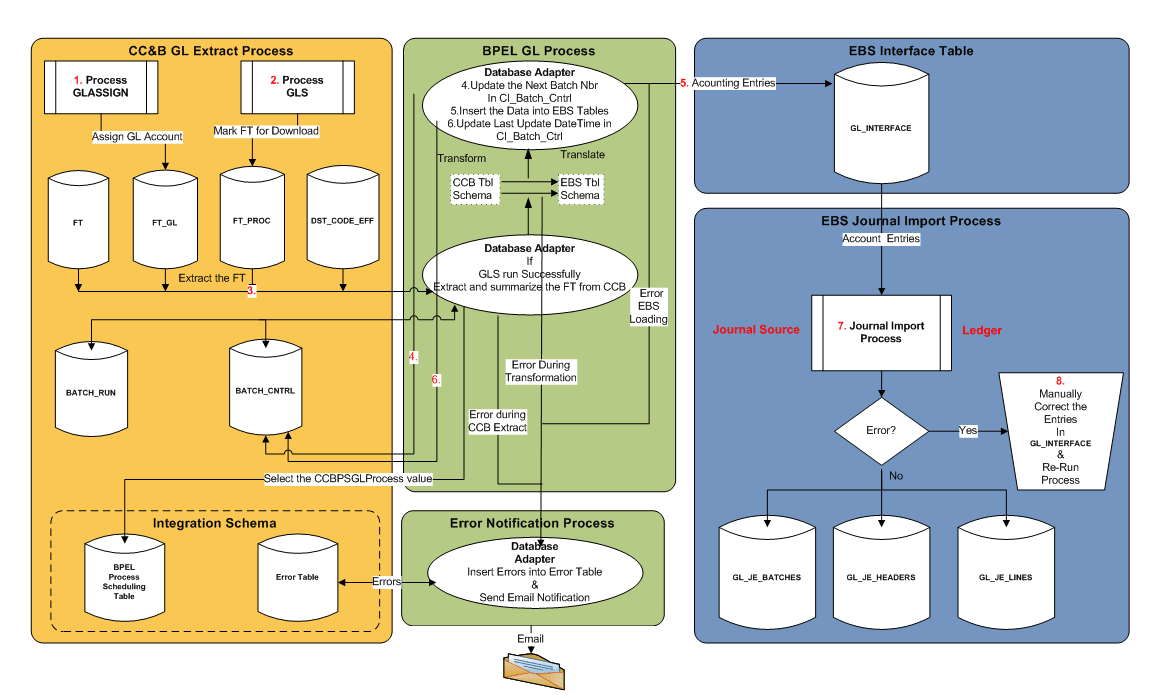
These are the steps for the GL process flow:
1. Run the GLASSIGN batch program in Oracle Utilities Customer Care and Billing.
2. Run the GLS batch program in Oracle Utilities Customer Care and Billing.
3. The BPEL process extracts FT information from Oracle Utilities Customer Care and Billing.
4. The BPEL process updates the Next_Batch_Nbr for GLDL in CI_Batch_Ctrl table in Oracle Utilities Customer Care and Billing.
5. The BPEL process transforms and inserts the data into Oracle E-Business Suite Financials for General Ledger and Accounts Payable interface tables.
6. The BPEL process updates the Last_Update_DateTime in CI_Batch_Ctrl table in Oracle Utilities Customer Care and Billing.
7. Run the Journal Import process in Oracle E-Business Suite Financials for General Ledger and Accounts Payable to import FTs.
8. Any errors in interface tables must be corrected in Oracle E-Business Suite Financials for General Ledger and Accounts Payable and Journal Import process must be re-run.
Logic used in GL integration Point
1. BPEL Polls to verify that FTs are ready for extraction.
GetCCBGLData integration process polls Oracle Utilities Customer Care and Billing to verify whether financial tractions are ready for extraction.
If GLS has run since the last run of the integration
AND the GLS run has completed successfully
Retrieve the Batch of Rows identified in CI_BATCH_RUN (created by GLS)
Else
Do nothing
2. Update the NEXT BATCH NUMBER in CI_BATCH_CTRL.
UpdateCCBGLControlTable runs the below query to update the batch number in Oracle Utilities Customer Care and Billing batch control table:
Increment by 1 the NEXT_BATCH_NBR in CI_BATCH_CTRL WHERE BATCH_CD is GLDL
3. Extract Financial Transactions from Oracle Utilities Customer Care and Billing.
GetCCBGLData process runs the following query to extract the FTs from Oracle Utilities Customer Care and Billing.
Select the information shown in the table below:
FROM CI_FT_PROC, CI_FT_GL, CI_FT FT, CI_DST_CODE_EFF
WHERE the rows were marked by GLS as belonging to the latest batch that is ready to be integrated
Summarize and group the rows
BY FTPR.BATCH_NBR, FTGL.DST_ID, FTGL.GL_ACCT, FT.CIS_DIVISION, FT.GL_DIVISION, FT.CURRENCY_CD, FT.FT_TYPE_FLG, DST.STATISTICS_CD, FT.ACCOUNTING_DT, DST.FUND_CD
Extract Information
Field | Description |
Source System | Set to CCB |
BATCH_NBR | The batch number for the group of FTs extracted. The batch number is assigned to the financial transaction when GLS is run |
DIST_ID | The distribution code used in Oracle Utilities Customer Care and Billing to derive the GL account information. A sample data example is R – ELERES for electric residential revenue financial transactions |
GL_ACCT | The actual GL account with ‘.’ separating the substructure numbers like department. For example 101.73653.8873..87 |
CIS_DIVISION | The CIS Division |
GL_DIVISION | The GL Division |
CURRENCY_CD | The currency type, such as USD |
STATISTICS_CD | The identifier of the type of statistical amount being sent to GL such as KWH for electricity or CCF for gas |
ACCOUNTING_DT | The effective accounting date for the GL transactions |
AMOUNT | The dollar amount of the GL debit or credit |
STATISTIC_AMOUNT | The quantity associated with the Statics Code |
FT_TYPE_FLG | The Financial Type Flag. For example,Payment, Billing or Adjustment. Note: FT_TYPE_FLG is only retrieved from CCB if Patch 25758196 is applied. |
When the above is executed successfully, continue by executing the following:
1. Update the LAST UPDATE TIME FOR GLDL in CI_BATCH_CTRL.
2. Set the last update date and time by setting the following:
CI_BATCH_CTRL LAST_UPDATE_DTTM to SYSDATE WHERE BATCH_CD = 'GLDL'
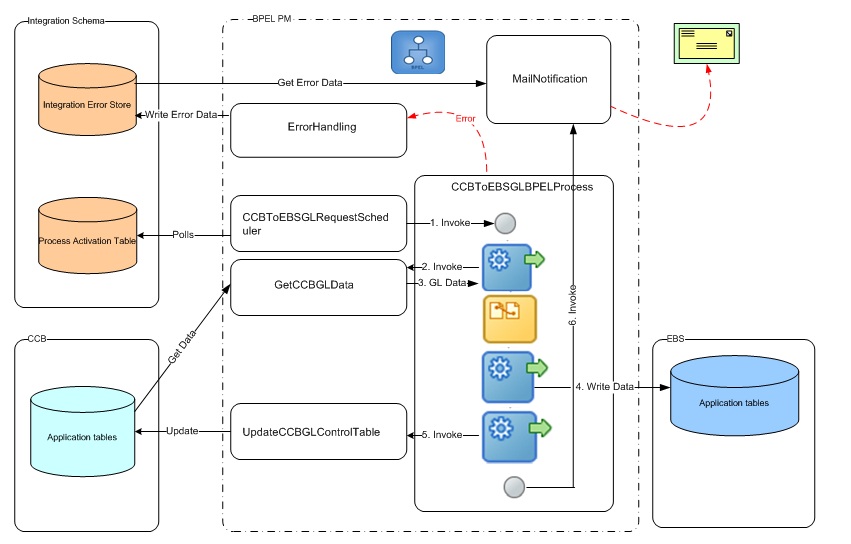
Composites
The following is the list of composite processes that comprise the GL Integration between Oracle Utilities Customer Care and Billing and Oracle E-Business Suite Financials for General Ledger and Accounts Payable:
Composite Name | Description |
CCBToEBSGLRequestScheduler | Used to poll the INTEGRATION_PROCESS_ACTIVATION table at set intervals for GL interface |
CCBToEBSGLBPELProcess | Main process of the GL Integration. Get the GL data from Oracle Utilities Customer Care and Billing and inserts into Oracle E-Business Suite |
GetCCBGLData | To verify that GL data is available for transfer. |
UpdateCCBGLControlTable | To update the Oracle Utilities Customer Care and Billing batch control table when applicable |
Integration Process/ Composite name | CCBToEBSAPRequestScheduler |
Description | Polls the INTEGRATION_PROCESS_ACTIVATION table in the Integration Schema at predefined intervals and invokes the CCBToEBSAPBPELProcess. |
Calls to | CCBToEBSAPBPELProcess ErrorhandlingProcess (if an error occurs) |
Calls from | None |
Inputs | None |
Outputs | None |
Interaction pattern | Asynchronous |
Exceptions/Errors | Possible Exceptions - None |
Integration Process/ Composite name | CCBToEBSAPBPELProcess |
Description | Main process of the AP Integration. Gets the AP Data from Oracle Utilities Customer Care and Billing, transforms it, and inserts it into Oracle E-Business Suite Financials for General Ledger and Accounts Payable AP Invoice Interface tables (AP_INVOICES_INTERFACE, AP_INVOICE_LINES_INTERFACE). Additionally, updates status in two of the Oracle Utilities Customer Care and Billing tables. Invokes services for error handling and email notification. |
Calls to | • GetCCBAPData • UpdateCCBAPControlTable • ErrorhandlingProcess (if an error occurs) • MailNotification |
Calls from | CCBToEBSAPRequestScheduler |
Inputs | None |
Outputs | None |
Interaction pattern | Asynchronous |
Exceptions/Errors | Possible Exceptions – None |
Integration Process/ Composite name | GetCCBGLData |
Description | Verify that GL data is available in Oracle Utilities Customer Care and Billing for transfer. If data is available, it returns a dataset to the calling program. |
Calls to | |
Calls from | CCBToEBSGLBPELProcess |
Inputs | Input String object contains the Integration Point name invoking this BPEL process. Example: EBS |
Outputs | SelectCCBGLRecordsOutput xml object |
Interaction pattern | Synchronous |
Exceptions/Errors | Possible Exceptions – BPEL Remote Fault, BPEL Binding Fault |
Integration Process/ Composite name | UpdateCCBGLControlTable |
Description | Update the next batch number in the GL Batch Control table available in Oracle Utilities Customer Care and Billing database |
Calls to | |
Calls from | CCBToEBSGLBPELProcess |
Inputs | None |
Outputs | None |
Interaction pattern | Synchronous |
Exceptions/Errors | Possible Exceptions – BPEL Remote Fault, BPEL Binding Fault |
Database Tables Involved in General Ledger
The following Oracle Utilities Customer Care and Billing tables are used when extracting Financial Transaction data for sending to the GL as Journal Vouchers.
Table Name | Description | Application Name |
|---|---|---|
CI_FT | Financial Transaction | OUCCB |
CI_FT_GL | Financial Transaction General Ledger | OUCCB |
CI_DST_CODE_EFF | Distribution Code GL Account | OUCCB |
CI_FT_PROC | FT Process | OUCCB |
CI_BATCH_CTRL | Batch Control | OUCCB |
CI_BATCH_RUN | Batch Run | OUCCB |
CI_BATCH_JOB | Batch Job | OUCCB |
GL_INTERFACE | Is used to stage the incoming accounting entries from Oracle Utilities Customer Care and Billing | EBS |
AP Request
• The AP Request transactions are written in one direction from Oracle Utilities Customer Care and Billing to Oracle E-Business Suite Financials for General Ledger and Accounts Payable. Customer, customer account, and AP Request information is extracted from Oracle Utilities Customer Care and Billing and imported to the Oracle E-Business Suite Financials for General Ledger and Accounts Payable Payables as Invoice import information. Customer and AP Request information is used to create a one-time supplier and supplier site that is used for invoice creation.
• The integration extracts AP Requests from Oracle Utilities Customer Care and Billing where the status of the AP Request is 'N' which indicates that the AP Request is 'Not Selected for Payment'. Once the data has been integrated, the integration software updates the AP Request status in Oracle Utilities Customer Care and Billing to 'R' indicating it has been 'Requested for Payment'.
• Once the customer and refund request data is loaded into Oracle E-Business Suite Financials for General Ledger and Accounts Payable by the integration product, the standard Payables Open Interface Import (APXIIMPT) process must be executed to create invoices. This can be accomplished using a scheduled process or by manually running the process through the standard user interface provided within the Oracle E-Business Suite Financials for General Ledger and Accounts Payable product.
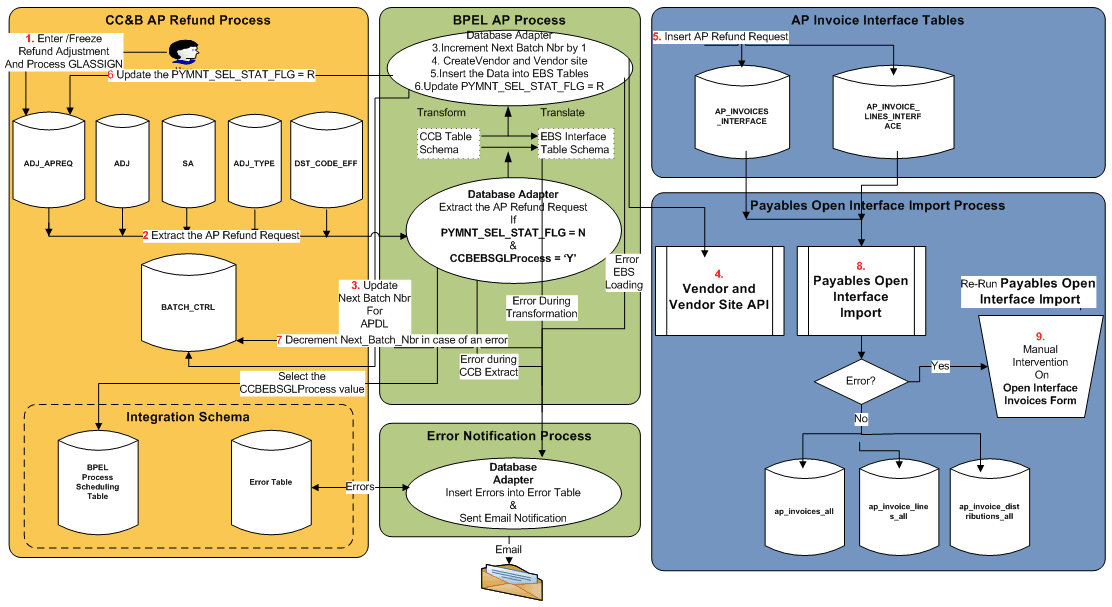
These are the steps in AP request flow:
1. Create and freeze an adjustment in Oracle Utilities Customer Care and Billing and run the GLASSIGN batch program.
2. The integration process extracts AP Refund Request information from Oracle Utilities Customer Care and Billing.
3. BPEL process updates the Next_Batch_Nbr for APDL in CI_Batch_Ctrl table in Oracle Utilities Customer Care and Billing.
4. The BPEL process invokes Vendor and Vendor Site API in Oracle E-Business Suite Financials for General Ledger and Accounts Payable to create/update Vendor and Vendor Site.
5. The BPEL process transforms and inserts the data into Oracle E-Business Suite Financials for General Ledger and Accounts Payable interface tables.
6. The BPEL updates the status of A/P Request in Oracle Utilities Customer Care and Billing.
7. In case of an error, the BPEL decrements the Next_Batch_Nbr for APDL batch code in CI_Batch_Ctrl table in Oracle Utilities Customer Care and Billing.
8. Run the Payables Open Interface Import process in Oracle E-Business Suite Financials for General Ledger and Accounts Payable to import the invoices.
9. Any errors in Interface tables must be corrected in Oracle E-Business Suite Financials for General Ledger and Accounts Payable and the Payables Open Interface Import process must be re-run.
Logic Used for AP Request Integration Point
1. Update the NEXT BATCH NUMBER in CI_BATCH_CTRL.
Increment by 1 the NEXT_BATCH_NBR in CI_BATCH_CTRL where the BATCH_CD is APDL
2. BPEL polls to verify whether the AP requests are ready for extraction.
GetCCBAPData integration process polls Oracle Utilities Customer Care and Billing to verify whether AP requests are ready for extraction.
If there are AP Requests where the CI_ADJ_APREQ PYMNT_SEL_STAT_FLG is N (Not selected for Payment) AND the associated adjustment is in a frozen status
Process the AP Requests that have not been integrated before and mark them all with the next APDL Batch Number
Else do nothing.
3. Extract of customer and AP Refund request.
An extract of Customer and AP refund request is made from Oracle Utilities Customer Care and Billing.
Select the following information:
AP_REQ_ID, GL_ACCT,CHAR_VAL, SA_ID, ADJ_ID, CRE_DT, ADJ_TYPE_CD, CIS_DIVISION, CHAR_VAL, ENTITY_NAME, COUNTRY, ADDRESS1, ADDRESS2, ADDRESS3, ADDRESS4,
CITY, NUM1, NUM2, COUNTY, HOUSE_TYPE, STATE, POSTAL, CURRENCY_CD, CURRENCY_PYMNT, GEO_CODE, IN_CITY_LIMIT, PYMNT_METHOD_FLG, ADJ_AMT, SCHEDULED_PAY_DT
(Refer to the mapping table within this document for more details)
FROM CI_ADJ_APREQ, CI_ADJ, CI_SA, CI_ADJ_TYPE, CI_DST_CODE_EFF, CI_DST_CD_CHAR, CI_CIS_DIV_CHAR
Where the PYMNT_SEL_STAT_FLG status flag is N (Not Selected for Payment)
AND the Adjustment is frozen
4. Updating CI_ADJ_APREQ Status.
In UpdateCCBAPAdjReqTable integration process payment status flag is updated to R.
UPDATE CI_ADJ_APREQ
SET PYMNT_SEL_STAT_FLG to R (Requested for Payment)
5. Decrement the BATCH NUMBER in CI_BATCH_CTRL and CI_ADJ_APREQ tables in case of an error.
In case of an error:
Decrement by 1 the NEXT_BATCH_NBR in CI_BATCH_CTRL where the BATCH_CD is APDL
Update the Batch Number in CI_ADJ_APREQ table to previous value so that the same set of records can be processed again
The BPEL flow for AP Request Integration Point is shown below: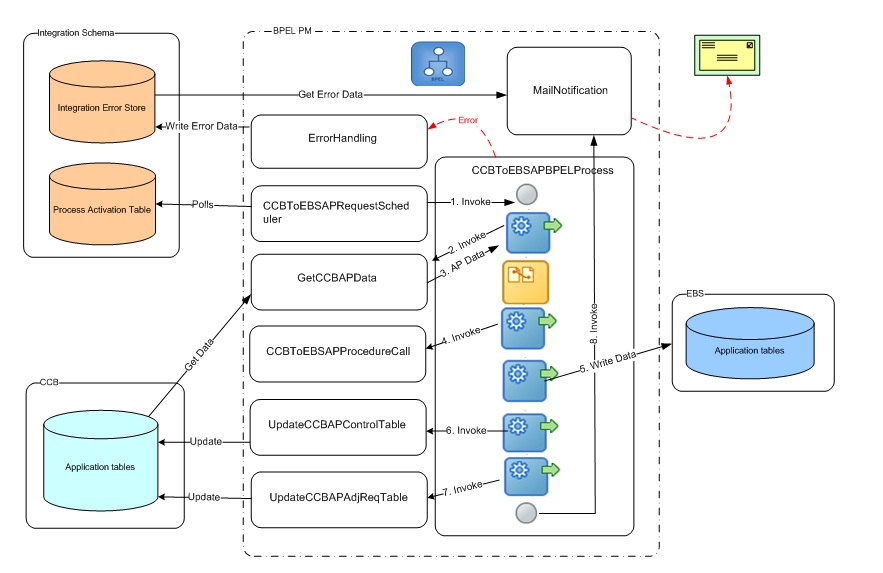
Composites
The following is the list processes that comprise the AP Request Integration between Oracle Utilities Customer Care and Billing and Oracle E-Business Suite Financials for General Ledger and Accounts Payable:
Composite Name | Description |
CCBToEBSAPRequestScheduler | Used to poll the INTEGRATION_PROCESS_ACTIVATION table at set intervals for AP interface. |
CCBToEBSAPBPELProcess | Main process of the AP Integration. Gets the AP Data from Oracle Utilities Customer Care and Billing and inserts into Oracle E-Business Suite. |
GetCCBAPData | Checks if AP Data is available in Oracle Utilities Customer Care and Billing for transfer. |
CCBToEBSAPProcedureCall | Process to create/update Supplier and site in Oracle E-Business Suite. |
UpdateCCBAPControlTable | To update the next batch number in the AP Batch Control table. |
UpdateCCBAPAdjReqTable | To update payment flag to R in the Oracle Utilities Customer Care and Billing CI_ADJ_APREQ table. |
Integration Process/ Composite name | CCBToEBSAPRequestScheduler |
Description | Polls the INTEGRATION_PROCESS_ACTIVATION table in the Integration Schema at predefined intervals and invokes the CCBToEBSAPBPELProcess. |
Calls to | CCBToEBSAPBPELProcess |
Calls from | None |
Inputs | None |
Outputs | None |
Interaction pattern | Asynchronous |
Exceptions/Errors | Possible Exceptions - None |
Integration Process/ Composite name | CCBToEBSAPBPELProcess |
Description | Main process of the AP Integration. Gets the AP Data from Oracle Utilities Customer Care and Billing, transforms it, and inserts it into Oracle E-Business Suite Financials for General Ledger and Accounts Payable AP Invoice Interface tables (AP_INVOICES_INTERFACE, AP_INVOICE_LINES_INTERFACE). Additionally, updates status in two of the Oracle Utilities Customer Care and Billing tables. Invokes services for error handling and email notification. |
Calls to | • GetCCBAPData • UpdateCCBAPControlTable • UpdateCCBAPAdjReqTable • ErrorhandlingProcess (if an error occurs) • MailNotification |
Calls from | CCBToEBSAPRequestScheduler |
Inputs | None |
Outputs | None |
Interaction pattern | Asynchronous |
Exceptions/Errors | Possible Exceptions – BPEL Remote Fault, BPEL Binding Fault. |
Integration Process/ Composite name | GetCCBAPData |
Description | Checks if AP Data is available in Oracle Utilities Customer Care and Billing for transfer. If data is available, it returns a dataset to the calling process. |
Calls to | |
Calls from | CCBToEBSAPBPELProcess |
Inputs | Input String object containing the Integration Point name invoking this BPEL process. For example: EBS |
Outputs | SelectCCBRecordsWithTemplate xml object |
Interaction pattern | Synchronous |
Exceptions/Errors | Possible Exceptions - BPEL Remote Fault, BPEL Binding Fault |
Integration Process/ Composite name | CCBToEBSAPProcedureCall |
Description | Process to create/update Supplier and site in Oracle E-Business Suite. Invokes Integration package CCB_EBS_SUPPLIERS_IMPORT_PKG. Invokes services for error handling and email notification |
Calls to | |
Calls from | CCBToEBSAPBPELProcess |
Inputs | CCBToEBSAPProcedureCallProcessRequest xml object |
Outputs | None |
Interaction pattern | Asynchronous |
Exceptions/Errors | Possible Exceptions – BPEL Remote Fault, BPEL Binding Fault. |
Integration Process/ Composite name | UpdateCCBAPControlTable |
Description | Updates the next batch number in the AP Batch Control table available in the Oracle Utilities Customer Care and Billing Database. |
Calls to | |
Calls from | CCBToEBSAPBPELProcess |
Inputs | None |
Outputs | None |
Interaction pattern | Synchronous |
Exceptions/Errors | Possible Exceptions – None |
Integration Process/ Composite name | UpdateCCBAPAdjReqTable |
Description | Updates PYMNT_SEL_STAT_FLG to R in the Oracle Utilities Customer Care and Billing AP Adjustment Request table CI_ADJ_APREQ for the provided AP Request ID. |
Calls to | |
Calls from | CCBToEBSAPBPELProcess |
Inputs | CiAdjApreqCollection xml object |
Outputs | None |
Interaction pattern | Synchronous |
Exceptions/Errors | Possible Exceptions – None |
Database tables involved in AP Request
The Oracle Utilities Customer Care and Billing APREQ table is considered an interface table for this integration point even though it is a core table within Oracle Utilities Customer Care and Billing. BPEL extracts the data directly from the core tables. The following tables are used when extracting AP Request information from Oracle Utilities Customer Care and Billing.
Table Name | Description | Application Name |
CI_ADJ_APREQ | A/P Check Request | OUCCB |
CI_ADJ | Adjustment | OUCCB |
CI_SA | Service Agreement | OUCCB |
CI_ACCT | Account | OUCCB |
CI_ACCT_PER | Account Person Relationship | OUCCB |
CI_PER | Person | OUCCB |
CI_PER_NAME | Person Name | OUCCB |
AP_INVOICES_ INTERFACE | Used to stage the incoming AP Requests from Oracle Utilities Customer Care and Billing | EBS |
AP_INVOICE_LINES_ INTERFACE | Used to stage the incoming AP Requests from Oracle Utilities Customer Care and Billing | EBS |
AP_INTERFACE_ REJECTIONS | Error messages are stored in this table | EBS |
Oracle Application API's to create/update Vendor and Vendor Site:
• AP_VENDOR_PUB_PKG.CREATE_VENDOR
• AP_VENDOR_PUB_PKG.CREATE_VENDOR_SITE
• AP_VENDOR_SITES_PKG.UPDATE_ROW
AP Data
• The AP Data transactions are written in one direction from Oracle E-Business Suite Financials for General Ledger and Accounts Payable to Oracle Utilities Customer Care and Billing.
• The payment information for system-generated checks to customers is generated and processed in Oracle E-Business Suite Financials for General Ledger and Accounts Payable and then exported to Oracle Utilities Customer Care and Billing.
This Payment information corresponds to the AP Refund Requests originally generated in Oracle Utilities Customer Care and Billing and exported to Oracle E-Business Suite Financials for General Ledger and Accounts Payable for payment processing. The Integration Point updates the original AP Request in Oracle Utilities Customer Care and Billing with the details of the payment including the check number and date.
• Once a payment has been created in Oracle E-Business Suite Financials for General Ledger and Accounts Payable and the information is integrated to Oracle Utilities Customer Care and Billing, the AP Request status in Oracle Utilities Customer Care and Billing is updated to 'P' indicating that the AP Request has been paid. Additional statuses that can occur include 'C' - Closed or on Hold and 'X' - Cancelled.
Refer to the table below to review how canceled payments are handled:
Oracle E-Business Suite Financials for General Ledger and Accounts Payable Action | Oracle Utilities Customer Care and Billing AP Request Resulting Action | Oracle Utilities Customer Care and Billing Adjustment Resulting Action |
|---|---|---|
Payment is completed | Payment information updated and status changes to "P" for Paid | No change |
Payment stopped and placed on hold | Payment status changes to "C" for Closed | No change |
Payment is re-issued | Payment information updated and status changes to "P" for Paid | No change |
Payment is cancelled and the liability is closed | Payment status changes to "X" for Cancelled | Adjustment is cancelled |
Payment Cancellation
When a payment is cancelled in Oracle E-Business Suite Financials for General Ledger and Accounts Payable, the following options are available:
• Re-Issue
Re-Issue
If a check is re-issued for any reason in Oracle E-Business Suite Financials for General Ledger and Accounts Payable, the new information is sent across the integration and is updated on the AP Request in Oracle Utilities Customer Care and Billing and the AP Request status is set to 'P' indicating that the AP Request has been paid.
The AP Request in Oracle Utilities Customer Care and Billing only holds the most recent check information sent (no history of checks re-issued).
Initiate Stop
If a payment is stopped, the cancellation information is sent to Oracle Utilities Customer Care and Billing as updates to the AP Request. The AP Request payment status flag in Oracle Utilities Customer Care and Billing is set to 'C' indicating a 'Closed' status. Only the AP Request is affected, the adjustment in Oracle Utilities Customer Care and Billing is not impacted.
Void Hold
If an invoice is put on hold, the cancellation information is sent to Oracle Utilities Customer Care and Billing as updates to the AP Request. The AP Request payment status flag in Oracle Utilities Customer Care and Billing is set to 'C' indicating a 'Closed' status. Only the AP Request is affected, the adjustment in Oracle Utilities Customer Care and Billing is not impacted.
Void Cancel
If the payment is void cancelled and all liability is closed, the integration cancels the AP Request and then calls an Oracle Utilities Customer Care and Billing service to cancel the adjustment related to the request. The AP Request payment status flag in Oracle Utilities Customer Care and Billing is set to 'X' indicating a 'Cancelled' status. The adjustment is also cancelled using the standard adjustment maintenance object within the Oracle Utilities Customer Care and Billing application software.
An Oracle Utilities Customer Care and Billing algorithm CI_ADCA-CRTD 'Adjustment Cancellation - Create To Do Entry' can be configured to create a To Do List entry to notify the users about the cancellation of the adjustment and AP Request within Oracle Utilities Customer Care and Billing.
The adjustment cancellation algorithm is shipped and documented as part of standard Oracle Utilities Customer Care and Billing application software.
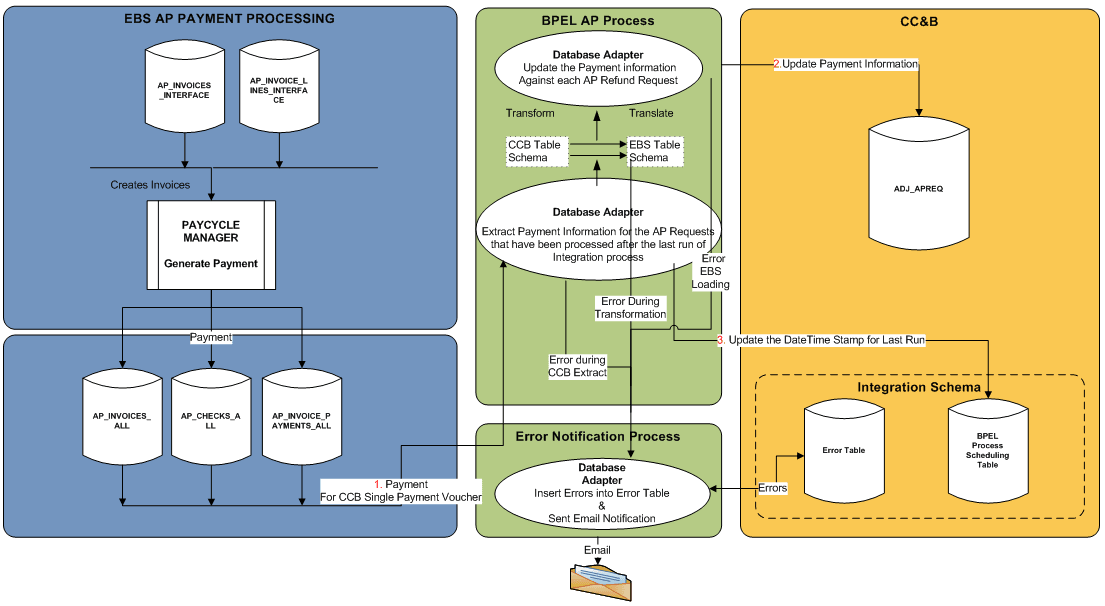
When a payment is made in Oracle E-Business Suite Financials for General Ledger and Accounts Payable, in the AP Data process flow:
• Payment is made in Oracle E-Business Suite Financials for General Ledger and Accounts Payable for Invoices originated from Oracle Utilities Customer Care and Billing.
• The BPEL process transforms and updates the Payment information in Oracle Utilities Customer Care and Billing.
• The BPEL process updates the Last Run Date of the AP Data process in Integration schema.
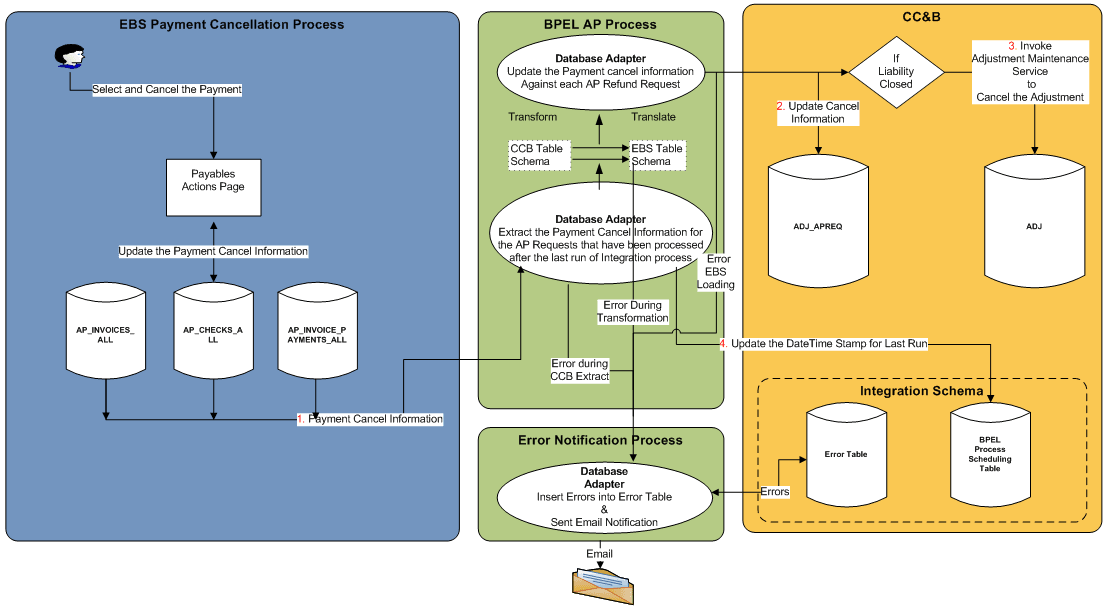
These are the steps in the AP Data process flow when a payment is cancelled in Oracle E-Business Suite Financials for General Ledger and Accounts Payable:
• Payment is cancelled in Oracle E-Business Suite Financials for General Ledger and Accounts Payable for invoices originated from Oracle Utilities Customer Care and Billing.
• The BPEL process updates the Cancellation information in Oracle Utilities Customer Care and Billing.
• The BPEL process invokes AdjustmentMaintenance Web Service in Oracle Utilities Customer Care and Billing to cancel the adjustment.
• The BPEL process updates the Last Run Date of AP Data process in the integration schema.
Logic Used in AP Data Integration Point
Extract the Payment Information from Oracle E-Business Suite Financials for General Ledger and Accounts Payable.
Select APA.invoice_id
, APA.invoice_num ADJ_ID
, APA.invoice_date
,APA.PAYMENT_STATUS_FLAG
,APA.POSTING_STATUS
,APA.CANCELLED_BY
,APA.CANCELLED_DATE
,APA.CANCELLED_AMOUNT
,AIPA.BANK_ACCOUNT_NUM
,AIPA.REVERSAL_FLAG
,AIPA.REVERSAL_INV_PMT_ID
,ACA.CHECK_DATE payment_date
,ACA.CHECK_NUMBER payment_number
,ACA.STATUS_LOOKUP_CODE
,ACA.VOID_DATE
,ACA.STOPPED_BY
, ACA.STOPPED_DATE
, APA.PAYMENT_REASON_COMMENTS AP_REQ_ID (for Release 11.5.10 ATTRIBUTE15 is used)
, ACA.CHECK_ID
,ACA.amount
, ACA.released_date
FROM ap_invoices_all APA
, AP_INVOICE_PAYMENTs_all AIPA
, ap_checks_all ACA
WHERE APA.invoice_id = AIPA.invoice_id
AND AIPA.check_id = ACA.check_id
AND APA.source = 'CCB'
AND (APA.CANCELLED_DATE >= TO_DATE ('2008-01-31','YYYY-MM-DD') -- last date the interface was run
OR APA.CREATION_DATE >= TO_DATE ('2008-01-31','YYYY-MM-DD')-- last date the interface was run
OR ACA.stopped_date >= TO_DATE ('2008-01-31','YYYY-MM-DD')-- last date the interface was run
OR ACA.released_date >= TO_DATE ('2008-01-31','YYYY-MM-DD')-- last date the interface was run
OR ACA.void_date >= TO_DATE ('2008-01-31','YYYY-MM-DD') -- last date the interface was run
UNION
Select APA.invoice_id
,APA.invoice_num ADJ_ID
,null released_date
,APA.invoice_date
,APA.PAYMENT_STATUS_FLAG
,APA.POSTING_STATUS
,APA.CANCELLED_BY
,APA.CANCELLED_DATE
,APA.CANCELLED_AMOUNT
,null BANK_ACCOUNT_NUM
,null REVERSAL_FLAG
,null REVERSAL_INV_PMT_ID
,null payment_date
,null payment_number
,null STATUS_LOOKUP_CODE
,null VOID_DATE
,null STOPPED_BY
,null STOPPED_DATE
,APA.PAYMENT_REASON_COMMENTS AP_REQ_ID
,null CHECK_ID
,null AMOUNT
FROM ap_invoices_all APA
WHERE APA.CANCELLED_DATE >= #LastRunDate6
AND APA.SOURCE = #invoice_source1
and apa.invoice_id not in (SELECT invoice_idFROM ap_invoice_payments_all aipa1 )
For each payment selected above, verify that this payment is already applied in Oracle Utilities Customer Care and Billing.
If AP_INVOICES_ALL.CANCELLED_DATE <> NULL and AP_INVOICES_ALL. PAYMENT_STATUS_FLAG<>'Y' (Payment is void /cancelled)
If the Payment has been canceled in Oracle E-Business Suite Financials for General Ledger and Accounts Payable, update the CI_ADJ_APREQ. PYMNT_SEL_STAT_FLG to
'X'(Canceled) and invoke C1AdjustmentMaintenance service to cancel the Adjustment corresponding to this payment.
BPEL flow for AP Data Integration Point is shown below: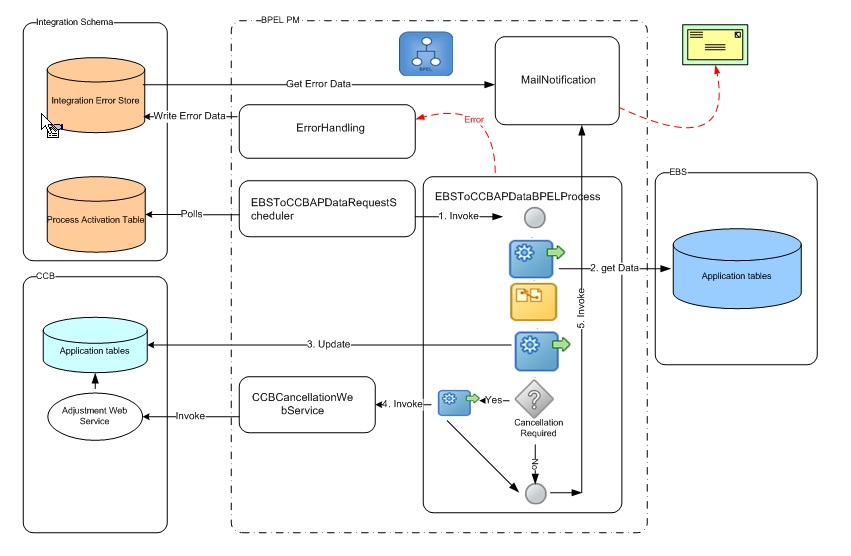
Composites
The following is the list of composites involved in GL integration point.
Composite Name | Description |
EBSToCCBAPDataRequestScheduler | Polls the INTEGRATION_PROCESS_ACTIVATION table at predefined intervals for AP Data interface |
EBSToCCBAPDataBPELProcess | Main process of the AP Data Integration which collects the payment information from Oracle E-Business Suite and sends it to Oracle Utilities Customer Care and Billing |
CCBCancellationWebService | To cancel an adjustment in Oracle Utilities Customer Care and Billing |
Integration Process/ Composite name | EBSToCCBAPDataRequestScheduler |
Description | Polls the INTEGRATION_PROCESS_ACTIVATION table in the Integration Schema at predefined intervals and invokes the EBSToCCBAPDataBPELProcess |
Calls to | • EBSToCCBAPDataBPELProcess • ErrorhandlingProcess (if an error occurs) |
Calls from | None |
Inputs | None |
Outputs | None |
Interaction pattern | Asynchronous |
Exceptions/Errors | Possible Exceptions – None |
Integration Process/ Composite name | EBSToCCBAPDataBPELProcess |
Description | Main process of the AP Data Integration. Collects all the Oracle E-Business Suite Financials for General Ledger and Accounts Payable payment information from Oracle E- Business Suite Financials for General Ledger and Accounts Payable application tables (AP_INVOICES_ALL, AP_CHECKS_ALL, and AP_INVOICE_PAYMENTS_ALL), transforms the data, and updates the information in the Oracle Utilities Customer Care and Billing table application table CI_ADJ_APREQ. |
Calls to | • CCBCancellationWebService • ErrorhandlingProcess (if an error occurs) • MailNotification |
Calls from | EBSToCCBAPDataRequestScheduler |
Inputs | None |
Outputs | None |
Interaction pattern | Asynchronous |
Exceptions/Errors | Possible Exceptions - BPEL Binding fault, BPEL Remote Fault |
Integration Process/ Composite name | CCBCancellationWebService |
Description | This process is a BPEL wrapper to call the Adjustment Maintenance web service in Oracle Utilities Customer Care and Billing to cancel the Adjustment ID corresponding to the AP Request ID for the given payment |
Calls to | ErrorhandlingProcess (if an error occurs). |
Calls from | EBSToCCBAPDataBPELProcess |
Inputs | String object - AdjustmentID |
Outputs | String result – containing APRequest ID for success or error messages |
Interaction pattern | Synchronous |
Exceptions/Errors | Possible Exceptions - BPEL Binding Fault, BPEL Remote Fault. |
Database Tables involved in AP Data
Table Name | Description | Application Name |
AP_INVOICES_ALL | The Payment Information is extracted from this table | EBS |
AP_CHECKS_ALL | The Payment Information is extracted from this table | EBS |
AP_INVOICE_ PAYMENTS_ALL | The Payment Information is extracted from this table | EBS |
CI_ADJ_APREQ | This table is updated with the Payment Information received from Oracle E-Business Suite. | OUCCB |
Shared Integration Points
These BPEL processes are used across multiple integration points within this integration product.
Process Name | Error Handling Process |
|---|---|
Description | Invoked only when errors occur. Inserts data into error table INTEGRATION_ERROR_STORE in the Integration Schema. |
Calls To | None |
Calls From | • CCBToEBSGLBPELProcess • UpdateCCBAPControlTable • CCBToEBSAPBPELProcess • CCBCancellationWebService • EBSToCCBAPDataBPELProcess |
Inputs | ErrorHandlingProcessRequest xml object |
Outputs | String result |
Synch/Asynch | Synchronous |
Exceptions/Errors | Possible Exceptions - None |
Process Name | MailNotification |
Description | Invoked at the end of each batch run. If there was any error generated, it assimilates all these messages into an e-mail and sends the email to configured email address. |
Calls To | None |
Calls From | • CCBToEBSGLBPELProcess • CCBToEBSAPBPELProcess • EBSToCCBAPDataBPELProcess |
Inputs | MailNotificationInputParameters xml object |
Outputs | None |
Synch/Asynch | Asynchronous |
Exceptions/Errors | Possible Exceptions - None |