Integration Overview
The Oracle Utilities Work and Asset Cloud Service Integration to Oracle Field Service supports the (WACS) work activities in the field using Oracle Field Service (OFS).
A work activity can:
• Be created and planned in .
• Be scheduled in Oracle Field Service.
• Have the work in the field recorded in Oracle Field Service.
• Be completed in based on the details entered in the field.
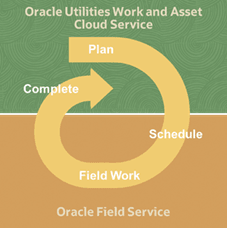
WACS and WAM
The integration to Oracle Field Service can be used both for cloud and on-premises deployments either between:
• Oracle Utilities Work and Asset Cloud Service and Oracle Field Service; or
• Oracle Utilities Work and Asset Management and Oracle Field Service
Important! In this document, references to the integration with Oracle Utilities Work and Asset Cloud Service also apply to the integration with Oracle Utilities Work and Asset Management.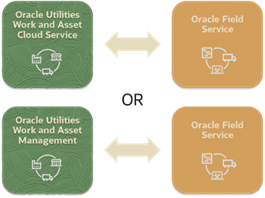
End-to-End Integration
The integration provides end-to-end integration processes that involve functionality in the following applications:
Oracle Integration Cloud
Oracle Integration Cloud manages the integration flows between Oracle Utilities Work and Asset Cloud Service or Oracle Utilities Work and Asset Management and Oracle Field Service:
• Transforming and transporting data
• Handling errors that occur within the integration layer
Oracle Utilities Work and Asset Cloud Service
Outbound messages in are used to pass data from to Oracle Field Service via Oracle Integration Cloud. The outbound message types that are used for creating, updating, and cancelling activities are recorded in the Activity Type.
Inbound web services are used in to receive data passed from Oracle Field Service via Oracle Integration Cloud. The inbound web service used for this integration has the Work Order Activity Integration web service category.
Oracle Field Service
An accelerator in Oracle Field Service supports related field work functions.
Field Work Functions
The integration supports both work activities and construction work activities.
For construction work activities, the field work details for both installation and removal compatible units can be recorded in Oracle Field Service using the accelerator.
For standard, non-construction, work activities the accelerator allows field work details to be recorded in Oracle Field Service for the following:
• Installation, removal and replacement of assets
• Attachment and removal of components
• Use of stock items
In addition, the following can be created in Oracle Field Service using the accelerator:
• Service histories
• Measurements
• Timesheets
• Equipment and miscellaneous resource usage
Functional Integration Flows
The integration to Oracle Field Service includes the following functional integration flows.
Note that in the follwoing descriptions, work activity refers to both construction and non-construction work activities.
Send Activity Details Integration Flows
• Create Field Service Activity
This integration flow creates an activity in Oracle Field Service for a work activity when the work activity transitions to ‘Sent’.
OIC Process: Oracle Utilities WACS OFSC Activity Process (OUTL-BA-WACS_OFSC_ACTIVITY_PROC)
• Update Field Service Activity
This integration flow is initiated when a work activity is resent from WACS. The integration flow updates the corresponding activity in OFS with the latest WACS work activity details.
OIC Processes:
• Oracle Utilities WACS OFSC Activity Process (OUTL-BA-WACS_OFSC_ACTIVITY_PROC)
• Oracle Utilities OFSC WACS Activity Pull Update (OUTL-BA-OFSC_WACS_ACTV_UPDT_PULL)
• Cancel Field Service Activity
This integration flow is initiated when a work activity is cancelled in . The integration flow cancels the corresponding activity in Oracle Field Service provided this activity is pending or enroute.
OIC Process: Oracle Utilities WACS OFSC Activity Process (OUTL-BA-WACS_OFSC_ACTIVITY_PROC)
• Update Work Activity State
This integration flow updates the state of a work activity in to ‘In Progress’ when the corresponding activity is started in Oracle Field Service.
OIC Process: Oracle Utilities OFSC WACS Activity Interim Status (OUTL-BA-OFSC_WACS_ACTIVITY_STAT)
• Refresh Field Service Activity
This integration flow is initiated when a user in Oracle Field Service selects the Refresh Activity action for an activity. The integration flow updates the activity details in Oracle Field Service with the latest details from the corresponding work activity in .
OIC Process: Oracle Utilities OFSC WACS Activity Pull Update (OUTL-BA-OFSC_WACS_ACTV_UPDT_PULL)
Perform and Complete Activity Integration Flows
• Check Asset Instalment or Attachment
The integration flow is triggered when recording in Oracle Field Service that an asset is being installed or attached. It checks that it is valid in for the asset to be installed at the location or for the asset to be attached to the other asset.
OIC Process : Oracle Utilities OFSC WACS Asset Query (OUTL-BA-OFSC_WACS_ASSET_QUERY) with Operation 'default'
• Search for Asset
This integration flow is used when a field worker is entering follow up or new work in Oracle Field Service. It allows the field worker to search for an asset in .
OIC Process: Oracle Utilities OFSC WACS Asset Query (OUTL-BA-OFSC_WACS_ASSET_QUERY) with Operation 'assetQueryForPickup'
• Retrieve Asset Details
This integration flow retrieves details about an asset from . It is used during the entry of new or follow up work in Oracle Field Service.
OIC Process: Oracle Utilities OFSC WACS Asset Query (OUTL-BA-OFSC_WACS_ASSET_QUERY) with Operation 'assetQueryDetailsPickup'
• Retrieve Asset History
The integration flow retrieves from details about previous service histories, measurements, and activities related to an asset. This flow is used when the Asset History screen is opened in Oracle Field Service and also when searches are performed within the Asset History screen.
OIC Process: Oracle Utilities OFSC WACS Asset Query (OUTL-BA-OFSC_WACS_ASSET_QUERY) with Operation 'assetQueryDetailsHistory'
• Create Timesheet
This integration flow passes timesheet details entered in Oracle Field Service to . It is triggered when timesheet details are completed in Oracle Field Service. In , the integration results in the creation of a Timesheet Detail record. If there is no non-cancelled Timesheet record for the employee and time period, a new Timesheet record is also created.
OIC Integration Flow: Oracle Utilities OFSC WACS Resource Usage Details (OUTL-BA-OFSC_WACS_RES_USAGE_SEND)
• Create Other Direct Charge
This integration flow passes the details of an equipment and other resource usage entered in Oracle Field Service to . It is triggered when the details of equipment usage and other charges are completed in Oracle Field Service. In , the integration results in the creation of an Other Direct Charges Detail record. If there is not an Other Direct Charges record for the employee in a non-final state, a new Other Direct Charges record is also created.
OIC Process: Oracle Utilities OFSC WACS Resource Usage Details (OUTL-BA-OFSC_WACS_RES_USAGE_SEND)
• Complete Work Activity
When an activity is completed in Oracle Field Service, the Complete Work Activity integration flow initiates completion of the processing for the corresponding work activity in .
For activities that do not have segments, the completion of the activity in Oracle Field Service initiates the completion of the corresponding work activity in . For the activity that does have segments (such as an activity whose duration spans multiple days), the completion of the last segment initiates completion of the corresponding work activity in .
For construction work activities that have segments, completion of a segment which is not the last segment in Oracle Field Service results in an interim completion in . An interim completion involves the processing of completion details (example: installing a planned asset), but the work activity does not transition to complete.
In addition to initiating activity completion processing, the Complete Work Activity integration flow also initiates the creation of a material request and the issuing of this request when the activity in Oracle Field Service has recorded the use of material from a truck.
OIC Integration Flow: Oracle Utilities OFSC WACS Activity Complete (OUTL-BA-OFSC_WACS_ACTIVITY_COMP)
Additional Work Integration Flows
• Create Work Order
This integration flow creates a work order and work activity in based on the details entered in Oracle Field Service. It is invoked when the entry of the work order details is completed in Oracle Field Service. The work order can be for new or follow up work.
OIC Process: Oracle Utilities OFSC WACS Work Order (OUTL-BA-OFSC_WACS_WORK_ORDER)
• Create Work Request
This integration flow creates a work request in based on the details entered in Oracle Field Service. It is invoked when the entry of the work request details is completed in Oracle Field Service. The work request can be for new or follow up work.
OIC Process: Oracle Utilities OFSC WACS Work Request (OUTL-BA-OFSC_WACS_WORK_REQ)
Truck Storeroom Integration Flows
• Update Truck Resources
The flow creates and updates Oracle Field Service truck resources based on the mobile storerooms in . This integration flow is initiated from Oracle Integration Cloud. It can be either run on an adhoc basis when needed or scheduled in Oracle Integration Cloud to run periodically.
OIC Process: Oracle Utilities WACS OFSC Storeroom Admin Sync (OUTL-BA-WACS_OFSC_STRM_ADMN_SYNC)
• Scheduled Truck Inventory Update
The integration flow replaces the inventories of truck resources in Oracle Field Service with the current contents of the corresponding mobile storerooms. It is invoked from Oracle Integration Cloud. It can be scheduled to run periodically. Note that, optionally, this integration flow can be used instead of the Scheduled Truck Inventory Update integration flow.
OIC Process: Oracle Utilities WACS OFSC Schedule Storeroom Sync (OUTL-BA-WACS_OFSC_SCH_STRM_SYNC)
• Update Truck Inventory on Route Activation
This integration flow is initiated when a resource’s route is activated. It replaces the inventories of the truck resources with the current contents of the corresponding mobile storerooms for the truck resources linked to the resource whose queue was activated. Note that, optionally, the Scheduled Truck Inventory Update integration flow can be used instead of the Update Truck Inventory on Route Activation integration flow.
OIC Process: Oracle Utilities OFSC WACS Route Activation (OUTL-BA-OFSC_WACS_RTE_ACTIVATION)
• Requested Truck Inventory Update
This integration flow allows a fieldworker to update the contents of a truck resource in Oracle Field Service with the latest details from the corresponding mobile storeroom in . It is initiated from Oracle Field Service for a specific truck.
OIC Process: Oracle Utilities OFSC WACS Storeroom Sync (OUTL-BA-OFSC_WACS_STOREROOM_SYNC)
Supporting Integration Flow
• Admin Sync
The integration flow populates Oracle Field Service with administration data such as overtime types, downtime reasons, and activity types. It is initiated from Oracle Field Service. It can be either run on an adhoc basis when needed or scheduled in Oracle Integration Cloud to run periodically.
OIC Integration Flow: Oracle Utilities WACS OFSC Admin Data Sync (OUTL-BA-WACS_OFSC_ADMIN_SYNC)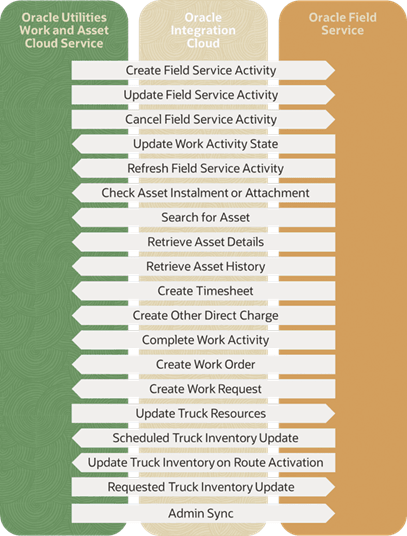
The three major components in this implementation are:
Oracle Utilities Work and Asset Cloud Service (WACS)
Oracle Utilities Work and Asset Cloud Service efficiently manages asset lifecycles, streamlines maintenance operations, maximizes supply chain performance, enhances safety, and improves regulatory compliance.
Oracle Field Service (OFS)
Oracle Field Service is built on time-based, self-learning, and predictive technology, empowering to solve business problems while evolving the field service organization. It has various modules to choose, such as forecasting, routing, capacity, mobility, collaboration, core manage, smart location, customer communication, and more. It leverages the performance pattern profiles to create optimal daily routes and schedules and continues to learn as employee work patterns change over time.
The Oracle Field Service functionality is based on user privileges to support the business case. There are two primary types of users:
• Users who use the manage aspect, for example, dispatchers and field managers.
• Field service resources who use the mobile application. Example: field service personnel
The screens are different for administrator, dispatcher, crew, and so on. For more information, refer to Additional Information - Integration Concepts.
Oracle Integration Cloud (OIC)
Oracle Integration Cloud is a business accelerator package with pre-build interactions to facilitate Oracle Utilities Work and Asset Cloud Service and Oracle Field Service communications.
Oracle Integration Cloud ensures that the Oracle Utilities Work and Asset Cloud Service requests are being forwarded to Oracle Field Service and vice versa. Oracle Utilities Work and Asset Cloud Service are sending direct requests when the operator makes changes on the user interface. On the other hand, Oracle Field Service is an event-based applications and Oracle Integration Cloud is listening to incoming event changes.
To implement certain business logic, Oracle Integration Cloud is using properties stored configuration files named lookups to:
• Translate Oracle Utilities Work and Asset Cloud Service into Oracle Field Service understandable values
• Preset default values
• Pre-defined field names