
Baseline Calculation Rule
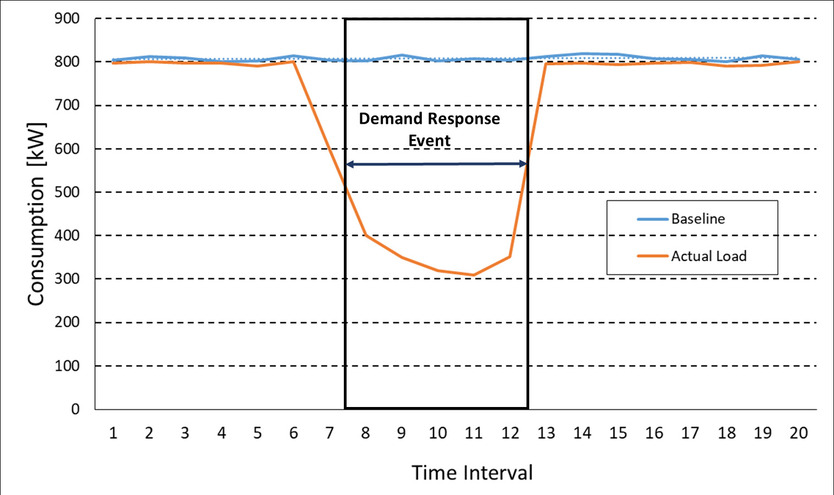
This rule is used to estimate the electric consumption a customer would have used had they not participated in a program event, which is used to calculate reductions in consumption or demand for use in program event settlement transactions that represent credits or changes that will be applied to a customer's bill based on participation in an individual event. This done by calculating a "Demand Response Customer Baseline" or baseline that represents this estimated consumption. The figure below shows a baseline compared to actual meter data and depicts how they can be compared during an event to calculate the reduction.
The Baseline Calculation rule uses an "X of Y Calculation Method", a statistical methodology that considers Y eligible days (referred to as "Qualified" or "Qualifying" days) and selects the X days (referred to as "Selected" days) with the load to calculate the baseline on the basis of the most recent meter readings for consumption levels within those days. Qualified and Selected days can be determined based on Load, Temperature, or Net values (Consumed - Generated). The X Selection Parameter defines if the rule will use Load or Temperature, and the presence of "Generated" UOM, TOU, and SQI values indicate that the rule should use Net values.
The Baseline Calculation Details section is used to define how the baseline consumption is calculated.
-
UOM: The unit of measure used to define the interval values to be created in the program event settlement transaction.
-
TOU: The time of use period used to define the interval values to be created in the program event settlement transaction.
-
SQI: The service quantity identifier used to define the interval values to be created in the program event settlement transaction.
-
UOM Generated: The unit of measure used to define generated interval values used in the program event settlement transaction calculation. Used to calculate Net consumption (Consumed - Generated).
-
TOU Generated: The time of use period used to define generated interval values used in the program event settlement transaction calculation. Used to calculate Net consumption (Consumed - Generated).
-
SQI Generated: The service quantity identifier used to define generated interval values used in the program event settlement transaction calculation. Used to calculate Net consumption (Consumed - Generated).
-
Work Calendar: A work calendar used to define weekdays, weekends and holidays. See Defining Work Calendar for more information.
- Lookback: The number of days preceding an Event Day (the day on which a Program Event took place) to be evaluated when identifying Qualified days. Examples could include the last 10 non-holiday weekdays, the 10 most recent program-eligible non-event days, the10 most recent program-eligible days beginning 2 days before the event, last 45 calendar days, or the previous year.
-
X of Y Type: The type of X days to be selected. Valid options include:
- High: Excludes the lowest Y-X values
- Low: Excludes the highest Y-X values
- Middle: Uses the middle values of the Y quantities
-
X Selection Parameter: The criteria for the selection of (X) Selected days from the (Y) Qualifying Days. Valid options include:
- Load: The baseline is calculated by taking the highest/lowest/middle consumption from the X highest/lowest/middle consumption days from the Y Qualified days
- Temperature: The baseline is calculated by taking the highest/lowest/middle consumption from the X highest/lowest/middle temperature days from the Y Qualified temperature days.
- UOM Temperature: The unit of measure used to define the temperature values used in the calculation.
- TOU Temperature: The time of use period used define the temperature values used in the calculation.
- SQI Temperature: The service quantity identifier used to define the temperature values used in the calculation.
-
Value of X: The number of Selected Days
-
Value of Y: The number of Qualified Days
-
Adjustment Type: The type of adjustment applied to the baseline, used if or when conditions on the day of a Program Event may differ from the conditions over the previous days which were used for the calculation of baseline. Valid options include:
-
Additive: Adds or subtracts a numerical value to each hour of the
event. This value is calculated by:
-
Averaging the 4 hours prior to the event excluding the hour immediately prior to the event start; and,
-
Define the difference between the average load for these three hours relative to the same 3-hour average of the CBL calculation data set.
-
The difference is then applied to each counterfactual hour of the event and is capped at both a 20% increase and a 20% decrease.
Note: This is modeled after the "PJM CBL Addition Adjustment" approach. -
-
Multiplicative: Applies a multiple to each hour of the event. The
multiplier is calculated by:
- Averaging the 4 hours prior to the event excluding the hour immediately prior to the event start; and,
- Define the ratio of the average load for these three hours relative to the same 3-hour average of the CBL calculation data set.
-
The same multiplier is then applied to each counterfactual hour of the event and is capped at both a 20% increase and a 20% decrease.
Note: This is modeled after the "CAISO CBL Multiplication Adjustment" approach. - None: the standard X of Y method selected will be employed, utilizing the X and Y values configured to compute the baseline
-
Additive: Adds or subtracts a numerical value to each hour of the
event. This value is calculated by:
- Adjustment Window Start: The number of (15-minute) intervals which are selected to calculate the fixed quantity for adjustment of the baseline. Typically, the adjustment window start begins no more than four hours prior to an event's start. Applicable only if the Adjustment Type is "Additive" or "Multiplicative".
- Adjustment Window End: The number of (15-minute) intervals which are selected to calculate the fixed quantity for adjustment of the baseline. Typically, the adjustment window end ends no more than an hour prior to the event start .Applicable only if the Adjustment Type is "Additive" or "Multiplicative".
- Adjustment Cap: A limit on how much the baseline can be adjusted upwards or downwards during an event, typically expressed as a percentage of the original baseline, used to prevent extreme adjustments and ensure fairness in the measurement of demand reduction. For example, if a customer's normal baseline load is 100kW and the adjustment cap is set at 20%, then the maximum adjusted baseline could only be 120kW (100kW + 20% increase) or 80kW (100kW - 20% decrease), regardless of how much their load deviates during the event. Applicable only if the Adjustment Type is "Additive" or "Multiplicative".
-
Interval Size: The size of the interval values to be created in the program event settlement transaction represented as hours:minutes:seconds (HH:MI:SS).
Notes and Recommendations
Additional detail on the logic of this rule can be found in the Detailed Description of the D2-BASELINEC Algorithm Type.
For help with the meaning of specific configuration fields, refer to the embedded help on the screen when adding or editing the rule.
Business Object
D2-BaselineCalc
Example Scenarios
Scenario 1: Calculate a baseline based on the Highest 3 (X) of 5 (Y) days within 30 days prior to the program event, with no adjustment type
-
Sequence: 10
-
Description: Baseline - Highest 3 of 5
-
Baseline Calculation Details:
-
UOM: Kilowatt Hours
-
TOU:
-
SQI:
-
Work Calendar: US 2025 Work Calendar
-
Lookback: 30
-
X of Y Type: Highest
-
X Selection Parameter: Load
-
Value of X: 3
-
Value of Y: 5
-
Adjustment Type: None
-
Interval Size: 01:00:00
-
-
Results:
-
Qualified Baseline Measurements
- Unit of Measure: Kilowatt Hours
- Service Quantity Identifier: Baseline Qualified
-
Selected Baseline Measurements
- Unit of Measure: Kilowatt Hours
- Service Quantity Identifier: Baseline Selected
-
Skipped Measurements
- Unit of Measure: Kilowatt Hours
- Service Quantity Identifier: Baseline Skipped
-
Pre Event Measurements
- Unit of Measure: Kilowatt Hours
- Service Quantity Identifier: Baseline Pre-Event
-
Pre Event Baseline Measurements
- Unit of Measure: Kilowatt Hours
- Service Quantity Identifier: Baseline Pre-Event Selected
-
Raw Baseline Measurements
- Unit of Measure: Kilowatt Hours
- Service Quantity Identifier: Baseline Raw
-
Scenario 2: Calculate a baseline based on the Highest 3 (X) of 5 (Y) days within 30 days prior to the program event using net consumption, with no adjustment type
-
Sequence: 10
-
Description: Baseline - Highest 3 of 5
-
Baseline Calculation Details:
-
UOM: Kilowatt Hours - Consumed
-
TOU:
-
SQI:
-
UOM Generated: Kilowatt Hours - Generated
-
TOU Generated:
-
SQI Generated:
-
Work Calendar: US 2025 Work Calendar
-
Lookback: 30
-
X of Y Type: Highest
-
X Selection Parameter: Load
-
Value of X: 3
-
Value of Y: 5
-
Adjustment Type: None
-
Interval Size: 01:00:00
-
-
Results:
-
Qualified Baseline Measurements
- Unit of Measure: Kilowatt Hours
- Service Quantity Identifier: Baseline Qualified
-
Selected Baseline Measurements
- Unit of Measure: Kilowatt Hours
- Service Quantity Identifier: Baseline Selected
-
Skipped Measurements
- Unit of Measure: Kilowatt Hours
- Service Quantity Identifier: Baseline Skipped
-
Pre Event Measurements
- Unit of Measure: Kilowatt Hours
- Service Quantity Identifier: Baseline Pre-Event
-
Pre Event Baseline Measurements
- Unit of Measure: Kilowatt Hours
- Service Quantity Identifier: Baseline Pre-Event Selected
-
Raw Baseline Measurements
- Unit of Measure: Kilowatt Hours
- Service Quantity Identifier: Baseline Raw
-