Personal Tracker
The Personal Tracker provides customers with up to one year's comparison of their current year's usage to the previous year. It offers a range of data scenarios, displaying usage information across as few as three bills or as many as two full years of bills. The module includes an evaluative statement that assesses the customer's performance, a bar chart for visualization, seasonal helpers, and insights into why their energy use may have increased, decreased, or remained the same. This module may be used as a replacement for the Self-Comparison module located on the back of the Progress Report.
Appears in: Progress Report.
On this page:
Requirements
Utility Requirements
|
Category |
Description |
|---|---|
|
Required Cloud Service |
Oracle Utilities Opower Energy Efficiency Cloud Service |
|
Scale |
Not applicable. |
Customer Requirements
|
Category |
Description |
|---|---|
|
Billing Frequency |
Monthly, bi-monthly, or quarterly. |
|
Data Delivery Frequency |
Monthly, bi-monthly, or quarterly. |
|
Data Requirements |
Not applicable. |
|
Data History |
A minimum of one historical bill. |
|
Data Coverage |
Not applicable. |
|
Supported Fuels |
Progress Reports: Electric-only, gas-only, dual fuel. |
Limitations
- The module can be used as a replacement for the Self-Comparison module in the Progress Report.
User Experience
This section describes the user experience of an electric-only customer, followed by how the user experience may vary.

Header: The header informs the customer that the module is a comparison of their current energy use to the previous year.
Chart: The bar chart displays the customer's bills over time and provides a comparison to previous energy use if enough data is available. By default, it will compare the customer's energy usage month over month going as far back as the beginning of the previous year. It also supports customers with bimonthly or quarterly bill periods.
- Unit of measurement: The unit of measurement varies by fuel type: kWh, therms, and units.
- Insight icon: An insight icon positioned above the current month correlates to the secondary insight located below the chart.
Insight: The insight located next to the chart informs the customer if their energy use has increased or decreased since the previous bill period.
Secondary insight: The secondary insight provides explanations for why their energy use may have increased or decreased compared to the previous billing period, particularly in relation to changes in temperature. The module uses weather insight calculations to determine whether the average temperature was higher or lower between the current and comparison billing periods. Based on this calculation, the Personal Tracker provides suggestions as to why the customer's energy use increased or decreased.
User Experience Variations
Fuel Type
The module varies by customer fuel type:
Dual Fuel: For dual-fuel customers, 'energy use 'is used in the module title and insights. The measurements is in units.
Gas: For gas customers, gas-specific language us used in the title and insight. The measurements are in therms.
Available data
The user experience is impacted by the amount of available data.
Less than 13 months of data
If less than 13 months of data is available, the header changes to ‘Track your progress.’ The current bill is compared to previous period since a year or less of data is available.

13 months or more of data with one January bill
If the customer has at least 13 bills available, but only one of them is from January, the bars for missing months of the previous year do not appear in the chart.

13 months or more of data with two January bills
If the customer has at least 13 bills available, including two January bills, the module emphasizes that the chart is a comparison with the previous year.
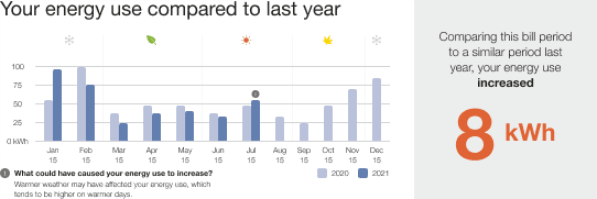
Missing Data - Missing Bill
In cases where a bill is missing, an asterisk appears next to the corresponding x-axis label, and a message at the bottom of the module explains the possible reasons for the missing data. For example "Bills may be missing due to 0 kWh energy usage or no bills found for specific periods.".
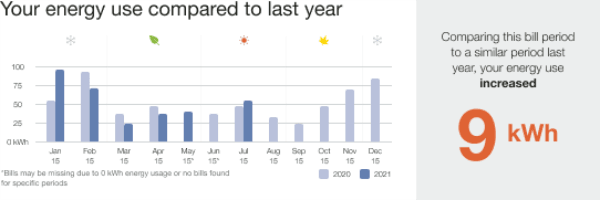
Missing Data - Missing Year Over Year Comparison
In cases where a customer has more than 13 months of data is available but a comparison with last year’s billing period is not possible because data from similar billing period from last year is missing, the comparison takes place with the previous billing period value. There is no secondary insight in this use case or an information icon above the current month.

Missing Data - Missing Bill and Year Over Year Comparison
For cases where comparison with last year’s similar billing period is not possible and we cannot compare to the previous bill period, the module fails.
Billing
Bi-monthly Billing
If a customer has bi-monthly bills, the energy use bar will be plotted at the end of the two-month period. This results in fewer data points compared to monthly bills. The seasonal icons above the chart are replaced with a short explainer text, "We report energy use based on the end of your bimonthly bill period."

Quarterly Billing
If a customer has quarterly bills, the energy use data bar will be plotted at the end of the three-month period. This results in fewer data points compared to monthly or bi-monthly bills. The seasonal icons above the chart are replaced with a short explainer text, "We report energy use based on the end of your quarterly bill period."
