Repackaging a Service Pack for OEM Compliance
- From the downloaded existing service pack, extract the contents of
*Oracle-Database-MultiplatForm.zipto your/DBfolder.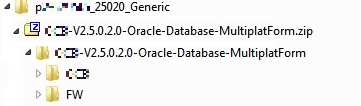
The contents of
*Oracle-Database-MultiplatForm.zipcontain all database installers. - The application installers, which will be copied into your
/Appfolder, can be broadly divided into three categories: Framework installer, Framework rollup, and application installer. All the application and Framework installers are packaged as<product>-<version>.MultiplatForm.zip. If a Framework rollup installer is also present, it will be packaged as<product>-<version>-FW-PREREQ-MultiplatForm.zip. Each of these zip files contain a jar file with the same name.- Copy the folders after unzipping the jar files to your
/Appfolder.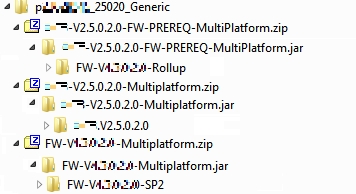
- Copy the folders after unzipping the jar files to your
- Create the new compliant service pack zip file from your
/Appand/DBfolders. The new zip file must have the same name as the original downloaded service pack name. The following image illustrates the structure of the new compliant zip.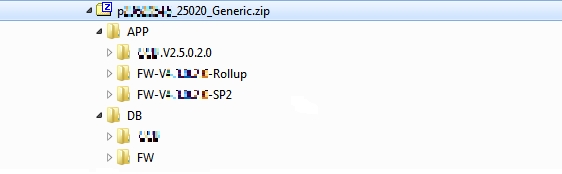
Follow the steps in the next topic to create and add the required Metadata.xml file to the final compliant zip.