3.5 Fast Data Transfer Approval
This topic describes the systematic instructions to FDT approval.
- To complete the Fast Data Transfer Approval task, follow the steps below:
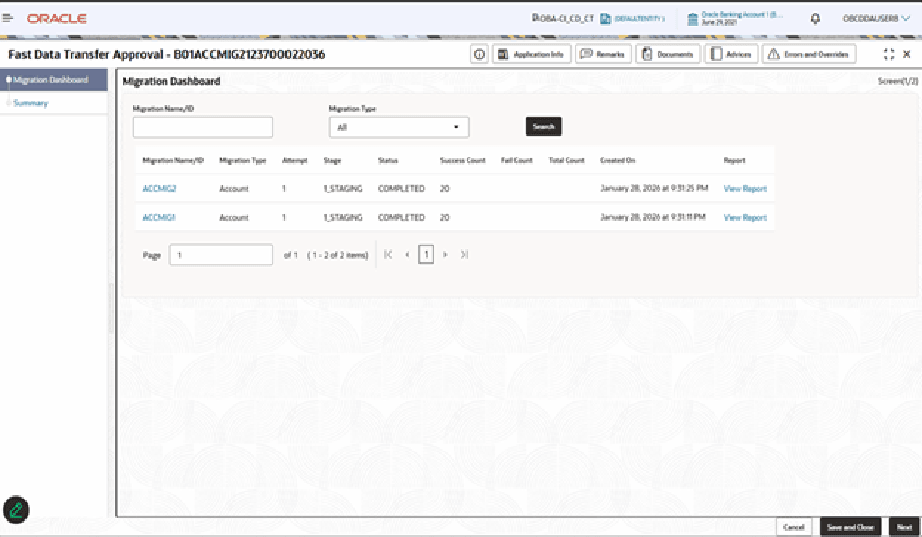
- Click Acquire and Edit.The Fast Data Transfer Approval screen displays with Migration Dashboard Data Segment.
Table 3-8 Migration Dashboard - Field Description
Field Description Migration Name/ID Displays the unique Migration ID associated with the set of files selected in the previous stage. Migration Type Displays the Migration Type associated with the particular Migration ID. The available options are:- Account
- Financial
Attempt Displays the attempt number for the Migration ID. Stage Displays the current stage of a particular Migration ID. The values displayed in the UI are:- 1_UPLOAD
- 2_STAGING
- 3_FDT
Status Displays the completion status of a particular Migration ID. The available options are:- Completed
- Completed with errors
- Failed
Success Count Displays the number of successful records for the particular stage. Fail Count Displays the number of failed records for the particular stage. Total Count Displays the total number of records for the particular stage. Created On Displays the Date Time Stamp of when the particular Migration ID was initiated. Report The user can generate report for the particular Migration ID using this.
- Click Acquire and Edit.
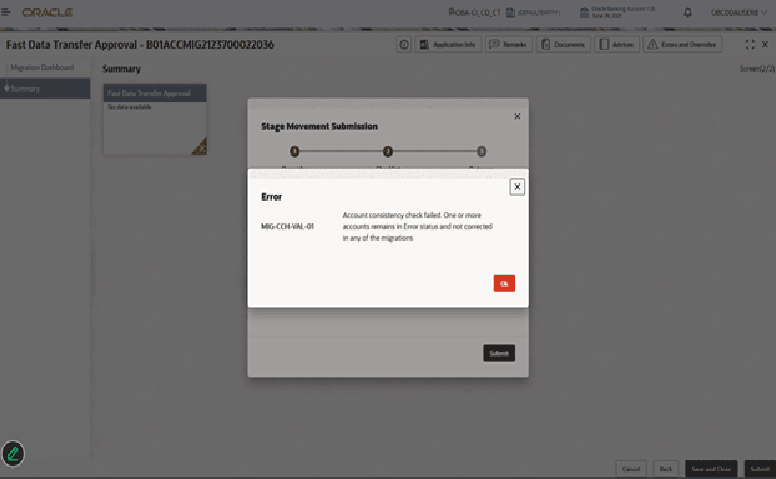
- Click Submit from the Summary screen.The Stage Movement Submission dialog displays the Overrides stage.
On stage submit if validations fail, review generated errors and overrides.
Parent topic: Migration Process