3.6 Verification
This topic describes the systematic instructions to verify the migration.
- To complete the Verify Migration task, follow the steps below:
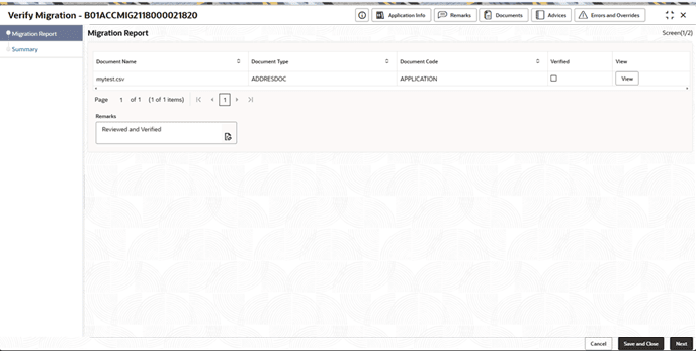
- Click Acquire and Edit.The Verify Migration screen displays with Migration Report Data Segment.
For more information on fields, refer to the field description table.
Table 3-9 Migration Report - Field Description
Field Description Document Name Displays the name of the uploaded migration reports. Document Type Displays the type of migration report uploaded. Document Code Displays the document code of the uploaded migration report. Verified Check box to indicate that the user has verified the migration reports. View The user can view the uploaded migration reports using this option. Remarks The user can provide final remarks in this text box.
- Click Acquire and Edit.
Parent topic: Migration Process