3.5.1 Create Certificate of Deposit Amount Block
User can block the CD amount. A Certificate of Deposit can be blocked for certain amount for full balance block due to different reasons like collateral to an overdraft, funds provider account during sweep transactions, and so on.
Also, the Bank might receive request from any authorized external agencies to block the CD amount.
Note:
The fields marked as Required are mandatory.To create amount block:
- On the Home screen, from the Certificate of
Deposit Services mega menu, under Certificate of
Deposits and Maintenance, click
Create Amount Block, or specify Create
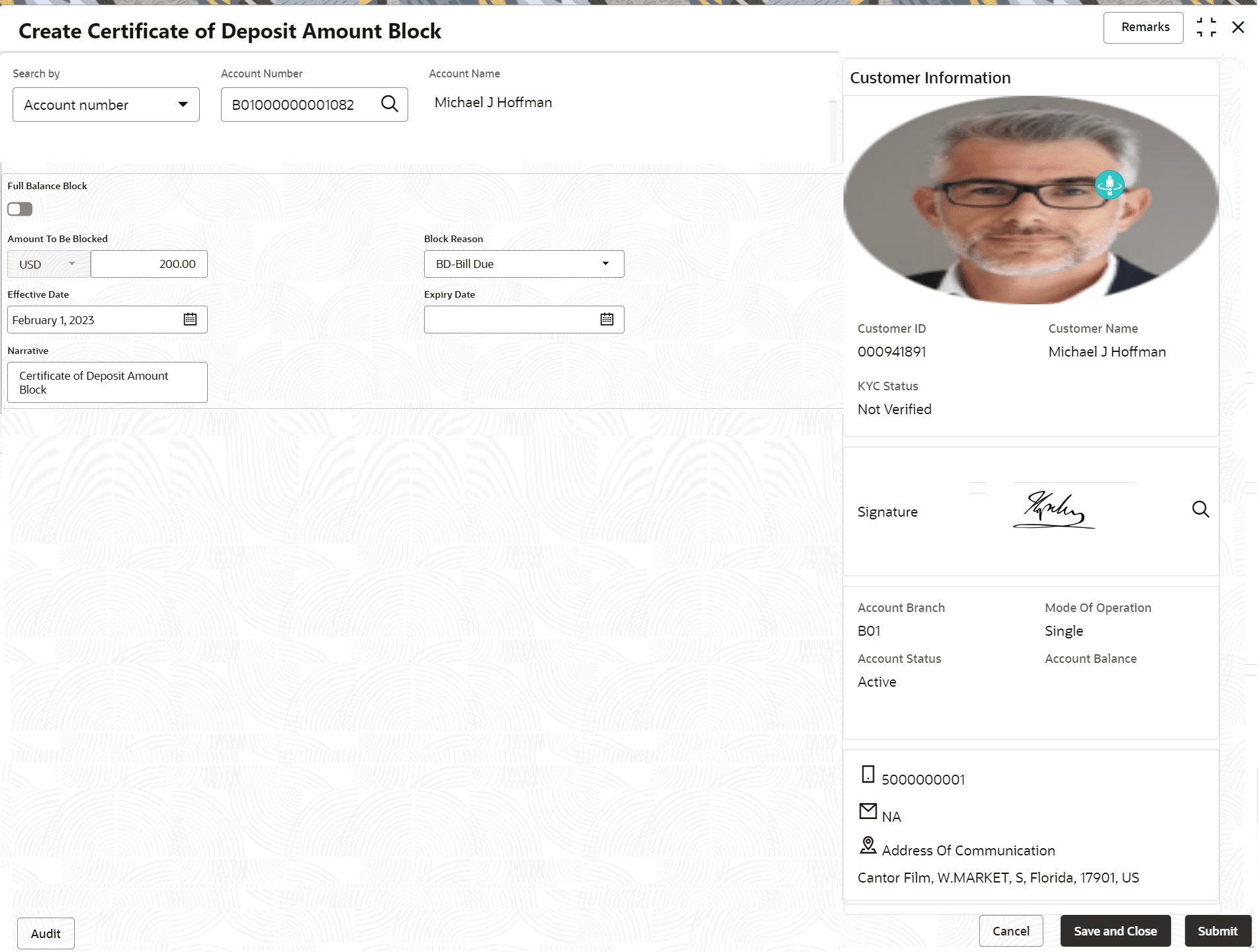
Amount Block in the search icon bar and select the screen.The Create Certificate of Deposit Amount Block screen is displayed.
- Select the appropriate option from the Search by field.
- Perform the required action, based on the option selected from the Search by field. The details for the account entered are displayed.
Figure 3-41 Create Certificate of Deposit Amount Block Details
- Specify the fields on the Create Certificate of Deposit Amount Block screen. For more information on fields, refer to the field description
table.
Table 3-37 Create Certificate of Deposit Amount Block – Field Description
Field Description Search By Users can search for an account number by using any of the available search criteria. The account number is set as the default search option. Users can specify the account number directly in the adjacent field or search for an account number by clicking the Search icon. Users can also search for the specific account number by providing customer ID, account number, or account name.
Other search options available in the Search by field are Customer ID, Tax Identification Number, Mobile Number, and Email.
A specific customer ID can be searched by providing the customer name or customer ID. If Tax Identification Number, mobile, or email IDs are chosen to find an account number, the respective IDs have to be input entirely in the adjacent field for the system to display the account number. For a given search criteria, multiple account numbers may be linked.
For example, two or more account numbers can be linked to a single mobile number. In such cases, the system displays all the account number matches and the user can select the relevant account number on which to perform a servicing operation.- The label of the field adjacent to the Search by field changes dynamically. For example, if the Account number is chosen as the search criteria, the label of the adjacent field is displayed as the Account Number. If Tax Identification Number is chosen as the search criteria, then the adjacent field would display the label as Tax Identification Number.
- If user selects an account with closed status, then an appropriate message is displayed. The user will not be allowed to proceed with the required action in the screen.
Full Balance Block Switch the toggle ON to create the block on full amount in the account. Amount To Be Blocked
Specify the amount to be blocked for the Certificate of Deposit (CD). The currency for the CD will be displayed by default. Note:
This field is not enabled, if the Full Balance Block toggle is ON.Block Reason
Select reason for block from drop-down list. Effective Date Specify or select the effective date for the block. Note:
This date cannot be less than current process date.Expiry Date Specify or select the expiry date for the block. Note:
This date cannot be less than current process date and effective date.Narrative Specify the narration, if any for the block. - Click Submit.The screen is successfully submitted for authorization.
Parent topic: CD Maintenances