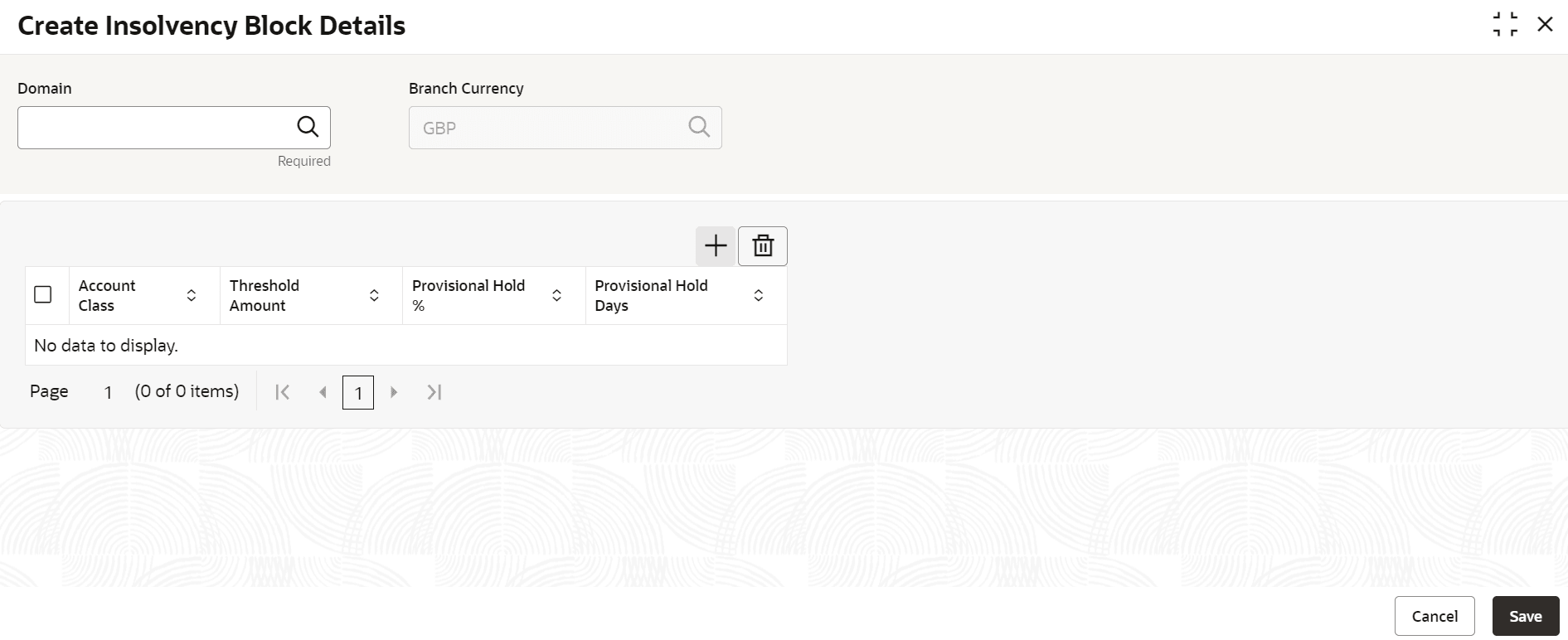
Provision to maintain the balance threshold and hold percentage at the account class level for Current and Savings Accounts, and Deposits account classes for the purpose of FDIC provisional holds. This topic describes the systematic instructions to create insolvency block details.
Figure 10-1 Create Insolvency Block Details
Note:
The Fields marked as Required are Mandatory.Table 10-1 Create Insolvency Block Details - Field Description
| Field | Description |
|---|---|
| Domain | The domain for which the maintenance is to be done that is Retail Accounts or Retail Deposits. Based on the value entered here, the account class list in the grid will be filtered. Click Search icon and select the value from the list displayed. |
| Branch Currency | Click Search icon and select the value from the list displayed or specify the local Currency for which the hold parameters are to be maintained. |
| Account Class | Click Search icon and the list of value displays all the account classes belonging to the specified domain. |
| Threshold Amount | Enter the balance threshold amount up to which no hold will be placed on an account. |
| Provisional Hold % | Enter the percentage of account balance
exceeding the threshold for blocking.
This field has minimum value as 1 and maximum as 100. Maximum decimals allowed is 3. |
| Provisional Hold Days | Enter the number of days which will determine the End Date for the Federal Deposit Insurance Corporation (FDIC) hold. |
Note:
At this point, the status of the Insolvency Block Details are Unauthorized. A user with a supervisor role has to approve the Insolvency Block Details. After approval, the status changes to Authorized, and the Insolvency Block Details is available for use by another process.Note:
As a maker of this configuration, you cannot approve it. It has to be approved by another user with a Supervisor role.