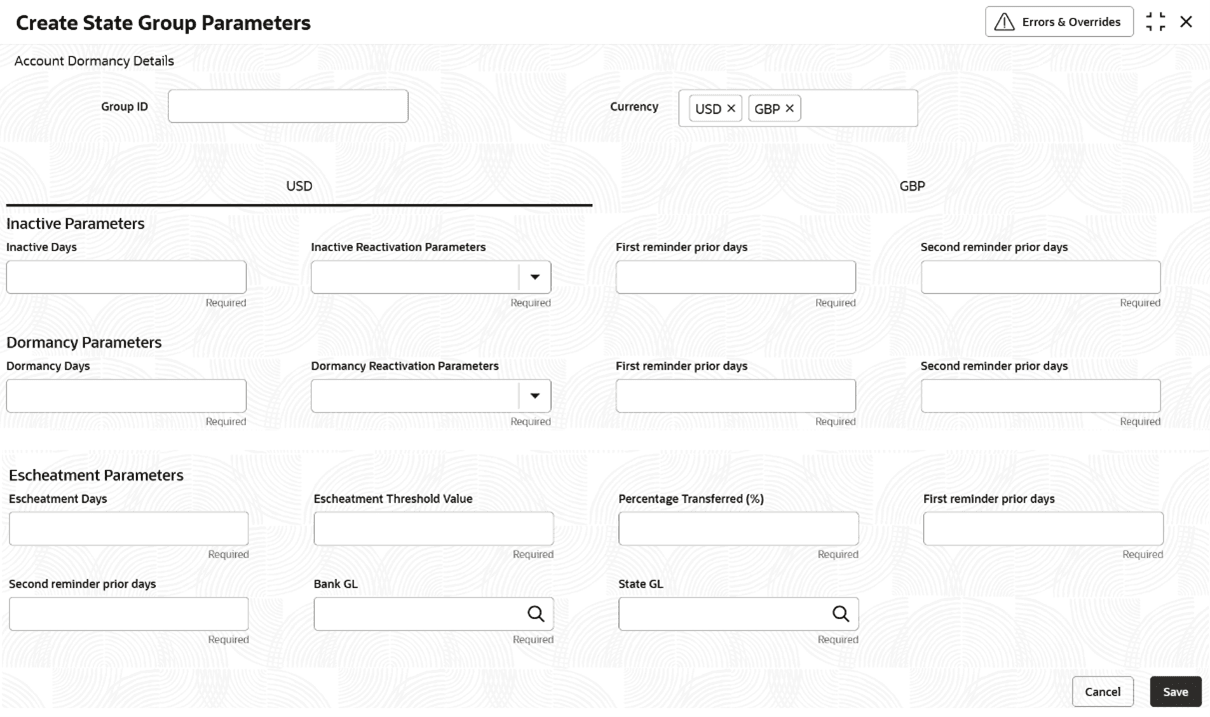
This topic describes the systematic instructions to create state group parameters.
- Click Account Configurations. Under Account Configurations, click State Group Parameters.
- Under State Group Parameters, click Create State Group Parameters.The Create State Group Parameters page displays.
Note:
The fields marked as Required are mandatory. - On Create State Group Parameters page, specify the fields.
Note:
All fields on this page are mandatory, unless otherwise stated in a field description.Table 8-1 Create State Group Parameters - Field Description
Field Description Group ID Specify the group parameter name. This is a user defined field. For example, GRP001. Currency Select the currency for which the group parameter is applicable from the drop-down list. For example, GBP. Inactive Parameters Specify the fields in this section that contains configurations to make an Account Inactive. This is a read-only label. Inactive Days Specify the number of days that the account can be idle before marking the account as inactive. This is a user input field. For example, 300. Inactive Reactivation Parameters Select the conditions which allows an inactive or dormant account to become active. The available options are: - Debit
- Credit
- Any
- Manual
First Remainder Prior Days Specify the number of days before which the customer is notified in advance before an account gets inactive as a first reminder. This is a user input field. For example, 1. Second Remainder Prior Days Specify number of days before which the customer is notified in advance before an account gets inactive as a second reminder. This is a user input field. For example, 5. Dormancy Parameters The fields under this section contains configuration for making an Account Dormant, This is a read-only text field. Dormancy Days Specify the number of days that the account can be idle before marking the account as dormant. For example, 320. Dormancy Reactivation Parameters Select the condition which allows an inactive/dormant account to become Active automatically. The available Options are: - Debit
- Credit
- Any
- Manual
First Remainder Prior Days Specify the number of days before which the customer is notified in advance before an account gets dormant as a first reminder. This is a user input field. For example, 1. Second Remainder Prior Days Specify number of days before which the customer is notified in advance before an account gets dormant as a second reminder. This is a user input field. For example, 10. Escheatment Parameters The fields under this section contains configuration related to Escheatment of an account. This is a read-only text field. Escheatment Days Specify the number of days that the account can be dormant before the account can be eligible for Escheatment. This is a user input field. For example, 1. Escheatment Threshold Value Specify the threshold for account balance beyond which the Account Balance Amount must be shared with the state. Percentage Transferred (%) Specify the percentage share of Account Balance to the state For Example, If the (%) value is given as 90%, then 90% of funds will be transferred to the state GL and 10% will be retained by the bank. First Remainder Prior Days Specify the the number of days before which the customer is notified in advance before an account gets Escheated as a first reminder. This is a user input field. For example, 5. Second Remainder Prior Days Specify the number of days before which the customer is notified in advance before an account gets Escheated as a second reminder. This is a user input field. For example, 5. Bank GL Specify the bank GL code used for transferring the bank share of the account balance of the Escheated account. This is a user input field. For example, 215000001. State GL Specify the state gl code used for transferring the state's share of the account balance of the Escheated account. This is a user input field. For example, 216000001. - Specify all the details and click Save to complete the
steps or click Cancel to exit without saving.The State Group Parameters are created.
Note:
At this point, the status of the State Group Parameters are Unauthorized. A user with a supervisor role has to approve the State Group Parameters. After approval, the status changes to Authorized, and the State Group Parameters are available for use by another process. - Approve the State Group Parameters.To approve or reject State Group Parameters, Refer View State Group Parameters.
Note:
As a maker of this configuration, you cannot approve it. It has to be approved by another user with a Supervisor role.