7.3 Configure Tasks

This topic provides a systematic instructions to configure tasks. Tasks are configured in the following ways to be triggered at a specific time on a day of the month or a week. Tasks can also be triggered when a specific event occurs.

  1. On Home screen, click Task Management. Under Task Management, and click Configure Tasks.
    The Configure Tasks page displays.

    Table 7-3 Configure Tasks - Field Description

    Field Description
    Task Name Displays the name of the task.
    Task Definition Displays the task definition.
    Actions Click Delete, to delete the task.
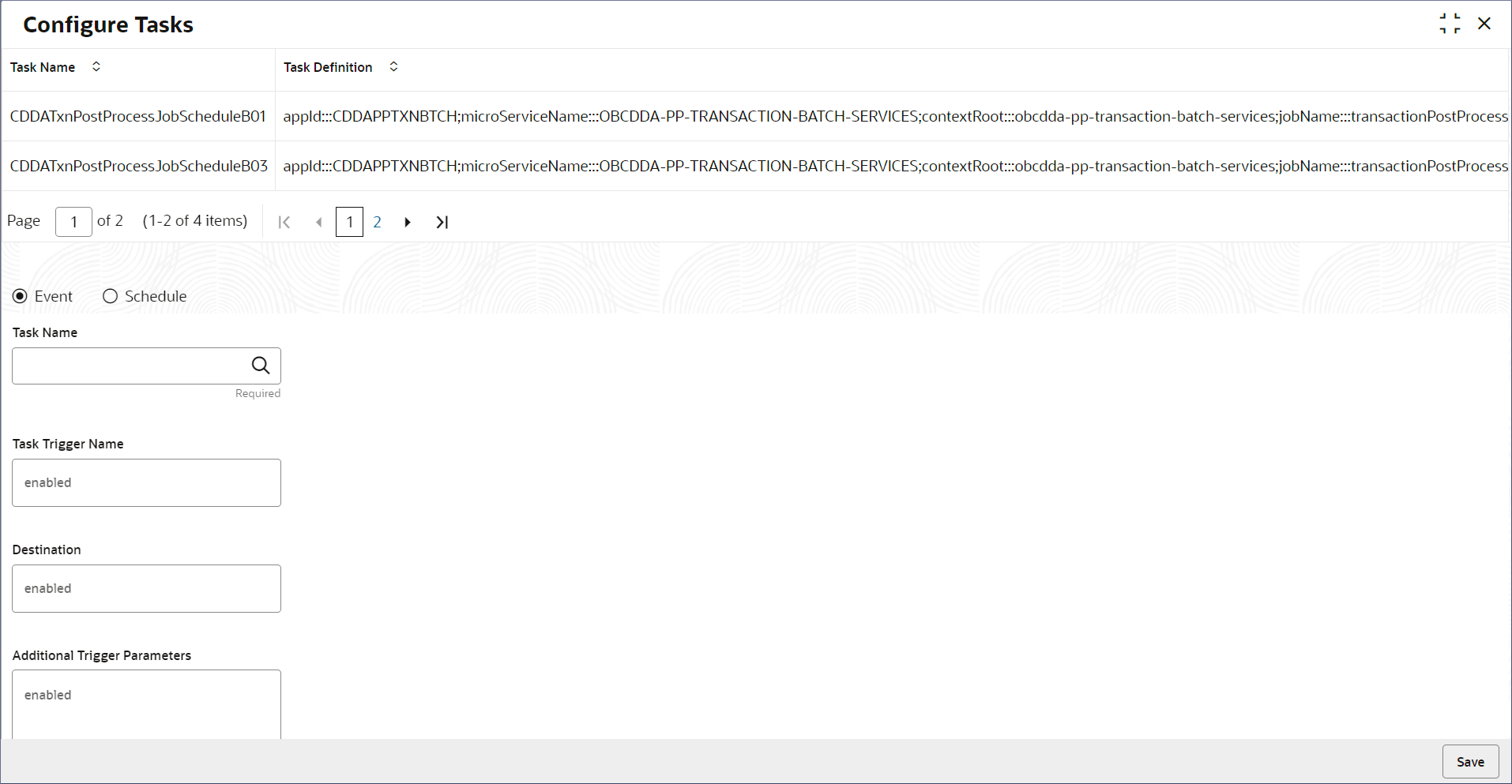
  2. On the Configure Task screen, specify the required fields. For more information on fields, refer to field description table.

    Table 7-4 Configure Task - Field Description

    Field Name Description
    Event or Schedule Select Event to trigger a task when a specific event occurs.

    OR

    Select Schedule to trigger a task at a specific time of a day of a month or week.

    Task Name Select the task for the event or scheduled trigger.
    Task Trigger Name Specify a unique name for the configured trigger.
    CRON Expression Displays whether the user is scheduling a trigger. Specify the CRON Expression that specifies the specific time and day. The expression consists of six single space-separated fields, representing second, minute, hour, day, month, and weekday. For the month and weekday, provide the first three letters of their English names.
    Destination Displays whether user is configuring an event trigger. Specify the destination that triggers the task when a new event occurs.

    Sample Task configurations are given below:

    Table 7-5 OBCA Transaction Post Processing Task

    Task Name Task Description Additional Parameters
    OBCA Transaction Post Processing Task appId:::CDDAPPTXNPPBTCH;microServiceName:::obcdda-pp-txn-post-processing-batch-services;contextRoot:::obcdda-pp-txn-post-processing-batch-services;type:::schedule;jobName:::executorBatch;populationParamAccountDomain:::CDDAPP;populationParamIsCleanup:::true;batchName:::TxnPostProcessingBatch;processCode:::TxnPostProcessingBatch;populationParamPopulationType:::method;populationParamIsContinuousDataPopulationRequired:::true branchCode:::<Valid branch code>;userId:::<Valid User id>;populationParamStreamSize:::1;domainBatchParamPageSize::: <any numeric value> (based on the server performance, the size can be defined)

    Table 7-6 OBCA Statement Narrative Task

    Task Name Task Description Additional Parameters
    OBCA Statement Narrative Task appId:::CDDAPPSTNHBTCH;microServiceName:::obcdda-pp-statement-narrative-batch-services;contextRoot:::obcdda-pp-statement-narrative-batch-services;type:::schedule;jobName:::executorBatch;populationParamAccountDomain:::CDDAPP;populationParamIsCleanup:::true;batchName:::statementnarrativebatch;processCode:::statementnarrativebatch;populationParamPopulationType:::method;populationParamIsContinuousDataPopulationRequired:::true branchCode:::<Valid branch code>;userId:::<Valid User id>; populationParamStreamSize:::<Numeric value>; (based on the server performance, the size can be defined)domainBatchParamPageSize:::<Numeric value>; (based on the server performance, the size can be defined)populationParamPostProcessingStatus:::C; populationParamStatementNarrativeUpdateStatus:P

    Table 7-7 OBCAGL Account Intermediate Handoff Task

    Task Name Task Description Additional Parameters
    OBCAGL Account Intermediate Handoff Task appId:::CDDAPPGLHIBTCH;microServiceName:::obcdda-pp-glhandoff-intermediate-batch-services;contextRoot:::obcdda-pp-glhandoff-intermediate-batch-services;type:::schedule;jobName:::executorBatch;populationParamAccountDomain:::CDDAPP;populationParamIsCleanup:::true;batchName:::TxnPostProcessingBatch;processCode:::TxnPostProcessingBatch;populationParamPopulationType:::method;populationParamIsContinuousDataPopulationRequired:::true branchCode:::<Valid branch code>; userId::: <Valid User id>; populationParamStreamSize:::<Numeric value>; (based on the server performance, the size can be defined); domainBatchParamPageSize:::<Numeric value>; (based on the server performance, the size can be defined)

    Table 7-8 OBCA WithdrBalance Update Task

    Task Name Task Description Additional Parameters
    OBCA Withdr Balance Update Task appId:::CDDAPPTBSWBUBTCH;microServiceName:::obcdda-pp-withdr-balance-update-batch-services;contextRoot:::obcdda-pp-withdr-balance-update-batch-services;type:::schedule;jobName:::executorBatch;populationParamAccountDomain:::CDDAPP;batchName:::WithdrawableBalanceBatch;processCode:::WithdrawableBalanceBatch;populationParamPopulationType:::method;populationParamIsContinuousDataPopulationRequired:::true contextRoot:::obcdda-pp-withdr-balance-update-batch-services;branchCode:::<Valid branch code>;userId:::<Valid User id>;populationParamStreamSize:::<Numeric value>; (based on the server performance, the size can be defined)
  3. Click Save.
    The configuration is saved and sent for authorization.

Table 7-9 Examples of CRON Expressions

CRON Expression Description
0 0 12 * * ? Trigger at 12:00 (PM) everyday
0 * 14 * * ? Fire every minute starting at 2:00 PM and ending at 2:59 PM, every day
0 10,44 14 ? 3 WED Triggers at 2:10 PM and 2:44 PM every Wed of March
0 15 10 ? * MON-FRI Triggers at 10:15 AM every day from Monday to Friday
0 15 10 ? * 6L 2020-2025 Triggers at 10:15 AM on the last Friday of every month from 2020 to 2025
0 15 10 ? * 6#3 Triggers at 10:15 AM on the third Friday of every month
0 0 0 1 1 * Triggers at the start of a new year