3.7 Online Interest Calculation
This topic describes the systematic instructions to perform online interest calculation.
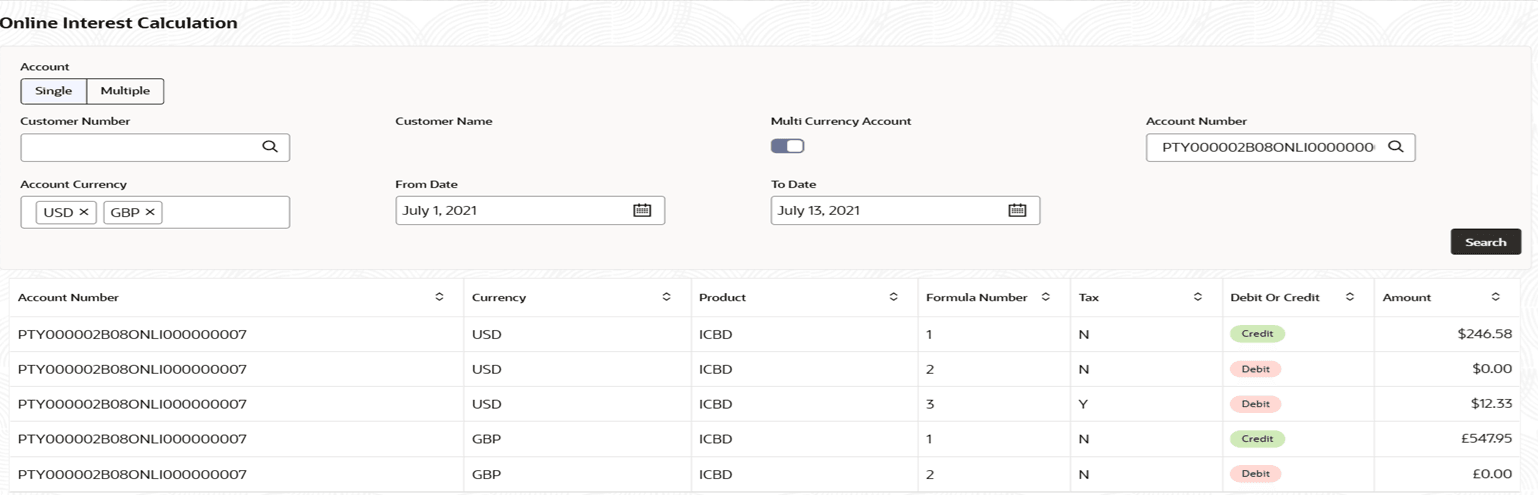
The Online Interest Calculation screen allows users to view the interest accrued on a Single account or Multiple accounts, based on input details.
- Click Corporate Account Enquiries and Corporate Account Enquiries. Under Corporate Account Enquiries, click Online Interest Calculation.The Online Interest Calculation page displays.
- Click
 .The system will calculate and display the interest amount for the selected accounts based on the From and To date range specified. For more information on fields, refer to the field description table below:
Table 3-27 Interest Calculation Details - Field Description
Column Description Account Number Displays the account number. Currency Displays the operating currency of the account. Product Displays the product name. Formula Number Displays the formula number. Tax Displays whether tax is applicable. Debit Or Credit Displays the type of transaction. The possible options: - Debit
- Credit
Amount Displays the amount along with currency for the respective account.

Parent topic: Corporate Account Enquiries