2.2 Retail Lending

This topic describes the systematic instructions for the retail lending accounts integration.

Configure Loans Services, as user can maintain the routing configuration of the Oracle Banking Routing Hub in the common core for Deposit Servicing transitions of the Oracle Banking Branch to create, update, and query the host system.
  1. On the Home screen, click Core Maintenance.
  2. Under Inter Connect click Routing Hub, and then select Service Consumers or specify Service Consumers in the search and select the screen.
    The Service Consumers screen is displayed.
  3. Select New Service Consumer
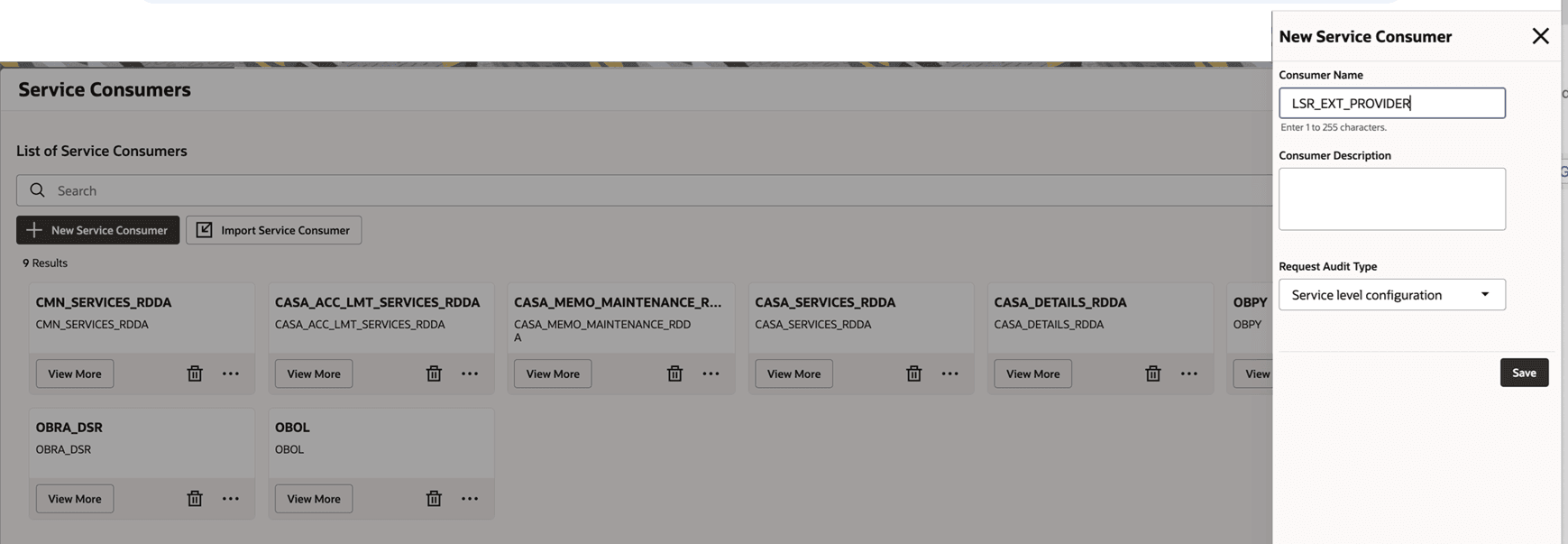
    The New Service Consumer section is displayed.

    Figure 2-4 New Service Consumer - Retail Lending



  4. In the New Service Consumer section, specify LSR_EXT_PROVIDER in the Consumer Name field.
  5. Select Save.
    The new consumer service is saved successfully.
  6. User should create all Consumer Services as mentioned below:
    • GetPartyEntities
    • SaveAccountForfeit
    • GetHardshipPlans
    • GetAccountHardshipPlan
    • GetPaymentDues
    • SavePenaltyRateModification
    • SaveManageBalance
    • SimulateManageBalance
    • GetAmendmentParams
    • SimulateAmendment
    • SaveAmendment
    • SaveHardship
    • GetClosureQuote
    • SaveClosureQuote
    • SimulatePenaltyRateModification
    • SimulatePayment
    • GetFees
    • SaveFees
    • HolidayPaymentPeriods
    • HolidayPaymentRevisedSchedule
    • HolidayPaymentHandoff
    • FetchAdhocCharges
    • SaveAdhocCharge
    • SimulateWriteOff
    • SaveWriteOff
    • FetchAccountHealth
    • ReverseTransaction
    • ActivateLoanAccounts
    • FetchRepaymentDateChangeDetails
    • SimulateRepaymentDateChangeData
    • PerformConsolidatedRollover
    • SimulatePricingDetails
    • HandOffRepaymentData
    • FetchLoanBalanceDetails
    • FetchLoanScheduleDetails
    • SimulateDisbursement
    • SaveDisbursement
    • SaveRepaymentDateChangeDetailsData
    • FetchLoanDashboardDetails
    • FetchLsrLOVDetails
    • FetchPaymentBalances
    • SimulateDuesInstalmentPayment
    • SimulateDuesArrearAllocation
    • SimulateAdvanceInstallmentPayment
    • SimulateAdvancePaymentForHolidayPeriod
    • SimulatePartialPayOff
    • SimulateAccountClosure
    • MakeLoanPayment
    • FetchSettlementAccountDetails
    • FetchLoanDCNStatement
    • GenerateAccountStatement
    • FetchLoanAccountStatement
    • FetchPaymentPreferenceDetails
    • ValidatePaymentPreferenceDetails
    • FetchAccountPreferences
    • HandoffPaymentPreferenceDetails
    • FetchAccountDetails
    • FetchArrearDetails
    • SimulateScheduleSetup
    • SimulateRolloverSetup
    • FetchRateValue
    • GetParty_Loan
    • FetchCustomerBalances
    • SimulateBulkPayment
    • SimulateProductPricing
    • SimulateProductScheduleSetup
    • FetchAccountsForConsolidation
    • SaveBulkPayment
    • FetchEventTransactions
    • FetchEventTransactionDetail
    • GetServiceMemberDetail

    Note:

    Refer Routing Hub Configuration User Guide for creation of service provider and configuring consumer services.